The choice between an AM4 motherboard and an AM5 motherboard comes down to a fundamental architectural split between mature DDR4 stability and high-bandwidth DDR5 future-proofing. AM4 platforms rely on proven PCIe 4.0 lanes and DDR4 memory modules, while AM5 introduces dedicated PCIe 5.0 bandwidth, high-frequency DDR5 support, and a processor socket built for multiple generations of upgrades.
Choose an AM4 motherboard if you want a reliable, cost-effective build centered on established Ryzen 3000 or 5000 series desktop processors. Choose an AM5 motherboard if you want modern platform longevity, PCIe 5.0 solid-state drive capability, and native compatibility with Ryzen 7000, 8000, and 9000 series CPUs.


AM4 vs AM5 at a Glance
| Feature | AM4 Motherboard | AM5 Motherboard |
|---|---|---|
| Supported Memory Type | DDR4 | DDR5 |
| Memory Frequencies Listed | 2133 MHz to 3200 MHz | 4400 MHz to 6400 MHz |
| Maximum RAM Capacity | 128 GB across 4 DIMM slots | 128 GB across 4 DIMM slots |
| Processor Support | Ryzen 3000, 4000, and 5000 Series | Ryzen 7000, 8000, and 9000 Series |
| PCIe Bus Generation | PCIe 4.0 | PCIe 4.0 and PCIe 5.0 |
| Next-Gen Storage Interface | Dual M.2 PCIe 4.0 | PCIe 5.0 NVMe x4 M.2 |
| VRM Power Phase Range | 10+3 to 12+2 power stages | 12+2 to 14+2+1 power phases |
| Onboard Ethernet Standard | 1GbE to Intel 2.5 Gb LAN | Realtek 2.5 Gb to 2.5GbE LAN |
| Wireless Standards Listed | WiFi 6 and WiFi 6E | WiFi 6 and WiFi 6E |
| Best For | Value-focused builds and mature system stability | Enthusiast performance and multi-generational upgrade paths |
Memory Architecture and System Throughput
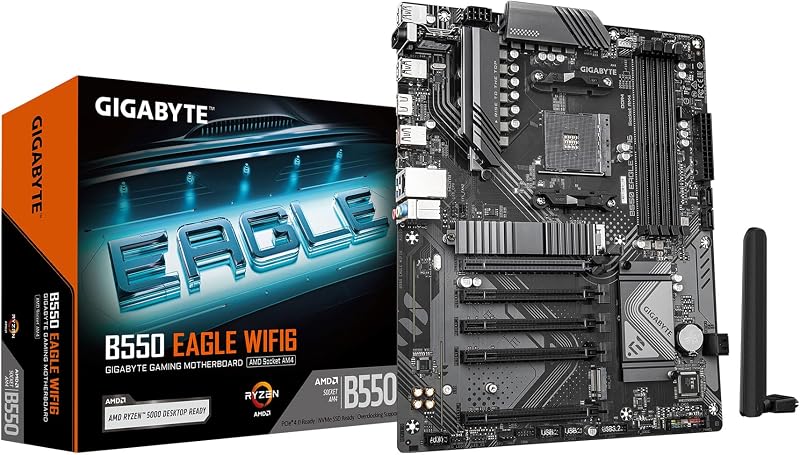
Memory technology dictates system bandwidth, application responsiveness, and how the processor accesses data during intensive multitasking. The fundamental boundary in an AM4 vs AM5 DDR4 vs DDR5 evaluation is hardware incompatibility: DDR4 modules cannot physically or electrically slot into DDR5 motherboards, and vice versa. Motherboards on the AM4 platform feature four DIMM slots supporting DDR4 memory, with listed speeds reaching 3200 MHz on the GIGABYTE B550 Eagle WIFI6 and base clock speeds such as 2133 MHz on the Asus ROG Strix B550-F Gaming WiFi II. Both models handle up to 128 GB of system memory, providing generous headroom for productivity software and large gaming installations.
AM5 motherboards transition entirely to DDR5 memory architecture, delivering substantial jumps in baseline clock frequencies. The ASUS TUF Gaming B650-PLUS WiFi lists DDR5 memory speeds up to 6400 MHz, while the GIGABYTE B650 AORUS Elite AX specifies 4400 MHz memory support alongside native AMD EXPO and Intel XMP profile compatibility. For builders assessing memory profile optimization, exploring the g.skill flare x5 ddr5 6000 vs ripjaws s5 ddr5 memory kit comparison illustrates how latency timings and EXPO profiles operate on newer chipsets. The DDR5 standard doubles internal memory bank groups and implements on-die error correction, delivering higher peak memory throughput for content creation and simulation workloads.
Choosing AM4 means taking advantage of mature DDR4 memory modules that run reliably without complex memory tuning. In contrast, AM5 motherboards require DDR5 modules, which run at significantly higher frequencies and deliver raw bandwidth improvements for modern applications. The trade-off is component flexibility: AM4 locks you into an older memory generation, while AM5 requires an investment in current-generation RAM that can carry forward into future system builds.
Edge: AM5 Motherboard. The platform supports high-speed DDR5 memory reaching up to 6400 MHz, doubling the memory clock speeds seen on comparable AM4 motherboards.
Processor Compatibility and Socket Longevity
The processor socket dictates which CPU generations you can install initially and what replacement options will exist several years later. Socket AM4 represents one of the longest-running desktop platforms in computing history, supporting AMD Ryzen 3000, 4000, and 5000 series desktop processors. As highlighted by the B550 Eagle WIFI6 and ROG Strix B550-F Gaming WiFi II, an AM4 board handles Ryzen 5000 and 3000 series chips, alongside 4000 and 5000 G-series processors with integrated graphics. However, AMD has concluded major microarchitecture development for AM4, meaning the Ryzen 5000 series serves as the definitive performance ceiling for this socket.
The AM5 socket upgrade path represents an active, forward-looking hardware standard. Both the TUF Gaming B650-PLUS WiFi and the B650 AORUS Elite AX support AMD Ryzen 7000 series desktop processors out of the box, with documentation confirming readiness for Ryzen 8000 and 9000 series CPUs. Choosing an AM5 board ensures that you can drop in modern Zen 4 or Zen 5 processors without replacing your underlying motherboard or cooling hardware. This multi-generation support protects your initial investment if you intend to upgrade your processor midway through the system’s operational life.
For builders who want a fixed-configuration PC where the processor will never be replaced, AM4 provides immediate access to powerful 8-core and 12-core Ryzen 5000 options. But for builders who value longevity and continuous CPU iterations, AM5 is the only platform that offers an active upgrade path to contemporary architectures without forcing a motherboard replacement down the line.
Edge: AM5 Motherboard. Socket AM5 supports AMD Ryzen 7000, 8000, and 9000 series processors, ensuring multi-generational CPU upgrades that are impossible on the retired AM4 socket.
Storage Protocols and PCIe 5.0 Expansion
Storage throughput and expansion bus standards determine how quickly a desktop reads large asset libraries, loads game environments, and communicates with add-in cards. An analysis of the AM4 vs AM5 PCIe 5.0 landscape reveals substantial generational differences. AM4 motherboards rely on PCI Express 4.0 interfaces for graphics cards and solid-state drives. The B550 Eagle WIFI6 features dual M.2 slots and a PCIe 4.0 graphics card interface, while the ROG Strix B550-F Gaming WiFi II provides dual M.2 slots alongside its primary PCIe 4.0 expansion slot. For SATA storage, AM4 models offer broad expandability, with the GIGABYTE board providing 4 SATA ports and the ASUS ROG Strix board offering 6 SATA 3 ports.
AM5 motherboards introduce dedicated PCIe 5.0 architecture directly to the primary M.2 storage interface. The TUF Gaming B650-PLUS WiFi features an M.2 PCIe 5.0 slot alongside high-speed Serial ATA/600 ports, while the B650 AORUS Elite AX integrates a dedicated PCIe 5.0 NVMe x4 M.2 connector protected by an M.2 Thermal Guard. PCIe 5.0 storage interfaces double the theoretical bandwidth of PCIe 4.0 x4 lanes, allowing supported solid-state drives to reach unprecedented sequential read and write speeds when transferring massive data sets.
While PCIe 4.0 drives running on AM4 boards remain more than fast enough for general operating system use and standard gaming loads, PCIe 5.0 represents the storage frontier. Content creators working with uncompressed 4K video footage or heavy digital rendering pipelines gain tangible time savings from the expanded lane throughput that AM5 motherboards deliver natively.
Edge: AM5 Motherboard. The inclusion of dedicated PCIe 5.0 M.2 slots on AM5 boards unlocks double the storage interface bandwidth of the PCIe 4.0 M.2 slots found on AM4 motherboards.
Power Delivery and VRM Thermal Engineering
Clean voltage regulation modules (VRMs) and passive heatsinks ensure that the CPU receives stable electrical current under sustained multi-threaded workloads without thermal throttling. A detailed AM4 motherboard review reveals solid power engineering built for mature chips. The GIGABYTE B550 Eagle WIFI6 utilizes a digital twin 10+3 phases VRM design equipped with enlarged VRM heatsinks and 5 W/mk thermal pads, complemented by a pre-installed I/O shield. The Asus ROG Strix B550-F Gaming WiFi II elevates power handling with 12+2 teamed power stages, high-quality alloy chokes, durable capacitors, and a ProCool power connector integrated into a multi-layer Stack Cool 3+ printed circuit board.
AM5 motherboards feature substantially heavier power stages engineered to accommodate the higher power limits and aggressive boost behaviors of modern processor architectures. The ASUS TUF Gaming B650-PLUS WiFi provides 12+2 teamed power stages backed by 8+4 ProCool power sockets, enlarged VRM and PCH heatsinks, and hybrid fan headers managed through Fan Xpert 2 plus software. The GIGABYTE B650 AORUS Elite AX raises the standard even further, deploying a twin 14+2+1 phases VRM with 70A power stages, a 6mm heatpipe, fully covered MOSFET heatsinks, and an 8-layer 2X copper PCB.
Just as multi-phase VRM delivery governs thermal performance on modern Intel boards like those examined in the msi mpg z790 edge vs asus tuf gaming b860-plus analysis, VRM capabilities on AMD motherboards dictate how reliably high-core-count processors maintain their maximum boost clocks. While AM4 power designs handle Ryzen 5000 processors effortlessly, AM5 VRM configurations feature higher amperage ratings and heavier thermal assemblies designed for the demanding power profiles of newer chip series.
Edge: AM5 Motherboard. Robust power delivery systems, including up to 14+2+1 phases with 70A power stages and heatpipe-linked cooling, provide superior electrical stability for high-draw processors.
Peripheral Connectivity and High-Speed Interfaces
Rear panel inputs, high-speed networking adapters, and front-panel headers determine what peripherals, external storage drives, and display devices you can attach to your PC. AM4 motherboards provide comprehensive, mature I/O solutions. The ROG Strix B550-F Gaming WiFi II features 11 total ports, including USB 3.2 Gen 2 Type-C, optical S/PDIF audio, HDMI 2.1, DisplayPort 1.2, WiFi 6E, Bluetooth 5.2, and an Intel 2.5 Gb Ethernet port with ASUS LANGuard. The B550 Eagle WIFI6 delivers 12 ports total, 8 USB ports, USB 3.2 Gen 1 Type-C, 1GbE LAN, and integrated WiFi 6 connectivity.
An AM5 motherboard review highlights a noticeable transition toward higher total bandwidth and expanded port density. The ASUS TUF Gaming B650-PLUS WiFi stands out with 20 total ports, USB 3.2 Gen2x2 Type-C connectivity, front-panel USB 3.2 Gen 1 Type-C support, USB4 header capability, Realtek 2.5 Gb Ethernet, and hardware-level Two-way AI Noise Cancelation. The GIGABYTE B650 AORUS Elite AX includes 13 total external ports, 12 USB ports, front and rear USB-C connections, 2.5GbE LAN, WiFi 6E, and user-friendly assembly tools like EZ-Latch and a Q-Flash BIOS update button.
Just as premium platform architectures differ in rear connectivity when comparing options like the asus rog strix z790-a vs tuf gaming b860-plus motherboards, AM5 boards deliver faster USB standards like USB 3.2 Gen2x2 (20 Gbps) and USB4 compatibility. While AM4 gives you reliable 2.5 Gb networking and standard USB Type-C, AM5 significantly expands high-speed external data transfer options.
Edge: AM5 Motherboard. With support for ultra-fast USB 3.2 Gen2x2 Type-C, USB4 integration, and up to 20 total connection ports, AM5 outpaces the older peripheral standards on AM4.
Build Economics and Gaming Value
Deciding between AM4 or AM5 for gaming requires evaluating total system construction factors rather than looking at processor specs in isolation. The AM4 platform excels in component availability and mature manufacturing. Building an AM4 system allows builders to pair accessible DDR4 memory kits with mainstream B550 motherboards. For competitive 1080p and 1400p gaming, AM4 motherboards paired with Ryzen 5000 series processors deliver smooth, high frame rates without requiring investment in newly released memory architectures.
Evaluating an AM4 or AM5 for budget build scenario requires weighing long-term platform costs against initial part investments. When evaluating brand ecosystems and tool ecosystems, such as in the dewalt vs milwaukee trade study, entering a mature tool line costs less up front, whereas entering a modern battery platform pays dividends across future hardware releases. The same principle applies here: AM4 provides unmatched immediate value because DDR4 memory and B550 boards are established products, whereas AM5 represents a complete platform shift requiring DDR5 modules and AM5-compatible processors.
If your primary objective is assembling an enjoyable gaming rig without paying the premium associated with newly standardized DDR5 memory and cutting-edge chipsets, AM4 remains exceptionally competitive. However, if you want your gaming system to support high-end storage streaming and future CPU architectures, AM5 delivers better performance longevity.
Edge: AM4 Motherboard. For builders focused strictly on cost-effective gaming stability, AM4 offers a mature ecosystem of DDR4 memory and accessible components that maximize initial build value.
Pros and Cons
AM4 Motherboard
Pros
- Broad compatibility with mature DDR4 memory modules
- Stable 10+3 to 12+2 phase VRM configurations
- Up to 6 SATA ports for extensive legacy storage
- PCIe 4.0 graphics and dual M.2 support
Cons
- Incompatible with high-speed DDR5 memory
- No PCIe 5.0 high-bandwidth storage lanes
- Hardware upgrades capped at Ryzen 5000 series
View GIGABYTE B550 Eagle WIFI6 AMD AM4 on Amazon
AM5 Motherboard

Pros
- DDR5 memory speeds reaching up to 6400 MHz
- PCIe 5.0 NVMe x4 M.2 storage capability
- Active support for Ryzen 7000, 8000, and 9000 processors
- High-output VRM power delivery up to 14+2+1 phases
Cons
- Requires purchasing new DDR5 memory kits
- No backward compatibility with older Ryzen processors
View ASUS TUF Gaming B650-PLUS WiFi AMD on Amazon
Who Should Buy Each One
Choose the AM4 Motherboard If
- You are assembling a dedicated gaming PC on a practical budget using DDR4 memory modules.
- You already own an AMD Ryzen 3000 or 5000 series desktop CPU and need a dependable replacement board.
- You require up to 6 SATA 3 ports for multiple legacy hard drives or secondary storage arrays.
- You do not plan on upgrading your processor or memory architecture for the next three to five years.
Choose the AM5 Motherboard If
- You want guaranteed compatibility with modern AMD Ryzen 7000, 8000, and 9000 series desktop processors.
- You demand bleeding-edge memory bandwidth with DDR5 speeds reaching 6400 MHz and AMD EXPO profiles.
- You plan to install high-speed PCIe 5.0 NVMe solid-state drives for intensive workstation and creative workloads.
- You want a durable foundation featuring 14+2+1 phase power delivery and forward-looking USB4 or USB 3.2 Gen2x2 connectivity.
Final Verdict
For the majority of modern PC builders, the AM5 motherboard platform is the superior investment. By introducing dedicated PCIe 5.0 M.2 storage lanes, DDR5 memory frequencies up to 6400 MHz, robust 14+2+1 digital VRM phases, and broad multi-generation support across the Ryzen 7000, 8000, and 9000 families, AM5 ensures that your system will remain relevant and upgradable for years to come. High-speed I/O features such as USB 3.2 Gen2x2 and USB4 compatibility cement AM5 as the modern standard for enthusiasts and content creators.
However, the AM4 motherboard platform remains an outstanding choice for value-focused PC builders and gamers who prioritize immediate build efficiency. If your performance targets are fully met by a Ryzen 5000 processor and mature DDR4 memory, building on a reliable B550 motherboard like the ROG Strix B550-F Gaming WiFi II or the B550 Eagle WIFI6 provides exceptional stability without the overhead of purchasing newly adopted memory hardware.
FAQ
Is AM5 worth it for an existing AM4 user?
AM5 is worth it if you have hit the performance ceiling of your current AM4 processor and need the expanded memory bandwidth of DDR5, PCIe 5.0 solid-state drive capability, or the higher computing speeds of Ryzen 7000, 8000, and 9000 series processors. If your current Ryzen 5000 configuration handles your games and daily applications smoothly, staying on AM4 remains a viable, cost-effective choice.
Can I use my DDR4 RAM on an AM5 motherboard?
No. AM5 motherboards physically and electrically support DDR5 memory exclusively. DDR4 memory modules have a different pin configuration, notch placement, and voltage architecture, meaning they cannot fit into the DDR5 DIMM slots found on AM5 motherboards.
Can AM4 motherboards run AMD Ryzen 9000 series processors?
No. AM4 motherboards support AMD Ryzen 3000, 4000, and 5000 series desktop processors. The newer Ryzen 7000, 8000, and 9000 series processors require the redesigned Socket AM5 land grid array interface.
Do AM5 motherboards support PCIe 4.0 expansion cards and storage drives?
Yes. PCI Express standards are backward compatible. Even though AM5 motherboards provide dedicated PCIe 5.0 lanes for high-speed M.2 solid-state drives, you can install PCIe 4.0 graphics cards and PCIe 4.0 NVMe drives into AM5 slots without encountering compatibility problems.
How do the networking capabilities compare between AM4 and AM5?
Both platforms offer strong networking configurations, but AM5 establishes higher baseline speeds across modern boards. AM4 boards typically feature either 1GbE or Intel 2.5 Gb LAN alongside WiFi 6 or WiFi 6E. AM5 motherboards standardize on 2.5GbE or Realtek 2.5 Gb LAN, alongside onboard WiFi 6 or WiFi 6E wireless interfaces.
Is an AM4 or AM5 motherboard better for a budget build?
An AM4 motherboard is generally better for a budget-focused build. Because AM4 motherboards use widely available DDR4 memory and mature B550 chipsets, the total hardware outlay for a complete AM4 system is significantly lower than configuring an AM5 machine with DDR5 memory and a newer processor.


