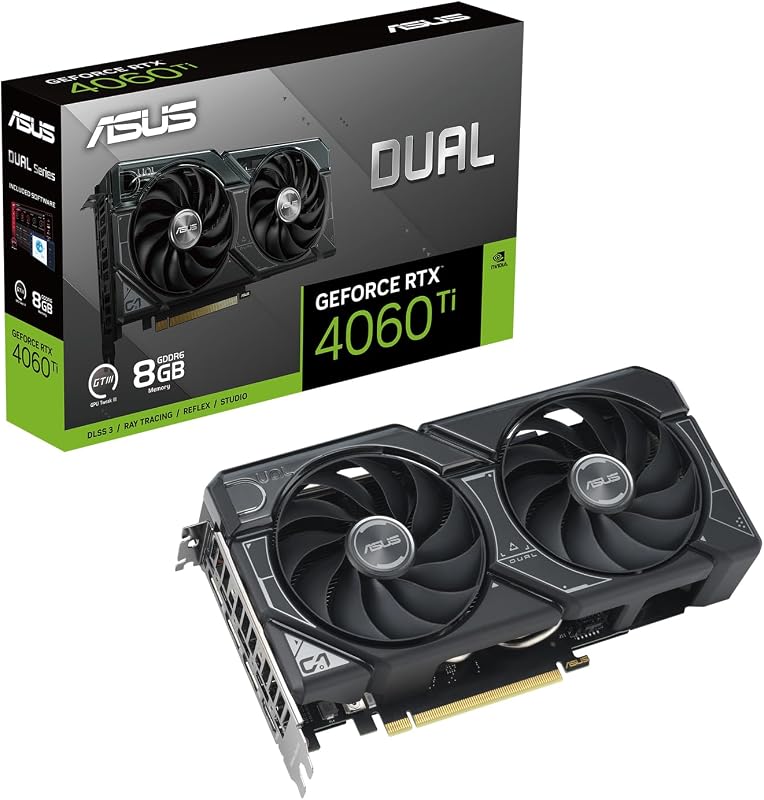
The single defining difference that separates the Nvidia RTX 5060 from the Nvidia RTX 5080 is the scale of the memory subsystem: the 5080 doubles the frame buffer to 16GB of GDDR7 memory across a wide 256-bit bus, whereas the 5060 provides an 8GB GDDR7 allocation over a narrower 128-bit interface.
Mainstream builders assembling compact desktop rigs should choose the Nvidia RTX 5060 for its space-conscious footprint and balanced mainstream performance, while enthusiasts building high-resolution workstations and 4K battle stations should pick the Nvidia RTX 5080 to maximize memory capacity, clock speeds, and bandwidth.


Nvidia RTX 5060 vs Nvidia RTX 5080 at a Glance
| Specification | Nvidia RTX 5060 | Nvidia RTX 5080 |
|---|---|---|
| GPU Architecture | NVIDIA Blackwell | NVIDIA Blackwell |
| Memory Capacity | 8 GB | 16 GB |
| Memory Type | GDDR7 | GDDR7 |
| Memory Bus Width | 128-bit | 256-bit |
| Memory Clock Speed | 28000 MHz | 30 GHz (30000 MHz) |
| GPU Core Clock | 2512 MHz | 2760 MHz |
| Display Outputs | DisplayPort, HDMI | DisplayPort x 3 (v2.1a), HDMI 2.1b x 1 |
| Card Dimensions | 7.83″L x 4.57″W | Not listed |
| Cooling Hardware | WINDFORCE 2-fan system | MSI SUPRIM cooling system |
| Maximum Digital Resolution | 7680 x 4320 pixels | 7680 x 4320 pixels |
| Best For | Standard desktop builds & 1080p gaming | Heavy multi-display rigs & 4K gaming |
Memory Capacity and Memory Bus Bandwidth
The core specification dividing these cards in any RTX 5060 8GB vs RTX 5080 16GB comparison is memory architecture. Graphics memory stores high-resolution textures, shadow maps, geometry data, and frame buffers during rendering. When a game demands more VRAM than an installed card possesses, assets must cycle through system memory across the motherboard, causing instantaneous frame drops and stuttering. The memory bus acts as the data highway between the GPU processor and that VRAM cache. A wider memory bus directly increases the total data throughput delivered every clock cycle, which proves essential when rendering dense asset files at elevated display resolutions.
Evaluating the official RTX 5060 vs 5080 specs reveals a massive hardware gap on this criterion. The Gigabyte RTX 5060 features 8GB of GDDR7 memory managed through a 128-bit interface, running at a 28000 MHz memory clock. In contrast, the MSI RTX 5080 doubles that onboard allocation with 16GB of GDDR7 memory while also doubling the interface breadth to a 256-bit bus, accompanied by a faster 30 GHz memory clock. Comparing these parameters clarifies how data traverses the board: the RTX 5080 pairs double the addressable memory capacity with a vastly broader data pipeline, allowing high-resolution texture packs to stream unimpeded. Gamers considering how other hardware tiers fit into this dynamic often evaluate the nvidia rtx 5060 vs 5070 when balancing memory thresholds.
In practice, the 8GB buffer on the RTX 5060 handles mainstream title workloads smoothly, but modern asset-heavy games running ultra-quality assets place upward pressure on that boundary. The RTX 5080, with its 16GB pool and 256-bit memory path, eliminates asset throttling entirely at ultra settings, ensuring that complex environments, ray-traced reflections, and compute-heavy background tasks never exhaust the onboard buffer.
Edge: Nvidia RTX 5080, because it provides double the GDDR7 memory capacity, twice the memory bus width, and a faster 30 GHz memory clock speed.
Core GPU Clock Speeds and Compute Architecture
Clock speed determines how rapidly a GPU core processes vertex shading, compute shaders, and rasterization instructions per second. Higher base and boost operating frequencies mean the processor finishes rendering calculations faster, directly contributing to frame rate output and responsiveness. While architectural enhancements bring generational IPC gains, elevated clock frequencies push raw rendering output further when demanding physics calculations, artificial intelligence processing, and complex lighting models are active.
Both graphics cards utilize the NVIDIA Blackwell generation, bringing dedicated Tensor Cores and enhanced RT Cores to modern PC setups, alongside support for DLSS 4. However, the listed clock frequencies differ noticeably between these implementations. The Gigabyte RTX 5060 WINDFORCE OC operates at a GPU clock speed of 2512 MHz. The MSI RTX 5080 SUPRIM SOC steps well beyond that figure with an extreme performance clock rating of 2760 MHz. This gives the 5080 an advantage of nearly 250 MHz in factory clock speed over the 5060, working in tandem with the higher memory clock to expedite frame delivery.
This factory clock advantage gives the RTX 5080 a decisive lead in compute-heavy scenarios. When evaluating an in-depth Nvidia RTX 5080 review versus an Nvidia RTX 5060 review, operating frequency serves as a foundation for smooth frametimes during heavy graphics pipeline loads. Builders examining adjacent middle-ground configurations often review the nvidia rtx 5060 ti vs 5080 to evaluate the stepping stones between these two core frequency tiers.
Edge: Nvidia RTX 5080, due to its higher factory clock speed of 2760 MHz compared to the 2512 MHz clock on the RTX 5060.
Display Output Connectivity and Multi-Monitor Support
Display connectivity determines how easily a graphics card interfaces with high-refresh gaming monitors, multi-panel desktop workspaces, and modern television panels. The revision of the display interfaces impacts the available video transmission bandwidth, governing whether a graphics card can transmit uncompressed high-refresh signals to modern panels without downsampling color formats. For sim racers, workstation professionals, and multi-display power users, port layout is a critical buying consideration.
Looking at the output configuration across this RTX 5080 vs 5060 matchup, the hardware listings showcase different configurations. The Gigabyte RTX 5060 listing identifies standard DisplayPort and HDMI connections, providing the fundamental interfaces required for dual-display setups or a single primary monitor. The MSI RTX 5080 SUPRIM SOC features a specialized array of three DisplayPort outputs upgraded to version 2.1a, accompanied by one HDMI 2.1b connection. Both graphics cards match at the top tier of maximum digital resolution, supporting up to 7680×4320 pixels for ultra-high-definition output.
The triple DisplayPort 2.1a array on the 5080 provides superior flexibility for advanced configurations. Users running multi-monitor surround arrays or feeding ultra-high-bandwidth next-generation monitors can use all three DisplayPort 2.1a interfaces simultaneously alongside a dedicated HDMI 2.1b line. The 5060 supplies standard connectivity for single-screen or dual-display arrangements, but lacks the expansive port assortment provided on the 5080 card. Enthusiasts surveying competitive segments might also examine the nvidia rtx 5060 ti vs amd rx 9060 xt to compare diverse port distributions.
Edge: Nvidia RTX 5080, offering three DisplayPort 2.1a ports and one HDMI 2.1b port compared to the standard dual-output configuration on the RTX 5060.
Form Factor, Dimensions, and Chassis Clearance
Physical graphics card dimensions dictate whether a component fits inside a specific computer case. As high-end graphics processors grow larger to house expansive cooling assemblies, chassis compatibility has become a primary bottleneck for builders. A graphics card that exceeds clearance margins can block front-mounted radiator fans, collide with drive cages, or demand an entirely new computer case, adding friction to an upgrade.
The Gigabyte RTX 5060 WINDFORCE OC measures 7.83 inches in length and 4.57 inches in width, featuring a dual-fan cooling assembly. This sub-8-inch profile makes it an exceptionally versatile card, fitting comfortably into micro-ATX and small-form-factor (SFF) desktop towers without restricting interior airflow or encroaching on front intake fans. The MSI RTX 5080 SUPRIM SOC listing, by comparison, does not specify exact length and width dimensions in the product data, highlighting instead its premium SUPRIM aesthetic materials and multi-slot desktop orientation. In typical high-tier segment design, enthusiast cards of this class demand substantially more physical clearance than compact mainstream boards.
For builders who want a simple drop-in upgrade that preserves room for cable management, hard drive mounts, or liquid cooling tubes, the compact 7.83-inch profile of the RTX 5060 is an enormous practical advantage. Those analyzing different stepped chassis builds frequently look at the nvidia rtx 5060 vs 5070 ti to see where enclosure limitations begin to shape purchasing choices.
Edge: Nvidia RTX 5060, thanks to its verified compact dimensions of 7.83 inches long and 4.57 inches wide, guaranteeing effortless chassis compatibility.
Gaming Resolution Suitability and Workflow Targets
Selecting the right graphics card requires aligning hardware output with native monitor resolution. Render targets increase pixel processing exponentially: running a game at 4K (3840×2160) demands rendering four times the pixel count of standard Full HD 1080p (1920×1080). This intense rendering load rapidly saturates GPU execution units and memory pipelines, creating distinct performance divides between mid-tier and flagship hardware tiers.
When asking whether you need the RTX 5060 or 5080 for 1440p gaming, the operational balance shifts based on target refresh rates and graphics presets. The RTX 5060 delivers dedicated 1080p rendering capability via its 8GB GDDR7 buffer and 2512 MHz clock speed, with support for DLSS 4 assisting in demanding titles. However, when stepping up to RTX 5060 or 5080 for 4k gaming, the RTX 5080 stands in a class of its own. Backed by its 2760 MHz clock speed, 30 GHz GDDR7 memory, and 16GB frame buffer across a 256-bit bus, the 5080 possesses the raw memory bandwidth and compute frequency necessary to drive 4K rendering without choking frame buffer caches. Builders debating adjacent tiers often study the nvidia rtx 5060 ti vs 5070 to find the middle ground between standard 1080p rendering and upper-tier demands.
In RTX 5060 vs RTX 5080 gaming scenarios, the 5060 serves as an efficient choice for mainstream refresh rates at moderate resolutions. Conversely, the 5080 targets enthusiasts running high-refresh 1440p panels or native 4K screens who refuse to lower texture fidelity or disable advanced visual features.
Edge: Nvidia RTX 5080, which possesses the 16GB GDDR7 memory capacity, 256-bit bus width, and elevated clock rates needed for native 4K and heavy high-refresh workloads.
Cooling Architecture and Thermal Management Design
Thermal management is essential for maintaining sustained boost clock speeds and preventing thermal throttling during prolonged gaming sessions. Proper cooling ensures that GPU components, VRAM chips, and power delivery stages operate within safe temperature margins, which stabilizes performance under sustained workloads and keeps fan acoustics unobtrusive.
The two manufacturers employ distinct cooling engineering for these cards. The Gigabyte RTX 5060 uses the WINDFORCE cooling system, equipped with a 2-fan configuration engineered to cool the compact 7.83-inch card efficiently. Dual-fan arrangements provide targeted direct airflow over the heatsink fin stack while keeping the overall footprint short and manageable. The MSI RTX 5080 features MSI’s flagship SUPRIM cooling design, engineered with premium materials to tame higher clock rates and substantial memory bandwidth output. While the MSI listing notes exceptional cooling and premium materials, it does not specify the exact fan count in its data.
Both implementations provide thermal solutions matched directly to the requirements of their respective processors. The dual-fan WINDFORCE cooler on the 5060 keeps thermal dissipation simple and reliable in restricted chassis environments, whereas the SUPRIM system on the 5080 is designed to sustain aggressive 2760 MHz frequencies during extended sessions. Because both models feature custom cooling solutions engineered precisely to match their thermal loads, this criterion represents a practical draw based on listing specifications.
Edge: Tie, as both the Gigabyte dual-fan WINDFORCE cooler and MSI SUPRIM system deliver dedicated thermal solutions tailored to their respective power demands.
Pros and Cons
Nvidia RTX 5060

Pros
- Compact 7.83-inch dual-fan footprint
- Next-gen GDDR7 memory technology
- Modern NVIDIA Blackwell architecture
- DLSS 4 feature support
Cons
- 8GB VRAM limits ultra 4K textures
- Narrow 128-bit memory interface
- Lower 2512 MHz core clock
View Nvidia RTX 5060 on Amazon
Nvidia RTX 5080

Pros
- Generous 16GB GDDR7 frame buffer
- Wide 256-bit memory interface
- Fast 2760 MHz GPU clock speed
- Three DisplayPort 2.1a video outputs
Cons
- Demands substantial desktop case clearance
- Physical dimensions unlisted in product data
View Nvidia RTX 5080 on Amazon
Who Should Buy Each One
Choose the Nvidia RTX 5060 If
- You build in a compact micro-ATX or small-form-factor case that requires a short 7.83-inch card clearance.
- You target standard 1080p gaming where an 8GB GDDR7 frame buffer easily meets visual demands.
- You prefer an efficient dual-fan cooling system that fits cleanly into basic desktop PC configurations.
- You want modern Blackwell architecture features such as DLSS 4 without sizing up your chassis hardware.
Choose the Nvidia RTX 5080 If
- You game on a native 4K monitor or high-refresh multi-display workstation that demands a 16GB GDDR7 frame buffer.
- You need the massive bandwidth delivered by a 256-bit memory bus and a 30 GHz memory clock speed.
- You operate multi-screen battle stations requiring three DisplayPort 2.1a ports and an HDMI 2.1b connection.
- You want peak processing speeds, leveraging a high 2760 MHz factory clock speed out of the box.
Final Verdict
For high-end enthusiasts and builders demanding maximum performance, the Nvidia RTX 5080 is the definitive recommendation. Doubling the VRAM allocation to 16GB of GDDR7, pairing it with a massive 256-bit bus, boosting memory speeds to 30 GHz, and delivering core clocks up to 2760 MHz make the 5080 superior for high-resolution gaming. Its inclusion of three DisplayPort 2.1a ports ensures full support for next-generation visual standards, cementing it as an exceptional foundation for 4K desktop builds.
The Nvidia RTX 5060 wins decisively when physical space and mainstream efficiency are the driving requirements. At only 7.83 inches in length with a dual-fan WINDFORCE cooling setup, the 5060 fits where massive enthusiast cards cannot, all while providing current Blackwell architecture features and DLSS 4 capabilities on an 8GB GDDR7 frame buffer. When building a compact desktop for standard resolutions, the 5060 provides an ideal form factor, while the 5080 remains the powerhouse for uncompromising 4K workloads.
FAQ
What is the difference in memory specs between the RTX 5060 and RTX 5080?
The Nvidia RTX 5060 features 8GB of GDDR7 memory across a 128-bit memory bus running at 28000 MHz. The Nvidia RTX 5080 doubles that capacity with 16GB of GDDR7 memory on a 256-bit bus, backed by a faster 30 GHz memory clock.
Can the Nvidia RTX 5060 fit inside compact PC cases?
Yes. The Gigabyte RTX 5060 WINDFORCE OC measures 7.83 inches in length and 4.57 inches in width, featuring a dual-fan layout designed to fit into smaller desktop cases with standard clearance.
Which display connections are available on the RTX 5080?
The MSI RTX 5080 SUPRIM SOC comes equipped with three DisplayPort 2.1a outputs and one HDMI 2.1b output, supporting high-refresh connectivity up to a maximum digital resolution of 7680×4320 pixels.
Do both cards support the NVIDIA Blackwell architecture and DLSS 4?
Yes. Both the RTX 5060 and RTX 5080 are built on NVIDIA’s Blackwell architecture, incorporating enhanced RT and Tensor Cores alongside DLSS 4 support for AI-accelerated rendering.
Is the RTX 5080 worth it over the RTX 5060 for 4K gaming?
Yes. The RTX 5080 is far better suited for 4K gaming because of its 16GB GDDR7 memory pool, 256-bit bus width, 30 GHz memory speed, and higher 2760 MHz GPU clock, which prevent the memory bottlenecks common at high resolutions.
What are the factory GPU clock speeds for each graphics card?
The Gigabyte RTX 5060 WINDFORCE OC runs at a GPU clock speed of 2512 MHz, while the MSI RTX 5080 SUPRIM SOC operates at a higher extreme clock speed of 2760 MHz.