The primary decision when evaluating B650 vs X670 comes down to total high-speed PCIe lane throughput and M.2 storage capacity. While both platforms natively support AMD Ryzen 7000, 8000, and 9000 series desktop processors on the AM5 socket with DDR5 memory, X670 utilizes a dual-chipset architecture that doubles downstream PCIe bandwidth to support up to four onboard M.2 solid-state drives alongside massive external connectivity without forcing hardware lane-sharing trade-offs.
Choose a B650 motherboard if you are building a dedicated gaming PC equipped with one graphics card, one or two ultra-fast NVMe drives, and standard peripheral requirements. Select an X670 motherboard if you operate a professional content-creation workstation or multi-drive home server that requires three or four simultaneous high-speed NVMe drives and maximum rear I/O expansion.


B650 vs X670 at a Glance
| Feature | B650 | X670 |
|---|---|---|
| Chipset Architecture | Single Promontory 21 controller | Dual daisy-chained Promontory 21 controllers |
| Processor Socket | Socket AM5 | Socket AM5 |
| Processor Compatibility | AMD Ryzen 7000, 8000, and 9000 Series | AMD Ryzen 7000, 8000, and 9000 Series |
| Typical M.2 Slot Count | 2 to 3 slots (PCIe 5.0 or 4.0) | Up to 4 slots (Quad NVMe M.2) |
| VRM Power Phase Range | 12+2 to 14+2+1 power phases | 8+8 to 16+2+2 power phases |
| Memory Architecture | Dual-channel DDR5 up to 128 GB | Dual-channel DDR5 up to 128 GB |
| Max Memory Clock Listed | Up to 6400 MHz | Up to 8000 MHz |
| Total SATA Ports | 4 ports | 4 ports |
| Total Listed External Ports | 13 to 20 ports | 13 to 23 ports |
| Best For | Mainstream gaming and daily performance | Storage-heavy workstations and power users |
M.2 NVMe Storage and Drive Expansion
Storage capability represents the most decisive practical dividing line between these two AM5 platforms. Modern solid-state drives operate over high-speed PCIe lanes, and how a motherboard routes those lanes determines how many high-bandwidth drives you can mount simultaneously. On mainstream platforms, system builders frequently run out of dedicated storage slots after installing a primary boot drive and a secondary game library drive, making baseline M.2 capacity a crucial deciding factor for long-term ownership.
Looking at representative hardware, the ASUS TUF Gaming B650-PLUS WiFi delivers cutting-edge throughput by providing an M.2 PCIe 5.0 slot alongside secondary PCIe 4.0 provisions. Similarly, the GIGABYTE B650 AORUS Elite AX supplies a dedicated PCIe 5.0 NVMe x4 M.2 connector protected by thermal guards. However, B650 boards generally max out at two or three functional M.2 interfaces before depleting the chipset’s available lanes. For detailed analysis of competing board layouts, explore our guide on the asus tuf gaming b650-plus wifi vs proart x670e-creator to see how storage lane allocation varies across premium tiers.
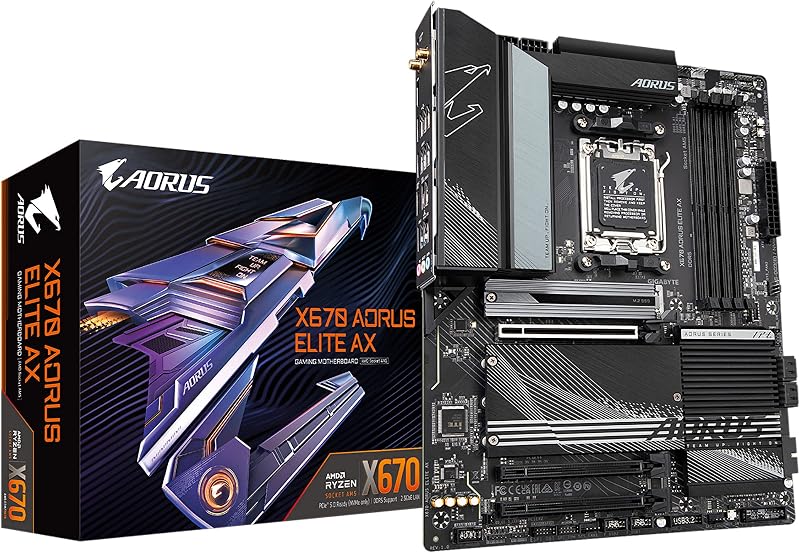
By contrast, the dual-chipset layout of X670 motherboards expands high-speed storage potential significantly. The GIGABYTE X670 AORUS Elite AX features Quad NVMe x4 M.2 configuration, allowing builders to run four discrete high-speed NVMe drives directly on the motherboard without requiring secondary PCIe adapter cards. Both platforms provide four standard SATA 6Gb/s ports for legacy bulk storage drives, but X670 dominates when your workflow relies entirely on rapid NVMe scratch disks and multi-terabyte solid-state arrays.
Edge: X670 provides quadruple M.2 drive capacity natively, whereas B650 boards top out at two or three drive slots.
PCIe Lanes and High-Speed Expansion
The technical foundation underlying the B650 vs X670 difference is the physical chipset layout engineered by AMD. A B650 motherboard uses a single Promontory 21 controller linked to the processor. This architecture provides ample lanes for the primary PCI Express graphics slot and a fast M.2 drive, but leaves limited auxiliary bandwidth for supplementary PCIe expansion slots, high-end capture cards, or dedicated audio production cards.
When considering B650 vs X670 PCIe lanes, X670 doubles the downstream silicon by chaining two Promontory 21 chipsets in series. This dual-controller setup significantly expands the PCIe lane pool available to motherboard manufacturers. Advanced board designs like the Gigabyte AORUS Elite AX AMD X670 Socket AM5 ATX DDR5 Motherboard take full advantage of this routing freedom, delivering PCI-Express x16 graphics card connectivity alongside broad supplementary lane paths. This structural headroom answers the frequent builder question: is X670 worth it? If your system requires multiple add-in PCIe cards without cannibalizing your primary graphics bandwidth, the extra expansion lanes prove indispensable. For further lane architecture context, review our comparison of the gigabyte b650 aorus elite ax vs msi mpg x670e carbon.
For standard single-GPU gaming rigs, the additional PCIe lanes on X670 often go completely unutilized. The B650 platform fully powers a dedicated PCI Express graphics card and high-speed PCIe 5.0 storage without bottlenecks. The trade-off is purely about future add-in flexibility: B650 locks you into a minimalist expansion envelope, while X670 acts as a scalable platform for demanding hardware peripherals.
Edge: X670 wins by delivering double the chipset-level lane capacity to support multiple add-in cards without bandwidth lane throttling.
VRM Power Delivery and Overclocking Thermal Design
Power delivery systems determine whether a motherboard can sustain continuous boost clocks on top-tier processors under intensive rendering or compiling workloads. When examining the B650 vs X670 VRM layout, both tiers feature robust digital voltage regulator modules designed to manage heavy thermal demands, but higher-end boards push power stage counts further to lower operating temperatures and increase current headroom.
In mainstream B650 boards, power delivery remains remarkably capable. The GIGABYTE B650 AORUS Elite AX features a twin 14+2+1 phase digital VRM design with 70A power stages and an 8-layer 2X copper PCB, backed by a 6mm heatpipe and fully covered MOSFET heatsinks. The ASUS TUF Gaming B650-PLUS WiFi employs 12+2 teamed power stages with 8+4 ProCool sockets, alloy chokes, and enlarged VRM heatsinks. Both designs comfortably supply clean power for multi-core desktop computing. You can examine how midrange hardware holds up against workstation gear in our gigabyte b650 aorus elite ax vs asus proart x670e-creator breakdown.
On the X670 side, VRM configurations scale from balanced 8+8 phase designs up to direct 16+2+2 phase digital VRM solutions seen on the GIGABYTE X670 AORUS Elite AX. These extra phases divide the electrical workload across more components, reducing localized heat generation on the motherboard surface during prolonged all-core rendering. When deciding between B650 or X670 for Ryzen 7000, 8000, or 9000 series chips, both chipsets handle high-wattage processors reliably, making VRM quality a board-specific specification rather than an inherent chipset limitation.
Edge: Tie. High-grade B650 and X670 boards both supply overbuilt 14-phase to 16-phase power delivery designs capable of handling flagship AM5 processors.
Rear I/O, Peripheral Ports, and Networking
External connectivity dictates how many high-speed accessories, audio interfaces, input devices, and external backup drives you can connect without relying on external USB hubs. The dual-chipset nature of X670 naturally supplies higher peripheral bandwidth, translating to denser rear input/output panels and higher total port counts across the chassis.
Specifications show clear separation between these tiers. The Gigabyte AORUS Elite AX X670 model lists up to 23 total ports, offering expansive USB connectivity for complex multi-device workstations. Meanwhile, the GIGABYTE X670 AORUS Elite AX incorporates high-bandwidth USB-C 3.2 Gen2x2 data transfer, alongside an optical S/PDIF connector for dedicated digital audio systems. The B650 platform remains competitive for general use: the ASUS TUF Gaming B650-PLUS WiFi features 20 total ports, including USB 3.2 Gen2x2 Type-C, front USB 3.2 Gen 1 Type-C, and USB4 support, while the B650 AORUS Elite AX specifies 12 total USB ports. Compare these layouts directly in our asus tuf gaming b650-plus wifi vs msi mpg x670e carbon head-to-head match.
Networking across both platforms is evenly matched on modern revisions. Both B650 and X670 boards include Realtek 2.5 Gb Ethernet and either WiFi 6 or WiFi 6E wireless radios, complete with Bluetooth 5.2 on select models. If you need maximum peripheral density for audio mixers, streaming gear, and multiple high-speed external hard drives, X670 delivers the broader interface pool.
Edge: X670 provides superior maximum port counts and dedicated high-speed peripheral routing.
Memory Support and DDR5 Overclocking Potential
Both B650 and X670 motherboards exclusively utilize DDR5 memory architecture across four DIMM slots, officially supporting up to 128 GB of system RAM. Each platform accommodates AMD EXPO and Intel XMP memory profiles, enabling automated memory overclocking for lower latencies and increased gaming frame rates.
Listing specifications highlight differing memory frequency ceilings across individual board implementations. B650 models like the GIGABYTE B650 AORUS Elite AX list baseline memory clock ratings starting at 4400 MHz, while the ASUS TUF Gaming B650-PLUS WiFi supports memory speeds up to 6400 MHz. In contrast, X670 motherboards advertise higher validated ceilings, with the GIGABYTE X670 AORUS Elite AX specifying 6666 MHz and advanced X670 models listing memory clock ratings reaching up to 8000 MHz. For users considering memory validation across varying tiers, see our evaluation of the msi pro b650-p wifi vs asus proart x670e-creator.
In daily computing and gaming environments, memory stability on the AM5 platform is primarily governed by the CPU memory controller rather than the chipset alone. While X670 boards frequently undergo validation for extreme memory frequency profiles, B650 motherboards easily achieve the standard sweet spot of DDR5 memory performance required for modern gaming and productivity applications.
Edge: X670 lists higher validated memory frequency limits up to 8000 MHz, offering greater headroom for aggressive memory overclocking.
Pros and Cons
B650

Pros
- PCIe 5.0 M.2 high-speed storage support
- Robust 12 to 14 power stage VRMs
- Fast 2.5 GbE and WiFi 6E connectivity
- Efficient single-chipset thermal profile
- Full support for AMD Ryzen 7000 to 9000
Cons
- Fewer total M.2 slots than X670
- Limited secondary PCIe expansion lanes
- Lower maximum external USB port density
View ASUS TUF Gaming B650-PLUS WiFi AMD on Amazon
X670
Pros
- Quad NVMe M.2 storage slots available
- Extensive I/O offering up to 23 total ports
- Direct 16+2+2 digital power phase solutions
- Memory overclocking support up to 8000 MHz
- Doubled chipset PCIe lane architecture
Cons
- Excess PCIe lanes for single-GPU gaming
- Dual-chipset design increases board complexity
View GIGABYTE X670 AORUS Elite AX AMD on Amazon
Who Should Buy Each One
Choose the B650 If
- You are assembling a dedicated gaming PC utilizing a single high-performance graphics card.
- Your storage plans require no more than two or three high-speed M.2 NVMe solid-state drives.
- You want high-end motherboard essentials like 2.5 Gb Ethernet, WiFi 6 or 6E, and PCIe 5.0 M.2 storage without unnecessary hardware redundancy.
- You prefer a cooler-running motherboard layout powered by a single energy-efficient chipset controller.
Choose the X670 If
- Your productivity workflow requires four onboard M.2 NVMe SSDs running concurrently without adapter cards.
- You utilize multiple PCIe add-in devices such as dedicated capture cards, sound cards, or secondary high-speed networking adapters.
- You connect an extensive array of high-bandwidth external peripherals requiring up to 23 total ports and USB 3.2 Gen2x2 throughput.
- You want an overbuilt digital VRM with direct 16+2+2 power phases and memory validation reaching up to 8000 MHz.
Final Verdict
For the vast majority of PC builders deciding between AM5 B650 or X670, B650 represents the optimal, balanced choice. Modern B650 motherboards deliver robust 12-phase to 14-phase power designs, full DDR5 compatibility up to 128 GB, 2.5 Gb Ethernet, and PCIe 5.0 M.2 storage support. When assessing B650 or X670 for gaming, B650 supplies every ounce of gaming performance that modern graphics cards and Ryzen processors demand, without forcing you to pay for unused silicon lanes.
However, an X670 review confirms that the dual-chipset platform remains the undisputed choice for heavy content creators, engineers, and hardware enthusiasts. If you require Quad M.2 NVMe storage arrays, extensive rear port selections up to 23 total ports, and maximum PCIe expansion headroom for demanding multi-card setups, X670 provides the uncompromising foundation your workstation needs.
FAQ
Is B650 or X670 better for gaming rigs?
B650 is generally the better choice for dedicated gaming rigs. Both chipsets deliver identical in-game frame rates when paired with the same processor, RAM, and graphics card. Because modern gaming builds only require one PCIe x16 graphics card slot and one or two fast M.2 NVMe drives, the extra PCIe lanes and storage slots on X670 provide no measurable gaming benefit.
Can a B650 motherboard handle flagship AMD Ryzen 9 processors?
Yes. Quality B650 motherboards feature robust power delivery systems, such as the 14+2+1 phase design on the GIGABYTE B650 AORUS Elite AX or the 12+2 teamed stages on the ASUS TUF Gaming B650-PLUS WiFi. These power stages supply ample current and maintain stable temperatures even under sustained multi-threaded processing loads.
What is the fundamental hardware difference between B650 and X670 chipsets?
The core physical difference is the chipset configuration. B650 motherboards utilize a single Promontory 21 chipset processor, while X670 motherboards link two Promontory 21 controllers in a daisy-chain configuration. This dual-controller design doubles the downstream PCIe bandwidth, enabling more M.2 slots, supplementary expansion slots, and high-speed USB ports.
Is X670 worth it for a standard single NVMe drive build?
No. If your build uses only a single M.2 NVMe solid-state drive and one graphics card, an X670 motherboard will leave most of its high-speed PCIe lanes completely unused. A well-equipped B650 motherboard provides all necessary features, high-speed networking, and DDR5 support without redundant hardware complexity.
Do B650 motherboards support PCIe 5.0 SSDs?
Yes. Many leading B650 motherboards, including the ASUS TUF Gaming B650-PLUS WiFi and the GIGABYTE B650 AORUS Elite AX, provide dedicated PCIe 5.0 M.2 slots wired directly to the AM5 processor lanes, allowing you to run the fastest next-generation storage drives available.
How do RAM speed limits compare between B650 and X670?
Both platforms feature four DDR5 DIMM slots supporting up to 128 GB of dual-channel system memory. However, listed maximum memory overclock ratings vary: B650 listings generally specify memory clocks up to 6400 MHz, whereas high-end X670 listings advertise validated memory support reaching 6666 MHz to 8000 MHz.