The single difference that decides the choice between these two CPU coolers is physical form factor versus thermal capacity: the ultra-compact low-profile design of the Noctua NH-L9i allows it to fit into slim enclosures with severe height limitations, whereas the single-tower dual-fan layout of the DeepCool AG400 delivers substantial cooling headroom for chassis with standard vertical clearance.
Choose the Noctua NH-L9i if you are building an ultra-small form factor desktop, home theater PC, or sub-five-liter console chassis where total cooler height cannot exceed 37 millimeters. Choose the DeepCool AG400 if your computer case can house a standard tower radiator and you need up to 220 watts of thermal dissipation for sustained gaming or heavy computing workloads.
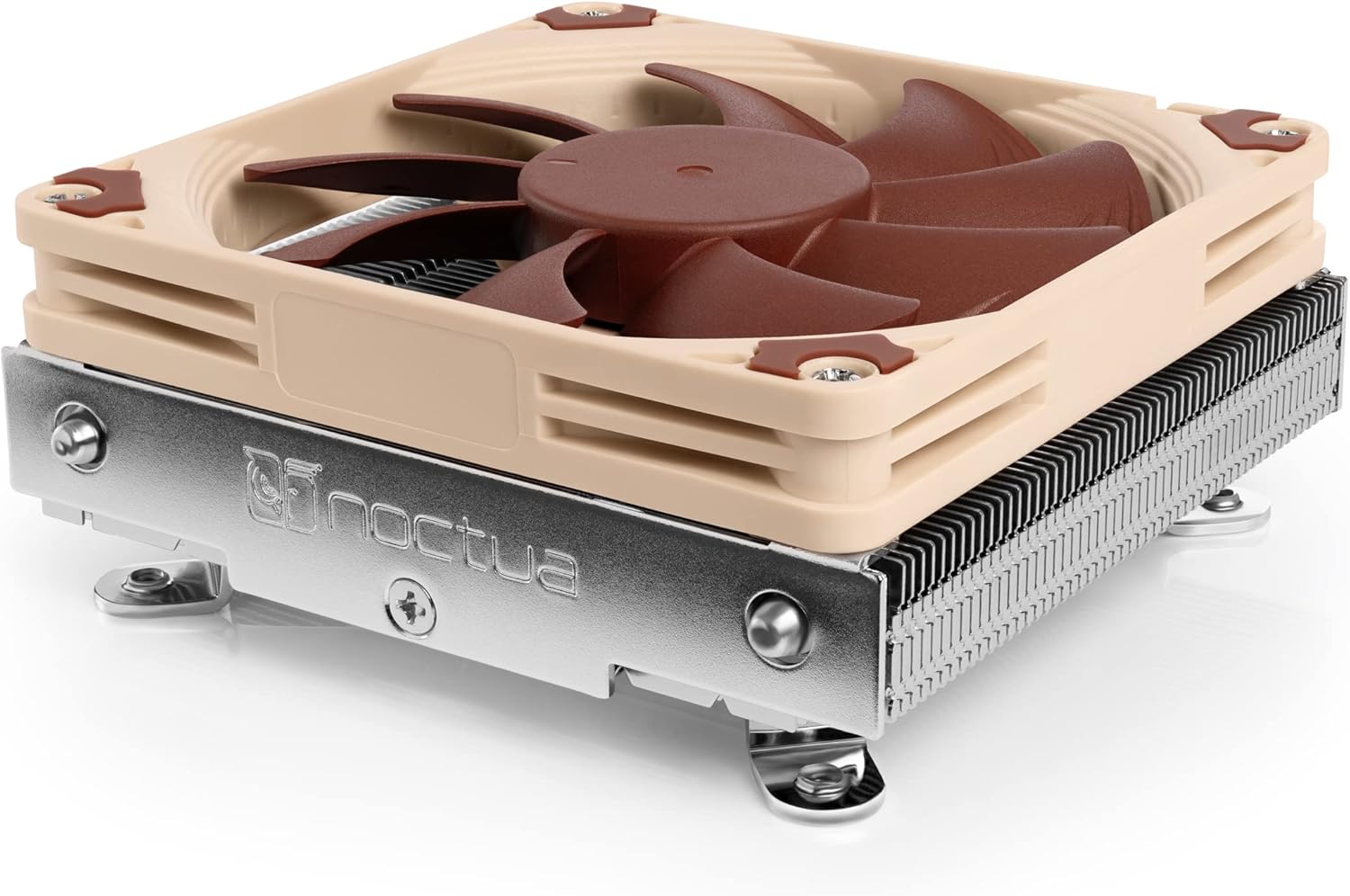

Noctua NH-L9i vs DeepCool AG400 at a Glance
| Feature | Noctua NH-L9i | DeepCool AG400 |
|---|---|---|
| Cooler Architecture | Ultra-low-profile horizontal downdraft | Single-tower dual-fan radiator |
| Total Dimensions | 3.74 x 3.74 x 1.46 inches (95 x 95 x 37 mm) | Not listed (uses 120mm fans) |
| Cooler Height | 37 mm (1.46 inches) | Not listed |
| Thermal Rating | Moderate heat loads (65W-class guidance) | 220 watts TDP |
| Heatpipe Array | Copper base and heat-pipes with soldered joints | 4 heatpipes |
| Fan Configuration | Single slim 92mm fan (NF-A9x14 HS-PWM) | Dual 120mm fans (9 blades, fluid bearing) |
| Fan Speed Range | Up to 2500 RPM (PWM controlled) | 500 to 2000 RPM (PWM controlled) |
| Maximum Sound Level | 23.6 dB (further quieted by Low-Noise Adaptor) | Not listed |
| Socket Compatibility | Intel LGA1150, LGA1151, LGA1155, LGA1156, LGA1200 | Intel LGA1700, LGA1200, LGA115X; AMD AM4, AM5 |
| Warranty Coverage | 6-year manufacturer warranty | Not listed (fan rated for 100,000 hours) |
| Best For | Ultra-compact ITX, HTPC, and SFF enclosures | Mid-tower and micro-ATX gaming PCs |
Form Factor and Case Clearance
The physical profile of a CPU cooler dictates the entire enclosure selection when planning a custom build. In this comparison, the difference in form factor represents a complete architectural contrast. The Noctua NH-L9i is designed from the ground up as an ultra-compact downdraft cooler. Measuring a total 3.74 by 3.74 inches wide and deep with an astonishing total cooler height of just 1.46 inches (37 millimeters including the pre-installed slim fan), it nestles directly over the CPU socket area. This low profile ensures that it will fit inside tight custom loop cases, thin desktop boxes, and tiny home theater setups where traditional cooling hardware cannot even clear the chassis lid.
By contrast, the DeepCool AG400 is an upright, vertical tower cooler. While the product listing does not state the exact millimeter height of the overall assembly, tower coolers carrying 120mm cooling fans require a conventional vertical clearance profile common to standard mid-tower and spacious micro-ATX cases. When evaluating DeepCool AG400 vs Noctua NH-L9i dimensions, you are choosing between horizontal downdraft airflow that preserves every fraction of an inch and a vertical fin array that channels air directly toward the rear exhaust vent of a larger case. For builders considering ultra-slim enclosures, our comparison of the noctua nh-l9i vs be quiet! dark rock pro 5 explores a similar divide between miniaturized low-profile cooling and full-sized desktop hardware.
Clearance around adjacent motherboard components is equally critical. The NH-L9i strictly complies with Intel’s designated socket keep-out zones via its 95x95mm footprint. Because it does not protrude beyond this perimeter, it guarantees total non-interference with tall RAM heatspreaders or the primary PCIe expansion card, even on tightly packed Mini-ITX motherboards. The AG400 utilizes a push-pull dual-fan array wrapped around a 4-heatpipe radiator tower. In standard desktop motherboards, a tower of this type sits vertically above the components, but in cramped ITX layouts, its multi-fan tower body requires careful checking of case side-panel depth and nearby power supply brackets.
Edge: Noctua NH-L9i, because its 37mm total height and precise 95x95mm footprint ensure absolute compatibility with space-restricted SFF enclosures without blocking RAM or PCIe lanes.
Thermal Dissipation Headroom and Performance Ratings
A CPU cooler’s job is to transfer heat away from the processor die fast enough to prevent thermal throttling under sustained computation. Thermal dissipation performance differs dramatically between these two models due to the mass of their radiators and their available surface area. The DeepCool AG400 is engineered as a performance workhorse, carrying an official DeepCool AG400 TDP rating of 220 watts. It manages this heavy heat capacity through four direct-contact or routed heatpipes that carry thermal energy across a dense array of aluminum fins, assisted by two 120mm fans running in a push-pull orientation to cycle air through the heatsink rapidly.
The Noctua NH-L9i targets a very different thermal profile. As an ultra-low-profile cooler with a condensed fin block, its thermal dissipation mass is physically constrained. Noctua explicitly documents the NH-L9i for processors with moderate heat loads, detailing compatibility with 65-watt class chips such as the Intel Core i3, Core i5, and select non-unlocked Core i7 processors like the Core i7-10700, Core i7-11700, Core i5-11600, or Core i9-11900 under managed power limits. It is not intended for heavy overclocking or unlocked enthusiast processors running at unrestricted wattage. Anyone conducting a Noctua NH-L9i review must acknowledge that physics sets hard boundaries for heatsinks under two inches tall, as also seen when comparing the noctua nh-d15 vs nh-l9i.
For demanding computing sessions, the AG400 provides the necessary thermal buffer to keep modern high-wattage desktop chips well below their thermal thresholds. The dual-fan assembly pushes air through a full-size fin block, preventing heat soak during extended rendering sessions or intense gaming. While the NH-L9i handles desktop productivity and moderate power profiles effortlessly, the DeepCool AG400 offers significantly higher raw heat dissipation that lets processors sustain peak boost clocks for longer periods without hitting thermal limits.
Edge: DeepCool AG400, providing an exceptional 220-watt TDP rating backed by four heatpipes and a dual-fan tower fin stack.
Fan Engineering, Acoustics, and Noise Levels
Acoustic performance often determines whether a cooler feels like a seamless desktop enhancement or an irritating distraction. Noctua has earned an industry-wide reputation for quiet acoustics, and the NH-L9i relies on the custom-engineered NF-A9x14 HS-PWM slim 92mm fan to deliver impressive quietness. Despite spinning up to 2500 RPM to compensate for its compact 14mm blade depth, the fan maxes out at an official sound level of 23.6 dB. Noctua also bundles the NA-RC7 Low-Noise Adaptor (L.N.A), an inline resistor cable that reduces maximum rotational velocity to guarantee silent operation in quiet office spaces or living room entertainment centers.
The DeepCool AG400 relies on two 120mm cooling fans spinning at speeds between 500 and 2000 RPM via a 4-pin PWM connection. While the manufacturer listing emphasizes that the dual-fan setup reduces operational noise caused by high thermal spikes and eliminates harsh high-pitch whirring, the listing does not publish a specific decibel figure for the DeepCool AG400 noise level. The 120mm fans utilize 9-blade impellers built on long-lasting fluid bearings rated for an operational lifespan of 100,000 hours, pushing up to 75.89 units of air volume with an air pressure rating of 2.53 to maintain airflow through the dual-fan array.
When selecting Noctua NH-L9i or DeepCool AG400 for gaming, acoustic profiles diverge based on workload. The larger 120mm fans on the AG400 can move significant volumes of air at moderate RPM levels, meaning that under light-to-medium thermal loads, they can stay at low rotational speeds. However, Noctua provides fully documented acoustic ratings down to the decibel, a custom slim fan profile, and an included acoustic tuning adapter right out of the box, ensuring predictable, whisper-quiet performance in any environment.
Edge: Noctua NH-L9i, backed by a verified 23.6 dB maximum noise ceiling and an included Low-Noise Adaptor for guaranteed quiet operation.
Processor Socket Compatibility and Platform Support
Socket hardware determines whether a cooler will even mount to your chosen motherboard. In this comparison, socket compatibility represents a significant divergence between modern platform coverage and legacy platform focus. The DeepCool AG400 listing lists comprehensive socket support across both major chip manufacturers, featuring native mounting hardware for Intel LGA1700, LGA1200, and legacy LGA115X (1150, 1151, 1155, 1156), as well as AMD Socket AM4 and Socket AM5. This makes the AG400 an adaptable solution for builders assembling systems on modern platforms. If you are examining modern single-tower alternatives, you can also see how it fares against competing options in our guide to the thermalright phantom spirit 120 vs deepcool ag400.
The Noctua NH-L9i listing, in contrast, is explicitly built around Intel LGA115x and LGA1200 architectures. Its SecuFirm2 mounting apparatus is tailored to fit Intel LGA1150, LGA1151, LGA1155, LGA1156, and LGA1200 sockets out of the box. The product listing does not include native mounting brackets for Intel LGA1700 or AMD platforms such as AM4 or AM5; Noctua manufactures dedicated variants (such as the NH-L9a for AMD) for those sockets. For buyers examining Noctua NH-L9i CPU compatibility, this means the base NH-L9i is strictly tailored to Intel 10th and 11th Gen platforms and their direct predecessors.
If you are building a modern desktop computer using an Intel 12th, 13th, or 14th Generation processor on LGA1700, or a modern AMD Ryzen processor on AM4 or AM5, the DeepCool AG400 includes the necessary brackets directly in the package. The NH-L9i requires checking socket specifics carefully to ensure your motherboard matches its dedicated Intel footprint.
Edge: DeepCool AG400, offering broad native compatibility across modern Intel LGA1700 and AMD AM4/AM5 sockets in addition to legacy platforms.
Materials, Build Quality, and Included Accessories
The engineering quality of a heatsink affects everything from thermal transfer longevity to ease of installation. Noctua builds the NH-L9i with top-tier materials: it features a machined copper base and soldered heatpipes bonded directly to aluminum cooling fins, completely nickel-plated to prevent oxidation over time. The mounting mechanism is Noctua’s renowned SecuFirm2 system, which utilizes dedicated backplates and fixed spring-loaded screws to ensure optimal contact pressure without warping delicate motherboards. The retail bundle includes a tube of high-grade NT-H1 thermal compound, the NA-RC7 Low-Noise Adaptor, a metal case badge, and an extra set of longer mounting screws should you wish to replace the slim 14mm fan with a standard 92x92x25mm fan.
The DeepCool AG400 focuses its bill of materials on robust cooling efficiency. It features four copper heatpipes routed through an aluminum cooling fin stack, paired with a dual-fan push-pull configuration. Its fans rely on high-durability fluid bearings that provide an estimated 100,000-hour operational lifetime, ensuring that the moving mechanical parts will endure years of daily operation. The listing highlights replacement fan capabilities that stabilize device temperatures, protect motherboards from heat degradation, and maintain operational stability under load.
When assessing build craftsmanship, Noctua stands alone with soldered fin-to-pipe joints that prevent thermal degradation over years of thermal expansion cycles, backed up by a full 6-year manufacturer warranty. The DeepCool cooler provides heavy-duty mechanical reliability for everyday cooling, but Noctua’s inclusion of premium NT-H1 paste, specialized accessories, and extended warranty protection gives the NH-L9i an elevated level of refinement. For more perspective on compact cooler construction, read our head-to-head breakdown of the noctua nh-l9i vs thermalright peerless assassin 120.
Edge: Noctua NH-L9i, featuring soldered nickel-plated joints, an extensive accessory bundle with NT-H1 paste, and a 6-year warranty.
Installation and Everyday Usability
Installing a CPU cooler inside a desktop chassis can range from a smooth five-minute job to a frustrating process involving stripped screws and blocked headers. The Noctua NH-L9i is celebrated for having one of the simplest installation procedures in the PC building community. Because the heatsink is pre-assembled with the slim fan attached and does not extend past the 95x95mm Intel socket perimeter, you simply apply the thermal compound, position the cooler over the CPU, and tighten the four mounting screws from the rear of the motherboard. There is no need to remove the fan to access mounting brackets, and zero risk of colliding with tall VRM heatsinks or memory sticks.
The DeepCool AG400 requires a traditional tower cooler installation workflow. You must install the appropriate socket brackets, mount the central heatsink radiator securely onto the processor, and clip the dual 120mm fans onto both sides of the tower. While standard for desktop tower coolers, managing fan clips inside a compact enclosure can be challenging if the motherboard is already installed inside the chassis. Furthermore, placing a fan on the front of the tower means builders must verify that the fan frame does not push against tall RGB memory modules.
In everyday maintenance, the NH-L9i’s compact downdraft arrangement blows air downward, which has the added benefit of circulating ambient airflow over the motherboard’s power delivery stages and M.2 storage drives. The AG400’s horizontal push-pull airflow channels heat toward the rear case fan, which is ideal for overall case thermodynamics in mid-tower enclosures. If you are deciding whether to choose the Noctua NH-L9i or DeepCool AG400 for ITX enclosures, the NH-L9i’s straightforward installation and zero-clearance friction make it far easier to service in tight spaces.
Edge: Noctua NH-L9i, thanks to its pre-assembled four-screw rear installation and guaranteed non-interference design.
Pros and Cons
Noctua NH-L9i
Pros
- Ultra-compact 37mm profile fits tight SFF cases
- Zero clearance issues with RAM or PCIe slots
- Backed by 6-year manufacturer warranty
- Quiet 23.6 dB operation with low-noise adapter
Cons
- Limited to moderate CPU heat loads
- Lacks native AMD socket support
DeepCool AG400
Pros
- Handles high thermal loads up to 220W TDP
- Supports modern Intel LGA1700 and AMD AM4/AM5 sockets
- Four heat pipes enhance heat dissipation
- Dual 120mm fans maximize cooling throughput
Cons
- Tower design incompatible with low-profile ITX cases
- Bulkier footprint risks clearance issues
Who Should Buy Each One
Choose the Noctua NH-L9i If

- You are building a custom PC inside an ultra-compact Small Form Factor (SFF) or HTPC chassis with vertical clearance under 50mm.
- You want guaranteed 100% RAM and PCIe slot clearance on tight Mini-ITX motherboards without measuring millimeter clearances.
- You are pairing the cooler with a moderate-heat Intel Core i3, Core i5, or 65W Core i7 processor on LGA1200 or LGA115X motherboards.
- You value whisper-quiet acoustics backed by a 23.6 dB noise ceiling, an included Low-Noise Adaptor, and a 6-year manufacturer warranty.
Choose the DeepCool AG400 If

- You are building inside a standard mid-tower or micro-ATX chassis with ample vertical height for a multi-fan tower radiator.
- You need up to 220 watts of thermal capacity to handle demanding computing tasks and prolonged multi-threaded workloads.
- You are assembling a modern desktop PC powered by an Intel LGA1700 processor or an AMD AM4/AM5 platform.
- You want a push-pull dual 120mm fan setup that channels warm exhaust air directly out the rear of your chassis.
Final Verdict
For most desktop computer builders assembling a gaming or productivity rig in a standard mid-tower chassis, the DeepCool AG400 is the practical pick. Its traditional tower architecture, four heatpipes, dual 120mm push-pull fans, and substantial 220-watt TDP rating provide the cooling headroom necessary to keep modern processors running at high clock speeds without thermal throttling. Furthermore, its native support for both AMD AM4/AM5 and Intel LGA1700 sockets makes it a versatile, future-proof choice for standard desktop form factors.
However, the Noctua NH-L9i remains unmatched when space is at an absolute premium. If you are building an ultra-small form factor PC, a desk-mounted media center, or a console-sized gaming rig, the AG400 simply will not fit. With a total cooler height of just 37 millimeters, zero clearance interference with RAM or graphics cards, refined acoustic tuning, and a 6-year warranty, the NH-L9i is the undisputed gold standard for ultra-low-profile Intel cooling. Evaluate your case’s internal clearance first: if your chassis has the vertical space, buy the DeepCool AG400 for its superior heat capacity; if your case is strictly limited to low-profile hardware, the Noctua NH-L9i is the cooler to choose.
FAQ
Can the Noctua NH-L9i cool an Intel Core i7 processor?
Yes, but it depends on the specific processor model and workload. Noctua recommends the NH-L9i for Intel Core i7 processors with moderate heat loads, such as 65-watt non-K SKUs like the Core i7-10700 or i7-11700 under standard power limits. It is not designed for heavily overclocked or unlocked enthusiast processors running sustained full-load power draws exceeding standard thermal envelopes.
Does the DeepCool AG400 fit in a Mini-ITX PC case?
It depends entirely on the specific Mini-ITX chassis. While some larger Mini-ITX cases have enough vertical depth to support a 120mm tower cooler, many ultra-compact SFF enclosures have height limits well below 70 millimeters. You must check your computer chassis specifications to confirm it can accommodate a full-size tower cooler before installing the AG400.
Can I use the Noctua NH-L9i on an AMD AM4 or AM5 motherboard?
The standard Noctua NH-L9i model covered here includes SecuFirm2 mounting hardware designed exclusively for Intel LGA1150, LGA1151, LGA1155, LGA1156, and LGA1200 sockets. It does not include AMD mounting brackets out of the box. For AMD AM4 or AM5 motherboards, Noctua produces the dedicated NH-L9a series designed specifically for AMD mounting patterns.
How loud is the DeepCool AG400 under heavy load?
The DeepCool AG400 listing highlights a design aimed at eliminating harsh fan whirring and reducing high-temperature noise spikes, running its dual 120mm fans from 500 up to 2000 RPM via PWM control. While the listing does not publish a specific decibel measurement, its fluid bearing fans are built to deliver stable, quiet cooling across normal operating conditions.
Does the Noctua NH-L9i overhang tall RAM modules?
No. The Noctua NH-L9i features a compact 95 by 95 millimeter footprint that adheres completely to Intel’s socket keep-out zone. It stays entirely within this perimeter, guaranteeing 100% clearance for memory modules of any height and avoiding any contact with the PCIe graphics card slot on standard Mini-ITX motherboards.
Can you swap the stock fan on the Noctua NH-L9i for a thicker fan?
Yes. The Noctua NH-L9i comes equipped with the slim 14mm thick NF-A9x14 fan, but the package includes a set of longer mounting screws specifically designed to accommodate standard 92x92x25mm fans. If your PC case has an extra 11 millimeters of vertical space, installing a thicker 25mm fan can increase airflow while maintaining the cooler’s compact footprint.
Is DeepCool AG400 worth it for modern gaming builds?
The DeepCool AG400 is worth it if you are constructing a gaming rig inside a mid-tower or micro-ATX chassis and need reliable thermal capacity without complex water cooling. With a 220W TDP rating, four copper heatpipes, dual 120mm fans, and broad compatibility for Intel LGA1700 and AMD AM5, it provides ample cooling performance for mainstream gaming processors.


