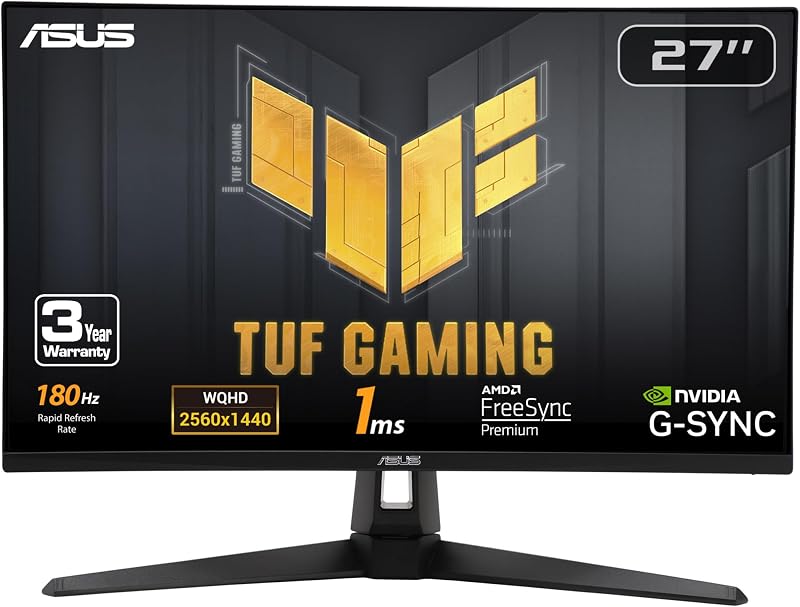
When comparing the Gigabyte G27Q20-T and the Asus TUF Gaming VG27AQ3A, the single difference that decides the choice for most players is whether they prioritize maximum raw refresh rate speed or versatile motion blur reduction paired with all-in-one convenience. The Gigabyte display pushes competitive performance with a native 200Hz refresh rate that overclocks to 210Hz alongside a rapid 0.5ms response time, while the Asus monitor features 180Hz pacing, proprietary ELMB Sync technology that operates simultaneously with variable refresh rates, and integrated desktop speakers.
Competitive esports players seeking peak frame rates and minimal latency should pick the G27Q20-T, while balanced gamers who want clear motion strobing without screen tearing and built-in audio should pick the VG27AQ3A.


Gigabyte G27Q20-T vs Asus TUF Gaming VG27AQ3A at a Glance
| Feature | Gigabyte G27Q20-T | Asus TUF Gaming VG27AQ3A |
|---|---|---|
| Screen Size and Panel Type | 27-inch SuperSpeed IPS | 27-inch Fast IPS |
| Native Resolution | 2560 x 1440 (QHD) | 2560 x 1440 (QHD) |
| Refresh Rate | 200Hz (Overclockable to 210Hz) | 180Hz |
| Response Time | 0.5ms GTG | 1ms |
| Variable Refresh Rate | AMD FreeSync Premium, NVIDIA G-SYNC Compatible | FreeSync Premium, G-SYNC Compatible, VESA AdaptiveSync |
| Blur Reduction Technology | Aim Stabilizer | ELMB Sync |
| Color Gamut | 123% sRGB (8-bit color) | 130% sRGB |
| Integrated Audio | Not listed | Integrated stereo speakers |
| Stand Ergonomics | Tilt (-5° to +20°) | Tilt (listing does not specify range) |
| Included Accessories | Not listed | DisplayPort cable, screwdriver, power adapter |
| Best For | Fast-paced competitive FPS and esports | Versatile gaming with blur reduction and speakers |
Refresh Rate and Latency for Competitive Gaming
Refresh rate and pixel response speed dictate how quickly visual information reaches your eyes during rapid gameplay. A display updating at higher frequencies shortens the window between hardware rendering and screen updates, creating fluid motion tracking that makes target acquisition easier. When evaluating the Gigabyte G27Q20-T refresh rate, the monitor delivers 200Hz right out of the box and features an overclock profile that boosts performance to 210Hz. The VG27AQ3A caps its maximum refresh rate at 180Hz. While 180Hz provides a smooth experience compared to standard 144Hz panels, the extra 20Hz to 30Hz ceiling on the Gigabyte model gives an advantage to players running high-performance graphics cards capable of sustaining frame rates above 200 frames per second at 1440p.
Pixel response time works alongside the refresh cycle to keep fast motion sharp. The G27Q20-T features a SuperSpeed IPS panel with a 0.5ms gray-to-gray response time rating, engineered to minimize pixel transition lag. The VG27AQ3A utilizes Fast IPS panel technology rated at 1ms. When deciding between the Gigabyte G27Q20-T or Asus TUF Gaming VG27AQ3A for esports, this latency difference matters in competitive tactical shooters like Counter-Strike 2, Valorant, or Apex Legends where micro-adjustments decide round outcomes. Builders pairing high-refresh monitors with performance motherboards often compare hardware combinations like the gigabyte m27q2 vs asus tuf vg27aq to find the right balance between raw responsiveness and stability.
The Gigabyte G27Q20-T response time and faster frame cycle reduce display-level input delay. Shorter frame intervals mean your inputs register on-screen with less perceptual latency. For players competing in twitch-reflex environments, every fraction of a millisecond shaved off the render-to-display pipeline provides a cleaner visual feed when flicking across the screen.
Edge: Gigabyte G27Q20-T because its native 200Hz panel pushes to a 210Hz overclock and achieves a faster 0.5ms response time rating for twitch gaming.
Motion Blur Reduction and Variable Refresh Rate Support
Motion blur reduction technologies use backlight strobing to insert moments of darkness between frame cycles, clearing the human eye’s retinal persistence and eliminating trailing artifacts. Historically, backlight strobing could not run alongside variable refresh rate technologies like AMD FreeSync or NVIDIA G-Sync, forcing players to pick between motion clarity or screen-tear elimination. The VG27AQ3A addresses this problem directly through Asus VG27AQ3A ELMB Sync. This proprietary implementation allows Extreme Low Motion Blur strobing to operate simultaneously with variable refresh rate synchronization, keeping moving targets razor-sharp without introducing horizontal screen tearing.
The G27Q20-T includes Gigabyte’s Aim Stabilizer technology alongside support for AMD FreeSync Premium and NVIDIA G-Sync compatibility. Aim Stabilizer reduces motion blur during intense gunfire and high-speed turns, but it does not offer the simultaneous variable-strobing flexibility that Asus provides with ELMB Sync. When matching display features with modern system architectures, as seen when comparing components like the gigabyte b760 aorus elite ax vs asus tuf gaming b860-plus, system consistency across fluctuating frame rates is essential.
When selecting the Gigabyte G27Q20-T or Asus TUF Gaming VG27AQ3A for gaming across a diverse library of titles, the Asus monitor proves more versatile. Demanding single-player campaigns and open-world games frequently experience frame rate dips. Because ELMB Sync adapts dynamically to variable refresh rates across FreeSync Premium, G-Sync compatible, and VESA AdaptiveSync profiles, the VG27AQ3A maintains crisp motion clarity even when your graphics card cannot maintain a locked maximum frame rate.
Edge: Asus TUF Gaming VG27AQ3A because ELMB Sync allows backlight strobing to function concurrently with variable refresh rates, preventing tearing while eliminating ghosting.
Color Reproduction and Visual Presentation
Color accuracy and dynamic range determine how lifelike virtual worlds appear, whether traversing dark corridors or brightly illuminated landscapes. The VG27AQ3A features a 130% sRGB color gamut, delivering rich saturation and wide color space coverage. The G27Q20-T provides a 123% sRGB color gamut with 8-bit color depth. Both monitors rely on IPS technology, ensuring consistent color reproduction across wide 178-degree horizontal and vertical viewing angles without noticeable chromatic shift when viewing off-center.
Contrast and luminance specifications outline how these panels handle lighting highlights. Both monitors feature a 1000:1 static contrast ratio, which is typical for fast IPS panels. The G27Q20-T lists a peak brightness of 350 cd/m², while the VG27AQ3A lists an 856.5 lumen output. Both panels support the HDR 10 standard to enhance bright highlights and dark details in high dynamic range content. Selecting the right display often mirrors motherboard matching considerations, such as balancing platforms like the asus tuf gaming b760-plus wifi vs gigabyte b760 aorus elite ax, where small spec advantages tailor a rig to specific creative or gaming workloads.
Readers examining a detailed Gigabyte G27Q20-T review or an Asus TUF Gaming VG27AQ3A review will find that the Asus panel produces a wider spectrum of saturated tones. While both screens deliver clean 1440p clarity across their 27-inch frames, the 130% sRGB volume on the VG27AQ3A provides a slightly more colorful picture in vibrant open-world titles and media viewing.
Edge: Asus TUF Gaming VG27AQ3A because its 130% sRGB color gamut provides broader saturation and richer color rendering.
Integrated Audio, Connectivity, and Desk Ergonomics
Physical features and connectivity dictate how smoothly a monitor integrates into your desktop workspace. The VG27AQ3A includes integrated stereo speakers, offering immediate audio playback without requiring a dedicated soundbar, external desktop speakers, or constant headphone use. For general tasks, watching videos, or casual listening, these built-in speakers save desk space. The listing for the G27Q20-T does not specify any integrated speakers, meaning users must connect external audio equipment or a gaming headset to hear system audio.
Port arrangements and packaging accessories highlight distinct practical differences. The G27Q20-T includes two HDMI ports and one USB port, allowing multiple video sources to remain connected alongside data access for firmware management. The VG27AQ3A listing details comprehensive package contents, including a DisplayPort cable, an L-shaped screwdriver for assembly, a power cord, and a power adapter configured for 240V support. Planning system layouts around port connectivity mirrors decisions made when setting up motherboards like the asus tuf gaming b650-plus wifi vs gigabyte b650 aorus elite ax, where built-in features reduce the need for peripheral add-ons.
Stand adjustments and physical footprint determine day-to-day comfort. The G27Q20-T features an ergonomic stand engineered with a tilt range of -5° to +20°, letting players dial in their preferred viewing angle across a 9.9-pound chassis. The VG27AQ3A weighs 4.6 kg (approximately 10.1 pounds) and features tilt support, though the listing does not specify exact adjustment degrees. The inclusion of an assembly tool and bundled DisplayPort cable with the Asus model simplifies out-of-the-box physical setup.
Edge: Asus TUF Gaming VG27AQ3A because its integrated speakers and bundled DisplayPort cable provide greater all-in-one desk convenience.
Tactical Gaming Utilities and Software Ecosystem
Modern gaming displays incorporate software utilities that allow users to customize monitor parameters without reaching for clunky physical buttons. The G27Q20-T features Gigabyte’s tactical Game Assist suite, which includes OSD Sidekick software. OSD Sidekick lets you adjust display settings, fine-tune black equalizer levels, and create custom profiles using your keyboard and mouse inside Windows. The tactical suite also incorporates Smart OD (overdrive) tuning, on-screen timers, and crosshair overlays that assist competitive play.
The VG27AQ3A counterbalances tactical utilities with creative value. Asus packages the monitor with a complimentary 3-month Adobe Creative Cloud subscription valid through August 31, 2028, giving users access to video editing and graphic design software. When evaluating whether the Asus TUF Gaming VG27AQ3A vs Gigabyte G27Q20-T matchup favors your routine, consider how you split your screen time between pure gaming and digital content creation. Deciding if the Asus TUF Gaming VG27AQ3A is worth it depends heavily on whether you utilize software bundles and hybrid creative tools.
Warranty coverage represents another vital differentiator for long-term ownership. Gigabyte backs the G27Q20-T with a 3-year manufacturer warranty. This extensive warranty coverage ensures multi-year support against manufacturing defects. When evaluating if the Gigabyte G27Q20-T is worth it, the combination of dedicated tactical software, on-the-fly OSD management, and a 3-year warranty provides peace of mind similar to investing in durable core system hardware like the gigabyte z790 aorus elite ax vs asus tuf gaming b860-plus platform.
Edge: Gigabyte G27Q20-T because its OSD Sidekick desktop control software, tactical Game Assist tools, and 3-year warranty offer better long-term gaming utility.
Pros and Cons
Gigabyte G27Q20-T

Pros
- Native 200Hz refresh rate with 210Hz overclock
- Ultra-fast 0.5ms GTG response time
- OSD Sidekick for desktop setting adjustments
- Included 3-year manufacturer warranty
Cons
- No integrated speakers listed
- Slightly narrower 123% sRGB color gamut
View Gigabyte G27Q20-T on Amazon
Asus TUF Gaming VG27AQ3A
Pros
- ELMB Sync enables strobing with variable refresh rates
- Integrated stereo speakers for desktop audio
- Wider 130% sRGB color gamut coverage
- Includes DisplayPort cable and screwdriver
Cons
- Lower 180Hz maximum refresh rate
- Slower 1ms response time rating
View Asus TUF Gaming VG27AQ3A on Amazon
Who Should Buy Each One
Choose the Gigabyte G27Q20-T If
- You play fast-paced competitive shooters and want a 200Hz native refresh rate with a 210Hz overclock profile.
- You demand the lowest pixel latency possible with a 0.5ms response time rating.
- You want to adjust display settings directly in Windows using keyboard and mouse inputs through OSD Sidekick.
- You prioritize long-term peace of mind backed by a 3-year manufacturer warranty.
Choose the Asus TUF Gaming VG27AQ3A If
- You want ELMB Sync so you can use backlight strobing and variable refresh rates at the same time.
- You prefer an all-in-one setup with integrated desktop speakers to save desk space.
- You value a wider 130% sRGB color gamut for richer, more vibrant visuals in cinematic games.
- You plan to use the included 3-month Adobe Creative Cloud subscription for media production.
Final Verdict
For dedicated esports enthusiasts, the Gigabyte G27Q20-T earns the recommendation. Its 200Hz native panel, 210Hz overclock, and rapid 0.5ms response time deliver lower frame latency and smoother tracking during intense firefights. Paired with convenient OSD Sidekick software and a dependable 3-year warranty, the G27Q20-T is engineered specifically to give competitive players every possible performance advantage at 1440p resolution.
The Asus TUF Gaming VG27AQ3A wins for gamers who want a balanced, feature-rich display for mixed gaming and multimedia. By combining backlight strobing with variable refresh rate synchronization via ELMB Sync, it eliminates motion blur without screen tearing even when frame rates fluctuate. With integrated desktop speakers, a wider 130% sRGB color space, and a complimentary Adobe Creative Cloud subscription, the VG27AQ3A delivers superior everyday versatility.
FAQ
Does the Asus TUF Gaming VG27AQ3A have built-in speakers?
Yes, the VG27AQ3A includes integrated stereo speakers that provide desktop audio output without requiring external speakers or headphones.
What is the maximum refresh rate of the Gigabyte G27Q20-T?
The G27Q20-T runs at a native 200Hz refresh rate and includes a factory overclock setting that increases the maximum refresh rate to 210Hz.
Can you use ELMB Sync and variable refresh rate at the same time on the VG27AQ3A?
Yes, Asus ELMB Sync is specifically designed to allow backlight strobing and variable refresh rate technologies like AMD FreeSync and NVIDIA G-Sync compatibility to operate simultaneously.
What ports are available on the Gigabyte G27Q20-T?
The G27Q20-T listing specifies two HDMI ports and one USB port for video input and peripheral data connectivity.
Do both monitors support HDR10 content?
Yes, both the G27Q20-T and the VG27AQ3A support the HDR 10 standard to enhance visual depth, contrast, and highlights in supported games and media.
Which monitor offers better warranty coverage?
The G27Q20-T explicitly includes a 3-year manufacturer warranty from Gigabyte, whereas the VG27AQ3A includes a warranty card in the package but the listing does not specify the exact duration.

