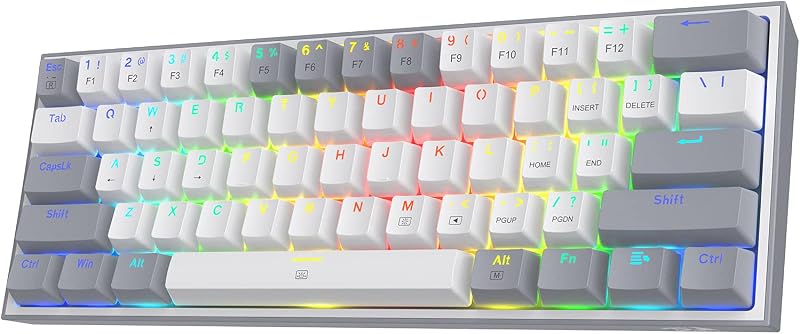
The deciding factor between a tenkeyless (TKL) keyboard and a full size keyboard comes down to whether you prioritize unhindered mouse movement and natural shoulder alignment or the continuous, rapid calculation speed of a dedicated numeric keypad. Removing the ten-key section frees roughly three to four inches of horizontal desk area, creating an ergonomic alignment between hands and shoulders that benefits high-speed mouse navigation. In contrast, preserving the numeric block allows accountants, analysts, and developers to input sequences, mathematical formulas, and custom macro triggers without relying on the secondary top-row number keys.
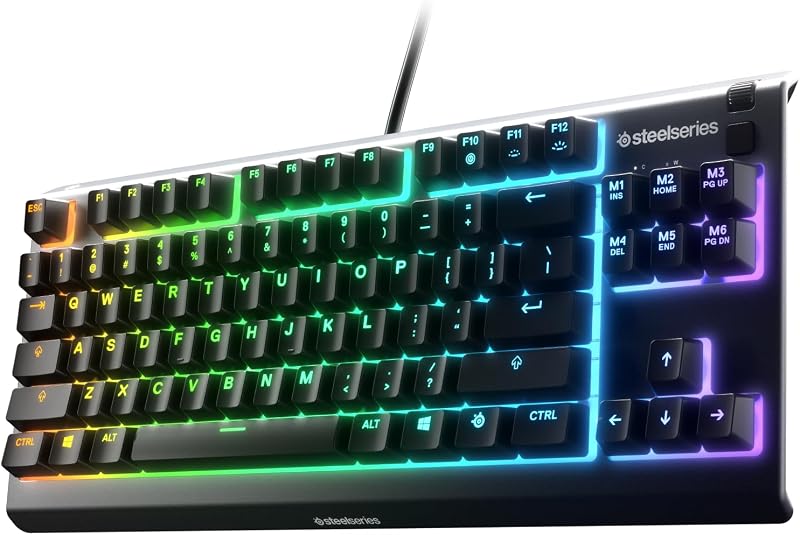
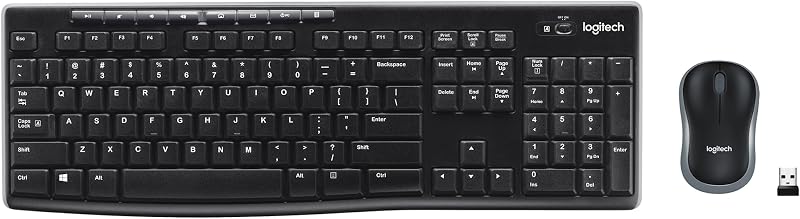
Choose a SteelSeries Apex 3 TKL or similar compact design if you spend your computer sessions playing fast-paced games or navigating limited desk space that requires broad sweeping arm gestures. Choose a full size keyboard such as the Logitech MK270 or Keychron J15 HE if your daily tasks revolve around heavy data entry, engineering inputs, or spreadsheet calculations that become tedious without a standalone number pad.


TKL vs Full Size Keyboard at a Glance
| Feature | TKL | Full Size Keyboard |
|---|---|---|
| Standard Key Count | 84 to 87 keys | 104 keys |
| Dedicated Number Pad | No | Yes |
| Physical Dimensions | Compact width (listing does not specify exact inches) | 18.03″L x 5.84″W x 1.62″H (Keychron J15 HE) |
| Available Switch Technologies | Whisper Quiet tactile switches, Analog Optical Gen-2 | Quiet linear switches, Keychron Ultra-Fast Lime Magnetic switches |
| Adjustable Actuation | 0.1 to 4.0 mm (Razer Huntsman V3 Pro TKL) | 0.2 to 3.3 mm (Keychron J15 HE) |
| Connectivity Options | Wired USB-A connection | Tri-mode (2.4 GHz, Bluetooth 5.2, USB-C) or 2.4 GHz USB receiver |
| Rapid Trigger Support | Yes (Razer Huntsman V3 Pro TKL) | Yes (Keychron J15 HE) |
| Water and Dust Resistance | IP32 rated (SteelSeries Apex 3 TKL) | Spill-resistant design (Logitech MK270) |
| Software Customization | Onboard LED array and dial (Razer) / Not listed | QMK with browser-based Launcher (Keychron J15 HE) |
| Best For | Low-DPI gaming, ergonomic posture, small desks | Spreadsheets, financial entry, all-in-one productivity |
Desk Space and Mouse Movement Clearance
Desk real estate directly impacts physical comfort, posture, and operational efficiency during long hours behind a computer screen. A tenkeyless board slices off the standard right-hand number block, leaving you with an 84-key or 87-key layout that contains only the primary alphanumeric block, function row, and navigation cluster. By cutting off that numeric section, your mouse pad can move inward closer to the center of your workstation. This shift allows your right arm to rest at a neutral, shoulder-width angle rather than flaring outward to clear the frame of an elongated chassis. Players who utilize low mouse sensitivities for first-person shooters require every square inch of surface space to execute full arm swipes without clipping the edge of their keyboard frame. When exploring compact form factors such as in our 60% vs tkl keyboard guide, users often find that tenkeyless provides the ideal midpoint between extreme desk saving and keeping essential navigational arrows.
Full size keyboards, by comparison, measure significantly wider across your desk mat. The Keychron J15 HE, for instance, spans 18.03 inches in total length. When you align a board of that width with the standard alphanumeric home row centered to your monitor, the additional four inches of number keys and navigational spacing push your mouse surface far to the right. On standard student desks, small office cubicles, or crowded recording stations, this footprint leaves restricted clearance for mouse maneuverability. Users who maintain high mouse sensitivities might not notice this limitation, but anyone who lowers their pointer tracking speed will routinely bump the plastic casing of a full-size unit during quick cursor transitions across multi-monitor arrays.
The reduction in physical width offered by a TKL chassis like the Razer Huntsman V3 Pro TKL completely transforms the ergonomics of your workstation. Having your primary typing keys and your mouse centered directly in front of your chest relieves strain across the upper back, neck, and right shoulder blade. With a full-size layout, you are constantly making an ergonomic concession: you either place the keyboard off-center to keep the mouse in a comfortable position, or you center the keyboard and force your mousing arm outward. If you do not perform dedicated arithmetic or data entry for multiple hours every day, the spatial reclaim of a tenkeyless footprint makes an immediate, perceptible difference in workstation comfort.
Edge: TKL, because eliminating the numeric pad provides superior shoulder-width posture and grants unobstructed horizontal space for sweeping mouse inputs.
Numeric Keypad Productivity and Data Entry
The primary justification for choosing a full size keyboard is the dedicated numeric keypad located on the right side of the deck. This section organizes digits zero through nine, mathematical operation keys (addition, subtraction, multiplication, division), a dedicated decimal point, and an alternate Enter key into an efficient grid meant for blind, single-handed touch typing. For professionals working in accounting, inventory management, statistical programming, and spreadsheet-heavy finance roles, this clustered arrangement allows calculation entries to occur at speeds unattainable on a flat row of numbers. The muscle memory built into the standard 10-key layout allows an operator to process rows of numeric data with their right hand while resting their left hand on reference paperwork or a mouse.
A tenkeyless board strips this cluster entirely, forcing users to rely on the horizontal number row stationed directly above the QWERTY alpha keys. Inputting complex formulas, tax figures, or coordinates across the number row requires constant visual checks and awkward finger stretching, slowing down processing speeds. While third-party auxiliary numeric keypads exist, integrating a standalone accessory adds another cable, introduces desk clutter, and negates the tidy simplicity of having an integrated peripheral. Users evaluating larger layouts, as discussed in our keychron k10 pro vs q3 assessment, regularly discover that missing a built-in numeric block causes persistent friction during corporate workflows.
Full size options like the Keychron J15 HE are explicitly manufactured with spreadsheet, engineering, and data users in mind, combining that essential 10-key block with high-end mechanical components. Even non-mechanical options like the Logitech MK270 provide low-profile keys and standard full-size spacing to deliver smooth numerical work out of the box. If your primary livelihood depends on entering figures into Microsoft Excel, enterprise resource planning platforms, or accounting ledgers, picking a tenkeyless layout will introduce daily operational delays that outweigh the ergonomic advantages of a compact casing.
Edge: Full Size Keyboard, because its integrated 10-key numerical cluster delivers unmatched speed, accuracy, and muscle-memory efficiency for mathematical and data-heavy tasks.
Gaming Performance and Switch Mechanics
Competitive gaming demands precise actuation, fast switch resets, and tight hardware execution. Modern tenkeyless models frequently serve as the showcase tier for cutting-edge mechanical and optical innovations. The Razer Huntsman V3 Pro TKL highlights this focus by integrating Analog Optical Switches Gen-2, which support an adjustable actuation range spanning from 0.1 mm to 4.0 mm, paired with a massive 100 million keystroke lifespan. It also features Rapid Trigger technology, which resets the key registration the exact instant your finger lifts off the keycap rather than waiting for it to travel past a fixed mechanical reset threshold. Furthermore, Razer Snap Tap prioritizes the latest directional input between two assigned keys without requiring the player to lift the opposing key, unlocking snappy directional counter-strafing in competitive shooters. Even entry-level TKL choices like the SteelSeries Apex 3 TKL include dedicated anti-ghosting technology and Whisper Quiet switches designed to maintain keystroke accuracy during chaotic multiplayer engagements.
Full size keyboards have traditionally prioritized typing utility over competitive hardware, but the gap is closing rapidly. The Keychron J15 HE demonstrates that full-size layouts can adopt high-performance components by incorporating Hall Effect magnetic switches. Using its Keychron Ultra-Fast Lime Magnetic switches, the board enables actuation depth tuning from 0.2 mm to 3.3 mm alongside rapid trigger capabilities to eliminate input latency. However, budget full-size configurations such as the Logitech MK270 rely on standard linear, low-profile membrane mechanisms that lack customizable travel depths, advanced anti-ghosting matrices, or analog sensitivity adjustments. A wider look at layout compromises is covered in our logitech g915 tkl vs g413 comparison, showing how switch selection alters the gaming experience across varying board dimensions.
While cutting-edge magnetic switches are now appearing inside full-size decks, competitive gaming remains distinctly tilted in favor of the tenkeyless format. Even when both sides boast rapid trigger switches and sub-millimeter actuation adjustments, the smaller physical profile of the TKL allows gamers to tilt their keyboard diagonally across the desk. Angling a TKL keyboard brings the WASD movement cluster closer to the user while maximizing the left-to-right swiping boundary for mouse tracking. Trying to angle a wide, 18-inch full-size board frequently results in the numeric pad colliding with the display stand or invading the mouse glide zone.
Edge: TKL, because its smaller chassis allows versatile board angling on desk surfaces while integrating specialized features like Razer Snap Tap and ultra-sensitive optical switches.
Connectivity, Battery Life, and Desk Setup Versatility
How a keyboard connects to your computer dictates the clean lines of your desk and determines whether the device can transition between different systems throughout the work week. The available TKL listings in this comparison represent corded electric systems. The SteelSeries Apex 3 TKL utilizes a hardwired cable format designed for continuous, lag-free signal transmission to PCs and gaming consoles, while the Razer Huntsman V3 Pro TKL operates via a dedicated USB-A connection. A wired connection guarantees that your keyboard never drops an input, never experiences wireless signal degradation, and never requires recharging sessions midway through a work project or game. However, it permanently ties your keyboard to a fixed physical cable routing on your desk.
Full size boards in this comparison demonstrate extensive wireless flexibility across various price segments. The Logitech MK270 provides cord-free desk organization using a 2.4 GHz USB plug-and-forget wireless receiver that operates at distances up to 33 feet (10 meters). Powered by disposable batteries, the MK270 delivers up to 36 months of keyboard battery life, eliminating daily or weekly charging routines entirely. For users who need seamless hardware hopping, the Keychron J15 HE features tri-mode connectivity, allowing users to toggle between 2.4 GHz wireless, Bluetooth 5.2, and USB-C wired connections across Windows, macOS, and Linux platforms. Backed by an internal 4000mAh rechargeable battery, the J15 HE can alternate between a primary desktop tower, an office laptop, and mobile devices with minimal fuss.
The broad platform versatility found in full size wireless units provides an advantage for modern multi-device workstations. If you maintain a hybrid workstation where a personal machine and a company-issued laptop share the same workspace, a multi-mode keyboard removes the annoyance of physically swapping USB cords between ports. When analyzing productivity layouts, as highlighted in our keychron k6 vs k10 pro guide, wireless freedom and multi-system Bluetooth switching elevate everyday utility across home office setups.
Edge: Full Size Keyboard, thanks to versatile tri-mode wireless switching, multi-device compatibility, and battery systems that operate for weeks or months without a tethered cable.
Build Materials, Customization, and Hardware Controls
The tactile feeling of everyday typing depends largely on the materials used in the chassis, the plastic composition of the keycaps, and the inclusion of dedicated tactile hardware controls. Within the tenkeyless category, hardware execution varies based on the target audience. The SteelSeries Apex 3 TKL focuses on external durability, boasting IP32 water and dust resistance that protects the internal electronics from accidental spills, paired with a clickable volume roller and media buttons. Taking build quality into enthusiast territory, the Razer Huntsman V3 Pro TKL incorporates textured doubleshot PBT keycaps that resist finger oils and shine over prolonged usage. It also includes a magnetic firm leatherette wrist rest, an onboard LED array to adjust actuation depths on the fly without software, and a multi-function digital dial alongside macro-assignable media buttons.
Full size keyboards bring their own suite of specialized materials and acoustic dampening techniques to the table. The Keychron J15 HE uses an ABS plastic enclosure paired with MDA-profile PBT keycaps that feature an ergonomic concave shape and matte texture. Underneath the keycaps, it utilizes hot-swappable switch sockets that allow owners to exchange magnetic switches at will, backed by a three-layer acoustic dampening structure made up of 3.5 mm sandwich foam, EPDM foam, and factory re-lubricated switches. Additionally, it integrates with the browser-based Keychron Launcher via QMK to remap individual keys, create custom macro profiles, and fine-tune per-key RGB lighting. Even the office-focused Logitech MK270 implements sustainable materials, utilizing 54% post-consumer recycled plastic in the keyboard casing alongside 8 dedicated multimedia hotkeys for rapid access to email, volume, and browser tools.
Both form factors demonstrate robust engineering, making a definitive victor dependent on your individual setup priorities. If your workspace is prone to liquid accidents or requires quick onboard hardware tweaking without software running in the background, options like the IP32-rated Apex 3 TKL or dial-equipped Huntsman V3 Pro TKL provide immense value. If your preference leans toward sound-dampened acoustics, open-source QMK key remapping, hot-swappable components, and sustainable recycled plastics, the full-size spectrum delivers exceptional versatility. For broader context on mechanical options, our keychron k10 pro vs v3 article breaks down how custom firmware elevates daily typing.
Edge: Tie, as tenkeyless options provide high-grade PBT caps, spill protection, and magnetic wrist rests, while full-size contenders deliver internal acoustic foam, hot-swappable switches, and deep QMK remapping.
Pros and Cons
TKL Size Keyboard
Pros
- Compact footprint frees desk space
- Closer mouse placement improves ergonomics
- Easier to transport and pack
- Retains dedicated arrow keys and navigation cluster
Cons
- Lacks dedicated numeric keypad
- Less efficient for spreadsheet data entry
Full Size Keyboard
Pros
- Integrated number pad for rapid data entry
- Complete 104-key standard layout
- Dedicated multimedia hotkeys and shortcuts
- Ideal for finance and spreadsheet workflows
Cons
- Wide footprint restricts mouse movement
- Bulkier and harder to carry
View Logitech MK270 Full Size Wireless Keyboard on Amazon
Who Should Buy Each One
Choose the TKL If
- You play competitive shooters or action games and need unobstructed mouse pad space for broad arm sweeps.
- You want to improve desktop ergonomics by keeping your mouse and keyboard aligned comfortably at shoulder width.
- You use a compact desk or shared workstation where an 18-inch keyboard overcrowds your workspace.
- You prefer physical hardware dials, dedicated volume rollers, and quick onboard LED actuation adjustments without running background software.
Choose the Full Size Keyboard If
- Your daily work involves heavy numerical data entry, accounting ledgers, spreadsheet navigation, or scientific calculation.
- You require integrated 10-key touch-typing speed without buying and managing a separate external numeric pad.
- You want flexible multi-device connectivity, such as toggling between 2.4 GHz wireless, Bluetooth 5.2, and USB-C across multiple computers.
- You value expansive physical layouts that include dedicated multimedia hotkeys and standard full-size spacing across function keys and arrows.
Final Verdict
For the majority of modern computer users, competitive gamers, and general office workers, the tenkeyless form factor represents the smarter, more ergonomic investment. Eliminating the numeric keypad immediately fixes the outward arm flaring that causes neck and shoulder fatigue, all while delivering a massive boost to usable mouse desk space. With cutting-edge technologies like Rapid Trigger, optical analog switches, and durable doubleshot PBT keycaps readily available on boards like the Razer Huntsman V3 Pro TKL, you get uncompromising gaming performance and clean desktop aesthetics without sacrificing essential navigation keys.
A full size keyboard remains the undeniable champion for individuals whose livelihood depends on numbers. If your daily routine involves continuous sessions inside accounting software, statistical programming environments, or complex spreadsheets, trading away the dedicated 10-key cluster for extra mouse clearance is an inefficient compromise. With modern models like the Keychron J15 HE introducing hot-swappable magnetic switches, tri-mode wireless connectivity, and comprehensive QMK software mapping, a full size keyboard with number pad still provides unmatched all-in-one productivity for data-intensive professionals.
FAQ
What is the difference between a TKL and a full size keyboard?
A tenkeyless (TKL) keyboard omits the dedicated 10-key numeric keypad typically located on the right-hand side, yielding an 84-key to 87-key footprint. A full size keyboard contains the complete 104-key arrangement, including the alphanumeric keys, navigation cluster, function row, and dedicated number pad.
Is a TKL or full size keyboard better for gaming?
A TKL keyboard is generally superior for gaming, especially for first-person shooters and competitive multiplayer titles. The absence of the number pad allows you to pull your mouse pad closer to the center of your desk, granting your mouse arm a wider range of motion for low-sensitivity flick shots without striking the keyboard chassis.
Is a full size keyboard worth it for programming and development?
A full size keyboard is worth it for developers who routinely enter hexadecimal codes, numeric constants, or IP addresses, or those who bind dedicated macros and debugging commands to the number pad. However, programmers who rarely touch the 10-key cluster often prefer the ergonomic posture and shorter reach of a TKL keyboard.
Can I type numbers quickly on a TKL keyboard without a number pad?
Yes, you can type numbers using the standard horizontal number row located directly above the QWERTY alpha keys. While this row is perfectly sufficient for typing passwords, casual figures, and web addresses, it is significantly slower for rapid mathematical calculations and bulk financial entry than a touch-type numeric pad.
How much desk space does a TKL keyboard actually save?
A tenkeyless board typically saves roughly 3 to 4 inches of horizontal desk width compared to a full-size deck. While that distance may sound modest on paper, it represents a substantial increase in mouse swiping clearance and allows you to keep both arms positioned naturally at shoulder width.
Can I buy an external numeric keypad later if I choose a TKL keyboard?
Yes, standalone wireless and wired numeric keypads are widely available. You can place a separate keypad on the left side of your TKL keyboard for ergonomic data input, or store it inside a drawer until tax season or heavy spreadsheet work demands it.