The single mechanical difference that decides the choice between Cherry MX Red and Cherry MX Brown is tactile feedback: Cherry MX Red provides a completely straight, linear keystroke with zero physical interruption, whereas Cherry MX Brown incorporates a distinct tactile bump midway through key travel to signal switch actuation.
Gamers demanding rapid double-taps and effortless key travel should choose Cherry MX Red. Typists and office workers who require physical confirmation to minimize keystroke errors should choose Cherry MX Brown.


Cherry MX Red vs Cherry MX Brown at a Glance
| Feature | Cherry MX Red | Cherry MX Brown |
|---|---|---|
| Switch Type | Linear | Tactile |
| Tactile Feedback | None (smooth travel) | Noticeable actuation bump |
| Audible Click | None (non-clicky) | None (non-clicky) |
| Rated Lifespan | Over 50 million keypresses | Over 100 million actuations |
| Silent Variant Options | MX2A Silent Red available | Not listed |
| Lighting Support | Single-color white LED | White LED or 16-million color RGB |
| Chassis Materials | Solid aluminum top plate, ABS enclosure | Extruded aluminum housing, anodized metal plate |
| Rollover Performance | Full N-key rollover and anti-ghosting | Full N-key rollover with WIN lock |
| Best For | Fast-paced competitive gaming | Everyday typing accuracy and hybrid productivity |
Keystroke Feel and Tactile Feedback
The core mechanical distinction between linear vs tactile switches comes down to the internal stem design and how it interacts with the contact leaf inside the switch housing. On Cherry MX Red, the slider moves downward in an uninterrupted, completely straight path from top to bottom. There is no physical hurdle or resistance point along the stroke. While mechanical keyboard enthusiasts frequently compare Cherry MX Red actuation force against heavier springs, the manufacturer listing does not specify the exact actuation force in grams, emphasizing instead the smooth, fluid switching characteristics that allow fingers to glide through repeated strokes effortlessly.
By contrast, Cherry MX Brown switches feature an engineered protrusion along the stem slider that creates the signature Cherry MX Brown actuation bump. As you depress the key, resistance ramps up slightly before yielding smoothly once the electrical contact is made. The listing confirms that this design produces a precise and noticeable typing feel with tactile switching characteristics while remaining entirely free of an audible click. When weighing cherry mx2a vs cherry mx red, internal component tolerance and stem stabilization heavily dictate how noticeable this tactile transition feels in practice.
Choosing between these two profiles depends on whether your fingers crave feedback or raw speed. Linear switches like those in the G.SKILL KM360 Cherry MX Red keyboard minimize finger fatigue during intense gaming sessions because your hand never has to overcome an actuation hump. However, typists who rely on muscle memory often prefer the feedback of tactile stems, as the physical bump lets you know a keystroke has registered without needing to push the key down to the bottom plate.
Edge: Cherry MX Brown for physical keystroke verification, while Cherry MX Red wins for users who prioritize completely unhindered travel.
Gaming Performance and Rapid Inputs
When deciding between Cherry MX Red or Brown for gaming, response consistency and reset speed are the decisive factors. Fast-paced genres like first-person shooters, arena fighters, and real-time strategy games require rapid input execution and lightning-quick direction changes. Linear switches excel in these environments because the stem resets along the exact same path it actuates, allowing players to flutter keys or initiate stutter-stepping without having to let the switch rebound past an actuation bump.
Tactile switches can introduce subtle resistance during rapid double-tapping. Because the Cherry MX Brown stem has a distinct bump, releasing and immediately re-pressing the key requires navigating that mechanical ridge twice per input cycle. While many gamers adapt to this sensation without issue, competitive players often find that linear switches feel cleaner and less fatiguing over multi-hour gaming marathons. For players exploring ultra-fast actuation options, comparing cherry mx red vs cherry mx speed silver reveals how travel distance impacts competitive responsiveness.
Hardware features also influence gaming performance. Keyboards featuring Cherry MX Brown, such as the Cherry MX 3.0S MX Brown, integrate dedicated gaming enhancements like a Windows key lock to prevent accidental desktop drops, full N-key rollover so every keystroke registers simultaneously, and complete anti-ghosting. Both switch families support high-tier gaming electronics, but the straight travel of the Red switch provides a distinct mechanical advantage for pure input speed.
Edge: Cherry MX Red provides superior input speed and seamless double-tapping for competitive gaming.
Typing Accuracy and Everyday Productivity
While linear switches dominate competitive gaming discussions, evaluating Cherry MX Red or Brown for typing reveals why tactile switches remain an office staple. Typing on a smooth linear switch requires careful motor control. Because there is no tactile resistance prior to registration, resting heavy fingers on the keycaps or brushing adjacent keys can inadvertently register unintended keystrokes. This lack of feedback frequently leads typists to bottom out hard against the aluminum backplate, which can increase finger shock and fatigue over thousands of words.
Cherry MX Brown mitigates typing errors through its tactile resistance point. That modest bump acts as an alert system, informing your nervous system that the character has appeared on screen. This feedback allows touch-typists to develop a lighter touch, floating over the keys rather than driving them completely into the baseplate. Shoppers often ask is Cherry MX Brown worth it for general productivity, and the consensus among data-entry professionals and programmers is that tactile feedback significantly reduces backspacing and transcription errors.
Those who want tactile feedback without the sharp noise of clicky mechanisms often explore how these switches stack up against heavier options like holy panda vs cherry mx brown. Within the official Cherry ecosystem, the tactile bump on Brown switches strikes a practical balance between feedback and low actuation resistance, delivering a cleaner, more controlled typing workflow than completely smooth linear stems.
Edge: Cherry MX Brown delivers superior typing accuracy and reduces accidental keystrokes during text entry.
Acoustic Profile and Office Suitability
Keyboard acoustics play a major role in shared work environments, making the debate over Cherry MX Red vs Brown for office use particularly relevant. Neither switch incorporates a click jacket or click bar, meaning neither produces the loud metallic click typical of blue switches. Instead, the noise generated by both standard switches comes from two mechanical events: the downstroke bottoming out against the metal plate, and the upstroke top-out sound when the switch spring pushes the stem back up against the upper housing.
In standard configurations, both switches emit a moderate clack in quiet office settings. However, the Red switch family holds a distinct advantage thanks to dedicated silent variants. The Cherry KC 200 MX Silent Red keyboard utilizes improved CHERRY MX2A Silent Red switches equipped with internal dampening materials. The listing highlights a smooth and quiet typing feel with linear characteristics and no click, making it significantly quieter than un-dampened mechanical boards and well-suited for cubicles and open offices.
By comparison, the tactile Cherry KC 200 MX Brown listing confirms tactile switching without a click, but it lacks the specialized internal silent dampening pads found in the Silent Red model. Sound-sensitive shoppers comparing smooth linear alternatives like gateron yellow vs cherry mx red often note that switch housing design directly affects pitch, but the availability of factory-dampened Silent Red switches gives the Red side an acoustic edge in noise-restricted workplaces.
Edge: Cherry MX Red wins on noise management due to available MX2A Silent Red variants designed specifically for quiet office environments.
Durability and Switch Lifespan
Mechanical keyboard switches represent a long-term hardware investment, making actuation longevity a critical comparison point. According to the official product listings, Cherry MX Red switches in keyboards like the G.SKILL KM360 and KC 200 MX Silent Red are rated for over 50 million keypresses. This rating guarantees decades of reliable operation under typical daily typing conditions, backed by solid contact leaves and corrosion-resistant metal internal components.
Cherry MX Brown switches, however, boast an even higher durability specification in current hardware releases. Listings for the Cherry KC 200 MX Brown and Cherry MX 3.0S specify that the tactile Brown switches are rated for more than 100 million actuations per key. This doubling of rated key life reflects refined manufacturing tolerances and updated switch housing treatments, giving heavy-duty typists and gamers extra peace of mind regarding long-term reliability.
Typists who consider older tactile designs often reference comparisons like cherry mx blue vs cherry mx brown to evaluate mechanical complexity. Because Cherry MX Brown achieves tactile feedback using a single integrated slider rather than a multi-part click jacket, the mechanism maintains extreme durability under continuous stress, outlasting the 50-million-keypress rating of standard Red switches according to the official product documentation.
Edge: Cherry MX Brown holds the official longevity advantage with a rating of more than 100 million actuations compared to 50 million on Red switches.
Chassis Integration and Hardware Features
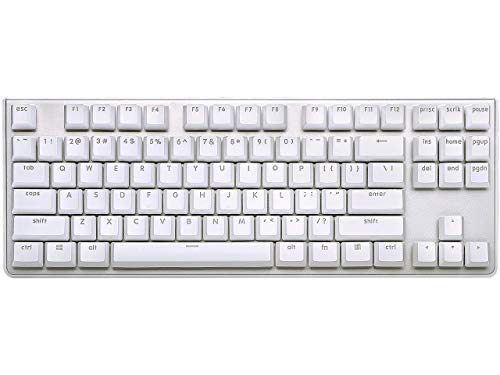
The switches themselves are only part of the equation; how keyboards integrate these switches into their physical chassis determines everyday usability. Keyboards utilizing Cherry MX Red switches feature robust, functional construction. The G.SKILL KM360 provides a tenkeyless 87-key footprint, solid aluminum top plate, wear-proof ABS dual-injection keycaps, and a detachable USB Type-C cable for easy desk organization. For full-size office setups, the KC 200 MX Silent Red incorporates an anodized metal plate, molded keycaps with laser-etched abrasion resistance, white status LEDs, and four dedicated shortcut keys for instant volume and calculator access.
Keyboards powered by Cherry MX Brown match this build quality while offering distinctive gaming and styling options. The Cherry KC 200 MX Brown mirrors the full-size office layout with an anodized metal plate, non-slip fold-out feet, and laser-etched keycaps. For performance setups, the Cherry MX 3.0S features an extruded aluminum housing with a completely screw-free design, round rubber feet, and vibrant RGB backlighting supporting over 16 million colors customizable through CHERRY UTILITY software.
Both switch options benefit from full N-key rollover and complete anti-ghosting circuitry across all listed models, ensuring that complex key combinations register accurately regardless of typing speed. Whether you prefer the compact tenkeyless form factor of the KM360 or the expansive RGB-lit metal chassis of the MX 3.0S, both switch camps are backed by premium metal enclosures and durable keycaps.
Edge: Tie. Both switch families are integrated into high-quality aluminum chassis with durable keycaps and full N-key rollover.
Pros and Cons
Cherry MX Red

Pros
- Smooth linear keystroke with no bump
- Available with MX2A Silent Red dampening
- Solid aluminum top plate construction
- Wear-proof ABS dual-injection keycaps
Cons
- Rated for 50 million actuations
- Higher risk of accidental typing errors
View G.SKILL USB KM360 Professional Tenkeyless Mechanical on Amazon
Cherry MX Brown

Pros
- Tactile bump confirms key registration
- Rated for over 100 million actuations
- Screw-free extruded aluminum housing
- Customizable 16-million color RGB lighting
Cons
- Tactile bump can slow rapid key fluttering
- No silent variant in representative listings
View Cherry KC 200 MX Wired Mechanical on Amazon
Who Should Buy Each One
Choose the Cherry MX Red If
- You primarily play fast-paced competitive games and need seamless double-tapping without physical resistance.
- You work in a noise-sensitive open office and can take advantage of factory-dampened MX2A Silent Red models.
- You prefer a feather-light, completely linear keystroke that does not interrupt finger movement.
- You want a compact desk footprint like the 87-key tenkeyless layout found on the G.SKILL KM360.
Choose the Cherry MX Brown If
- You spend extensive hours typing documents, writing code, or entering data and need tactile feedback to prevent typos.
- You want switches rated for maximum longevity, offering more than 100 million actuations per key.
- You desire tactile confirmation of keypresses without the sharp acoustic disturbance of clicky switches.
- You want an esports-ready gaming keyboard with customizable 16-million color RGB lighting like the Cherry MX 3.0S.
Final Verdict
For most buyers seeking an all-around mechanical keyboard, Cherry MX Brown is the more versatile and dependable choice. Its noticeable tactile bump provides essential confirmation for everyday typing, programming, and general productivity, significantly cutting down on accidental keypresses. Coupled with an impressive lifespan rating of over 100 million actuations and silent non-clicky operation, Cherry MX Brown serves as the ideal bridge between office utility and gaming responsiveness.
However, Cherry MX Red remains the superior option for dedicated gamers and open-office workers. If your daily computer use revolves around fast-action gaming where rapid, unobstructed keypresses dictate success, the smooth linear travel of the Red switch delivers an undeniable advantage. Furthermore, when paired with specialized options like the MX2A Silent Red switches, Cherry MX Red creates a virtually silent typing experience that tactile switches in this pairing cannot match.
FAQ
Is Cherry MX Brown worth it for competitive gaming?
Yes, Cherry MX Brown is fully capable of competitive gaming. It provides tactile feedback so you know precisely when an input registers, and keyboards like the Cherry MX 3.0S include gaming-grade features like full N-key rollover, anti-ghosting, and a Windows key lock. However, competitive players who rely on rapid key fluttering often prefer linear switches to avoid navigating the tactile bump on resets.
Are Cherry MX Red switches completely silent?
Standard Cherry MX Red switches do not produce an intentional click, but bottoming out the keycap against the metal top plate will generate a noticeable tapping sound. If you require near-silent operation, keyboards equipped with Cherry MX2A Silent Red switches feature specialized internal dampening to dramatically reduce both bottom-out and top-out acoustic clatter.
Which switch is better for prolonged daily office typing?
Cherry MX Brown is generally superior for prolonged office typing because its tactile bump indicates when the key switch has actuated. This allows typists to avoid bottoming out forcefully on every stroke, reducing typing errors and minimizing hand fatigue over long typing sessions.
What is the difference between linear vs tactile switches?
A linear switch, such as Cherry MX Red, travels smoothly down and up in a straight path with no interruption or change in resistance. A tactile switch, such as Cherry MX Brown, has an engineered bump along its travel path that provides physical feedback to your fingertips the moment electrical contact occurs.
Do Cherry MX Red or Brown switches have an audible click?
No, neither Cherry MX Red nor Cherry MX Brown features an audible click mechanism. Unlike blue mechanical switches that utilize a click jacket to produce an intentional snap sound, Red and Brown switches are classified as non-clicky switches, emitting only the natural sound of mechanical parts moving and bottoming out.
What is the rated lifespan of these mechanical switches?
According to the product specifications, Cherry MX Red switches are rated for over 50 million keypresses, while Cherry MX Brown switches are rated for more than 100 million actuations per key, ensuring years of heavy daily typing and gaming.