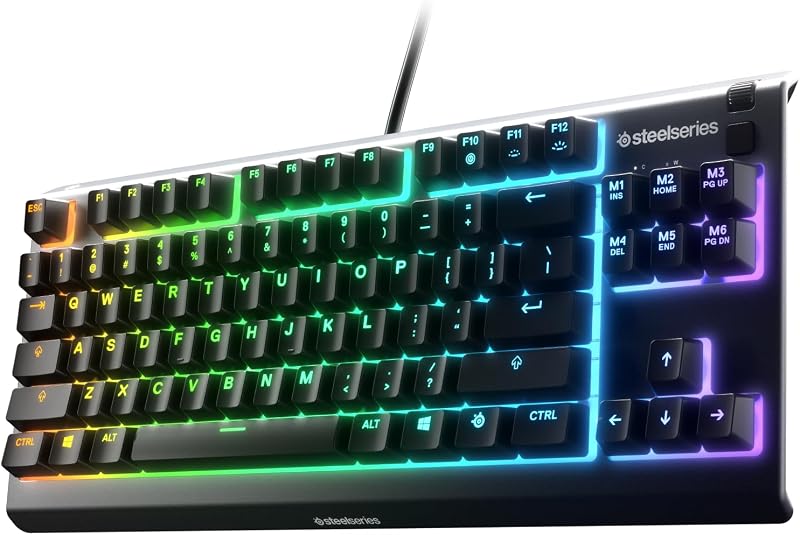
The choice between Gateron Brown and Cherry MX Brown switches centers on a direct trade-off between keystroke glide and tactile resistance. Gateron Brown switches feature a lighter, rounded tactile bump with exceptionally smooth stem travel, whereas Cherry MX Brown switches produce a firmer, crisper bump that clearly demarcates the exact actuation threshold.
Choose Gateron Brown switches if you prioritize fluid, low-resistance keypresses for rapid-fire gaming and effortless general typing. Choose Cherry MX Brown switches if you demand distinct mechanical tactile feedback to prevent bottoming out and reduce typos during intense office productivity.


Gateron Brown vs Cherry MX Brown at a Glance
| Attribute | Gateron Brown | Cherry MX Brown |
|---|---|---|
| Switch Mechanism | Tactile Mechanical | Tactile Mechanical |
| Actuation Force | 45g (Glorious) to 55gf (G Pro 3.0) | Not listed in keyboard specifications |
| Tactile Bump Feel | Subtle, smooth, and rounded | Firm, noticeable, and crisp |
| Total Travel Distance | 4.0 mm (G Pro 3.0) | Not listed in keyboard specifications |
| Rated Lifespan | 100 million cycles (G Pro 3.0) | More than 100 million actuations |
| Factory Lubrication | Pre-lubed on G Pro 3.0; dry on standard variants | MX2A improved switch variant; dry on standard MX |
| Acoustic Profile | Moderate noise level with slight vibration | Quiet tactile without audible click |
| Pin & Mounting Style | 3-Pin and 5-Pin PCB / Surface mount with reinforced pins | Integrated keyboard PCB plate mount |
| Lighting Compatibility | SMD, RGB, and fine-grain light guide column | Integrated white LEDs or 16M color RGB support |
| Best For | High-cadence typing and fast-paced hybrid gaming | Deliberate touch typists and structured productivity |
Tactility and Keystroke Smoothness
Tactility determines how your fingers register that a keypress has registered without needing to push the keycap all the way to the backplate. When looking at a Gateron Brown review, enthusiasts consistently highlight the switch stem design, which uses a shallower, gentler slope on the contact legs. This engineering creates a subtle tactile bump that yields smoothly under finger pressure. In switches like the GLORIOUS Gateron Brown Mechanical Keyboard Switches (120 Pack), the tactile resistance is understated, giving the switch an effortless downward glide that shares mechanical traits with light linear switches while still supplying tactile guidance.
By contrast, any detailed Cherry MX Brown review underscores the switch manufacturer’s commitment to firm mechanical feedback. Built into options such as the Cherry KC 200 MX Wired Mechanical Office Keyboard MX2A Brown Switches, the internal leaf creates a crisp, sudden threshold that your finger must consciously push through. While some typists compare lighter tactiles to linear options like those explored in our cherry mx red vs cherry mx brown breakdown, the Cherry MX Brown retains a distinct mechanical boundary. In everyday typing, this sharpness guarantees you feel the precise point where the switch registers, providing clean feedback for touch typists who rarely bottom out their keys.
Keystroke smoothness also differs dramatically between these two designs out of the box. The modern Gateron G Pro 3.0 Brown Switches for Mechanical Keyboard come factory lubricated from the assembly line, eliminating stem friction and delivering a remarkably plush keystroke immediately. Standard Cherry switches rely on dry polymer friction unless you step up to the refined MX2A variants featured in contemporary Cherry boards. For users comparing Gateron G Pro Brown vs Cherry MX Brown, the pre-lubed Gateron stem feels significantly silkier, whereas traditional Cherry switches offer a drier, more textured stroke that some users describe as scratchy until thoroughly broken in through millions of keystrokes.
Edge: Gateron Brown wins for keystroke smoothness and glide, while Cherry MX Brown delivers more distinct tactile feedback.
Actuation Force and Travel Dynamics
Actuation dynamics govern finger fatigue over eight-hour workdays and reaction speed during high-intensity gaming sessions. The published Gateron Brown actuation force varies across versions: the standard Glorious variant specifies a light 45g actuation force, whereas the G Pro 3.0 Brown listing specifies an operating force of 55gf with a full 4.0mm total travel distance. This variation allows users to balance a lightweight keypress against accidental actuation. If you transition from ultra-light switches like those discussed in our gateron yellow vs cherry mx red comparison, the 45g Gateron Brown switch feels featherlight and highly responsive.
In contrast, the product listings for Cherry keyboards such as the Cherry MX 3.0S Wired Mechanical Gaming Keyboard MX Brown Switches do not specify the exact operating force in grams or travel millimeters on their specification sheets, highlighting instead the tactile switching characteristics without a click. In actual operation, the firmer leaf resistance makes the Cherry tactile event feel weightier than the 45g Gateron switch. The threshold requires positive finger commitment, which significantly reduces stray inputs when resting your hands on the home row.
For high-volume typing, this difference in resistance dictates your posture and stamina. Typists seeking an effortless, swift downstroke will find the light Gateron Brown actuation force ideal for skimming across keys with minimal muscular strain. Typists who strike keys with heavy downward force often find that the lighter Gateron switches collapse too quickly, making Cherry MX Brown switches the safer pick to prevent unintended keystrokes and bottoming-out impact shock.
Edge: Gateron Brown for lighter, low-fatigue key travel; Cherry MX Brown for deliberate keystroke control.
Gaming Responsiveness and Competitive Performance
When evaluating Gateron Brown or Cherry MX Brown for gaming, switch responsiveness and reset speed dictate performance during rapid double-tapping and complex inputs. The subtle tactile bump and slick glide of Gateron Brown switches make them exceptionally fast for first-person shooters and real-time strategy games. Because the tactile bump does not produce a harsh plateau, the stem resets rapidly, allowing gamers to spam movement keys without feeling caught in an aggressive upward return gate. The low 45g resistance in standard Gateron models keeps rapid directional adjustments fluid and natural.
Cherry MX Brown switches take a more structured approach to gaming inputs. In the Cherry MX 3.0S, Cherry pairs its tactile switches with full N-key rollover, complete anti-ghosting, and a dedicated Windows key lock to handle hectic tournament play. The pronounced tactile bump provides clear tactile confirmation that an ability or command has been executed. Gamers who prefer distinct feedback over pure linear speed will appreciate knowing exactly when an action registers. However, players used to ultra-light gaming switches may find the sharp tactile peak slightly slower to reset during sustained rapid inputs.
Durability under gaming strain is reinforced by structural enhancements on both sides. Gateron equips the G Pro 3.0 series with a three-layer enhanced pin design that stiffens the terminal legs without thickening them, ensuring reliable contact even during forceful installations. Cherry counters with an extruded aluminum housing and plate-mounted mechanical architecture designed for zero chassis flex. If pure double-tap actuation speed is your main gaming priority, Gateron holds the advantage; for rigid tournament durability and intentional inputs, Cherry keyboards remain formidable competitors.
Edge: Gateron Brown takes the lead for fast-paced gaming due to its lighter bump and faster stem recovery.
Typing Accuracy, Ergonomics, and Daily Office Use
Deciding between Gateron Brown or Cherry MX Brown for typing comes down to whether your technique favors light glancing strokes or structured mechanical keystrokes. Cherry MX Brown switches are specifically engineered for error-free text entry. The noticeable tactile threshold built into the Cherry KC 200 MX ensures that your fingers register activation before bottoming out. This characteristic helps typists train themselves to type lighter, avoiding fatigue while maintaining high accuracy across thousands of words of prose or code. For those comparing tactile feedback against clicky switches like in our cherry mx blue vs cherry mx brown analysis, Cherry MX Browns offer that tactile accuracy without the loud office-disrupting click.
Gateron Brown switches offer a distinctly different ergonomic experience. With an operating force of 55gf on the G Pro 3.0 and 45g on the Glorious pack, the Gateron profile promotes fluid, low-friction typing. Typists who glide rapidly over keycaps will appreciate the absence of scratchiness and the gentle descent. However, because the tactile bump is subdued, users who type with heavy hands might fail to feel the actuation point and bottom out hard on every stroke, negating some of the ergonomic benefits.
Office utility is further elevated on Cherry boards by practical hardware implementations. The Cherry KC 200 MX includes dedicated quick-access keys for the calculator app and volume controls, white status LEDs directly integrated into the Caps Lock and Num Lock keys, and laser-etched, abrasion-resistant keycaps designed to stay legible over years of constant use. While standalone Gateron switches let you build custom hot-swappable setups, Cherry delivers an integrated, distraction-free typing platform right out of the box.
Edge: Cherry MX Brown wins for typing accuracy and deliberate touch typing ergonomics.
Switch Sound Profile and Acoustic Resonance
Acoustic profile is an essential consideration for shared work environments and home studios. The Gateron Brown switch sound is characterized by a moderate noise level with slight mechanical vibration, as specified in the G Pro 3.0 documentation. Because Gateron switches feature smoother stem-to-housing tolerances and factory-applied lubrication on the G Pro line, the acoustic profile lacks harsh scratchy friction. Instead, it yields a soft, rounded clack upon bottom-out and a muted rebound sound that blends quietly into open office spaces.
Cherry MX Brown switches produce a firmer, dry mechanical sound. The listings for both the KC 200 MX and MX 3.0S specify a tactile switching characteristic without an audible click. However, the internal metal leaf and the dry stem slide generate an audible mechanical scratch on older production runs, transitioning into a solid, hollow tap when bottoming out on Cherry aluminum plates. While not as loud as clicky switches or heavy tactile alternatives discussed in our holy panda vs cherry mx brown comparison, unlubed Cherry MX Brown switches have a higher-pitched acoustic profile than factory-lubed Gateron models.
Backplate materials also influence the final acoustic output of Cherry setups. The Cherry MX 3.0S utilizes an elegant extruded aluminum housing with a screw-free design, which amplifies the mechanical resonance of the switches, producing a distinct metallic acoustic signature. The Gateron switches, sold primarily as modular switch packs, adapt to whatever custom case, foam dampener, or plate material you install them into. If you want a softer, lower-frequency acoustic signature without opening switches to lube them manually, pre-lubed Gateron switches offer superior sound straight from the box.
Edge: Gateron Brown provides a quieter, smoother sound profile with less high-pitched leaf chatter.
Durability, Engineering Standards, and Customization Flexibility
Longevity is exceptional across both mechanical switch platforms. Gateron rates its G Pro 3.0 Brown switches for a mechanical life of 100 million cycles. To protect these components during installation and shipping, Gateron ships them in an exquisite PVC plastic box where every switch sits separately to protect the shaft body and prevent bent pins. Furthermore, the G Pro 3.0 features a three-layer pin enhancement that stiffens the terminal legs, making them less prone to bending during repeated insertions into hot-swappable sockets. For custom builders exploring smooth switch variants like those in our gateron milky yellow vs gateron yellow guide, Gateron’s pin durability makes switch swapping straightforward and reliable.
Cherry has long set the durability benchmark in mechanical keyboards, and its specifications reflect this legacy. Both the Cherry KC 200 MX and MX 3.0S advertise more than 100 million actuations per key. Cherry pairs this robust internal switch mechanism with rugged keyboard chassis construction. The KC 200 MX features an anodized metal top plate, sturdy non-slip fold-out feet, and molded keycaps with laser-etched legends that resist abrasion. The MX 3.0S goes further with an aluminum enclosure and plate, providing rigid, zero-flex durability suitable for grueling travel schedules.
When it comes to customization flexibility, the comparison shifts between loose components and finished consumer keyboards. The Gateron options are modular switch packs (108-count or 120-count) engineered with transparent top covers, fine-grain surface light guide columns, and universal 3-pin or 5-pin PCB mount compatibility. They are built specifically for hot-swappable mechanical keyboards and SMD LED integration. The Cherry models referenced here are complete, pre-built, wired keyboards featuring plug-and-play USB-A connectivity, anti-ghosting, and dedicated software integration. If you want to customize your own keyboard, Gateron provides the modular building blocks; if you want an indestructible, pre-assembled typing tool, Cherry delivers a turnkey package.
Edge: Tie. Both achieve 100+ million actuations, with Gateron dominating DIY customization and Cherry excelling in complete keyboard durability.
Pros and Cons
Gateron Brown

Pros
- Factory lubricated in G Pro 3.0 series
- Light 45g to 55gf actuation options
- Three-layer reinforced pin design
- Transparent top cover with light guide
- Rated for 100 million cycles
Cons
- Subtle tactile bump may feel too light
- Sold as loose switch packs without keyboard
View GLORIOUS Gateron Brown Mechanical Keyboard Switches on Amazon
Cherry MX Brown

Pros
- More than 100 million actuations lifespan
- Noticeable tactile feel without audible click
- Robust metal and extruded aluminum enclosures
- Full N-key rollover and anti-ghosting
- Abrasion-resistant laser-etched keycaps
Cons
- Dry stem travel on standard versions
- Actuation force not listed in specs
View Cherry KC 200 MX Wired Mechanical on Amazon
Who Should Buy Each One
Choose the Gateron Brown If
- You own a hot-swappable keyboard and want pre-lubricated switches that slide smoothly right out of the box.
- You play fast-paced games where a light tactile bump allows for quicker key resets and double-taps.
- You want broad RGB illumination enhanced by transparent top covers and dedicated light guide columns.
- You prefer a lighter actuation feel to reduce finger fatigue during extended, high-cadence typing sessions.
Choose the Cherry MX Brown If
- You want a complete, ready-to-use mechanical keyboard with an anodized metal or extruded aluminum frame.
- You demand clear, crisp tactile feedback to maintain high typing accuracy and prevent accidental actuations.
- You need dedicated productivity hardware like calculator keys, Caps Lock status LEDs, and anti-abrasion keycaps.
- You rely on proven mechanical switches rated for over 100 million actuations in a rigid, screw-free chassis.
Final Verdict
When weighing Cherry MX Brown vs Gateron Brown, your final selection rests on how much tactile resistance you want under your fingertips. Gateron Brown represents modern mechanical switch design: it is silky, factory-lubricated in the G Pro 3.0 iteration, and features a subtle, rounded tactile bump that accommodates swift gaming and effortless typing. For enthusiasts building or upgrading a hot-swappable board who want smooth key action without the burden of manual switch modification, Gateron Brown provides outstanding performance.
However, when asking is Cherry MX Brown worth it, the answer remains a firm yes for typists who demand defined physical feedback. In pre-built platforms like the Cherry KC 200 MX and Cherry MX 3.0S, Cherry MX Brown switches deliver a deliberate, unmistakable tactile event that prevents typos and stabilizes your keystrokes. If your primary objective is accurate, focused office typing or structured mechanical reliability backed by a rigid metal enclosure, Cherry MX Brown remains an enduring industry benchmark.
FAQ
What is the primary difference between Gateron Brown and Cherry MX Brown switches?
The primary difference is the tactile bump and keystroke smoothness. Gateron Brown switches feature a gentler, more rounded tactile bump with smooth, low-friction stem travel, particularly on the factory-lubed G Pro 3.0 version. Cherry MX Brown switches feature a sharper, more noticeable tactile bump that provides distinct physical confirmation when a key activates.
What is the Gateron Brown actuation force compared to Cherry MX Brown?
The Glorious Gateron Brown switch listing specifies a balanced 45g actuation force, while the Gateron G Pro 3.0 Brown switch specifies an operating force of 55gf. The product listings for Cherry keyboards with MX Brown switches highlight tactile characteristics without an audible click, but do not list a specific actuation force in their specification tables.
Are Gateron Brown switches good for gaming?
Yes, Gateron Brown switches are widely favored for gaming because their subtle tactile bump and smooth stem glide allow keys to reset quickly. This minimal resistance makes rapid double-tapping and complex movement inputs feel fluid and responsive compared to switches with heavier tactile peaks.
How does the Gateron Brown switch sound compare to Cherry MX Brown?
The Gateron G Pro 3.0 Brown is listed as having a moderate noise level with slight vibration during keystrokes, benefiting from factory lubrication to eliminate high-pitched scratchiness. Cherry MX Brown switches are non-clicking tactile switches, but their unlubed leaves and mounting in rigid aluminum plates can produce a firmer, dry mechanical tap.
Can I install Gateron Brown switches into any mechanical keyboard?
Gateron Brown switches are compatible with most hot-swappable mechanical keyboards that accept standard 3-pin or 5-pin switches and SMD LEDs. The G Pro 3.0 models feature reinforced three-layer pins designed to resist bending during installation into compatible hot-swap sockets.
Do Cherry MX Brown switches feature RGB lighting?
Yes, depending on the keyboard model. While the office-focused Cherry KC 200 MX includes practical white status LEDs inside specific function keys, the gaming-oriented Cherry MX 3.0S features vibrant RGB backlighting supporting over 16 million colors with customizable lighting modes.