Choosing between the Razer BlackWidow V4 Pro and the Corsair K70 RGB Pro comes down to whether you prioritize a full-size command station equipped with physical macro keys and analog dial controls or a compact tenkeyless board engineered around adjustable magnetic switches and rapid reset technology.
Gamers seeking extensive macro customization, dedicated media hardware, and an expansive desk presence should select the Razer BlackWidow V4 Pro, while competitive players focused on lightning-fast movement inputs, rapid reset dynamics, and mouse clearance should opt for the Corsair K70 RGB Pro.


Razer BlackWidow V4 Pro vs Corsair K70 RGB Pro at a Glance
| Feature | Razer BlackWidow V4 Pro | Corsair K70 RGB Pro |
|---|---|---|
| Form Factor | Full-Size (104 keys) | Tenkeyless (84/87 keys) |
| Switch Technology | Razer Yellow Mechanical Switches | Pre-Lubed CORSAIR MGX Hyperdrive Magnetic Switches |
| Switch Action | Linear & Silent with Sound Dampeners | Linear Hall Effect with Double-Rail Structure |
| Actuation Customization | Fixed mechanical actuation | Per-key adjustable from 0.4mm to 3.6mm (0.1mm steps) |
| Rapid Trigger Support | Not listed | Dynamic Rapid Trigger and Simultaneous SOCD |
| Maximum Polling Rate | Not listed | 8,000Hz hyper-polling via AXON (0.125ms) |
| Dedicated Macro & Dial Controls | Command Dial and 8 dedicated macro keys | Volume roller, hotkeys, and programmable keys |
| Keycap Material | Doubleshot ABS | ABS Double-Shot |
| Wrist Rest | Magnetic plush leatherette with 3-side underglow | Detachable wrist rest included |
| Dimensions | 18.36″L x 6.01″W x 1.73″H | 14.41″L x 5.31″W x 1.57″H |
| Best For | Macro-heavy battlestations and complex desktop workflows | High-speed competitive gaming and twitch movement accuracy |
Switch Architecture and Actuation Performance
Keyboard responsiveness originates at the switch level, dictating how rapidly your keystrokes register and reset during intense gaming sessions. In any head-to-head matchup involving the razer huntsman v3 pro vs corsair k70 rgb pro or traditional mechanical boards, the internal switch mechanism establishes the baseline input feel and speed. The Razer BlackWidow V4 Pro uses Razer Yellow mechanical switches, which provide a traditional linear travel profile paired with internal sound dampeners for quiet actuation. These switches rely on physical metallic contact leaves that actuate at a fixed distance along the key travel, delivering smooth, reliable performance suited for both long typing sessions and rapid gameplay.
By contrast, analyzing the BlackWidow V4 Pro Yellow switches vs Corsair MGX highlights an entirely different engineering approach. The Corsair K70 RGB Pro integrates pre-lubricated MGX Hyperdrive magnetic switches that harness Hall effect sensors rather than physical metal contacts. This magnetic design eliminates physical wear points, granting each primary switch a rated durability of 150 million keystrokes alongside a double-rail structure designed to minimize key wobble. Furthermore, Corsair k70 pro magnetic switch actuation is completely adjustable on a per-key basis, allowing players to calibrate trigger depths anywhere from a hair-trigger 0.4mm down to a deliberate 3.6mm in granular 0.1mm increments. The Corsair MGX switches also allow dual actuation, permitting two distinct commands to execute on a single keypress depending on how deep the key is depressed.
This technical disparity means the BlackWidow V4 Pro delivers a traditional, non-variable linear mechanical press, whereas the K70 RGB Pro allows you to tailor sensitivity to individual fingers or specific in-game commands. You can configure movement keys for instant actuation while setting critical ability keys deeper to prevent accidental misclicks. For players who demand custom activation thresholds, the magnetic switch architecture provides a level of control that traditional mechanical switches cannot replicate.
Edge: Corsair K70 RGB Pro provides superior switch versatility thanks to its Hall effect magnetic sensors, 150-million-click durability rating, and per-key actuation depth customization.
Rapid Trigger and Competitive Responsiveness
In competitive first-person shooters and fast-paced action titles, how quickly a key resets is just as critical as how fast it actuates. Traditional mechanical switches require the key stem to travel back upward past a fixed reset point before a new input can be recognized. In contrast, Rapid Trigger technology decouples reset behavior from fixed physical positions, monitoring the physical direction of the key stem in real time. Comparing the razer blackwidow v4 pro vs corsair k100 rgb shows how premium full-size designs handle execution, but the magnetic K70 brings a dedicated speed advantage to the table.
When looking at the Razer BlackWidow V4 Pro vs Corsair K70 Rapid Trigger capabilities, the difference is absolute. The BlackWidow V4 Pro relies on standard mechanical reset dynamics, meaning your finger must allow the switch to travel upward past the physical reset leaf before you can initiate another keystroke. The Corsair K70 RGB Pro incorporates dynamic Rapid Trigger, which instantly resets the key the fraction of a millimeter it begins upward travel, and immediately re-actuates the moment downward pressure resumes. This enables hyper-responsive counter-strafing, rapid peeking, and stutter-stepping that feels instantaneous.
Beyond Rapid Trigger, the Corsair K70 RGB Pro incorporates AXON hyper-processing technology, pushing polling rates up to 8,000Hz to register inputs in as little as 0.125 milliseconds. The K70 RGB Pro also includes simultaneous SOCD (Simultaneous Opposing Cardinal Directions) processing, resolving conflicting directional inputs cleanly during high-intensity matches. The BlackWidow V4 Pro provides fast linear inputs with its dampened Yellow switches, but its fixed reset mechanism and standard processing architecture do not match the twitch input response of Corsair’s magnetic platform.
Edge: Corsair K70 RGB Pro wins decisively due to its dynamic Rapid Trigger, simultaneous SOCD handling, and 8,000Hz hyper-polling engine.
Macro Keys, Dial Controls, and Battlestation Command
While competitive responsiveness matters on the tournament stage, complex desktop gaming environments demand extensive hardware control. Players who immerse themselves in massive multiplayer online games, complex strategy titles, or content creation workflows often require fast access to multiple keybind sequences, window adjustments, and application controls without diving into software menus. When reading any comprehensive Razer BlackWidow V4 Pro review, hardware versatility stands out as the keyboard’s primary strength.
The comparison between Razer BlackWidow V4 Pro macro keys vs Corsair K70 hardware reveals a stark contrast in layout philosophy. The BlackWidow V4 Pro features a dedicated programmable Razer Command Dial located on the top-left corner alongside 8 dedicated macro keys-comprising 5 dedicated macro keys aligned along the left edge and 3 secondary macro buttons built into the side frame. The Command Dial allows users to assign dynamic rotational modes such as zooming, window switching, track scrubbing, or customized tool selection. Having 8 dedicated, physical macro switches ensures that complex macros, spell rotations, and streaming hotkeys remain isolated from primary alphanumeric keys.
The Corsair K70 RGB Pro takes a streamlined approach, omitting dedicated vertical macro banks in favor of standard programmable keys, general hotkeys, and an integrated aluminum volume roller. While every key on the K70 RGB Pro can be remapped or assigned macro functionality through Corsair iCUE, it lacks the tactile convenience of dedicated macro banks and programmable rotary dials. For users who rely heavily on auxiliary inputs and analog dial control, the BlackWidow V4 Pro transforms your desk into an expansive command console.
Edge: Razer BlackWidow V4 Pro takes this category comfortably with its 8 dedicated physical macro buttons and programmable multi-function Command Dial.
Form Factor, Desk Footprint, and Ergonomics
Desk space allocation directly influences how comfortably you can operate your keyboard alongside sweeping mouse movements. A full-size keyboard provides integrated numeric pads and extensive control clusters, but its wide footprint can crowd mousepad space. Exploring alternatives like the razer deathstalker v2 vs corsair k70 rgb pro illustrates how varying chassis sizes impact desktop ergonomics.
The Razer BlackWidow V4 Pro is a full-sized command center spanning 18.36 inches in length, 6.01 inches in width, and standing 1.73 inches tall across 7 distinct keyboard sections. This substantial frame houses 104 keys, the macro cluster, and the command dial. To ensure wrist comfort over extended sessions, Razer bundles a magnetic plush leatherette wrist rest that cushions the palms while snapping directly against the lower chassis. Both the keyboard frame and wrist rest feel substantial, but the wide chassis forces low-sensitivity shooter players to position their arms wider apart on the desk.
The Corsair K70 RGB Pro utilizes a space-saving tenkeyless form factor measuring 14.41 inches long, 5.31 inches wide, and 1.57 inches tall. By eliminating the numeric keypad, the K70 RGB Pro frees nearly 4 inches of horizontal desk space, allowing wide, sweeping mouse strokes essential for low-DPI aiming. Its chassis combines an aluminum top plate with ABS plastic and silicone internal dampening for rigid structural stability. Corsair includes a detachable wrist rest, though it lacks the plush leatherette cushioning found on the Razer model. Both boards feature robust doubleshot ABS keycaps engineered with thick walls to resist wear and prevent legend fading. If you want maximum mouse mobility, Corsair holds the advantage, but Razer provides superior wrist cushioning.
Edge: Tie; the Corsair K70 RGB Pro provides a superior space-saving footprint for mouse agility, while the Razer BlackWidow V4 Pro provides greater typing comfort with its plush cushioned wrist rest.
Lighting, Immersion, and Aesthetics
Aesthetic customization elevates a functional gaming setup into a cohesive visual battlestation. For many enthusiasts wondering whether the corsair k70 rgb pro vs k100 rgb or Razer alternatives provide better desk presence, ambient illumination plays a pivotal role in the decision-making process.
The Razer BlackWidow V4 Pro is designed to serve as an illuminated centerpiece. In addition to per-key Razer Chroma RGB backlighting that shines through its doubleshot ABS key legends, the board incorporates an expansive 3-side ambient underglow. When you attach the magnetic plush wrist rest, electrical contact pins pass illumination directly into the rest, continuing the 3-side underglow around the front and sides of your typing position. This creates a continuous halo of diffused light that synchronizes seamlessly across compatible games and battlestation peripherals, creating striking desktop immersion.
The Corsair K70 RGB Pro delivers vibrant per-key RGB backlighting driven by the Corsair iCUE software ecosystem. Light radiates brightly against its aluminum top plate, and users can program complex custom lighting patterns, color gradients, and game integrations. However, the K70 RGB Pro confines its lighting strictly to the key switch matrix; it does not feature chassis perimeter underglow, nor does its detachable wrist rest include RGB lighting elements. For players looking to bathe their desk mat in diffused ambient illumination, the BlackWidow V4 Pro offers a noticeably richer visual presentation.
Edge: Razer BlackWidow V4 Pro dominates visual immersion with integrated 3-side chassis underglow and an illuminated magnetic wrist rest.
Software Customization and Ecosystem Integration
Hardware capabilities are only as effective as the software engine managing them. Both Razer and Corsair maintain mature peripheral configuration suites that allow users to customize key assignments, macro strings, performance parameters, and visual profiles. Evaluating the razer blackwidow v4 pro vs deathstalker v2 highlights Razer’s software continuity, yet comparing Razer Synapse to Corsair iCUE across these specific models reveals distinct functional priorities.
On the Razer BlackWidow V4 Pro, configuration centers on macro generation, Command Dial profile assignment, and Razer Chroma lighting effects. Synapse allows you to map complex multi-step macros to any of the 8 dedicated macro keys, designate dial rotation steps for specific Windows or design software actions, and save custom profile layers. Because the Yellow switches operate mechanically, software settings focus on utility, media navigation, and aesthetic synchronization rather than electrical switch tuning.
The Corsair K70 RGB Pro utilizes Corsair iCUE to manage deep switch-level calibration alongside traditional mapping. Through iCUE, users adjust the physical actuation point of every MGX switch in 0.1mm increments, toggle and tune Rapid Trigger sensitivity, assign secondary actuation triggers for dual-action keypresses, and configure simultaneous SOCD resolution modes. Additionally, iCUE manages the keyboard’s 8,000Hz polling rate and onboard memory storage. While Razer Synapse excels at macro mapping and peripheral lighting synchronization, Corsair iCUE unlocks low-level hardware control over key switch mechanics that directly alters in-game movement mechanics.
Edge: Corsair K70 RGB Pro offers deeper functional control, enabling per-key actuation depth calibration, Rapid Trigger tuning, and 8,000Hz hyper-polling management.
Pros and Cons
Razer BlackWidow V4 Pro
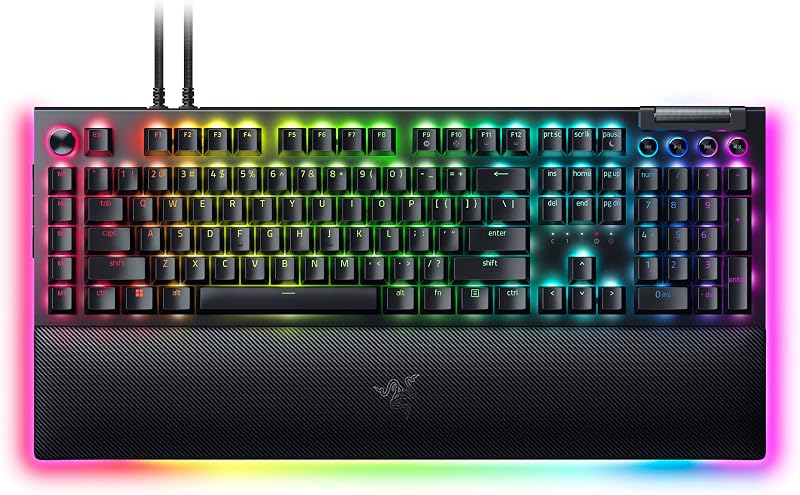
Pros
- 8 dedicated physical macro keys
- Multi-function programmable Command Dial
- Striking 3-side underglow and illuminated wrist rest
- Plush magnetic cushioned leatherette support
- Sound-dampened linear Yellow mechanical switches
Cons
- Large 18.36-inch desk footprint
- Lacks adjustable actuation and Rapid Trigger
View Razer BlackWidow V4 Pro on Amazon
Corsair K70 RGB Pro

Pros
- Pre-lubed MGX magnetic Hall effect switches
- Dynamic Rapid Trigger and simultaneous SOCD
- Per-key actuation adjustable from 0.4mm to 3.6mm
- 8,000Hz AXON hyper-polling rate
- Space-saving tenkeyless layout for mouse movement
Cons
- Lacks dedicated physical macro key banks
- Wrist rest lacks cushioning and RGB lighting
View Corsair K70 RGB Pro on Amazon
Who Should Buy Each One
Choose the Razer BlackWidow V4 Pro If
- You require 8 dedicated physical macro keys and a multi-function Command Dial for complex MMO binds or creative editing shortcuts.
- You want a full-size 104-key layout with an integrated number pad for daily data entry and productivity alongside gaming.
- You prioritize premium wrist comfort and dynamic desk aesthetics with a plush leatherette wrist rest and 3-side ambient underglow.
- You prefer a quiet, traditional linear mechanical keystroke dampened with internal sound-absorbing material.
Choose the Corsair K70 RGB Pro If
- You play competitive shooters and want Rapid Trigger to execute instant counter-strafes and movement resets.
- You want per-key adjustable actuation between 0.4mm and 3.6mm to customize keypress sensitivity and eliminate accidental inputs.
- You need a compact tenkeyless form factor that preserves maximum desk area for broad mouse swipes.
- You demand tournament-level input speeds powered by an 8,000Hz AXON hyper-polling engine registering in 0.125ms.
Final Verdict
When deciding whether to buy the Razer BlackWidow V4 Pro or Corsair K70 RGB Pro for gaming, your primary gaming genres should dictate your choice. The Corsair K70 RGB Pro represents the modern competitive standard, trading numeric pads and auxiliary dials for raw physical speed. Its pre-lubed MGX magnetic switches, dynamic Rapid Trigger, per-key adjustable actuation, and 8,000Hz polling engine give competitive FPS and action gamers tangible mechanical advantages during high-speed engagements.
Conversely, the Razer BlackWidow V4 Pro remains the ultimate desktop centerpiece for players who want comprehensive command over their battlestation. With its 8 dedicated macro keys, multi-function Command Dial, full 104-key layout, silent Yellow linear switches, and wraparound underglow lighting on both the chassis and plush wrist rest, it provides unrivaled utility for MMOs, simulation titles, and content creation. If raw movement speed and desk space drive your setup, choose Corsair; if you want complete macro control and full-size luxury, choose Razer.
FAQ
Does the Razer BlackWidow V4 Pro feature Rapid Trigger?
No, the Razer BlackWidow V4 Pro uses traditional linear mechanical Yellow switches that rely on fixed physical actuation and reset points. It does not feature Hall effect magnetic sensors or Rapid Trigger technology.
Can you adjust the actuation point on the Corsair K70 RGB Pro?
Yes, the Corsair K70 RGB Pro features pre-lubed MGX Hyperdrive magnetic switches that allow per-key actuation adjustments from 0.4mm to 3.6mm in granular 0.1mm steps via Corsair iCUE software.
What is the benefit of the Razer Command Dial?
The programmable Razer Command Dial lets you assign custom rotary functions such as window switching, digital zoom, track scrubbing, or brush resizing, allowing fast analog adjustments without opening software menus.
Is Corsair K70 RGB Pro worth it for competitive first-person shooters?
Yes, the Corsair K70 RGB Pro is especially well suited for competitive FPS titles because its tenkeyless layout provides generous mouse clearance, while Rapid Trigger and 8,000Hz polling enable near-instant directional changes and counter-strafing.
How do the wrist rests differ between both keyboards?
The Razer BlackWidow V4 Pro features a cushioned, magnetic plush leatherette wrist rest equipped with integrated 3-side Chroma RGB underglow, whereas the Corsair K70 RGB Pro includes a standard detachable wrist rest without padding or lighting elements.
Are the keycaps on these keyboards resistant to wear?
Yes, both keyboards feature doubleshot ABS keycaps manufactured using a dual-molding process that prevents lettering from fading or wearing away during prolonged, heavy gaming sessions.
What connectivity options are available on these keyboards?
The Razer BlackWidow V4 Pro utilizes a detachable USB-C wired connection, while the Corsair K70 RGB Pro listing specifies wired connectivity supporting USB-A and USB-C interfaces.


