When deciding between the G502 X vs Logitech G Pro X Superlight, the primary difference that settles the choice for most gamers is whether you prioritize an ultra-lightweight, wireless design built for raw competitive flick speed or an ergonomic, multi-button wired setup built for deep macro customization and versatility.
If you demand sub-63-gram wireless agility and low inertia for competitive tactical shooters, choose the Logitech G Pro X Superlight. If you want hybrid optical switches, extensive programmable inputs, and a dual-mode scroll wheel for mixed gaming genres, choose the Logitech G502 X.
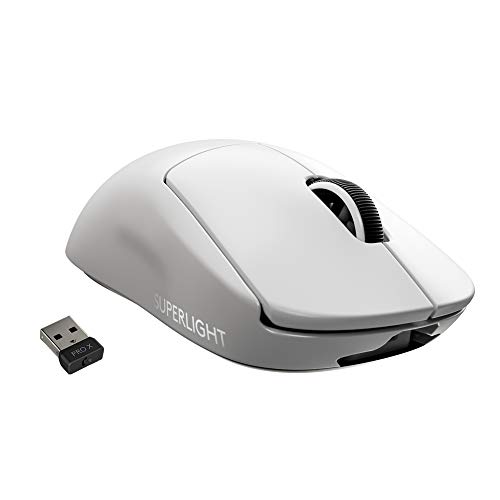
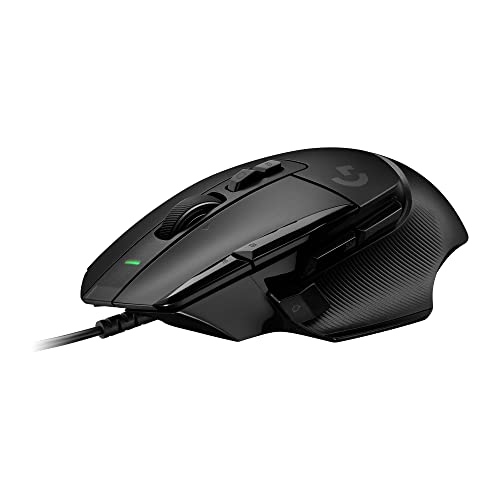
Logitech G Pro X Superlight vs G502 X at a Glance
| Feature | Logitech G Pro X Superlight | Logitech G502 X |
|---|---|---|
| Weight | Under 63 grams (less than 2.22 oz) | 89 grams (3.14 oz) |
| Connectivity | LIGHTSPEED Wireless (USB receiver) | Wired (Corded Electric) |
| Sensor Model | HERO Sensor | HERO 25K Sensor |
| Max Sensitivity | 25,600 DPI | 25,600 DPI (100 – 25,600 DPI range) |
| Switch Type | Mechanical esports switches | LIGHTFORCE hybrid optical-mechanical switches |
| Programmable Controls | 5 programmable buttons | 13 programmable controls (9 button quantity) |
| Scroll Wheel | Standard ratcheted wheel | Dual-mode hyperfast (ratchet and free-spin) with tilt |
| Gliding Surface | Zero-additive PTFE feet | PTFE feet |
| Onboard Memory Profiles | Not listed | Up to 5 profiles |
| Best For | Competitive FPS and fast-twitch shooters | Multi-genre gaming, MMOs, and complex productivity setups |
Weight and Chassis Agility
The starkest physical contrast in this comparison comes down to the G Pro X Superlight vs G502 X weight profile. The G Pro X Superlight tips the scale at less than 63 grams, representing a hyper-minimal redesign that stripped away nearly 25 percent of the mass found in the standard PRO Wireless mouse without needing exterior honeycomb cutouts. In practice, a sub-63g chassis translates to almost zero hand inertia, enabling rapid target switching, immediate crosshair stops, and significantly reduced wrist fatigue during high-intensity sessions.
By contrast, the G502 X incorporates a thin-wall exoskeleton to minimize material while retaining maximum rigidity, reducing the historic weight of the G502 line down to 89 grams (3.14 ounces). While 89 grams is respectably light for a feature-packed ergonomic chassis, it is noticeably heavier than the Superlight. That additional heft provides grounded stability for deliberate tracking, but it requires more physical effort when performing rapid sweep-and-reset motions across a wide mouse pad. Anyone evaluating whether to pick the Logitech G Pro X Superlight or G502 X for FPS titles will find that low weight directly impacts tracking acceleration.
For players whose primary focus is high-speed aiming mechanics, the physical reduction in mass delivers an undeniable competitive edge. Players researching lightweight upgrades often inspect comparisons like the logitech g pro x superlight vs superlight 2, but even against newer releases, the original Superlight chassis remains an iconic benchmark for featherweight balance.
Edge: Logitech G Pro X Superlight because its sub-63-gram mass provides significantly lower inertia and effortless gliding during rapid aiming maneuvers.
Programmable Buttons and Control Customization
Examining the Logitech G Pro X Superlight vs G502 X buttons reveals completely opposite design philosophies. The G Pro X Superlight features a streamlined five-button layout: left click, right click, a clickable scroll wheel, and two thumb buttons located on the left side of the shell. This hyper-minimalist configuration eliminates accidental clicks and reduces shell complexity, giving competitive shooter enthusiasts only the core inputs necessary to reload, crouch, or aim.
The G502 X, on the other hand, is built around versatility. It offers 13 programmable controls mapped across a 9-button physical layout, along with up to 5 onboard memory profiles. Logitech equipped the G502 X with a redesigned DPI-shift button that is both reversible and removable, allowing players to adjust its proximity to their thumb or swap it out for a blank cover to suit their hand size. Additionally, the scroll wheel tilts left and right, introducing two extra programmable inputs right under your index finger.
If your gaming library spans action RPGs, battle royales, and MMOs where inventory management, ping systems, and ability bars demand immediate access, the G502 X offers superior control options. Readers who prefer this complex input array but want to explore alternative wireless specs frequently look at the logitech g pro x superlight 2 vs g502 x to determine if extra buttons outweigh wireless design.
Edge: Logitech G502 X thanks to its 13 programmable controls, customizable DPI-shift thumb trigger, and onboard profile storage.
Switch Mechanics and Actuation Reliability
Click execution is critical during competitive play, and the underlying switch technology sets these two mice apart. The G502 X introduces Logitech’s LIGHTFORCE hybrid optical-mechanical switch technology on the primary left and right buttons. These hybrid switches use an optical beam for instantaneous actuation to eliminate mechanical debounce delay, paired with a physical mechanical leaf spring that retains the crisp, tactile tactile click feedback that traditional PC gamers prefer.
The G Pro X Superlight uses traditional mechanical microswitches engineered for rapid response and consistency in tournament conditions. While reliable and responsive, mechanical switches rely strictly on electrical contact points. Over prolonged periods of intense competitive gaming, hybrid optical-mechanical switches offer enhanced long-term durability by reducing physical contact wear during actuation.
The distinct tactile feel of the LIGHTFORCE switches on the G502 X gives it a snappy, precise report with virtually instantaneous signal delivery. Gamers looking at broader modern hardware lineups often compare different switch generations, much like readers reviewing the logitech g pro x superlight vs g502 x plus breakdown to weigh tactile feedback against battery optimization.
Edge: Logitech G502 X due to its cutting-edge LIGHTFORCE hybrid optical-mechanical switches that combine optical speed with tactile mechanical feedback.
Scroll Wheel Engineering and Utility
The scroll wheel serves very different purposes on these two mice. On the G Pro X Superlight, the wheel is engineered specifically to save weight while maintaining clean tactile notches. It provides a standard, reliable stepping action designed to prevent weapon switching errors or accidental jump inputs when binding bunny-hops to scroll down. It does not tilt or free-spin, adhering strictly to esports minimalism.
The G502 X features Logitech’s redesigned dual-mode hyperfast scroll wheel. A mechanical toggle switch directly behind the wheel lets users toggle between a precise ratcheting mode for structured gaming inputs and a friction-free hyperfast spin mode. The free-spinning mode allows you to fly through massive weapon inventories, long web documents, and extensive spreadsheets in seconds. Furthermore, the wheel tilts horizontally left and right, adding two distinct programmable actions.
While the complex metal-and-ratchet mechanism of the G502 X adds mass to the mouse, the functional payoff is massive for users who split their desk time between gaming and productivity. The Superlight wheel is purely functional for competitive inputs, but the G502 X wheel is an adaptable utility tool.
Edge: Logitech G502 X because of its dual-mode ratcheting and hyper-fast spin mechanism paired with lateral tilt functionality.
Connectivity, Glide Dynamics, and Sensor Precision
Tracking performance on both mice is governed by Logitech’s HERO sensor architecture, delivering up to 25,600 DPI with zero smoothing, filtering, or acceleration. Both units track down to sub-micron accuracy, ensuring that mouse movements translate one-to-one onto the screen without software interference. The fundamental difference lies in how each mouse connects and moves across your desk surface.
The G Pro X Superlight utilizes proprietary LIGHTSPEED wireless technology with an included USB receiver, offering an operating range of up to 10 meters and complete liberation from cord resistance. Powered by an internal lithium-polymer battery, it pairs cord-free operation with oversized, zero-additive PTFE feet. These pure PTFE feet lack color additives, creating an exceptionally smooth, fluid glide across cloth and hard pads alike.
The G502 X is a corded electric mouse with a 5-meter operational rating. While its wired design ensures uninterrupted power without ever needing a recharge, the cable inevitably introduces micro-drag across the desk edge unless managed with a dedicated mouse bungee. The G502 X also features PTFE feet, but moving an 89-gram wired body produces measurably more friction than sweeping a sub-63g wireless body. Those weighing budget-friendly wireless performance against tethered units often examine the logitech g pro x superlight 2 vs g305 to evaluate how wireless freedom impacts everyday gameplay.
Edge: Logitech G Pro X Superlight because its LIGHTSPEED wireless freedom and zero-additive PTFE feet eliminate cable resistance entirely.
Genre Versatility and Gameplay Balance
Determining whether the Logitech G Pro X Superlight or G502 X for gaming suits your setup depends heavily on the titles you play most. If your primary library consists of tactical shooters like Counter-Strike, Valorant, or Apex Legends, every gram shed directly aids high-speed corrections and precise headshots. In these competitive environments, extra buttons are unnecessary and extra weight is a hindrance.
Conversely, for games like World of Warcraft, Final Fantasy XIV, Dota 2, or complex survival crafting titles, five buttons are simply not enough. The G502 X provides quick-access thumb macros, DPI adjustments for sniper scopes or vehicle controls, and lateral scroll clicks to execute complex commands instantly. Shoppers often wonder: is G502 X worth it if you play a wide range of games? The answer is yes, because its ergonomic contouring and rich input layout adapt effortlessly to diverse gaming demands.
For players trying to decide if the Logitech G Pro X Superlight is worth it, the value proposition rests purely on speed and esports execution. Those investigating ergonomic mice with higher palm support also consider alternatives like the logitech g pro x superlight 2 vs g703, but within this comparison, the G502 X remains the undisputed master of versatility.
Edge: Logitech G502 X due to its flexible input suite that handles productivity, MMOs, and action titles far better than a minimalist esports mouse.
Pros and Cons
Logitech G Pro X Superlight

Pros
- Under 63g ultra-lightweight design
- LIGHTSPEED low-latency wireless freedom
- Large zero-additive PTFE gliding feet
- Precise 25,600 DPI HERO sensor
Cons
- Limited to 5 buttons
- No hyperfast or tilt scroll wheel
View Logitech G Pro X Superlight on Amazon
Logitech G502 X

Pros
- LIGHTFORCE hybrid optical-mechanical switches
- 13 programmable controls with tilt wheel
- Dual-mode ratchet and hyperfast scroll
- Reversible and removable DPI-shift button
Cons
- Heavier 89-gram chassis
- Tethered corded electric cable
View Logitech G502 X on Amazon
Who Should Buy Each One
Choose the Logitech G Pro X Superlight If
- You primarily play competitive first-person shooters where sub-63-gram weight and low inertia improve flick accuracy.
- You want a clean desk setup powered by low-latency LIGHTSPEED wireless connectivity without cable drag.
- You prefer a symmetrical, minimalist shell with large zero-additive PTFE feet for frictionless sweeps.
- You only require standard five-button functionality and have no need for tilt wheels or complex macro keys.
Choose the Logitech G502 X If
- You play MMOs, MOBAs, or action titles requiring up to 13 programmable controls and multiple onboard profiles.
- You want the durability and rapid actuation of LIGHTFORCE hybrid optical-mechanical primary switches.
- You value a dual-mode hyperfast scroll wheel for rapid web browsing and seamless inventory navigation.
- You prefer a tethered wired connection that never needs to be recharged or managed around battery life.
Final Verdict
For pure competitive gaming, particularly in tactical FPS genres, the Logitech G Pro X Superlight is the clear champion. By stripping out every gram of unnecessary material to reach a sub-63-gram benchmark, Logitech created a wireless mouse that feels like an extension of your hand. Its HERO sensor delivers flawless tracking, while the large zero-additive PTFE feet and LIGHTSPEED connection ensure completely unrestricted mouse movement across your pad. If your goal is hitting targets faster and reducing fatigue during long competitive grinds, the Superlight delivers unmatched performance.
However, if your gaming habits extend beyond fast-twitch shooters into RPGs, strategy games, and daily productivity, the Logitech G502 X is the far more capable tool. Its 13 programmable controls, versatile dual-mode scroll wheel, reversible DPI-shift button, and advanced LIGHTFORCE optical-mechanical switches offer a level of day-to-day utility that the minimalist Superlight cannot match. Unless ultra-low weight is your single highest priority, the G502 X provides a richer, more adaptable feature set for general gaming and desktop use.
FAQ
Is the Logitech G Pro X Superlight or G502 X for FPS gaming better?
The Logitech G Pro X Superlight is widely considered the superior choice for fast-paced FPS gaming due to its sub-63-gram weight and wireless design. The lower weight allows for faster flick shots and micro-adjustments with less wrist fatigue, while the absence of a cable eliminates drag on your mouse pad.
What is the exact G Pro X Superlight vs G502 X weight difference?
The G Pro X Superlight weighs under 63 grams (less than 2.22 ounces), whereas the G502 X weighs 89 grams (3.14 ounces). That makes the Superlight roughly 26 grams lighter, a difference that is immediately noticeable during rapid gaming movements.
How do the buttons differ between the Logitech G Pro X Superlight vs G502 X?
The G Pro X Superlight has 5 programmable buttons arranged in a simple, minimalist layout. The G502 X features 9 physical buttons that support up to 13 programmable controls, including horizontal scroll wheel tilt and a removable, reversible DPI-shift thumb trigger.
Is the G502 X worth it for non-competitive gaming and office work?
Yes, the G502 X excels at everyday desktop tasks and multi-genre gaming. Its hyperfast dual-mode scroll wheel allows you to toggle into free-spin mode for fast document scrolling, and its 13 programmable controls can be mapped to productivity shortcuts or complex game macros.
Is the Logitech G Pro X Superlight worth it without extra buttons?
Yes, if competitive gaming performance is your priority. The Superlight was intentionally designed in collaboration with esports professionals to remove all non-essential features, ensuring that weight, sensor accuracy, and frictionless glide take absolute precedence over extra inputs.
Does the G502 X require batteries to operate?
No, the G502 X featured in this comparison is a corded electric wired mouse. It draws power directly from your computer via its USB connection, meaning you never have to recharge it or monitor battery levels.
What sensor do both mice use, and how high does the DPI go?
Both models are powered by Logitech’s HERO sensor architecture capable of reaching up to 25,600 DPI. The sensor provides 1:1 sub-micron tracking with zero smoothing, filtering, or acceleration across its entire operational range.