The primary distinction deciding between the Logitech G Pro X Superlight and the Logitech G502 X Plus comes down to competitive low-friction agility versus multi-button command utility. While both mice employ Logitech G’s flagship HERO 25K optical sensor with sub-micron tracking up to 25,600 DPI, they diverge fundamentally in their physical execution: one strips away non-essential hardware to achieve a sub-63-gram esports profile, while the other packs 13 programmable controls, hybrid optical-mechanical switches, and dynamic RGB into an ergonomic 106-gram chassis.
Choose the G Pro X Superlight if you need an ultra-lightweight, low-drag wireless pointer engineered specifically for fast-twitch competitive first-person shooters. Choose the G502 X Plus if you require deep macro flexibility, specialized thumb inputs, and advanced optical-mechanical switches across a diverse rotation of gaming genres and desktop workflows.
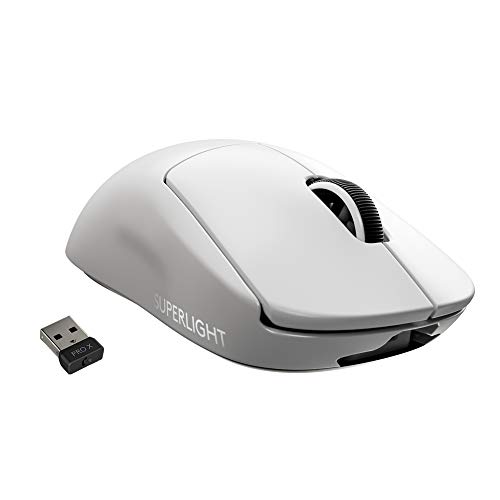
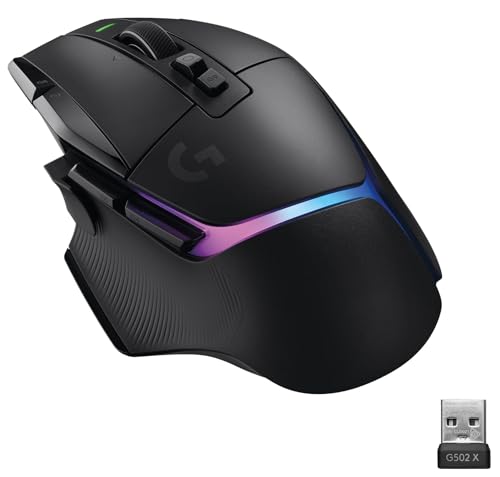
Logitech G Pro X Superlight vs G502 X Plus at a Glance
| Feature | Logitech G Pro X Superlight | Logitech G502 X Plus |
|---|---|---|
| Total Weight | Under 63 grams | 106 grams |
| Programmable Controls | 5 buttons | 13 buttons |
| Primary Switch Type | Mechanical (listing does not specify hybrid) | LIGHTFORCE hybrid optical-mechanical |
| Sensor Specification | HERO (up to 25,600 DPI) | HERO 25K (100 to 25,600 DPI) |
| Wireless Protocol | LIGHTSPEED wireless | Updated LIGHTSPEED (68% faster response) |
| Scroll Wheel Functionality | Standard notched scroll wheel | Dual-mode (free-spin / ratchet) with left and right tilt |
| Battery Runtime | Long battery life (listing does not specify hours) | 120 hours (RGB off), 37 hours (RGB on) |
| RGB Illumination | None | LIGHTSYNC 8-LED 8-zone RGB |
| Charging Interface | USB | USB-C, POWERPLAY compatible |
| Onboard Memory Profiles | Not listed in specification | Up to 5 profiles |
| Best For | Competitive FPS and esports players | Multi-genre gaming, MMOs, and macro-heavy productivity |
Weight and Fast-Twitch Maneuverability
The physical mass of a gaming mouse directly dictates how quickly you can initiate, stop, and redirect crosshair movement during high-stakes competitive matches. A lighter mouse minimizes physical inertia, allowing for rapid target acquisition and micro-adjustments with less physical strain over extended sessions. When evaluating the logitech g pro x superlight vs g502 x lineage, mass is the most decisive functional divide between minimalist esports engineering and complex ergonomic utility.
The logitech g pro x superlight weight sits at under 63 grams, achieving nearly a 25% weight reduction compared to the standard PRO Wireless without needing exterior honeycomb perforations. By contrast, the G502 X Plus weighs 106 grams, making it roughly 43 grams heavier. While 106 grams represents a refined profile compared to older iterations of the G502 chassis, it remains noticeably substantial during sudden flick maneuvers. Players comparing the logitech g pro x superlight or g502 x plus for fps will quickly find that the Superlight glides with far less resistance across mouse pads, largely due to its low mass combined with large zero-additive PTFE feet.
For gamers who prioritize raw speed, wrist agility, and rapid resets in titles like tactical shooters, the lower mass of the Superlight represents an indisputable physical advantage. Conversely, players who prefer a planted, steady feel with inherent stability might appreciate the extra heft of the G502 X Plus, though that weight inevitably demands more muscular force during high-acceleration swipes.
Edge: Logitech G Pro X Superlight because its sub-63-gram weight drastically reduces physical fatigue and enables faster target acquisition in competitive play.
Programmable Controls and Scroll Wheel Flexibility
Button count and layout determine how much in-game functionality you can offload from your keyboard directly onto your mouse hand. In complex games such as battle royales, MMOs, and action RPGs, having immediate access to abilities, pings, and weapon swaps can streamline decision-making. However, adding switches increases chassis complexity and total mouse weight, forcing manufacturers to balance structural efficiency against input density.
Looking at g502 x plus programmable buttons, the device offers an impressive total of 13 customizable controls. This includes primary clickers, dual side thumb buttons, two index-finger edge buttons, and a specialized DPI shift button that is both reversible and removable to fit different hand grips. Furthermore, its dual-mode scroll wheel allows you to toggle between precise notched ratcheting and hyperfast free-spinning rotation, while also featuring horizontal left and right tilt inputs. When examining the logitech g pro x superlight 2 vs g502 x plus landscape, the sheer input versatility of the G502 platform stands out.
The G Pro X Superlight takes a deliberately hyper-minimal approach, offering only 5 programmable buttons: left click, right click, a clickable scroll wheel, and two left-side thumb switches. There is no dedicated DPI toggle on the exterior shell, nor does the scroll wheel tilt sideways or unlock into a free-spin mode. In any direct g502 x plus vs logitech g pro x superlight comparison, the G502 X Plus dominates if your playstyle relies on keybind density and detailed macro execution.
Edge: Logitech G502 X Plus due to its 13 programmable controls, versatile tilt wheel, and removable DPI shift trigger.
Switch Architecture and Click Response
Switch mechanisms govern the tactile feedback, actuation speed, and long-term durability of the primary left and right mouse buttons. Mechanical switches rely on physical metal contact points that complete an electrical circuit, whereas optical switches actuate via light beams to eliminate debounce delay and mechanical wear. Understanding switch design is a central part of any thorough logitech g502 x plus review or competitive hardware breakdown.
The G502 X Plus features Logitech’s LIGHTFORCE hybrid optical-mechanical switch technology on its primary triggers. This design combines the high speed, low latency, and reliability of optical actuation with the crisp tactile feedback of a traditional mechanical switch. Additionally, the G502 X Plus includes an updated LIGHTSPEED wireless protocol that Logitech rates as delivering a 68% faster response rate compared to previous generations, reinforcing its rapid input transmission.
The G Pro X Superlight relies on standard mechanical switches; the listing does not specify hybrid optical-mechanical technology for this first-generation model. While its clicks remain highly responsive and meticulously tuned for esports pros, mechanical contacts lack the theoretical speed ceiling and contact-free actuation of hybrid optical hardware. When reviewing the evolution across the logitech g pro x superlight vs superlight 2 lifecycle, optical actuation represents a distinct engineering step forward that the G502 X Plus already provides.
Edge: Logitech G502 X Plus because its LIGHTFORCE hybrid optical-mechanical switches combine optical speed with tactile mechanical feedback.
Battery Life, Lighting, and Charging Ecosystem
Wireless mouse endurance dictates how frequently you need to interrupt your gaming sessions to tether up for a recharge. Battery performance is also heavily affected by aesthetic features like RGB lighting, which drains current rapidly when displaying active lighting profiles. Buyers often wonder is logitech g502 x plus worth it when balancing visual flair against battery longevity.
The g502 x plus battery life offers flexibility based on how you configure its LIGHTSYNC 8-LED lighting array. With active 8-zone RGB illumination running, the mouse provides up to 37 hours of continuous gaming. However, if you disable the RGB lighting, the battery runtime jumps significantly up to 120 hours of constant movement. Recharging is handled via a modern USB-C port, and the mouse is fully compatible with Logitech’s POWERPLAY wireless charging mat (sold separately), which keeps the mouse continuously powered during gameplay and rest.
For the G Pro X Superlight, the product listing highlights a built-in Lithium Polymer battery offering “Long Battery Life,” though it does not publish specific hourly runtime figures. To maintain an ultra-light frame and maximize power efficiency, the Superlight omits RGB lighting entirely. It charges over a standard USB connection, though the listing does not specify USB-C for this model. For users who prioritize extended runtime options, configurable lighting, and wireless mat charging, the G502 X Plus delivers a significantly broader charging ecosystem.
Comparing these systems against models like the logitech g pro x superlight 2 vs g703 highlights how modern peripherals treat power management. The G502 X Plus gives gamers complete transparency with exact runtimes across different lighting profiles.
Edge: Logitech G502 X Plus due to its 120-hour non-RGB battery capacity, USB-C interface, and POWERPLAY wireless charging support.
Ergonomics, Gliding Feet, and Form Factor
Mouse geometry and glide characteristics determine physical comfort and hand support over long gaming marathons. A shape that aligns naturally with your grip style prevents cramping, while high-grade base skates ensure seamless tracking across cloth and hard surfaces. Symmetrical shells cater to standardized competitive grips, whereas sculpted ergonomic bodies offer specialized finger rests.
The G502 X Plus features a dedicated right-handed sculpted shell measuring 131.1 mm long, 79.2 mm wide, and 41.1 mm tall. It includes an integrated thumb rest, contoured rubberized side grips, and PTFE feet (referred to in the listing as PTFE Paws) for smooth gliding. This ergonomic shape fills the palm comfortably, making it ideal for palm and relaxed claw grip users who spend hours playing diverse game titles or navigating desktop software.
The G Pro X Superlight features a hyper-minimal, neutral right-handed profile engineered in collaboration with world-class esports professionals. The listing indicates PTFE enclosure material and large zero-additive PTFE feet that deliver a fluid, low-friction glide across the desk. Because its shape avoids aggressive contours, thumb rests, or deep finger grooves, it accommodates fingertip, claw, and palm grips with equal balance. Any comprehensive logitech g pro x superlight review highlights how this neutral geometry allows players to adjust their hand position instantly mid-match without hitting restrictive edges.
Comparing shapes like the logitech g pro x superlight 2 vs g305 proves that grip preference is deeply individual. The G502 X Plus provides specialized palm support and thumb resting, while the Superlight provides universally adaptable competitive agility.
Edge: Tie because the G502 X Plus offers superior dedicated palm ergonomics and thumb support, while the Superlight provides a universally adaptable neutral esports shape with zero-additive PTFE glide.
Pros and Cons
Logitech G Pro X Superlight

Pros
- Weighs under 63 grams
- Large zero-additive PTFE feet
- HERO 25,600 DPI optical sensor
- Clean chassis without surface holes
- Neutral shape for varied grips
Cons
- Only 5 programmable buttons
- No optical-mechanical switches listed
- Lacks dual-mode free-spin scroll wheel
View Logitech G Pro X Superlight on Amazon
Logitech G502 X Plus

Pros
- 13 programmable controls
- LIGHTFORCE hybrid optical-mechanical switches
- Up to 120 hours battery life
- Dual-mode tilt scroll wheel
- POWERPLAY wireless charging compatible
Cons
- Heavier 106-gram chassis
- Battery drops to 37 hours with RGB
- Dedicated right-hand ergonomic shape only
View Logitech G502 X Plus on Amazon
Who Should Buy Each One
Choose the Logitech G Pro X Superlight If
- You play competitive FPS titles where rapid mouse flicks and low inertia are critical
- You prefer an ultra-lightweight mouse chassis that stays under 63 grams without exterior holes
- You want a neutral, streamlined shape with large zero-additive PTFE feet for low-drag gliding
- You only need a simple 5-button setup and prefer to avoid distracting RGB lighting
Choose the Logitech G502 X Plus If
- You need 13 programmable buttons to map complex macros, abilities, and utility functions
- You want LIGHTFORCE hybrid optical-mechanical switches for crisp actuation and long-term durability
- You enjoy customizable LIGHTSYNC 8-LED RGB illumination and want up to 120 hours of battery life with lighting off
- You prefer a sculpted right-handed ergonomic body with a thumb rest and a dual-mode tilt scroll wheel
Final Verdict
For most competitive PC gamers, the Logitech G Pro X Superlight remains the preferred weapon of choice. By stripping away excess weight down to under 63 grams, eliminating lighting, and refining the base with zero-additive PTFE feet, Logitech engineered a mouse that removes physical barriers between the player and the screen. If your primary objective is climbing competitive ladders in fast-twitch tactical shooters, the agility and minimal drag of the Superlight provide a tangible advantage that heavier utility mice simply cannot match.
However, the Logitech G502 X Plus decisively wins for players whose gaming spans beyond pure esports into MMOs, action RPGs, and productivity workflows. With its 13 programmable controls, LIGHTFORCE hybrid optical-mechanical switches, dual-mode tilt scroll wheel, and up to 120 hours of runtime, it offers unmatched versatility. If you value thumb support, macro density, and customizable RGB lighting over absolute featherweight construction, the G502 X Plus is the more capable and well-rounded companion for your setup.
FAQ
How does the weight difference impact fast-paced FPS gaming?
The G Pro X Superlight weighs under 63 grams, whereas the G502 X Plus weighs 106 grams, creating a 43-gram difference. In fast-paced FPS games, lower weight reduces hand inertia, enabling quicker flick shots, faster directional stops, and reduced wrist fatigue during continuous aiming.
Can the DPI shift button on the G502 X Plus be removed or customized?
Yes, the G502 X Plus features a redesigned DPI shift thumb button that is both reversible and removable. You can flip its orientation to bring it closer to your thumb, or remove it entirely and replace it with an included blanking cover to avoid accidental presses.
Does the Logitech G Pro X Superlight feature any RGB lighting?
No, the G Pro X Superlight intentionally excludes RGB lighting to maintain its ultra-lightweight profile under 63 grams and extend battery efficiency. The G502 X Plus, by contrast, includes customizable LIGHTSYNC 8-LED 8-zone RGB lighting.
What is the battery life of the G502 X Plus compared to the Superlight?
The G502 X Plus delivers up to 120 hours of continuous movement runtime when RGB lighting is switched off, and up to 37 hours when running active LIGHTSYNC RGB. The G Pro X Superlight listing specifies long battery life via an internal Lithium Polymer battery, but does not list an exact hourly figure.
Are both mice compatible with Mac and Windows computers?
Yes, both mice support PC platforms. The G502 X Plus listing explicitly specifies compatibility with Windows 10 and Mac OS 10.14 Mojave, while the G Pro X Superlight listing notes compatibility for Personal Computers running Windows 10 and Mac platforms.
Which mouse is better for palm grip users?
The G502 X Plus is generally better suited for palm grip users because of its larger, sculpted right-handed chassis, thumb rest, and 131.1 mm length. The G Pro X Superlight features a neutral symmetrical shape that accommodates palm grip, but is especially favored by claw and fingertip grip players who prioritize quick micro-adjustments.


