The single deciding factor between these two compact wireless mice is whether your priority lies in competitive gaming response or silent, multi-device productivity. The Logitech G305 strips away physical mass to achieve an ultra-lightweight 59-gram build backed by an ultra-fast HERO 44K sensor and pro-grade LIGHTSPEED wireless, making it a pure instrument for low-latency flick shots and tracking agility. Conversely, the Logitech MX Anywhere 3S concentrates on workplace refinement, pairing an 8K DPI Darkfield sensor that tracks even on glass with nearly silent switches, high-speed MagSpeed scrolling, and instantaneous multi-device Bluetooth toggling.
Choose the Logitech G305 if you demand high-speed tracking, sub-millisecond wireless responsiveness, and an ultra-light chassis for competitive PC gaming. Choose the Logitech MX Anywhere 3S if you need a quiet, travel-ready work mouse that can seamlessly navigate three separate operating systems and scroll through massive spreadsheets at a thousand lines per second.


Logitech G305 vs Logitech MX Anywhere 3S at a Glance
| Feature | Logitech G305 | Logitech MX Anywhere 3S |
|---|---|---|
| Sensor Technology | HERO 44K Optical | Darkfield High Precision Optical |
| Maximum Sensitivity | Up to 44,000 DPI | 8,000 DPI |
| Tracking Speed | 678 IPS | Not listed |
| Weight | 59 g (approx. 60 g) | 99 g |
| Connectivity Options | LIGHTSPEED Wireless, Bluetooth, Wired USB-C | Bluetooth Low Energy (Logi Bolt compatible, receiver not included) |
| Multi-Device Pairing | Manual mode switching | Up to 3 devices across multiple operating systems |
| Scroll Wheel Mechanism | Standard stepped gaming scroll wheel | MagSpeed electromagnetic wheel (1,000 lines/sec) |
| Click Acoustics | Standard tactile mechanical clicks | Quiet Clicks (dampened acoustic profile) |
| Battery Life Rating | 130+ continuous hours | Up to 70 days (approx. 2.33 months) |
| Lighting | Expressive LIGHTSYNC RGB | None |
| Best For | Fast-paced competitive PC gaming | Multi-device office productivity and travel |
Sensor Performance and Surface Tracking
Sensor capability dictates how accurately a mouse translates physical hand movement into on-screen cursor motion, but the demands of high-level gaming diverge drastically from mobile productivity. When evaluating the Logitech G305 or MX Anywhere 3S for gaming, the G305 holds a massive technical advantage. It features the cutting-edge HERO 44K optical sensor, which scales up to an astonishing 44,000 DPI and tracks velocities up to 678 inches per second (IPS). This immense tracking headroom ensures that rapid, erratic hand swipes across wide desk mats register without sensor spin-outs, jitter, or smoothing. For gamers comparing modern options like in a logitech g pro x superlight vs g305 matchup, having pro-grade optical accuracy coupled with an architecture that can be upgraded to an 8 kHz polling rate via a PRO LIGHTSPEED receiver provides unprecedented tracking fluidity.
The MX Anywhere 3S relies on Logitech’s Darkfield High Precision sensor, which caps out at 8,000 DPI. While an 8K DPI ceiling is more than sufficient for multi-monitor desktop navigation, creative editing, and office applications, it cannot match the tracking speed and precision tolerances of the HERO sensor under intense gaming workloads. Where Darkfield triumphs, however, is environmental versatility. The Darkfield sensor is engineered to track on virtually any surface, including high-gloss hotel desks and clear glass tables with a minimum thickness of 4 mm. The G305 optical sensor requires a conventional, non-reflective mouse pad or textured surface to register movement properly, making the MX Anywhere 3S far more accommodating for professionals working in varied locations.
The practical result of this divide comes down to speed versus adaptability. The G305 delivers raw tracking fidelity designed to eliminate input lag and handle aggressive physical acceleration during matches. The MX Anywhere 3S trades extreme tracking speed for the freedom to leave your mouse pad at home, reliably registering fine cursor movements on coffee shop tables, airplane trays, and glass surfaces where standard gaming sensors struggle.
Edge: Logitech G305 for high-speed tracking fidelity, acceleration thresholds, and gaming-grade sensor accuracy.
Chassis Weight, Form Factor, and Ergonomic Agility
Physical handling defines day-to-day comfort, and the disparity in Logitech G305 vs MX Anywhere 3S weight dramatically reshapes the user experience. The G305 adopts a Superlight chassis design, dropping its mass down to approximately 59 grams (or roughly 60 grams depending on manufacturing variations). Logitech achieves this featherlight construction without resorting to external honeycomb holes, ensuring a solid outer shell with no body flex. Gamers who utilize fingertip or claw grips benefit tremendously from this ultra-lightweight profile, as lower physical mass translates directly into reduced wrist inertia, faster directional flick transitions, and minimized muscular fatigue during marathon computing sessions.
In contrast, the MX Anywhere 3S weighs 99 grams-an increase of nearly 68 percent over the G305. While 99 grams is considered compact for an office peripheral, that extra weight is immediately apparent during fast-twitch gaming maneuvers. However, the MX Anywhere 3S utilizes its physical mass to provide a dense, premium hand feel. Its external dimensions measure 100.5 mm long, 65 mm wide, and 34.4 mm tall, creating a low-profile silhouette optimized for sliding into laptop sleeves and backpacks. Similar to the ergonomic contrasts explored in a logitech g305 vs g703 assessment, hand fatigue depends heavily on whether you prioritize effortless rapid repositioning or anchored palm stability.
Deciding between the Logitech G305 or MX Anywhere 3S for travel also depends on how you carry your gear. The G305 retains its classic symmetrical egg shape, which accommodates both right- and left-handed grip styles comfortably, although its primary side buttons favor right-handed users. The MX Anywhere 3S provides a slightly shorter footprint with subtle side contours, making it exceptionally portable for mobile professionals who want a compact mouse that stays grounded on small, cramped work surfaces without accidentally sliding around.
Edge: Logitech G305 for its ultralight 59-gram chassis that minimizes wrist fatigue and accelerates physical handling.
Scrolling Mechanics and Switch Acoustics
How a mouse feels and sounds under your fingers determines whether it belongs in an esports arena or a quiet corporate conference room. In this area of any Logitech MX Anywhere 3S review, the standout feature is the MagSpeed electromagnetic scroll wheel. Constructed with machined steel, the MagSpeed wheel can shift automatically from precise line-by-line ratcheting to frictionless free-spinning capable of scrolling up to 1,000 lines per second. It also incorporates horizontal scrolling functionality when holding one of the side buttons while turning the wheel. For professionals navigating endless spreadsheets, lines of code, or large PDF documents, this scrolling mechanism represents an unmatched productivity enhancement, a design standard frequently highlighted in logitech mx master 3s vs mx anywhere 3s comparisons.
The MX Anywhere 3S also introduces Quiet Clicks, which drastically dampen the acoustic report of the left and right switches compared to earlier generation hardware. The click provides a tactile bump with virtually no audible click noise, making the mouse ideal for shared workspaces, open-plan offices, libraries, and late-night work sessions next to sleeping family members. The G305 takes the opposite approach, utilizing crisp, mechanical switches with an audible, tactile click engineered to give gamers unmistakable auditory and sensory confirmation of every single trigger pull or weapon swap.
When assessing the Logitech G305 or MX Anywhere 3S for productivity, the G305 falls behind due to its traditional stepped gaming scroll wheel. While the G305 wheel offers tactile resistance that prevents accidental weapon switching during high-stress matches, it lacks free-spinning momentum and horizontal navigation, forcing you to repeatedly flick the wheel to scroll through lengthy documents. For anyone whose daily computer usage leans heavily toward document review, data management, or quiet workplace etiquette, this acoustic and mechanical difference is crucial when deciding if the mouse is MX Anywhere 3S worth it.
Edge: Logitech MX Anywhere 3S for its lightning-fast MagSpeed scrolling wheel and whisper-quiet switch acoustics.
Connectivity Modes and Multi-Device Flexibility
Modern workflows frequently require operating across desktop rigs, laptops, and tablets, and each mouse handles wireless pairing with a distinct philosophy. The G305 offers versatile Tri-Mode connectivity: pro-grade LIGHTSPEED wireless via a dedicated USB RF receiver, universal Bluetooth for pairing with portable devices, and a direct wired USB-C connection that operates while recharging. The proprietary LIGHTSPEED protocol delivers the ultra-low latency and rock-solid interference resistance required for competitive play. Furthermore, the G305 hardware is 8 kHz polling ready, allowing enthusiasts to achieve near-instantaneous cursor polling rates if they purchase a compatible PRO LIGHTSPEED receiver separately.
The MX Anywhere 3S takes an entirely different wireless approach centered on multi-device cross-platform fluidity. It connects primarily via Bluetooth Low Energy and includes multi-device pairing buttons that allow you to sync with up to three separate devices simultaneously. With a simple tap on the underside channel button, you can alternate control between a Windows desktop, a MacBook, and an iPad or Linux workstation. The MX Anywhere 3S is also Engineered for Intel Evo, validating optimal Bluetooth connectivity without wires or dongles. While it is compatible with the Logi Bolt USB receiver for secure wireless RF connections, the listing explicitly notes that no Bolt receiver is included in the box; you receive only a USB-A to USB-C charging cable.
These connectivity designs create a direct operational trade-off, echoing the functional debates found when studying logitech g305 vs mx master 3s setups. If you need instantaneous zero-latency transmission for PC gaming, the G305 and its included LIGHTSPEED hardware provide the proper performance foundation. However, if your daily routine demands fluid hopping between multiple workstations running different operating systems, the MX Anywhere 3S provides seamless multi-device flexibility that the gaming-focused G305 cannot replicate.
Edge: Logitech MX Anywhere 3S for effortless three-device Bluetooth pairing across diverse operating systems.
Battery Runtime and Fast-Charging Efficiency
Battery maintenance can either be an occasional background task or a constant operational concern. A thorough Logitech G305 vs MX Anywhere 3S battery life comparison reveals two distinct power delivery profiles tailored to different usage cycles. The G305 features an internal rechargeable Lithium Ion battery rated for 130 or more hours of continuous play on a single full charge. For a dedicated gaming mouse operating at high polling frequencies, 130 hours represents substantial endurance, allowing weeks of regular gaming before requiring a cord. When the battery does run low, the G305 features rapid USB-C quick-charging: a brief 2-minute plug-in provides up to 3.5 hours of continuous gameplay.
The MX Anywhere 3S operates on a 500 mAh rechargeable Lithium Polymer battery designed around low-power office use, yielding an extraordinary lifespan of up to 70 days (approximately 2.33 months) on a full charge. This prolonged endurance means mobile professionals can travel for weeks at a time without packing a charging cable. When power is depleted, its fast-charging USB-C port delivers up to 3 hours of working battery life from just a 60-second charge, minimizing downtime during critical meetings or travel sprints.
Examining these power dynamics against other cross-category comparisons, such as a logitech g502 x plus vs mx anywhere 3s evaluation, underscores how much energy high-performance gaming sensors and polling rates consume. The G305 provides robust battery performance for a high-drain competitive peripheral, proving that the mouse is Logitech G305 worth it for players who want modern rechargeable convenience without sacrificing low latency. Yet for overall longevity between wall charges, the MX Anywhere 3S delivers months of hands-off power that leaves gaming mice far behind.
Edge: Logitech MX Anywhere 3S for exceptional 70-day runtime between charges.
Software Customization and Structural Materials
Software ecosystems and chassis manufacturing reflect the core audiences each mouse aims to serve. Any thorough Logitech G305 review must highlight the mouse’s integration with Logitech G HUB software. Through G HUB, users can fine-tune the HERO 44K sensor in granular DPI increments, reassign its 6 programmable buttons, configure intricate multi-key macros, and control expressive LIGHTSYNC RGB illumination. The RGB lighting allows the mouse to reflect visual in-game events or coordinate aesthetics across your desktop setup, giving gamers extensive visual and functional customization over their hardware.
In a parallel MX Anywhere 3S vs Logitech G305 comparison on the productivity side, the MX Anywhere 3S relies on Logi Options+ software. Options+ does not offer RGB lighting controls or sub-millisecond macro timings, as the mouse features no decorative illumination. Instead, it offers deep workflow personalization, allowing users to configure app-specific button shortcuts for programs like Microsoft Excel, Zoom, Google Chrome, and Adobe Creative Cloud. You can set the side buttons to instantly mute your microphone during video calls or navigate forward and backward through browser tabs, transforming the mouse into a tailored productivity controller.
The build philosophies also show divergent priorities. The G305 utilizes a rigid, lightweight plastic enclosure engineered to deliver complete structural integrity with no creaking, flex, or shell perforations despite its 59-gram weight. The MX Anywhere 3S emphasizes environmental sustainability by incorporating certified post-consumer recycled plastic into its chassis-utilizing 78% recycled plastic for the Graphite finish and 61% for the Pale Grey and Rose variants. Both devices feature 6 durable buttons and right-hand optimized ergonomic profiles, but their onboard customization targets polar opposite computing tasks.
Edge: Tie. Logitech G HUB offers elite gaming macro and RGB customization, while Logi Options+ delivers superior app-specific productivity tools and sustainable materials.
Pros and Cons
Logitech G305
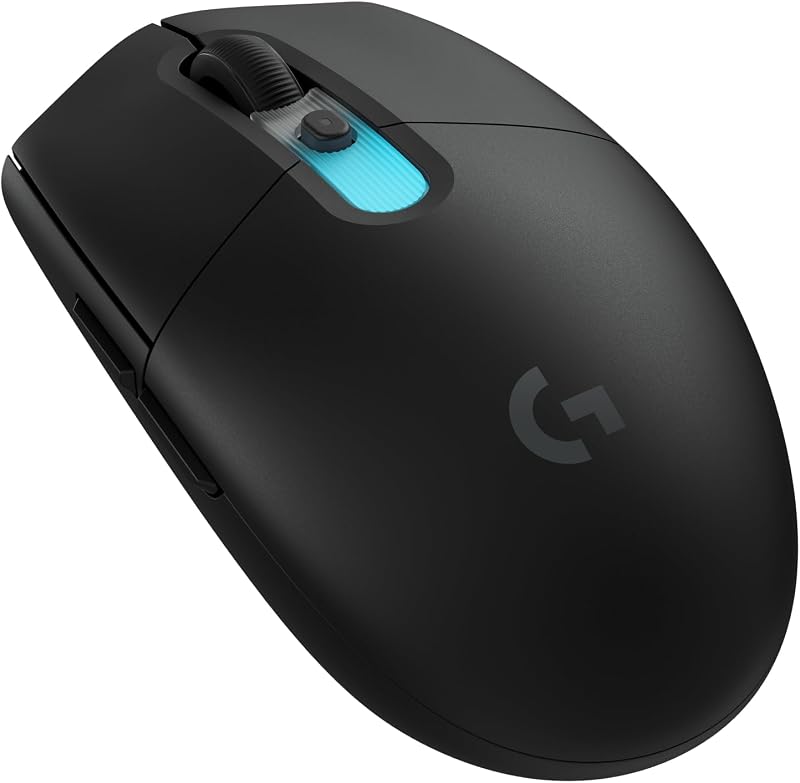
Pros
- Ultra-lightweight 59-gram chassis
- HERO 44K sensor reaching 44,000 DPI and 678 IPS
- Tri-mode LIGHTSPEED, Bluetooth, and USB-C connectivity
- Upgradable to 8 kHz polling rate
- Customizable LIGHTSYNC RGB illumination
Cons
- Lacks seamless multi-device Bluetooth pairing switch
- Audible gaming clicks unsuitable for silent rooms
- Requires separate PRO receiver for 8 kHz polling
Logitech MX Anywhere 3S

Pros
- Darkfield sensor tracks smoothly on glass surfaces
- Quiet Clicks significantly reduce acoustic distraction
- MagSpeed wheel spins up to 1,000 lines per second
- Connects to three devices with instant OS switching
- Up to 70 days of battery runtime
Cons
- No USB wireless receiver included in the box
- Heavier 99-gram weight hampers fast-twitch gaming
- Maximum 8,000 DPI ceiling trails dedicated gaming mice
View Logitech MX Anywhere 3S on Amazon
Who Should Buy Each One
Choose the Logitech G305 If
- You play fast-paced competitive PC games that demand a featherweight 59-gram chassis for rapid, effortless cursor flicking.
- You need the extreme tracking precision, 44,000 DPI headroom, and 678 IPS velocity limits of the HERO 44K optical sensor.
- You require pro-grade LIGHTSPEED wireless low-latency transmission and want the option to upgrade to an 8 kHz report rate.
- You enjoy customizable LIGHTSYNC RGB lighting and deep macro programming through Logitech G HUB software.
Choose the Logitech MX Anywhere 3S If
- You travel frequently and need a Darkfield sensor that tracks smoothly on clear glass tables and unpredictable surfaces.
- You work in shared office spaces, classrooms, or quiet home environments where Quiet Clicks eliminate distracting noise.
- You frequently navigate large spreadsheets, codebases, or long documents and require the 1,000-line-per-second MagSpeed scroll wheel.
- You juggle multiple devices simultaneously and need seamless Bluetooth switching across Windows, macOS, iPadOS, and Linux.
Final Verdict
For gamers and performance-focused PC enthusiasts, the Logitech G305 is the definitive choice. By combining an ultra-lightweight 59-gram shell with the staggering tracking speed of the HERO 44K sensor and the rock-solid latency of LIGHTSPEED wireless, it provides an uncompromised competitive edge. Its tactile switches, RGB lighting options, and upgradability to an 8 kHz polling rate ensure that every rapid movement translates directly to competitive precision on the screen.
However, the Logitech MX Anywhere 3S clearly wins the day for mobile professionals, office workers, and multi-system power users. Its 70-day battery life, compact pocket-friendly dimensions, MagSpeed scrolling wheel, and whisper-quiet switches address the real-world friction of daily digital productivity. If you do not plan to game competitively and instead need a dependable, silent tool that tracks on glass and pairs across three separate machines, the MX Anywhere 3S is the superior investment for your workflow.
FAQ
Can the Logitech G305 connect to multiple computers simultaneously?
The Logitech G305 features Tri-Mode connectivity that includes pro-grade LIGHTSPEED wireless, Bluetooth, and a wired USB-C connection. While you can toggle between connections using onboard controls, it lacks the dedicated multi-device easy-switch buttons found on the MX Anywhere 3S that allow instant toggling across three distinct synced computers.
Does the Logitech MX Anywhere 3S come with a USB wireless receiver?
No, the Logitech MX Anywhere 3S does not include a USB wireless dongle in the package. It connects out of the box via Bluetooth Low Energy and includes a USB-A to USB-C charging cable. While it is fully compatible with the Logi Bolt USB receiver, that receiver must be purchased separately if you require an RF connection.
Is the Logitech G305 suitable for quiet office environments?
While the Logitech G305 can certainly be used for day-to-day office computing, its mechanical gaming switches produce an audible, crisp click with every press. In quiet conference rooms, libraries, or shared work areas, these standard clicks may sound disruptive compared to the specialized dampened switches found on the MX Anywhere 3S.
Can the Logitech MX Anywhere 3S handle fast-paced gaming?
The MX Anywhere 3S can easily handle turn-based strategy games, casual desktop titles, and general gaming. However, its 99-gram weight, 8,000 DPI sensor ceiling, and standard Bluetooth connection latency make it less suitable for high-speed competitive first-person shooters compared to the 59-gram G305 and its LIGHTSPEED wireless technology.
Which mouse performs better for travel and mobile work?
The Logitech MX Anywhere 3S is the better dedicated travel mouse for productivity because its Darkfield sensor tracks on virtually any surface, including clear glass hotel desks. Furthermore, its 70-day battery life, compact 34.4 mm height, and quiet switches make it exceptionally practical for working in coffee shops, airport terminals, and client offices.
How fast do the rechargeable batteries replenish on each mouse?
Both mice offer impressive fast-charging capabilities over USB-C. The Logitech G305 provides approximately 3.5 hours of continuous gaming time from a 2-minute quick charge, while the Logitech MX Anywhere 3S generates up to 3 hours of productivity runtime from just a 1-minute quick charge.


