The fundamental divide between these two keyboards comes down to switch profile, mounting architecture, and intended desk setup: one is an ultra-slim, gasket-cushioned aluminum deck built for quiet typing ergonomics, while the other is a full-height, clicky, vintage-inspired mechanical board loaded with physical switches and external macro hardware.
Choose the Lofree Flow if you prioritize a minimal desk footprint, low wrist strain, and smooth, cushioned linear keystrokes for daily professional typing. Choose the 8BitDo Retro Mechanical if you crave classic retro gaming hardware with tactile clicky switches, independent hardware dials, and programmable macro buttons for desktop play.

Lofree Flow vs 8BitDo Retro Mechanical at a Glance
| Attribute | Lofree Flow | 8BitDo Retro Mechanical |
|---|---|---|
| Chassis Profile | Ultra-slim low profile | Full-height vintage profile |
| Case Material | All-aluminum body | Plastic enclosure |
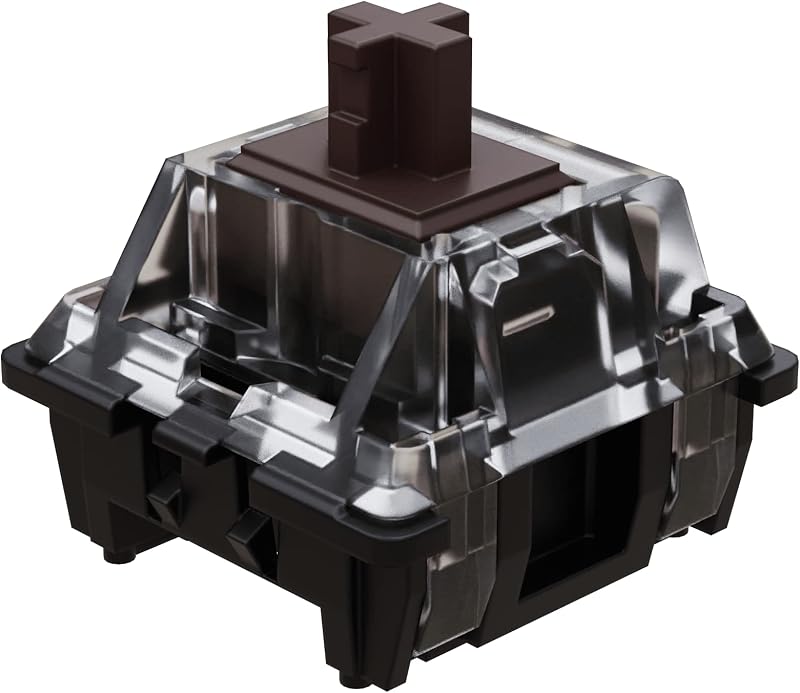
| Switch Type | Kailh Full POM Ghost linear switches | Kailh Box Switch V2 White mechanical |
| Mounting Style | Gasket mount design | Top mount style |
| Hot-Swappable PCB | Yes | Yes |
| Key Count | 100 keys (with compact number pad) | 87 keys (tenkeyless) |
| Keycap Technology | Five-sided dye-sublimation PBT | Dye-sub PBT |
| Wireless Connectivity | Bluetooth, USB-C wired | Bluetooth, 2.4G wireless, USB-C wired |
| Backlighting | RGB sidelit and single-color backlit | Classic power status LED (no key RGB) |
| Dedicated Macro Hardware | None | Dual Super Buttons (large programmable keys) |
| Best For | Quiet office work and low-profile ergonomics | Nostalgic desktop setups and tactile gaming |
Switch Design and Typing Feel
Typing feel dictates daily satisfaction on any mechanical keyboard, and these two models target completely opposite tactile preferences. The Flow is equipped with Kailh Full POM Ghost linear switches, which use a self-lubricating polyoxymethylene material across the entire switch housing and stem. Because POM becomes slicker with continuous use, these switches glide effortlessly down the keystroke path without scratchiness or mechanical ping. The short travel distance inherent to low-profile hardware allows typists to register keystrokes rapidly with minimal finger lift, creating a muted, fluid typing cadence suitable for shared work environments.
In contrast, the 8BitDo board features Kailh Box Switch V2 White mechanical switches. These are full-travel, clicky switches featuring a distinct tactile bump accompanied by a sharp audible click upon actuation. The internal box architecture protects the contact mechanism from debris and provides substantial stem stability, but the switch demands deliberate finger force and announces every keypress. When weighing ducky one 3 vs lofree flow typing characteristics, standard mechanical switches demand much deeper travel than low-profile stems, and comparing the Lofree Flow switches vs Kailh Box White shows that the former is engineered for whisper-quiet speed while the latter prioritizes classic acoustic feedback.
For extensive typing sessions involving spreadsheets, long emails, and documentation, the self-lubricating linear switches of the Flow cause significantly less acoustic disturbance and lower mechanical fatigue. The Box White switches on the 8BitDo provide reassuring confirmation for gamers and vintage enthusiasts who love hearing their keystrokes, but they will quickly dominate the room in a quiet home or office setting. The question of whether to choose the Lofree Flow or 8BitDo Retro for typing comes down to whether you prefer gliding silently on short-throw linear stems or bottoming out on crisp, loud click bars.
Edge: Lofree Flow offers an exceptionally smooth, quiet, and fluid typing feel thanks to its self-lubricating full-POM linear switches.
Ergonomics and Case Profile
Ergonomics on a keyboard depend on front chassis height, keycap angle, and how much wrist extension is required to reach the keys. A low profile vs retro mechanical keyboard comparison highlights a major divide in how your arms sit at the desk. The Flow features an ultra-slim silhouette designed to sit flat against the desktop. Because the entire unit maintains a low front lip, your palms and wrists can stay in a neutral, relaxed posture without requiring an elevated wrist rest or awkward forearm positioning.
The 8BitDo Retro Mechanical takes structural cues from vintage computer consoles, resulting in a tall, chunky plastic housing that rises significantly off the desk surface. Typing on this full-height profile demands that you either hover your wrists in traditional touch-typing posture or supply a matching palm rest to avoid uncomfortable wrist bend during extended sessions. When contrasting desktop setups like logitech g413 vs mx keys s, full-height mechanical cases always demand more vertical clearance and wrist compensation than low-profile alternatives.
Beyond the height of the chassis, mounting execution directly influences joint impact. Lofree includes a cushioned gasket-mount design, distributing bottom-out pressure across flexible dampening materials beneath the plate to absorb typing shock. The 8BitDo uses a rigid top-mount style where the switch plate screws directly into the upper housing, providing a firmer, uncompromising bottom-out. Users who spend eight hours a day keying in text will find the low chassis and cushioned plate of the Flow far more forgiving on their wrists and finger joints.
Edge: Lofree Flow provides superior ergonomic comfort through its ultra-slim profile and pressure-distributing gasket mount.
Layout Efficiency and Desk Footprint
Key density and layout choices determine how much desk real estate you surrender and how efficiently you navigate numeric data. The Flow packs 100 keys into a tight, condensed footprint that retains a dedicated number pad, directional arrow cluster, and full function row. By eliminating negative space between sections, Lofree squeezes full numerical input capability into a chassis barely wider than a standard tenkeyless board, making it an exceptional space-saver for data entry specialists and accountants.
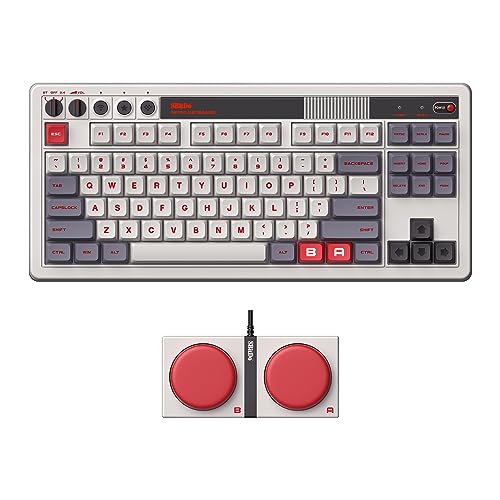
The 8BitDo Retro Mechanical adopts an 87-key tenkeyless form factor that leaves off the numeric pad to liberate mouse movement room. While the listing specifications note an AZERTY layout configuration, the primary physical format follows standard tenkeyless dimensions. However, 8BitDo expands on this layout by shipping the keyboard with external Dual Super Buttons-two gigantic, programmable mechanical buttons that sit beside the main deck. These large external modules add substantial footprint flexibility but require additional surface area on your desk mat.
When studying compact productivity layouts like keychron k4 vs q1, cramming a number pad into a single continuous block requires minor adaptation because navigation keys are rearranged. The 8BitDo sticks to classic spaced-out navigation clusters, which makes blind indexing effortless for gaming, but it completely abandons dedicated numeric entry. In the 8bitdo retro mechanical vs lofree flow footprint battle, the Flow delivers more functional keys per square inch of desk space.
Edge: Lofree Flow maximizes productivity efficiency by fitting 100 keys including a number pad into a compact frame.
Gaming Utility and Programmability
Gaming performance depends on input reliability, macro accessibility, and physical switch behavior. The 8BitDo Retro Mechanical is purpose-built as a gaming keyboard, sporting full n-key rollover across its 87 keys to ensure that simultaneous keystrokes register accurately without ghosting. More importantly, it features the aforementioned Dual Super Buttons. These massive external macro keys can be mapped to complex key combinations or game actions on the fly directly from the hardware control panel without opening configuration software.
The Flow approaches gaming from an ambidextrous, low-profile perspective. While its linear switches actuate smoothly with short key travel, the listing does not specify advanced gaming features such as n-key rollover, onboard macro profiles, or dedicated game software support. The compressed 100-key layout also places arrow keys and modifiers closer together, which can occasionally lead to accidental keystrokes in fast-paced action games where frantic finger movements are common.
Choosing between the Lofree Flow or 8BitDo Retro Mechanical for gaming comes down to macro utility and switch response. Gamers who play titles requiring fast command triggers benefit from the tactile reset of Box White switches and the massive physical surface of the Super Buttons, which can be slammed with a palm mid-match. Evaluating the logitech g715 vs mx keys s demonstrates how dedicated gaming hardware outperforms standard low-profile boards during competitive play, and 8BitDo delivers those exact gaming strengths.
Edge: 8BitDo Retro Mechanical dominates gaming scenarios with n-key rollover and programmable Dual Super Buttons.
Wireless Connectivity and Device Compatibility
Modern desk setups frequently span multiple platforms, requiring fast switching between computers, tablets, and gaming stations. The 8BitDo board offers triple-connectivity modes: low-latency 2.4G wireless via a dedicated USB receiver, Bluetooth for multi-device pairing, and USB-C wired mode. It is explicitly compatible with Windows 10 (version 1903 or above), Android 9.0 or above, and gaming consoles, giving it immense versatility across gaming rigs and living room media setups.
The Flow offers Bluetooth and wired USB-C connectivity, paired with a rechargeable battery system. It natively supports Windows, Mac OS, laptops, PCs, and tablets (with the listing specifically highlighting compatibility with tablet models like the AAUB P30). The inclusion of dedicated hotkeys and media keys makes switching operating contexts seamless for laptop power users and mobile professionals working across multiple personal devices.
However, the lack of a 2.4G wireless adapter on the Flow leaves it reliant on Bluetooth for wireless transmission, which can experience interference or slightly higher latency in dense wireless environments. The 8BitDo board’s 2.4G wireless receiver provides a lag-free wireless connection essential for competitive gaming where Bluetooth latency is undesirable. While Lofree covers standard office platforms including Mac OS and Windows, 8BitDo delivers a more robust multi-channel wireless toolkit.
Edge: 8BitDo Retro Mechanical wins on connectivity thanks to its inclusion of 2.4G wireless alongside Bluetooth and USB-C.
Build Materials and Aesthetics
Visual presentation and structural materials define how these two products sit on a desk. A direct look at Lofree Flow aluminum vs 8BitDo retro construction reveals entirely divergent design philosophies. Lofree encases the Flow in an all-aluminum body from top to bottom, providing structural rigidity, crisp metal edges, and an ultra-modern aesthetic that matches high-end laptops and minimalist office spaces. Lofree tops the switches with custom PBT low-profile keycaps crafted using an advanced five-sided dye-sublimation process, ensuring sharp legends that will not shine or wear down.
The 8BitDo Retro Mechanical embraces vintage nostalgia with a matte plastic enclosure modeled after historic 8-bit home console hardware. Finished in its iconic N Edition styling, it includes a classic power status LED and an independent hardware control panel complete with tactile knobs and switches for toggling connectivity modes. It also uses dye-sub PBT keycaps molded in retro colorways to complete the vintage look. While the plastic housing feels sturdy, it lacks the dense, premium heft of solid aluminum.
Lighting also separates their aesthetic presentation. Lofree integrates RGB sidelighting alongside a single-color keyboard backlight, projecting an ambient glow against your desk and through the switch housings. The 8BitDo eschews RGB illumination entirely, relying solely on its classic red status light to maintain its retro hardware authenticity. Anyone reading a Lofree Flow review or 8BitDo Retro Mechanical keyboard review will note that Lofree provides executive luxury, while 8BitDo provides charming, retro gaming character.
Edge: Lofree Flow takes the build quality crown with its full all-aluminum body and refined five-sided dye-sub PBT keycaps.
Pros and Cons
Lofree Flow

Pros
- All-aluminum body top to bottom
- World’s first gasket-mount low-profile design
- Self-lubricating Kailh Full POM linear switches
- Compact 100-key layout with numpad
- Five-sided dye-sublimation PBT keycaps
Cons
- Lacks 2.4G wireless connectivity
- No dedicated programmable macro buttons
8BitDo Retro Mechanical

Pros
- Dual Super Buttons for software-free macro mapping
- Versatile 2.4G, Bluetooth, and wired connections
- Tactile Kailh Box Switch V2 White switches
- Full n-key rollover support
- Independent physical control panel with status LED
Cons
- Plastic enclosure lacks metal construction
- No RGB per-key backlighting
View 8BitDo Retro Mechanical on Amazon
Who Should Buy Each One
Choose the Lofree Flow If:
- You want an ultra-slim aluminum keyboard that promotes neutral wrist ergonomics without requiring a palm rest.
- You work in quiet corporate offices or shared spaces where clicky switches would cause disturbance.
- You need a dedicated numeric keypad for data entry but refuse to give up precious mouse space.
- You switch regularly between Windows, Mac OS, and portable tablet devices.
Choose the 8BitDo Retro Mechanical If:
- You love retro gaming console aesthetics and authentic vintage hardware styling.
- You demand clicky mechanical switches with prominent tactile feedback and loud acoustic bottom-out clicks.
- You want a lag-free 2.4G wireless connection alongside Bluetooth for multi-platform PC and console gaming.
- You want physical macro controls and large programmable Dual Super Buttons you can map without running background software.
Final Verdict
For most typists, professionals, and desktop minimalists, the Lofree Flow is the superior everyday keyboard. Its all-aluminum unibody construction, revolutionary low-profile gasket mounting, and self-lubricating Kailh Full POM Ghost linear switches provide a typing experience that is as quiet as it is comfortable. Squeezing 100 keys into an ultra-slim, travel-friendly chassis ensures you retain full numeric functionality without forcing your wrists into unnatural angles.
However, the 8BitDo Retro Mechanical takes the crown for gamers, retro enthusiasts, and mechanical purists who crave tactile drama. With its clicky Kailh Box V2 White switches, top-mount rigidity, 2.4G wireless adapter, and programmable Dual Super Buttons, it functions as a dedicated gaming centerpiece. If you need silent productivity, buy Lofree; if your desk is built for nostalgic play, the 8BitDo is worth every bit of the retro hype.
FAQ
Are the switches hot-swappable on both keyboards?
Yes, both keyboards feature hot-swappable PCBs. The Lofree Flow allows users to swap its low-profile switches, while the 8BitDo Retro Mechanical features a hot-swappable PCB compatible with mechanical switches, allowing you to customize your switches without soldering.
Can I use the Lofree Flow with a Mac?
Yes, the listing notes compatibility with Windows and Mac OS, as well as laptops, PCs, and tablets, allowing you to use it across operating systems over Bluetooth or USB-C.
How do the Dual Super Buttons work on the 8BitDo keyboard?
The Dual Super Buttons are large, external programmable mechanical keys that connect to the 8BitDo board. You can map any keystroke or macro combination directly to the Super Buttons on the fly without needing to install or run computer software.
Does the 8BitDo Retro Mechanical keyboard have RGB backlighting?
No, the 8BitDo Retro Mechanical keyboard does not feature RGB backlighting under the keys. It maintains its authentic vintage styling by featuring a classic power status LED indicator on its independent control panel.
What kind of switches come installed in the Lofree Flow?
The Lofree Flow comes with Kailh Full POM Ghost linear switches. These are low-profile switches manufactured entirely from self-lubricating POM material to provide an exceptionally smooth, quiet keystroke that glides easily during long typing sessions.
Is 8BitDo Retro keyboard worth it for competitive gaming?
The 8BitDo Retro Mechanical keyboard includes key gaming features like n-key rollover, a low-latency 2.4G wireless dongle, and programmable macro Super Buttons, making it very capable for gaming setups where tactile clicky feedback is preferred.