The choice between the Razer Viper V3 Pro and the Razer Naga V2 Pro comes down to a fundamental clash of philosophies: pure physical agility optimized for rapid tracking versus extensive macro command access packed into a single hand.
Choose the Viper V3 Pro if your primary focus is competitive first-person shooters that demand near-weightless flicking and instant sensor response. Choose the Naga V2 Pro if you spend your hours in complex multiplayer titles where managing dozens of hotkeys, keybinds, and utility macros directly from your mouse dictates your success.


Razer Viper V3 Pro vs Naga V2 Pro at a Glance
| Feature | Razer Viper V3 Pro | Razer Naga V2 Pro |
|---|---|---|
| Sensor Model | Focus Pro 35K Optical Sensor Gen-2 | Focus Pro 30K Optical Sensor |
| Maximum Sensitivity | 35,000 DPI | 30,000 DPI |
| Maximum Polling Rate | Up to 8000 Hz HyperPolling | Not listed |
| Total Button Count | 8 | 19 programmable buttons |
| Switch Type | Optical Mouse Switches Gen-3 | Mechanical Mouse Switches Gen-2 |
| Switch Lifespan | 90 million clicks | 60 million clicks |
| Weight | 54 g | Not listed |
| Battery Life | Up to 95 hours | Up to 250 hours (HyperSpeed), up to 400 hours (Bluetooth) |
| Battery Configuration | 1 Rechargeable Lithium-Ion (included) | 1 AA replaceable battery (included) |
| Scroll Wheel Functionality | Standard optical scroll wheel | HyperScroll Technology (Free-spin and Tactile modes) |
| Wireless Connectivity | HyperSpeed Wireless (with 8K Dongle), USB | HyperSpeed Wireless (2.4 GHz), Bluetooth, USB |
| Best For | Competitive FPS and high-speed esports | MMO raid progression, MOBAs, and macro-heavy workflows |
Weight, Agility, and Handling
Physical inertia dictates how quickly you can start, stop, and redirect a mouse across a pad. In competitive shooter titles, the physical resistance of a peripheral directly affects micro-adjustments and target acquisition speed. The Razer Viper V3 Pro weight sits at an exceptionally low 54 grams, engineered specifically alongside esports professionals to eliminate unnecessary drag and forearm fatigue during frantic gaming sessions. This ultra-lightweight profile enables clean stopping power, making rapid target switching feel almost telepathic because the hand is moving virtually no excess mass.
In contrast, the listing for the Naga V2 Pro does not specify an exact gram figure, but its architecture tells a very different story. Between housing 19 internal button mechanisms, a complex dual-mode scroll wheel assembly, and a physical AA battery cell, this chassis carries substantial bulk compared to a stripped-down esports pointer. When managing high-tension raiding environments, this added substance provides a planted, deliberate feel on your desk surface, preventing accidental movement while you coordinate intensive skill rotations with your thumb. Readers looking into previous iterations can evaluate the razer viper v2 pro vs naga v2 pro matchup to observe how Razer has continuously separated its lightweight and multi-button categories over time.
Ultimately, the hand dynamics between the two could not be more polarized. The Viper V3 Pro encourages dynamic arm aiming and loose fingertip or claw control, allowing players to reset their mouse position repeatedly without strain. The Naga V2 Pro functions best as a stable command station anchored to your pad, prioritizing thumb access across an array of side inputs rather than rapid physical displacement across wide desk areas.
Edge: Razer Viper V3 Pro, providing an uncompromising 54g featherlight shell that maximizes physical movement speed and reduces hand fatigue.
Button Layout and Macro Programmability
Input density is the primary dividing line when comparing these two devices. Modern games demand fundamentally different layouts depending on whether your performance is limited by raw mechanical aim or by how rapidly you can trigger complex sequences of abilities. When evaluating the Razer Naga V2 Pro vs Razer Viper V3 Pro from an interface perspective, your choice immediately determines how many actions you can offload from your keyboard to your mouse hand.
The Naga V2 Pro is armed with an impressive layout of 19 programmable buttons. This extensive control matrix puts an entire ability bar at the tip of your thumb, allowing players to execute complex macro combinations, manage inventory items, target party members, and fire off cooldowns without moving their left hand away from the WASD movement cluster. For titles with bloated action bars like World of Warcraft or Final Fantasy XIV, the Razer Naga V2 Pro programmable buttons eliminate the need for awkward keyboard gymnastics, giving players an integrated control station on their desk. Those deciding on heavy macro hardware might also explore the razer basilisk v3 pro vs naga v2 pro breakdown to compare different multi-input philosophies.
On the opposite end, the Viper V3 Pro keeps things strictly focused on competitive fundamentals with an 8-button total configuration. This streamlined setup provides primary clicks, dual side buttons, a clickable wheel, and minimal utility inputs-just enough to bind essential voice lines, push-to-talk, or weapon swaps. The lack of clustered side buttons prevents accidental misclicks in the middle of chaotic gunfights where a firm grip on the side panels is mandatory. While the Viper offers full configuration through the Razer Synapse app, its physical layout is intentionally restrained to keep your grip stable and secure.
Edge: Razer Naga V2 Pro, running away with the category thanks to an expansive 19-button grid that accommodates endless custom macros and ability binds.
Sensor Precision and Polling Rate Performance
Sensor fidelity and transmission frequency govern how faithfully your physical gestures translate into on-screen crosshair movement. A comprehensive Razer Viper V3 Pro review must spotlight its updated Focus Pro 35K Optical Sensor Gen-2, which delivers an astronomical 35,000 DPI ceiling alongside ultra-precise 1-DPI step adjustments. This level of granularity lets competitive players dial in their exact sensitivity down to the single digit. Additionally, the Viper V3 Pro features Razer HyperPolling technology, supporting a blistering true polling rate of up to 8000 Hz via its included wireless dongle. The 8000 Hz Razer Viper V3 Pro polling rate translates to data reporting intervals of just 0.125 milliseconds-yielding smoother cursor tracking on ultra-high refresh rate gaming monitors.
The Naga V2 Pro utilizes the previous-generation Focus Pro 30K Optical Sensor, which is no slouch with a 30,000 DPI maximum and dependable glass tracking. However, the listing does not specify support for HyperPolling beyond standard wireless rates, operating across standard low-latency HyperSpeed parameters. In practice, 30,000 DPI easily surpasses the operational needs of MMO and strategy titles, where smooth camera panning and precise UI clicking are valued far above micro-pixel tracking corrections. Players interested in how sensor tiers compare across form factors may look at the razer viper v3 pro vs basilisk v3 comparison for further context on Razer sensor generations.
Beyond raw DPI numbers, the generational leap in sensor and transmission hardware gives the Viper V3 Pro a distinct technical ceiling. The 8000 Hz HyperPolling rate drastically reduces input latency and motion judder on high-end displays, whereas the Naga V2 Pro prioritizes stable tracking efficiency that matches the rhythmic pace of action-RPG combat and tactical rotations.
Edge: Razer Viper V3 Pro, featuring the newer Focus Pro 35K Gen-2 sensor and native 8000 Hz wireless HyperPolling for unmatched tracking precision.
Switch Technology and Click Responsiveness
The internal switch mechanisms dictate how long a mouse lasts and how swiftly it registers every command. Fast-paced shooters demand switches that actuate instantaneously without introducing mechanical debounce delays, while strategy and macro gamers often prioritize predictable tactile actuation during high-volume clicking sessions.
The Viper V3 Pro utilizes Razer Optical Mouse Switches Gen-3, which actuate using a light beam rather than metal contact plates. This optical design allows the switch to achieve a blistering 0.2-millisecond actuation speed with absolutely zero debounce delay. Because there are no physical contacts to oxidize or wear out, the switches eliminate double-clicking problems and boast an extended durability rating of up to 90 million clicks. In tactical shooters where a fraction of a millisecond decides whether your shot lands first, this instantaneous optical registration gives competitive players complete confidence in their primary clicks.
The Naga V2 Pro adopts Mechanical Mouse Switches Gen-2, built with gold-plated contact points that resist degradation over time. These switches offer a rated lifespan of up to 60 million clicks, providing satisfying, distinct mechanical tactile feedback on every depress. While 60 million clicks provides years of dependable usage, mechanical switches rely on traditional contacts and inherently require debounce filtering to prevent accidental chatter. For macro management, raid buffs, and inventory sorting, this mechanical actuation feels crisp and deliberate, but it cannot match the raw actuation velocity of third-generation opticals.
Edge: Razer Viper V3 Pro, leveraging Gen-3 optical switches with 0.2ms actuation, 90-million-click durability, and zero double-clicking vulnerabilities.
Battery Life and Power Systems
Battery longevity and power management determine whether your mouse is an effortless wireless peripheral or a regular charging chore. The two devices use fundamentally different approaches to keep their internal hardware energized, creating a clear division in how you manage runtime during extended gaming marathons.
The Naga V2 Pro is designed for long-term endurance, boasting up to 250 hours of continuous gameplay over low-latency 2.4 GHz Razer HyperSpeed Wireless and up to 400 hours when operating via Bluetooth. It achieves this massive battery reserve by drawing power from a single replaceable AA battery cell. This design means you never have to plug your mouse into a charging tether mid-fight; swapping in a fresh AA cell instantly restores full power. The inclusion of Bluetooth also allows you to conserve power during casual computing or productivity work, reserving the 2.4 GHz HyperSpeed link for raid nights.
The Viper V3 Pro opts for an internal, rechargeable Lithium-Ion battery pack to keep its overall weight down to an airy 54 grams. The listing rates this internal cell for up to 95 hours of competitive gaming on a full charge. While 95 hours easily covers several weeks of daily scrims and competitive play, running the peripheral at higher polling tiers like 8000 Hz increases power consumption and requires more frequent top-offs using a USB cable. For readers evaluating lightweight mice with alternative power designs, comparing the razer viper v3 pro vs orochi v2 reveals how AA-powered portable designs stack up against dedicated esports battery configurations.
Edge: Razer Naga V2 Pro, delivering up to 400 hours of runtime and the convenience of instant battery swapping alongside dual wireless modes.
Scroll Wheel Mechanics and Connectivity Options
Scroll wheel utility and pairing flexibility play critical roles in everyday desktop use outside of pure aiming. Depending on whether you handle general productivity workflows or strictly launch competitive titles, these secondary features can completely shift the value equation.
A standout element in any Razer Naga V2 Pro review is its integration of Razer HyperScroll Technology. This feature equips the scroll wheel with dual-mode functionality: a notched tactile mode for precise weapon or spell selection, and a free-spin mode that lets you zip through endless web pages, spreadsheets, or long game documents with zero resistance. Coupled with dual wireless connectivity-offering both low-latency 2.4 GHz HyperSpeed and flexible Bluetooth-the Naga transitions seamlessly between a dedicated raid battle station and a versatile multi-device productivity powerhouse. It also lists a standard 10.0-meter operating range suitable for conventional desk setups.
The Viper V3 Pro focuses exclusively on performance execution. Its scroll wheel uses a standardized optical layout optimized for defined steps without accidental over-scrolling, ensuring you never inadvertently cycle past your secondary weapon in a match. On the connectivity side, it omits Bluetooth entirely to eliminate excess weight, focusing purely on high-grade Razer HyperSpeed Wireless paired with its dedicated HyperPolling dongle. Interestingly, the Viper V3 Pro lists an expansive operating range of 100.0 meters, reflecting an exceptionally robust signal pipeline designed to avoid interference in crowded tournament environments.
Edge: Razer Naga V2 Pro, featuring dual-mode HyperScroll free-spinning mechanics and the convenience of multi-device Bluetooth pairing.
Pros and Cons
Razer Viper V3 Pro
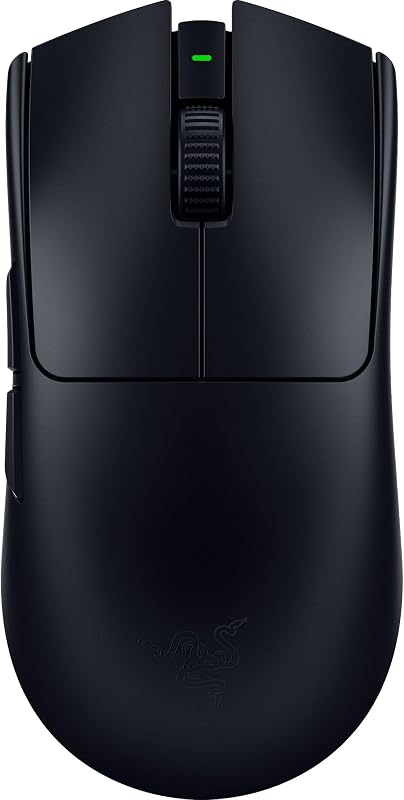
Pros
- Ultra-lightweight 54g esports design
- Focus Pro 35K Gen-2 optical sensor
- 8000 Hz HyperPolling wireless capability
- Fast 90M click Gen-3 optical switches
Cons
- Only 8 total buttons
- No Bluetooth connectivity option
View Razer Viper V3 Pro on Amazon
Razer Naga V2 Pro

Pros
- 19 programmable buttons for macro mastery
- Up to 400 hours of battery life
- Dual-mode HyperScroll free-spin wheel
- Dual HyperSpeed wireless and Bluetooth support
Cons
- Heavier build using AA battery
- Uses older mechanical switches
View Razer Naga V2 Pro on Amazon
Who Should Buy Each One
Choose the Razer Viper V3 Pro If
- You play competitive tactical shooters where micro-aiming, rapid flicks, and arm-aiming agility are paramount.
- You want an ultra-lightweight 54g chassis that eliminates hand strain and provides lightning-fast stopping power.
- You demand the highest tracking fidelity available, including an 8000 Hz polling rate and a 35,000 DPI optical sensor.
- You prioritize optical switches rated for 90 million clicks with zero debounce delay and immunity to double-clicking issues.
Choose the Razer Naga V2 Pro If
- You specialize in MMORPGs, MOBAs, or complex strategy games requiring dozens of macros and accessible keybinds.
- You want a multi-mode HyperScroll wheel with free-spin functionality for fast document navigation and rapid command inputs.
- You value extreme battery life of up to 400 hours and prefer swapping standard AA batteries over plugging in charging cables.
- You need Bluetooth connectivity alongside 2.4 GHz wireless to alternate between work laptops and your primary gaming rig.
Final Verdict
When asking whether the Razer Viper V3 Pro or Naga V2 Pro for FPS is the better investment, the Viper V3 Pro is the decisive winner. By combining an ultra-light 54-gram profile, 8000 Hz HyperPolling capabilities, Gen-3 optical switches, and the class-leading Focus Pro 35K sensor, it stands as an uncompromising tool for competitive shooters and high-speed esports titles. For anyone seeking peak aiming potential, is Razer Viper V3 Pro worth it? Absolutely, provided your gameplay leans heavily on pure mechanical reaction time rather than binding complex skill rotations.
On the other side of the spectrum, is Razer Naga V2 Pro worth it for players immersed in rotation-heavy titles? Without question. If you are debating the Razer Viper V3 Pro or Naga V2 Pro for MMO gaming, the Naga V2 Pro provides utility that the Viper cannot replicate. Its 19 programmable buttons, dual-mode HyperScroll wheel, dual-mode wireless with Bluetooth, and immense 400-hour battery life make it the ultimate desktop controller for raid progression, complex hotkey management, and deep macro customization.
FAQ
Can the Razer Viper V3 Pro achieve an 8000 Hz polling rate wirelessly?
Yes. The Viper V3 Pro comes equipped with Razer HyperPolling technology and an included HyperPolling Wireless Dongle, allowing it to reach a true wireless polling rate of up to 8000 Hz on supported PC systems.
Does the Razer Naga V2 Pro feature optical mouse switches?
No. According to the listing specifications, the Naga V2 Pro utilizes Razer Mechanical Mouse Switches Gen-2, which feature gold-plated contacts and a lifespan of up to 60 million clicks.
What type of batteries do these mice require?
The Viper V3 Pro uses an internal, rechargeable Lithium-Ion battery that provides up to 95 hours of competitive gaming. The Naga V2 Pro is powered by a single replaceable AA battery, which yields up to 250 hours of gameplay on HyperSpeed Wireless or up to 400 hours on Bluetooth.
Can either mouse track effectively on a glass surface?
Yes. Both the Viper V3 Pro (using the Focus Pro 35K Gen-2 sensor) and the Naga V2 Pro (using the Focus Pro 30K sensor) are engineered to deliver tracking across a wide variety of surfaces, including glass.
Does the Razer Viper V3 Pro support Bluetooth pairing?
No. The listing specifications for the Viper V3 Pro confirm connectivity via USB and Razer HyperSpeed Wireless. If you require Bluetooth connectivity for multi-device pairing, the Naga V2 Pro includes Bluetooth alongside its 2.4 GHz HyperSpeed mode.
How do the scroll wheels differ between the Viper V3 Pro and Naga V2 Pro?
The Naga V2 Pro features Razer HyperScroll Technology, providing both a notched tactile mode and a frictionless free-spin mode. The Viper V3 Pro features a standard optical mouse wheel designed strictly for defined steps during competitive play.


