The single deciding factor between a USB microphone and an XLR microphone is how the audio signal is processed and transmitted: a USB microphone contains an internal preamplifier and analog-to-digital converter to send a finished digital stream through a single computer cable, while an XLR microphone outputs a raw, balanced analog signal that requires an external audio interface or mixer to function.
Solo streamers, podcasters, and remote workers looking for instant desktop convenience without extra hardware should choose a USB microphone. Dedicated studio creators, musicians, and multi-guest podcast hosts who require modular hardware control and long-term equipment versatility should invest in an XLR microphone.



USB Microphone vs XLR Microphone at a Glance
| Feature | USB Microphone | XLR Microphone |
|---|---|---|
| Primary Connection | USB Type-A or USB Type-C | 3-pin XLR male connector |
| Signal Type | Digital audio stream | Balanced analog signal |
| Required Equipment | Computer or compatible console only | Audio interface or mixer with phantom power |
| Polar Patterns | Multipattern (cardioid, omni, bidirectional, stereo) or cardioid | Fixed cardioid or dynamic vocal pattern |
| Hardware Controls | Onboard gain, mute, headphone volume, pattern selection | None (controlled via external interface) |
| Power Requirements | 5V USB bus power | +48V phantom power or passive dynamic operation |
| Frequency Response Range | 20 Hz to 20 kHz | 20 Hz to 20 kHz or 50 Hz to 15 kHz |
| Signal-to-Noise Ratio | 78 dB to 100 dB | 74 dB to 78 dB |
| Best For | Solo desktop streaming, gaming, and simple voice recording | Studio tracking, voice acting, and multi-mic podcasting |
Setup Complexity and Signal Chain Integration
The physical signal chain represents the most immediate operational contrast between these two microphone categories. A USB microphone houses the capsule, an internal preamplifier, an analog-to-digital converter, and a USB controller inside a single enclosure. Setting up a model like the Logitech Creators Blue Yeti or the FIFINE K669B requires plugging the included USB cable directly into an open port on a PC, Mac, or compatible gaming console. Operating systems detect the unit as an integrated audio input and output device immediately, removing the need for external hardware drivers or signal routing utilities.
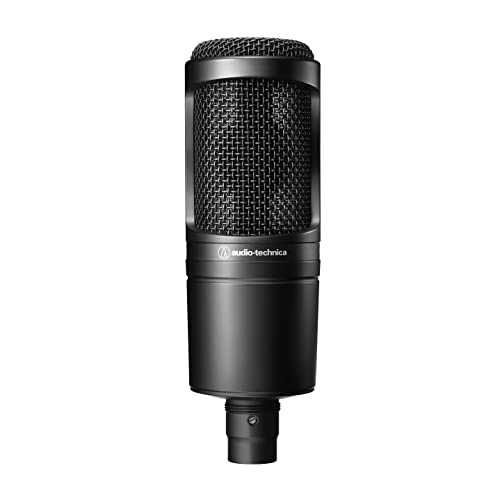
In contrast, an XLR microphone relies entirely on an external hardware chain. Studio condenser units like the Audio-Technica AT2020 and dynamic stage microphones like the Shure SM58 terminate in a standard 3-pin XLR male plug. Because computers cannot interpret raw analog audio through standard ports, you must route an XLR cable from the microphone into a dedicated USB vs XLR audio interface or mixing console. The interface provides the analog preamp gain, supplies 48-volt phantom power to condenser capsules, handles analog-to-digital conversion, and relays the digitized signal to your recording software over a separate data cable.
This technical difference determines physical workspace layout and operational friction. A USB microphone requires only a few inches of desk surface and a single cord, making it ideal for mobile laptop bags and minimalist workstations. The modular XLR workflow demands additional desk space for an interface box, introduces multiple connection points that require troubleshooting, and increases setup time. However, this extra physical hardware isolates the analog signal from electromagnetic interference generated inside the host computer chassis, which we examine in detail throughout our blue yeti vs shure mv7 technical evaluation.
Edge: USB microphone. It eliminates the need for separate interfaces, secondary cables, and external phantom power supplies by providing instant, single-cable operation.
Audio Quality and Dynamic Sound Capture
When comparing USB microphone vs XLR audio quality, the conversation centers around component isolation, noise floor management, and converter headroom. A USB microphone must pack delicate audio processing chips into the same casing as the acoustic capsule. In compact units like the FIFINE K669B, which records across a 20 Hz to 20 kHz frequency response with a 78 dB signal-to-noise ratio and 16 dB of audible noise, power supply ripple from the computer USB port can sometimes introduce faint electrical background hiss. Higher-tier USB options like the Blue Yeti counteract this with custom tri-capsule arrays, delivering a 100 dB signal-to-noise ratio and 120 dB audio sensitivity across multiple pickup settings.
XLR microphones separate the sensitive capsule from the digital conversion hardware entirely, transmitting balanced analog signals that actively reject radio frequency interference and electrical hum along the cable run. The Audio-Technica AT2020 features a custom-engineered low-mass diaphragm tailored for extended frequency response, high sound pressure level handling, and a 74 dB signal-to-noise ratio. This acoustic design delivers fast transient response on vocal plosives and acoustic instruments. Meanwhile, dynamic XLR options like the Shure SM58 focus on vocal articulation through a tailored 50 Hz to 15 kHz frequency curve with a subtle midrange presence lift, utilizing a uniform cardioid pickup pattern to reject off-axis room reverberation.
For untreated domestic spaces, the acoustic behavior of the capsule type matters as much as the connection interface. Condenser USB microphones tend to be exceptionally sensitive, capturing mechanical keyboard clicks, computer cooling fans, and wall reflections unless paired with aggressive software noise suppression. A dynamic XLR vocal microphone like the SM58 relies on a heavier moving coil design that naturally dampens distant background noises, resulting in cleaner, drier vocal tracks without software gating. For an in-depth look at dynamic broadcast capture versus condenser clarity, read our shure sm7b vs elgato wave 3 breakdown.
Edge: XLR microphone. Balanced analog transmission and isolated converter hardware yield higher acoustic headroom, lower system noise, and superior vocal isolation.
Modular Flexibility and Upgrade Paths
Modularity is the foundational strength of the analog XLR ecosystem. Every component in an XLR signal chain functions as an independent, interchangeable module. If you decide to upgrade your preamplifiers, add hardware compression, or switch from a two-channel interface to an eight-channel studio console, your existing microphone remains fully compatible. An engineer can swap out an Audio-Technica AT2020 studio condenser for an acoustic guitar pass and instantly switch to a Shure SM58 for vocal tracking using the exact same cabling and desktop interface.
USB microphones represent fixed, closed-circuit ecosystems. The capsule, preamplifier, analog-to-digital converter, and physical output jack are permanently fused on an internal circuit board. If the USB connection port wears out over repeated desktop repositioning, or if you require an upgraded analog-to-digital conversion chip with lower jitter, you must discard the entire unit. Furthermore, a USB microphone cannot connect directly to analog mixing consoles, PA sound systems, or dedicated hardware outboard processors used in live performance and professional broadcast facilities.
For creators planning long-term studio expansion, evaluating whether to switch from USB to XLR microphone comes down to hardware lifespan and scaling requirements. An XLR microphone manufactured decades ago still connects seamlessly to modern digital audio interfaces because the analog 3-pin standard has remained unchanged. USB microphones remain tied to computer driver architectures and operating system updates. Creators seeking hybrid gear that navigates both spaces often study our rode podmic vs podmic usb comparison to understand bridge designs.
Edge: XLR microphone. The standardized analog connection ensures permanent hardware compatibility and allows individual components to be upgraded independently over time.
Hardware Controls and Software Integration
USB microphones prioritize rapid, direct control for solo desktop creators who manage their own sound without an audio engineer. The Logitech Creators Blue Yeti exemplifies this with dedicated physical hardware controls mounted directly onto the microphone chassis, including microphone gain adjustment, headphone monitoring volume, an instant mute switch with an LED status light, and a four-position polar pattern selector switch. These controls allow live streamers and remote workers to adjust sensitivity or mute their feed instantly without switching windows or interrupting active software applications.
Software ecosystems further expand the utility of modern USB models. The Blue Yeti integrates with Blue VO!CE software, providing real-time vocal shaping tools, broadcast equalization presets, voice modulation effects, and sample playback. In basic plug-and-play models like the FIFINE K669B, an integrated physical volume knob on the front metal casing provides immediate tactile gain adjustments, making it easy to raise or lower voice sensitivity when transitioning between quiet speech and loud gaming commentary.
By comparison, pure XLR microphones like the AT2020 and SM58 feature zero onboard buttons, dials, switches, or software control suites. Any change in preamplification gain, monitor level, or signal muting must occur on the external audio interface or within your recording software. While this passive design guarantees that an accidental bump of the microphone body will never alter your input gain during a critical recording session, it removes the immediate, one-touch accessibility prized by content creators. Our rode podmic usb vs elgato wave 3 review highlights how much software integration influences daily streaming usability.
Edge: USB microphone. Onboard gain knobs, instant mute buttons, pattern switching dials, and integrated software processing give solo desktop operators unmatched operational speed.
Multi-Mic Podcasting and Multi-Channel Expandability
Recording multiple people in the same physical space reveals the fundamental networking limitations of computer operating systems. When shopping for a USB microphone or XLR microphone for podcasting, creators frequently attempt to plug multiple USB units into a single computer. Windows and macOS treat each USB microphone as an independent clock source and sound card. Attempting to record two or more USB microphones simultaneously regularly results in software driver conflicts, gradual audio drift where voices fall out of sync over time, and sudden system dropouts.
XLR configurations handle multi-microphone podcasting effortlessly. Multi-channel audio interfaces feature dedicated inputs for two, four, or eight XLR cables, consolidating all analog signals into a single unified digital audio clock. This hardware architecture allows you to place two Shure SM58 microphones for dynamic close-up dialogue alongside an Audio-Technica AT2020 for room ambience, recording each host to an isolated track inside software like Audacity, OBS, or a professional digital audio workstation without driver conflicts.
Some USB microphones attempt to resolve multi-speaker environments through acoustic pickup patterns. The Blue Yeti features bidirectional and omnidirectional polar patterns alongside its standard cardioid mode, allowing two hosts to speak across a single desk or an entire roundtable to share one central microphone. While convenient for casual discussions, sharing a single capsule records all voices to one unified audio track, making it impossible to adjust individual vocal volumes or edit out one person cough without cutting the other host speech. Creators navigating multi-mic setups can explore our rode nt-usb+ vs podmic guide for additional studio routing insights.
Edge: XLR microphone. Multi-channel audio interfaces record several independent microphones simultaneously onto separate software tracks with zero clock drift or driver conflicts.
Durability and Physical Versatility
Physical longevity and build construction separate studio-bound hardware from road-ready performance tools. The Shure SM58 is engineered specifically to survive extreme physical handling, featuring a heavy metal casing, an integrated spherical steel mesh grille with built-in pop filtering, and a break-resistant stand adapter. Weighing 310 grams, it handles accidental drops, live stage movements, and physical impact without damaging its resilient internal dynamic cartridge. The Audio-Technica AT2020 also utilizes a rigid metal housing designed for lasting durability in project studio environments.
USB microphones are primarily built as static desktop equipment. The Blue Yeti incorporates an adjustable, weighted metal desktop stand that pivots to align the capsule with the speaker mouth, but its multi-capsule internal condenser assembly and soldered circuit boards are sensitive to physical shocks and drops. The FIFINE K669B uses solid metal construction paired with an included tabletop tripod stand, but its hardwired or port-dependent connections are more vulnerable to desktop cable snags than heavy-duty, locking XLR connectors.
Furthermore, locking 3-pin XLR jacks prevent cables from accidentally pulling out during active recording sessions or energetic live broadcasts. USB plugs, whether Type-A or Type-C, rely solely on friction fits that can loosen or disconnect if a boom arm shifts abruptly. While USB microphones offer better self-contained portability for travelers who only want to pack a single microphone and a lightweight cable, XLR hardware delivers far greater mechanical durability over years of physical repositioning.
Edge: XLR microphone. Heavy-duty metal construction, locking cable connectors, and resilient internal dynamic capsules provide superior physical durability against drops and travel wear.
Pros and Cons
USB Microphone

Pros
- Instant plug-and-play desktop USB connectivity
- Onboard gain, mute, and headphone controls
- Selectable polar patterns on advanced models
- Includes desktop stands and mounting accessories
Cons
- Difficult to record multiple microphones simultaneously
- Internal converter cannot be upgraded independently
- More susceptible to USB computer bus noise
View Logitech Creators Blue Yeti USB Microphone on Amazon
XLR Microphone

Pros
- Modular design compatible with all interfaces
- Balanced analog cabling eliminates electrical line hum
- Rugged metal construction and durable dynamic capsules
- Seamless multi-channel recording for studio podcasts
Cons
- Requires a separate audio interface or mixer
- Lacks onboard mute switches and direct USB plugs
View Audio-Technica AT2020 Cardioid Condenser Studio XLR on Amazon
Who Should Buy Each One
Choose the USB Microphone If
- You need an immediate plug-and-play audio tool for Twitch streaming, Zoom meetings, Discord chat, or YouTube voiceovers without buying an audio interface.
- You work from a single computer desk and want physical controls like instant mute, headphone volume, and microphone gain directly on the microphone body.
- You record alone and want versatile pickup modes, such as the Blue Yeti cardioid, omni, bidirectional, and stereo settings, to handle different recording styles.
- You travel frequently with a laptop and need a compact setup that requires only one USB cable and no bulky external hardware.
Choose the XLR Microphone If
- You plan to host multi-person in-studio podcasts that require multiple microphones connected to a single interface with dedicated multi-track recording.
- You are building a dedicated home recording studio or voice acting booth where you want to upgrade preamps, interfaces, and microphones independently.
- You record in untreated rooms and want the superior acoustic rejection and durable build of a dynamic stage microphone like the Shure SM58.
- You need balanced analog cables that can run across long distances without picking up electromagnetic noise or computer interference.
Final Verdict
For the vast majority of solo content creators, desktop gamers, and remote business professionals, the USB microphone is the most practical choice. It eliminates the technical learning curve, removes the need to purchase external conversion gear, and delivers clear broadcast sound right out of the box. With onboard gain adjustment, zero-latency headphone monitoring, integrated desktop stands, and custom vocal software presets, units like the Blue Yeti and FIFINE K669B streamline the entire voice capture workflow into a single, clutter-free cable run.
The XLR microphone wins decisively whenever your audio ambitions expand beyond a single desktop user. If you are conducting in-person interviews with multiple guests, tracking professional music vocals, or assembling a commercial voiceover workstation, the modular flexibility of an XLR chain is irreplaceable. Investing in an analog microphone like the Audio-Technica AT2020 or Shure SM58 paired with a dedicated audio interface guarantees true multi-channel isolation, superior electrical shielding, and an upgrade path that will remain technologically relevant for decades to come.
FAQ
Is an XLR microphone worth it for beginner creators?
An XLR microphone setup is worth it for beginners only if they plan to expand into multi-person podcasting, commercial voiceover work, or music production in the near future. For basic solo streaming, game commentary, or video calls, a plug-and-play USB microphone delivers comparable spoken vocal clarity without requiring an external audio interface, additional balanced cables, or technical signal routing knowledge.
Can you connect an XLR microphone directly into a PC without an interface?
You cannot connect a standard XLR microphone directly into a computer USB port using a passive adapter cable and expect reliable performance. XLR microphones output low-level analog signals that require preamplification to reach line level, analog-to-digital conversion for the computer to recognize the audio, and +48V phantom power if you are using a condenser microphone like the AT2020.
Which is better: a USB microphone or XLR microphone for streaming?
A USB microphone is generally better for solo streamers because it connects directly to the gaming PC, sits neatly on a desk stand, and features tactile mute and gain controls on the chassis. However, streamers using complex multi-PC broadcast setups with hardware mixing desks often prefer an XLR microphone to route audio seamlessly through external audio hardware.
Should I choose a USB or XLR microphone for voice acting?
Professional voice acting overwhelmingly favors an XLR microphone paired with a clean audio interface. Voiceover agencies and production houses expect an extremely low noise floor, wide dynamic range, and uncolored vocal capture, which condenser XLR microphones with low-mass diaphragms provide more consistently than all-in-one USB microphones.
Why is an XLR microphone setup better for multi-person podcasts?
Computer operating systems struggle to synchronize multiple USB microphones simultaneously, frequently causing clock drift and driver errors. An XLR setup connects two or more microphones into a single multi-channel audio interface, allowing recording software to capture each speaker on a completely separate, synchronized track for precise post-production volume balancing.
What hardware is required when making the switch from USB to XLR microphone?
To switch from a USB microphone to an XLR microphone, you need the XLR microphone itself, a standard balanced 3-pin XLR cable, a desktop boom arm or microphone stand, and a USB audio interface or mixer equipped with a built-in preamplifier and phantom power supply to connect to your computer.
Does a USB microphone produce worse audio quality than an XLR microphone?
A high-quality USB microphone produces spoken voice clarity that closely rivals an entry-level XLR microphone in casual listening environments. The primary difference lies not in basic clarity, but in the higher noise floor, lower dynamic headroom, and potential USB bus interference found in all-in-one USB microphone enclosures compared to isolated XLR analog signal chains.



