The central decision between the SteelSeries Arctis Nova Pro Wireless and the HyperX Cloud II comes down to modern multi-device wireless versatility with active noise suppression versus reliable, no-latency wired simplicity backed by an aluminum chassis. While one platform redefines continuous desktop audio management across consoles and computers, the other focuses purely on plug-and-play stamina without the need to manage software suites, charge stations, or wireless signals.
Choose the Arctis Nova Pro Wireless if you manage multiple gaming stations simultaneously and want active noise cancellation, customizable parametric equalization, and zero downtime through swappable battery packs. Choose the Cloud II if you want a battle-tested, durable wired headset that delivers direct hardware-driven audio amplification without battery anxiety or complicated setup routines.


SteelSeries Arctis Nova Pro Wireless vs HyperX Cloud II at a Glance
| Attribute | SteelSeries Arctis Nova Pro Wireless | HyperX Cloud II |
|---|---|---|
| Connectivity | 2.4GHz Wireless, Simultaneous Bluetooth, USB-C | Wired (USB Audio Control Box, 3.5mm) |
| Driver Type | Premium High Fidelity Neodymium Magnetic Drivers | Large 53mm Drivers |
| Frequency Response | Not listed | 15Hz – 25,000Hz (15-25kKhz) |
| Noise Cancellation | 4-Mic Hybrid Active Noise Cancellation with Transparency Mode | Passive Closed-Ear Isolation |
| Power & Battery System | Infinity Power System (2 Hot-Swappable Batteries) | Wired (No Battery Required) |
| Surround Audio Processing | 360° Spatial Audio, Tempest 3D, Microsoft Spatial Sound | Hardware-Driven Virtual 7.1 Surround Sound |
| Microphone Configuration | Retractable ClearCast Gen 2 with AI Noise Cancelling | Detachable Noise-Cancelling (Discord & TeamSpeak Certified) |
| External Hardware Controls | OLED Wireless Base Station (Dual USB Ports, EQ, ChatMix) | In-Line USB Sound Card Audio Control Box |
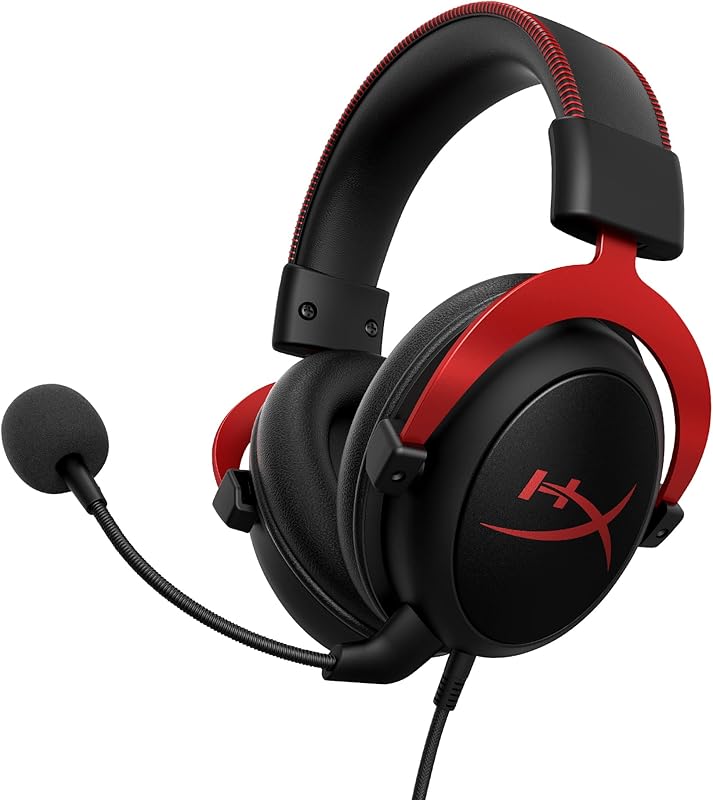
| Frame Construction | Over-Ear Ergonomic Frame | Solid, Durable Aluminum Frame |
| Weight | Not listed | 11.29 ounces |
| Manufacturer Warranty | 1 Year | 2-Year Manufacturer Warranty |
| Best For | Multi-platform power users seeking ANC and wireless freedom | Desktop and console purists wanting wired durability |
Connectivity and Multi-System Switching
Connectivity shapes how seamlessly your audio gear integrates into your daily setup. The SteelSeries Arctis Nova Pro Wireless uses an OLED wireless base station equipped with dual USB ports. This interface enables physical dual-system connectivity, allowing players to plug into two platforms simultaneously-such as a PC and a PlayStation 5, or a console and a Mac-and switch between them at the press of a single button. Alongside lag-free 2.4GHz gaming audio, the Nova Pro Wireless incorporates a simultaneous Bluetooth channel. This dual audio stream capability lets you take phone calls, chat in Discord over mobile, or play music while maintaining uncompromised in-game sound cues without tethering to a desk.
The HyperX Cloud II approaches connectivity through dedicated physical cables. Operating via a specialized USB sound card audio control box or a direct 3.5mm connection, the headset plugs directly into your system. When deciding between the steelseries arctis nova pro wireless vs hyperx cloud iii or classic wired options like the Cloud II, the lack of wireless pairing routines remains a prominent factor. The Cloud II functions natively across PC and Mac through its USB control box, while providing stereo performance across consoles including PS4, Xbox One (with the Microsoft adapter), and Nintendo Switch. There are no wireless radios to pair, no signal congestion to troubleshoot, and no cross-talk drops during crowded competitive play.
For players operating a multi-device setup, the Arctis Nova Pro Wireless eliminates constant cable swapping between consoles and desktop computers. However, for a single-station battle station where the headset stays plugged into one USB port, the Cloud II offers immediate, driver-free plug-and-play operation without wireless latency or setup friction. Comparing the steelseries arctis nova 7 vs hyperx cloud ii highlights similar trade-offs between wireless docks and traditional cords, but the Nova Pro Wireless pushes flexibility further by allowing simultaneous Bluetooth mixing.
Edge: SteelSeries Arctis Nova Pro Wireless provides unmatched flexibility through its dual-system OLED hub and simultaneous Bluetooth audio streams.
Noise Cancellation and Environmental Isolation
Environmental noise management is essential when trying to maintain concentration during intense matches. The SteelSeries Arctis Nova Pro Wireless ANC system leverages a specialized 4-mic hybrid active noise cancellation architecture tuned explicitly for gaming. This system actively monitors external ambient frequencies and neutralizes distracting household sounds, PC fan roar, and low-frequency rumble before they reach your ears. In environments where environmental awareness is required, the Nova Pro Wireless features Transparency Mode, offering variable pass-through levels to let external voices or doorbells filter in without taking the headset off.
The HyperX Cloud II relies entirely on passive noise cancellation achieved through closed ear cup architecture. By utilizing dense memory foam ear cushions and padded leatherette materials clamped securely against the head, the physical earcups form an acoustic barrier that attenuates higher-frequency environmental sounds. The listing notes that proper ear fit is critical to obtaining the intended sound isolation and acoustic properties. While it lacks active electronic cancellation components, the closed-back build dampens room chatter and typing clatter naturally without generating anti-phase background hiss or consuming power.
Between active electronic suppression and physical acoustic isolation, the functional divide is considerable. If your gaming space faces steady environmental challenges like street noise, loud air conditioning, or shared living spaces, the active hybrid mics of the Arctis Nova Pro Wireless carve out a significantly quieter listening floor. The Cloud II isolates well for a standard closed-back headset, but passive clamping cannot match the active background nullification of a dedicated hybrid 4-mic array.
Edge: SteelSeries Arctis Nova Pro Wireless dominates environmental isolation with its 4-mic hybrid active noise cancellation and adjustable Transparency Mode.
Audio Performance, Driver Engineering, and Surround Sound
A headset’s primary duty is clear acoustic imaging, allowing you to track opponents by sound and enjoy detailed audio production. The SteelSeries Arctis Nova Pro Wireless features Premium High Fidelity Neodymium Magnetic Drivers running through the Nova Pro Acoustic System. In a comprehensive SteelSeries Arctis Nova Pro Wireless review, the Sonar Software suite stands out as a core strength, introducing a pro-grade parametric EQ that lets users alter pinpoint frequency bands. In spatial performance, the Nova Pro Wireless delivers 360° Spatial Audio, offering full native integration with Tempest 3D Audio on PlayStation 5 and Microsoft Spatial Sound on Windows platforms.
The HyperX Cloud II anchors its acoustic signature on large 53mm dynamic drivers featuring a wide frequency response span of 15Hz to 25,000Hz. This driver size produces forceful, dynamic audio reproduction, engineered to reproduce heavy explosions alongside subtle tactical cues like reloading or footsteps. The Cloud II utilizes a dedicated hardware-driven USB sound card control box to generate virtual 7.1 surround sound. Because this virtual 7.1 spatialization is processed directly inside the inline USB dongle, PC and Mac gamers obtain hardware-driven distance and depth rendering without needing background software suites running on the host system.
When evaluating the HyperX Cloud II surround sound against the software-backed tuning of the Nova Pro Wireless, the sound control philosophies diverge sharply. The Cloud II delivers bold, plug-and-play sound with immediate access to 7.1 toggle buttons on its USB box, but it lacks deep sound profile sculpting on a system level. The Nova Pro Wireless provides surgical acoustic personalization through Sonar, letting players sculpt specific EQ curves for specific competitive titles while enjoying system-level spatial standards on both consoles and modern PCs.
Edge: SteelSeries Arctis Nova Pro Wireless offers higher audio customization and spatial compatibility via Sonar and high-fidelity drivers.
Power Management and Battery Life
Power delivery determines whether your gaming sessions remain continuous or get interrupted by sudden cutoffs. The SteelSeries Arctis Nova Pro Wireless solves wireless downtime through its Infinity Power System. Instead of integrating a permanent internal cell that requires plugging the entire headset into a wall or USB cable, SteelSeries supplies two hot-swappable batteries. One battery powers the headset while the second charges continuously inside a dedicated charging bay located directly within the desktop OLED Base Station. When a pack runs low, you swap it out in seconds, ensuring indefinite operation without being tethered to a cable.
The HyperX Cloud II eliminates power management altogether by relying entirely on its wired connection. It draws continuous current directly through the host computer’s USB port or the console controller’s analog audio jack. There are no charging docks, no internal cells that degrade across years of thermal cycling, and no battery indicators to monitor before entering an extended gaming marathon. Players exploring headsets in the steelseries arctis nova 5 vs hyperx cloud ii bracket frequently weigh the peace of mind of wired audio against the physical mobility of wireless headsets.
Evaluating the SteelSeries Arctis Nova Pro Wireless battery life against the Cloud II highlights two different solutions to endurance. The Nova Pro Wireless delivers genuine cable-free movement while eliminating the standard wireless pitfall of dead headsets through its swappable dual-battery dock. Yet, for gamers who hate battery management in all forms, the Cloud II offers endless, zero-maintenance power from the second you plug it in.
Edge: Tie. The Nova Pro Wireless provides continuous wireless freedom via hot-swappable dual batteries, while the Cloud II delivers perpetual, zero-maintenance wired operation.
Microphone Quality and Voice Communications
Clear vocal output keeps competitive teams organized and prevents misheard callouts during high-stakes play. The SteelSeries Arctis Nova Pro Wireless features the ClearCast Gen 2 microphone, engineered to silence ambient background noise so clear comms reach your teammates. On PC platforms running Windows 8.1 or newer (or Mac OS 10.13 and above), the microphone links directly with Sonar Software to utilize AI-powered noise-cancelling algorithms that strip out keystrokes, mouse clicks, and household commotion. When playing single-player games or taking the headset on the go, the microphone retracts completely flush into the earcup frame.
The HyperX Cloud II features a detachable, noise-cancelling microphone certified by both TeamSpeak and Discord. This analog boom capsule mounts on a flexible arm, allowing precise positioning relative to the mouth to avoid breath pops. When voice comms are unneeded during offline sessions or movie watching, the microphone can be unplugged completely, shedding weight and leaving the left ear cup clean. Audio gain and mic mute functions are handled physically on the in-line USB audio control box, giving users direct hardware control without opening desktop menus.
In practice, both headsets provide certified voice performance for everyday gaming, but the Arctis Nova Pro Wireless provides greater hardware integration. The retractable boom cannot be misplaced like a detachable mic, and the base station provides immediate ChatMix balancing to tweak voice-to-game volume balance without tabbing away. Gamers researching options like the steelseries arctis nova pro wireless vs arctis nova 5 will find that the flagship Pro line retains this physical ChatMix control right on the desk dock.
Edge: SteelSeries Arctis Nova Pro Wireless delivers a more convenient retractable design with AI-backed noise filtering and physical ChatMix integration.
Build Quality, Materials, and Long-Term Comfort
Long gaming sessions demand durable frames and materials that prevent pressure points across the skull and jawline. The HyperX Cloud II has long maintained an industry benchmark for comfort due to its solid, durable aluminum frame. Aluminum yokes provide structural rigidity against drops, flexing, and aggressive twisting, ensuring the headset withstands daily knocks over years of use. At 11.29 ounces, the Cloud II pairs this metallic skeleton with exceptionally comfortable memory foam ear cushions and a thickly padded leatherette headband. The package even includes replacement ear cushions, an airplane adapter, and a mesh travel bag, backed by a generous 2-year manufacturer warranty.
The SteelSeries Arctis Nova Pro Wireless utilizes an over-ear, over-the-head chassis executed in a matte black finish with an adjustable headband suspension design. While the listing does not specify its exact gram weight, the chassis integrates complex electronics: an active noise cancellation mic array, internal Bluetooth and 2.4GHz transceivers, a battery housing compartment, and an integrated retractable microphone channel. The Nova Pro Wireless is supported by a 1-year warranty and includes dual USB-C to USB-A cables alongside the wireless base station.
When assessing structural simplicity, the Cloud II holds a distinctive advantage. Its solid aluminum frame is built with fewer moving parts and hinges, making it resilient to drops and heavy-handed handling. Those considering if the HyperX Cloud II is worth it will appreciate that its aluminum architecture and included replacement cushions provide lasting structural reliability, whereas the Arctis Nova Pro Wireless houses more delicate internal electronics and mechanical bays.
Edge: HyperX Cloud II leads in long-term structural resilience thanks to its durable aluminum frame and 2-year manufacturer warranty.
Pros and Cons
SteelSeries Arctis Nova Pro Wireless

Pros
- Hybrid 4-mic active noise cancellation
- Hot-swappable dual battery system
- Simultaneous 2.4GHz and Bluetooth audio
- OLED base station multi-system switching
- Fully retractable AI-powered microphone
Cons
- Shorter 1-year manufacturer warranty
- Advanced software requires PC or Mac
View SteelSeries Arctis Nova Pro Wireless on Amazon
HyperX Cloud II
Pros
- Solid, durable aluminum frame
- Large 53mm high-output drivers
- Hardware-driven 7.1 USB sound card
- Zero battery charging required
- Includes spare cushions and travel bag
Cons
- Lacks active noise cancellation
- Tethered to a physical wired connection
View HyperX Cloud II on Amazon
Who Should Buy Each One
Choose the SteelSeries Arctis Nova Pro Wireless If:
- You split playtime across multiple platforms, like PC and PS5, and want instant one-touch switching through an OLED base station.
- You game in noisy surroundings and need active hybrid noise cancellation to silence background chatter and fan whir.
- You want wireless convenience without tethering to charge cables, using the dual-battery Infinity Power System.
- You want to mix phone calls, Discord, or mobile music simultaneously alongside your primary gaming audio feed.
Choose the HyperX Cloud II If:
- You demand plug-and-play simplicity without having to manage wireless pairing, docking hubs, or charging cycles.
- You prioritize a rugged, durable aluminum frame designed to survive drops, travel, and intense daily abuse.
- You prefer hardware-driven virtual 7.1 surround sound that works instantly via a USB sound card box without software.
- You want the peace of mind that comes with a standard 2-year manufacturer warranty and included spare ear cushions.
Final Verdict
When choosing between the SteelSeries Arctis Nova Pro Wireless or HyperX Cloud II for gaming, the Arctis Nova Pro Wireless stands as the overall victor for players seeking a comprehensive, multi-platform desktop audio hub. SteelSeries packed this headset with premium features: active hybrid noise cancellation, simultaneous 2.4GHz and Bluetooth streams, parametric EQ customization through Sonar, and the hot-swappable dual-battery Infinity Power System. It transforms how you manage audio across your entire desk, consolidating PC, console, and mobile communications into a single command center.
However, the HyperX Cloud II remains an exceptional option for desktop purists who value classic reliability over wireless complexity. With its durable aluminum frame, ultra-comfortable memory foam cushions, large 53mm drivers, and hardware-driven virtual 7.1 sound card, the Cloud II delivers straightforward audio performance without battery degradation or connection drops. If you want a zero-maintenance wired headset that will hold up through years of competitive sessions, the Cloud II delivers enduring value. For alternative comparisons within these brands, explore our analysis of the steelseries arctis nova 5 vs hyperx cloud alpha wireless.
FAQ
Can I use the SteelSeries Arctis Nova Pro Wireless while charging?
Yes, the Infinity Power System includes two batteries. One battery powers the headset while the other charges inside the OLED Base Station, allowing you to hot-swap them without ever plugging the headset into a wall cable.
Does the HyperX Cloud II surround sound work on all gaming consoles?
No, the hardware-driven virtual 7.1 surround sound functions via the USB sound card on PC, Mac, and PS4. On Xbox One, Nintendo Switch, and mobile devices connected via the 3.5mm jack, the headset operates in standard stereo audio.
Can the SteelSeries Arctis Nova Pro Wireless connect to my phone and PC simultaneously?
Yes, the headset features dual audio streams, allowing you to connect via lag-free 2.4GHz wireless to your PC or console while simultaneously pairing with your phone via Bluetooth for calls, Discord, or music.
Is the microphone on the HyperX Cloud II detachable?
Yes, the Cloud II microphone can be completely detached from the left ear cup when not needed, converting the headset into a standard pair of headphones for media consumption.
How do I adjust EQ settings on the SteelSeries Arctis Nova Pro Wireless?
You can adjust EQ settings, volume, and ChatMix directly on the OLED Base Station without pausing your game, or use the Sonar Software on PC for advanced parametric equalization.
What accessories come included with the HyperX Cloud II?
The HyperX Cloud II package includes the gaming headset, detachable microphone, USB sound card audio control box, airplane headphone adapter, an extra pair of ear cushions, and a mesh travel bag.