The single difference that decides the choice between these two headsets is whether you prioritize boundless endurance or multi-device wireless versatility. The HyperX Cloud Alpha Wireless provides an unmatched 300-hour battery life engineered for marathon desktop play, whereas the SteelSeries Arctis Nova 5 offers dual-mode Bluetooth quick-switching and real-time audio tuning through a dedicated mobile companion app.
Shoppers who bounce between a PC, phone, and gaming consoles should choose the SteelSeries Arctis Nova 5. Dedicated PC gamers who want to go weeks between charges without tethering to a cable should pick the HyperX Cloud Alpha Wireless.


SteelSeries Arctis Nova 5 vs HyperX Cloud Alpha Wireless at a Glance
| Feature | SteelSeries Arctis Nova 5 | HyperX Cloud Alpha Wireless |
|---|---|---|
| Battery Life | Up to 60 hours | Up to 300 hours |
| Fast Charging | 15 minutes gives 6 hours of use | The listing does not specify |
| Wireless Technology | 2.4GHz wireless and Bluetooth 5.3 (Quick-Switch) | 2.4GHz wireless via USB adapter |
| Audio Drivers | Neodymium Magnetic Drivers | HyperX Dual Chamber Drivers |
| Spatial Audio / Software | Arctis Nova 5 Companion App (100+ presets) | DTS Headphone:X Spatial Audio via NGENUITY |
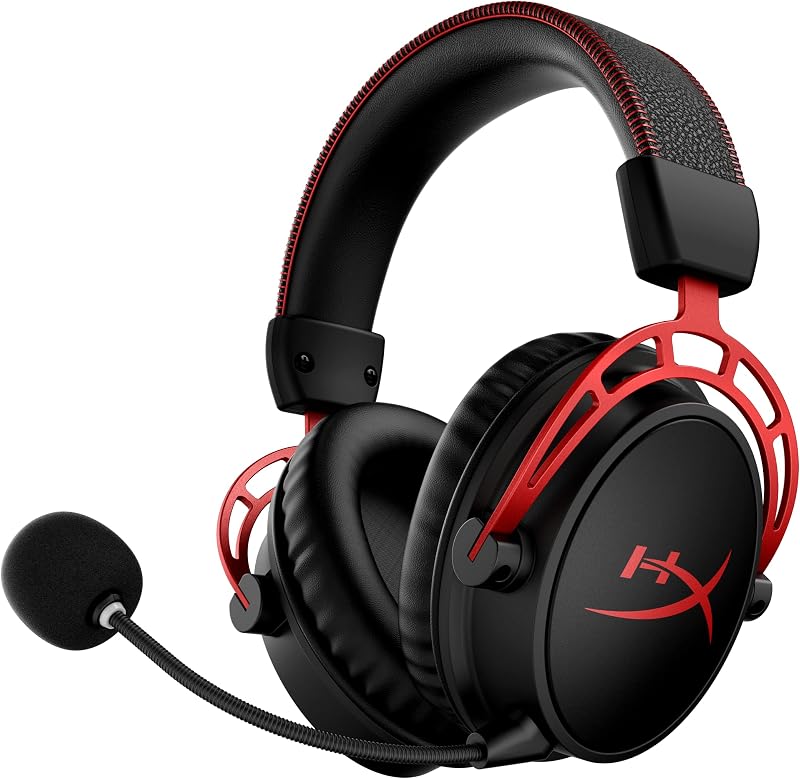
| Microphone | ClearCast Gen 2.X (fully retractable, 32KHz/16Bit) | Detachable noise-canceling with pop filter |
| Headset Weight | 0.28 kg | The listing does not specify |
| Frame and Cushion Materials | Over-ear frame with round ear cushions | Aluminum frame, memory foam, breathable leatherette |
| Manufacturer Warranty | 1 Year | 2 Year |
| Best For | Multi-platform gamers wanting phone audio and mobile app tuning | Marathon PC players demanding class-leading battery longevity |
Battery Life and Fast Charging Performance
Battery longevity determines how freely you use a wireless headset without tethering yourself to a charging cable during a high-stakes match. Frequent charging interrupts long sessions and accelerates battery wear over the lifespan of your peripheral. When comparing options for extended gaming, the endurance benchmark dictates whether you must remember to plug in every few nights or if charging becomes an afterthought you handle once a month.
The HyperX Cloud Alpha Wireless battery life sets a standard that no other wireless gaming peripheral currently matches. Rated at up to 300 hours of continuous wireless gaming when tested at 50 percent volume, the Cloud Alpha Wireless allows a player to game for 8 hours every day for over a month on a single charge. If you evaluate whether the purchase is worthwhile based purely on freeing your desk from power cords, the Cloud Alpha Wireless delivers unparalleled endurance that eliminates battery anxiety entirely.
The SteelSeries Arctis Nova 5 delivers a respectable 60-hour battery life, which allows for 8 hours of play every day across an entire week. While that runtime is dwarfed by the Cloud Alpha Wireless, the Arctis Nova 5 compensates with USB-C Fast Charge technology that restores 6 hours of playback from a quick 15-minute charge. This rapid replenishment ensures that even if you forget to plug in over the weekend, a brief pause gives you enough power for an entire evening session.
Edge: HyperX Cloud Alpha Wireless because its 300-hour battery life provides unmatched marathon endurance that lasts weeks longer than the Arctis Nova 5 on a single charge.
Wireless Connectivity and Platform Flexibility
Connectivity options determine how easily a headset transitions from a dedicated desktop setup to consoles, handhelds, and mobile phones. Gamers who stick exclusively to a desk have different requirements than those who want to accept incoming phone calls, watch videos on a tablet, or switch between a home console and a portable system without unplugging adapters.
The Arctis Nova 5 features Quick-Switch Wireless technology that lets you alternate between high-speed 2.4GHz gaming and Bluetooth 5.3 at the press of an on-ear button. Using a compact USB-C multi-platform dongle alongside a 5-foot USB-C to USB-A extension cable, the headset connects seamlessly to PC, PlayStation 5, PlayStation 4, Nintendo Switch, Meta Quest, smartphones, and tablets. When you are gaming on 2.4GHz, mobile connections remain on standby, giving you notification beeps for incoming phone calls so you never miss urgent alerts. Readers examining the steelseries arctis nova 5 vs hyperx cloud ii will appreciate how modern dual-wireless protocols improve practical day-to-day usability.
The Cloud Alpha Wireless is engineered primarily for desktop play, relying on a 2.4GHz USB wireless adapter to deliver a low-latency connection without audio degradation. However, it lacks Bluetooth support entirely, which limits your ability to pair the headset directly with smartphones, tablets, or portable devices without a USB port. While the 2.4GHz wireless connection is rock-solid for PC and compatible consoles, the absence of Bluetooth means you cannot take phone calls or listen to external media while remaining connected to your gaming rig.
Edge: SteelSeries Arctis Nova 5 because its dual 2.4GHz and Bluetooth 5.3 Quick-Switch wireless system provides superior multi-platform flexibility and mobile standby integration.
Audio Driver Architecture and Sound Customization
Driver architecture and audio tuning determine how accurately you perceive directional sound cues, footsteps, and explosive cinematic effects in competitive and single-player games. The ability to tailor sound profiles to specific titles transforms a generic audio signature into a tactical asset that emphasizes crucial audio information like enemy reloads and distant gunfire.
The Cloud Alpha Wireless utilizes HyperX Dual Chamber Drivers that mechanically separate the mid and high frequencies from the low-end bass. By tuning these chambers independently, the headset produces crisp mid-range vocals and clear treble without low-frequency rumble muddying the overall soundscape. It features a broad frequency response of 15 Hz to 21 kHz and integrates DTS Headphone:X Spatial Audio through the desktop HyperX NGENUITY software for pinpoint 3D localization. In any detailed HyperX Cloud Alpha Wireless review, this dual chamber design stands out for delivering clean acoustic separation right out of the box, as further explored in comparisons like the steelseries arctis nova 5 vs hyperx cloud iii.
The Arctis Nova 5 counters with custom Neodymium Magnetic Drivers engineered to output an ultra-detailed soundscape featuring crisp highs, pinpoint mids, and deep bass. What sets the Nova 5 apart is the Arctis Nova 5 Companion App, which unlocks more than 100 tailored game audio presets for titles such as Fortnite, Apex Legends, GTA V, Call of Duty, and Minecraft. Audio engineers and esports professionals tuned these profiles so you can alter your equalizer settings in real time via your phone without tabbing out of your game. You can even preserve specific EQ presets on the 2.4GHz bandwidth without altering your preferred media profiles for Bluetooth listening.
Edge: SteelSeries Arctis Nova 5 because its mobile companion app grants real-time access to over 100 dedicated game presets without requiring you to minimize your active game.
Microphone Clarity and Physical Integration
Clear vocal capture is vital for coordinating tactics in team-based games and ensuring your voice sounds natural during voice chats. Beyond raw recording clarity, the mechanical design of the microphone arm dictates convenience, portability, and whether the boom gets in your way when you are playing solo or consuming media.
SteelSeries equips the Arctis Nova 5 with the ClearCast Gen 2.X microphone, an upgraded communication system built around a high-bandwidth chipset supporting 32KHz/16Bit audio. This hardware configuration yields twice the vocal clarity of standard legacy gaming mics. The boom arm is fully retractable, meaning you can slide the microphone completely inside the left earcup when you do not need voice chat. This retractable approach keeps the headset sleek for casual music listening and protects the capsule from damage without risking misplacing a detached boom, an advantage noted when comparing premium lineups like the steelseries arctis nova pro wireless vs hyperx cloud iii.
HyperX equips the Cloud Alpha Wireless with a detachable noise-canceling microphone accompanied by an included pop filter. The noise-canceling element helps isolate your voice from background clatter, while the foam pop filter reduces harsh plosives and breath sounds during intense voice exchanges. When you only want to listen to game audio, you can unplug the microphone completely from the earcup. The trade-off is physical management: unlike a retractable arm, a detached microphone can be misplaced on your desk or lost when transporting your headset.
Edge: SteelSeries Arctis Nova 5 because its 32KHz/16Bit high-bandwidth chipset delivers superior vocal clarity, while the fully retractable arm is far more convenient than a detachable boom.
Build Quality and Long-Session Comfort
Physical construction dictates how well a gaming headset survives daily wear while maintaining comfortable clamping force during multi-hour gaming sessions. Headsets built with rigid metal components often provide superior structural longevity, whereas lighter composite frames reduce neck fatigue during marathon play.
The Cloud Alpha Wireless is built around a durable aluminum frame that provides structural rigidity against bending, drops, and long-term wear. HyperX pairs this sturdy metal backbone with signature plush memory foam and breathable leatherette circumaural ear cushions. The circumaural shape encloses your ears completely, distributing clamping pressure evenly across your skull to prevent hotspotting. Backed by a 2-year manufacturer warranty, the Cloud Alpha Wireless is engineered to survive years of intense daily gaming, a trait shared with legacy models discussed in the steelseries arctis nova 7 vs hyperx cloud ii comparison.
The Arctis Nova 5 emphasizes lightweight engineering, registering a total weight of 0.28 kg. Its over-ear design uses round ear cushions that sit comfortably over your ears, reducing the downward pull and head strain that heavier headsets can cause during marathon gaming sessions. The headset includes a 1-year manufacturer warranty. While its composite construction feels lightweight on your head, it lacks the metal reinforcement found in the aluminum headband of the Cloud Alpha Wireless.
Edge: HyperX Cloud Alpha Wireless because its durable aluminum frame, signature memory foam, and 2-year warranty provide superior long-term durability and structural integrity.
On-Ear Controls and Day-to-Day Usability
A wireless headset must offer seamless control over basic functions without forcing the user to pause their game or search through desktop settings menus. The layout of physical dials and toggles impacts how intuitively you can mute your voice, alter volume levels, or shift audio sources in the heat of competition.
The Arctis Nova 5 incorporates an extensive suite of physical on-ear controls distributed across the earcups. You have immediate access to power, a tactile mic mute button, a smooth volume adjustment wheel, and the dedicated Quick-Switch button that toggles between 2.4GHz gaming and Bluetooth audio. These on-ear controls allow you to switch from PC game audio to answering an incoming mobile phone call in a fraction of a second. This intuitive interface makes the headset exceptionally versatile for gamers who juggle multimedia across different devices, a workflow advantage highlighted in guides like the steelseries arctis nova 7 vs logitech g pro x 2.
The Cloud Alpha Wireless keeps physical controls simple and focused. The earcups house the essential power button, a microphone mute switch, and a volume dial, alongside a USB port for charging. All advanced equalization adjustments and battery status monitoring are routed through the HyperX NGENUITY software on PC. Because there is no secondary Bluetooth connection or multi-device switching on the headset, the control layout remains uncluttered, though it lacks the multifunction control depth found on the Nova 5.
Edge: SteelSeries Arctis Nova 5 because its dedicated Quick-Switch button and complete on-ear control suite provide immediate access to multi-platform functions without software dependence.
Pros and Cons
SteelSeries Arctis Nova 5

Pros
- Dual 2.4GHz and Bluetooth 5.3 wireless
- 100+ mobile app audio presets
- Retractable 32KHz/16Bit ClearCast mic
- Fast charge gives 6 hours in 15 minutes
- Lightweight 0.28 kg chassis
Cons
- 60-hour runtime trails the Cloud Alpha Wireless
- 1-year warranty instead of 2 years
View SteelSeries Arctis Nova 5 on Amazon
HyperX Cloud Alpha Wireless
Pros
- Staggering 300-hour battery runtime
- Durable aluminum frame construction
- HyperX Dual Chamber Drivers
- DTS Headphone:X Spatial Audio support
- 2-year manufacturer warranty
Cons
- No Bluetooth support for mobile devices
- Detachable mic can be misplaced
- No mobile app for on-the-fly EQ tuning
View HyperX Cloud Alpha Wireless on Amazon
Who Should Buy Each One
Choose the SteelSeries Arctis Nova 5 If
- You want dual-wireless flexibility to take phone calls or stream music over Bluetooth 5.3 while gaming on a 2.4GHz connection.
- You prefer tuning sound profiles directly from your smartphone using 100+ game audio presets without minimizing your matches.
- You value a fully retractable 32KHz/16Bit microphone that slides away cleanly when you are listening to media or traveling.
- You want a lightweight 0.28 kg headset featuring fast charging that yields 6 hours of battery in just 15 minutes.
Choose the HyperX Cloud Alpha Wireless If
- You want a massive 300-hour battery life that allows you to play for weeks or months between charge cycles.
- You are primarily a desktop PC player who relies on DTS Headphone:X Spatial Audio for immersive 3D surround sound.
- You prefer a rugged aluminum frame paired with plush memory foam cushions and breathable leatherette.
- You want the peace of mind that comes with a comprehensive 2-year manufacturer warranty.
Final Verdict
For the majority of multi-platform gamers, the SteelSeries Arctis Nova 5 is the more versatile and modern audio solution. Its Quick-Switch Wireless capability lets you alternate instantly between a 2.4GHz dongle and Bluetooth 5.3, ensuring you never miss a phone call while playing on PC, PlayStation, or Nintendo Switch. Combined with more than 100 game-specific presets accessible through a mobile app, a lightweight 0.28 kg chassis, and an ultra-clear 32KHz/16Bit retractable microphone, the Nova 5 delivers comprehensive daily utility that extends far beyond the desk.
On the other hand, the HyperX Cloud Alpha Wireless remains the undisputed champion of sheer battery endurance. If your gaming takes place primarily at a desktop PC and you despise the routine of plugging in peripherals, its staggering 300-hour battery life stands in a class of its own. Backed by a tough aluminum frame, Dual Chamber Drivers, DTS Headphone:X spatial processing, and a 2-year warranty, the Cloud Alpha Wireless is the ultimate low-maintenance headset for dedicated PC marathons.
FAQ
Does the HyperX Cloud Alpha Wireless feature Bluetooth connectivity?
No, the HyperX Cloud Alpha Wireless does not have Bluetooth built in. It connects strictly through its included 2.4GHz USB wireless adapter, making it suitable for PC and compatible gaming systems, but unable to pair wirelessly with smartphones or tablets.
Can the SteelSeries Arctis Nova 5 play 2.4GHz and Bluetooth audio at the exact same time?
The SteelSeries Arctis Nova 5 uses Quick-Switch Wireless rather than simultaneous audio mixing. You toggle between high-speed 2.4GHz gaming and Bluetooth 5.3 with the tap of an on-ear button. However, while you are gaming on 2.4GHz, the headset keeps your Bluetooth mobile connection on standby, chiming notification beeps for incoming calls.
How is the 300-hour battery life of the HyperX Cloud Alpha Wireless measured?
HyperX rates the Cloud Alpha Wireless for up to 300 hours of continuous wireless gaming based on testing conducted at 50 percent headphone volume. Real-world runtime will vary depending on your listening volume and operational distance from the USB adapter.
How do you adjust EQ settings on the SteelSeries Arctis Nova 5?
You can adjust equalizers using the Arctis Nova 5 Companion App on your mobile device. The app communicates with the headset over Bluetooth, allowing you to select from more than 100 game-specific presets in real time without tabbing out of your game on PC or console.
Is the microphone on the SteelSeries Arctis Nova 5 detachable?
The ClearCast Gen 2.X microphone on the SteelSeries Arctis Nova 5 is not detachable; it is fully retractable. You can pull the flexible boom arm out for voice chat and push it back until it sits completely flush inside the left earcup for storage or music listening.
Can you use the HyperX Cloud Alpha Wireless while it charges?
Yes, you can connect the included USB charge cable to the HyperX Cloud Alpha Wireless and continue playing while the internal battery charges. Given that the headset provides up to 300 hours on a full charge, tethered gameplay will be an extremely rare occurrence.