The fundamental divide between a gaming laptop and a desktop comes down to all-in-one mobility versus modular thermal headroom. A gaming laptop packs a dedicated graphics chip, an integrated high-refresh display, and a keyboard into a clamshell you can carry in a backpack, whereas a desktop demands dedicated desk space in exchange for unrestricted chassis airflow, expansive port selections, and hassle-free part replacement.
Gamers and students who need a single portable rig for campus, travel, and LAN sessions should select a gaming laptop, while stationary battlestation builders seeking higher sustained graphics power and long-term hardware upgrades should invest in a desktop.


Gaming Laptop vs Desktop at a Glance
| Attribute | Gaming Laptop | Desktop |
|---|---|---|
| Form Factor | Clamshell with integrated screen and keyboard | Stationary computer tower |
| Processor Options | Intel Core i7-14650HX or AMD Ryzen 7 260 | Intel Core Ultra 7-265 or AMD Ryzen 7 8700F |
| Graphics Hardware | NVIDIA GeForce RTX 5060 Laptop GPU (8GB) | NVIDIA GeForce RTX 5070 or integrated graphics |
| Cooling Architecture | Vapor chambers, liquid metal, tri-fan or quad-intake | Chassis air coolers with multiple intake/exhaust fans |
| Display Integration | Built-in 16-inch 165Hz-180Hz panels | Requires external display (supports up to 4 monitors) |
| Memory Expansion | Tool-free RAM access or dual DDR5 slots up to 32GB | Standard desktop dual-channel DDR5 slots |
| Storage Expansion | PCIe Gen 4 SSD with dual M.2 slot availability | Up to 2TB M.2 NVMe SSD with modular drive bays |
| Weight | 4.6 lbs to 2.65 kg (approx. 5.8 lbs) | 21.3 lbs (full tower) or compact mini-tower |
| Best For | Mobile players, students, and hybrid workspaces | Dedicated home setups and modular performance |
Gaming Laptop vs Desktop Performance and Graphics Horsepower
When measuring framework laptop 16 vs razer blade 16 style mobile performance against full-sized rigs, physical thermal headroom dictates raw speed. A gaming laptop relies on specialized mobile silicon engineered to operate within constrained wattage limits. Contemporary examples like the ASUS ROG Strix G16 harness an Intel Core i7 14650HX alongside an NVIDIA GeForce RTX 5060 Laptop GPU with 8GB of memory, utilizing Blackwell architecture, DLSS 4, and Max-Q technologies. Similarly, the Acer Nitro V 16S AI combines an AMD Ryzen 7 260 processor boasting up to 38 AI TOPS with an RTX 5060 Laptop GPU rated for 572 AI TOPS. These machines deliver smooth frame rates at 1080p and 1200p resolutions, but their power envelopes are closely regulated to prevent overheating inside thin chassis.
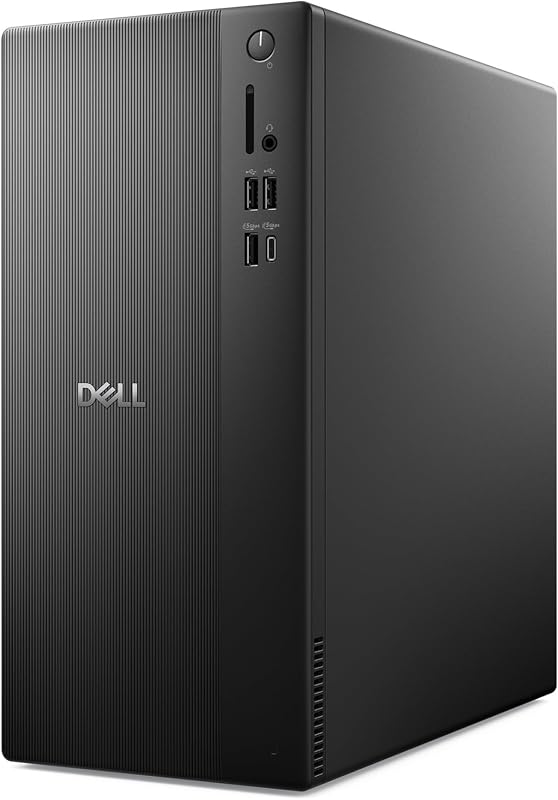
In contrast, stationary computer towers have room for higher-tier silicon and robust power supplies. The MSI Codex Z2 steps up graphical horsepower by housing a full desktop-class NVIDIA GeForce RTX 5070 graphics card paired with an 8-core, 16-thread AMD Ryzen 7 8700F processor boosting up to 5.0 GHz with 18MB of cache. Even productivity-oriented designs like the Dell Tower Desktop provide formidable compute throughput via the Intel Core Ultra 7-265 processor, utilizing 180 watts of total system power delivery. When considering gaming laptop vs desktop performance, desktop components draw higher sustained wattage without triggering thermal throttle points, maintaining peak clock speeds across demanding titles.
The performance trade-off centers on efficiency versus brute force. Modern laptops leverage neural rendering tools like DLSS 4 Multi Frame Generation and Ray Reconstruction to compensate for lower silicon surface area. However, for sheer rendering power and processing complex game geometry at high refresh rates, a desktop tower equipped with an RTX 5070 outpaces an 8GB RTX 5060 mobile GPU. When deciding between a gaming laptop or desktop for gaming, pure graphical dominance remains firmly in the desktop court.
Edge: Desktop. Desktop chassis accommodate higher-tier graphics cards like the RTX 5070 that sustain greater clock speeds without strict wattage ceilings.
Gaming Laptop vs Desktop Thermals and Acoustic Engineering
Thermal dissipation dictates how long a gaming rig can operate under heavy loads before dropping clock frequencies. Inside a notebook, engineers must evacuate massive amounts of heat through extremely dense enclosures. The ASUS ROG Strix G16 tackles this challenge with ROG Intelligent Cooling, deploying an end-to-end vapor chamber, a tri-fan technology system, and Conductonaut extreme liquid metal directly applied to the processor. In the Acer Nitro V 16S AI, a quad-intake cooling system draws cool air through targeted chassis vents to keep both the AMD Ryzen 7 260 CPU and Blackwell GPU from throttling. While these cooling systems represent peak mobile thermal engineering, the compact layout inevitably forces smaller fans to spin at high revolutions, creating audible acoustic noise during intense gaming sessions.
Desktops handle heat dissipation through expansive internal air volume and large cooling fans that move significant air volume at lower RPMs. The MSI Codex Z2 utilizes an ARGB fan air cooler paired with four full system fans-three front intakes pulling cool external air and one rear exhaust pushing thermal output out of the chassis. Even the compact Dell Tower Desktop relies on dedicated internal air cooling channels to manage the thermal footprint of its Intel Core Ultra processor within its 11.54 x 6.06 x 12.77-inch profile. The sheer physical space inside a tower prevents heat from pooling around the motherboard components, resulting in a cooler and quieter gaming environment.
Evaluating gaming laptop vs desktop thermals reveals that while modern liquid metal and vapor chambers allow laptops to run hardware reliably, desktop airflow remains vastly superior. A desktop maintains cooler skin temperatures, eliminates hot-spot throttling on wrist rests, and operates with less high-pitched fan whine during long gaming marathons.
Edge: Desktop. Dedicated intake and exhaust fans moving air through a spacious tower enclosure dissipate heat far more effectively and quietly than compact laptop heat pipes.
Portability, Form Factor, and College Convenience
Portability represents the single greatest divide in the desktop vs gaming laptop decision. A gaming notebook integrates every essential piece of hardware into a unified shell that fits neatly inside a backpack. The Acer Nitro V 16S AI measures just 0.79 inches thick and weighs 4.6 pounds, making it an effortless travel companion for students moving between lecture halls and dormitories. The ASUS ROG Strix G16 adds advanced chassis lighting and cooling while maintaining a manageable 2.65 kg (about 5.8 pounds) weight and a 0.9-inch profile. When considering a framework laptop 13 vs razer blade 14 form factor comparison, mobile gaming rigs combine functional productivity with serious gaming readiness on the go.
A desktop setup is an inherently fixed installation. The MSI Codex Z2 weighs 21.3 pounds and measures 16 x 8.38 x 19 inches, demanding a sturdy desk surface, dedicated power outlets, and continuous cable management. While the Dell Tower Desktop features a more space-saving design at 11.54 x 6.06 x 12.77 inches, it still cannot function without a separate monitor, keyboard, and wired power connection. Relocating a desktop requires disconnecting multiple cables and carefully transporting fragile components, making it impractical for regular travel.
For buyers asking whether a gaming laptop or desktop for college is the smarter pick, the laptop format provides undeniable utility. The built-in battery and compact clamshell form factor allow you to take notes during morning classes and run high-refresh multiplayer matches in the evening without purchasing a second computer. If you ever need to game outside a single room, the laptop is the only viable choice.
Edge: Gaming Laptop. Sub-six-pound weights and all-in-one clamshell designs provide on-the-go computing versatility that stationary towers cannot match.
Gaming Laptop vs Desktop Upgradability and Maintenance
Component longevity hinges on the ease of servicing and upgrading hardware over time. In a gaming laptop vs desktop upgradability comparison, the stationary tower holds a major structural advantage. The Dell Tower Desktop features tool-less entry with a removable side panel, giving users immediate access to internal hardware for routine dust cleaning and component swaps. Similarly, standard mid-towers like the MSI Codex Z2 utilize standard motherboard form factors, making it easy to swap the power supply, replace case fans, or install a next-generation graphics card into standard PCIe slots years down the road.
Modern gaming laptops have made commendable strides in modularity, but physical constraints limit their upgrade paths. The ASUS ROG Strix G16 features tool-free access to RAM and SSD slots, allowing users to expand their memory or storage pools without complex disassembly. The Acer Nitro V 16S AI includes two DDR5 slots supporting a maximum of 32GB 5600MHz memory, along with two PCIe M.2 slots (one left open from the factory for storage expansion). Understanding soldered vs upgradable laptop ram is crucial, because while storage drives and SO-DIMM sticks remain swappable on these models, the processor and graphics chip are permanently soldered to the main logic board.
When you outgrow the performance of an RTX 5060 mobile GPU, your only recourse is to purchase an entirely new laptop. A desktop owner, however, can retain their case, power supply, and storage drives while simply dropping in a new GPU or adding faster dual-channel memory modules like those compared in our 6000mhz vs 6400mhz ddr5 analysis. For builders wondering is a prebuilt gaming desktop worth it, the ability to repair and replace individual failed components makes the desktop a far more resilient long-term investment.
Edge: Desktop. Standard chassis layouts, modular power delivery, and swappable graphics cards ensure desktop towers can be upgraded indefinitely.
Integrated Displays and Peripheral Ecosystem
A gaming laptop provides a complete audiovisual setup right out of the box. The ASUS ROG Strix G16 comes equipped with a 16-inch 16:10 FHD+ display featuring a 165Hz refresh rate and a rapid 3ms response time, treated with an ACR film that reduces glare and enhances contrast. It also integrates Dolby Atmos audio, an esports-ready keyboard, and a 360-degree Aura RGB light bar. Stepping up display specs, the Acer Nitro V 16S AI includes a 16-inch WUXGA (1920 x 1200) IPS panel running at 180Hz with 100% sRGB color coverage, alongside a built-in backlit keyboard and numeric keypad. For buyers who want to unbox their machine and immediately jump into fast-paced gameplay, the difference between standard screens and high-refresh panels is explored in our 60hz vs 144hz overview.
Desktops, conversely, are bare computing engines that require external peripherals to function. While this means you must source your own monitor, mouse, and keyboard, it also grants complete freedom to build an expansive battlestation. The Dell Tower Desktop excels in multi-display productivity, featuring DisplayPort and HDMI 2.1 outputs capable of driving two 4K displays or daisy-chaining up to four FHD monitors. The MSI Codex Z2 features dedicated HDMI and DisplayPort connections directly on the RTX 5070 graphics card, allowing you to connect ultra-wide gaming displays, VR headsets, and high-refresh esports panels simultaneously.
The laptop delivers superior convenience and self-contained value because you do not need to research or purchase a separate display panel. However, desktops provide superior connectivity for multi-monitor setups without requiring external USB-C hubs or adapters. For all-in-one simplicity, the integrated high-refresh laptop screen wins out.
Edge: Gaming Laptop. Factory-calibrated 165Hz to 180Hz displays, integrated keyboards, and built-in audio provide an instant gaming station without extra peripheral purchases.
Pros and Cons
Gaming Laptop

Pros
- Integrated 165Hz to 180Hz display
- Lightweight portable clamshell form factor
- Tool-free access to RAM and SSD
- Vapor chamber and liquid metal cooling
Cons
- Permanently soldered CPU and GPU
- Audible fan noise under sustained load
View ASUS ROG Strix G16 (2025) Gaming on Amazon
Desktop
Pros
- Full-sized desktop RTX 5070 graphics
- Spacious multi-fan chassis airflow
- Effortless tool-less component upgrades
- Native support for up to four monitors
Cons
- Stationary build weighing over 21 pounds
- Requires separate display and peripherals
View Dell Tower Desktop Intel Core Ultra on Amazon
Who Should Buy Each One
Choose the Gaming Laptop If
- You need a mobile computer that easily travels between dorms, offices, and LAN parties in a standard backpack.
- You want a complete, ready-to-use gaming setup out of the box with an integrated 165Hz or 180Hz high-refresh display.
- Your living situation or study area has limited desk space that cannot accommodate a full-sized computer tower and external monitor.
- You prefer factory-integrated cooling solutions like vapor chambers and liquid metal without worrying about custom fan curves.
Choose the Desktop If
- You want maximum graphical performance and ray-tracing horsepower from cards like the desktop GeForce RTX 5070.
- You plan to upgrade your graphics card, storage, or internal components over several years to keep up with demanding software.
- You require a quiet, cool-running system with expansive airflow that avoids thermal throttling during heavy workloads.
- You run complex multi-monitor battlestations driving up to four external displays for streaming, content creation, or multitasking.
Final Verdict
For most gamers who split their time between work, school, and recreation, the modern gaming laptop is the practical choice. Machines like the ASUS ROG Strix G16 and Acer Nitro V 16S AI package NVIDIA RTX 5060 graphics, fast DDR5 memory, and fluid 165Hz-180Hz displays into chassis weighing under six pounds. While you accept permanent silicon configurations and louder cooling fans under load, the ability to unplug a single cable and take your entire game library anywhere delivers unmatched convenience for everyday life.
However, if your PC remains permanently stationed in a bedroom or home office, a desktop like the MSI Codex Z2 or Dell Tower Desktop is the superior investment. Desktops deliver significantly higher graphical horsepower via unconstrained components like the RTX 5070, operate with whisper-quiet multi-fan airflow, and offer tool-less expansion that lets you swap parts for years to come. If you do not require daily portability, the desktop platform provides the ultimate foundation for performance and long-term modularity.
FAQ
Is a gaming laptop worth it compared to a desktop?
A gaming laptop is worth it if you value space-saving portability and need an all-in-one machine with a built-in high-refresh display, keyboard, and battery. If portability is not a requirement, a desktop offers superior cooling, higher sustained frame rates, and long-term part upgradability.
Can a gaming laptop replace a desktop for college?
Yes, a gaming laptop is an ideal desktop replacement for college students. Lightweight models weighing under five pounds, such as the Acer Nitro V 16S AI, easily handle daytime lecture note-taking, productivity software, and evening gaming sessions without requiring a bulky secondary computer in a small dorm room.
How do gaming laptop thermals compare to desktop cooling?
Gaming laptops operate at higher internal temperatures because their cooling hardware is packed into a tight clamshell enclosure. While advanced systems like the ROG Intelligent Cooling setup in the ASUS ROG Strix G16 use liquid metal and vapor chambers to manage heat safely, desktops feature large air volume and multiple chassis fans that keep temperatures lower and noise levels quieter.
Is a prebuilt gaming desktop worth it for beginners?
A prebuilt gaming desktop like the MSI Codex Z2 is an excellent choice for users who want desktop-class performance without assembling individual parts from scratch. It provides plug-and-play reliability, synchronized RGB lighting, multi-fan cooling, and standardized internal components that can still be upgraded in the future.
Can you upgrade the graphics card in a gaming laptop?
No, the graphics card and processor in modern gaming laptops are soldered directly to the motherboard and cannot be upgraded. You can, however, upgrade memory and storage on models equipped with dual DDR5 slots and open M.2 PCIe slots like those found on the ASUS ROG Strix G16 and Acer Nitro V 16S AI.
Which platform offers better display options out of the box?
A gaming laptop offers the best out-of-the-box display value because it includes an integrated high-refresh screen, such as a 165Hz FHD+ or 180Hz WUXGA IPS panel. A desktop requires you to purchase a separate external monitor, though its graphics card outputs allow you to connect multiple 4K displays or ultra-wide gaming monitors over DisplayPort and HDMI.


