The single difference that decides the choice between Thunderbolt and USB-C is operational bandwidth and protocol tunneling: while both standards frequently use the exact same physical oval connector, Thunderbolt cables bundle high-speed PCI Express data paths up to 80Gbps, high-resolution DisplayPort streams, and up to 240W Power Delivery into a single link, whereas baseline USB-C cords often operate across legacy USB 2.0 wiring restricted to 480Mbps transfers and 15W charging.
Choose Thunderbolt if you transfer massive files to external NVMe solid-state drives, output video to high-resolution display setups, or need a single-cable docking solution for your laptop workstation. Choose USB-C if your primary requirement is plugging a phone or everyday accessory into a standard USB-A wall block or laptop port for reliable overnight battery replenishment without paying for unused bandwidth.


Thunderbolt vs USB-C at a Glance
| Feature | Thunderbolt | USB-C |
|---|---|---|
| Maximum Data Transfer Speed | 40Gbps to 80Gbps | 480Mbps (0.48Gbps) |
| Video Output Capability | Single 8K, Dual 4K, up to 16K@60Hz | Not supported (USB 2.0 data/charge only) |
| Maximum Charging Wattage | 240W Power Delivery (PD 3.1) | 15W (5V / 3A) |
| Smart Charging Hardware | Integrated E-Marker chip | Not listed |
| DisplayPort Protocol | DisplayPort Alt Mode and DisplayPort 2.1 | Not supported |
| Connector Physical Configuration | Reversible USB-C to USB-C (24-pin) | USB-A to USB-C (28-pin) |
| Exterior Cable Construction | Braided nylon with aluminum housing | Braided nylon with reinforced strain relief |
| Multi-Stream Display Support | Dual 4K, Dual 8K, Triple 4K@144Hz | Not supported |
| Best For | High-speed creative workstations, eGPUs, displays | Everyday phone charging and basic peripherals |
Data Transfer Rate and Storage Throughput
Data transfer rate dictates how swiftly your system moves files between connected drives, local storage volumes, and processing units. In modern production environments, bus speed determines whether you can edit multi-stream raw video directly from an external enclosure or whether you must endure agonizing copy queues. When evaluating a high-bandwidth connection, the raw bandwidth defines your storage ceiling.
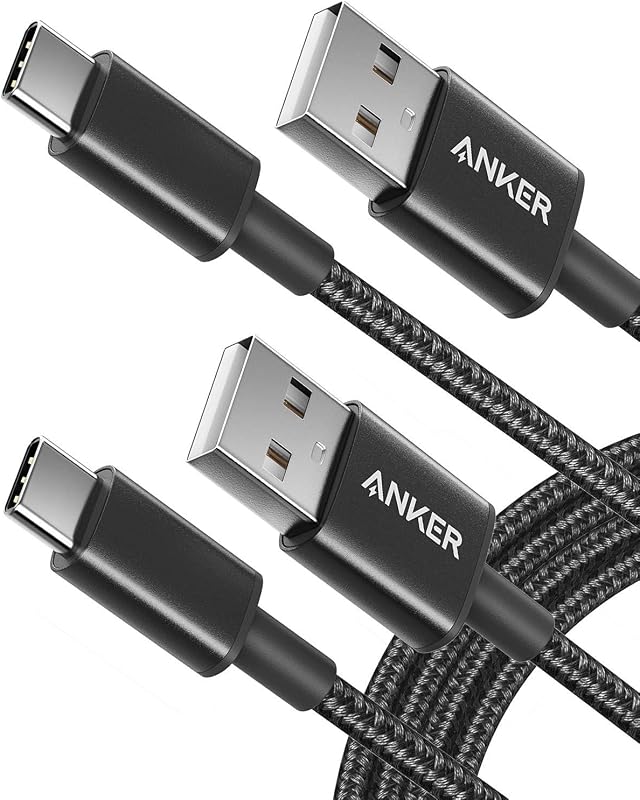
The performance gap between these two categories is immense. A certified high-speed cable such as the Maxonar USB4 for Thunderbolt 4 Cable operates at 40Gbps, while next-generation options like the UGREEN 240W USB C to USB C Cable hit 80Gbps through USB4 Gen4 specifications. According to product specifications, an 80Gbps link transfers a 20GB 4K video file in approximately three seconds. In stark contrast, a standard baseline cord like the Anker USB A to USB C Cable operates at USB 2.0 throughput, which caps data transfer at 480Mbps (0.48Gbps). Moving that identical 20GB media library across a 480Mbps connection takes minutes instead of seconds, turning rapid drive backups into prolonged interruptions.
If you are deciding between asus tuf gaming b650-plus wifi vs proart x670e-creator desktop motherboards to maximize creative throughput, choosing Thunderbolt or USB-C for SSD tasks completely reshapes your storage efficiency. Realizing true NVMe drive speeds requires the full PCIe tunneling pipeline provided by Thunderbolt transfer speed capabilities, whereas basic USB-C lines choke modern solid-state media down to legacy mechanical drive rates.
Edge: Thunderbolt, delivering 40Gbps to 80Gbps transfer rates that outpace basic 480Mbps USB-C links by up to 166 times.
Display Output and Multi-Monitor Capabilities
External display support allows a single physical port on your computer to push uncompressed audio and video signals to desktop monitors, visual production panels, and television screens. Professional visual workspaces require multi-display chaining, extreme color depth, and refresh rates capable of handling precision color grading and real-time graphics authoring.
Thunderbolt excels in visual transmission by incorporating native DisplayPort Alt Mode and DisplayPort 2.1 protocol support. The Maxonar cable powers a single 8K display or dual 4K monitors simultaneously over a single line, making it directly compatible with studio displays, graphics docks, and monitor hubs. Pushing visual fidelity further, the UGREEN cable leverages DisplayPort 2.1 to handle up to a single 16K display at 60Hz, dual 8K displays at 60Hz, or triple 4K monitors running at an ultra-smooth 144Hz refresh rate. Standard USB-A to USB-C cords provide zero video passthrough because their internal pinout and legacy USB 2.0 controllers lack the physical lanes and signaling bandwidth necessary for DisplayPort video packets.
When selecting dell u2723qe vs benq pd2725u visual panels for design work, deciding whether to run Thunderbolt or USB-C for external monitor setups determines whether your screens operate at native resolution. Utilizing a certified Thunderbolt connection allows a laptop to drive multi-screen docking arrays seamlessly, whereas basic USB-C charge cords cannot transmit any display signal whatsoever.
Edge: Thunderbolt, offering up to 16K visual resolutions and triple-display setups while basic USB-C cables lack video capability entirely.
Power Delivery and Charging Speed
Charging speed determines how rapidly your laptop, tablet, or smartphone replenishes its battery pack under sustained computing loads. Advanced modern hardware draws substantial wattage, particularly 16-inch laptops with dedicated graphics rendering complex rendering queues or compiling code.
In this category, Thunderbolt vs USB-C charging speed reveals two completely different power tiers. Both the Maxonar and UGREEN cables support Extended Power Range Power Delivery (PD 3.1) up to 240W. This standard uses an integrated E-Marker chip to automatically negotiate power profiles across 5V, 9V, 15V, 20V, and 48V rails. The UGREEN cable charges a MacBook Pro 16-inch to 56% battery capacity in just 30 minutes, while the Maxonar listing confirms a full charge for the same machine in under two hours while actively transmitting high-speed data and driving an external monitor. Meanwhile, the Anker USB A to USB C Cable operates at a fixed ceiling of 15W (5V at 3A) and explicitly states in its specifications that it is not compatible with Power Delivery protocols.
Connecting a powerful laptop to an Anker 15W cable will result in battery depletion even while plugged in if the processor is running under load. The 240W capability of Thunderbolt allows a single cord to supply full operational power to workstation notebooks while simultaneously maintaining charging headroom for connected peripherals and smartphones.
Edge: Thunderbolt, supplying 240W Power Delivery with intelligent E-Marker safety compared to the 15W ceiling of basic USB-C cords.
Connector Compatibility and System Integration
System compatibility determines where and how a cable fits into your existing technology ecosystem. Having the most advanced protocol does little good if the physical plugs do not mate with your available wall adapters, desktop ports, or portable battery banks.
Thunderbolt hardware features reversible Type-C connectors on both ends with a 24-pin layout designed for modern host machines. The Maxonar cable maintains verified compatibility with modern systems such as the M4 Mac mini, Studio Display, Dell XPS, iPad Pro, and recent smartphones like the iPhone 16 and Galaxy S24. The UGREEN cable extends backward compatibility across Thunderbolt 4, Thunderbolt 3, USB4, and generic USB-C ports. Conversely, baseline USB-C products like the Anker USB A to USB C Cable (3 ft) feature a traditional rectangular USB-A male connector on one end and a USB-C male connector on the other, utilizing a 28-pin arrangement tailored for older power bricks, automotive charging ports, and legacy desktop motherboards.
If your daily environment relies on older charging bricks, enterprise desktops, or automotive consoles that only feature rectangular USB-A ports, a basic USB-A to USB-C cable connects without requiring passive adapters. However, when evaluating gigabyte b650 aorus elite ax vs asus proart x670e-creator connectivity options, motherboards with dedicated high-speed Type-C headers unlock the full protocol tunneling that makes Thunderbolt 4 vs USB-C modern integration so powerful.
Edge: Thunderbolt, because its symmetrical Type-C design supports multi-generation Thunderbolt and USB4 protocols across modern computers, tablets, and smartphones.
Cable Construction and Practical Durability
Physical cable construction dictates how well a cord survives daily workplace use, repeated coiling in travel bags, and continuous mechanical stress at connector strain relief collars. High-frequency signals degrade rapidly over poor shielding, making physical build quality crucial for maintaining high data throughput and safe power delivery.
Both product types in this comparison demonstrate rugged physical engineering tailored to heavy use. The UGREEN cable features high-purity copper wiring, triple internal shielding, an aluminum connector housing, and a double-braided nylon jacket rated to withstand over 10,000 bends. Maxonar uses reinforced connectors and braided nylon shielding to eliminate tangling and prevent signal loss during daily docking. On the USB-C side, Anker constructs its cables with heavy-duty nylon braiding and reinforced stress points, resulting in a build that the brand specifies lasts five times longer than standard generic cords.
Where these cables diverge is the trade-off between physical length and electrical performance. Pushing 40Gbps or 80Gbps over copper demands tight signal integrity, meaning high-speed cables like the Maxonar and UGREEN cords are typically deployed in compact 3.3-foot lengths for desktop desks, though Maxonar does provide options up to 16.5 feet for specific installations. In contrast, basic USB-C lines like the 6-foot Anker provide extended physical reach for couch or bedside phone charging without any concern for high-frequency signal degradation, making each well-suited for its intended physical application.
Edge: Tie, as both sides utilize durable nylon braiding and reinforced strain relief optimized for their respective operational demands.
Pros and Cons
Thunderbolt

Pros
- Up to 80Gbps data transfer speeds
- 240W Power Delivery with E-Marker
- High-res video up to 16K or dual 8K
- Universal docking and eGPU support
Cons
- High performance requires compatible ports
- Shorter reach on maximum bandwidth lines
View Maxonar 2-Pack USB4 Thunderbolt 4 on Amazon
USB-C
Pros
- Broad legacy USB-A charger compatibility
- Durable nylon braided construction
- Extended 6-foot reach options
- Reliable 15W everyday device charging
Cons
- Data transfer capped at 480Mbps
- Lacks video transmission capability
- No Power Delivery protocol support
View Anker USB A to USB C on Amazon
Who Should Buy Each One
Choose Thunderbolt If
- You transfer massive video libraries, photo catalogs, or drive images to external solid-state drives and need 40Gbps to 80Gbps transfer rates.
- You connect your computer to high-resolution visual displays like 4K, 8K, or 16K monitors or run dual-screen desktop setups.
- You need a single-cable docking station hub that routes high-wattage power, high-speed networking, and multiple display signals through one connection.
- You charge high-performance creator laptops like a 16-inch MacBook Pro that require up to 240W Power Delivery to sustain heavy workloads.
Choose USB-C If
- Your existing wall chargers, power strips, and automobile ports use rectangular USB-A receptacles.
- You simply need an overnight charging cord for everyday smartphones, wireless earbuds, or basic battery packs.
- You want a durable 6-foot cord for relaxed bedside or living room charging where high data speeds are irrelevant.
- You are connecting low-bandwidth desktop accessories such as input keyboards, mice, or baseline audio interfaces.
Final Verdict
For high-performance creative workstations, gaming rigs, and modern laptop docks, Thunderbolt is overwhelmingly the superior connection standard. With data transfer speeds scaling from 40Gbps on the Maxonar cable up to an astonishing 80Gbps on the UGREEN cable, alongside 240W Power Delivery and native DisplayPort 2.1 video output, Thunderbolt solves every desktop connectivity bottleneck through a single cord. When comparing high-end gaming displays like the samsung odyssey neo g7 32 vs lg 27up850 or managing demanding creative peripherals, the immense bandwidth of Thunderbolt ensures that display refresh rates and SSD read speeds operate at their absolute hardware limits.
Standard USB-C cords, like the Anker USB-A to USB-C options, remain the sensible, practical choice when your goals are strictly utilitarian. If you do not own an external NVMe drive, do not connect to external displays, and merely need to plug a smartphone or wireless microphone into a standard USB-A charging port-as when comparing desktop audio gear like the shure sm7b vs rode nt-usb+-the high-bandwidth capabilities of Thunderbolt provide no tangible benefit. For simple 15W everyday power delivery and basic accessory syncing, a durable, flexible USB-C cable gets the job done cleanly without operational complexity.
FAQ
Can I plug a Thunderbolt cable into a standard USB-C port?
Yes, Thunderbolt cables utilize the universal Type-C connector shape and are backward compatible with standard USB-C ports on laptops, tablets, and mobile phones. When plugged into a standard non-Thunderbolt port, the cable will automatically adjust its data and power negotiation down to match the maximum capability supported by that host device.
Can a basic USB-A to USB-C cable transmit video to a monitor?
No, basic USB-A to USB-C cables operating on USB 2.0 architecture cannot transmit video signals. They lack the physical high-speed data lanes and DisplayPort Alt Mode signaling required by external displays, restricting their functionality strictly to basic 480Mbps data syncing and 15W power charging.
Why do some USB-C cables only transfer data at 480Mbps?
Many everyday charging cords are wired internally using legacy USB 2.0 specifications. Manufacturers omit the high-frequency copper data pairs and shielding required for 10Gbps, 40Gbps, or 80Gbps throughput to keep the cord thinner and more flexible for simple phone charging tasks.
Does Thunderbolt charge devices faster than standard USB-C?
Thunderbolt cables supporting Power Delivery 3.1 deliver up to 240W of power, which charges large laptops significantly faster than basic USB-C cords limited to 15W. However, charging speed is ultimately governed by the power source and the receiving device; a smartphone that only accepts 15W will charge at the same rate on both cables.
Is Thunderbolt worth the investment for an external SSD?
Thunderbolt is worth the investment if you use an external NVMe solid-state drive capable of multi-gigabyte transfer rates. A 40Gbps or 80Gbps Thunderbolt cable allows the drive to read and write at full operational speed, whereas a baseline 480Mbps cable limits the drive to roughly 40 to 43 megabytes per second.
How can I identify if my cable supports Thunderbolt or basic USB?
Thunderbolt cables typically feature a lightning bolt symbol or a specific speed marking (such as 40 or 80) printed directly on the connector housing. Basic USB-C charging cables generally display the manufacturer logo or standard USB icons without any high-bandwidth certification symbols.

