The decisive contrast when comparing the Dell XPS 15 against the HP Envy x360 15 rests on whether your workflow demands raw workstation-grade graphics processing or flexible 2-in-1 touchscreen ergonomics. The Dell XPS 15 combines a high-voltage 45W H-series processor with dedicated NVIDIA GeForce RTX graphics in a traditional clamshell chassis, while the HP Envy x360 15 pairs an efficient dynamic processor with integrated graphics inside a 360-degree rotating convertible enclosure.
Choose the Dell XPS 15 if you produce media, compile heavy codebases, or run graphic-intensive software that requires discrete video hardware and 32GB of high-speed memory. Choose the HP Envy x360 15 if your daily computing emphasizes handwriting notes, digital sketches, flexible presentation viewing angles, and rapid battery replenishment on the move.

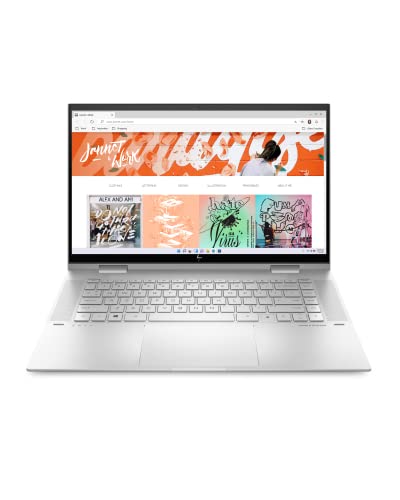
Dell XPS 15 vs HP Envy x360 15 at a Glance
| Feature | Dell XPS 15 | HP Envy x360 15 |
|---|---|---|
| Chassis Form Factor | Clamshell | Convertible 2-in-1 |
| Processor (CPU) | Intel Core i7-12700H (14 cores, 20 threads, up to 4.7GHz) | Intel Core i7-1260P (12th Gen Intel Core dynamic processor) |
| Graphics (GPU) | NVIDIA GeForce RTX 3050 (4GB GDDR6 dedicated) | Intel Iris Xe Graphics (Integrated) |
| System Memory | 32GB DDR5 4800MHz RAM | 16GB RAM |
| Storage Drive | 1TB PCIe NVMe M.2 SSD | 1TB SSD |
| Display Panel | 15.6-inch FHD+ (1920 x 1200), IPS, Non-Touch, 500 nits, 100% Adobe RGB | 15-inch Edge-to-edge FHD Touchscreen |
| Operating System | Windows 11 Pro (64-bit) | Windows 11 Home |
| Weight | Not listed | 4 pounds |
| Port Selection | 2x Thunderbolt 4 / USB4, USB 3.2 Gen 2 Type-C, SD Card Reader | HDMI, USB ports (specific counts not listed) |
| Wireless Technology | Intel Killer Wi-Fi 6 AX211, Bluetooth 5.2 | Bluetooth (Wi-Fi standard not listed) |
| Best For | Demanding creative professionals, engineers, and heavy multitaskers | Students, collaborative presenters, and everyday touchscreen users |
Processing Architecture and Computational Muscle
Central processor performance dictates how smoothly a machine handles sustained rendering, large file archives, and simultaneous background services. The Dell XPS 15 features an Intel 12th Gen Alder Lake Tetradeca-Core i7-12700H processor configured with 14 physical cores, 20 threads, a base clock of 2.3GHz, a boost clock up to 4.7GHz, and 24MB of cache. In contrast, the HP Envy x360 15 houses an Intel Core i7-1260P processor, which belongs to Intel’s performance-thin segment designed to balance output with lower electrical consumption. The computational variance between an H-series processor and a P-series chip reveals itself during continuous operational load.
When executing complex jobs such as video transcoding, code compilation, or multi-track audio mastering, the 14-core architecture of the XPS 15 provides an immense computational headroom. The high thread count enables Windows 11 Pro to distribute background utilities to power-efficient cores while assigning compute-heavy foreground tasks to performance cores without bottlenecking. Those comparing broader portable lineups in our dell xps 16 vs hp envy x360 15 analysis will find that the XPS design philosophy focuses on unconstrained processing throughput under sustained thermal draw.
The HP Envy x360 15 utilizes its 12th Gen Intel Core processor to allocate responsive computing to active applications efficiently. For web browsing across dozens of tabs, office documents, videoconferencing, and media streaming, the i7-1260P handles standard productivity tasks without stuttering. However, because convertible thin-and-light chassis focus on thermal limits suited for handheld use, sustained computational bursts will throttle earlier than on a dedicated performance clamshell. If pure processing speed over prolonged rendering sessions is your priority, the XPS 15 operates in a different performance tier.
Edge: Dell XPS 15 due to its 14-core, 20-thread i7-12700H processor with 24MB cache delivering significantly higher sustained compute performance than the P-series chip.
Graphics Hardware and Visual Production Workflow
The graphics processing unit determines whether a computer can handle hardware-accelerated video rendering, complex vector rendering, 3D geometry manipulation, and modern gaming. In this Dell XPS 15 RTX 3050 vs HP Envy Iris Xe comparison, the hardware differences are absolute. The Dell XPS 15 comes equipped with a discrete NVIDIA GeForce RTX 3050 graphics card with 4GB of dedicated GDDR6 VRAM. The HP Envy x360 15 relies entirely on integrated Intel Iris Xe Graphics, which draws its video memory dynamically from the shared system pool.
Having dedicated GDDR6 memory allows the XPS 15 to offload visual pipelines directly to discrete hardware. In creative suites like Adobe Premiere Pro, DaVinci Resolve, Blender, or AutoCAD, the RTX 3050 provides dedicated CUDA and Tensor cores to expedite export times, timeline previews, and real-time noise reduction. Evaluating the Dell XPS 15 or HP Envy x360 15 for video editing highlights why professional creators gravitate toward the XPS line. The discrete GPU ensures that 4K timeline scrubbing remains fluid even when applying color grades and multilayer effects.
The Intel Iris Xe engine inside the HP Envy x360 15 is capable for everyday visual tasks, casual graphic editing, and playing low-intensity games. However, without dedicated video memory, intensive graphical workloads consume system memory, causing potential bottlenecks across other open applications. Readers comparing ultraportables in our dell xps 15 vs hp spectre x360 14 breakdown will note that integrated graphics chips excel at everyday efficiency rather than intensive 3D rendering. The Envy holds its own for general media consumption and lightweight visual manipulation, but the XPS 15 provides distinct hardware acceleration for professional production environments.
Edge: Dell XPS 15 thanks to its dedicated NVIDIA GeForce RTX 3050 GPU with 4GB of fast GDDR6 video memory.
Display Quality, Color Accuracy, and Form Factor Mechanics
The display panel serves as the central interface for your work, but how it is mounted fundamentally alters how you interact with the device. The Dell XPS 15 features a 15.6-inch FHD+ anti-glare IPS InfinityEdge screen featuring a 1920 x 1200 resolution. This 16:10 aspect ratio provides additional vertical workspace compared to conventional displays, accompanied by an impressive 500 nits of peak brightness and 100% Adobe RGB color space coverage. The display is non-touch and framed within an aluminum clamshell form factor.
Conversely, the HP Envy x360 15 is built around an edge-to-edge FHD touchscreen housed inside an aluminum 2-in-1 convertible hinge. This physical design allows the panel to rotate 360 degrees, morphing the machine from a conventional laptop into a presentation stand, a media tent, or a large flat tablet. For professionals who mark up PDF blueprints, sign documents digitally, sketch concepts, or present slideshows directly to clients across a conference table, the touchscreen convertible versatility of the HP Envy x360 15 2-in-1 vs Dell XPS 15 provides an interactive experience that no traditional clamshell can match.
The trade-off lies in visual calibration and outdoor readability. The XPS 15 screen delivers 500 nits of brightness with full 100% Adobe RGB coverage, making it a reliable reference display for photographers and graphic designers whose print and web projects demand strict color fidelity. The anti-glare finish on the Dell also disperses reflections in harsh overhead office lighting. While the HP Envy gives you the convenience of direct physical touch interaction and convertible modes, the Dell provides superior optical precision and maximum brightness for rigorous visual workflows.
Edge: HP Envy x360 15 for form factor versatility and direct touchscreen capability, though the Dell XPS 15 holds the technical advantage in color volume and peak brightness.
Memory Bandwidth and Multitasking Capacity
RAM capacity and bus speed establish the threshold of how many demanding applications can run simultaneously without relying on paging files. The Dell XPS 15 arrives equipped with 32GB of cutting-edge DDR5 memory operating at a rapid 4800MHz frequency. The HP Envy x360 15 provides 16GB of system RAM. While 16GB remains sufficient for standard multitasking, 32GB of modern DDR5 memory doubles your operating margin, allowing intensive programs to run unrestricted.
For data scientists running local SQL databases, programmers virtualizing multiple environments, and digital artists stacking dozens of layers in complex compositions, the XPS 15 handles large project files with exceptional stability. DDR5 architecture introduces higher bandwidth and improved power efficiency per channel compared to older standards. As explored in our dell inspiron 14 plus vs hp envy x360 15 overview, memory capacity is often the first ceiling encountered by heavy power users who keep dozens of browser tabs, communication apps, and editing suites active at the same time.
The 16GB memory footprint of the HP Envy x360 15 is well-balanced for office productivity suites, streaming, Zoom meetings, and standard web research. However, because the Intel Iris Xe GPU shares this system memory for frame buffering and graphical compute, the memory pool available to Windows 11 Home is reduced during graphics-heavy tasks. The Dell XPS 15 not only provides double the memory capacity, but its dedicated 4GB GDDR6 GPU memory ensures the entire 32GB of DDR5 RAM remains completely accessible to your primary operating system tasks.
Edge: Dell XPS 15 due to its 32GB of high-speed DDR5 4800MHz RAM that operates independently from its discrete GPU memory.
Connectivity, External Displays, and Data Transfer Speeds
Peripheral connectivity determines how seamlessly a laptop integrates into an existing desk setup, dock, or camera production workflow. The Dell XPS 15 provides modern, high-speed input/output options, including two Thunderbolt 4 / USB4 ports rated for 40Gbps bidirectional transfer rates, one USB 3.2 Gen 2 Type-C port, a full-size SD card reader, a 3.5mm combo audio jack, and an Intel Killer Wi-Fi 6 AX211 card with Bluetooth 5.2. The integration of dual Thunderbolt 4 controllers allows the machine to power external 4K monitors, high-speed RAID storage, and eGPUs across a single unified cable.
The HP Envy x360 15 takes an alternative approach focused on legacy convenience, integrating native HDMI and standard USB ports alongside Bluetooth connectivity. For professionals who frequently connect to older office projectors, external monitors, or traditional USB thumb drives, the Envy eliminates the immediate need to carry USB-C dongles or breakout adapters. Those tracking interface layouts in our dell xps 14 vs hp spectre x360 14 guide know that native display outputs remain convenient for quick presentations.
Nevertheless, the full-size SD card slot on the Dell XPS 15 is an indispensable tool for photographers and videographers who need to offload footage directly from camera cards without searching for an external reader. Combined with the sheer throughput of 40Gbps Thunderbolt 4 bandwidth, the Dell workstation serves as a superior desktop replacement hub. While the HP Envy offers plug-and-play simplicity for HDMI equipment, the XPS 15 provides far higher data throughput and pro-grade expansion capabilities.
Edge: Dell XPS 15 for its dual 40Gbps Thunderbolt 4 ports and integrated full-size SD card reader.
Everyday Portability, Battery Charging, and Mobility
Portability encompasses not just the physical weight of a laptop, but how quickly it recovers power during brief breaks between lectures or business meetings. The HP Envy x360 15 lists an official weight of 4 pounds within an all-aluminum Natural Silver chassis. Furthermore, it incorporates HP Fast Charge technology, engineered to take the system battery from 0 to 50 percent charge in approximately 30 minutes using its 45-volt adapter. This capability provides practical peace of mind for mobile professionals who only have brief access to a wall outlet between transit stops.
The Dell XPS 15 sports a premium Platinum Silver aluminum chassis with precision-milled edges and an integrated fingerprint reader in the power button. However, the listing does not specify the exact total carrying weight or the precise battery capacity in watt-hours. Because the XPS 15 powers a 45W H-series processor and a dedicated NVIDIA RTX graphics chip, its electrical demands are naturally higher than those of a convertible laptop operating on a low-voltage P-series processor. Evaluating dell xps 16 vs hp spectre x360 14 designs reveals that machines with dedicated GPUs typically consume battery reserves faster under sustained rendering loads.
When assessing the HP Envy x360 15 vs Dell XPS 15 for portability in lecture halls or coffee shops, the Envy has distinct practical advantages. At a verified 4 pounds, it is manageable inside a backpack, and its rapid 30-minute charging turnaround makes it highly dependable for mobile workdays. The XPS 15 remains an exceptionally sleek 15.6-inch clamshell, but its hardware is geared toward desktop-grade execution rather than extended off-grid endurance.
Edge: HP Envy x360 15 due to its documented 4-pound weight and HP Fast Charge reaching 50% capacity in approximately 30 minutes.
Pros and Cons
Dell XPS 15
Pros
- Dedicated NVIDIA GeForce RTX 3050 graphics
- Powerful 14-core Intel Core i7-12700H processor
- Generous 32GB DDR5 system memory
- Bright 500-nit 16:10 display
- Dual Thunderbolt 4 ports
Cons
- Non-touch display
- Rigid clamshell chassis lacks 2-in-1 flexibility
HP Envy x360 15
Pros
- Versatile 360-degree convertible 2-in-1 design
- Responsive edge-to-edge touchscreen
- Fast charging to 50% in 30 minutes
- Portable 4-pound aluminum chassis
Cons
- Integrated Intel Iris Xe graphics
- Lower-power Core i7-1260P processor
- Half the RAM capacity at 16GB
View HP Envy x360 15 on Amazon
Who Should Buy Each One
Choose the Dell XPS 15 If

- You produce digital video, 3D renderings, or complex graphics requiring dedicated NVIDIA GeForce RTX 3050 acceleration.
- You run memory-intensive multitasking environments, virtual machines, or heavy software suites that require 32GB of DDR5 RAM.
- You need a color-critical 500-nit screen offering full 100% Adobe RGB coverage for photography and visual design work.
- You rely on high-bandwidth peripherals, dual 40Gbps Thunderbolt 4 docking, and direct full-size SD card offloading.
Choose the HP Envy x360 15 If

- You want a 360-degree convertible hinge that allows you to alternate between standard laptop typing, tent viewing, and tablet drawing modes.
- You interact directly with your screen for handwriting, annotating contracts, signing documents, or navigating menus with touch.
- You frequently move between locations and need HP Fast Charge to replenish 50% of your battery in about 30 minutes.
- You prefer a 4-pound all-around aluminum laptop equipped with convenient native HDMI connectivity for classroom or boardroom presentations.
Final Verdict
Deciding between these two 15-inch systems comes down to prioritizing workstation computational muscle or adaptable touchscreen convenience. Any rigorous Dell XPS 15 review makes it clear that this machine is engineered for users who treat their laptop as a portable production studio. By pairing a 14-core Intel Core i7-12700H processor with discrete NVIDIA GeForce RTX 3050 graphics, 32GB of DDR5 memory, dual Thunderbolt 4 interfaces, and a 500-nit 100% Adobe RGB display, the XPS 15 outclasses integrated ultraportables on heavy editing, computational modeling, and creative workflows.
On the other hand, an objective HP Envy x360 15 review confirms that pure rendering power is not every user’s primary requirement. For students, sales professionals, and everyday business multitaskers, the Envy x360 15 provides a degree of physical utility that a conventional clamshell cannot replicate. Its flexible 2-in-1 hinge, intuitive edge-to-edge touchscreen, lightweight 4-pound aluminum chassis, native HDMI port, and 30-minute fast-charging profile make it a remarkably versatile computing companion for mobile lifestyles.
FAQ
Dell XPS 15 or HP Envy x360 15 for video editing?
The Dell XPS 15 is significantly better for video editing. It includes a dedicated NVIDIA GeForce RTX 3050 GPU with 4GB of GDDR6 VRAM, 32GB of DDR5 RAM, and a 14-core i7-12700H processor, which together accelerate timeline playback and export rendering. The HP Envy x360 15 utilizes integrated Intel Iris Xe Graphics, which handles casual cutting but lacks dedicated video memory for demanding multi-stream 4K editing.
Dell XPS 15 or HP Envy x360 15 for college?
The right choice depends on your college major. For engineering, computer science, architecture, or digital film students requiring dedicated GPU acceleration, the Dell XPS 15 is the necessary choice. For humanities, business, or general education students who value hand-drawn note taking, reading digital textbooks in tablet mode, lightweight 4-pound carrying, and quick 30-minute fast charging between lectures, the HP Envy x360 15 is the more versatile daily machine.
How does the Dell XPS 15 RTX 3050 compare to the HP Envy Iris Xe?
The Dell XPS 15 RTX 3050 is a discrete graphics chip with 4GB of dedicated GDDR6 memory designed to process complex 3D shaders, ray tracing features, and GPU-accelerated computing. The HP Envy Iris Xe is an integrated graphics processor embedded in the CPU that shares system RAM, making it suitable for video playback and light everyday tasks, but far less capable for intensive graphics processing.
Does the Dell XPS 15 display support touch or pen input?
No, the Dell XPS 15 model compared here features a non-touch, anti-glare IPS display designed with narrow InfinityEdge bezels and 100% Adobe RGB color accuracy. If you require native touch input, tablet drawing, or stylus navigation, the HP Envy x360 15 features an edge-to-edge FHD touchscreen with a 360-degree rotating hinge built specifically for direct touch interaction.
How does Dell XPS 15 vs HP Envy x360 battery life compare?
While the product listings do not state continuous runtimes in exact hours, the hardware architectures point to different power profiles. The HP Envy x360 15 relies on a lower-draw Intel Core i7-1260P processor and integrated graphics, backed by HP Fast Charge that restores 50% power in approximately 30 minutes. The Dell XPS 15 draws substantially more wattage to power its 45W H-series CPU and discrete RTX 3050 GPU, meaning heavy computing tasks will deplete battery reserves more rapidly.
Is HP Envy x360 15 worth it for business professionals?
Yes, the HP Envy x360 15 is well worth it for business professionals who prioritize versatility, direct client presentations, and mobile note taking. Its 2-in-1 form factor allows the laptop to fold into a tent or tablet for interactive meetings, its aluminum chassis provides professional styling at 4 pounds, and Windows 11 Home paired with fingerprint biometric security handles standard office productivity with ease.
Is Dell XPS 15 worth it for demanding power users?
Yes, the Dell XPS 15 is exceptionally well suited for power users, developers, and designers. With Windows 11 Pro, an upgraded 32GB DDR5 memory pool, 1TB NVMe SSD, dual Thunderbolt 4 connections, and a color-accurate 500-nit panel, it delivers the raw processing capacity and hardware expansion needed to replace a full desktop workstation on the go.


