Choosing between high-end portable hardware and raw computing dominance comes down to a fundamental architectural trade-off: a slim 4.1-pound chassis with a rapid-response OLED screen versus a heavy 6.3-pound desktop replacement driven by a 175W flagship GPU and an expansive Mini LED display.
Buyers needing sleek mobility, creator-grade color reproduction, and an effortless footprint for travel should select the Asus ROG Zephyrus G16, while stationary enthusiasts demanding extreme graphical throughput and sustained thermal headroom will be better served by the Asus ROG Strix Scar 16.


Asus ROG Zephyrus G16 vs ROG Strix Scar 16 at a Glance
| Feature | Asus ROG Zephyrus G16 | ROG Strix Scar 16 |
|---|---|---|
| Processor | Intel Core Ultra 9 285H (16 Cores, up to 5.4GHz, 13 TOPS NPU) | Intel Core Ultra 9 275HX |
| Graphics Processor | NVIDIA GeForce RTX 5070 8GB GDDR7 | NVIDIA GeForce RTX 5090 (175W TGP) |
| Display Type & Resolution | 16-inch WQXGA (2560 x 1600) OLED, 500 nits | 18-inch 2.5K (2560 x 1440) ROG Nebula HDR Mini LED |
| Refresh Rate & Response | 240Hz / 0.2ms | 240Hz / 3ms |
| System Memory | 16GB DDR5 | 32GB DDR5-5600MHz |
| Solid-State Storage | 512GB SSD (Upgrades available) | 2TB PCIe Gen 4 SSD (up to 7,000MB/s) |
| Cooling Hardware | The listing does not specify internal cooler details | End-to-end vapor chamber, Tri-fan, Conductonaut Extreme liquid metal |
| Chassis Dimensions | 13.94″L x 9.69″W x 0.65″Th | 15.71″L x 11.73″W x 0.93″Th |
| Weight | 4.1 pounds | 6.3 pounds |
| Operating System | Windows 11 Home | Windows 11 Pro |
| Best For | Mobile creators and traveling gamers | Stationary power users and competitive desktop replacements |
Graphics and Raw Gaming Performance
Graphics hardware establishes the baseline for sustained frame rates, texture fidelity, and advanced rendering workloads. When comparing the ROG Strix Scar 16 vs Asus ROG Zephyrus G16, the disparity in graphics processing capacity represents the single largest mechanical divide between these two machines. The Zephyrus G16 equips a dedicated NVIDIA GeForce RTX 5070 containing 8GB of next-generation GDDR7 memory. This GPU effortlessly tackles modern ray-traced releases at 1600p with high settings, backed by artificial intelligence features driven by an onboard Intel AI Boost NPU pushing up to 13 TOPS. However, the slim chassis envelope inherently limits power delivery to preserve safe operational boundaries.
In contrast, the Strix Scar 16 incorporates an NVIDIA GeForce RTX 5090 Laptop GPU configured for an immense 175W Total Graphics Power (TGP). This flagship configuration incorporates a hardware MUX Switch paired with Advanced Optimus, bypassing the integrated processor to route rendered frames directly to the display panel for a measurable 5% to 10% performance uplift. Players seeking the highest possible visual presets across uncompromising competitive titles will see much higher ceiling rates on the larger system. When evaluating the asus rog zephyrus g14 vs g16 family alongside dedicated performance monsters, the sheer wattage advantage of a 175W component remains impossible to match in sub-one-inch chassis designs.
Choosing between the Asus ROG Zephyrus G16 or ROG Strix Scar 16 for gaming hinges on your tolerance for hardware compromise. The RTX 5070 configuration in the Zephyrus is a remarkably efficient card suited for general enthusiasts, but the RTX 5090 in the Strix Scar operates in an entirely different performance tier. It offers massive compute overhead for native rendering, extreme texture packs, and complex multi-threaded creation workflows without throttling graphical pipelines.
Edge: ROG Strix Scar 16 due to its flagship 175W NVIDIA GeForce RTX 5090 GPU and dedicated MUX Switch hardware.
Display Technology and Visual Quality
Screen construction dictates both competitive responsiveness and color precision for creative workflows. The Zephyrus G16 brings a 16-inch WQXGA (2560 x 1600) OLED panel featuring a 16:10 aspect ratio, 500 nits of peak brightness, 100% DCI-P3 color gamut coverage, and NVIDIA G-SYNC support. The defining asset of this OLED configuration is its near-instantaneous 0.2ms response time paired with a fluid 240Hz refresh rate. Because OLED pixels emit their own light, black levels are absolute, yielding infinite contrast ratios that highlight fine shadow details in dark game environments and video editing timelines. Mobile editors weighing the asus rog zephyrus g16 vs proart p16 often prioritize this exact panel behavior for its pixel-level perfection.
The Strix Scar takes an entirely different visual route, deploying a massive 18-inch 2.5K (2560 x 1440) ROG Nebula HDR display built on Mini LED backlighting technology. Rather than individual organic diodes, this panel utilizes over 2,000 distinct local dimming zones to generate extraordinary localized specular highlights while combating ambient glare through dual ACR anti-reflective layers. The panel shares the matching 240Hz refresh rate, though its 3ms grey-to-grey response time trails the instantaneous pixel transitions of the OLED rival. The Strix Scar matches the 100% DCI-P3 color standard, making both panels exceptional for high-dynamic-range production work.
For fast-paced esports where motion clarity is paramount, the 0.2ms pixel transitions of the Zephyrus G16 display eradicate the slight motion ghosting visible on traditional backlit LCD panels. Conversely, the Strix Scar delivers an expansive, cinematic canvas where bright environmental highlights in games pop with extraordinary intensity thanks to its dense Mini LED array. If absolute contrast and motion sharpness matter most, OLED wins; for expansive screen real estate with blistering localized HDR brightness, Mini LED leads.
Edge: Asus ROG Zephyrus G16 for its superior 0.2ms response time and perfect pixel-level OLED contrast.
Chassis Portability and Form Factor
A laptop’s external dimensions and physical mass govern how freely it integrates into daily travel, academic commutes, and variable workspaces. Analyzing the Zephyrus G16 vs Strix Scar 16 weight reveals a stark divide. The Zephyrus G16 measures 13.94 inches long, 9.69 inches wide, and an astonishingly thin 0.65 inches thick, weighing in at a manageable 4.1 pounds. This sleek profile slides easily into standard backpacks and messenger bags without creating uncomfortable shoulder strain during long transit days.
The Strix Scar 16, housing its expansive hardware and cooling infrastructure, spans 15.71 inches long, 11.73 inches wide, and 0.93 inches thick, tipping the scale at a hefty 6.3 pounds. Carrying this machine involves handling over two additional pounds of hardware, before factoring in its substantial high-wattage power brick. Those cross-shopping slim machines like the asus rog zephyrus g16 vs zenbook 14 oled will find the Zephyrus G16 remarkably close to traditional ultrabook ergonomics while retaining discrete graphics power.
When deciding on the Asus ROG Zephyrus G16 or ROG Strix Scar 16 for college lectures or coffee shop productivity, footprint is decisive. The Zephyrus G16 fits effortlessly on small lecture hall desks, airplane tray tables, and crowded shared office benches. The Strix Scar demands a committed desktop surface, requiring substantial clearance behind and beside the chassis to prevent obstruction of its thermal exhaust channels.
Edge: Asus ROG Zephyrus G16 due to its 4.1-pound weight and razor-thin 0.65-inch profile.
Cooling Architecture and Sustained Thermals
Thermal engineering dictates whether powerful silicon can maintain its advertised clock speeds under extended loads or suffer from severe thermal throttling. Evaluating Zephyrus G16 vs Strix Scar 16 thermals illustrates two opposing approaches to heat dissipation. The Zephyrus G16 utilizes a compact internal cooling arrangement designed to keep an Intel Core Ultra 9 285H processor and RTX 5070 running within a 0.65-inch chassis envelope. While capable, slim machines must constantly balance fan acoustic noise against thermal ceilings, restricting maximum wattage to prevent internal heat soak.
The Strix Scar utilizes the flagship ROG Intelligent Cooling ecosystem, which occupies a massive portion of its 0.93-inch thickness. This system integrates an end-to-end vapor chamber paired with a sandwiched heatsink array and a proprietary Tri-fan setup. Thermal interface duties are handled by Conductonaut Extreme liquid metal applied directly to the chipset, offering thermal conductivity far beyond standard silicone paste compounds. This heavy cooling engine easily exhausts heat from the 175W RTX 5090 and the high-output Intel Core Ultra 9 275HX processor during hours-long gaming sessions.
For buyers analyzing gaming notebooks across segments, such as in an asus rog strix scar 16 vs tuf gaming a15 comparison, thermal headroom remains the foundation of raw frame rate stability. The Strix Scar keeps its internal components running cooler for longer, minimizing thermal spikes and ensuring clock speeds remain pinned at their maximum frequencies even under heavy simultaneous CPU and GPU loads.
Edge: ROG Strix Scar 16 for its end-to-end vapor chamber, Tri-fan technology, and Conductonaut Extreme liquid metal.
Memory, Storage, and Tool-Free Maintenance
Long-term hardware usability depends heavily on initial system capacity and the ease with which components can be maintained or upgraded. In any thorough ROG Strix Scar 16 review, the chassis maintenance system stands out as an engineering triumph. The Strix Scar incorporates tool-free access, enabling users to swap RAM, solid-state storage, or clear fan assemblies simply by sliding a latch on the lower half of the device. Advanced tinkerers can also navigate a removable internal protective frame without searching for precision screwdrivers. From the factory, it arrives outfitted with 32GB of DDR5-5600MHz memory and a massive 2TB PCIe Gen 4 SSD pushing sequential throughput up to 7,000MB/s.
The Zephyrus G16 featured here comes configured with 16GB of DDR5 memory and a 512GB solid-state drive. Potential buyers must note that this specific Delca customized configuration is resealed to facilitate internal component upgrades, providing a one-year seller warranty on the upgraded memory and storage alongside the standard one-year manufacturer warranty on the base hardware. While functional, the 512GB baseline storage fills rapidly once several modern AAA gaming titles are installed, requiring early expansion or reliant external drives.
In terms of external connectivity, the Zephyrus G16 features a highly versatile layout including one Thunderbolt 4 port, one USB-C 3.2 port with DisplayPort and Power Delivery, two USB-A 3.2 ports, an HDMI 2.1 output, a 3.5mm combo audio jack, and a full-size SD card reader. The Strix Scar provides extensive HDMI and USB peripheral support tailored to complex gaming battle stations, external displays, and printers. Yet, the ease of upgrading memory and double the out-of-the-box storage give the Strix a definitive edge in system longevity.
Edge: ROG Strix Scar 16 due to its 32GB baseline DDR5 memory, 2TB high-speed SSD, and tool-free chassis latch system.
Aesthetic Design and Hardware Refinement
Visual styling separates these two laptops into distinct operational categories. The Zephyrus G16 embraces a clean, sophisticated Eclipse Gray exterior that blends naturally into boardroom meetings, classroom lectures, or corporate workspaces. It integrates a 1-Zone RGB backlit keyboard, an integrated 1080P FHD IR camera supporting facial recognition login, and a premium audio suite featuring Dolby Atmos, Hi-Res certification, Smart Amp Technology, and bidirectional AI noise cancellation for crystal-clear teleconferencing. For users researching an asus rog zephyrus g14 vs rog strix scar 16 matchup, the refined Zephyrus shell consistently delivers executive appeal.
The Strix Scar is unabashedly built for gamer expression, cloaked in a bold black chassis with customizable AniMe Vision on the lid. This display grid lets users showcase animated graphics, custom typography, or personal logos directly on the exterior casing. A full-surround RGB light bar wraps the chassis to emit a continuous 360-degree ambient underglow. For settings requiring visual discretion, the device features a dedicated Stealth Mode that disables all perimeter illumination instantly, converting the aggressive battle station into a subdued work machine.
Both machines deliver specialized refinements for their intended audiences. The Zephyrus excels at subtle, high-end construction tailored for multi-purpose lifestyles, whereas the Strix Scar offers unmatched visual personalization and aggressive enthusiast gaming cues. Those prioritizing minimalist elegance will favor the Eclipse Gray notebook, while RGB enthusiasts will naturally gravitate toward the customizable lid matrix and surround lighting of the Scar.
Edge: Tie. The Zephyrus G16 offers superior professional subtlety, while the Strix Scar 16 delivers unmatched gamer customization via AniMe Vision.
Pros and Cons
Asus ROG Zephyrus G16

Pros
- Ultra-thin 0.65-inch profile
- Lightweight 4.1-pound chassis
- 240Hz WQXGA OLED panel
- Instant 0.2ms response time
- Built-in SD card reader
Cons
- Smaller 512GB base SSD
- Lower-tier RTX 5070 graphics
- Resealed package for upgrades
View Asus ROG Zephyrus G16 on Amazon
Asus ROG Strix Scar 16
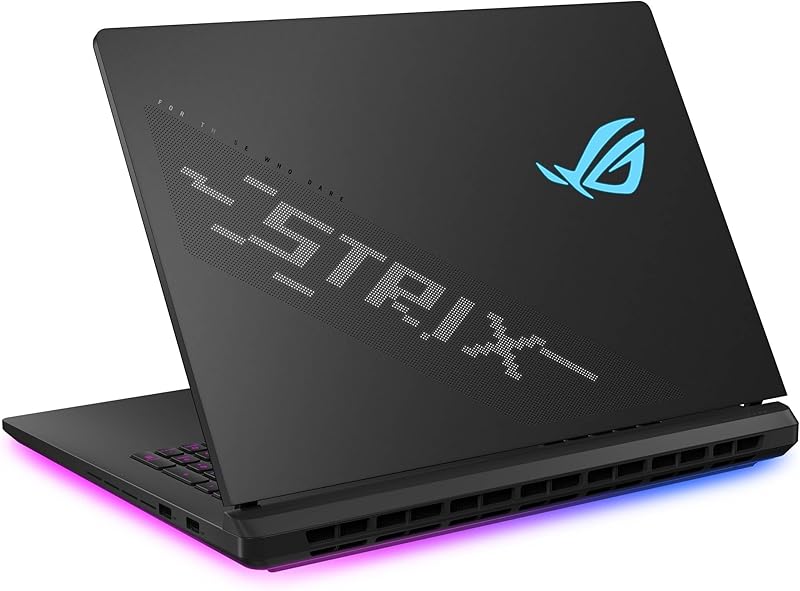
Pros
- Flagship RTX 5090 175W TGP
- 2,000-plus dimming zone Mini LED
- Vapor chamber and Tri-fan cooling
- Tool-free sliding latch access
- Massive 2TB PCIe Gen 4 SSD
Cons
- Heavier 6.3-pound chassis
- Bulky 0.93-inch thickness
- Demanding power consumption
View Asus ROG Strix Scar 16 on Amazon
Who Should Buy Each One
Choose the Asus ROG Zephyrus G16 If
- You travel frequently or carry your laptop across campus and require a lightweight 4.1-pound build.
- Your workflow demands an ultra-thin 0.65-inch form factor that slides effortlessly into standard bags.
- You prioritize pixel-perfect contrast, 0.2ms response times, and 100% DCI-P3 coverage on a 240Hz OLED display.
- You want a professional Eclipse Gray design with an SD card reader for seamless photography and creator tasks.
Choose the ROG Strix Scar 16 If
- You demand maximum gaming frame rates powered by a top-tier NVIDIA GeForce RTX 5090 running at 175W TGP.
- You want high sustained thermal endurance backed by a vapor chamber, three cooling fans, and liquid metal.
- You prefer a massive 18-inch Mini LED display featuring over 2,000 dimming zones for blinding HDR specular highlights.
- You value tool-free maintenance, 32GB of standard DDR5 RAM, and a spacious 2TB PCIe Gen 4 solid-state drive.
Final Verdict
The Asus ROG Zephyrus G16 represents the ideal balance of portability, visual precision, and capable processing power for the modern mobile user. By pairing an Intel Core Ultra 9 285H processor and an RTX 5070 graphics card with an exceptional 240Hz WQXGA OLED screen inside a 0.65-inch, 4.1-pound aluminum profile, it provides a complete computing package for creators, students, and hybrid gamers. It transitions from creative design sessions to multiplayer gaming without drawing unwanted attention or burdening your daily commute.
However, when outright graphical dominance and thermal stability are required, the ROG Strix Scar 16 is the undisputed champion. With its massive 175W NVIDIA GeForce RTX 5090 GPU, Intel Core Ultra 9 275HX processing core, 32GB of fast DDR5 memory, and advanced vapor-chamber cooling, it operates as a full-fledged desktop replacement. For enthusiasts asking is ROG Strix Scar 16 worth it, the answer is an easy yes if you plan to keep the machine primarily anchored to a desk where its 6.3-pound weight and incredible rendering muscle can truly shine.
FAQ
Is the ROG Strix Scar 16 worth it for everyday travel?
No, the Strix Scar is poorly suited for regular travel due to its 6.3-pound chassis, 0.93-inch thickness, and large footprint. It is engineered as a stationary desktop replacement rather than a portable commuter notebook.
How do the displays compare on the Zephyrus G16 and ROG Strix Scar?
The Zephyrus G16 features a 16-inch OLED panel delivering absolute black levels, infinite contrast, and an ultra-fast 0.2ms response time. The Strix Scar features an 18-inch Mini LED display utilizing over 2,000 local dimming zones to achieve extraordinary HDR brightness levels.
Can the Zephyrus G16 handle modern AAA gaming smoothly?
Yes, the Zephyrus G16 handles modern AAA gaming with high visual settings at native 1600p resolution, driven by an Intel Core Ultra 9 285H processor and a dedicated NVIDIA GeForce RTX 5070 graphics card with 8GB of GDDR7 memory.
What are the primary thermal differences between these two laptops?
The Zephyrus G16 uses a compact internal cooling layout optimized for its slim 0.65-inch frame. The Strix Scar employs heavy-duty cooling consisting of an end-to-end vapor chamber, three active fans, a sandwiched heatsink, and Conductonaut Extreme liquid metal to manage its 175W GPU load.
Which laptop is better suited for college students or hybrid office workers?
The Zephyrus G16 is significantly better for students and hybrid workers. Its 4.1-pound weight, thin profile, understated Eclipse Gray chassis, and full-size SD card slot make it practical for classrooms, lecture halls, and offices.
Can you upgrade the internal components on both machines?
Yes, both support memory and storage adjustments. However, the Strix Scar provides convenient tool-free access via a sliding latch on the bottom chassis, while the Zephyrus G16 featured here is an upgraded, resealed model serviced by Delca Electronics.
What operating systems come pre-installed on these laptops?
The Asus ROG Zephyrus G16 comes pre-installed with Windows 11 Home, while the ROG Strix Scar 16 arrives configured with Windows 11 Pro.


