The single deciding factor when choosing between the AMD Ryzen 7 5800X and the AMD Ryzen 9 5900X is your workload balance between pure gaming and thread-intensive creative productivity. While both processors share the advanced Socket AM4 architecture, the Ryzen 9 delivers a substantial step up to 12 cores, 24 processing threads, and 70 MB of total cache, whereas the Ryzen 7 confines its compute power to a concentrated 8-core, 16-thread layout with 36 MB of total cache.
Gamers who focus strictly on high-framerate gameplay and standard desktop tasks should choose the Ryzen 7 5800X for its exceptional per-core efficiency without paying for unused silicon. In contrast, power users, live streamers, and video editors should invest in the Ryzen 9 5900X to cut down render times and handle heavy background multitasking without compromise.


AMD Ryzen 7 5800X vs AMD Ryzen 9 5900X at a Glance
| Feature | AMD Ryzen 7 5800X | AMD Ryzen 9 5900X |
|---|---|---|
| Processor Series | AMD Ryzen 7 | Ryzen 9 |
| Physical Core Count | 8 cores | 12 cores |
| Concurrent Thread Count | 16 threads | 24 threads |
| Maximum Boost Speed | 4.7 GHz | 4.8 GHz |
| Total Cache Size | 36 MB | 70 MB |
| Secondary Cache Size | 4 MB | 4 MB |
| Thermal Design Power (TDP) | 105 watts | 105 watts |
| Socket Compatibility | Socket AM4 | Socket AM4 |
| Memory Specification | DDR-3200 support | DDR-3200 support |
| Best For | Dedicated high-FPS gaming and everyday computing | Heavy multitasking, content creation, and production workloads |
Multi-Threaded Processing and Core Count
The direct comparison between the Ryzen 9 5900X vs AMD Ryzen 7 5800X centers primarily on how computational tasks are distributed across processing cores. Modern operating systems and demanding production software rely heavily on parallel computing, splitting complex calculations across as many simultaneous threads as possible. In a head-to-head evaluation of Ryzen 5800X vs 5900X core count, the specifications reveal a massive 50 percent advantage for the Ryzen 9 5900X. With 12 physical cores and 24 concurrent threads compared to the 8 cores and 16 threads found on the Ryzen 7 5800X, the higher-tier silicon operates with far greater headroom when processing multi-layered rendering, file compression, and virtual machines.
For everyday desktop computing and standard gaming sessions, eight high-speed cores represent the sweet spot for modern desktop software. Most contemporary video game engines are architected to maximize performance across six to eight execution cores, meaning the remaining four cores and eight threads on the Ryzen 9 5900X often sit idle during pure gaming workloads. If you are comparing your options against more accessible mid-tier parts like in our amd ryzen 5 5600x vs ryzen 7 5800x matchup, the 8-core design of the 5800X already provides plenty of longevity. However, when software can actually saturate every available thread, the 5900X finishes intensive multi-threaded workloads significantly faster, transforming background computational stalls into seamless productivity gains.
The difference in compute capacity also alters how each processor responds to background overhead. When running live broadcasts, disc recording software, or heavy browser tabs alongside a full-screen game, the 12-core architecture ensures system processes never choke active gaming loops. While an AMD Ryzen 7 5800X review must acknowledge its stellar performance in isolated scenarios, the 5900X simply possesses the brute structural hardware to absorb sustained multi-threaded punishment without flinching.
Edge: AMD Ryzen 9 5900X provides 50 percent more physical cores and execution threads, delivering unmatched throughput for heavily parallel software.
Cache Architecture and Gaming Performance
When evaluating Ryzen 7 5800X or Ryzen 9 5900X for gaming, cache size and access latencies play a decisive role in delivering stable frametimes. Both processors claim the ability to deliver elite 100+ FPS performance in the world’s most popular games according to manufacturer specifications. However, an analysis of Ryzen 5800X vs 5900X cache shows a substantial difference in overall capacity: the Ryzen 7 5800X features 36 MB of total cache memory installed, whereas the Ryzen 9 5900X doubles down with an expansive 70 MB pool. Both chips share an identical 4 MB secondary cache specification, meaning the primary disparity lies within their high-speed data reservoirs.
In gaming scenarios, large pools of cache memory allow the processor to store critical asset instructions, character positional data, and physics calculations immediately adjacent to the execution cores. This proximity dramatically reduces the frequency with which the CPU must reach out to system RAM, which runs at a standard DDR-3200 memory speed on both chips. Interestingly, gamers exploring specialized high-cache variants often compare these units against 3D V-Cache options as detailed in our amd ryzen 7 5800x vs 5800x3d breakdown, but within standard 5000-series parts, the 5900X holds the on-die capacity crown.
Despite the 5900X carrying 70 MB of cache compared to the 36 MB on the 5800X, this cache is split across two distinct compute complexes in the 12-core part, whereas the 5800X holds its cache in a single consolidated complex accessible to all eight cores. Because game engines rarely utilize more than eight cores at once, gaming framerates between the two chips remain virtually indistinguishable in the vast majority of gaming titles. The 5800X provides all the gaming muscle you could ever need from the AM4 platform without introducing multi-die communication hops for gaming threads.
Edge: Tie. Both processors hit elite 100+ FPS marks in demanding games, and the 5800X delivers matching gaming framerates despite the larger cache footprint of the 5900X.
Clock Speeds and Single-Core Responsiveness
Single-core responsiveness dictates how snappy an operating system feels during daily use, app launches, and tasks that cannot be divided among multiple processing cores. Manufacturer specifications list the AMD Ryzen 7 5800X with a maximum boost clock of 4.7 GHz, while the AMD Ryzen 9 5900X pushes slightly higher to a peak boost clock of 4.8 GHz. Both desktop processors are fully unlocked for overclocking, allowing enthusiasts to fine-tune frequencies using supported motherboard BIOS settings or utility software across Linux and Windows platforms.
That 100 MHz clock speed delta represents a marginal paper advantage for the Ryzen 9 5900X. In practical desktop computing, a 4.8 GHz boost clock yields microscopic differences in single-threaded benchmark passes compared to the 4.7 GHz ceiling of the 5800X. Users upgrading from entry-level chips, such as those weighing an upgrade in our amd ryzen 5 5600 vs ryzen 7 5800x comparison, will find that both 5000-series chips offer instantaneous desktop responsiveness, crisp UI transitions, and swift application starts.
In any comprehensive AMD Ryzen 9 5900X review, clock speed stability across varying core loads is another important variable. Because the 5900X distributes its heat and workload across more physical silicon, it can occasionally sustain higher single-core opportunistic boosts in light bursts. However, for real-world user interaction, the practical difference between 4.7 GHz and 4.8 GHz is nearly imperceptible. The 5900X holds the technical spec victory, but it does not fundamentally transform the desktop experience over the 5800X.
Edge: AMD Ryzen 9 5900X holds a slight technical lead with its 4.8 GHz maximum boost speed compared to the 4.7 GHz ceiling of the 5800X.
Content Creation and Video Editing Throughput
Creative production environments create the widest practical gulf between these two processors. Deciding whether to select the Ryzen 7 5800X or Ryzen 9 5900X for video editing comes down to the rendering timeline and the complexity of your project assets. Video encoding suites, motion graphics software, and audio workstations scale directly with available thread counts. With 24 concurrent threads running on the 5900X versus 16 threads on the 5800X, video render queues and file exports finish significantly quicker on the 12-core model.
Broadcasting live gameplay presents another intense multi-faceted workload. When evaluating the Ryzen 7 5800X or 5900X for streaming, core allocation becomes an operational asset. Software-based CPU video encoding requires dedicated threads to compress and transmit video streams without dropping frames. While the 8-core 5800X can manage streaming alongside gaming, it leaves narrower safety margins. The 12-core 5900X allows content creators to cleanly isolate gaming threads to one section of the chip while dedicating entire leftover cores to encoding software, browser overlays, and chat integration.
Creative professionals also benefit tremendously from the massive 70 MB cache pool when handling immense production timelines, complex code compilations, and RAW media files. Those evaluating alternative productivity options often contrast these parts with different thermal tiers, such as in our amd ryzen 7 5700x vs ryzen 9 5900x comparison, but the 5900X represents the definitive creative powerhouse in this match. For any workstation environment that routinely turns CPU cycles into completed client projects, the 5900X provides unmatched speed.
Edge: AMD Ryzen 9 5900X dominates creative workloads with its 24 threads and 70 MB cache, significantly reducing render times and streamlining heavy live broadcasts.
Thermal Output, Power Consumption, and Platform Compatibility
System integration, motherboard compatibility, and thermal management require careful consideration before mounting either processor. Both the Ryzen 7 5800X and the Ryzen 9 5900X feature an identical Thermal Design Power (TDP) rating of 105 watts. Furthermore, both chips are packaged in the standard Socket AM4 form factor measuring 1.57 inches long by 1.57 inches wide. They each offer native DDR-3200 memory support and enable high-speed PCIe 4.0 connectivity across X570 and B550 chipset motherboards, providing an identical foundation for storage drives and graphics cards.
Crucially, manufacturer listings note that neither processor comes packaged with a bundled thermal cooling solution, explicitly stating that a high-performance aftermarket cooler is recommended. The Ryzen 9 5900X listing specifically highlights a maximum operating temperature rating of 90°C. Interestingly, because the Ryzen 7 5800X concentrates its entire 105-watt power envelope into a single 8-core silicon die, thermal density is remarkably high, often requiring cooling solutions every bit as robust as those used for the 12-core 5900X. Builders seeking lower thermal limits sometimes look at more conservative options, as highlighted in our amd ryzen 7 5700x vs 5800x evaluation.
From an operational and upgrade perspective, both CPUs drop cleanly into existing AM4 motherboards without requiring new memory standards or chassis modifications. Because both processors carry identical 105W thermal profiles, require substantial aftermarket cooling, and operate within the same PCIe 4.0 and DDR-3200 ecosystem, neither processor holds a structural integration advantage over the other.
Edge: Tie. Both CPUs share identical 105W TDP ratings, Socket AM4 motherboard support, PCIe 4.0 capability, and lack included coolers.
Pros and Cons
AMD Ryzen 7 5800X
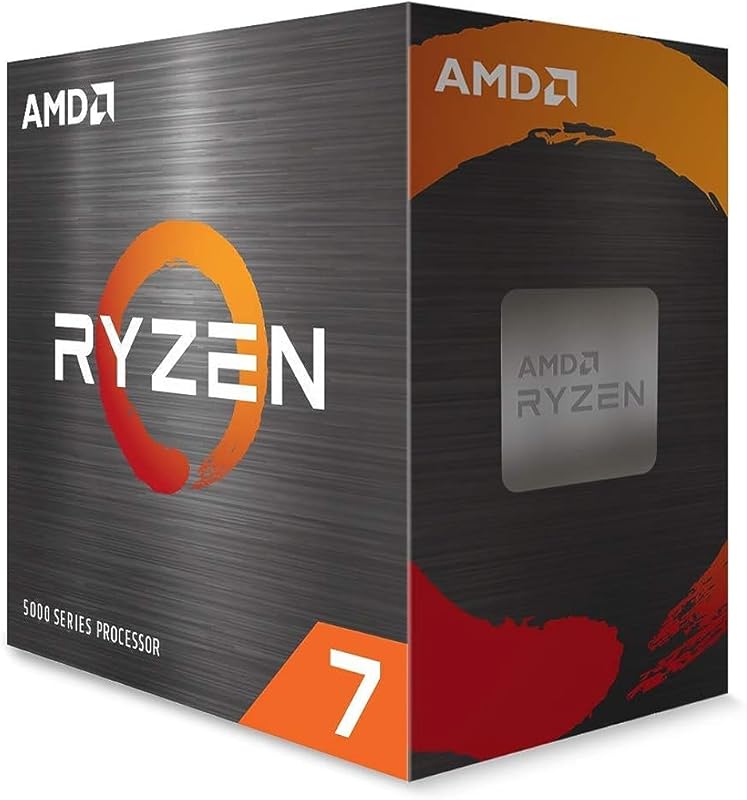
Pros
- 8 cores and 16 concurrent threads
- 7 GHz maximum boost clock
- Elite 100+ FPS gaming capability
- Native PCIe 4.0 motherboard support
Cons
- Cooler not included in box
- Half the total cache of 5900X
- Fewer threads for video production
View AMD Ryzen 7 5800X on Amazon
AMD Ryzen 9 5900X

Pros
- 12 cores and 24 concurrent threads
- Massive 70 MB cache pool
- 8 GHz maximum boost clock
- Superior multi-threaded render throughput
Cons
- Cooler not included in box
- Reaches up to 90°C maximum temperature
- Surplus cores remain idle in games
View AMD Ryzen 9 5900X on Amazon
Who Should Buy Each One
Choose the AMD Ryzen 7 5800X If
- You focus primarily on gaming and want elite 100+ FPS performance without paying for surplus compute threads.
- You run standard desktop software, office tools, and single-application tasks that rely on high single-core frequencies.
- You want an easy drop-in 8-core AM4 processor upgrade for an existing B550 or X570 motherboard.
- You prefer a unified 8-core complex design that simplifies thread scheduling for PC games.
Choose the AMD Ryzen 9 5900X If
- You frequently edit high-resolution video, compile extensive codebases, or render 3D scenes.
- You broadcast high-bitrate live streams and require surplus dedicated threads for background encoding.
- You run intensive virtual machines, heavy workstation software, or extreme multitasking setups.
- You want the maximum possible L3 cache pool (70 MB) available on standard 5000-series AM4 hardware.
Final Verdict
For the vast majority of desktop enthusiasts and PC gamers, the AMD Ryzen 7 5800X is the more sensible and practical purchase. It delivers the same elite 100+ FPS tier gaming capabilities, native PCIe 4.0 bandwidth on X570 and B550 boards, and a rapid 4.7 GHz boost speed within an efficient 8-core, 16-thread package. Because contemporary game engines do not effectively exploit more than eight processor cores, the extra silicon on higher-tier processors produces virtually zero frame rate advantage in pure gaming sessions.
However, if your daily computing involves video production, 3D modeling, intensive software development, or heavy live streaming, asking is Ryzen 9 5900X worth it yields a resounding yes. The jump to 12 cores, 24 threads, a 4.8 GHz boost clock, and a colossal 70 MB cache pool drastically reduces multi-threaded rendering times and provides unmatched headroom for complex multitasking. The Ryzen 7 5800X wins the gaming value crown, while the Ryzen 9 5900X reigns supreme for demanding creators who transform raw compute cycles into productive output.
FAQ
Do either the Ryzen 7 5800X or Ryzen 9 5900X include a cooler in the box?
No. AMD does not include a cooler in the box for either processor. Both listings specify that a high-performance aftermarket cooler is recommended to handle their 105-watt power envelopes, with the 5900X listing citing a maximum operating temperature of 90°C.
Which processor is better for pure PC gaming?
Both processors deliver virtually identical gaming performance, with AMD stating that both can achieve elite 100+ FPS marks in the world’s most popular games. Because modern games rely heavily on single-core speed and rarely utilize more than eight cores, the Ryzen 7 5800X matches the gaming output of the 12-core 5900X without leaving unused cores idle.
What motherboards support the Ryzen 7 5800X and Ryzen 9 5900X?
Both processors use the Socket AM4 platform and officially support PCIe 4.0 on X570 and B550 motherboards. They can be installed on compatible AM4 motherboards that provide the appropriate BIOS firmware updates.
Is the Ryzen 9 5900X better for video editing and content creation?
Yes, the Ryzen 9 5900X is significantly superior for video editing, rendering, and creative multitasking. Its 12 cores, 24 threads, and 70 MB cache provide a 50 percent increase in parallel execution capacity compared to the 8 cores, 16 threads, and 36 MB cache of the 5800X, directly reducing export and processing times.
What type of memory do both processors support?
Both desktop processors officially support DDR-3200 system memory. Users can pair either chip with compatible DDR4 memory modules on their AM4 motherboards for stable memory performance.
Can both processors be overclocked?
Yes, both the Ryzen 7 5800X and the Ryzen 9 5900X are fully unlocked for overclocking. Both support AMD’s overclocking utilities and custom BIOS tuning across compatible Windows and Linux operating system environments.


