The core distinction between AMD motherboards centers on how PCIe 4.0 lanes flow across the system: the enthusiast X570 platform distributes full PCIe 4.0 bandwidth across both the processor connections and the motherboard chipset buses, whereas the mainstream B550 platform reserves PCIe 4.0 speeds strictly for the primary graphics slot and the main M.2 solid-state drive interface while downgrading general system expansion lanes to PCIe 3.0.
Builders putting together dedicated gaming systems with a single modern graphics card and one ultra-fast boot drive should target B550. Creators, workstation operators, and multi-drive power users who demand uncompromising Gen 4 transfer speeds across secondary high-speed storage arrays and peripheral expansion cards should invest in X570.


B550 vs X570 at a Glance
| Feature | B550 | X570 |
|---|---|---|
| Primary PCIe Graphics Slot | PCIe 4.0 x16 | PCIe 4.0 x16 |
| Chipset Interconnect Bus | PCIe 3.0 x4 | PCIe 4.0 x4 |
| Secondary M.2 NVMe Speeds | PCIe 3.0 x4 | PCIe 4.0 x4 |
| General Expansion Lanes | PCIe 3.0 | PCIe 4.0 |
| Maximum System Memory | 128 GB DDR4 | 128 GB DDR4 (1000 TB listed on select spec sheets) |
| Legacy Processor Compatibility | Ryzen 3000, 4000, and 5000 Series | Ryzen 2000 and 3000 Series (Ryzen 5000 via BIOS update) |
| Integrated Wireless Capability | Up to Wi-Fi 6E (802.11ax) and Bluetooth 5.2 | Up to Wi-Fi 5 (802.11ac) |
| Onboard Ethernet Standards | 1GbE or 2.5Gb LAN | 1GbE LAN |
| SATA III Storage Ports | 4 to 6 Ports | SATA 3 Supported (Port counts vary by board) |
| Best For | Mainstream gaming rigs and single-GPU desktop setups | Multi-drive video editing workstations and complex expansion builds |
PCIe 4.0 Lane Distribution and Chipset Architecture
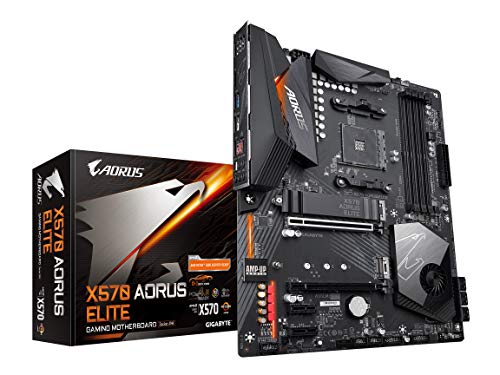
System bandwidth determines how quickly your graphics card, storage controllers, and add-in cards communicate with the central processor without causing data bottlenecks. In the Gigabyte X570 AORUS Elite, the chipset links to the processor using four dedicated PCIe 4.0 lanes. This architectural pipeline allows every downstream lane handled by the X570 platform controller hub to operate at full PCIe 4.0 signaling rates, doubling the potential bandwidth of every auxiliary lane compared to previous-generation standards.
By contrast, B550 motherboards adopt an asymmetrical bandwidth configuration. The processor supplies dedicated PCIe 4.0 lanes straight to the primary graphics card slot and the primary M.2 slot, ensuring your main components perform at peak capability. However, the chipset connects to the processor through a PCIe 3.0 uplink. Consequently, all additional expansion slots on boards like the GIGABYTE B550 Eagle WIFI6 run exclusively at PCIe 3.0 speeds. Evaluating the key X570 vs B550 differences reveals that B550 provides plenty of throughput for standard components, but prevents auxiliary add-in cards from accessing full Gen 4 speeds.
Analyzing B550 vs X570 PCIe lanes demonstrates that users installing single-slot sound cards, capture devices, or standard expansion peripherals will experience identical gaming throughput on either chipset. However, if your day-to-day workflow relies on secondary high-bandwidth capture cards or multiple high-speed controllers, the restricted PCIe 3.0 interconnect on B550 can saturate under intense continuous data transfers, making the true Gen 4 pipeline of X570 superior for demanding multi-card installations.
Edge: X570 delivers uncompromised PCIe 4.0 throughput across all chipset-managed expansion slots rather than limiting them to PCIe 3.0 speeds.
High-Speed NVMe Storage and M.2 Capabilities
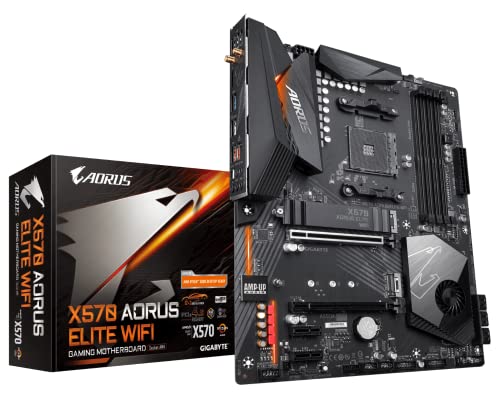
Storage performance between these AM4 platforms hinges entirely on how many high-speed solid-state drives you plan to run simultaneously. The enthusiast-grade GIGABYTE X570 AORUS Elite Wi-Fi provides dual ultra-fast NVMe PCIe 4.0/3.0 x4 M.2 connectors equipped with dedicated thermal guards. Because both M.2 slots support PCIe 4.0 x4 bandwidth, content creators can transfer files between two high-tier NVMe solid-state drives at peak operational speeds exceeding 7,000 megabytes per second without dropping data rates on either drive.
On the B550 platform, only the top M.2 socket connects directly to the processor to leverage Gen 4 throughput. The secondary M.2 socket routes through the B550 chipset, which limits speeds to PCIe 3.0 x4 ceilings around 3,500 megabytes per second. If you compare premium modern solid-state drives such as the wd black sn850x vs sn7100, putting a Gen 4 drive into the secondary slot of a B550 motherboard caps its sequential read and write speeds in half, leaving potential hardware performance unrealized.
For builders wondering is X570 worth it for everyday operating systems and gaming loading screens, the practical answer leans toward no. Games load assets primarily using random read speeds and short burst transfers, where the gap between Gen 3 and Gen 4 is barely perceptible in daily gameplay. Yet, for professional editors working with uncompressed 4K and 8K video footage across multiple internal drives, the secondary Gen 4 drive slot on X570 eliminates workflow delays that B550 inevitably introduces.
Edge: X570 provides dual PCIe 4.0 x4 NVMe M.2 slots, whereas B550 caps the secondary drive connector to PCIe 3.0 x4 speeds.
Power Delivery and VRM Thermal Management
Processor power delivery decides how smoothly your motherboard supplies stable voltage to multi-core processors under sustained processing loads. The Asus ROG Strix B550-F Gaming WiFi II features a robust 12+2 teamed power stage layout with ProCool power connectors, high-quality alloy chokes, durable capacitors, and a Stack Cool 3+ design to handle demanding multi-threaded rendering workloads without voltage instability or thermal throttling.
Similarly, the X570 AORUS Elite employs a digital 12+2 phase power design utilizing integrated DrMOS power stages alongside extended VRM heatsinks. Both design philosophies focus on minimizing electrical resistance and dissipating heat away from critical power delivery components. While early AM4 motherboards featured modest power stages, modern B550 solutions feature power arrays that equal or even surpass earlier premium platforms. For example, the B550 Eagle WIFI6 incorporates a digital twin 10+3 phase VRM solution with enlarged heatsinks layered with 5 W/mk thermal pads.
When running a comprehensive B550 review against an X570 review, voltage regulation module capabilities emerge as a functional wash between similarly tiered products. Both chipsets comfortably provide the continuous amperage required to maintain stable boost clocks on modern performance hardware. Thermal stability across modern B550 boards proves that you do not need to step up to an X570 platform purely to obtain clean, reliable power delivery.
Edge: Tie, as high-end B550 and X570 motherboards both feature durable 12+2 power stage arrays capable of handling heavy processor workloads.
Networking Standards and Rear Panel Connectivity
External connectivity dictates how efficiently your desktop connects to high-speed home networks, external backup drives, and peripherals. Because B550 motherboards launched later in the AM4 product cycle, several boards come equipped with newer connectivity controllers out of the box. The ROG Strix B550-F Gaming WiFi II includes integrated Wi-Fi 6E (802.11ax), Bluetooth 5.2, and an Intel 2.5 Gb Ethernet port with ASUS LANGuard for ultra-responsive online connections.
In comparison, earlier production motherboards such as the X570 AORUS Elite Wi-Fi rely on Intel Dual Band 802.11ac (Wi-Fi 5) wireless modules and standard 1 GbE LAN controllers. Users pairing their desktops with modern high-bandwidth wireless routers, as examined in network comparisons like the tp-link archer ax55 vs be550, will benefit significantly from the 6 GHz spectrum and higher throughput enabled by the newer Wi-Fi 6E and Wi-Fi 6 modules found on mainstream B550 motherboards.
Rear I/O port assortments also show distinct differences across boards. The ROG Strix B550-F Gaming WiFi II supplies 11 external rear ports, including USB 3.2 Gen 2 Type-C, alongside HDMI 2.1 and DisplayPort 1.2 video outputs. The B550 Eagle WIFI6 provides 12 total ports and 8 USB connections. While X570 boards supply front-panel USB Type-C headers and dedicated optical S/PDIF connections, B550 boards often feature more up-to-date wired and wireless network controllers directly from the factory.
Edge: B550 holds the advantage here by commonly integrating faster 2.5 GbE network controllers and modern Wi-Fi 6/6E wireless solutions.
Processor Compatibility and Memory Speed Ceilings
Socket AM4 covers several processor architectures, and chipset selection determines how easily your components pair together. The X570 AORUS Elite motherboards were developed alongside the launch of 3rd Gen Ryzen hardware and provide native hardware support for older AMD 2nd Generation Ryzen chips and Ryzen processors with Radeon Vega graphics, giving users with legacy components a viable upgrade path.
On the other hand, B550 motherboards drop backward compatibility for older 1st and 2nd Gen Ryzen chips to streamline system firmware. Instead, B550 offers tailored native support for AMD Ryzen 3000, 4000 G-series, and 5000 series desktop processors right out of the box. When matching an AM4 motherboard B550 or X570 with modern gaming chips, choosing B550 vs X570 for Ryzen 5000 configurations offers straightforward BIOS compatibility and avoids legacy firmware bloat, especially when comparing processors such as the amd ryzen 5 5600 vs ryzen 7 5800x or assessing performance jumps like the amd ryzen 5 5600x vs ryzen 7 5800x.
Memory clock support presents another technical variance across specific implementations. While standard B550 specifications frequently list baseline operational profiles from 2133 MHz up to 3200 MHz with AMD EXPO module support on the B550 Eagle, enthusiast X570 boards advertise overclocked memory ceilings reaching up to 4400 MHz on the X570 AORUS Elite Wi-Fi. However, because AMD Ryzen memory performance relies on a 1:1 ratio between the memory clock and processor Infinity Fabric, clock speeds beyond 3600 to 3800 MHz offer diminishing returns when evaluating is B550 good enough for daily use.
Edge: B550, due to its streamlined out-of-the-box support for Ryzen 3000, 4000, and 5000 series desktop processors without legacy microcode baggage.
Pros and Cons
B550

Pros
- PCIe 4.0 on primary graphics and storage
- Passive silent chipset cooling without fans
- Upgraded Wi-Fi 6E and 2.5GbE options
- Streamlined native Ryzen 5000 compatibility
Cons
- Secondary M.2 slot capped at PCIe 3.0
- Chipset expansion lanes limited to Gen 3 speeds
- Lacks backward support for Ryzen 2000 chips
View Asus ROG Strix B550-F Gaming WiFi on Amazon
X570

Pros
- Full PCIe 4.0 lanes across all slots
- Dual high-speed Gen 4 NVMe M.2 connectors
- Native compatibility with legacy Ryzen 2000 processors
- Supports dual-channel ECC unbuffered memory
Cons
- Older models feature slower Wi-Fi 5 networking
- Chipsets generate more heat during heavy transfers
- Often limited to standard 1GbE LAN ports
View Gigabyte X570 AORUS Elite (AMD Ryzen on Amazon
Who Should Buy Each One
Choose the B550 If
- You are building a dedicated gaming rig with one graphics card and one primary Gen 4 NVMe solid-state drive.
- You want modern networking features including 2.5 Gbps Ethernet, Wi-Fi 6E, and Bluetooth 5.2 connectivity.
- You prefer a passive, silent motherboard design without an active cooling fan on the chipset heatsink.
- You are installing a modern AMD Ryzen 3000, 4000, or 5000 series desktop processor.
Choose the X570 If
- You run professional workstation applications requiring two or more PCIe 4.0 NVMe drives operating at full read/write speeds.
- You intend to install secondary high-speed PCIe expansion cards, such as dedicated 4K capture devices or RAID controllers.
- You need backward compatibility with an AMD 2nd Generation Ryzen processor or early APU with Radeon Vega graphics.
- You require specialized enterprise memory configurations like unbuffered DDR4 ECC support alongside standard memory.
Final Verdict
For the vast majority of PC builders and gamers, B550 is the smarter and more practical platform choice. It directs PCIe 4.0 bandwidth directly to the primary components where performance gains are tangible: your graphics card and your main operating system NVMe SSD. Because B550 boards hit the market later, models like the Asus ROG Strix B550-F Gaming WiFi II frequently include faster 2.5 GbE wired networking and modern Wi-Fi 6E adapters while keeping motherboard operating temperatures low through silent, passive heatsinks.
The X570 chipset remains the winner for power users, digital media professionals, and multi-drive enthusiasts who push beyond single-GPU gaming builds. If your productivity relies on sustained high-speed file transfers across dual PCIe 4.0 NVMe drives or heavy data streams across multiple auxiliary expansion cards, the unrestricted Gen 4 chipset bus of boards like the Gigabyte X570 AORUS Elite delivers bandwidth capabilities that B550 cannot match.
FAQ
Is B550 good enough for modern gaming systems?
Yes, B550 provides everything required for peak gaming performance. Because the processor supplies full PCIe 4.0 x16 bandwidth to the primary graphics card slot and dedicated PCIe 4.0 x4 lanes to the primary NVMe M.2 slot, your graphics card and game storage run at peak performance levels without being throttled by the chipset.
What is the main difference in B550 vs X570 PCIe lanes?
The main difference lies in the chipset interconnect and secondary expansion lanes. X570 connects the processor to the chipset over a PCIe 4.0 x4 bus, allowing all secondary expansion slots and M.2 slots to run at Gen 4 speeds. B550 uses a PCIe 3.0 x4 chipset link, restricting all secondary slots and secondary M.2 drives to PCIe 3.0 speeds.
Can I run two PCIe 4.0 NVMe SSDs at full speed on B550?
No, B550 only supports one PCIe 4.0 NVMe SSD at full Gen 4 speed in its primary M.2 slot. Any secondary M.2 drive installed on a B550 board operates across the chipset bus and is capped at PCIe 3.0 speeds, approximately 3,500 megabytes per second. To run two Gen 4 drives at full sequential speeds, choose an X570 motherboard.
Does X570 support AMD Ryzen 5000 series processors?
Yes, X570 motherboards support AMD Ryzen 5000 series processors, though earlier manufacturing revisions may require a BIOS update to recognize the newer microcode. By contrast, modern B550 motherboards feature native out-of-the-box support for Ryzen 3000, 4000, and 5000 series processors directly from the factory.
Do B550 motherboards require an active chipset fan?
No, B550 motherboards operate with low enough thermal output that passive aluminum heatsinks provide complete cooling stability. Many original X570 motherboards required a dedicated active cooling fan over the chipset hub due to the higher electrical power draw and thermal generation of PCIe 4.0 lanes running across the entire board.
Can an X570 motherboard use 2nd Gen AMD Ryzen processors?
Yes, motherboards like the Gigabyte X570 AORUS Elite maintain hardware compatibility with AMD 2nd Generation Ryzen processors and Ryzen chips with Radeon Vega graphics. Most B550 motherboards dropped backward support for 1st and 2nd Gen Ryzen chips to focus on Ryzen 3000 series processors and newer architectures.
Which platform should I choose for Ryzen 5000 gaming between B550 or X570?
If your build focuses on gaming with a single graphics card and a processor like those evaluated in the amd ryzen 5 5600x vs ryzen 7 5800x3d comparison, choose B550. It saves power, runs quietly without active chipset cooling, offers updated Wi-Fi and 2.5 GbE networking on newer revisions, and matches X570 frame rates in gaming benchmarks.