The decisive choice between the HyperX Cloud II and the HyperX Cloud III comes down to modern platform flexibility and acoustic architecture versus a classic, hardware-dongle virtual surround configuration. While both headsets use substantial 53mm acoustic drivers mounted in durable aluminum frames, the newer model introduces angled drivers, native USB-C connectivity with a USB-A adapter, an upgraded 10mm noise-cancelling microphone with an internal mesh filter and mute LED, and direct on-earcup controls. In contrast, the legacy headset relies on a dedicated USB sound card audio control box to deliver hardware-driven virtual 7.1 surround sound across PC and Mac setups.
Choose the HyperX Cloud II if your gaming takes place primarily on a traditional USB-A desktop environment where you prefer external in-line audio controls and an accessory bundle that includes a mesh travel pouch and airplane adapter. Choose the HyperX Cloud III if you play across modern consoles and mobile devices that demand native USB-C cabling, direct on-headset volume adjustments, and clearer voice communication for team lobbies.


HyperX Cloud II vs HyperX Cloud III at a Glance
| Feature | HyperX Cloud II | HyperX Cloud III |
|---|---|---|
| Driver Architecture | Standard 53mm dynamic drivers | Angled 53mm dynamic drivers |
| Surround Audio Processing | Hardware-driven virtual 7.1 surround sound | Spatial audio support |
| Microphone Capsule Size | Standard detachable noise-cancelling mic | Upgraded 10mm detachable noise-cancelling mic |
| Microphone Mute Indicator | Not listed | Integrated red LED mute light |
| Connector Types | USB-A sound card control box, 3.5mm | Native USB-C, USB-A adapter, 3.5mm |
| Audio Control Placement | In-line USB sound card audio control box | On-earcup volume wheel and mic mute button |
| Frequency Response Range | 15 Hz to 25,000 Hz | The listing does not specify |
| Weight | 11.29 ounces | The listing does not specify |
| Included In-Box Accessories | Airplane adapter, mesh bag, ear cushions, USB control box | USB to 3.5mm cable, USB-C adapter |
| Platform Compatibility | PC, Mac, PS4, Xbox One (with Microsoft adapter) | PC, PS5, Xbox Series X|S, Xbox One, Nintendo Switch, Mac, Mobile |
| Best For | PC gamers wanting in-line dongle controls | Multiplatform players needing USB-C and clearer voice chat |
Driver Architecture and Sound Reproduction
Acoustic engineering represents the primary mechanical divergence between these two headsets. The Cloud II utilizes standard 53mm drivers positioned flat against the ear cup baffles, delivering audio across a stated frequency response of 15 Hz to 25,000 Hz. These large drivers are engineered to reproduce heavy bass lines, footsteps, and gunshots with high acoustic energy, using closed ear cup passive noise cancellation to isolate the listener from environmental sound. The soundstage is amplified through a dedicated USB sound card audio control box that processes hardware-driven virtual 7.1 surround sound, generating artificial distance and directional cues without requiring third-party desktop software.
With the Cloud III, HyperX audio engineers reworked the interior acoustic chambers by tilting the 53mm drivers at an angle. Angling the drivers directs acoustic energy straight into the natural angle of the human ear canal, which reduces unwanted reflections inside the ear chamber and accents dynamic gaming audio details. Rather than relying on a proprietary legacy 7.1 hardware button, the Cloud III is tuned to interface with modern spatial audio technologies across platforms. When assessing the hyperx cloud iii vs cloud alpha wireless, this angled alignment provides a distinct listening profile that clarifies mid-range frequencies such as reloading sounds, footsteps, and teammate callouts without overpowering the soundscape with boomy sub-bass.
For players analyzing hyperx cloud ii vs cloud iii specs to choose between the hyperx cloud 2 or cloud 3 for gaming, this architectural change redefines how audio cues translate in competitive play. The Cloud II pushes a punchier, bass-forward profile through its legacy hardware card, which many players appreciate for atmospheric single-player campaigns. The Cloud III trades raw low-end thickness for spatial positioning, clearer separation of acoustic layers, and refined dynamic range through its tuned, angled transducers.
Edge: HyperX Cloud III delivers improved directional accuracy and sound separation thanks to its retuned, angled 53mm drivers.
Microphone Clarity and Voice Capture
Voice communication reveals a major generational leap when comparing these two gaming headsets. The Cloud II utilizes a standard detachable noise-cancelling microphone that carries TeamSpeak and Discord certification. While it reliably isolates vocal frequencies from background room noise, the capsule size limits the warmth and natural resonance of your voice, occasionally resulting in a slightly compressed or nasal tone during fast-paced multiplayer sessions.
The Cloud III addresses this directly by implementing an upgraded 10mm microphone capsule. A larger capsule captures a wider acoustic spectrum, giving spoken commands more depth and natural presence. Furthermore, HyperX integrated an internal mesh pop filter directly into the mic housing, eliminating the need for a separate foam windscreen while actively mitigating harsh breath sounds and plosives. An essential operational upgrade is the physical LED mic mute indicator located near the tip of the boom, which glows red when your voice is cut off to eliminate communication accidents.
Conducting a side-by-side cloud ii vs cloud iii mic test illustrates just how significant this hardware upgrade is for daily Discord calls and competitive lobbies. While the older model remains functional for basic callouts, the Cloud III provides superior clarity, lower vocal distortion, and immediate visual confirmation of your mute status. If your priority is clean vocal capture without setting up a standalone desktop microphone, the Cloud III represents a clear step forward, a distinction that also holds up when comparing the steelseries arctis nova 5 vs hyperx cloud iii.
Edge: HyperX Cloud III easily wins with its larger 10mm capsule, built-in mesh filter, and integrated LED mute indicator.
Connectivity and Multiplatform Integration
Interface standards dictate where and how easily each headset operates across modern hardware ecosystems. The Cloud II is built primarily around a USB-A sound card audio control box that breaks out into a 3.5mm analog connection. According to product specifications, its virtual 7.1 surround sound card functions exclusively on PC, Mac, and PS4. While the headset connects via 3.5mm to Xbox One controllers, Nintendo Switch, and mobile hardware, it operates solely in basic stereo on those systems, and older Xbox One controllers require a separate Microsoft headset adapter.
The Cloud III modernizes this workflow by including native USB-C connectivity alongside a USB-A adapter and a standard 3.5mm plug. This modular setup allows gamers to plug directly into high-speed USB-C ports on modern motherboards, gaming laptops, Nintendo Switch handhelds, and Android or iOS mobile devices without requiring third-party dongles. The packaging includes a USB to 3.5mm cable and a USB-C adapter, granting plug-and-play access to PC, PS5, Xbox Series X|S, Xbox One, Nintendo Switch, Mac, and mobile platforms right out of the box.
When determining whether to choose the hyperx cloud ii or iii for ps5, connectivity plays a pivotal role. The Cloud II requires either plugging an analog jack into the DualSense controller or managing a long USB-A cable connected to the console chassis with limited surround features. The Cloud III connects directly via the console USB-C port or the controller jack, taking full advantage of the console modern spatial audio engine without compatibility hurdles. Gamers who split time across modern devices will appreciate this native universal integration.
Edge: HyperX Cloud III provides complete modern connectivity with native USB-C, included USB-A conversion, and certified multiplatform support.
Headset Controls and Ergonomic Adjustments
How you adjust volume and mute your voice during high-stress matches influences real-world comfort and convenience. The Cloud II relies on its heavy in-line USB control box, which hangs along the cable run. This dongle features physical push buttons to raise or lower headphone volume, adjust microphone gain independently, and toggle virtual 7.1 audio on or off. A sliding switch on the side handles microphone muting. While having separate mic and game volume buttons is beneficial, the dongle adds physical drag to the cable, frequently snagging on desk corners or clothing.
The Cloud III removes in-line cable clutter entirely by migrating primary controls directly onto the headset earcups. Gamers can reach up to the left earcup to find an intuitive microphone mute button, which triggers the red LED indicator on the microphone boom. The right earcup houses a low-profile volume wheel that allows immediate analog adjustments on the fly without fumbling for an in-line plastic module. This control layout maintains a cleaner cable drape and ensures you never lose track of where your volume wheel is during an intense encounter.
When assessing hyperx cloud 3 vs cloud 2 comfort and daily usability, moving the controls to the earcups represents a notable quality-of-life advancement. The elimination of a dangling control box prevents uneven downward weight on the left ear cup, letting the user stay immersed in long gaming sessions. In any direct cloud iii vs cloud ii usability comparison, having onboard controls combined with a visual mute light proves significantly faster and more reliable than managing an inline dongle.
Edge: HyperX Cloud III wins by placing smooth volume and mute adjustments directly onto the earcups while eliminating cable weight.
Build Quality, Weight, and Physical Durability
Both headsets carry the celebrated structural integrity that established the HyperX Cloud line as an industry benchmark. Each model is engineered around a sturdy, flexible aluminum frame designed to withstand flexing, drops, and aggressive handling during competitive play. Both feature plush memory foam cushioning inside the headband and ear cushions, wrapped in soft leatherette to distribute clamping force evenly around the head and prevent pressure hotspots during marathon gaming sessions.
The Cloud II specifies an item weight of 11.29 ounces and provides an exceptionally generous physical accessory bundle. In the box, buyers receive an airplane headphone adapter, extra velour ear cushions, a mesh travel storage bag, and the detachable microphone alongside the USB sound card box. The listing also contains a legacy note regarding earbud tips, though the headset itself is a pure over-ear design. The included replacement cushions allow users to switch between leatherette for passive noise cancellation and breathable fabric depending on personal preference.
The Cloud III refines the physical chassis by shaping the earcups into an ergonomic oval contour that accommodates a broader range of ear shapes without pinna contact. However, the listing does not specify the exact headset weight, and HyperX streamlined the included media down to the essential cables: the detachable microphone, headphone unit, USB to 3.5mm cable, and USB-C adapter. While the Cloud III feels refined and durable, it omits the secondary ear cushions, airplane adapter, and mesh carry bag found in the classic package. Looking at any detailed hyperx cloud ii review or hyperx cloud iii review, the older bundle delivers more physical accessories in the box, comparable to premium open-back and studio packages discussed in our hyperx cloud iii vs corsair virtuoso pro comparison.
Edge: Tie because the Cloud III features improved oval earcup ergonomics, while the Cloud II includes a richer accessory package with extra ear cushions and a carry bag.
Pros and Cons
HyperX Cloud II
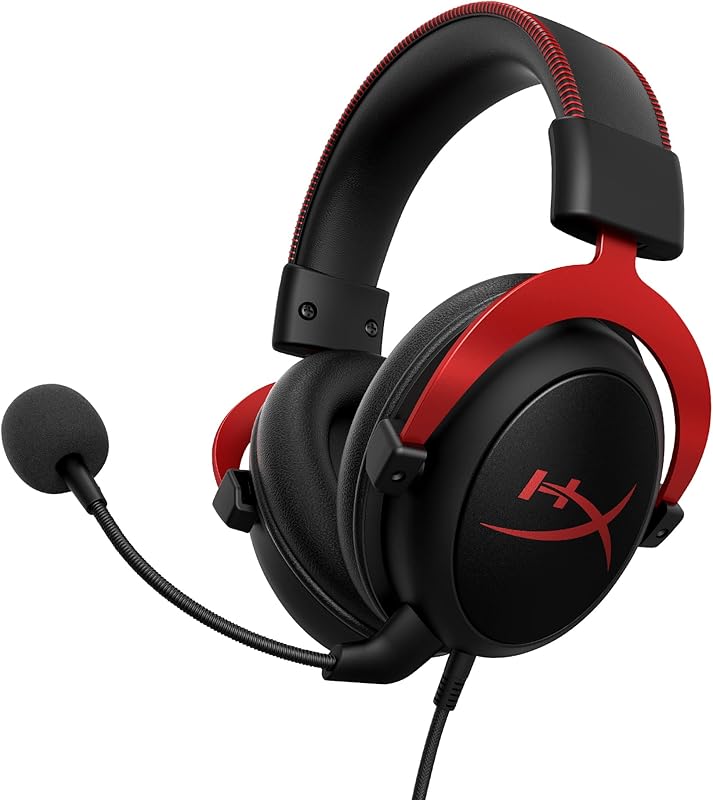
Pros
- Hardware-driven virtual 7.1 USB sound card
- Includes mesh travel pouch and airplane adapter
- Extra replacement ear cushions in the box
- Durable aluminum frame construction
- Proven 53mm driver acoustic performance
Cons
- Lacks native modern USB-C connectivity
- No integrated microphone mute LED indicator
- Heavy in-line audio control box cable drag
View HyperX Cloud II on Amazon
HyperX Cloud III

Pros
- Acoustically tuned angled 53mm drivers
- Upgraded 10mm mic with internal mesh filter
- Integrated red LED microphone mute indicator
- Native USB-C connector with USB-A adapter
- Convenient on-earcup volume and mute controls
Cons
- Listing omits stated frequency response
- No mesh travel pouch or extra cushions
View HyperX Cloud III on Amazon
Who Should Buy Each One
Choose the HyperX Cloud II If
- You primarily game on a desktop PC with standard USB-A ports and prefer an external sound card with physical push-button volume controls.
- You want a complete out-of-the-box travel bundle that includes an airplane adapter and a dedicated mesh storage pouch.
- You value having secondary replacement ear cushions included in the box to swap cushioning materials.
- You prefer the proven, punchy acoustic signature of traditional flat-mounted 53mm drivers for gaming and media.
Choose the HyperX Cloud III If
- You play across multiple platforms including PlayStation 5, Xbox Series X|S, Nintendo Switch, and USB-C mobile devices.
- You want crystal-clear vocal comms with a 10mm microphone capsule, built-in mesh pop protection, and an LED mute indicator.
- You prefer clean earcup-mounted volume wheels and mute toggles rather than a heavy in-line cable dongle.
- You want the positional audio clarity and refined soundstage provided by modern angled 53mm transducers.
Final Verdict
The HyperX Cloud III represents an intelligent, modernized evolution of an iconic gaming headset. By redesigning the 53mm drivers with an angled baffle, HyperX improved directional sound staging and voice clarity, making subtle gaming details easier to pinpoint. The addition of an upgraded 10mm microphone with an internal mesh filter and a visible red LED mute indicator fixes one of the few historical complaints about the original model. Combined with native USB-C cabling, an included USB-A adapter, and clean on-earcup controls, the Cloud III is the superior choice for modern multiplatform gamers asking is hyperx cloud iii worth it.
Nevertheless, the original HyperX Cloud II remains an outstanding piece of hardware that continues to serve PC gamers exceptionally well. If your battlestation relies on legacy USB-A connectivity, you prefer tactile push-button control over game and microphone levels via a dedicated sound card dongle, and you appreciate having a mesh travel pouch and spare ear cushions included in the box, the Cloud II retains strong appeal. For universal console integration, clearer communication, and streamlined ergonomics, the Cloud III earns the overall recommendation, standing tall even when cross-shopped against high-end alternatives featured in our steelseries arctis nova pro wireless vs hyperx cloud iii breakdown.
FAQ
Can the HyperX Cloud II use virtual 7.1 surround sound on the PS5?
The HyperX Cloud II USB sound card audio control box is officially rated for virtual 7.1 surround sound on PC, Mac, and PS4. While you can connect the 3.5mm cable to a PS5 controller for stereo audio and utilize the console built-in Tempest 3D spatial engine, the hardware 7.1 button on the USB dongle is not officially supported for PS5 operation.
What makes the microphone on the Cloud III different from the Cloud II?
The Cloud III features an enlarged 10mm microphone capsule compared to the standard capsule on the Cloud II. Additionally, the Cloud III integrates an internal mesh filter inside the mic head to reduce pop noises without needing a foam cover, along with an LED mute indicator that glows red when your microphone is muted.
Does the HyperX Cloud III include an airplane adapter or carry bag?
No, the listing does not specify an airplane adapter or travel pouch for the Cloud III. The retail package includes the headset, detachable microphone, USB to 3.5mm cable, and USB-C to USB-A adapter. The Cloud II includes an airplane adapter, mesh carry bag, and secondary ear cushions in its box.
Can you connect the Cloud III directly to a USB-C smartphone or Nintendo Switch?
Yes, the Cloud III features a native USB-C connection on its main audio cable. This allows you to plug directly into the USB-C port of a Nintendo Switch in handheld mode, gaming laptops, and compatible USB-C mobile devices without needing an external adapter.
How do you control the volume on the Cloud III compared to the Cloud II?
The Cloud II relies on an in-line USB sound card audio control box attached to the cable, featuring push buttons for volume and a sliding mute toggle. The Cloud III eliminates the in-line box, placing an analog volume wheel directly on the right earcup and a microphone mute button on the left earcup.
Are the ear cushions and headband materials different between these models?
Both headsets utilize signature HyperX memory foam inside the headband and ear cushions wrapped in leatherette. However, the Cloud III introduces an updated oval earpiece shape for improved ear clearance, whereas the Cloud II features traditional memory foam cushions and includes a bonus pair of alternate cushions in the packaging.


