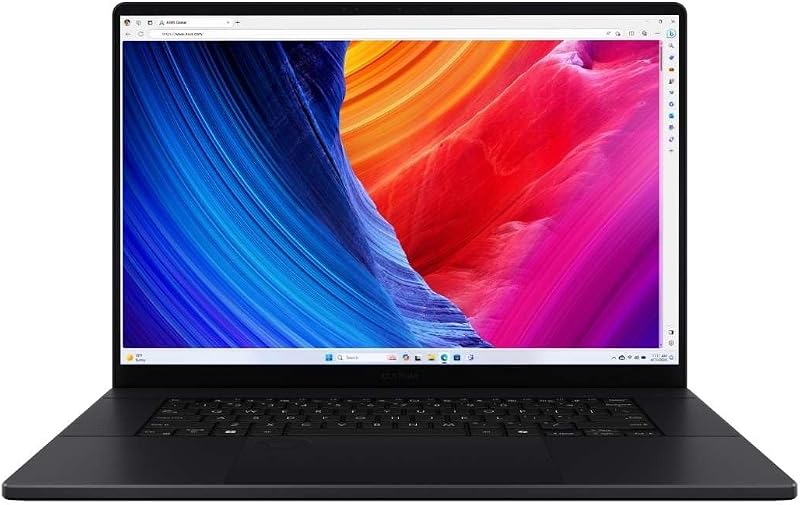
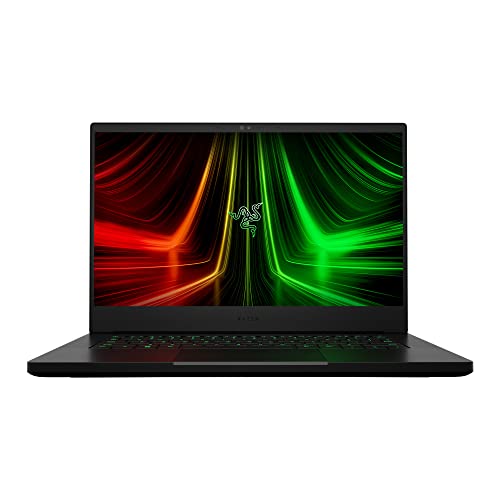
The choice between the MSI Katana 15 and the Razer Blade 14 comes down to a fundamental trade-off between modern component muscle and compact chassis engineering. MSI equips its machine with a 24-core Intel Core i9-14900HX processor, cutting-edge NVIDIA Blackwell RTX 5070 graphics, and 32GB of DDR5 memory inside a full-sized 15.6-inch form factor that weighs five pounds. Razer approaches gaming from the opposite direction, engineering a luxury CNC anodized aluminum chassis that weighs just 3.9 pounds and measures 0.66 inches thin, driven by an AMD Ryzen 9 6900HX processor, RTX 3070 Ti graphics, and an advanced vapor chamber cooling setup.
Choose the Katana 15 if you need maximum compute power, next-generation AI rendering pipelines, and extensive desktop-style connectivity for fixed setups. Choose the Blade 14 if you prioritize structural rigidity, whisper-quiet vapor chamber thermals, and effortless portability for daily transit.

MSI Katana 15 vs Razer Blade 14 at a Glance
| Attribute | MSI Katana 15 | Razer Blade 14 |
|---|---|---|
| Processor (CPU) | Intel Core i9-14900HX (24 cores, hybrid architecture) | AMD Ryzen 9 6900HX (8 cores, up to 4.9GHz Max Boost) |
| Graphics (GPU) | NVIDIA GeForce RTX 5070 (8GB GDDR7, Blackwell Architecture) | NVIDIA GeForce RTX 3070 Ti (16GB RAM listed, 100W Max Graphics Power) |
| System Memory | 32GB DDR5 | 16GB DDR5 4800MHz |
| Internal Storage | 1TB NVMe SSD | 1TB PCIe x4 SSD |
| Display Panel | 15.6-inch QHD 165Hz, 100% DCI-P3 | 14-inch QHD 165Hz |
| Thermal Engineering | Cooler Boost 5 (Dual fans, 5 shared heat pipes) | Next-Gen Vapor Chamber Cooling |
| Chassis Material | Black composite chassis with 4-zone RGB keyboard | CNC Aluminum, Anodized Black with backlit green Razer logo |
| Dimensions and Weight | 14.13″ x 10.31″ x 0.99″, 5.00 lbs | 12.59″ x 8.66″ x 0.66″, 3.90 lbs |
| Wired Networking | Dedicated RJ45 Ethernet port | Not listed |
| Best For | Stationary gamers, software developers, and simulation work | Mobile professionals, traveling gamers, and compact desk setups |
Processing Power and Multitasking Muscle
Central processor architecture dictates how well a system handles heavy compile jobs, high-framerate physics engines, background audio encoding, and demanding multitasking environments. The Katana 15 features the Intel Core i9-14900HX, an elite-tier mobile processor built on a 24-core hybrid architecture that splits workloads between performance and efficiency cores. In contrast, the Blade 14 runs an AMD Ryzen 9 6900HX processor sporting 8 dedicated cores, 16 threads, and boost clocks reaching up to 4.9GHz. Evaluating the framework laptop 16 vs msi katana 15 demonstrates how high core counts transform compute-heavy workflows, and here the Katana 15 holds a distinct structural advantage for raw compute.
The practical difference in processing throughput between these two machines is substantial. In any direct msi katana 15 i9 vs blade 14 evaluation, the 24 cores of the i9-14900HX provide immense headroom for tasks that scale across multiple threads, such as video rendering, 3D asset generation, and software development. While the Ryzen 9 6900HX inside the Razer system remains responsive and capable for eight-core gaming loops, it cannot match the sheer calculation throughput of Intel’s 14th-generation silicon when processing heavy background tasks alongside active gameplay.
Memory capacity expands this performance gap even further. The Katana 15 comes standard with 32GB of DDR5 memory, giving power users double the operational buffer found on the 16GB DDR5 4800MHz configuration of the Blade 14. Modern simulation titles, high-resolution texture packs, and intensive virtual machine environments consume large swathes of system memory. By offering both a 24-core processor and 32GB of DDR5 right out of the box, the Katana 15 functions as an uncompromising processing workstation.
Edge: MSI Katana 15 delivers three times the raw core count and double the factory memory capacity for demanding compute workloads.
Graphics Performance and Gaming Fidelity
Dedicated graphics processors govern real-time rasterization, ray tracing complexity, and high-resolution visual fidelity. The Katana 15 is equipped with the NVIDIA GeForce RTX 5070, constructed on the modern NVIDIA Blackwell architecture and backed by 8GB of high-speed GDDR7 video memory. This architecture brings hardware support for modern ray tracing pipelines and DLSS 4 AI-enhanced frame generation. The Blade 14 relies on the previous-generation NVIDIA GeForce RTX 3070 Ti laptop graphics chip, which operates with a maximum graphics power rating of 100W and a boost clock of 1200MHz, supported by 16GB of graphics memory in its official listing configuration.
Analyzing msi katana 15 rtx 5070 performance against older mobile graphics highlights major generational shifts in graphics efficiency and architecture. The RTX 5070 benefits directly from Blackwell architectural improvements, executing advanced lighting calculations and machine-learning upscaling algorithms far more efficiently than Ampere-generation cards. In fast-paced competitive shooters and high-fidelity titles alike, the RTX 5070 delivers responsive frame pacing and advanced ray-traced reflections that older hardware architectures struggle to sustain without heavy visual compromises.
The Blade 14 remains a capable 1440p gaming machine, and the listing points out that its RTX 3070 Ti can deliver up to 100 frames per second at 1440p while outpacing older RTX 2070 Super mobile chips by up to 70 percent. Dedicated razer blade 14 ryzen 9 gaming sessions demonstrate smooth visual fluidity at native resolutions. However, when choosing between the msi katana 15 or razer blade 14 for gaming with upcoming modern graphics engines, the Blackwell-based RTX 5070 in the Katana provides higher generational frame rates and access to newer rendering features that extend its technological longevity.
Edge: MSI Katana 15 wins with its modern NVIDIA Blackwell architecture, GDDR7 memory, and advanced DLSS 4 frame generation support.
Chassis Build Quality and Portability
Chassis construction directly impacts a machine’s physical durability, structural rigidity, desk footprint, and ease of transportation. The Blade 14 is renowned for its premium CNC aluminum unibody enclosure, finished in an anodized black coating accented by a backlit green Razer logo. It measures a trim 12.59 inches long, 8.66 inches wide, and an ultra-thin 0.66 inches thick, tipping the scales at just 3.9 pounds. The Katana 15 presents a more utilitarian profile: a black gaming chassis measuring 14.13 inches long, 10.31 inches wide, and 0.99 inches thick, with a total weight of 5.0 pounds.
Comparing razer blade 14 portability vs katana 15 reveals an enormous difference in daily handling. The Blade 14 slides into standard backpacks, compact messenger bags, and briefcase sleeves with zero resistance. Its milled aluminum chassis eliminates flex across the keyboard deck, display lid, and bottom panel, giving it a dense, unified feel that withstands the rigors of frequent business and campus travel. Readers investigating the msi stealth 16 vs razer blade 14 often prioritize this exact metallic density and compact travel footprint.
The Katana 15, while described in its listing as ultra-portable within the 15-inch class, requires a full-size laptop bag and adds over a full pound of additional weight to your load. Its thicker 0.99-inch chassis provides ample internal volume for larger fans and heat spreaders, but users who carry their computer across campus or through airport terminals will immediately notice its larger dimensions. When evaluating if the luxury build makes a difference, shoppers often ask is razer blade 14 worth it; for users who touch, carry, and travel with their hardware every day, the unibody aluminum engineering provides an immediate, tangible tactile advantage.
Edge: Razer Blade 14 wins decisively with its CNC unibody aluminum construction, 0.66-inch profile, and sub-four-pound travel weight.
Display Quality and Visuals
The screen is your primary window into every application, determining visual sharpness, motion clarity, and color fidelity. The Katana 15 features a 15.6-inch QHD display operating at a 165Hz refresh rate with full 100% DCI-P3 color gamut coverage. The Blade 14 is equipped with a 14-inch QHD display that also runs at a 165Hz refresh rate, balancing sharp resolution with smooth motion tracking. Comparing screen implementations on machines like the msi katana 15 vs razer blade 16 illustrates how panel dimensions and color standards define the user experience.
Because both laptops render at a crisp QHD resolution, the Blade 14 technically achieves a higher pixel density due to its smaller 14-inch diagonal span. This produces sharp text rendering and crisp interface elements. However, the Katana 15 offers a larger physical canvas across its 15.6-inch panel, which makes spotting distant targets in tactical games significantly easier without squinting. Furthermore, the Katana 15 explicitly provides 100% DCI-P3 color coverage, delivering a broader, richer color palette than standard sRGB panels, which benefits both cinematic media consumption and visual design workflows.
Motion handling is exceptionally matched between the two contenders. Both screens refresh at 165Hz, ensuring that rapid camera pans remain clear, ghosting is minimized, and mouse tracking feels instantaneous. However, the combination of a larger 15.6-inch viewable surface and wide-gamut 100% DCI-P3 color accuracy makes the Katana 15 more rewarding for extended gaming sessions and color-sensitive media consumption.
Edge: MSI Katana 15 edges ahead with its expansive 15.6-inch canvas and verified 100% DCI-P3 wide color gamut coverage.
Thermal Engineering and Acoustic Management
Cooling hardware decides whether high-performance internal components can sustain their peak clock speeds during intense gaming sessions without suffering thermal throttling. The Katana 15 relies on MSI’s Cooler Boost 5 architecture, which pairs dual internal exhaust fans with a 5-heat-pipe shared-pipe layout that bridges the CPU and GPU. The Blade 14 takes a more advanced engineering path, implementing a next-generation vapor chamber cooling system constructed with expanded exhaust fins, quieter fans, and an increased liquid volume inside the sealed chamber.
Vapor chamber designs excel at rapidly spreading concentrated heat across a broad copper surface area, which is vital when operating inside an ultra-slim 0.66-inch chassis. The Blade 14 manages to cool an 8-core processor and a 100W RTX 3070 Ti without the high-pitched acoustic whines that often plague small-form-factor gaming machines. As detailed in comparisons like the razer blade 14 vs 16, Razer’s vapor chamber thermal dissipation represents some of the most sophisticated acoustic and heat engineering available in the sub-15-inch gaming category.
MSI’s Cooler Boost 5 system takes a more traditional brute-force thermal route. By utilizing the extra physical volume of its 0.99-inch chassis, the Katana 15 pulls air across five wide thermal pipes to exhaust heat generated by the high-power 24-core i9-14900HX and RTX 5070. While the system effectively maintains stable frame rates and prevents throttling during marathon sessions, traditional fan-and-pipe systems typically produce louder airflow signatures under full gaming loads than custom vapor chamber enclosures. The Blade 14 achieves superior cooling sophistication relative to its ultra-compact enclosure size.
Edge: Razer Blade 14 wins for its whisper-quiet, space-efficient vapor chamber thermal system.
Port Selection, Networking, and Peripheral Usability
Input and output flexibility determines whether a laptop can act as a standalone battle station without cluttering your desk with dongles and docking hubs. The Katana 15 includes a versatile port array featuring USB-C Gen 2, multiple USB-A ports, an HDMI port supporting video outputs up to 8K resolution, and an RJ45 Gigabit Ethernet jack. The Blade 14 provides dual USB-C ports, dual USB-A ports, and an HDMI 2.1 port. Looking at modular options such as the framework laptop 13 vs msi katana 15 shows how essential dedicated networking ports remain for competitive gamers.
The presence of an RJ45 wired Ethernet port on the Katana 15 is a vital differentiator. Competitive online multiplayer gaming requires rock-solid network latency and immunity from local Wi-Fi packet drops. While both laptops incorporate modern Wi-Fi 6E wireless cards for high-speed cord-free browsing, the Katana allows users to plug directly into a local network switch without carrying a separate USB adapter. Furthermore, its HDMI output supports external displays up to 8K, compared to the HDMI 2.1 standard on the Blade 14.
Everyday ergonomic hardware also exhibits distinct design philosophies. The Katana 15 includes a 4-zone RGB keyboard with highlighted WASD keys, emphasizing fast physical orientation in competitive games. The Blade 14 counters with Razer Chroma per-key RGB backlighting and THX Spatial Audio processing with 7.1 codec support over HDMI. While the Blade 14 provides clean audio routing and balanced USB-C symmetry, the Katana 15 offers a more practical peripheral configuration for users who demand wired networking and ultra-high-resolution external displays.
Edge: MSI Katana 15 wins by providing a dedicated RJ45 Ethernet port and video output up to 8K.
Pros and Cons
MSI Katana 15

Pros
- Intel Core i9-14900HX 24-core processor
- GeForce RTX 5070 Blackwell graphics
- Generous 32GB DDR5 system memory
- 6-inch QHD 100% DCI-P3 display
- Built-in RJ45 Ethernet and 8K HDMI
Cons
- Heavier five-pound total chassis weight
- Thicker 0.99-inch overall physical footprint
Razer Blade 14

Pros
- CNC anodized aluminum unibody construction
- Ultra-thin 0.66-inch profile
- Lightweight 3.9-pound travel design
- Advanced vapor chamber cooling system
- Per-key Razer Chroma RGB backlighting
Cons
- Older generation 8-core AMD CPU
- Capped at 16GB pre-installed memory
- Lacks dedicated RJ45 Ethernet port
Who Should Buy Each One
Choose the MSI Katana 15 If
- You demand top-tier computational speed from an Intel Core i9-14900HX 24-core processor for compiling code, editing video, or heavy multi-tasking.
- You want modern NVIDIA Blackwell architecture with RTX 5070 graphics, GDDR7 video memory, and DLSS 4 support for modern AAA titles.
- You prefer a spacious 15.6-inch QHD display featuring 100% DCI-P3 wide color gamut coverage for vibrant gaming and accurate media production.
- You require integrated RJ45 Ethernet connectivity for lag-free competitive online gaming without external adapters.
Choose the Razer Blade 14 If
- You travel frequently and need an ultra-thin 0.66-inch profile weighing just 3.9 pounds that slips easily into any bag.
- You insist on the structural rigidity, premium feel, and executive aesthetics of a unibody CNC anodized aluminum chassis.
- You value acoustic refinement and quiet operational thermals driven by an engineered liquid vapor chamber cooling system.
- You want high-density QHD visuals on a compact 14-inch form factor matched with Razer Chroma per-key RGB customization.
Final Verdict
A comprehensive razer blade 14 review side by side with an msi katana 15 review shows two entirely different approaches to mobile PC gaming. The Katana 15 is built for maximum processing and graphics muscle. By combining a 24-core Intel Core i9-14900HX processor, 32GB of DDR5 system RAM, and the modern NVIDIA Blackwell RTX 5070 graphics card, it outpaces the competition in raw frame generation, rendering tasks, and future-proof architectural features. Its inclusion of wired RJ45 Ethernet, 8K HDMI output, and a 100% DCI-P3 QHD screen makes it the definitive performance pick for stationary desktop replacement setups.
Conversely, the Razer Blade 14 represents the pinnacle of compact, premium engineering. While its Ryzen 9 6900HX processor and RTX 3070 Ti graphics belong to an earlier component generation, they remain potent enough to deliver fluid 1440p gaming inside a laptop that measures just 0.66 inches thin and weighs under four pounds. When deciding between the msi katana 15 or razer blade 14 for students or mobile professionals who prioritize unibody CNC aluminum durability, refined acoustics, and unmatched portability above maximum frame rates, the Razer Blade 14 remains an exceptional ultraportable gaming machine.
FAQ
Can the MSI Katana 15 output to an 8K external monitor?
Yes, the Katana 15 features an HDMI output configured to support resolutions up to 8K, allowing you to connect modern ultra-high-resolution external gaming monitors and televisions directly.
Does the Razer Blade 14 have a dedicated Ethernet port for wired gaming?
No, the listing does not specify an RJ45 Ethernet port on the Blade 14. Users requiring a wired network connection must use a USB-C to Ethernet adapter or dock, whereas the Katana 15 includes a built-in RJ45 port.
Which laptop is lighter and easier to carry in a backpack?
The Blade 14 is significantly lighter and more compact. It weighs 3.9 pounds and measures 0.66 inches thin, compared to the Katana 15, which weighs 5.0 pounds and has a thickness of 0.99 inches.
How much system memory comes pre-installed in these systems?
The Katana 15 includes 32GB of DDR5 memory, providing double the multi-tasking buffer of the Blade 14, which comes equipped with 16GB of DDR5 memory running at 4800MHz.
What audio technologies are built into these laptops?
The Blade 14 includes built-in stereo speakers, THX Spatial Audio processing, and 7.1 codec support via HDMI. The Katana 15 comes equipped with HD Audio and Hi-Res Audio certification.
What operating system comes installed on each laptop?
The Katana 15 comes loaded with Windows 11 Home along with Microsoft Office automatic backup software, while the Blade 14 comes pre-configured with Windows 11.