The choice between the Nvidia RTX 3060 and the Nvidia RTX 3060 Ti comes down to a direct trade-off between memory capacity and pipeline throughput. While the base card carries a massive 12GB frame buffer to prevent memory bottlenecks in asset-heavy tasks, the titanium edition leverages an expansive 256-bit memory bus and denser core configuration to drive far higher rasterization frame rates.
Creative professionals and digital artists who manipulate massive 3D models or dense production timelines should pick the RTX 3060 for its sprawling memory headroom. Dedicated PC gamers demanding smooth frame delivery and higher visual presets should pick the RTX 3060 Ti for its substantially wider data pipe.

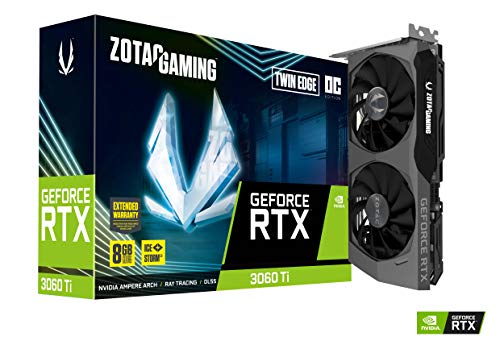
Nvidia RTX 3060 vs Nvidia RTX 3060 Ti at a Glance
| Feature | Nvidia RTX 3060 | Nvidia RTX 3060 Ti |
|---|---|---|
| Graphics Coprocessor | NVIDIA GeForce RTX 3060 | NVIDIA GeForce RTX 3060 Ti |
| Video Memory | 12 GB GDDR6 | 8 GB GDDR6 |
| Memory Bus Width | 192-Bit | 256-bit |
| GPU Clock Speed | 1777 MHz (1710 MHz base listing) | 1695 MHz Boost |
| Memory Clock / Data Rate | 1807 MHz (15 Gbps) | 14000 MHz (14 Gbps) |
| Power Consumption | The listing does not specify | 200W |
| Card Dimensions | 9.25 x 4.88 inches | 8.74 x 4.55 inches |
| Cooling Hardware | Torx Twin Fan dual fan | IceStorm 2.0 dual fan with Freeze Fan Stop |
| Display Outputs | DisplayPort 1.4a x 3, HDMI 2.1 x 1 | DisplayPort 1.4a x 3, HDMI 2.1 x 1 |
| Maximum Display Resolution | 7680 x 4320 | 7680 x 4320 |
| Best For | Large memory workloads and modded textures | High-framerate rasterization and 1440p gaming |
VRAM Capacity and Memory Allocation
Video memory acts as the high-speed scratchpad for every texture, geometry mesh, and frame buffer that a graphics processor touches during an active workload. When evaluating the RTX 3060 12GB vs 3060 Ti 8GB, the standard card holds a surprising 4GB numerical advantage. Having 12GB of GDDR6 RAM allows modern game engines to load uncapped texture packages without swapping data across the PCI Express interface. In production environments where memory spilling causes instant system slowdowns or software crashes, raw VRAM volume often takes precedence over computing speed.
For creative users weighing the RTX 3060 or 3060 Ti for video editing, the 12GB capacity of the base card provides substantial operational insurance. Exporting multi-layered 4K projects, applying complex color grades, and running generative visual workloads consume massive chunks of localized memory. While some users might consider alternatives like the nvidia rtx 3060 vs intel arc b580 to acquire double-digit VRAM, the RTX 3060 remains a proven platform for creative suites that rely on dedicated Ampere hardware acceleration. The 8GB capacity on the 3060 Ti is sufficient for most current gaming scenarios, but it leaves narrower overhead when modern titles demand peak asset storage alongside background system software.
The operational cost of choosing the smaller 8GB frame buffer is that users must manage their graphics options more conservatively in heavily unoptimized or deeply modded titles. However, the 12GB buffer on the RTX 3060 is coupled with a narrower memory path, meaning that while it stores significantly more data, it transfers that data at a slower rate than its titanium sibling. If an application never exceeds 8GB of memory usage, the surplus 4GB on the standard card sits idle without providing a performance uplift.
Edge: Nvidia RTX 3060 delivers a 50 percent larger memory pool that guards against buffer overruns in creative applications and texture-heavy game packages.
Memory Bus Width and Bandwidth Throughput
While memory capacity dictates how many assets the card can hold at once, memory bus width determines how rapidly those assets cycle in and out of the compute cores. A technical examination of the RTX 3060 memory bus vs 3060 Ti highlights the architectural dividing line between these two tiers. The MSI RTX 3060 employs a 192-bit bus operating alongside 15 Gbps memory. In contrast, the ZOTAC GAMING RTX 3060 Ti steps up to a wide 256-bit interface paired with 14 Gbps memory modules. That extra bus width dramatically widens the pipeline through which render passes, post-processing filters, and frame data travel.
This difference in channel width translates directly into sustained throughput. Even though the RTX 3060 clocks its GDDR6 modules slightly higher per pin at 15 Gbps, its 192-bit interface restricts theoretical bandwidth to approximately 360 GB/s. The 256-bit bus on the RTX 3060 Ti, despite running at 14 Gbps, pushes throughput up to roughly 448 GB/s. For readers cross-referencing upper-tier options like the nvidia rtx 3060 ti vs 3070, this 256-bit memory structure matches the architectural bus layout of higher-class cards, ensuring the graphics silicon remains constantly fed during dense computational cycles.
In practice, narrower memory buses struggle when high resolutions and complex shader instructions combine to create data congestion. The wider 256-bit path of the 3060 Ti prevents these data choke points, ensuring that the GPU cores do not spend idle cycles waiting for assets to load across the bus. This bandwidth advantage is a primary reason the 8GB card routinely pulls ahead in compute-heavy scenarios despite carrying less total memory volume.
Edge: Nvidia RTX 3060 Ti takes a commanding victory in data throughput thanks to its robust 256-bit memory bus configuration.
Resolution Scaling and 1440p Gaming
Resolution scaling places geometric demands on both compute cores and memory systems. At standard 1080p, the base RTX 3060 performs adequately, pushing high refresh rates in competitive shooters and stable frame rates in modern titles. However, when stepping up to 2560×1440, the rendering load expands by more than 77 percent. Choosing between the RTX 3060 or 3060 Ti for 1440p gaming requires looking at how each card handles the heavy rasterization penalties inherent to dense pixel counts.
The RTX 3060 Ti shines at 1440p because its Ampere silicon possesses far greater graphical muscle. When comparing RTX 3060 Ti vs RTX 3060 performance across high-resolution displays, the 3060 Ti maintains fluid motion and higher average frame rates with complex visual settings turned on. The standard RTX 3060 often requires dropping fidelity presets or relying heavily on resolution reconstruction to achieve the same smooth motion. Gamers exploring broader upgrades like the nvidia rtx 3060 ti vs 3070 ti will find that the 3060 Ti sits in an enviable sweet spot for native 1440p performance without requiring upper-tier system cooling.
Both graphics cards support display resolutions up to 7680×4320 through their trio of DisplayPort 1.4a jacks and single HDMI 2.1 port. While both can drive an 8K monitor or television for desktop usage and media playback, the RTX 3060 Ti has the computational authority to handle intermediate rendering resolutions far more cleanly. The standard RTX 3060 has the memory buffer for 1440p assets, but its raster processing hardware frequently hits its performance ceiling before that 12GB pool is fully utilized.
Edge: Nvidia RTX 3060 Ti is built specifically to maintain fluid rendering pipelines and stable frame pacing across 1440p gaming resolutions.
Core Architecture and Clock Speed Implementation
A surface reading of clock speeds can often mislead prospective buyers. The MSI RTX 3060 listing highlights a boost clock speed reaching 1777 MHz, with alternate listings referencing 1710 MHz base figures and an 1807 MHz memory clock. The ZOTAC GAMING RTX 3060 Ti lists an engine boost clock of 1695 MHz. While the base RTX 3060 advertises higher operating frequencies, raw megahertz numbers do not paint a complete picture when comparing different silicon tiers within Nvidia’s Ampere family.
The RTX 3060 Ti utilizes a much larger, trimmed-down variant of the GA104 graphics processor, whereas the standard RTX 3060 is built around the smaller GA106 chip. Because the 3060 Ti houses significantly more streaming multiprocessors, 2nd Generation Ray Tracing Cores, and 3rd Generation Tensor Cores, it completes substantially more work per clock cycle than the 3060. Anyone reading an in-depth Nvidia RTX 3060 Ti review alongside an Nvidia RTX 3060 review will discover that architectural density consistently trumps pure core clock frequencies in real-world graphical compute workloads.
The practical result is that the RTX 3060 Ti executes ray tracing computations, complex lighting passes, and machine learning upscaling algorithms with far lower latency. For enthusiasts evaluating the full mid-range spectrum through comparisons like the nvidia rtx 3060 vs 3070, the 3060 Ti operates much closer to top-tier Ampere silicon than the entry-level RTX 3060 does. The higher clock speed of the 3060 helps it maximize its smaller compute array, but it cannot bridge the wide hardware gulf separating the two processors.
Edge: Nvidia RTX 3060 Ti delivers far greater compute density and parallel execution capability despite showing lower rated clock speeds on paper.
Cooling Hardware, Board Dimensions, and Power Demands
Physical integration into your PC case involves evaluating cooler design, card clearance, and system power supply overhead. The MSI Gaming RTX 3060 features a dual-fan Torx Twin Fan cooling arrangement that measures 9.25 inches long and 4.88 inches wide. The ZOTAC GAMING RTX 3060 Ti Twin Edge OC measures 8.74 inches long and 4.55 inches wide, occupying a dual-slot footprint. The ZOTAC card is notably more compact, making it easier to slip into space-restricted micro-ATX or small-form-factor builds where GPU clearance is constrained.
Thermal management systems also differ across these two vendor executions. ZOTAC equips its 3060 Ti with the IceStorm 2.0 advanced cooling setup, incorporating Active Fan Control, a metal backplate for structural rigidity, and FREEZE Fan Stop functionality to keep the card silent during low-load periods. MSI provides a robust Torx fan design for the RTX 3060 that keeps temperatures well in hand across prolonged gaming sessions. While builders researching larger cards like the nvidia rtx 3060 vs 3080 must plan around massive three-slot coolers, both of these cards maintain manageable dual-fan physical profiles.
Power consumption is a key factor when asking is RTX 3060 Ti worth it for an existing desktop upgrade. The ZOTAC RTX 3060 Ti listing specifies a 200W power consumption profile, requiring a reliable desktop power supply with dedicated PCIe supplemental power cables. The MSI RTX 3060 listing does not specify an exact wattage rating, though base 3060 cards historically draw less total power than the 200W titanium variant. Upgraders swapping out older hardware must ensure their power supplies and chassis airflow can easily accommodate the thermal exhaust of a 200W board.
Edge: Tie. The RTX 3060 Ti delivers a more compact card length and a rigid metal backplate, while the RTX 3060 demands less power from host desktop systems.
Pros and Cons
Nvidia RTX 3060

Pros
- 12GB GDDR6 memory buffer
- Higher 1777 MHz boost clock
- 15 Gbps memory speed
- Three DisplayPort 1.4a outputs
Cons
- Narrower 192-bit memory bus
- Longer 9.25-inch card footprint
View Nvidia RTX 3060 on Amazon
Nvidia RTX 3060 Ti

Pros
- Wide 256-bit memory interface
- Compact 8.74-inch dual-slot build
- IceStorm 2.0 with Freeze Fan Stop
- Protective metal backplate included
Cons
- Smaller 8GB memory capacity
- 200W power consumption requirement
View Nvidia RTX 3060 Ti on Amazon
Who Should Buy Each One
Choose the Nvidia RTX 3060 If
- You focus on video editing, 3D scene compilation, or machine learning tools that demand an expansive 12GB VRAM buffer.
- You frequently play heavily modified role-playing games loaded with sprawling high-resolution texture packs.
- Your desktop chassis easily accommodates a card length of 9.25 inches without blocking front radiator mounts.
- You run a moderate desktop power supply and prefer a lower board power footprint over maximum compute speeds.
Choose the Nvidia RTX 3060 Ti If
- Your primary objective is maximizing frames per second on a dedicated 1440p gaming monitor.
- You demand the accelerated throughput and wider data pipeline provided by a 256-bit memory bus.
- You need a shorter graphics card footprint under 8.8 inches to fit inside a compact micro-ATX case.
- Your computer power supply easily handles a 200W graphics power profile and you value features like a metal backplate and silent fan-stop modes.
Final Verdict
For the vast majority of PC gamers, the Nvidia RTX 3060 Ti is the superior hardware investment. Its 256-bit memory bus, dense Ampere compute core arrangement, and 448 GB/s bandwidth give it the graphical power needed to drive modern titles smoothly at 1440p. While it offers 8GB of memory compared to the 12GB seen on the base card, that 8GB pool operates inside a vastly faster communication lane. The extra rasterization muscle ensures that frame pacing remains stable when action on screen peaks.
The standard Nvidia RTX 3060 remains the right selection for content creators, video editors, and specialized enthusiasts whose workflows are gated by memory capacity rather than graphical processing speed. Having 12GB of VRAM on a mid-range board allows digital artists to manipulate dense project timelines and high-polygon models without running into memory allocation crashes. If your daily PC use prioritizes creative timeline stability and massive asset buffering over 1440p frame rates, the 12GB RTX 3060 remains a remarkably capable workhorse.
FAQ
Is RTX 3060 Ti worth it over the standard RTX 3060?
The RTX 3060 Ti is worth selecting if you prioritize high-framerate gaming, particularly at 1440p resolution. Its wider 256-bit memory bus, increased core count, and significantly higher memory bandwidth deliver a clear step up in visual fluidity and computational speed over the standard RTX 3060.
Why does the RTX 3060 have 12GB of VRAM while the 3060 Ti only has 8GB?
Memory configuration is determined by the width of the memory bus interface. The RTX 3060 uses a 192-bit bus, which requires either a 6GB or 12GB configuration using standard GDDR6 memory chips, and Nvidia opted for 12GB. The RTX 3060 Ti features a wider 256-bit bus, which natively accommodates an 8GB memory layout using higher-density modules across its wider memory channels.
Which card is better: RTX 3060 or 3060 Ti for video editing?
The RTX 3060 is often preferred for intensive video editing timelines because its 12GB frame buffer allows creative applications to load extensive 4K media layers, transitions, and effects without running out of video memory. However, the RTX 3060 Ti renders effects and exports timelines faster due to its superior compute horsepower, provided the project files remain within its 8GB memory envelope.
Can either of these graphics cards output to an 8K display?
Yes. Both the MSI RTX 3060 and ZOTAC GAMING RTX 3060 Ti feature a maximum display resolution of 7680×4320. Each card includes three DisplayPort 1.4a outputs and one HDMI 2.1 port capable of driving ultra-high-resolution 8K panels and multi-monitor productivity workstations.
How does the RTX 3060 memory bus compare to the 3060 Ti?
The RTX 3060 features a 192-bit memory bus operating at 15 Gbps, yielding theoretical bandwidth around 360 GB/s. The RTX 3060 Ti features a wider 256-bit memory bus running at 14 Gbps, which produces roughly 448 GB/s of bandwidth. This wider highway allows the 3060 Ti to transfer visual data to its processing cores substantially faster.
What are the physical dimensions of these two graphics cards?
The MSI Gaming RTX 3060 measures 9.25 inches long by 4.88 inches wide. The ZOTAC GAMING RTX 3060 Ti Twin Edge OC measures 8.74 inches long by 4.55 inches wide and occupies a standard dual-slot space. The ZOTAC model is slightly shorter, making it easier to install in compact chassis configurations.
What is the power consumption difference between the two cards?
The ZOTAC GAMING RTX 3060 Ti specifies a power consumption rating of 200W. The MSI RTX 3060 listing does not specify its exact power draw, though standard RTX 3060 cards generally draw less overall board power than their higher-tier titanium counterparts.


