The single factor that decides whether you should choose the Razer DeathAdder V3 Pro or the Razer Viper V3 Pro comes down to structural ergonomics versus ultra-low mass and maximum polling speed. While the DeathAdder provides a supportive, sculpted ergonomic form weighing 63 grams with standard 1000 Hz polling, the Viper cuts down to an ultra-lightweight 54-gram profile paired with native 8000 Hz wireless hyperpolling.
Choose the DeathAdder V3 Pro if you rely on a full palm grip and require contoured support across long competitive sessions. Choose the Razer Viper V3 Pro if you demand the absolute lowest weight for rapid flicking and want an 8000 Hz polling rate for high-refresh competitive displays.


Razer DeathAdder V3 Pro vs Razer Viper V3 Pro at a Glance
| Attribute | Razer DeathAdder V3 Pro | Razer Viper V3 Pro |
|---|---|---|
| Item Weight | 63 g | 54 g |
| Maximum Polling Rate | 1000 Hz | 8000 Hz HyperPolling |
| Optical Sensor | Focus Pro 30K Optical Sensor | Focus Pro 35K Optical Sensor Gen-2 |
| Maximum Sensitivity | 30,000 DPI | 35,000 DPI |
| DPI Step Adjustments | Not listed | 1-DPI step adjustments |
| Switch Type & Lifecycle | Optical Gen-3 (90M clicks, 0.2ms) | Optical Gen-3 (90M clicks, 0.2ms) |
| Total Button Count | 6 programmable buttons | 8 buttons |
| Battery Average Life | Up to 90 hours | Up to 95 hours |
| Connectivity Technology | Bluetooth, USB | USB (HyperSpeed Wireless Dongle) |
| Operating System Support | Windows, macOS | Windows |
| Wireless Range | 10.0 meters | 100.0 meters |
| Best For | Ergonomic palm grip stability | Ultra-lightweight claw grip and high-refresh tracking |
Chassis Weight and In-Hand Handling
In competitive gaming, mouse weight directly impacts how quickly you can initiate a flick and how smoothly you can stop the mouse on target. When comparing razer deathadder v3 pro vs viper v2 pro models and modern releases, mouse chassis engineering has moved rapidly toward shedding physical grams. The DeathAdder V3 Pro vs Viper V3 Pro weight differential is 9 grams: the DeathAdder V3 Pro sits at 63 grams, while the Viper V3 Pro drops down to an ultra-lightweight 54 grams. While 63 grams is exceptionally light for a full-sized ergonomic design-representing a reduction of over 25 percent compared to earlier generations-the 54-gram chassis of the Viper V3 Pro changes the inertia equation noticeably on low friction mouse surfaces.
The Viper V3 Pro achieves its 54-gram weight through an ultra-streamlined, pro-tested chassis profile designed to facilitate instant micro-corrections. That 9-gram reduction lowers physical resistance during rapid directional changes, enabling players who use fast flick shots to accelerate and decelerate with minimal wrist strain. On the other hand, the DeathAdder V3 Pro uses its 63 grams to provide a grounded, reassuring glide that favors controlled sweeping motions. In any technical Razer Viper V3 Pro review, reviewers point out that ultra-light mice require higher muscular control to avoid overshooting, whereas the slightly heavier frame of the DeathAdder acts as a natural stabilizer for broad, sweeping aiming styles.
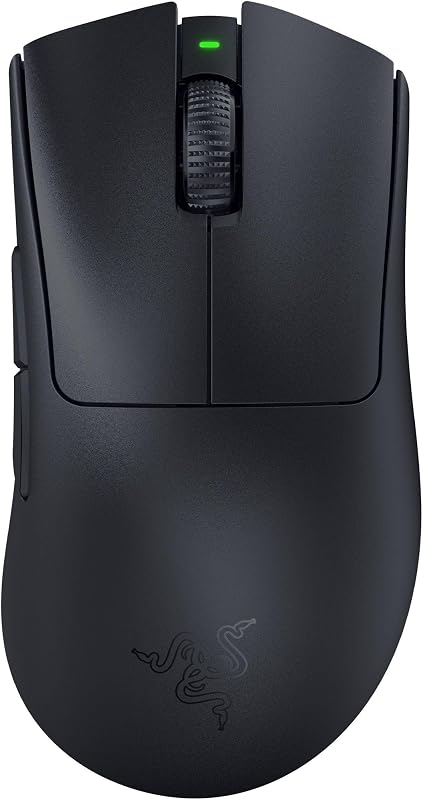
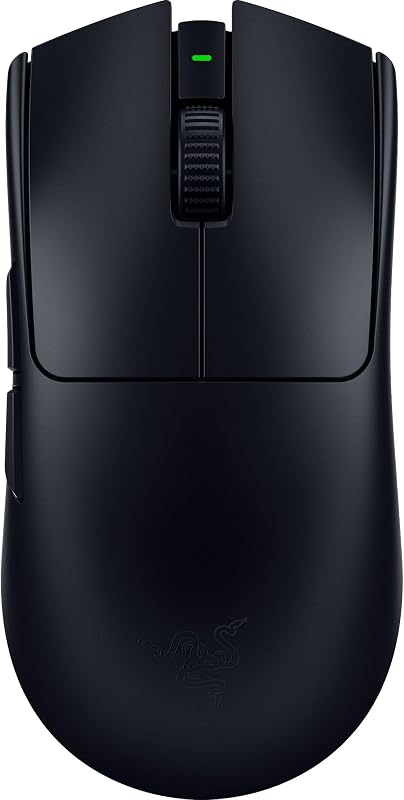
The physical handling differences extend into how each shell fills the hand. The DeathAdder V3 Pro features a refined, asymmetrical ergonomic shell created with input from competitive pros, distributing palm pressure evenly across the mouse surface. Conversely, the Viper V3 Pro adopts a balanced symmetrical profile built for aggressive, nimble control. If your priority is absolute agility with lowest physical resistance during matches, the 54-gram Viper takes the operational lead.
Edge: Razer Viper V3 Pro because its 54g chassis significantly lowers inertia during quick flick motions.
Polling Rate and Wireless Latency
Wireless polling rate dictates how frequently your mouse reports tracking data and button states back to your PC. A higher polling rate reduces input latency, increases positional fidelity on high-refresh-rate monitors, and produces smoother on-screen cursor trajectories. In this Razer Viper V3 Pro vs DeathAdder V3 Pro matchup, the wireless transmission ceiling is the clearest technical divide between the two generations.
The Razer Viper V3 Pro polling rate reaches up to 8000 Hz straight out of the box through Razer HyperPolling technology combined with the included HyperPolling Wireless Dongle. Standard wireless gaming mice, including the baseline DeathAdder V3 Pro configuration, transmit at 1000 Hz, corresponding to a 1-millisecond reporting interval. At 8000 Hz, the Viper V3 Pro cuts that interval down to a mere 0.125 milliseconds. This eightfold increase in reporting frequency delivers 8x the responsiveness, which matches modern 360 Hz, 500 Hz, and higher esports displays to eliminate micro-stuttering during sudden flick shots.
The DeathAdder V3 Pro operates on Razer HyperSpeed Wireless with a listed 1000 Hz polling rate style. Razer HyperSpeed provides an exceptionally stable, low-latency link that runs 25 percent faster than many competing wireless technologies and resists wireless interference in noisy tournament environments. However, the factory configuration of the DeathAdder V3 Pro does not include native 8000 Hz capabilities out of the box. For competitive gamers who prioritize maximum frame synchronization and the lowest attainable wireless delay, the Viper V3 Pro is uniquely equipped.
Edge: Razer Viper V3 Pro due to its included HyperPolling Wireless Dongle providing native 8000 Hz polling versus the standard 1000 Hz configuration.
Optical Sensor Precision and Granularity
Both mice feature top-tier optical sensors capable of tracking across diverse surfaces, including clear glass, but they differ in sensor generation, maximum resolution, and sensitivity stepping. Analyzing the Razer DeathAdder V3 Pro vs Viper V3 Pro sensor specifications reveals how Razer has iterated on its optical tracking engine.
The DeathAdder V3 Pro relies on the Razer Focus Pro 30K Optical Sensor, which tops out at 30,000 DPI and includes intelligent functions that enhance aim and surface calibration. This sensor provides flawless tracking on desktop mats and polished glass mousepads alike. Gamers looking at a thorough Razer DeathAdder V3 Pro review will find that the Focus Pro 30K remains one of the most consistent optical tracking units in esports, capable of handling rapid acceleration and extreme swipe speeds without skipping frames.
The Viper V3 Pro steps up to the Focus Pro 35K Optical Sensor Gen-2, raising maximum sensitivity to 35,000 DPI. While raw sensitivity above 30,000 DPI exceeds what practical competitive situations demand, the Gen-2 sensor brings a critical practical advantage: true 1-DPI step adjustments. Instead of shifting sensitivity in 50-DPI or 100-DPI increments, the Viper V3 Pro allows exact 1-DPI tuning via the Razer Synapse app. For players who match sensitivities down to exact decimal measurements across different tactical shooters or who want to replicate a legacy mouse sensitivity exactly, this granular control provides a distinct competitive edge.
Edge: Razer Viper V3 Pro because its Focus Pro 35K Gen-2 sensor delivers precise 1-DPI step adjustments.
Grip Compatibility and Ergonomic Form
Shape is the primary factor dictating long-term comfort and mechanical consistency in competitive play. When asking whether to buy the razer deathadder v3 vs viper v3 pro, the fundamental question centers on your natural hand placement and grip anatomy. A mouse with the best sensor is useless if your grip creates muscle tension or impedes precise trigger activation.
The DeathAdder V3 Pro features Razer’s iconic ergonomic form, sculpted specifically for natural hand positioning. The left side flares subtly to support the thumb, while the right side curves outward to rest the ring finger and pinky, keeping hand musculature relaxed. This contour makes the DeathAdder V3 Pro the premier option for full palm-grip players and hybrid palm-claw grips. The gentle arch supports the center of the palm, decreasing fatigue during hours of continuous scrimmages. When deciding between the DeathAdder V3 Pro or Viper V3 Pro for claw grip, players with larger hands who like arched palm support often lean toward the DeathAdder frame.
Conversely, the Viper V3 Pro utilizes a low-profile, balanced symmetrical profile engineered for aggressive finger placement. It gives the player total freedom to pinch the sides, making it the superior tool for pure claw-grip and fingertip-grip aimers. The flatter rear hump leaves space between the palm and the chassis, which allows your fingers to pull the mouse down into the palm for vertical recoil compensation. In head-to-head comparisons like the razer deathadder v3 pro vs basilisk v3 pro, heavier ergonomic mice lose out on sheer agility. The Viper V3 Pro maximizes that mobility, but it lacks the natural palm support that prevents cramping in players who rest their entire hand on the shell.
Edge: Razer DeathAdder V3 Pro for superior ergonomic palm support and natural wrist alignment over extended matches.
Button Layout and Hardware Switches
Both peripherals incorporate Razer Optical Mouse Switches Gen-3, which provide an industry-leading 90-million click lifecycle, zero double-clicking failures, and a blistering 0.2-millisecond actuation speed without debounce delay. Because light beams actuate the optical triggers rather than physical metal leaves, both mice deliver instantaneous actuation and long-term durability. Where they diverge is in external button quantity and mechanical mapping.
The DeathAdder V3 Pro features 6 programmable buttons: the two primary clicks, a clickable scroll wheel, two left-side thumb buttons, and a bottom-mounted DPI/power toggle. This layout keeps the shell clean and eliminates accidental actuations, focusing on the core inputs needed for tactical shooters. It avoids side buttons on the right flank, keeping weight low and handling uncluttered for right-handed ergonomic users.
The Viper V3 Pro lists 8 buttons in its technical specifications. This expanded button count gives players additional input flexibility to map tactical abilities, push-to-talk binds, or weapon toggles directly to the mouse hardware. Players evaluating broader multi-genre alternatives such as the razer viper v3 pro vs basilisk v3 often find standard esports mice restrictive in button count. The Viper V3 Pro bridges that gap by offering 8 functional buttons while still achieving an ultra-light 54-gram mass, providing more binding real estate than the DeathAdder V3 Pro without penalizing weight.
Edge: Razer Viper V3 Pro because it integrates 8 buttons into an ultra-lightweight chassis compared to the 6 buttons on the DeathAdder.
Battery Life and Operational Connectivity
Wireless convenience depends on battery longevity and connectivity versatility. Running out of charge in a competitive match ruins the wireless experience, forcing you onto a tethered cable. Examining the official specifications for each mouse reveals slight differences in operational runtimes and wireless protocol support.
The DeathAdder V3 Pro provides up to 90 hours of continuous play on a single charge at standard 1000 Hz polling, recharging via USB Type-C. Its listing also specifies connectivity over Bluetooth as well as USB and 2.4 GHz HyperSpeed Wireless, with a wireless operating range of 10.0 meters. The dual-mode wireless capability gives the DeathAdder utility beyond the primary gaming rig; it can pair easily with laptops or secondary systems without consuming a dedicated USB-A port. It also supports both Windows and macOS operating systems, broadening its versatility across diverse environments.
The Viper V3 Pro edges out the DeathAdder slightly with up to 95 hours of competitive gameplay per charge, though this figure represents operation at standard polling rates. Using the Viper at its peak 8000 Hz polling rate will increase power draw substantially due to the 8x reporting frequency. Unlike the DeathAdder, the Viper V3 Pro listing specifies USB wireless connectivity via its dedicated dongle without listing Bluetooth, but it boasts a remarkable 100.0-meter range rating. For pure competitive PC gaming, the Viper V3 Pro offers 5 extra hours of baseline runtime, though the DeathAdder provides broader operating system compatibility and Bluetooth flexibility.
Edge: Razer Viper V3 Pro by a small margin due to its 95-hour baseline battery rating compared to 90 hours on the DeathAdder.
Pros and Cons
Razer DeathAdder V3 Pro
Pros
- Ergonomic palm-grip contoured chassis
- Lightweight 63g design
- Up to 90-hour battery life
- Gen-3 optical switches with 0.2ms actuation
- Windows and macOS compatibility
Cons
- Heavier than Viper V3 Pro
- Limited to 1000 Hz out of box
- No 1-DPI adjustment steps listed
View Razer DeathAdder V3 Pro on Amazon
Razer Viper V3 Pro
Pros
- Ultra-lightweight 54g chassis
- Native 8000 Hz HyperPolling included
- Focus Pro 35K Gen-2 sensor
- Granular 1-DPI step adjustments
- Up to 95-hour battery life
Cons
- Lacks palm-filling ergonomic support
- MacOS support not listed in specs
- Higher polling reduces battery runtime
View Razer Viper V3 Pro on Amazon
Who Should Buy Each One
Choose the Razer DeathAdder V3 Pro If
- You use a traditional palm grip and want a contoured, ergonomic shell that supports your wrist and palm during long matches.
- You prefer a balanced 63-gram weight that provides natural mechanical stability for broad arm-aiming sweeps.
- You need broad operating system compatibility across both Windows and macOS environments alongside Bluetooth connectivity.
- You prioritize proven 1000 Hz HyperSpeed wireless reliability with a low-clutter 6-button physical layout.
Choose the Razer Viper V3 Pro If
- You demand an ultra-lightweight 54-gram chassis to maximize flick acceleration and quick micro-adjustments.
- You utilize high-refresh gaming monitors and want native 8000 Hz HyperPolling to achieve the lowest possible wireless latency.
- You use a claw or fingertip grip that requires a flat, symmetrical profile with freedom for finger-driven vertical pull-downs.
- You want granular 1-DPI step adjustments via the Focus Pro 35K Gen-2 optical sensor to match exact sensitivity settings.
Final Verdict
When deciding DeathAdder V3 Pro or Viper V3 Pro for FPS titles, the Razer Viper V3 Pro is the superior overall technical package for competitive esports players. By cutting chassis mass down to 54 grams, including native 8000 Hz HyperPolling right out of the box, and introducing the Focus Pro 35K Gen-2 sensor with 1-DPI step adjustments, it represents the leading edge of competitive mouse engineering. For fast-paced tactical shooters and tracking-heavy titles where flick speed, click latency, and positional reporting are paramount, the Viper V3 Pro provides measurable hardware advantages.
However, the Razer DeathAdder V3 Pro remains the definitive choice for players who cannot compromise on ergonomic palm support. An ultra-lightweight mouse offers no advantage if its flat symmetrical shell causes hand fatigue, cramping, or inconsistent grip pressure. If you are comparing the razer deathadder v3 vs viper v2 pro or looking at standard ergonomic flagships, the DeathAdder V3 Pro delivers a comfortable 63-gram shell, up to 90 hours of battery life, and flawless 30K optical tracking that make it a reliable partner for marathon competitive gaming.
FAQ
DeathAdder V3 Pro or Viper V3 Pro for FPS games?
The Viper V3 Pro holds the advantage for fast-twitch FPS games due to its lighter 54-gram weight and 8000 Hz polling rate, allowing for faster flicks and smooth micro-adjustments on high-refresh monitors. However, the DeathAdder V3 Pro is favored by FPS players who employ a full palm grip and prefer a stable 63-gram chassis for wide sweeping arm movements.
DeathAdder V3 Pro or Viper V3 Pro for claw grip?
The Viper V3 Pro is generally the better option for claw grip. Its symmetrical, low-profile body leaves ample clearance between your palm and the mouse shell, allowing your fingers to pull the mouse downward during spray control. The DeathAdder V3 Pro features a higher, contoured arch that fills the palm, which suits palm-claw hybrids but can restrict pure claw-grip finger mobility.
Is Razer Viper V3 Pro worth it over the DeathAdder V3 Pro?
The Viper V3 Pro is worth it if you play on high-refresh monitors and want native 8000 Hz polling, a lighter 54-gram chassis, and 1-DPI sensitivity steps. If you require an asymmetrical ergonomic shape that reduces hand fatigue during long gaming sessions, the DeathAdder V3 Pro remains the better fit.
Is Razer DeathAdder V3 Pro worth it for competitive play?
Yes, the DeathAdder V3 Pro remains a top-tier competitive esports mouse. At 63 grams, it is one of the lightest ergonomic mice available, and it features Gen-3 optical switches, a Focus Pro 30K optical sensor that tracks on glass, and up to 90 hours of battery life.
What is the battery difference between these two wireless mice?
The DeathAdder V3 Pro provides up to 90 hours of continuous play, while the Viper V3 Pro provides up to 95 hours of competitive gameplay. Both mice recharge via USB Type-C, though operating the Viper V3 Pro at its maximum 8000 Hz polling rate will reduce its battery runtime compared to standard 1000 Hz usage.
Can the sensors on both mice track on glass?
Yes. Both the Focus Pro 30K sensor on the DeathAdder V3 Pro and the Focus Pro 35K Gen-2 sensor on the Viper V3 Pro are engineered with optical tracking technologies that deliver flawless performance on a wide variety of surfaces, including clear glass.


