The single difference that decides the choice between the Razer Viper V3 Pro and the Razer Basilisk V3 Pro is how they prioritize physical weight against functional versatility. The Viper V3 Pro strips away non-essential features to achieve a 54-gram symmetrical frame built for rapid esports flicking, while the Basilisk V3 Pro trades pure lightness for an ergonomic right-handed shell packed with customizable buttons, multi-device Bluetooth, dynamic RGB lighting, and an adaptable scroll wheel.
Competitive shooter players who demand maximum tracking speed and zero hand resistance should choose the Viper V3 Pro. Gamers who split their time between multiple gaming genres, office productivity, and workstation setups should choose the Basilisk V3 Pro.


Razer Viper V3 Pro vs Basilisk V3 Pro at a Glance
| Feature | Razer Viper V3 Pro | Razer Basilisk V3 Pro |
|---|---|---|
| Chassis Weight | 54 g | Not listed |
| Sensor Model | Focus Pro 35K Optical Sensor Gen-2 | Focus Pro 30K Optical Sensor |
| Maximum Sensitivity | 35,000 DPI | 30,000 DPI |
| DPI Step Adjustment | 1-DPI steps | Not listed |
| Polling Rate Out of Box | Up to 8000 Hz (dongle included) | 1000 Hz (8000 Hz supported via separate accessory) |
| Total Programmable Buttons | 8 | 11 (10 + 1 programmable) |
| Scroll Wheel Mechanism | Standard tactile scroll wheel | HyperScroll Tilt Wheel (free-spin and tactile) |
| Lighting Zones | Not listed | 13-Zone Chroma Lighting with full underglow |
| Connectivity Modes | HyperSpeed Wireless (2.4GHz), USB | HyperSpeed Wireless (2.4GHz), Bluetooth, USB |
| Maximum Battery Life | Up to 95 hours | Up to 150 hours (Bluetooth) / 110 hours (HyperSpeed) |
| Operating System Support | Windows 10 minimum | Windows, macOS |
| Best For | Esports FPS and rapid target acquisition | Ergonomic comfort, MMO/MOBA, and daily productivity |
Weight, Chassis Design, and Ergonomics
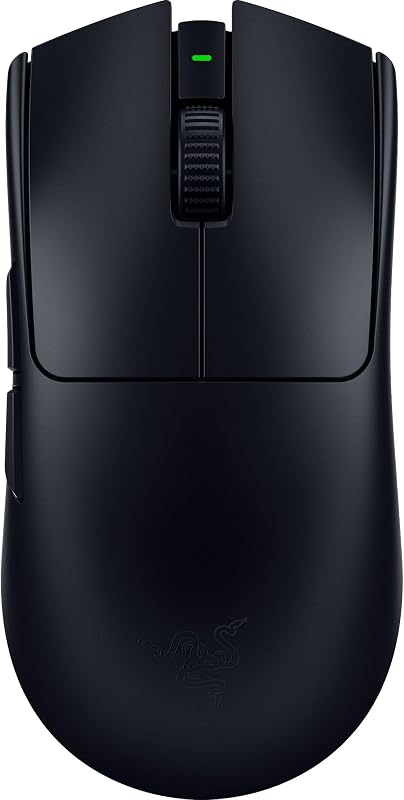
A mouse chassis defines how your arm, wrist, and fingers interact with every micro-adjustment on the mousepad. In any head-to-head evaluation of viper v3 pro vs basilisk v3 pro weight, the difference in design philosophy is immediate. The Viper V3 Pro weighs just 54 grams, created specifically in collaboration with esports professionals who require an ultra-lightweight peripheral that reduces inertia. When executing fast horizontal sweeps or recovering crosshair placement after sudden recoil, a lighter shell demands less physical effort from the fingers, helping eliminate micro-stutters during high-pressure aim adjustments.
In contrast, the Basilisk V3 Pro adopts an iconic right-handed ergonomic form factor engineered for palm support and sustained comfort. While the listing does not specify its exact weight in grams, its structural footprint is visibly more substantial, featuring an integrated thumb rest that keeps your hand elevated off the mat. For players exploring a razer viper v3 pro vs basilisk v3 comparison, the ergonomic sculpting of the Basilisk platform provides a secure resting grip that relieves forearm tension during multi-hour role-playing campaigns or desktop sessions.
When analyzing the viper v3 pro vs basilisk v3 pro for fps competition, the Viper V3 Pro provides superior mechanical handling. The 54-gram chassis allows an effortless claw or fingertip grip that makes twitch aiming instinctive, whereas the sculpted, heavier shell of the Basilisk V3 Pro is intentionally tailored for relaxed palm grippers who prefer stable, planted control over raw physical agility.
Edge: Razer Viper V3 Pro for its verified 54-gram ultra-lightweight frame that eliminates drag during competitive aiming.
Polling Rate and Wireless Responsiveness
Wireless polling rate determines how frequently your peripheral sends tracking and click data to your computer per second. A standard gaming mouse reports at 1000 Hz (once every millisecond), while an 8000 Hz polling rate reduces reporting intervals down to an eighth of a millisecond. Comparing the viper v3 pro vs basilisk v3 pro polling rate highlights a fundamental difference in what arrives in each retail package. The Viper V3 Pro comes bundled directly with the HyperPolling Wireless Dongle, enabling a native 8000 Hz polling rate out of the box without requiring supplemental hardware.
The Basilisk V3 Pro also features advanced Razer HyperSpeed Wireless technology, delivering ultra-responsive gaming that registers inputs 25% faster than standard wireless protocols. However, out of the box it operates at a standard 1000 Hz connection. Achieving a true 8000 Hz polling rate on the Basilisk V3 Pro requires purchasing either the Razer Mouse Dock Pro or the standalone HyperPolling Wireless Dongle, both sold separately according to the product specifications. While both devices leverage Razer Optical Mouse Switches Gen-3 with zero debounce delay and a rapid 0.2 ms actuation speed across 90 million clicks, the Viper V3 Pro delivers its ultra-high polling rate immediately without extra purchases.
In real-world competitive play, running an 8000 Hz report rate provides smoother cursor trajectories and lower input latency on high-refresh-rate gaming monitors. Because the Viper V3 Pro includes the necessary 8000 Hz dongle as standard equipment, competitive players can optimize their responsiveness straight out of the packaging without tracking down optional add-ons.
Edge: Razer Viper V3 Pro because it includes the 8000 Hz HyperPolling Wireless Dongle directly in the box.
Sensor Precision and Surface Tracking
The sensor is the mechanical core of any pointing device, translating physical movement across your desk into on-screen translation. The Viper V3 Pro showcases the newer Razer Focus Pro 35K Optical Sensor Gen-2. This optical unit reaches a maximum sensitivity ceiling of 35,000 DPI and supports fine-grained 1-DPI step adjustments through the Razer Synapse app. That level of micro-calibration lets competitive players dial in exact mouse sensitivities transferred from previous hardware, eliminating rounding discrepancies when converting tracking sensitivity between game engines.
The Basilisk V3 Pro runs the Razer Focus Pro 30K Optical Sensor, offering a maximum sensitivity of 30,000 DPI. While 30,000 DPI exceeds what any human eye can track on a display, both sensors share pro-grade tracking capabilities, including flawless movement on difficult surfaces such as glass mousepads. Readers evaluating a wider lineup like the razer viper v2 pro vs basilisk v3 pro will recognize that the Focus Pro family represents top-tier tracking accuracy with intelligent surface calibration across all variants.
Although tracking fidelity on traditional cloth and hybrid pads is identical between 30,000 DPI and 35,000 DPI, the Viper V3 Pro earns an operational advantage through its 1-DPI calibration steps. Serious esports enthusiasts can tweak their tracking resolution with complete numeric accuracy, giving the second-generation sensor an objective edge in precision configuration.
Edge: Razer Viper V3 Pro due to its updated Focus Pro 35K Gen-2 sensor and granular 1-DPI sensitivity steps.
Controls, Customization, and Hardware Utility
Button layouts and physical controls define how much workload a mouse can offload from your keyboard. The Basilisk V3 Pro dominates this area by offering 11 programmable buttons configured across an asymmetric right-handed shell. Crucially, it features the Razer HyperScroll Tilt Wheel, a versatile input mechanism that can switch between tactile ratcheted scrolling for precise weapon cycling and free-spinning mode for rapid web page navigation or accelerated inputs. It also features horizontal tilt clicks for additional hotkeys.
By comparison, the Viper V3 Pro features a minimalist 8-button layout and a standard tactile scroll wheel. The Viper eliminates extra mechanical levers, tilt axes, and thumb paddles to preserve its 54-gram balance. It also strips away decorative lighting entirely, whereas the Basilisk V3 Pro integrates a full 13-zone Chroma RGB system with 360-degree underglow that dynamically responds to over 150 Chroma-integrated game titles.
For gamers who juggle complex keybindings in MMORPGs, MOBAs, or creative design software, the extra physical inputs and multi-mode scroll wheel on the Basilisk V3 Pro provide functionality that the stripped-down Viper cannot replicate. As noted in any comprehensive razer deathadder v3 pro vs basilisk v3 pro comparison, extra assignable controls transform an ergonomic mouse into a versatile command center.
Edge: Razer Basilisk V3 Pro for its 11 programmable buttons, 13-zone Chroma RGB underglow, and versatile HyperScroll tilt wheel.
Battery Life and Connectivity Versatility
Connectivity options determine how easily a peripheral transitions between tournament rigs, mobile laptops, and daily work environments. In the comparison of viper v3 pro vs basilisk v3 pro battery life, each peripheral optimizes power consumption around different usage modes. The Viper V3 Pro provides up to 95 hours of competitive gaming performance on its 2.4GHz wireless connection. It relies entirely on its low-latency wireless protocol and wired USB connection, with the listing citing a wireless range of up to 100.0 meters and Windows 10 as its minimum required operating system.
The Basilisk V3 Pro provides significantly broader connection choices by incorporating Bluetooth alongside 2.4GHz HyperSpeed Wireless and USB. On Bluetooth, battery life extends up to 150 hours, while standard 1000 Hz HyperSpeed wireless provides up to 110 hours. If upgraded to 8000 Hz via the optional dongle or dock, battery life drops to 32 hours under constant motion. The Basilisk V3 Pro also provides verified compatibility across both Windows and macOS, whereas the Viper V3 Pro listing specifies Windows support.
Having onboard Bluetooth makes the Basilisk V3 Pro much more convenient for users who split time between a desktop gaming PC and an office laptop. Rather than moving a USB dongle between machines, you can switch wireless modes with a toggle switch on the bottom of the shell. When comparing competitive mice with mobile-friendly options like the razer viper v3 pro vs orochi v2, having Bluetooth built directly into the peripheral adds substantial everyday flexibility.
Edge: Razer Basilisk V3 Pro for its multi-platform Bluetooth connectivity, macOS support, and 150-hour maximum battery life.
Pros and Cons
Razer Viper V3 Pro
Pros
- 54-gram ultra-lightweight esports chassis
- Includes 8000 Hz HyperPolling wireless dongle
- Focus Pro 35K Gen-2 sensor with 1-DPI steps
- Up to 95 hours of competitive battery life
Cons
- No Bluetooth connectivity
- Lacks RGB lighting and tilt wheel functionality
View Razer Viper V3 Pro on Amazon
Razer Basilisk V3 Pro

Pros
- Ergonomic shell with 11 programmable buttons
- HyperScroll tilt wheel with free-spin mode
- Versatile Bluetooth and 2.4GHz wireless modes
- 13-zone Chroma RGB underglow lighting
Cons
- 8000 Hz polling requires separate accessory purchase
- Product listing does not specify chassis weight
View Razer Basilisk V3 Pro on Amazon
Who Should Buy Each One
Choose the Razer Viper V3 Pro If
- You play fast-paced competitive shooters and want a 54-gram frame for maximum flick speed.
- You want native 8000 Hz wireless hyperpolling included in the box without buying extra docks.
- You need the Focus Pro 35K Gen-2 sensor with single-DPI step adjustments for precise calibration.
- You prefer a stripped-down, tournament-focused design without the battery drain of RGB lighting.
Choose the Razer Basilisk V3 Pro If
- You prioritize ergonomic right-handed palm comfort and thumb support during extended gaming sessions.
- You need 11 programmable buttons and a HyperScroll tilt wheel for complex macros and productivity.
- You connect across multiple systems and want Bluetooth switching between Windows and macOS machines.
- You want 13-zone customizable Chroma RGB underglow to synchronize lighting across your desktop setup.
Final Verdict
Choosing between the razer basilisk v3 pro vs viper v3 pro ultimately comes down to whether your priority is raw competitive aim or all-around hardware capability. The Viper V3 Pro is the definitive choice for pure esports performance. With its 54-gram featherweight chassis, bundled 8000 Hz HyperPolling dongle, and 35K optical sensor, it strips away every ounce of non-essential bulk to ensure nothing interferes with your crosshair control. Anyone asking is viper v3 pro worth it will find their answer in the fluid responsiveness and zero-drag mobility it brings to competitive lobbies.
On the other hand, the Basilisk V3 Pro is the clear winner for players who treat their PC as a multi-purpose powerhouse. Between its 11 assignable buttons, HyperScroll free-spin wheel, 13-zone Chroma lighting, and multi-device Bluetooth capability, it excels across open-world exploration, strategy games, and daily desktop navigation. When asking is basilisk v3 pro worth it, gamers who prefer ergonomic palm stability and deep physical customization will discover an exceptionally complete feature set that justifies choosing utility over lightweight speed.
FAQ
Which mouse is better for competitive first-person shooters?
The Viper V3 Pro is superior for competitive FPS titles. Its 54-gram ultra-lightweight construction reduces wrist fatigue and inertial drag, allowing faster micro-adjustments and swift crosshair flicks. Additionally, its included 8000 Hz HyperPolling dongle provides the lowest possible input latency right out of the box.
Does the Razer Basilisk V3 Pro include an 8000 Hz dongle?
No, the Basilisk V3 Pro operates at standard 1000 Hz wireless using its included HyperSpeed dongle. To achieve an 8000 Hz polling rate, the listing states you must purchase the Razer Mouse Dock Pro or the Razer HyperPolling Wireless Dongle separately.
Can I use the Razer Basilisk V3 Pro on a Mac?
Yes, the Basilisk V3 Pro listing explicitly lists macOS alongside Windows under compatible operating systems, supported by its built-in Bluetooth and USB connectivity. In contrast, the Viper V3 Pro listing specifies Windows 10 as its minimum required operating system.
How do the optical switches compare between both models?
Both models use Razer Optical Mouse Switches Gen-3. According to the product data, these switches provide a 90-million click lifecycle, zero double-clicking issues, and a 0.2 ms actuation speed with no debounce delay on both mice.
Can the Razer Viper V3 Pro connect via Bluetooth?
The Viper V3 Pro listing specifies USB and HyperSpeed Wireless connectivity and does not list Bluetooth capability. If you need Bluetooth switching to pair across multiple devices, the Basilisk V3 Pro includes Bluetooth as a standard connectivity mode.
What does the HyperScroll Tilt Wheel do on the Basilisk V3 Pro?
The HyperScroll Tilt Wheel on the Basilisk V3 Pro allows you to switch between a tactile ratcheted mode for controlled weapon selection and a smooth free-spinning mode to fly through long documents or menus. It also includes horizontal tilt clicks that can be programmed as additional inputs.


