The single feature that separates these two wireless gaming headsets is how they handle dual wireless connections. The SteelSeries Arctis Nova 7 delivers simultaneous 2.4GHz and Bluetooth audio mixing, allowing you to hear game sound and phone audio at the exact same moment, while the SteelSeries Arctis Nova 5 uses Quick-Switch wireless to toggle between gaming audio and Bluetooth 5.3 with a button tap.
Gamers who participate in third-party Discord chats on a phone, monitor podcast feeds while raiding, or want a rugged steel frame should pick the Arctis Nova 7. Players who favor maximum battery longevity, a lighter chassis on the head, and a high-bandwidth microphone should choose the Arctis Nova 5.
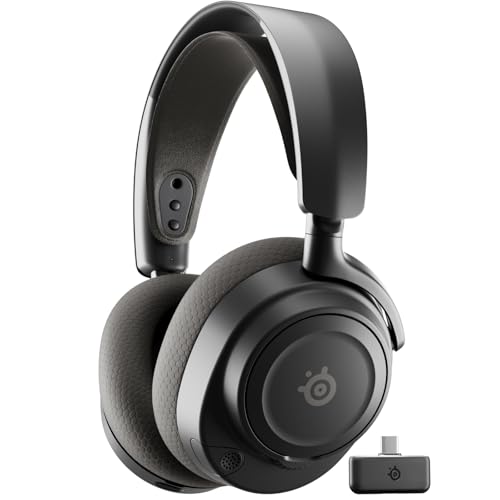

SteelSeries Arctis Nova 7 vs Arctis Nova 5 at a Glance
| Feature | SteelSeries Arctis Nova 7 | SteelSeries Arctis Nova 5 |
|---|---|---|
| Wireless Audio Mode | Simultaneous 2.4GHz and Bluetooth mixing | Quick-Switch toggle (2.4GHz or Bluetooth 5.3) |
| Battery Life | 50+ hours | 60 hours |
| Fast Charging | USB-C Fast Charge | USB-C Fast Charge (6 hours in 15 minutes) |
| App Audio Presets | 200+ game-specific presets | 100+ game audio presets |
| Microphone | ClearCast Gen 2 with -25dB noise rejection | ClearCast 2.X with 32KHz/16Bit bandwidth |
| Frame Construction | Rugged steel frame with elastic headband | Lightweight plastic build with headband |
| Weight | 11.52 ounces | 0.28 kg (approx. 9.88 ounces) |
| Platform Compatibility | PC, PS5, PS4, Switch, Mobile | PC, PS5, PS4, Switch, Meta Quest, Mobile |
| Best For | Multi-stream audio mixing and rugged durability | Extended gaming sessions and chat clarity |
Wireless Connectivity and Audio Mixing
The core difference between these headsets centers on how they handle two concurrent wireless signals. In competitive and cooperative gaming, players often rely on external devices for voice chat, music, or guide videos. The Arctis Nova 7 features simultaneous 2.4GHz gaming audio and Bluetooth connectivity. This architectural setup mixes both streams into the earcups at the same time. You can listen to full in-game environmental cues over the ultra-low-latency 2.4GHz USB-C dongle while chatting with teammates on a mobile Discord channel or streaming a playlist over Bluetooth without muting or interrupting the game. For players weighing options across premium SteelSeries tiers, exploring the steelseries arctis nova 7 vs arctis nova pro wireless comparison reveals how critical integrated simultaneous mixing is across everyday playstyles.
In contrast, the Arctis Nova 5 implements Quick-Switch wireless. Rather than mixing two active audio streams simultaneously, the Nova 5 maintains your mobile Bluetooth connection on standby while you game over the 2.4GHz connection. When an incoming phone call arrives, the headset alerts you with notification beeps. A single tap of the on-ear Quick-Switch button transfers your audio feed to Bluetooth 5.3 so you can take the call. Once finished, another tap returns you to your game audio. While this toggle system saves wireless processing overhead, it completely prevents you from hearing Spotify, YouTube, or mobile voice calls at the same time as your game audio.
This functional divide changes how you interact with your hardware during intense multiplayer matches. If your gaming routine requires blending third-party voice apps, phone notifications, and console game sounds into one unified feed, the Nova 7 provides an uninterrupted workflow. If you strictly focus on game audio and only require Bluetooth as an emergency phone answering channel, the Nova 5 handles that task smoothly without draining power on dual active radios.
Edge: SteelSeries Arctis Nova 7 because it enables true simultaneous dual-audio mixing rather than basic toggle switching.
Battery Life and Charging Performance
Wireless endurance dictates how often your gaming sessions are interrupted by charging cables. Headsets that last through multi-day campaigns allow players to keep desks clean without constant tethering. The Arctis Nova 5 sets the pace in this department with an advertised 60-hour battery life. SteelSeries rates this runtime to cover eight hours of gaming per day for an entire week on a single charge. Furthermore, the Nova 5 features optimized USB-C fast charging that delivers six hours of playtime from a 15-minute charge. When evaluating modern endurance benchmarks like those discussed in the steelseries arctis nova 5 vs hyperx cloud iii guide, the Nova 5 stands out as an exceptionally long-lasting option in the wireless bracket.
The Arctis Nova 7 delivers 50+ hours of continuous play on a full charge. This represents a 40 percent improvement over its previous generation, offering substantial reserve power for extended weekend gaming marathons. The Nova 7 also features USB-C fast charge support to quickly restore power when the battery runs down. However, the listing specifications do not define a specific minute-to-hour fast-charge ratio for the Nova 7, whereas the Nova 5 explicitly states its 15-minute, 6-hour benchmark.
For most gamers, both headsets offer enough stamina to make battery anxiety a non-factor during ordinary use. However, running simultaneous dual wireless radios on the Nova 7 demands additional power draw compared to the Nova 5 architecture. The extra 10 hours of headroom on the Nova 5 gives it a clear advantage for users who frequently travel or dislike plugging in peripherals during the workweek.
Edge: SteelSeries Arctis Nova 5 thanks to its larger 60-hour battery ceiling and rapid 15-minute quick charge turnaround.
Build Quality, Frame Materials, and Comfort
Structural integrity and earcup ergonomics determine whether a headset remains comfortable through five-hour gaming sessions. The Arctis Nova 7 is built around a rugged steel headband frame designed for long-term structural resilience. This steel foundation is paired with an elastic suspension comfort band that distributes clamping force evenly across the top of the skull. The earcups house memory foam cushions that conform to the side of the head, dampening external ambient sounds while maintaining breathability. Because of this metal skeleton, the Arctis Nova 7 weighs in at 11.52 ounces (approximately 326.6 grams).
The Arctis Nova 5 takes a different engineering direction, prioritizing weight reduction over metal reinforcement. Utilizing an all-plastic chassis with round ear cushions, the Nova 5 registers a light weight of 0.28 kilograms (approximately 9.88 ounces). Comparing structural tradeoffs against other popular sets, such as in the steelseries arctis nova 7 vs logitech g pro x 2 breakdown, illustrates how steel headbands improve physical durability at the expense of added ounces on the neck.
The trade-off between these two designs is straightforward. The Arctis Nova 7 provides a premium, torsionally rigid feel that withstands heavy drops, backpacks, and regular wear. The Arctis Nova 5 sheds more than an ounce and a half of weight, making it feel noticeably lighter on the crown of your head during marathon matches, though its exterior chassis lacks the rigid metal reinforcement found on its sibling.
Edge: SteelSeries Arctis Nova 7 for its rugged steel frame and balanced suspension design.
Microphone Clarity and Voice Features
Clear vocal capture is vital for coordinating tactical plays and ensuring your squad understands callouts under fire. The Arctis Nova 5 incorporates the upgraded ClearCast 2.X microphone system. This fully retractable boom mic features a high-bandwidth chipset supporting 32KHz/16Bit audio transmission, which the manufacturer notes provides twice the clarity of standard gaming microphones. The extra vocal bandwidth preserves natural mid-range frequencies, keeping voice chat from sounding thin or over-compressed over wireless connections. Similar clarity upgrades are analyzed in the steelseries arctis nova 5 vs hyperx cloud ii article, highlighting the competitive advantage of wider mic bandwidth.
The Arctis Nova 7 uses the ClearCast Gen 2 microphone array. This bidirectional capsule focuses heavily on ambient background noise attenuation, reducing unwanted room sounds such as keyboard clatter, desk fans, and environmental noise by up to -25dB. On PC, the microphone feed can be routed through SteelSeries Sonar software to leverage AI noise cancellation algorithms. While the Nova 7 excels at canceling out disruptive room noise, its broadcast chipset does not feature the 32KHz/16Bit high-bandwidth specification found on the Nova 5.
If your gaming environment is consistently loud with mechanical keyboards, air conditioners, or family members in the background, the -25dB passive rejection on the Nova 7 mic provides solid acoustic isolation. However, for pure vocal fidelity, warmer tone capture, and uncompressed console communication, the upgraded ClearCast 2.X hardware on the Nova 5 holds the technical advantage.
Edge: SteelSeries Arctis Nova 5 due to its 32KHz/16Bit high-bandwidth ClearCast 2.X microphone chipset.
Audio Drivers, Presets, and Sound Quality
In-game acoustic separation allows players to pinpoint footsteps, reloads, and spatial cues before visual confirmation. Both the Arctis Nova 7 and Arctis Nova 5 are equipped with custom-designed Neodymium magnetic drivers engineered to produce an ultra-detailed soundscape with clear treble, defined mid-tones, and deep low-frequency bass. The Nova 7 listing specifically specifies an impedance of 36 ohms and a frequency response reaching 22,000 Hz, alongside native support for 360° Spatial Audio to create an immersive three-dimensional sound field.
Where these two models diverge is in software preset integration and companion app depth. The Arctis Nova 7 provides access to over 200 game-specific EQ audio presets tailored for titles like Call of Duty, Fortnite, and Minecraft. Players can adjust these profiles in real time using the Arctis Companion mobile app via Bluetooth while remaining connected to their PC or console on the 2.4GHz band. It also supports distinct music profiles to enhance bass when streaming media. Readers examining driver flexibility in the steelseries arctis nova 7 vs hyperx cloud ii overview will note how integrated mobile app EQ controls eliminate the frustration of alt-tabbing out of matches.
The Arctis Nova 5 introduces the dedicated Arctis Nova 5 Companion App, which provides over 100 tuned audio presets created by audio engineers and esports professionals for games like Apex Legends, GTA V, and FIFA. The Nova 5 lets you switch presets in real time without leaving your game, and it stores independent EQ profiles on the 2.4GHz band without altering your Bluetooth media settings. While both headsets share Neodymium driver technology, the Nova 7 offers double the preset catalog size (200+ versus 100+) and explicit 360° Spatial Audio branding in its technical specifications.
Edge: SteelSeries Arctis Nova 7 for its larger 200+ audio preset library and explicit 360° Spatial Audio tuning.
Pros and Cons
SteelSeries Arctis Nova 7

Pros
- Simultaneous 2.4GHz and Bluetooth mixing
- Durable steel headband frame
- Over 200 game audio presets
- ClearCast Gen 2 with -25dB noise rejection
Cons
- Heavier 11.52-ounce steel build
- Lower 50-hour maximum battery runtime
View SteelSeries Arctis Nova 7 on Amazon
SteelSeries Arctis Nova 5

Pros
- Long 60-hour battery life
- Fast charge gives 6 hours in 15 minutes
- ClearCast 2.X mic with 32KHz/16Bit bandwidth
- Lightweight 0.28 kg chassis
Cons
- No simultaneous audio mixing
- Lacks steel headband reinforcement
View SteelSeries Arctis Nova 5 on Amazon
Who Should Buy Each One
Choose the SteelSeries Arctis Nova 7 If
- You want to chat on mobile Discord or listen to music while simultaneously hearing full game audio.
- You prefer the durability and premium feel of a rugged steel headband frame.
- You want access to an extensive catalog of over 200 game-specific EQ presets via mobile app control.
- You play in environments with distracting background noise that requires up to -25dB of microphone rejection.
Choose the SteelSeries Arctis Nova 5 If
- You want maximum battery longevity with 60 hours of continuous runtime on a single charge.
- You prefer a lighter headset weighing only 0.28 kg to minimize neck fatigue during marathon sessions.
- You want your voice to sound natural using a 32KHz/16Bit high-bandwidth ClearCast 2.X microphone.
- You only need basic Bluetooth call alerts and prefer quick toggle switching over simultaneous mixing.
Final Verdict
For the majority of gamers, the SteelSeries Arctis Nova 7 is the superior investment because of its simultaneous 2.4GHz and Bluetooth wireless mixing. The ability to merge console game audio with smartphone voice chat, strategy videos, or music without dropping either connection transforms the daily user experience. When combined with a rugged steel headband, memory foam earcups, and an expansive catalog of over 200 game-specific EQ presets, the Nova 7 provides the complete package for multi-platform players who refuse to compromise on audio versatility.
The SteelSeries Arctis Nova 5 remains an outstanding option for players who value battery performance and weight reduction above all else. With a massive 60-hour battery life, rapid 15-minute quick charging, a featherweight 0.28 kg chassis, and an upgraded 32KHz/16Bit ClearCast 2.X microphone, it delivers pure gaming fundamentals at a very high standard. If you never listen to secondary audio feeds while gaming and just want a dependable, lightweight headset that lasts all week, the Nova 5 is built for you.
FAQ
Can the SteelSeries Arctis Nova 5 play Bluetooth and 2.4GHz audio at the same time?
No. The Arctis Nova 5 features Quick-Switch wireless rather than simultaneous mixing. It allows you to toggle back and forth between high-speed 2.4GHz gaming and Bluetooth 5.3 with an on-ear button tap. While gaming, your phone connection stays on standby to provide call notification beeps, but you cannot hear game audio and Bluetooth audio simultaneously.
Does the SteelSeries Arctis Nova 7 work on PlayStation 5?
Yes. The Arctis Nova 7 includes a portable USB-C 2.4GHz wireless dongle and a USB-A adapter cable, allowing seamless plug-and-play operation with the PlayStation 5, PC, PS4, Nintendo Switch, and mobile devices.
How fast do both headsets charge using USB-C?
Both models feature USB-C fast charging capabilities. The Arctis Nova 5 explicitly states that a 15-minute charge provides 6 hours of continuous wireless use. The Arctis Nova 7 listing confirms optimized USB-C fast charging support, though it does not specify an exact minute-to-hour runtime ratio in its technical data.
Which headset has a clearer microphone for multiplayer chat?
The Arctis Nova 5 has the edge in raw vocal clarity due to its ClearCast 2.X microphone, which features a high-bandwidth chipset supporting 32KHz/16Bit audio. The Arctis Nova 7 uses a ClearCast Gen 2 microphone that focuses on eliminating environmental sounds by up to -25dB, which can be further enhanced on PC via Sonar AI software.
Can I change EQ presets on both headsets using a mobile phone?
Yes. Both headsets support mobile companion app integration. The Arctis Nova 7 connects to the Arctis Companion app to access over 200 game presets, while the Arctis Nova 5 uses its own dedicated companion app to adjust over 100 curated game presets in real time without having to exit your game.
Is the Arctis Nova 7 heavier than the Arctis Nova 5?
Yes. The Arctis Nova 7 weighs 11.52 ounces (approximately 326.6 grams) due to its rugged steel frame construction and suspension band. The Arctis Nova 5 utilizes a lightweight build with round earcups that weighs 0.28 kilograms (approximately 9.88 ounces).