The decisive difference between the MSI MAG B650 Tomahawk WiFi and the Asus TUF Gaming B650-Plus WiFi comes down to high-bandwidth PCIe 5.0 solid-state storage capabilities versus legacy drive capacity and newer wireless networking bands. Asus delivers a cutting-edge PCIe 5.0 M.2 drive connection paired with advanced USB4 support, whereas MSI focuses on six SATA 6Gb/s connections and Intel Wi-Fi 6E connectivity.
Choose the Asus TUF Gaming B650-Plus WiFi if you want next-generation solid-state drive speeds and flexible high-throughput peripheral connectivity. Choose the MSI MAG B650 Tomahawk WiFi if your desktop setup relies on multiple SATA storage drives and the less congested 6GHz wireless frequency band.


MSI MAG B650 Tomahawk WiFi vs Asus TUF Gaming B650-Plus WiFi at a Glance
| Feature | MSI MAG B650 Tomahawk WiFi | Asus TUF Gaming B650-Plus WiFi |
|---|---|---|
| Processor Socket | Socket AM5 | Socket AM5 |
| Compatible Processors | AMD Ryzen 9000 / 8000 / 7000 Series | AMD Ryzen 9000 / 8000 / 7000 Series |
| Maximum Memory Speed | 7600 MHz (6400+ OC) | 6400 MHz |
| Memory Capacity and Slots | 128 GB across 4 DDR5 slots | 128 GB across 4 DDR5 slots |
| High-Speed M.2 Support | Lightning PCIe Gen 4 | PCIe 5.0 M.2 Support |
| Total SATA 6Gb/s Ports | 6 Ports | 4 Ports |
| Wireless Connectivity | Intel Wi-Fi 6E, Bluetooth 5.3 | Wi-Fi 6 |
| Wired Ethernet | 2.5 Gbps LAN | Realtek 2.5 Gb Ethernet, TUF LANGuard |
| Fast USB and Expansion | USB 3.2 Gen 2 | USB 3.2 Gen2x2 Type-C, USB4 Support |
| Best For | Multi-SATA storage and Wi-Fi 6E setups | PCIe 5.0 SSD bandwidth and USB4 expandability |
Storage Architecture and M.2 Performance
Storage architecture dictates system responsiveness and data transfer potential across the AMD AM5 platform. When comparing the msi mag b650 tomahawk wifi vs asus rog strix b650e-f tier of boards and these mainstream contenders, the M.2 interface generation marks a critical functional divergence. The Asus TUF Gaming B650-Plus WiFi features next-generation M.2 PCIe 5.0 connectivity directly wired for future-proof solid-state drives. In contrast, the MSI MAG B650 Tomahawk WiFi uses Lightning M.2 operating at PCIe Gen 4. For users installing the fastest commercial drives, the PCIe 5.0 interface on the Asus board doubles the theoretical bandwidth ceiling over PCIe 4.0 drives.
SATA drive capacity shifts the balance back in favor of MSI. The MSI board features six SATA 6Gb/s ports, making it ideal for systems configured with mechanical hard drives or 2.5-inch solid-state arrays. The Asus board is limited to four SATA ports. In practical evaluation, looking at the B650 Tomahawk vs TUF B650-Plus PCIe 5.0 implementation demonstrates that Asus prioritized cutting-edge NVMe throughput, while MSI prioritized bulk drive attachments. Exploring the Asus TUF Gaming B650-Plus WiFi M.2 slots reveals dedicated M.2 heatsinks engineered to cool high-heat solid-state modules during continuous read and write operations.
Edge: Asus TUF Gaming B650-Plus WiFi provides an integrated PCIe 5.0 M.2 slot for next-generation solid-state drive bandwidth.
Wireless and Wired Networking Capabilities
Network connectivity directly influences local file synchronization, multiplayer gaming latency, and overall wireless stability. The MSI MAG B650 Tomahawk WiFi specs highlight an upgraded Intel Wi-Fi 6E solution alongside Bluetooth 5.3. Wi-Fi 6E opens access to the dedicated 6GHz frequency band in addition to traditional 2.4GHz and 5GHz channels. This additional spectrum minimizes wireless interference in congested household environments. The Asus TUF Gaming B650-Plus WiFi integrates standard Wi-Fi 6, which operates solely over 2.4GHz and 5GHz bands without 6GHz capability.
For wired networks, both mainboards deliver 2.5 Gbps Ethernet controllers capable of high-throughput local network transfers. Asus complements its Realtek 2.5 Gb Ethernet port with TUF LANGuard, an integrated hardware-level component designed to shield the interface against electrical surges and static discharge. While LANGuard enhances physical connection durability, the day-to-day functional upgrade of Wi-Fi 6E on the MSI gives wire-free workstations a tangible advantage. As outlined in our comparison of the msi pro b650-p wifi vs asus tuf gaming b650-plus wifi, dedicated 6GHz bandwidth remains a pivotal feature for un-tethered desktop builds.
Edge: MSI MAG B650 Tomahawk WiFi delivers advanced Intel Wi-Fi 6E connectivity and modern Bluetooth 5.3 support.
Power Delivery and VRM Thermal Design
Stable voltage regulation is essential to maintain boost clocks on high-core AMD Ryzen processors without triggering thermal throttling. The Asus TUF Gaming B650-Plus WiFi is engineered with an enhanced power solution featuring 12 plus 2 teamed power stages, 8 plus 4 ProCool sockets, alloy chokes, and durable capacitors. Asus surrounds these components with enlarged VRM heatsinks and PCH heatsinks, supported by hybrid fan headers and the Fan Xpert 2 plus utility within the Armoury Crate software suite to regulate thermal performance under demanding computational loads.
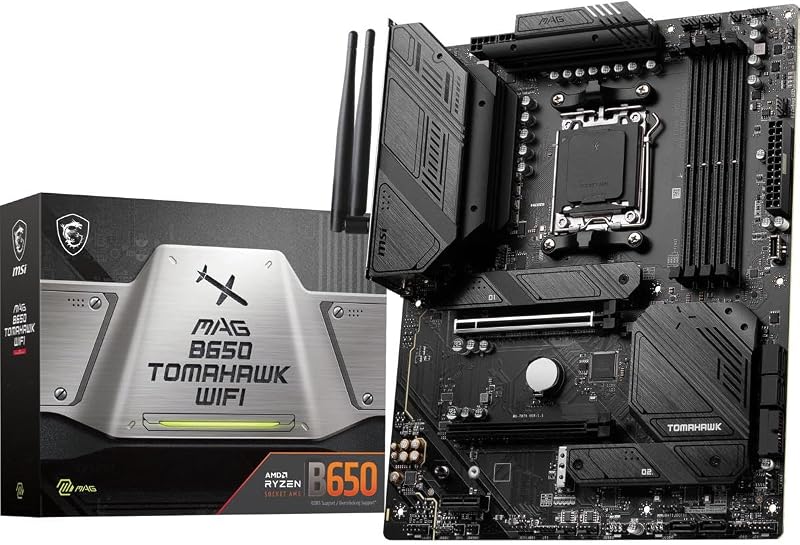
The MSI MAG B650 Tomahawk WiFi counters with an Extended Heatsink Design and integrated M.2 Shield Frozr pads built to keep VRM power delivery components and M.2 modules cool during non-stop operation. While MSI emphasizes heavy-duty thermal plating, Asus provides specific hardware details regarding power stage teaming and auxiliary ProCool socket pinouts. In sustained multi-threaded workloads, the power stage array of the Asus motherboard provides stable power routing. Reviewing the asus tuf gaming b650-plus wifi vs msi mpg x670e carbon shows that robust power stages are crucial for demanding AM5 configurations, confirming that the TUF board delivers dependable power delivery architecture.
Edge: Asus TUF Gaming B650-Plus WiFi features a documented 12 plus 2 teamed power stage array with ProCool auxiliary power sockets.
Memory Support and DDR5 Overclocking Speeds
Memory frequency directly impacts system latency and computational efficiency across the Socket AM5 ecosystem. The MSI MAG B650 Tomahawk WiFi supports DDR5 memory speeds up to 6400+(OC) MHz, with product specifications listing clock support reaching up to 7600 MHz across its four DIMM slots for a 128 GB maximum capacity. This gives memory tuners significant headroom when dialing in tight timings or pushing performance overclocks on high-speed memory kits.
The Asus TUF Gaming B650-Plus WiFi also houses four DDR5 memory slots supporting up to 128 GB in maximum capacity, but specifies memory clock speeds up to 6400 MHz. While a 6400 MHz ceiling easily covers the standard sweet spot for current AMD Ryzen 7000 processors, builders pursuing higher memory overclocking thresholds will find greater headroom on the MSI platform. As discussed in our msi mag b650 tomahawk wifi vs gigabyte b650 aorus elite ax overview, elevated memory clock validation offers an advantage for users seeking extreme memory speed stability.
Edge: MSI MAG B650 Tomahawk WiFi offers a higher documented memory ceiling up to 7600 MHz.
Rear I/O, USB Expansion, and Audio Hardware
External connectivity dictates how effectively your motherboard interacts with high-speed external storage drives, streaming hardware, and input devices. The Asus TUF Gaming B650-Plus WiFi listing details 20 total ports, highlighting next-generation expandability through USB 3.2 Gen2x2 Type-C, front USB 3.2 Gen 1 Type-C, and official USB4 support. The inclusion of USB 3.2 Gen2x2 allows for theoretical 20Gbps transfers on compatible external drives, while USB4 support provides a clear upgrade path for ultra-high-speed peripheral enclosures.
The MSI MAG B650 Tomahawk WiFi specifications list 11 total ports, featuring USB 3.2 Gen 2, HDMI, DisplayPort, and 2 USB 2.0 ports. For audio requirements, both motherboards provide an optical S/PDIF digital output, ensuring direct, clean audio output to external DACs and sound systems. However, the Asus board integrates Two-way AI Noise Cancelation to strip out ambient noise from both microphone input and incoming speaker feeds, alongside integrated Aura Sync addressable RGB headers. Comparing these features in a similar fashion to our msi mag b760 tomahawk wifi vs asus tuf gaming b760-plus wifi analysis confirms that Asus delivers greater port flexibility and external expansion headroom.
Edge: Asus TUF Gaming B650-Plus WiFi excels with USB 3.2 Gen2x2 Type-C, USB4 expandability, and Two-way AI Noise Cancelation.
Pros and Cons
MSI MAG B650 Tomahawk WiFi
Pros
- Six SATA 6Gb/s storage ports
- Intel Wi-Fi 6E and Bluetooth 5.3
- DDR5 memory support up to 7600 MHz
- Extended Heatsink Design and M.2 Shield Frozr
Cons
- Lacks PCIe 5.0 M.2 storage support
- Fewer total expansion ports listed
View MSI MAG B650 Tomahawk WiFi on Amazon
Asus TUF Gaming B650-Plus WiFi

Pros
- Next-generation PCIe 5.0 M.2 slot
- USB 3.2 Gen2x2 Type-C and USB4 support
- 12 plus 2 teamed power stages
- Two-way AI Noise Cancelation technology
Cons
- Only four SATA storage ports
- Standard Wi-Fi 6 lacks 6GHz band
View Asus TUF Gaming B650-Plus WiFi on Amazon
Who Should Buy Each One
Choose the MSI MAG B650 Tomahawk WiFi If
- You manage large media archives requiring six SATA 6Gb/s storage drive connections.
- You connect over crowded wireless home networks and require the 6GHz frequency band via Intel Wi-Fi 6E.
- You intend to install high-frequency DDR5 memory kits rated well beyond 6400 MHz.
- You require integrated Bluetooth 5.3 connectivity for modern wireless computer accessories.
Choose the Asus TUF Gaming B650-Plus WiFi If
- You want a PCIe 5.0 M.2 slot to support next-generation ultra-fast solid-state drives.
- You connect external high-speed storage via USB 3.2 Gen2x2 Type-C or require future USB4 support.
- You want Two-way AI Noise Cancelation to maintain clear voice chat during gaming and meetings.
- You prioritize a 12 plus 2 teamed power stage design with ProCool power sockets and TUF LANGuard surge protection.
Final Verdict
For the majority of builders assembling a modern AMD AM5 system, the Asus TUF Gaming B650-Plus WiFi emerges as the superior forward-looking option. Its integration of a PCIe 5.0 M.2 slot guarantees that your storage configuration will not hit an interface bandwidth ceiling as faster solid-state drives enter the market. Combined with a 12 plus 2 power stage architecture, USB 3.2 Gen2x2, and USB4 support, the Asus TUF B650-Plus vs MSI Tomahawk B650 comparison shows Asus offering more modern connectivity for performance desktop builds.
The MSI MAG B650 Tomahawk WiFi remains the smarter choice when specific hardware demands align with its unique advantages. If your workstation requires six SATA drives for bulk storage, or if running an Ethernet cable is impossible and you require the low-congestion benefits of Intel Wi-Fi 6E, the MSI board delivers immediate utility. Selecting the MSI B650 Tomahawk vs Asus TUF B650-Plus ultimately hinges on whether you value legacy storage volume and Wi-Fi 6E today, or next-generation PCIe 5.0 and USB4 speed for tomorrow.
FAQ
Does the MSI MAG B650 Tomahawk WiFi support PCIe 5.0 M.2 solid-state drives?
No. The MSI MAG B650 Tomahawk WiFi features Lightning M.2 slots running at PCIe Gen 4 speeds. While a PCIe 5.0 NVMe drive will physically fit and operate within the slot due to backward compatibility, it will be restricted to maximum PCIe 4.0 transfer rates.
How do the Asus TUF Gaming B650-Plus WiFi M.2 slots differ from the MSI layout?
The Asus board includes dedicated PCIe 5.0 M.2 support for next-generation solid-state drives, backed by custom M.2 heatsinks. The MSI board relies entirely on PCIe Gen 4 M.2 connections protected by MSI M.2 Shield Frozr cooling plates.
Is the Asus TUF Gaming B650-Plus WiFi worth it for gaming setups?
When deciding between the MSI MAG B650 Tomahawk WiFi or Asus TUF Gaming B650-Plus WiFi for gaming, the Asus board stands out due to its PCIe 5.0 storage readiness, Two-way AI Noise Cancelation for voice communication, and USB 3.2 Gen2x2 peripheral connectivity.
What is the difference between Wi-Fi 6E on MSI and Wi-Fi 6 on Asus?
The Intel Wi-Fi 6E solution on the MSI Tomahawk accesses the 6GHz wireless frequency band in addition to 2.4GHz and 5GHz. The standard Wi-Fi 6 module on the Asus TUF board is restricted to 2.4GHz and 5GHz bands, making the MSI board more resistant to wireless interference in crowded environments.
How many SATA drives can each motherboard accommodate?
The MSI MAG B650 Tomahawk WiFi accommodates up to six SATA 6Gb/s drives, whereas the Asus TUF Gaming B650-Plus WiFi supports a maximum of four SATA drives.
Which processors are compatible with both motherboards?
Both motherboards feature the AMD Socket AM5 interface and support AMD Ryzen 7000, 8000, and 9000 series desktop processors.
Do both boards include digital optical audio outputs?
Yes. Both the MSI MAG B650 Tomahawk WiFi and the Asus TUF Gaming B650-Plus WiFi include an optical S/PDIF connector on their rear connection panels for digital audio output.