Choosing between the MSI MAG B650 Tomahawk WiFi and the Asus ROG Strix B650E-F comes down to a decisive hardware split: next-generation expansion capability versus bulk internal drive connectivity. While the Asus ROG Strix B650E-F delivers high-bandwidth PCIe 5.0 lanes across both its primary graphics slot and top M.2 solid-state drive interface, the MSI MAG B650 Tomahawk WiFi relies on PCIe 4.0 architecture but provides six native SATA ports for extensive legacy storage setups.
Builders putting together an advanced, forward-looking rig with future graphics upgrades will appreciate the cutting-edge throughput of the ROG Strix B650E-F. Conversely, system integrators and storage-heavy users who operate multiple existing SATA hard drives or solid-state drives without sacrificing NVMe slots should select the MAG B650 Tomahawk WiFi.


MSI MAG B650 Tomahawk WiFi vs Asus ROG Strix B650E-F at a Glance
| Feature | MSI MAG B650 Tomahawk WiFi | Asus ROG Strix B650E-F |
|---|---|---|
| Processor Socket | Socket AM5 | Socket AM5 |
| Chipset | AMD B650 | AMD B650 |
| PCIe Primary Graphics Slot | PCIe 4.0 x16 | PCIe 5.0 x16 SafeSlot |
| M.2 High-Speed NVMe Support | Lightning M.2 (PCIe Gen 4) | 1x PCIe 5.0 M.2, 2x PCIe 4.0 M.2 |
| Total SATA 6Gb/s Ports | 6 | 4 |
| Fastest USB Connectivity | USB 3.2 Gen 2 | USB 3.2 Gen 2×2 Type-C (20Gbps) |
| Audio Solution | Optical S/PDIF Out (listing omits codec) | ROG SupremeFX ALC4080 + Savitech SV3H712 Amp |
| Wireless and Networking | Intel Wi-Fi 6E, Bluetooth 5.3, 2.5G LAN | Wi-Fi 6E (802.11ax), Bluetooth 5.2, Intel 2.5G LAN |
| Power Phase Design | Not listed in product data | 12 + 2 power stages (8 + 4 pin ProCool) |
| Best For | High-capacity SATA storage setups | Forward-looking PCIe 5.0 expansion and high-speed USB |
PCIe 5.0 Lane Allocation and Expansion Slots
The core distinction in this B650 vs B650E motherboard comparison rests on lane bandwidth. The Asus ROG Strix B650E-F takes advantage of AMD B650E architectural capabilities to run both a PCIe 5.0 x16 SafeSlot for add-in graphics cards and a dedicated PCIe 5.0 M.2 slot for extreme solid-state storage. PCIe 5.0 doubles the theoretical lane bandwidth over PCIe 4.0, which ensures that future graphics hardware and top-tier NVMe drives operate without a bus bottleneck. For builders looking closely at an asus tuf gaming b650-plus wifi vs rog strix b650e-f matchup, this level of PCIe generation support is consistently the defining factor.
In contrast, the MSI MAG B650 Tomahawk WiFi operates on standard PCIe 4.0 signaling for both its expansion slots and its Lightning M.2 drives. Current mainstream graphics cards do not saturate a PCIe 4.0 x16 link, meaning immediate gaming frame rates remain identical between both motherboards when using identical processors and graphics cards. However, the absence of PCIe 5.0 prevents the MSI board from hosting gen-5 solid-state drives at their rated sequential read and write speeds. Builders performing an in-depth MSI MAG B650 Tomahawk WiFi review will notice that while PCIe 4.0 is stable and mature, it lacks the architectural runway found on the Asus board.
If you intend to hold onto your AM5 platform across multiple CPU upgrade cycles and keep pace with next-generation add-in cards, the Asus ROG Strix B650E-F PCIe 5.0 capability offers distinct peace of mind. The Tomahawk board handles every current GPU with zero performance penalty, but the ROG Strix carries native high-bandwidth expansion forward into upcoming hardware generations.
Edge: Asus ROG Strix B650E-F due to its PCIe 5.0 primary graphics slot and native PCIe 5.0 M.2 storage support.
Storage Architecture and SATA Drive Expandability
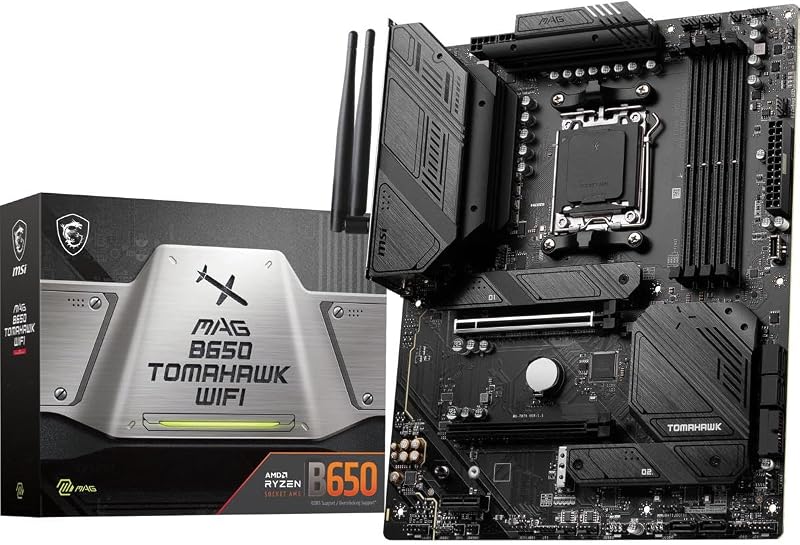
Storage arrangements reveal the sharpest divergence in daily utility between these boards. The MSI MAG B650 Tomahawk WiFi includes six total SATA 6Gb/s ports directly on the board. This makes it an outstanding candidate for builders moving large arrays of 2.5-inch SSDs or 3.5-inch mechanical storage drives from an older system. When planning a high-capacity media archive, local backup node, or mixed drive setup alongside high-speed M.2 drives, having six native SATA lanes on the motherboard prevents the need to purchase external controller cards or add-in storage expansion cards.
The Asus ROG Strix B650E-F limits its native SATA interface to four ports. It compensates by focusing heavily on M.2 high-speed storage slots, providing three dedicated M.2 interfaces covered by onboard heatsinks. Among those three slots, one connects via PCIe 5.0 while the other two run on PCIe 4.0. The MSI board also provides M.2 Shield Frozr cooling across its M.2 bays, but all run on PCIe Gen 4 lanes. Similar storage tradeoffs also appear when examining an older platform pairing like the msi mag b760 tomahawk wifi vs asus rog strix z790-a, where SATA counts often compete with top-tier M.2 slots.
Deciding between these platforms hinges on what drives you currently own. Those with heavy collections of SATA storage drives will quickly find the four-port ceiling on the ROG Strix limiting. Conversely, those building a modern PC relying entirely on NVMe sticks will gain faster sequential headroom on the Asus board’s top slot without missing the two extra SATA ports.
Edge: MSI MAG B650 Tomahawk WiFi for providing two additional SATA ports for high-density local storage.
Power Delivery, Thermal Dissipation, and Processor Support
Power handling dictates whether an AM5 platform can run demanding multi-core chips without thermal throttling. The Asus ROG Strix B650E-F publishes precise power delivery specifications, featuring a 12 + 2 power stage design backed by an 8 + 4 pin ProCool power connector array. To keep temperatures disciplined, Asus outfits the board with massive VRM heatsinks featuring strategically cut airflow channels and high-conductivity thermal pads. The listing notes readiness for AMD Ryzen 9000, 8000, and 7000 series processors, though a BIOS update may be necessary for Ryzen 9000 and 8000 chips.
The MSI MAG B650 Tomahawk WiFi is similarly prepared for modern computing loads, advertising compatibility with AMD Ryzen 8000 and 7000 processors, with the listing title extending support to the 9000 series. MSI implements its Extended Heatsink Design alongside M.2 Shield Frozr hardware to maintain thermal stability across non-stop multi-threaded tasks. However, the listing does not specify the exact phase count or power stage amperage for the Tomahawk’s VRM. Those reading an Asus ROG Strix B650E-F review will find confidence in the explicit 12 + 2 power stage documentation, whereas the Tomahawk emphasizes general thermal reliability through military-inspired sturdiness.
When selecting the MSI MAG B650 Tomahawk WiFi or Asus ROG Strix B650E-F for Ryzen 7000 builds, both handle heavy gaming and desktop workloads with ease. The Asus model takes a slight lead due to its documented ProCool connectors and specifically detailed 12 + 2 power architecture, ensuring clean current delivery under heavy sustained loads.
Edge: Asus ROG Strix B650E-F for its documented 12 + 2 power stage design and specialized VRM thermal routing.
Rear Connectivity, USB Bandwidth, and Integrated Audio
Input and output options show distinct generational differences when examining MSI B650 Tomahawk vs Asus B650E-F specs. The Asus ROG Strix B650E-F boasts twelve total ports, highlighted by an ultra-fast USB 3.2 Gen 2×2 Type-C connector delivering transfer rates up to 20Gbps. It also provides a front-panel USB 3.2 Gen 2 Type-C header, HDMI 2.1, DisplayPort 1.4, and an integrated audio stack powered by the SupremeFX ALC4080 codec coupled with a Savitech SV3H712 amplifier, DTS Sound Unbound, and Sonic Studio III. This dedicated audio solution gives headset users premium onboard analog output right from the back panel.
The MSI MAG B650 Tomahawk WiFi features eleven total rear ports, providing USB 3.2 Gen 2 connectors, HDMI, DisplayPort, two USB 2.0 ports, and an optical S/PDIF audio out connector. While it matches the optical output found on the Asus board for external digital DAC setups, the listing does not specify an advanced headphone amplifier or the exact audio codec model on the MSI board. Furthermore, the Tomahawk tops out at USB 3.2 Gen 2 bandwidth without the ultra-wide 20Gbps pipe provided by the Asus board’s Gen 2×2 Type-C implementation.
If you frequently transfer large media files via external NVMe enclosures, the 20Gbps Type-C port on the Asus gives it a significant real-world advantage. Those comparing the msi pro b650-p wifi vs asus rog strix b650e-f will note a similar pattern where the ROG Strix hardware prioritizes high-tier external bandwidth and amplified onboard sound.
Edge: Asus ROG Strix B650E-F due to its 20Gbps USB 3.2 Gen 2×2 Type-C interface, twelve total ports, and dedicated ALC4080 audio hardware.
Networking Capabilities and Wireless Standards
Both manufacturers equipped these motherboards with modern networking suites suited for low-latency gaming and heavy file transfers. The Asus ROG Strix B650E-F integrates on-board Wi-Fi 6E (802.11ax), an Intel 2.5G Ethernet controller shielded by ASUS LANGuard, and Bluetooth 5.2. Asus supplements this hardware with proprietary AI Networking and Two-Way AI Noise Cancelation software, which streamlines voice capture and automates network packet prioritization during competitive matches.
The MSI MAG B650 Tomahawk WiFi provides an Intel Wi-Fi 6E solution alongside its own 2.5Gbps high-speed LAN controller. Where the Tomahawk edges out a small spec difference is its Bluetooth integration: the MSI listing specifies Bluetooth 5.3, providing a newer revision of the wireless standard compared to the Bluetooth 5.2 chip on the Asus. Similar balanced networking setups are standard across modern motherboards, much like the hardware found when comparing msi mag b650 tomahawk wifi vs asus tuf gaming b650-plus wifi platforms.
Both motherboards provide full 6GHz Wi-Fi 6E band access and identical 2.5Gbps wired throughput. While the Asus board adds software-driven AI network prioritization, the MSI board’s newer Bluetooth 5.3 revision ensures broad compatibility with modern peripheral controllers. Overall, their core data transfer speeds over local networks and the internet remain evenly matched.
Edge: Tie. Both boards offer 2.5G LAN and Wi-Fi 6E, with MSI offering Bluetooth 5.3 and Asus including proprietary AI networking features.
Memory Speeds and Overclocking Profiles
Memory handling is essential for AM5 platform responsiveness. Both motherboards feature four DDR5 DIMM slots and accept standard unbuffered memory modules. The Asus ROG Strix B650E-F supports high-speed DDR5 modules, listing a memory clock speed of 6400 MHz in its technical overview, with total memory storage capacity listed up to 192 GB (with RAM maximum size noted at 128 GB in specification fields). This covers standard high-density dual- and quad-stick configurations for memory-intensive creation workflows.
The MSI MAG B650 Tomahawk WiFi lists DDR5 memory support with overclocks reaching up to 6400+(OC) MHz in its feature highlights, while its technical specification table documents memory clock speeds up to 7600 MHz. Its maximum supported RAM capacity is stated at 128 GB across four slots. While both motherboards handle high-frequency DDR5 kits, pushing past standard sweet-spot frequencies on the AM5 platform requires capable motherboard trace layouts. For builders interested in cross-platform DDR5 behavior, similar memory dynamics occur across Intel pairings such as the asus rog strix z790-a vs msi mag z890 tomahawk.
Because AMD Ryzen processors generally see optimal stability and gaming responsiveness around DDR5-6000, both motherboards easily meet the needs of competitive gamers and system tuners. MSI’s specification listing indicates testing up to 7600 MHz, giving extreme memory overclockers slightly more room on paper, while both boards reliably deliver standard DDR5-6400 overclocking profiles.
Edge: Tie. Both boards comfortably support DDR5-6400+(OC) profiles across four DIMM slots.
Pros and Cons
MSI MAG B650 Tomahawk WiFi
Pros
- Six native SATA 6Gbps ports
- DDR5 memory support up to 7600 MHz
- Updated Bluetooth 5.3 wireless standard
- M.2 Shield Frozr thermal heatsinks
Cons
- Lacks PCIe 5.0 expansion lanes
- No 20Gbps USB 3.2 Gen 2×2 port
View MSI MAG B650 Tomahawk WiFi on Amazon
Asus ROG Strix B650E-F

Pros
- PCIe 5.0 graphics SafeSlot and M.2 support
- Ultra-fast 20Gbps USB 3.2 Gen 2×2 Type-C
- 12+2 power stages with ProCool connectors
- SupremeFX ALC4080 audio with Savitech amplifier
Cons
- Limited to four native SATA ports
- May require BIOS update for Ryzen 9000
View Asus ROG Strix B650E-F on Amazon
Who Should Buy Each One
Choose the MSI MAG B650 Tomahawk WiFi If
- You own multiple SATA hard drives or 2.5-inch solid-state drives and need six native SATA ports without buying expansion cards.
- You are pairing your setup with a PCIe 4.0 graphics card and standard PCIe Gen 4 NVMe drives, making PCIe 5.0 lanes unnecessary for your current build plan.
- You prefer Bluetooth 5.3 connectivity for your wireless desktop peripherals and wireless audio equipment.
- You want a durable, military-styled layout featuring heavy M.2 Shield Frozr cooling plates without surplus RGB headers.
Choose the Asus ROG Strix B650E-F If
- You want forward-looking PCIe 5.0 support on both your primary graphics card slot and your primary M.2 solid-state drive slot.
- You need the ultra-fast data transfer rates of a rear-panel 20Gbps USB 3.2 Gen 2×2 Type-C interface for external drives.
- You want dedicated gaming audio hardware featuring the SupremeFX ALC4080 codec, integrated Savitech amplifier, and AI noise-canceling software.
- You intend to synchronize lighting components using Asus Aura Sync with three addressable Gen 2 RGB headers and one standard RGB header.
Final Verdict
When weighing the Asus ROG Strix B650E-F vs MSI MAG B650 Tomahawk WiFi, the Asus ROG Strix B650E-F emerges as the superior overall motherboard for modern system builds. Its integration of PCIe 5.0 for both the graphics card SafeSlot and the primary M.2 storage slot gives it genuine hardware longevity. Combined with a 20Gbps USB 3.2 Gen 2×2 Type-C port, a 12 + 2 power stage VRM design, and an upgraded SupremeFX ALC4080 audio solution with an integrated Savitech amplifier, the Asus motherboard delivers a richer, more forward-looking feature package.
Nevertheless, the MSI MAG B650 Tomahawk WiFi remains a dependable option for specific system configurations. If your build requires six native SATA connections for bulk storage, or if your hardware choices are firmly rooted in the PCIe 4.0 standard, the Tomahawk delivers stable power, M.2 Shield Frozr thermal management, and reliable 2.5G and Wi-Fi 6E networking. Is Asus ROG Strix B650E-F worth it over the Tomahawk? For users who want next-gen PCIe 5.0 expansion and faster external USB transfer speeds, the Asus board easily justifies the choice.
FAQ
Does the MSI MAG B650 Tomahawk WiFi support PCIe 5.0 graphics cards?
The MSI MAG B650 Tomahawk WiFi utilizes a PCIe 4.0 graphics card interface. While PCIe 5.0 graphics cards are backwards compatible and will function in a PCIe 4.0 slot, they will be limited to PCIe 4.0 data transfer bandwidth.
Can the Asus ROG Strix B650E-F run AMD Ryzen 9000 series processors?
Yes, the Asus ROG Strix B650E-F supports AMD Ryzen 9000 series desktop processors. However, the manufacturer listing notes that a BIOS update may be required to enable compatibility when using Ryzen 9000 or 8000 series CPUs.
Which board has better audio hardware for wired headphones?
The Asus ROG Strix B650E-F features a dedicated SupremeFX ALC4080 audio codec alongside a Savitech SV3H712 amplifier, DTS Sound Unbound, and Sonic Studio III. The MSI MAG B650 Tomahawk WiFi provides an optical S/PDIF output, but its listing does not specify an integrated dedicated headphone amplifier.
How many SATA drives can each motherboard support?
The MSI MAG B650 Tomahawk WiFi supports up to six SATA 6Gb/s storage drives natively. The Asus ROG Strix B650E-F includes four SATA 6Gb/s ports on the board.
Is MSI MAG B650 Tomahawk WiFi worth it for a pure gaming rig?
When considering the MSI MAG B650 Tomahawk WiFi or Asus ROG Strix B650E-F for gaming, the MSI board is fully capable of running modern PCIe 4.0 graphics cards and standard NVMe SSDs without any frame-rate penalty. However, it lacks the PCIe 5.0 future-proofing and high-speed USB 3.2 Gen 2×2 port found on the Asus board.
What are the primary USB speed differences between these two motherboards?
The Asus ROG Strix B650E-F features a 20Gbps USB 3.2 Gen 2×2 Type-C port and twelve total ports across its layout. The MSI MAG B650 Tomahawk WiFi includes eleven total ports, topping out at 10Gbps USB 3.2 Gen 2 transfer rates.


