The defining technical split between these two graphics cards lies in their silicon scale and memory architecture: the top-tier configuration deploys 24GB of GDDR6 memory across an ultra-wide 384-bit bus, whereas the balanced model utilizes a 16GB buffer on a 256-bit interface. When evaluating the AMD Radeon RX 7900 GRE vs XTX, this hardware divergence determines whether your system is optimized for high-refresh 1440p gaming or uncompromised 4K texture streaming.
Gamers seeking high-frame-rate performance at 1440p within standard chassis clearance dimensions should choose the AMD RX 7900 GRE. Enthusiasts prioritizing native 4K fidelity, massive VRAM buffers for creative production, and cutting-edge display standards should invest in the AMD RX 7900 XTX.


AMD RX 7900 GRE vs AMD RX 7900 XTX at a Glance
| Feature | AMD RX 7900 GRE | AMD RX 7900 XTX |
|---|---|---|
| VRAM Capacity and Type | 16 GB GDDR6 | 24 GB GDDR6 |
| Memory Bus Width | 256-Bit | 384-Bit |
| Memory Clock / Speed | 2333 MHz (18 Gbps) | 2680 MHz (20 Gbps) |
| Engine Boost Clock | Not listed | Up to 2680 MHz |
| Compute Units and Cache | Not listed | 96 Compute Units, 96MB Infinity Cache |
| Power Delivery and Connectors | Not listed | 22 Power Phase, Triple 8-Pin Connectors |
| Cooling Hardware | Triple Striped Axial Fans | Triple 110/100/110mm Striped Ring Fans |
| Card Dimensions | 11.97″ L x 5.16″ W | 16.55″ L x 9.5″ W |
| Display Outputs | DisplayPort, HDMI | 3 x DisplayPort 2.1, 1 x HDMI 2.1 |
| Included Accessories | Quick Installation Guide | Graphics Card Stand, Taichi Post Card, Guide |
| Best For | High-FPS 1440p Gaming | Uncompromising 4K Gaming and Workloads |
VRAM Capacity and Memory Subsystem
The memory architecture represents the primary performance dividing line when comparing these graphics cards. The ASRock RX 7900 GRE Steel Legend carries 16GB of GDDR6 memory operating across a 256-bit bus with an 18 Gbps transfer speed and a 2333 MHz memory clock. In contrast, the ASRock RX 7900 XTX Taichi delivers a 24GB GDDR6 pool over a 384-bit memory bus with a faster 20 Gbps memory speed and a 2680 MHz memory clock. This 7900 GRE vs 7900 XTX vram difference fundamentally changes how each card processes high-resolution graphical assets and intense computational buffers.
In real-world gaming environments, 16GB of video memory provides an exceptional foundation for 1440p rasterization and moderate ray tracing. However, native 4K rendering with maximum ray tracing, uncompressed texture packs, and expansive open-world geometry pushes memory utilization beyond standard thresholds. The 384-bit bus on the XTX delivers an immense increase in raw memory bandwidth over the GRE’s 256-bit bus, preventing performance bottlenecks when handling heavy asset streaming. As explored in our analysis of the amd rx 7900 gre vs 7900 xt, wide memory pipelines preserve frame pacing during complex visual scenes.
Beyond gaming, the 24GB frame buffer on the 7900 XTX transforms the GPU into a viable production engine for video editing, complex 3D rendering, and local artificial intelligence models. The 16GB allocation on the GRE remains robust for standard creative workloads, but the 50 percent increase in VRAM capacity on the flagship GPU provides critical insurance against out-of-memory errors in professional applications. The higher 20 Gbps memory bandwidth further accelerates rendering pipelines by minimizing cache miss penalties.
Edge: AMD RX 7900 XTX, providing 24GB of high-speed memory across an expansive 384-bit interface for superior bandwidth.
Compute Performance and Clock Speeds
Compute density determines how rapidly a GPU rasterizes complex geometries, handles mathematical shading calls, and accelerates ray intersections. The RX 7900 XTX listing confirms 96 AMD RDNA 3 Compute Units, fully loaded with dedicated Ray Tracing and AI Accelerators, alongside 96MB of AMD Infinity Cache technology. In comparison, while the RX 7900 GRE incorporates dedicated RT and AI accelerators on the RDNA 3 architecture, the listing does not specify its exact compute unit count or Infinity Cache allocation.
Engine clock profiles also establish a clear separation in raw rendering throughput between these two tiers. The ASRock Taichi 7900 XTX operates at an aggressive 2510 MHz game clock and ramps up to a 2680 MHz boost clock. The product data for the ASRock Steel Legend 7900 GRE specifies its 2333 MHz memory clock speed, but the listing does not specify its core engine game or boost clocks. In an in-depth AMD RX 7900 XTX review context, the higher operational clock frequencies and 96 compute units ensure the card maintains high frame rates under heavy rendering loads that degrade lesser silicon.
When weighing the RX 7900 GRE or 7900 XTX for 4k gaming, these compute specifications are critical. The sheer volume of 96 compute units working in tandem with 96MB of Infinity Cache provides the mathematical muscle needed to hold fluid frame rates at 3840×2160 resolution. The GRE functions exceptionally well within its design envelope, but the XTX provides the raw compute overhead required to push maximum graphical settings without compromise.
Edge: AMD RX 7900 XTX, backed by 96 RDNA 3 compute units, 96MB Infinity Cache, and verified 2680 MHz boost clocks.
Cooling Assembly and Chassis Clearance
Thermal management dictates acoustic levels, sustained boost clock stability, and physical chassis compatibility. The ASRock RX 7900 GRE Steel Legend utilizes a triple-fan design featuring Striped Axial Fans, Air Deflecting Fins, and an Ultra-fit Heatpipe arrangement. These thermal components are anchored by a reinforced metal frame and a stylish white metal backplate. Its physical footprint measures 11.97 inches in length and 5.16 inches in width, fitting cleanly into the vast majority of standard mid-tower computer cases without colliding with front-mounted liquid cooling radiators.
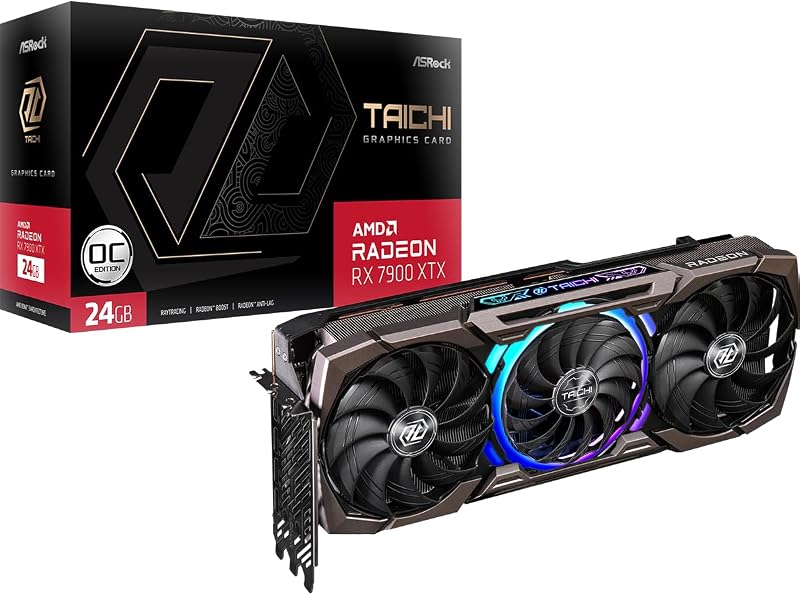
Conversely, the ASRock RX 7900 XTX Taichi features the Taichi 3X cooling system, an industrial thermal solution built with triple 110/100/110mm striped ring fans and an integrated ARGB backplate. This flagship assembly measures 16.55 inches in length and 9.5 inches in width, representing an exceptionally large physical package. To manage this substantial weight and footprint, ASRock bundles a dedicated graphics card stand alongside the Taichi post card and quick installation guide. System builders considering the amd rx 7800 xt vs 7900 gre will recognize that physical clearance often determines which tier is practical for an existing case.
The acoustic and thermal trade-offs between these two cards correlate directly to their size. The Taichi’s massive heatsink fin stack and oversized ring fans disperse thermal loads efficiently, but the 16.55-inch length restricts case selection primarily to full-tower or specialized open chassis. The Steel Legend GRE achieves a more practical balance, offering triple-fan active cooling and structural reinforcement in an 11.97-inch profile that does not demand an external support bracket for safe installation.
Edge: AMD RX 7900 GRE, delivering efficient triple-fan cooling in a compact 11.97-inch frame that fits standard mid-tower enclosures.
Power Architecture and System Integration
Power delivery systems establish the electrical stability necessary to sustain high frequencies under peak gaming loads. The ASRock RX 7900 XTX Taichi features an advanced 22 power phase design fed by triple 8-pin power connectors. This electrical framework provides clean, stable power delivery for extreme clock speeds, supported further by Dual BIOS functionality that lets users toggle between high-performance and quiet acoustic operation modes. The listing for the ASRock RX 7900 GRE does not specify its power phase count, power connectors, or Dual BIOS features.
Evaluating 7900 GRE vs 7900 XTX power consumption and electrical demands highlights important system-level considerations. The triple 8-pin connector array on the XTX mandates a high-wattage power supply equipped with three discrete PCIe cables, as daisy-chaining connectors on such an architecture is ill-advised. For builders asking is 7900 XTX worth it, factoring in power supply capability is essential. As detailed in our coverage of the nvidia rtx 4080 super vs amd rx 7900 xtx, top-tier power delivery ensures rock-solid operational stability under aggressive boost frequencies.
The streamlined profile of the RX 7900 GRE presents fewer demands on your electrical infrastructure. While the listing does not specify the exact connector count, its tier within the RDNA 3 hierarchy avoids the complex triple-cable delivery required by the 22-phase Taichi board. This makes the GRE significantly easier to drop into existing desktop gaming builds without necessitating a complete power supply replacement or custom cable management routine.
Edge: AMD RX 7900 GRE, offering standard integration requirements compared to the triple 8-pin demands of the XTX.
Display Outputs and Next-Gen Connectivity
Modern display connectivity defines a graphics card’s ability to drive multi-monitor setups, high-refresh 4K gaming panels, and ultra-high-resolution workstation displays. The ASRock RX 7900 XTX Taichi features next-generation connectivity consisting of three DisplayPort 2.1 ports and one HDMI 2.1 port, supporting output resolutions up to 7680 x 4320. DisplayPort 2.1 provides the expanded display pipeline bandwidth necessary to run uncompressed high-refresh rates on modern premium monitors.
The ASRock RX 7900 GRE listing confirms video output support for DisplayPort and HDMI with a maximum display resolution of 7680 x 4320 pixels. However, the listing does not specify the exact revision versions for its DisplayPort or HDMI interfaces, nor does it detail the exact port count breakdown. For users comparing the amd rx 7900 xt vs 7900 xtx, the presence of modern output revisions remains a crucial consideration for forward-looking display upgrades.
Both graphics cards readily support ultra-high-resolution 8K visual pipelines, but the confirmed inclusion of three DisplayPort 2.1 ports on the XTX provides distinct technical insurance. Enthusiasts running cutting-edge display technology with high refresh rates will benefit directly from the validated DisplayPort 2.1 bandwidth on the Taichi model, while the GRE delivers standard high-resolution connectivity for typical gaming displays.
Edge: AMD RX 7900 XTX, featuring three confirmed DisplayPort 2.1 outputs alongside HDMI 2.1 for superior bandwidth.
Pros and Cons
AMD RX 7900 GRE

Pros
- Compact 11.97-inch length fits mid-tower cases
- Generous 16GB GDDR6 memory buffer
- Triple fan cooling with metal backplate
- Polychrome SYNC white aesthetic
Cons
- Narrower 256-bit memory bus width
- Listing does not specify clock speeds
View AMD RX 7900 GRE on Amazon
AMD RX 7900 XTX
Pros
- Massive 24GB GDDR6 frame buffer
- Wide 384-bit memory bus interface
- 96 Compute Units with 2680 MHz boost
- Three modern DisplayPort 2.1 outputs
- Dual BIOS with 22 power phases
Cons
- Enormous 16.55-inch length requires large case
- Demands triple 8-pin power connectors
View AMD RX 7900 XTX on Amazon
Who Should Buy Each One
Choose the AMD RX 7900 GRE If
- You target smooth, high-frame-rate performance at 1440p without overbuilding your hardware.
- Your desktop case has limited physical clearance, requiring a card within 11.97 inches in length.
- You want a clean white aesthetic for your system build, enabled by the Steel Legend white finish and metal backplate.
- You prefer standard power integration that avoids the need for triple dedicated 8-pin power cabling.
Choose the AMD RX 7900 XTX If
- You require uncompromising 4K gaming performance powered by 96 compute units and a 2680 MHz boost clock.
- Your workloads or gaming titles require a massive 24GB VRAM buffer backed by a 384-bit bus.
- You own a high-refresh-rate monitor that utilizes DisplayPort 2.1 video connectivity.
- Your chassis accommodates a large 16.55-inch graphics card and you have a power supply with three 8-pin PCIe connectors.
Final Verdict
For the majority of PC gamers playing at 1440p, the AMD RX 7900 GRE represents the more practical and balanced selection. In any comprehensive AMD RX 7900 GRE review, its combination of 16GB GDDR6 memory, triple-fan cooling, and manageable 11.97-inch physical profile hits the operational sweet spot. It provides ample memory bandwidth on a 256-bit bus, slots neatly into mid-tower cases without requiring specialized anti-sag brackets, and delivers exceptional visual fidelity across modern titles without requiring extreme power configurations.
However, when the objective shifts to maximum performance at 4K resolution or heavy compute workloads, the AMD RX 7900 XTX stands unmatched. The Taichi edition delivers 24GB of high-speed memory across an ultra-wide 384-bit bus, 96 RDNA 3 compute units, 96MB Infinity Cache, and triple DisplayPort 2.1 outputs. If your chassis can accommodate its massive 16.55-inch length and your power supply can support its 22 power phase design with three 8-pin connectors, the 7900 XTX is the definitive flagship choice.
FAQ
Is the 7900 GRE or 7900 XTX better for 4k gaming?
The AMD RX 7900 XTX is significantly better suited for 4K gaming due to its 24GB GDDR6 memory pool, wider 384-bit memory bus, and 96 RDNA 3 compute units. The RX 7900 GRE features 16GB of VRAM on a 256-bit bus, which performs adequately at 4K but is fundamentally optimized for high-refresh 1440p gaming.
What is the main 7900 GRE vs 7900 XTX VRAM difference?
The RX 7900 XTX provides 24GB of GDDR6 memory running on a 384-bit bus at 20 Gbps (2680 MHz memory clock), while the RX 7900 GRE provides 16GB of GDDR6 memory on a 256-bit bus at 18 Gbps (2333 MHz memory clock). This gives the XTX 50 percent more memory capacity and substantially higher overall bandwidth.
Is the 7900 XTX worth it for a 1440p monitor setup?
In a direct RX 7900 GRE vs 7900 XTX 1440p comparison, the 7900 XTX is generally more hardware than necessary for standard 1440p gaming. The 16GB frame buffer and compute power of the RX 7900 GRE provide outstanding frame rates at 1440p, making the XTX an excessive choice unless you plan to upgrade to a 4K display in the near future.
How do the power requirements differ between these two cards?
The ASRock RX 7900 XTX Taichi features a heavy-duty 22 power phase design requiring three 8-pin power connectors to feed its extreme clock speeds. The listing for the ASRock RX 7900 GRE does not specify its exact power phase design or connector configuration, but it does not demand the extreme triple 8-pin power delivery seen on the flagship Taichi model.
What are the physical dimension differences between the ASRock Steel Legend GRE and Taichi XTX?
The ASRock RX 7900 GRE Steel Legend measures 11.97 inches long by 5.16 inches wide, fitting easily into standard mid-tower enclosures. The ASRock RX 7900 XTX Taichi is substantially larger, measuring 16.55 inches long by 9.5 inches wide, and includes a dedicated graphics card support stand to prevent motherboard slot strain.
Does the AMD RX 7900 GRE have DisplayPort 2.1 outputs?
The listing for the ASRock RX 7900 XTX Taichi explicitly confirms three DisplayPort 2.1 ports and one HDMI 2.1 port. While the listing for the ASRock RX 7900 GRE confirms DisplayPort and HDMI connectivity capable of 7680 x 4320 resolution, the listing does not specify the exact version standard for its ports.
Does the ASRock RX 7900 XTX have Dual BIOS?
Yes, the ASRock RX 7900 XTX Taichi includes Dual BIOS functionality, allowing users to switch easily between performance and quiet operating profiles depending on thermal and acoustic needs. The listing for the RX 7900 GRE does not specify Dual BIOS functionality.


