When deciding between high-end RDNA 3 graphics cards, the critical divide comes down to memory capacity and compute throughput. The Sapphire AMD RX 7900 XT provides 20GB of GDDR6 memory across a 320-bit bus with game clocks up to 2075 MHz, while the ASRock AMD RX 7900 XTX steps up to 24GB of GDDR6 memory across a 384-bit bus, 96 Compute Units, and boost clocks reaching 2680 MHz.
Gamers focusing on high-refresh 1440p displays will find the RX 7900 XT provides ideal memory headroom and thermal dimensions for standard ATX builds. Enthusiasts aiming for native 4K gaming with maximum settings and high-bandwidth display connectivity will get significantly more mileage from the RX 7900 XTX.


AMD RX 7900 XT vs AMD RX 7900 XTX at a Glance
| Feature | AMD RX 7900 XT | AMD RX 7900 XTX |
|---|---|---|
| GPU Model | AMD Radeon RX 7900 XT (Sapphire Pulse) | AMD Radeon RX 7900 XTX (ASRock Taichi OC) |
| Compute Units | The listing does not specify | 96 Compute Units (with RT and AI Accelerators) |
| VRAM Capacity and Type | 20GB GDDR6 | 24GB GDDR6 |
| Memory Interface Bus | 320-bit | 384-bit |
| Game Clock | Up to 2075 MHz | 2510 MHz |
| Boost Clock | Up to 2450 MHz | Up to 2680 MHz |
| Memory Speed | 20 Gbps Effective | 20 Gbps Effective |
| Display Outputs | 2 x HDMI, 2 x DisplayPort | 3 x DisplayPort 2.1, 1 x HDMI 2.1 |
| Cooling and Fans | Triple fans, 2.7-slot form factor | Taichi 3X triple fans (110/100/110mm), ARGB backplate |
| Power Delivery | The listing does not specify | 22 power phase design, triple 8-pin connectors |
| Included Accessories | User manual | Graphics card stand, quick install guide, postcard |
| Best For | High-framerate 1440p and entry 4K gaming | Uncompromised 4K gaming and heavy creative workloads |
Compute Performance and Clock Frequency
Compute performance defines how rapidly a graphics processing unit calculates geometry, lighting passes, physics simulations, and post-processing filters. In this 7900 XTX vs AMD RX 7900 XT evaluation, core silicon differences dictate how each GPU sustains high framerates when titles push complex modern shaders. The Sapphire RX 7900 XT operates with a factory game clock reaching up to 2075 MHz and a boost clock climbing to 2450 MHz. In contrast, the ASRock Taichi RX 7900 XTX is an overclocked flagship that runs a baseline game clock of 2510 MHz and pushes its boost limit all the way to 2680 MHz.
Architecture specifications highlight a major division between these two graphics cards. The ASRock listing details 96 AMD RDNA 3 Compute Units equipped with dedicated Ray Tracing and AI Accelerators alongside 96MB of AMD Infinity Cache. While the Sapphire listing does not specify its precise compute unit count or on-die cache volume, the documented clock disparity alone provides the Taichi XTX with an immediate frequency advantage. In high-demand scenarios where hundreds of draw calls occur per frame, that frequency elevation ensures steadier frame delivery. Shoppers researching modern high-end tiering often cross-reference cards like the nvidia rtx 4080 super vs amd rx 7900 xtx to see how AMD flagships hold up against competing architectures under heavy computational strain.
For players analyzing the RX 7900 XT vs RX 7900 XTX specs, that extra core speed pays immediate dividends in compute-heavy titles. The 435 MHz jump in game clock and 230 MHz jump in boost clock found on the Taichi card grant it noticeably higher throughput. If you run games with heavy ray tracing calculations or run machine learning packages that utilize the onboard AI hardware, the higher compute density on the larger silicon design prevents bottlenecks that lighter cards experience.
Edge: AMD RX 7900 XTX. Its 96 Compute Units, 96MB of Infinity Cache, and substantially higher 2680 MHz boost clock deliver greater raw processing power.
Memory Configuration and Memory Bandwidth
Memory capacity and bus bandwidth determine whether a graphics card can handle uncompressed 4K textures, dense open-world asset streaming, and heavy modification packages without hitching. Examining the 7900 XT vs 7900 XTX VRAM difference reveals two distinct hardware tiers. The Sapphire RX 7900 XT brings 20GB of GDDR6 memory mated to a 320-bit interface. The ASRock Taichi RX 7900 XTX expands this configuration to a full 24GB of GDDR6 memory operating across a wide 384-bit bus interface.
While both graphics cards run memory rated at an effective 20 Gbps speed, the bus width dictates the total memory throughput. The 384-bit memory bus on the 7900 XTX allows wider data transfers per clock cycle than the 320-bit interface on the 7900 XT. This bandwidth variance becomes apparent when rendering assets at native 3840×2160 or during heavy rendering passes. Enthusiasts comparing generational stepping stones such as the amd rx 7800 xt vs 7900 xtx will note how critical top-tier memory bandwidth is when driving uncompressed resolutions.
The practical consequence for high-resolution gaming is headroom. With 20GB of VRAM, the RX 7900 XT comfortably exceeds the demands of virtually every modern 1440p game, leaving vast space for high-resolution texture packs. However, when evaluating the question of is the 7900 XTX worth it for multi-year longevity, the 24GB frame buffer on the 7900 XTX mirrors professional workstation capacities. This additional 4GB combined with the 384-bit pipeline ensures that maximum-detail 4K gaming and memory-intensive creative tasks execute without running out of dedicated video memory.
Edge: AMD RX 7900 XTX. The 24GB GDDR6 pool over a wider 384-bit bus provides higher bandwidth and superior longevity for data-heavy workloads.
Display Connectivity and Output Configurations
Display connectivity dictates how easily a graphics card interfaces with high-refresh gaming monitors, multi-display command centers, and living room displays. The physical I/O ports on these two models show fundamentally different design approaches. The Sapphire Pulse RX 7900 XT integrates two HDMI ports and two DisplayPort connections. The ASRock Taichi RX 7900 XTX offers a configuration of three DisplayPort 2.1 outputs and a single HDMI 2.1 output.
The inclusion of DisplayPort 2.1 on the ASRock Taichi is a defining technical highlight. DisplayPort 2.1 dramatically increases transmission bandwidth, allowing modern ultra-high-resolution monitors to run at maximum refresh rates without compression artifacts. The listing notes that the ASRock card supports resolutions up to 8K across these outputs. Readers reviewing wider card lineups such as the amd rx 7900 gre vs 7900 xtx often look closely at output versions when pairing a card with newer generation gaming panels.
Conversely, the Sapphire Pulse RX 7900 XT caters well to multi-screen setups that utilize conventional consumer hardware. Having two native HDMI ports alongside two DisplayPort connections means you can easily drive a television and an HDMI capture device or secondary monitor simultaneously without relying on active adapter cables. Both graphics cards list maximum display output capabilities of 7680 x 4320, but the triple DisplayPort 2.1 array on the Taichi card offers greater versatility for multi-monitor PC setups and next-generation panels.
Edge: AMD RX 7900 XTX. Three DisplayPort 2.1 outputs offer future-ready bandwidth for ultra-high-refresh displays and immersive multi-monitor arrangements.
Cooling System and Acoustic Profiles
Thermal management is essential for maintaining sustained boost frequencies and keeping acoustic profiles unobtrusive during extended gaming sessions. The Sapphire Pulse RX 7900 XT relies on a 2.7-slot ATX form factor cooled by a triple-fan array. Its dimensions measure 313 mm in length, 133.75 mm in width, and 52.67 mm in height. This structured, compact profile makes it significantly easier to install in standard mid-tower chassis where clearance around drive cages or front radiators is limited.
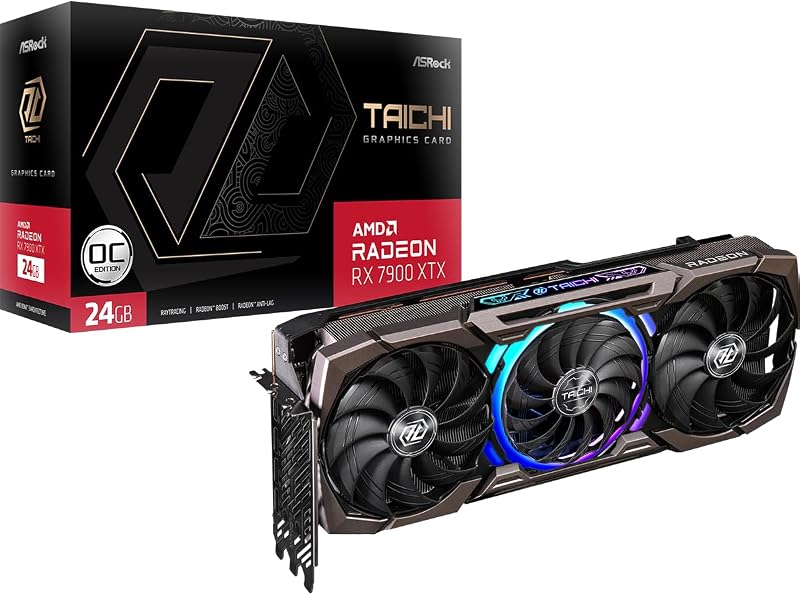
The ASRock Taichi RX 7900 XTX utilizes a larger, heavy-duty cooling assembly designated as the Taichi 3X Cooling System. This design incorporates striped ring fans in a 110/100/110mm arrangement, combining larger outer fans with a tailored center fan to direct airflow over an advanced heatsink. The structural build includes a reinforced metal frame and an integrated ARGB backplate compatible with Polychrome SYNC lighting. Shoppers exploring card scale across tiers, such as in an amd rx 7700 xt vs 7900 xtx comparison, should note that enthusiast-tier XTX coolers demand substantial space.
Another major operational feature on the ASRock Taichi is its Dual BIOS functionality. This hardware toggle allows users to switch directly between Performance and Quiet BIOS profiles to tailor fan curves and acoustic signatures to their preference. The Sapphire listing does not specify Dual BIOS support. ASRock also includes a dedicated graphics card support stand in the box to prevent PCB sag caused by the cooler’s substantial weight. Sapphire provides only the manual, relying on standard motherboard slot retention.
Edge: AMD RX 7900 XTX. The Taichi 3X cooler features optimized 110/100/110mm ring fans, an anti-sag support bracket, and Dual BIOS sound profile switching.
Power Delivery and System Requirements
Delivering stable electrical power directly influences GPU clock stability and thermal output under load. The ASRock Taichi RX 7900 XTX incorporates an advanced 22 power phase design fed by triple 8-pin auxiliary power connectors. This massive power delivery network is built specifically to support the card’s aggressive 2680 MHz boost clock and sustain peak performance during intense computing sessions.
The Sapphire Pulse RX 7900 XT listing does not specify its exact power phase count or connector layout, but operating at lower game and boost frequencies translates to a more moderate power envelope overall. Managing power on lower-tier cards is fundamentally simpler, as seen when comparing midrange hardware in an amd rx 7800 xt vs 7900 gre analysis. Lower sustained electrical draw results in lower heat dissipation into your PC case, reducing internal ambient temperatures for other components like M.2 storage and system memory.
Running the ASRock Taichi requires a power supply with three independent 8-pin PCIe cables, as daisy-chaining connectors on a high-draw flagship is not advisable. If your existing rig features a moderate power supply or lacks triple dedicated PCIe cables, installing the Taichi requires a hardware upgrade. The Sapphire RX 7900 XT represents a less demanding installation for users looking to drop a high-end card into an existing setup without overhauling power delivery infrastructure.
Edge: AMD RX 7900 XT. It operates with lower electrical and thermal demands, avoiding the strict triple 8-pin power delivery overhead required by the Taichi card.
Pros and Cons
AMD RX 7900 XT

Pros
- Generous 20GB GDDR6 memory buffer
- Dual HDMI and dual DisplayPort outputs
- More compact 2.7-slot ATX card size
- Effective 20 Gbps memory transfer speed
Cons
- Lower boost clock up to 2450 MHz
- Narrower 320-bit memory interface
- No included graphics card support stand
AMD RX 7900 XTX
Pros
- Massive 24GB GDDR6 on 384-bit bus
- Blazing 2680 MHz boost clock speed
- Three cutting-edge DisplayPort 2.1 video outputs
- Dual BIOS switch and 22 power phases
- Included anti-sag graphics card support stand
Cons
- Requires three 8-pin power connectors
- Large footprint demanding generous case clearance
- Provides only a single HDMI port
View AMD RX 7900 XTX on Amazon
Who Should Buy Each One
Choose the AMD RX 7900 XT If
- You primarily game at 1440p resolution and want blistering framerates backed by a generous 20GB memory pool.
- Your PC case has limited clearance and requires a graphics card strictly confined to a 313 mm length and 2.7-slot bracket.
- You use dual HDMI displays, TVs, or video capture hardware and want dual native HDMI ports without adapters.
- Your power supply setup does not have three separate 8-pin PCIe power cables available for a flagship GPU.
Choose the AMD RX 7900 XTX If
- You demand uncompromised 4K gaming performance and want 24GB of high-speed GDDR6 memory on a wide 384-bit bus.
- You plan to use high-refresh next-generation monitors that take full advantage of DisplayPort 2.1 video outputs.
- You want hardware Dual BIOS control to toggle between dedicated performance and quiet acoustic modes.
- You appreciate aesthetic features like Polychrome SYNC ARGB lighting and need an included graphics card support stand.
Final Verdict
For most enthusiasts building a high-end gaming machine focused on peak fidelity, the ASRock Taichi AMD RX 7900 XTX is the superior card. Its combination of 24GB VRAM on a 384-bit bus, 96 Compute Units, 96MB of Infinity Cache, and an elevated 2680 MHz boost clock delivers the horsepower needed for demanding 4K rendering. The added inclusion of three DisplayPort 2.1 ports, Dual BIOS acoustic control, a robust 22 power phase layout, and a bundled support stand make it a complete enthusiast package.
The Sapphire Pulse AMD RX 7900 XT remains the smarter selection when your priority is high-framerate 1440p gaming or when your PC chassis cannot accommodate a massive flagship footprint. With 20GB of GDDR6 memory, it provides more than enough VRAM for contemporary games, and its dual HDMI outputs offer excellent setup versatility. If you want top-tier performance without the intense power requirements and chassis clearance hurdles of the flagship tier, the RX 7900 XT is an exceptional hardware choice.
FAQ
Is the 7900 XTX worth it over the 7900 XT for gaming?
The 7900 XTX is worth it if you play games at native 4K resolution or use heavy texture modification packages. Its 24GB of VRAM on a 384-bit bus, 96 Compute Units, and 2680 MHz boost clock provide noticeably higher framerates than the 20GB and 2450 MHz limits of the 7900 XT.
How does the 7900 XT vs 7900 XTX VRAM difference affect modern games?
The 7900 XT features 20GB of GDDR6 memory on a 320-bit bus, whereas the 7900 XTX features 24GB of GDDR6 memory on a 384-bit bus. The extra 4GB of capacity and wider bus width on the 7900 XTX allow for higher total memory bandwidth, preventing performance slowdowns in high-resolution titles with dense texture streaming.
Should I choose the AMD RX 7900 XT or 7900 XTX for 4K gaming?
The AMD RX 7900 XTX is the better option for 4K gaming. Its 24GB frame buffer, 96MB of Infinity Cache, and higher game clock speed of 2510 MHz deliver the raw graphical compute needed to sustain smooth framerates at 3840×2160 resolution with maximum visual presets.
Should I choose the AMD RX 7900 XT or 7900 XTX for 1440p?
The AMD RX 7900 XT is the ideal pick for 1440p gaming. Its 20GB memory buffer offers immense headroom over typical 1440p requirements, and its 2450 MHz boost clock delivers ultra-high refresh rates without demanding the extreme power supply and chassis space of the larger 7900 XTX.
What display outputs do the ASRock 7900 XTX and Sapphire 7900 XT provide?
The Sapphire Pulse RX 7900 XT features two HDMI ports and two DisplayPort outputs. The ASRock Taichi RX 7900 XTX features three DisplayPort 2.1 ports and one HDMI 2.1 port, making the Taichi card more suitable for next-generation high-bandwidth monitors.
What accessories come included with each graphics card?
The ASRock Taichi RX 7900 XTX includes a dedicated graphics card stand, a quick installation guide, and a Taichi postcard in the box. The Sapphire Pulse RX 7900 XT listing includes only the user manual.


