The single difference that decides the choice between these two coolers comes down to physical clearance versus visual telemetry: the Thermalright Peerless Assassin 120 prioritizes visual customization with its magnetic 5-inch IPS LCD display and high-velocity 2150 RPM fans, while the Scythe Fuma 3 focuses on mechanical compatibility through a compact 154mm height profile and an asymmetrical heatsink that prevents memory slot obstruction.
Builders assembling a display-oriented mid-tower or full-tower rig who want active system monitoring on their cooler should choose the Thermalright Peerless Assassin 120, whereas builders working inside compact chassis or utilizing tall memory modules across all motherboard channels should select the Scythe Fuma 3.


Thermalright Peerless Assassin 120 vs Scythe Fuma 3 at a Glance
| Feature | Thermalright Peerless Assassin 120 | Scythe Fuma 3 |
|---|---|---|
| Total Height | 164 mm | 154 mm |
| Dimensions (L x W x H) | 125 x 135 x 164 mm | 8 x 7 x 6 in (packaged/overall listing) |
| Integrated Display | 5-inch IPS LCD (480×854 resolution) | Not listed |
| Fan Configuration | Dual 120x120x25mm PWM fans | Dual Kaze Flex II (one 25mm, one 15mm slim) |
| Maximum Fan Speed | 2150 RPM ± 10% | 1500 RPM |
| Airflow Rating | 69 CFM | 3000 CFM (as listed) |
| Rated Operating Noise | ≤ 27 dB(A) | 14 dB |
| Heat Pipe Array | 6 x 6mm AGHP Gen 5.0 copper pipes | 6 x 6mm copper heat pipes |
| Memory Clearance Design | Standard dual-tower symmetrical profile | Asymmetrical offset with 54mm rear fin cut-out |
| Socket Compatibility | Intel LGA1851/1700/115x/1200, AMD AM4/AM5 | Intel LGA1700/1200/115x/2066/2011(V3), AMD AM5/AM4 |
| Best For | Showcase cases and live hardware monitoring | Compact enclosures and high-profile RAM kits |
Chassis Height and Enclosure Clearance
Heatsink height determines which computer cases can physically close their side panels without touching the top of the cooler. The Peerless Assassin 120 height compatibility demands at least 164mm of vertical CPU clearance measured from the motherboard processor socket to the glass or metal side panel. This 164mm height aligns with standard mid-tower and full-tower ATX cases, but it restricts installation in many narrow cases, dual-chamber enclosures, and compact form factors where clearance is capped at 155mm or 160mm.
The Scythe Fuma 3 measures 154mm tall, standing a full 10mm shorter than the Thermalright unit. That reduced footprint transforms the cooler into an ideal candidate for small form factor setups, including a dedicated Scythe Fuma 3 mini ITX build where internal volume is strictly limited. The lower height allows the Fuma 3 to clear the side ventilation brackets and glass panels of specialized compact cases, such as those accommodating Mini-ITX motherboards like the ROG Strix Z690I mentioned in the listing specifications. Builders cross-shopping classic large-format dual towers often assess the noctua nh-d15 vs thermalright peerless assassin 120 when determining maximum enclosure requirements.
Choosing between these two coolers based on height comes down to your chassis specifications. If your case possesses generous width and easily accommodates 164mm towers, the Thermalright cooler drops into place without issue. However, if your chassis has a 155mm or 160mm ceiling, attempting to seat the Peerless Assassin 120 will prevent the side door from latching, making the Fuma 3 the sole viable selection between the pair.
Edge: Scythe Fuma 3. Its 154mm height profile provides a 10mm clearance advantage that fits a much wider variety of narrow and compact enclosures.
Memory Clearance and Component Interference
Component interference around the motherboard socket represents one of the most common friction points during PC assembly. The Peerless Assassin 120 vs Fuma 3 RAM clearance comparison highlights two completely different engineering philosophies. The Thermalright Peerless Assassin 120 adopts a standard symmetrical dual-tower footprint measuring 125mm in length and 135mm in width. In this layout, the front 120x25mm fan sits directly above the primary memory slots on mainstream motherboards, which can force builders to clip the front fan higher up the heatsink fin stack if using tall memory modules, inadvertently increasing total cooler height.
The Fuma 3 solves this interference through an engineered asymmetrical design. The entire fin array is tilted back away from the memory slots, providing completely unrestricted access to the front high-profile RAM slots. Additionally, the back of the radiator incorporates a cut-out fin design that yields 54mm of clearance for rear memory slots found on high-end desktop platforms like LGA2011 and LGA2066. This mechanical offset guarantees that tall heat spreaders and decorative memory lighting remain visible and physically accessible without moving the fans.
Builders running four filled memory channels or modules with elevated heatsinks will find the installation on the Fuma 3 substantially smoother. While low-profile heatsinks present no problem for the Thermalright heatsink, managing clearance on boards with dense heatsinks around the CPU socket often requires careful pre-planning, as seen when comparing dense coolers in the noctua nh-l9i vs thermalright peerless assassin 120 space.
Edge: Scythe Fuma 3. The asymmetrical radiator offset and 54mm rear cut-out prevent memory slot overhang entirely.
Fan Engineering, Airflow Dynamics, and Integrated Display
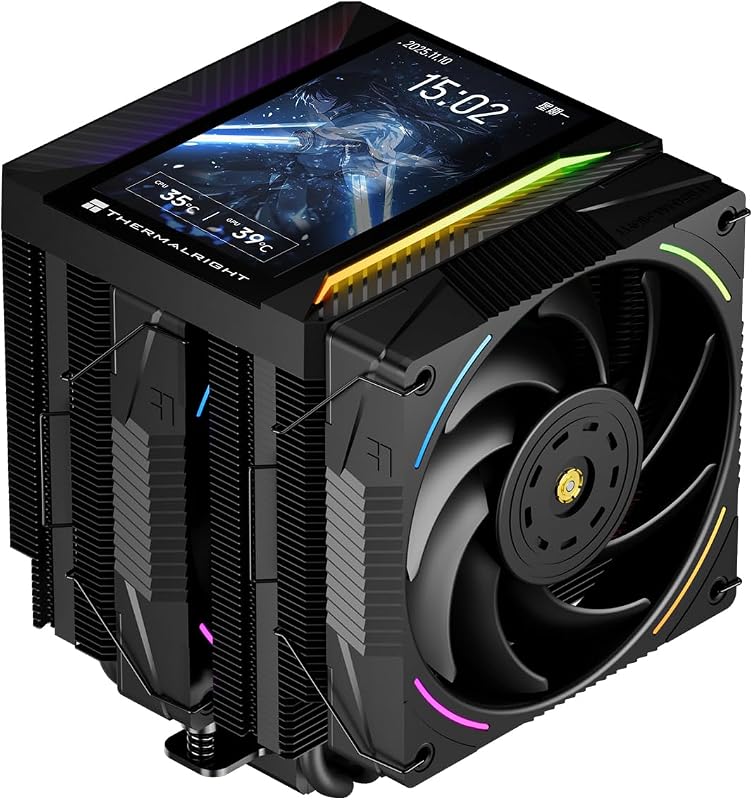
Fan layout and heatsink technology directly dictate how effectively thermal energy moves away from the fin stacks. A detailed Thermalright Peerless Assassin 120 review reveals heavy hardware: two full-sized 120x25mm PWM fans spinning up to 2150 RPM ± 10%, generating 69 CFM of airflow. The radiator utilizes six 6mm pure copper heat pipes with AGHP (Anti-Gravity Heat Pipe) Gen 5.0 technology, designed to optimize capillary action whether the cooler is mounted horizontally in a desktop case or vertically in a traditional tower. Its standout feature is a magnetic top cover housing a 5-inch IPS LCD display with a 480×854 resolution, controlled via TRCC software to provide real-time hardware telemetry, system metrics, and visual themes through a motherboard 9-pin USB header.
The Scythe Fuma 3 relies on a specialized aerodynamic setup using Kaze Flex II 120mm fans equipped with Fluid Dynamic Bearings. Instead of two identical fans, Scythe pairs a 25mm-thick fan with a 15mm-thick slim fan. These fans rotate in opposite directions to create higher static pressure and stable directional airflow through a higher fin density aluminum radiator. However, the Kaze Flex II fans top out at 1500 RPM. While the Fuma 3 package listing notes an airflow figure of 3000 CFM, standard 120mm fans at 1500 RPM typically operate within standard cubic-feet-per-minute ranges; the Thermalright unit provides aggressive, raw rotational speed reaching 2150 RPM.
Deciding between Thermalright Peerless Assassin 120 or Scythe Fuma 3 for gaming setups often hinges on whether your build showcases internal components. The Peerless Assassin 120 integrates addressable 5V 3-pin ARGB lighting and a customizable screen right on the cooler cap, eliminating the need for secondary display panels. Gamers looking at contemporary air-cooling options such as the thermalright peerless assassin 120 vs phantom spirit 120 often weigh these exact aesthetic additions against baseline thermal engineering.
Edge: Thermalright Peerless Assassin 120. It delivers 2150 RPM fan performance alongside a built-in 5-inch IPS display for active system monitoring.
Operating Noise and Acoustic Levels
Acoustic performance affects daily usability, particularly during intensive computational workloads or long gaming sessions. When examining Peerless Assassin 120 vs Fuma 3 noise level ratings, the Scythe Fuma 3 holds a distinct acoustic advantage on paper. The Fuma 3 listing specifies an operating noise level of just 14 dB, aided by its Fluid Dynamic Bearing fans and a conservative top rotational speed of 1500 RPM. Operating at 12 volts with a 2.88-watt power profile, the Kaze Flex II fans are specifically designed to prioritize quiet operation over raw velocity.
The Peerless Assassin 120 lists an operating noise ceiling of ≤ 27 dB(A). Because its fans achieve up to 2150 RPM to push 69 CFM of air, running the cooler at maximum PWM duty cycles produces audible air turbulence through the twin aluminum fin stacks. While 27 dB(A) remains quiet compared to high-RPM industrial blowers, it is noticeably louder than the ultra-subdued 14 dB sound floor claimed by Scythe. Managing fan curves becomes an important consideration for users who prefer silent desktop environments, similar to evaluations found when looking at the noctua nh-u12a vs thermalright peerless assassin 120.
A thorough Scythe Fuma 3 review must highlight that the cooler achieves its low noise signature by accepting lower maximum RPM ceilings. Builders whose primary objective is near-silent desktop operation will appreciate the Scythe design, as its reverse-rotating fans keep turbulence subdued even when pushing through the high-density fin stack.
Edge: Scythe Fuma 3. Its 14 dB rated noise floor and 1500 RPM ceiling make it significantly quieter than the 27 dB(A), 2150 RPM Thermalright configuration.
Socket Support and Mounting Systems
Processor platform compatibility determines whether a cooler transitions smoothly across hardware upgrades. In the Scythe Fuma 3 vs Thermalright Peerless Assassin 120 matchup, both manufacturers supply robust metal mounting solutions, but their socket compatibility lists feature minor differences. The Thermalright Peerless Assassin 120 explicitly includes mounting hardware for the newer Intel LGA1851 socket, alongside LGA1700, LGA1200, and legacy LGA1150/1151/1155/1156 sockets. On the AMD side, it supports both AM4 and AM5 platforms using the motherboard stock backplate.
The Scythe Fuma 3 utilizes the fifth-generation Hyper Precision Mounting System (HPMS V). This mounting mechanism supports Intel LGA1700, LGA1200, LGA115x, and extends compatibility to Intel High-End Desktop (HEDT) sockets including LGA2066 and LGA2011(V3). It also fully supports AMD AM4 and AM5 sockets. While the listing does not explicitly cite LGA1851 support for the Fuma 3, its support for enterprise and legacy enthusiast HEDT platforms like LGA2011 provides utility for users repurposing workstation hardware. System builders weighing modern mounting systems often compare these brackets to competing multi-socket solutions in the thermalright peerless assassin 120 vs be quiet! dark rock pro 5 breakdown.
Both coolers incorporate micro-engraved, nickel-plated copper base plates paired with six 6mm heat pipes via reflow soldering, guaranteeing uniform mating pressure against modern integrated heat spreaders. Because the Thermalright supports Intel LGA1851 out of the box while Scythe includes LGA2011/2066 HEDT hardware, the choice hinges entirely on your specific motherboard platform.
Edge: Tie. Thermalright explicitly lists current Intel LGA1851 compatibility, while Scythe accommodates Intel LGA2011/2066 HEDT platforms.
Pros and Cons
Thermalright Peerless Assassin 120
Pros
- 5-inch IPS LCD display
- Dual 2150 RPM high-speed fans
- Explicit Intel LGA1851 socket support
- AGHP Gen 5.0 heat pipe tech
Cons
- Tall 164mm height restricts small cases
- Higher operating noise up to 27 dB(A)
View Thermalright Peerless Assassin 120 on Amazon
Scythe Fuma 3

Pros
- Compact 154mm height fits smaller cases
- Asymmetrical design eliminates RAM interference
- Ultra-quiet 14 dB rated noise floor
- Reverse-rotating dual fan configuration
Cons
- Lacks integrated LCD monitoring display
- Lower 1500 RPM maximum fan speed
Who Should Buy Each One
Choose the Thermalright Peerless Assassin 120 If
- You want a built-in 5-inch IPS display with 480×854 resolution to monitor system vitals and run custom visual themes.
- Your chassis provides at least 164mm of vertical CPU cooler clearance.
- You require explicit, out-of-the-box support for the Intel LGA1851 socket.
- You prioritize aggressive airflow with dual 25mm PWM fans running up to 2150 RPM.
Choose the Scythe Fuma 3 If
- Your PC case has limited clearance and requires a cooler that stays at or below 154mm in total height.
- You use tall memory modules or fill all four DIMM slots and need zero RAM overhang.
- You are building inside a Mini-ITX chassis with dense component layout around the socket.
- You require near-silent acoustic output rated down to 14 dB with fluid dynamic bearings.
Final Verdict
The Thermalright Peerless Assassin 120 is the superior choice for mainstream desktop builders who have a standard ATX case and value visual monitoring. By integrating a 5-inch IPS display directly into the magnetic top cover, it turns the CPU cooler into a focal point of the build. Backed by dual 2150 RPM fans and AGHP Gen 5.0 heat pipe technology, it delivers strong airflow and modern socket coverage for Intel LGA1851 and AMD AM5 platforms, provided your chassis accommodates its 164mm height.
However, when asking is Scythe Fuma 3 worth it, the answer is an emphatic yes for space-constrained builds. Its 154mm profile fits where larger towers cannot, and its asymmetrical radiator completely clears front memory slots without requiring fan height adjustments. If low operating noise, Mini-ITX motherboard clearance, and total memory compatibility are your top priorities, the Scythe Fuma 3 remains the smarter mechanical choice.
FAQ
Can the Thermalright Peerless Assassin 120 fit in a Mini-ITX chassis?
The Peerless Assassin 120 stands 164mm tall and measures 135mm wide, which prevents it from fitting inside most compact Mini-ITX enclosures that require coolers under 155mm. It is primarily engineered for mainstream mid-tower and full-tower ATX cases.
Does the Scythe Fuma 3 block RGB RAM modules?
No, the Scythe Fuma 3 features an asymmetrical heatsink design that shifts the radiator fins backward, leaving the front memory slots completely open and unobstructed so that tall heat spreaders and lighting remain fully visible.
How does the LCD screen on the Peerless Assassin 120 receive data and power?
The 5-inch IPS display on the Peerless Assassin 120 connects directly to your motherboard via an internal 9-pin USB interface, which provides both the data stream for hardware telemetry and the necessary power to run the screen alongside the TRCC control software.
Which cooler supports the Intel LGA1851 socket out of the box?
The Thermalright Peerless Assassin 120 listing explicitly confirms support for Intel LGA1851 mounting hardware, making it ready for newer generation desktop motherboards without requiring separate mounting bracket kits.
How do the fan configurations differ between the Peerless Assassin 120 and Fuma 3?
The Peerless Assassin 120 uses two identical 120x120x25mm fans running up to 2150 RPM, while the Fuma 3 uses two Kaze Flex II fans of differing thicknesses (one 25mm and one 15mm slim fan) that rotate in opposite directions at up to 1500 RPM.
Is the Scythe Fuma 3 quieter than the Thermalright Peerless Assassin 120 during heavy loads?
Yes, the Scythe Fuma 3 is rated for a maximum noise output of 14 dB at 1500 RPM, whereas the Peerless Assassin 120 lists an operating noise level of up to 27 dB(A) when its dual fans reach 2150 RPM.
What rear memory clearance does the Scythe Fuma 3 provide on HEDT platforms?
The Scythe Fuma 3 features a cut-out fin array at the back of the radiator that provides 54mm of clearance for rear memory slots on Intel LGA2011 and LGA2066 motherboards.