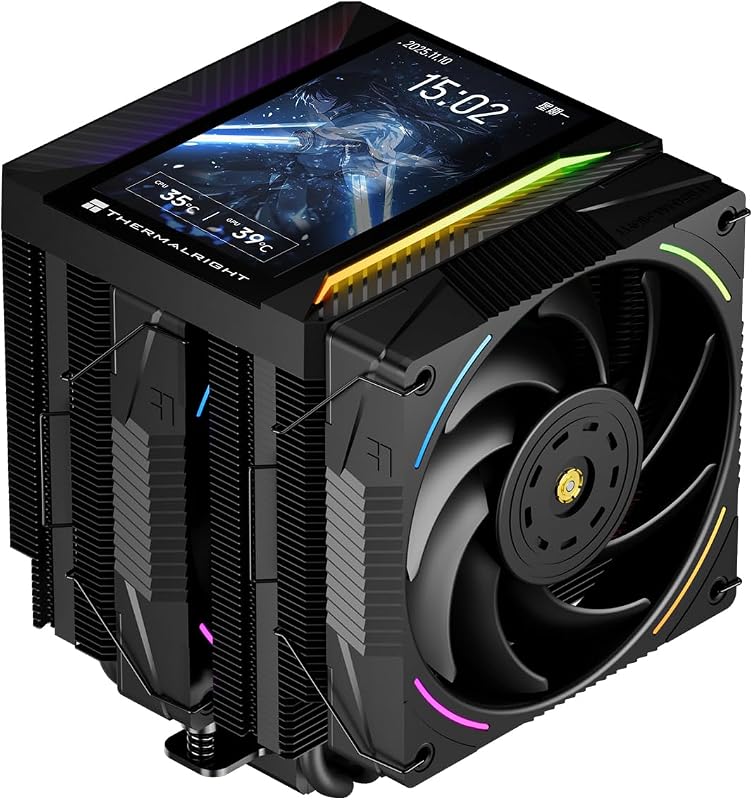
The single difference that decides the choice between these two twin-tower cooling solutions comes down to whether you prioritize real-time hardware telemetry displayed directly on your cooler via an integrated 5-inch IPS display or maximum passive heat extraction and quieter operation delivered by an expanded seven heat pipe array. While both units stem from the same high-efficiency cooling lineage, the Thermalright Peerless Assassin 120 Vision MAX ARGB emphasizes visual customization alongside high-RPM airflow, whereas the Thermalright Phantom Spirit 120 doubles down on acoustic dampening and raw copper surface transfer for pure cooling functionality.
Choose the Peerless Assassin 120 if you want an eye-catching centerpiece with custom video playback and temperature readouts right above your motherboard socket. Choose the Phantom Spirit 120 if you want a lower-profile, whisper-quiet air cooler built around seven heat pipes that prioritize acoustic performance and broad chassis clearance without requiring proprietary software.


Thermalright Peerless Assassin 120 vs Phantom Spirit 120 at a Glance
| Feature | Thermalright Peerless Assassin 120 | Thermalright Phantom Spirit 120 |
|---|---|---|
| Integrated Display | 5-inch IPS LCD (480×854 resolution) | Not listed |
| Heat Pipe Count | 6 pure copper pipes (6mm, AGHP 5.0) | 7 pure copper pipes (AGHP 4.0) |
| Maximum Fan Speed | 2150 RPM ±10% | 1500 RPM |
| Maximum Noise Level | 27 dB(A) | 25.6 dB(A) |
| Maximum Airflow | 69 CFM | 66.17 CFM |
| Overall Dimensions (LxWxH) | 125 x 135 x 164 mm | 125 x 135 x 157 mm |
| Lighting Features | 5V 3-pin ARGB | Not listed |
| Connection Interfaces | 4-pin PWM, 3-pin ARGB, 9-pin USB | 4-pin PWM |
| Intel Sockets Supported | LGA 1851 / 1700 / 115x / 1200 | LGA 1851 / 1700 / 115x / 1200 / 2011 |
| AMD Sockets Supported | AM4 / AM5 | AM4 / AM5 |
| Best For | System telemetry monitoring and visual builds | Whisper-quiet acoustic focus and compact chassis fit |
Thermal Architecture and Heat Pipe Design
The internal heat pipe structure represents the most significant functional divergence in this phantom spirit 120 vs peerless assassin 120 matchup. The Phantom Spirit 120 deploys seven dedicated heat pipes utilizing Thermalright AGHP 4.0 (Anti-Gravity Heat Pipe) technology. By packing phantom spirit 120 7 heat pipes into its dual aluminum fin stacks, the cooler maximizes the contact area across the nickel-plated copper baseplate. This increased surface density distributes thermal loads across a broader fin area, allowing the cooler to shed wattage efficiently even without spinning fans at extreme speeds. For dense modern processors that suffer from concentrated heat spots, having seven conduits moving energy away from the IHS offers a distinct structural benefit.
By comparison, the Peerless Assassin 120 Vision MAX utilizes six 6mm pure copper heat pipes upgraded to AGHP Gen 5.0 technology. These pipes feature reflow soldering directly into a nickel-plated micro-engraved copper base to overcome gravitational orientation penalties inside vertical or horizontal cases. While it operates with one fewer pipe than its counterpart, the unit compensates by pairing its six-pipe array with high-pressure fans that achieve up to 2150 RPM. As detailed in our noctua nh-d15 vs thermalright peerless assassin 120 assessment, six well-engineered AGHP pipes handle intense burst workloads reliably, but the thermal density per pipe remains marginally higher under sustained loads when compared directly against a seven-pipe layout.
In everyday use, the seven-pipe design of the Phantom Spirit 120 dissipates heat with lower reliance on brute-force air circulation. The six-pipe setup of the Peerless Assassin 120 is exceptionally capable, yet it relies more heavily on its higher airflow ceiling to manage peak heat. When running long-duration rendering tasks or high-load simulations, the extra copper conduit in the Phantom Spirit gives it an edge in thermal distribution efficiency.
Edge: Thermalright Phantom Spirit 120 because its seven-pipe thermal array provides greater copper surface contact for passive and continuous heat transfer.
Display and Monitoring Capabilities
A detailed thermalright peerless assassin 120 review reveals that the defining feature of the Vision MAX edition is its top-mounted display module. Sitting magnetically atop the twin cooling towers is an expansive 5-inch IPS LCD screen boasting a 480×854 resolution. This screen provides full real-time telemetry monitoring directly inside the chassis. Driven by the TRCC control software, users can display processor temperatures, fan speeds, system metrics, static graphics, animated custom themes, and full video playback. For builders with panoramic glass side panels, this hardware feature turns the CPU cooler into a primary visual focal point, eliminating the need for standalone sensor panels.
The Phantom Spirit 120 takes a strictly utilitarian approach, offering no LCD display, no secondary screen module, and no proprietary monitoring software. The top of the PS120 heatsink features clean, exposed fin caps and heat pipe tips. It provides cooling performance without demanding internal USB data connections or companion software overhead. Builders who prioritize functional simplicity and zero software footprints will appreciate that the Phantom Spirit requires no driver installation, background processes, or operating system monitoring tools to operate at maximum efficiency.
The presence of the 5-inch screen transforms the installation and system integration experience. The Peerless Assassin requires connecting to a 9-pin motherboard USB 2.0 header to transfer telemetry data and display custom media. This brings substantial visual versatility that the Phantom Spirit cannot match, although it introduces minor cable management duties behind the motherboard tray. For builders wanting an informative, styled interior, the Peerless Assassin delivers an integrated display experience usually reserved for all-in-one liquid coolers.
Edge: Thermalright Peerless Assassin 120 because of its sharp 5-inch IPS display, custom video playback, and real-time hardware telemetry integration.
Fan Acoustics and Rotational Speeds
Acoustics represent a defining factor when evaluating phantom spirit 120 noise level against the higher-output Peerless Assassin. The Phantom Spirit 120 is bundled with two TL-C12B V2 PWM 120mm fans equipped with S-FDB (Stabili-Fluid Dynamic Bearing) technology. These fans cap out at a maximum rotational speed of 1500 RPM while generating up to 66.17 CFM of airflow. The resulting operational noise is rated at a quiet 25.6 dB(A). Because these fans run at moderate speeds across the entire PWM curve, the cooler maintains a discreet acoustic signature even when the processor experiences heavy loads, making it an exceptional candidate for noise-sensitive workspace environments.
The Peerless Assassin 120 Vision MAX takes an aggressive, performance-oriented stance with its dual 120x120x25mm fans. These units reach speeds of up to 2150 RPM ±10%, delivering a maximum airflow rating of 69 CFM. However, pushing that volume of air through the dense fin stacks elevates the maximum noise rating to 27 dB(A). While the S-FDB bearings keep mechanical vibration low, the sheer velocity of air moving through the cooling assembly at 2150 RPM creates noticeable rushing noise at top speed. Buyers exploring this setup can contrast its fan curve against the findings in our thermalright peerless assassin 120 vs scythe fuma 3 breakdown, where acoustic dampening is balanced against fin density.
The acoustic difference between 25.6 dB(A) and 27 dB(A) represents a meaningful change in sound pressure during quiet room operation. The Phantom Spirit 120 ensures that even at 100% duty cycle, the cooler remains whisper-quiet. The Peerless Assassin delivers higher peak static pressure and greater raw CFM, which benefits maximum heat rejection, but it demands careful PWM curve tuning in BIOS to avoid unnecessary fan ramp-up during minor computing spikes.
Edge: Thermalright Phantom Spirit 120 because its 1500 RPM maximum fan speed limits acoustic output to a modest 25.6 dB(A).
Chassis Clearance and Cooler Dimensions
Form factor and vertical clearance frequently dictate whether a dual-tower heatsink can fit inside standard cases. The Phantom Spirit 120 features overall dimensions of 125 mm in length, 135 mm in width, and 157 mm in height (4.92 x 5.31 x 6.18 inches). Standing at 157 mm tall, it slips beneath the height restrictions of nearly all compact mid-tower enclosures and many modern micro-ATX or small-form-factor cases. This lower profile gives builders wide flexibility when pairing the cooler with cases that feature side glass panels or mounting brackets, a dynamic explored further in our noctua nh-u12a vs thermalright peerless assassin 120 spatial evaluation.
The Peerless Assassin 120 Vision MAX features the same 125 mm length and 135 mm width, but its overall height increases to 164 mm (6.46 inches). This added 7 mm of vertical height stems primarily from the magnetic top cover housing the 5-inch IPS display assembly. While 164 mm remains fully compatible with mainstream ATX tower enclosures, it crosses the threshold for certain compact cases that cap cooler clearance at 160 mm. Builders must double-check their chassis specifications before purchasing the Vision MAX edition to avoid side-panel contact.
Beyond vertical clearance, both coolers use symmetrical twin-tower layouts that balance over the CPU socket area. However, because the Peerless Assassin has a bulkier magnetic top plate to protect the LCD circuitry, shifting the front fan upward to clear tall memory modules will increase the effective height past 164 mm. The Phantom Spirit 120 offers slightly more breathing room, making fan elevation easier to accommodate inside mid-sized cases.
Edge: Thermalright Phantom Spirit 120 because its 157 mm total height provides superior clearance across standard and compact PC cases.
Socket Support and System Integration
Socket compatibility determines the longevity and upgrade path of any air cooler. When weighing peerless assassin 120 or phantom spirit 120 am5 builds, both models include complete mounting hardware for modern mainstream platforms. Both support AMD AM4 and AM5 platforms directly, using the motherboard’s native backplate for straightforward mounting. On the Intel side, both coolers provide full bracket compatibility for modern LGA1700 and upcoming LGA1851 sockets, alongside legacy LGA1200 and LGA115x sockets. However, the Phantom Spirit 120 lists support for Intel LGA2011 high-end desktop platforms, offering broader versatility for enterprise or older workstation builds.
Cabling and motherboard header requirements differ significantly between the two. The Phantom Spirit 120 keeps system integration minimal: it requires only a single 4-pin PWM CPU fan header (utilizing the included fan splitter) to power and control both TL-C12B V2 fans. There are no additional wiring harnesses, no LED headers, and no USB communication pathways to manage.
The Peerless Assassin 120 Vision MAX requires a multi-cable integration strategy. In addition to the standard 4-pin PWM connection for fan speeds, it incorporates a 5V 3-pin ARGB header to power the integrated illumination effects. Most notably, powering the 5-inch IPS screen and transferring live performance telemetry requires an internal 9-pin USB 2.0 connection to the motherboard. If your motherboard has limited internal USB headers-especially when paired with front-panel USB hubs or smart power supplies-you may need an internal USB expansion hub to get the screen operational, an integration factor also examined in our thermalright peerless assassin 120 vs be quiet! dark rock pro 5 guide.
Edge: Thermalright Phantom Spirit 120 because of its plug-and-play installation, lack of proprietary cabling, and extended LGA2011 platform support.
Gaming Performance and Airflow Delivery
Evaluating peerless assassin 120 or phantom spirit 120 for gaming depends on how your setup manages internal case heat and rapid thermal spikes. In a gaming rig, the graphics card exhausts substantial waste heat into the chassis, elevating ambient interior temperatures. The Peerless Assassin 120 Vision MAX counters this with its 2150 RPM fans, driving up to 69 CFM of airflow through the heatsink. This high volume of forced air helps strip thermal energy away quickly during intense gaming sessions where the CPU encounters variable load spikes. Combined with AGHP Gen 5.0 heat pipes, it rapidly shuttles heat upward regardless of horizontal GPU mounting positions.
The Phantom Spirit 120 relies on structural efficiency rather than sheer airflow volume. Its fans produce 66.17 CFM at 1500 RPM, working in conjunction with seven heat pipes to dissipate heat smoothly. During long gaming marathons, this configuration maintains low core temperatures without cycling fan speeds noticeably. For gamers who wear open-back headphones or game without audio headsets, the acoustic consistency of the PS120 eliminates annoying fan spin-up noises during momentary CPU usage spikes. Those interested in modern flagship air alternatives can review the noctua nh-d15 g2 vs thermalright peerless assassin 120 comparison to see how dual-tower air designs cope with contemporary gaming heat loads.
Ultimately, both coolers provide ample thermal capacity to prevent throttling on modern gaming CPUs. The Peerless Assassin provides higher peak airflow that helps exhaust ambient heat quickly when running demanding titles, while the Phantom Spirit achieves virtually identical gaming stability while operating at lower rotational speeds and quieter noise levels.
Edge: Tie because the Peerless Assassin offers higher peak airflow (69 CFM) while the Phantom Spirit balances performance with quieter operation (25.6 dB).
Pros and Cons
Thermalright Peerless Assassin 120
Pros
- 5-inch IPS telemetry display screen
- Higher maximum airflow reaching 69 CFM
- AGHP Gen 5.0 gravity-defying heat pipes
- Integrated 5V 3-pin ARGB lighting
Cons
- Taller 164mm height restricts compact cases
- Requires internal 9-pin USB motherboard header
- Higher 27 dB noise level at full speed
View Thermalright Peerless Assassin 120 on Amazon
Thermalright Phantom Spirit 120

Pros
- Seven pure copper AGHP heat pipes
- Whisper-quiet 25.6 dB noise profile
- Compact 157mm height fits more cases
- Broad support including legacy LGA2011
Cons
- No integrated hardware monitoring screen
- Lower 1500 RPM top fan speed
- Lacks built-in ARGB lighting effects
View Thermalright Phantom Spirit 120 on Amazon
Who Should Buy Each One
Choose the Thermalright Peerless Assassin 120 If
- You want a real-time hardware telemetry display inside your chassis without installing third-party external monitors.
- You prefer customizable aesthetic elements like video playback, dynamic backgrounds, and 5V 3-pin ARGB lighting.
- Your case provides at least 164 mm of vertical CPU cooler clearance and an open internal 9-pin USB motherboard header.
- You value high maximum airflow (up to 69 CFM) and do not mind a 27 dB(A) noise level at peak fan speeds.
Choose the Thermalright Phantom Spirit 120 If
- You demand silent operation with fans capped at 1500 RPM and a maximum noise rating of just 25.6 dB(A).
- You want the thermal headroom and distribution advantages provided by seven pure copper AGHP heat pipes.
- Your chassis is restricted to 157 mm or 160 mm of maximum cooler height.
- You prefer a simple, plug-and-play installation without background software, USB data cables, or ARGB wiring.
Final Verdict
When completing this thermalright phantom spirit 120 review alongside the Peerless Assassin Vision MAX, the overarching winner for pure cooling utility is the Phantom Spirit 120. By incorporating seven AGHP heat pipes into a compact 157 mm dual-tower footprint, it achieves exceptional thermal dissipation while keeping maximum noise down to an unobtrusive 25.6 dB(A). It installs without requiring companion software, frees up internal motherboard USB headers, and clears standard mid-tower chassis panels with ease, answering the question of whether the phantom spirit 120 is worth it for performance-focused builders.
On the other hand, the Peerless Assassin 120 Vision MAX represents a compelling evolution for visual-first configurations. Its 5-inch IPS display with 480×854 resolution, ARGB illumination, and 2150 RPM high-flow fans bring modern all-in-one liquid cooler aesthetics to the reliability of an air cooler. If your case accommodates its 164 mm profile and you want direct telemetry monitoring on your CPU block, this peerless assassin 120 vision max review confirms it stands out as one of the most feature-rich visual air coolers available.
FAQ
What software is required to operate the Peerless Assassin 120 screen?
The Peerless Assassin 120 Vision MAX uses Thermalright TRCC control software. This application communicates with the cooler via an internal 9-pin motherboard USB header to manage real-time temperature telemetry, fan RPM readouts, static themes, dynamic backgrounds, and custom video playback.
Does the Phantom Spirit 120 require any software or USB connection?
No, the Phantom Spirit 120 requires no software, drivers, or USB connections. It operates purely as an analog PWM cooler, connecting directly to the standard 4-pin CPU fan header on your motherboard to control fan speeds automatically based on temperature.
Will the Peerless Assassin 120 Vision MAX fit inside my mid-tower case?
The Peerless Assassin 120 Vision MAX has an overall height of 164 mm due to the magnetic LCD cover. While it fits in mainstream ATX cases, some compact mid-tower or micro-ATX cases feature a 160 mm cooler height limit, so you should verify your case specifications prior to installation.
How do the heat pipe designs differ between these two coolers?
The Phantom Spirit 120 features seven pure copper heat pipes utilizing AGHP 4.0 technology, providing extra surface contact across the baseplate. The Peerless Assassin 120 Vision MAX features six 6mm pure copper heat pipes using AGHP Gen 5.0 technology soldered to a micro-engraved nickel-plated copper base.
Which cooler is quieter during high-load workloads?
The Phantom Spirit 120 is the quieter cooler, rated at a maximum noise level of 25.6 dB(A) at 1500 RPM. In contrast, the Peerless Assassin 120 Vision MAX reaches up to 2150 RPM with an acoustic rating of ≤27 dB(A) when running at full capacity.
Can I install both coolers on AMD AM5 and Intel LGA1851 motherboards?
Yes, both coolers include dedicated mounting kits that fully support modern AMD AM5 and Intel LGA1851 platforms, as well as mainstream AMD AM4, Intel LGA1700, and LGA1200 sockets.