The choice between these two flagship dual-tower heatsinks hinges entirely on whether you prioritize refined acoustic engineering or real-time visual system telemetry inside your chassis. The Noctua NH-D15 G2 is an unapologetic exercise in thermal mass and fluid dynamics, pairing eight high-capacity copper heatpipes with custom-tuned 140mm fans designed to deliver massive static airflow while keeping noise emissions locked at whisper-quiet levels. In contrast, the Thermalright Peerless Assassin 120 Vision MAX ARGB combines an aggressive dual-fin stack with a magnetically attached 5-inch IPS LCD screen, transforming standard air cooling into an interactive diagnostic dashboard that reports live CPU metrics right behind your tempered glass panel.
Builders running high-wattage desktop processors who demand absolute silence under sustained computational loads should choose the Noctua NH-D15 G2. Enthusiasts wanting an expressive showcase build with live temperature telemetry and dynamic video playback directly on the heatsink top cover should select the Thermalright Peerless Assassin 120.


Noctua NH-D15 G2 vs Thermalright Peerless Assassin 120 at a Glance
| Feature | Noctua NH-D15 G2 | Thermalright Peerless Assassin 120 |
|---|---|---|
| Heatpipe Configuration | 8 copper heatpipes (soldered joints) | 6x6mm AGHP Gen 5.0 heatpipes |
| Fan Dimensions | Dual 140mm (NF-A14x25r G2) | Dual 120mm (120x120x25mm) |
| Maximum Rotational Speed | 1500 RPM | 2150 RPM (±10%) |
| Airflow Capacity | 155.6 m³/h | 69 CFM |
| Noise Level | 24.8 dB | ≤27 dB(A) |
| Total Cooler Height | 168 mm | 164 mm |
| Base Construction | Nickel-plated copper | Micro-engraved nickel-plated copper |
| Visual Telemetry | Not listed | 5-inch IPS LCD (480×854 resolution) |
| Socket Compatibility | Intel LGA1851/1700/1200/115x, AMD AM5/AM4 | Intel LGA1851/1700/1200/115x, AMD AM5/AM4 |
| Best For | Ultra-quiet high-wattage desktop performance | Aesthetic showcase builds and live hardware monitoring |
Acoustic Profile and Fan Engineering
Acoustic performance often determines daily satisfaction with high-end desktop hardware, especially when running compute-heavy workloads over long periods. In an in-depth Noctua NH-D15 G2 review, the cooling architecture reveals a pair of newly developed NF-A14x25r G2 140mm round-frame fans engineered around precise acoustic balance. Noctua incorporates a deliberate speed-offset between the front and middle fans, preventing unwanted acoustic beating or harmonic resonance when both impellers spin simultaneously. Capped at a maximum rotational ceiling of 1500 RPM and bundling Low-Noise Adaptors, the cooler maintains a strictly bounded Noctua NH-D15 G2 noise level of 24.8 dB, delivering maximum airflow while remaining virtually imperceptible across common office and studio environments.
By comparison, the Thermalright Peerless Assassin 120 utilizes dual 120mm high-velocity fans rated up to 2150 RPM with an operating sound profile listed up to 27 dB(A). To compensate for the smaller impeller footprint compared to a 140mm platform, Thermalright spins these fans significantly faster to push 69 CFM of airflow through the dense fin towers. While the included 4-pin PWM interface allows the motherboard to throttle fan curves down when idle, spinning up to 2150 RPM under peak thermal loading generates a noticeable acoustic presence. Builders who have weighed the classic noctua nh-d15 vs thermalright peerless assassin 120 matchup know that Thermalright favors compact, high-RPM output, whereas Noctua relies on larger sweeps and lower rotational velocities to damp acoustic output.
When assessing overall sound quality, the lower pitch produced by Noctua’s 140mm impellers blends easily into ambient background noise, whereas smaller 120mm fans running past 2000 RPM create a sharper acoustic frequency. The trade-off centers on RPM headroom: Thermalright gives you raw speed reserves to handle sudden heat spikes, but Noctua’s acoustic dampening creates a consistently silent operating space.
Edge: Noctua NH-D15 G2 delivers a lower maximum decibel ceiling and eliminates harmonic beating through acoustic fan speed offsetting.
Thermal Architecture and Fin Stack Design
Heatsink efficiency relies on raw surface area, conductive materials, and heatpipe layout to wick thermal energy away from the processor die. The NH-D15 G2 elevates dual-tower engineering by incorporating eight integrated copper heatpipes that thread through an expanded fin array boasting 20% more surface area than its direct predecessor. Noctua solders every fin joint to the nickel-plated copper heatpipes, ensuring that structural flexing and repeated heating cycles will not loosen fin contact over time. With a total weight of 1525 grams and an airflow capacity of 155.6 cubic meters per hour, the cooler offers an enormous thermal absorption reservoir that stabilizes sudden temperature transients on multi-core processors like the Ryzen 9 9950X or Core Ultra 285K.
The Peerless Assassin 120 relies on six 6mm pure copper heatpipes constructed with AGHP Gen 5.0 technology. Anti-Gravity Heat Pipes utilize specialized sintered powder capillary wicks that overcome gravitational drag, ensuring uncompromised heat transfer regardless of whether the desktop case rests in a horizontal or vertical orientation. The heatpipes integrate directly into a nickel-plated, micro-engraved copper base via reflow soldering, dispersing thermal energy across twin aluminum fin stacks. When examining NH-D15 G2 vs Peerless Assassin 120 cooling performance across heavy compute tasks, Thermalright’s six-pipe layout handles heat extraction reliably, but Noctua’s two extra heatpipes and expanded fin mass provide additional conductive channels to transfer heat away from modern, concentrated hot spots.
This structural disparity illustrates two different approaches to thermal management. The Peerless Assassin 120 maximizes efficiency within a standard 125x135mm footprint, similar to what you find when analyzing the thermalright peerless assassin 120 vs phantom spirit 120. Noctua expands the dual towers outwards to the outer boundary of ATX motherboard clearance, trading interior volume for heat absorption capacity.
Edge: Noctua NH-D15 G2 secures superior thermal transfer thanks to eight soldered heatpipes and an expanded fin surface area.
Display Telemetry, Lighting, and Aesthetic Customization
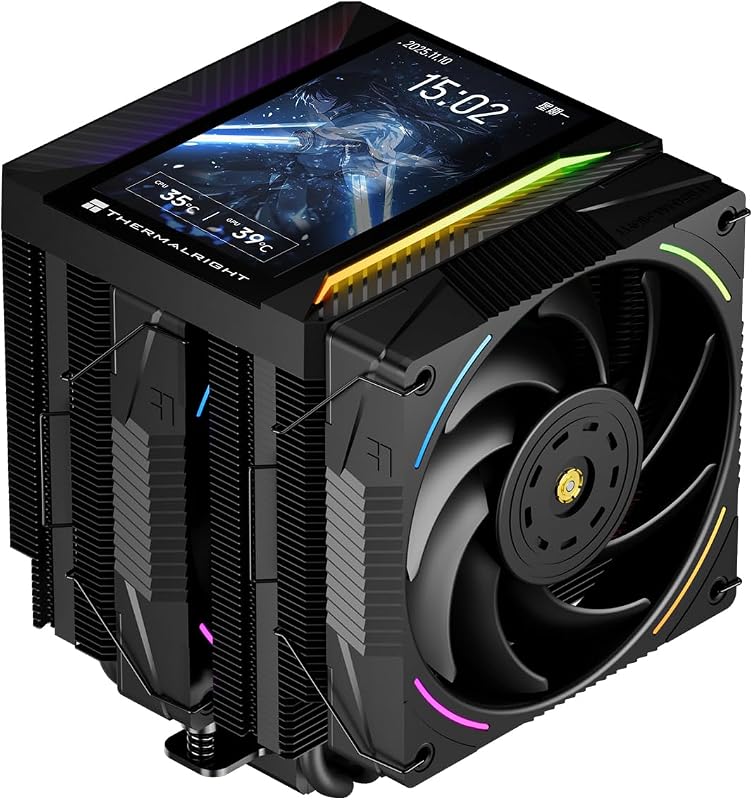
Visual integration inside desktop cases has evolved from simple illuminated logos to comprehensive hardware diagnostic hubs. The central attraction of this Thermalright Peerless Assassin 120 review is undeniably the Thermalright Peerless Assassin 120 screen. Thermalright outfits the cooler with a magnetic top cover housing a 5-inch IPS display boasting an 854×480 resolution. Powered and updated over an internal 9-pin motherboard USB connection, the display interfaces with the proprietary TRCC control software to present live system parameters, hardware utilization figures, static imagery, dynamic themed artwork, and even video playback directly above the cooling towers.
Alongside its high-definition visual screen, the Peerless Assassin 120 incorporates integrated 5V 3-pin ARGB lighting across its dual fans, casting vibrant illumination across the matte black heatsink coating. These visual additions cater directly to showcase builds with panoramic glass enclosures, letting users monitor their internal hardware stats at a glance without cluttering their operating system workspace with floating telemetry widgets. Those who compare the thermalright peerless assassin 120 vs be quiet! dark rock pro 5 will find that Thermalright goes significantly further in onboard visual display tech than most competing heavy-duty coolers.
In contrast, Noctua skips onboard displays, lighting zones, and cosmetic shrouds entirely. The NH-D15 G2 embraces an industrial aesthetic centered on bare aluminum cooling fins, nickel-plated heatpipes, and functional beige-and-brown 140mm fans. For builders who prioritize pure engineering simplicity, Noctua’s hardware-only approach means zero software background utilities, no internal USB header consumption, and zero potential driver conflicts. However, if personalized aesthetic flair and physical telemetry monitoring are high priorities, Noctua leaves those desires completely unaddressed.
Edge: Thermalright Peerless Assassin 120 dominates aesthetics with a 5-inch IPS display panel and addressable RGB fan lighting.
Socket Optimization and Platform Mounting Mechanisms
Modern CPU platforms feature distinct heat generation profiles, die placements, and structural bending issues that require tailor-made mounting solutions. Choosing between the Noctua NH-D15 G2 or Thermalright Peerless Assassin 120 for AM5 involves looking closely at how each brand approaches contact pressure. Noctua outfits the NH-D15 G2 with specialized offset mounting hardware specifically engineered for AMD AM5 sockets. Shifting the baseplate 7mm toward the south side of the socket positions the cooler’s internal core directly over the compute chiplets where thermal densities peak. For Intel platforms, Noctua includes NM-ISW1 contact washers to counteract ILM-induced CPU bending on LGA1700 sockets, along with a full Torx-driven SecuFirm2+ mounting kit, the NM-SD1 screwdriver, and a tube of premium NT-H2 thermal compound.
Thermalright delivers extensive out-of-the-box compatibility across mainstream sockets, covering AMD AM4 and AM5 alongside Intel LGA1851, LGA1700, LGA1200, LGA1150, LGA1151, LGA1155, and LGA1156. The heatsink relies on a traditional dual-screw crossbar retention bracket that interfaces with the motherboard’s native backplate on AMD systems and an included backplate for Intel boards. The micro-engraved nickel-plated base provides flat, uniform contact against the integrated heat spreader (IHS), ensuring dependable pressure distribution without complicated bracket reconfiguration.
Where Noctua pulls ahead is in socket-specific tuning. While Thermalright provides broad platform mounting that matches designs seen in the thermalright peerless assassin 120 vs scythe fuma 3, Noctua includes specialized hardware tweaks-such as the AM5 offset brackets and anti-warp washers-that directly solve platform-level thermal quirks.
Edge: Noctua NH-D15 G2 provides superior installation hardware, including dedicated AM5 offset mounting and LGA1700 anti-warp washers.
Dimensions, Motherboard Clearances, and Case Fitment
Physical space constraints inside mid-tower chassis frequently make or break an air-cooling build. The NH-D15 G2 stands at a tall 168mm in overall height, with an outer footprint spanning 5.98 inches long and 5.91 inches wide. Noctua engineers the lower cooling fin clusters with asymmetrical cutouts to clear top-tier PCIe x16 expansion slots on modern motherboards. However, memory clearance requires careful attention: while the recessed lower fin stack affords a generous 59mm of vertical RAM height when using the cooler in single-fan mode, installing the front 140mm fan drops clear memory height down to 32mm. To fit taller RGB memory sticks, you must mount the front fan higher on the fin stack, which pushes total cooler height well past 168mm and can block the side panel on narrower chassis.
The Peerless Assassin 120 takes up a noticeably smaller physical profile. Standing at 164mm tall, 125mm long, and 135mm wide, it slots into mainstream ATX and compact mid-tower enclosures without issue. Because Thermalright pairs this cooler with standard 120mm fans rather than oversized 140mm units, the front fan sits lower relative to the motherboard memory slots. Builders seeking a compact footprint without stepping down to ultra-compact designs like the noctua nh-u12a vs thermalright peerless assassin 120 will appreciate Thermalright’s balanced chassis compatibility. The magnetic top cover adds minimal bulk to the top of the towers while keeping the overall height right at 164mm.
For builders dealing with mid-tower chassis that enforce a hard 165mm cooler height limit, the 164mm Peerless Assassin 120 installs without side-panel clearance problems. Noctua’s 168mm baseline height demands a wide PC case, making chassis selection significantly more restrictive.
Edge: Thermalright Peerless Assassin 120 offers a shorter 164mm height and a more compact footprint that fits mainstream cases easily.
Pros and Cons
Noctua NH-D15 G2

Pros
- Eight copper heatpipes with soldered fin joints
- Dual 140mm fans with acoustic speed-offset tuning
- Includes NT-H2 paste and Torx mounting tool
- Whisper-quiet 24.8 dB maximum noise ceiling
- Dedicated AM5 offset and LGA1700 washer kit
Cons
- Taller 168mm profile restricts narrower chassis
- Reduces memory clearance to 32mm with both fans
- Lacks onboard visual telemetry display
View Noctua NH-D15 G2 on Amazon
Thermalright Peerless Assassin 120
Pros
- Integrated 5-inch IPS display with 480×854 resolution
- Six AGHP Gen 5.0 gravity-defying heatpipes
- ARGB fan lighting with 3-pin motherboard sync
- Shorter 164mm height eases case selection
- TRCC software supports custom video playback
Cons
- Higher 27 dB noise rating at maximum speed
- Requires internal 9-pin USB header for screen
- Smaller 120mm fans move lower volume per rotation
View Thermalright Peerless Assassin 120 on Amazon
Who Should Buy Each One
Choose the Noctua NH-D15 G2 If
- You demand whisper-quiet computing where acoustic output never exceeds 24.8 dB even under full CPU load.
- You run high-wattage desktop processors like the Ryzen 9 9950X or Core Ultra 285K that benefit from eight soldered heatpipes.
- You own an AM5 or LGA1700 motherboard and want purpose-built offset brackets and anti-warp contact washers included in the box.
- You prefer a purely hardware-driven cooler that operates independently of desktop software utilities and USB headers.
Choose the Thermalright Peerless Assassin 120 If
- You want live system temperatures, CPU loads, and custom video backgrounds displayed on a magnetic 5-inch IPS screen.
- You are building an expressive desktop with addressable RGB fan lighting synced to your motherboard.
- You use a mainstream PC case with a 165mm CPU cooler height clearance limit.
- You want balanced thermal performance from six AGHP Gen 5.0 gravity-defying heatpipes that work in any chassis orientation.
Final Verdict
Deciding whether the Thermalright Peerless Assassin 120 vs Noctua NH-D15 G2 is the right choice comes down to functional priorities. The Noctua NH-D15 G2 represents the pinnacle of air-cooling engineering. By pairing eight copper heatpipes with precision NF-A14x25r G2 fans, soldered fin joints, and tailored AM5 offset brackets, it operates as a silent workhorse for workstation professionals and enthusiasts running demanding compute tasks. If your goal is extracting peak sustained clocks from high-TDP desktop processors while keeping your workspace completely silent, the engineering refinements packed into the NH-D15 G2 make it the premier choice.
On the other side of the ledger, the Thermalright Peerless Assassin 120 Vision MAX ARGB redefines what you can expect from an air cooler’s visual capabilities. Its sharp 5-inch IPS display and dynamic TRCC telemetry software bring a level of interactive monitoring usually reserved for expensive liquid-cooling setups, all while maintaining solid dual-tower performance via six AGHP heatpipes. If you are debating if the Thermalright Peerless Assassin 120 is worth it for a showcase gaming PC, the combination of real-time hardware tracking, compact 164mm height, and integrated ARGB makes it the hands-down winner for visual presentation.
FAQ
Is the Noctua NH-D15 G2 or Thermalright Peerless Assassin 120 better for gaming?
When deciding between the Noctua NH-D15 G2 or Thermalright Peerless Assassin 120 for gaming, both deliver more than enough thermal dissipation to handle modern gaming CPUs. The Thermalright Peerless Assassin 120 is particularly well-suited for gaming setups thanks to its vivid ARGB lighting and 5-inch IPS display, which lets you glance through your tempered glass side panel to check real-time CPU temps and frame stats while playing. The Noctua NH-D15 G2 is ideal if you game with open-back headphones or keep your desktop on your desk right next to your mousepad, where keeping fan noise low is essential.
Is the Thermalright Peerless Assassin 120 worth it for its screen features?
Yes, is Thermalright Peerless Assassin 120 worth it comes down to whether you value live hardware monitoring without adding secondary desktop displays. The integrated 5-inch IPS screen delivers a crisp 480×854 resolution, attaches securely using magnets, and interfaces with TRCC software to show temperatures, background images, and video clips. If you want an interactive visual focal point inside your PC case without dealing with liquid cooler tubes, it provides exceptional utility.
Is the Noctua NH-D15 G2 worth it over traditional dual-tower coolers?
Determining whether is Noctua NH-D15 G2 worth it depends on your acoustic standards and processor wattage. The NH-D15 G2 introduces eight soldered copper heatpipes, 20% more fin area, state-of-the-art round-frame 140mm fans, a custom Torx SecuFirm2+ screwdriver, NT-H2 paste, and dedicated AM5 offset hardware. If you operate high-load rendering or compiling workstations that push silicon to its limits, the sustained thermal headroom and low 24.8 dB acoustic ceiling deliver tangible value.
How does the Thermalright Peerless Assassin 120 screen receive power and data?
The 5-inch IPS LCD screen integrated into the Peerless Assassin 120 top cover connects directly to an internal 9-pin USB 2.0 header on your motherboard. This single interface provides both electrical power and real-time data communication, allowing the TRCC software to stream system diagnostics and custom media directly to the display.
Can the Noctua NH-D15 G2 fit over tall RGB RAM modules?
The Noctua NH-D15 G2 provides 59mm of vertical memory clearance when operated in single-fan mode using only the central 140mm fan. When running both NF-A14x25r G2 fans, memory clearance drops to 32mm. While you can clip the front fan higher on the fin stack to accommodate taller RAM sticks, doing so increases the cooler’s overall height beyond its native 168mm specification, which may cause clearance issues with your PC case side panel.
Do these coolers support the latest AMD AM5 and Intel LGA1851 sockets?
Both models provide full native support for AMD AM5 and Intel LGA1851 sockets. Noctua includes custom offset mounting brackets that position the cooler directly over AM5 hotspot locations, as well as NM-ISW1 contact washers for Intel boards. Thermalright includes universal mounting hardware in the box to mount securely across AM4, AM5, LGA1851, LGA1700, and previous-generation Intel platforms.


