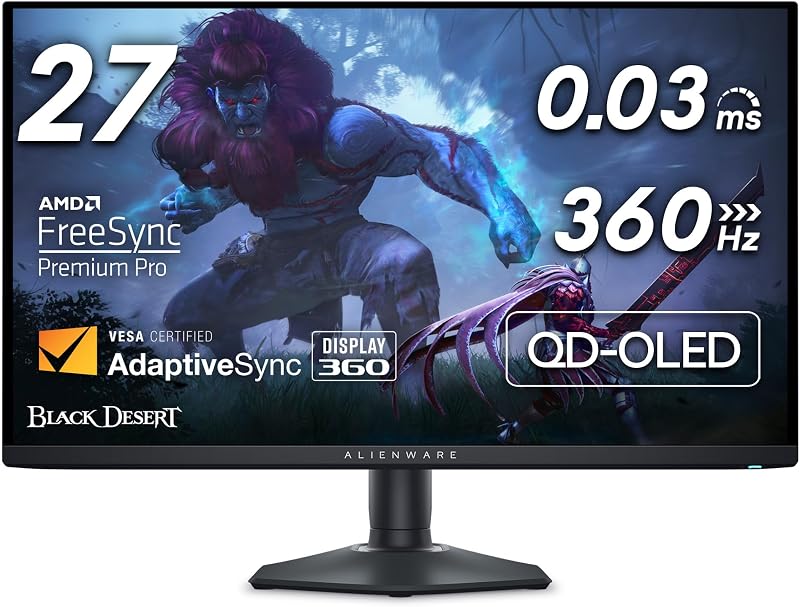
The choice between the Alienware AW2725DF and the LG 27GS95QE comes down to a clear hardware trade-off: pure esports refresh speed versus console-ready display connectivity. The Alienware AW2725DF pushes panel technology to a 360Hz refresh rate using a Quantum Dot OLED panel, while the LG 27GS95QE runs a 240Hz OLED panel paired with dedicated HDMI 2.1 bandwidth for modern gaming consoles and PC setups alike.
Competitive PC players chasing the highest frame rates and lowest input latency should pick the Alienware AW2725DF. Multi-platform players who alternate between a PC and current-generation gaming consoles will get more everyday utility from the LG 27GS95QE.


Alienware AW2725DF vs LG 27GS95QE at a Glance
| Feature | Alienware AW2725DF | LG 27GS95QE |
|---|---|---|
| Panel Technology | QD-OLED | OLED |
| Screen Size | 27 inches (26.7-inch viewable) | 27 inches |
| Native Resolution | 2560 x 1440 (QHD) | 2560 x 1440 (QHD) |
| Refresh Rate | 360Hz | 240Hz |
| Response Time | 0.03 ms (GtG min) | 0.03 ms (GtG) |
| Contrast Ratio | 1.5 million:1 (Infinite) | 1,500,000:1 |
| Color Gamut Coverage | 99.3% DCI-P3 (Delta E<2) | Up to 98.5% DCI-P3 |
| HDR Certification | VESA DisplayHDR True Black 400 | VESA DisplayHDR True Black 400 |
| Variable Refresh Rate | AMD FreeSync Premium Pro, VESA AdaptiveSync | AMD FreeSync Premium Pro, NVIDIA G-SYNC Compatible |
| Video Connectivity | HDMI, DisplayPort, USB 3.2 Gen1 | HDMI 2.1, DisplayPort 1.4 |
| Stand Adjustments | Height, Tilt, Swivel, Pivot | Height, Tilt, Swivel |
| Power Consumption | 27.6 watts | 37.7 watts |
| Best For | Competitive PC esports players | Hybrid PC and console gamers |
Refresh Rate and Motion Clarity
Motion clarity in fast-paced video games relies on two distinct factors: the physical response time of the pixels and the refresh rate of the monitor panel. Because both displays use self-emissive OLED technology, each achieves a near-instantaneous 0.03 ms gray-to-gray response time. This eliminates the ghosting trails and pixel smearing commonly seen on fast-moving IPS or VA gaming screens. However, when evaluating the Alienware AW2725DF vs LG 27GS95QE motion clarity, the refresh frequency makes an immediate visual impact.
The Alienware AW2725DF operates at an ultra-high 360Hz refresh rate, delivering a new frame every 2.77 milliseconds. In contrast, the LG 27GS95QE operates at 240Hz, rendering a new frame every 4.16 milliseconds. When tracking fast targets across a 1440p canvas in titles like Counter-Strike 2, Apex Legends, or Overwatch 2, that 50 percent increase in frame throughput yields smoother cursor tracking and diminished micro-stutter. The jump from 240Hz to 360Hz may not seem as massive as the historical leap from 60Hz to 144Hz, but in our analysis of the AW2725DF vs 27GS95QE refresh rate, top-tier esports athletes gain tangible feedback advantages during flick shots and rapid camera pans. Similar refresh rate considerations appear when evaluating ultra-fast panels in our alienware aw2725df vs lg 32gs95ue breakdown.
The LG 27GS95QE delivers exceptional 240Hz motion handling that easily outperforms traditional backlit panels, yet it cannot match the frame cadence of a native 360Hz display. Gamers pairing their screen with high-end PC hardware capable of maintaining over 300 frames per second at 1440p will find the Alienware display visibly sharper during fast horizontal rotations. For high-speed precision gaming, every extra frame update reduces human reaction latency.
Edge: Alienware AW2725DF delivers distinctly superior motion clarity thanks to its 360Hz refresh rate rendering frames 1.39 milliseconds faster than the 240Hz competition.
Panel Technology and Color Reproduction
While both monitors feature 2560×1440 resolution displays across a 27-inch diagonal, their underlying panel structures differ. The Alienware AW2725DF utilizes Quantum Dot OLED (QD-OLED) technology. This system layers blue OLED emitters behind a layer of printed quantum dots that convert light into pure reds and greens. The LG 27GS95QE utilizes LG’s UltraGear OLED display structure with an anti-glare, low-reflection coating. Both panels produce true, inky blacks with infinite 1.5 million to 1 contrast ratios and carry VESA DisplayHDR True Black 400 certification.
Color volume is where the AW2725DF pulls ahead on paper. Dell specifies that the Alienware display covers 99.3% of the cinematic DCI-P3 color space and ships factory-calibrated with a Delta E<2 accuracy rating. This ensures that game worlds and streaming content exhibit lifelike saturation without oversaturating flesh tones. The LG 27GS95QE specifies up to 98.5% coverage of the DCI-P3 color gamut alongside HDR10 support. While 98.5% DCI-P3 provides vivid picture quality for AAA single-player campaigns, the Quantum Dot layer on the Alienware creates slightly cleaner primary colors at wide viewing angles. Shoppers curious about how QD-OLED stacks up against standard OLED panels often examine the alienware aw2725df vs asus rog swift pg27aqdm comparison to see similar panel differences.
Regarding ambient lighting performance, both displays feature matte surface finishes designed to scatter reflections in brightly illuminated rooms. LG explicitly highlights its Anti-Glare with Low Reflection display surface to help players concentrate during daytime sessions. The Alienware lists a peak brightness capability of 1000 nits in localized HDR highlights, while the LG listing identifies a typical 275 cd brightness rating. In standard SDR gaming, both provide ample illumination, but the Alienware delivers higher dynamic pop in dark scenes featuring localized neon signs or explosions.
Edge: Alienware AW2725DF wins with its Quantum Dot color layer that achieves a wider 99.3% DCI-P3 gamut and factory-calibrated Delta E<2 accuracy.
Connectivity and Multi-Platform Versatility
Input selection defines how easily a monitor slots into a multi-device workstation or living room setup. The LG 27GS95QE comes equipped with dedicated HDMI 2.1 and DisplayPort 1.4 inputs. Both connections support the panel’s full 240Hz refresh rate at native 1440p resolution. Crucially, the presence of full-bandwidth HDMI 2.1 makes the LG display an ideal companion for current-generation home consoles like the PlayStation 5 and Xbox Series X. These consoles rely on HDMI 2.1 protocols to deliver 120Hz refresh rates, variable refresh rate signaling, and automated low-latency modes.
The Alienware AW2725DF provides HDMI, DisplayPort, and an integrated USB 3.2 Gen1 hub. While its DisplayPort pipeline effortlessly carries the full 360Hz refresh rate at 1440p to your gaming PC, the product listing does not specify HDMI 2.1 connectivity for its HDMI ports. PC-focused battlestations will not mind this omission, as DisplayPort remains the standard interface for desktop graphics cards. However, players who plan to share one monitor between a desktop rig and a console will appreciate LG’s plug-and-play HDMI 2.1 implementation. Gamers weighing desktop connectivity often compare ultra-wide setups in our alienware aw3423dwf vs lg 27gs95qe review.
The Alienware does balance its video inputs by including an onboard USB 3.2 Gen1 hub. This hub lets you route mouse and keyboard cables directly to the display, cleaning up desktop clutter and keeping short peripheral cords accessible. However, in pure video versatility across varied hardware platforms, having modern HDMI standard ports holds greater practical weight for general gaming households.
Edge: LG 27GS95QE takes the connectivity category by including high-bandwidth HDMI 2.1 ports that fully accommodate modern gaming consoles at high refresh rates.
Adaptive Sync and Tear-Free Gaming
Screen tearing ruins competitive immersion, making adaptive sync integration mandatory on modern high-refresh monitors. Both the Alienware AW2725DF and the LG 27GS95QE feature AMD FreeSync Premium Pro certification. This standard guarantees variable refresh rate support alongside low latency processing and mandatory HDR tone mapping support. Whether your graphics card outputs 80 frames per second during demanding single-player cutscenes or 200 frames per second in an online battle arena, FreeSync synchronizes the display to the GPU output seamlessly.
The LG 27GS95QE sets itself apart on graphics card compatibility by carrying official NVIDIA G-SYNC Compatible validation in addition to AMD FreeSync Premium Pro. While FreeSync displays typically work with modern GeForce cards through VESA protocols, official validation means NVIDIA has tested the panel extensively to guarantee zero flickering, pulsing, or blanking artifacts across its entire variable refresh window. For players running GeForce RTX hardware, this seal provides valuable peace of mind.
The Alienware AW2725DF matches the AMD FreeSync Premium Pro standard and carries VESA AdaptiveSync certification. To complement tear-free gameplay, Alienware adds AlienVision hardware overlays. These built-in visual aids provide night vision brightening, chroma highlighting, and crosshairs directly from the monitor hardware without triggering anti-cheat software. Still, for raw driver stability and cross-GPU validation, LG’s dual-certified status remains a key selling point. Similar variable refresh comparisons can be found when looking at the alienware aw3423dw vs lg 27gs95qe matchup.
Edge: LG 27GS95QE edges out the competition with official NVIDIA G-SYNC Compatible validation alongside AMD FreeSync Premium Pro.
Ergonomics, Stand Design, and Desktop Footprint
Physical adjustability directly impacts daily comfort during lengthy gaming sessions. The Alienware AW2725DF includes a fully ergonomic stand with height, tilt, swivel, and bidirectional pivot adjustments. The inclusion of pivot adjustability allows the screen to rotate 90 degrees into portrait orientation. This is invaluable for streamers monitoring chat logs, programmers reviewing code, or gamers mounting the display on an arm beside a secondary display. Alienware also engineered the stand with a compact hexagonal base designed to minimize desk footprint and leave maximal surface area for wide, low-DPI mouse sweeps.
The LG 27GS95QE features an attractive, virtually borderless chassis engineered around an ultra-thin profile. Its stand offers smooth height, tilt, and swivel adjustments, allowing gamers to find an ergonomic eye level easily. However, the listing does not specify pivot rotation for the LG stand. If portrait orientation is essential for your desktop setup, the LG requires an aftermarket VESA mount. Desktop builders researching ergonomics across brand lineups can also review our alienware aw2725df vs samsung odyssey oled g8 assessment.
Weight and power consumption also distinguish the two units. The Alienware AW2725DF weighs 13.9 pounds and draws 27.6 watts of power. It also includes 3-zone customizable AlienFX RGB lighting and Dell’s 3-year Advanced Exchange Service Warranty mentioned directly in the product listing. The LG 27GS95QE weighs 16.2 pounds, occupies a slightly deeper footprint at 10.2 inches versus Alienware’s 9.59 inches, and consumes 37.7 watts of power. Alienware delivers a lighter, more adaptable mechanical package backed by clear warranty terms.
Edge: Alienware AW2725DF wins with full pivot adjustability, a space-saving hexagonal base, lighter weight, lower power draw, and a 3-year Advanced Exchange warranty.
Pros and Cons
Alienware AW2725DF
Pros
- Blazing 360Hz refresh rate
- Rich QD-OLED 99.3% DCI-P3 color
- Instant 0.03ms GtG response time
- Full stand ergonomics with pivot
- Three-year Advanced Exchange warranty
Cons
- Listing omits HDMI 2.1 specification
- Requires powerful GPU to maximize 360Hz
View Alienware AW2725DF on Amazon
LG 27GS95QE

Pros
- High-bandwidth HDMI 2.1 connectivity
- Official NVIDIA G-SYNC Compatible validation
- Ultra-fast 240Hz OLED panel
- Anti-glare low reflection display finish
Cons
- Lacks portrait pivot adjustment
- Higher power consumption at 37.7 watts
Who Should Buy Each One
Deciding between the LG 27GS95QE vs Alienware AW2725DF requires balancing raw competitive speed against port versatility. Both deliver the instant pixel response times, infinite contrast, and ink-like blacks that make 1440p OLED displays stunning in action.
Choose the Alienware AW2725DF If:
- You play fast-paced PC esports titles like Counter-Strike 2, Valorant, or Apex Legends where 360Hz provides a tangible competitive edge.
- You prioritize color saturation and accuracy with 99.3% DCI-P3 coverage backed by a factory-calibrated Delta E<2 rating.
- You need vertical pivot rotation to turn your monitor into portrait mode for streaming, coding, or reading long documents.
- You want a compact hexagonal base that maximizes available desk space for low-sensitivity mouse sweeps.
Choose the LG 27GS95QE If:
- You regularly connect modern gaming consoles like the PS5 or Xbox Series X that demand HDMI 2.1 bandwidth for 120Hz gaming.
- You run an NVIDIA GeForce graphics card and prefer an officially certified NVIDIA G-SYNC Compatible display.
- Your PC hardware typically averages around 140 to 240 frames per second at 1440p, making 360Hz support unnecessary.
- You want an anti-glare screen with low reflection specifically tailored to minimize glare in brighter gaming rooms.
Final Verdict
For most dedicated PC gamers, the Alienware AW2725DF emerges as the superior overall display. Its combination of a 360Hz refresh rate and Quantum Dot OLED panel creates the cleanest motion clarity currently available in the 27-inch 1440p category. When paired with 99.3% DCI-P3 color reproduction, a lower power draw of 27.6 watts, full four-axis stand ergonomics including pivot, and a three-year Advanced Exchange Service warranty, the AW2725DF justifies its position as an esports powerhouse.
The LG 27GS95QE remains an outstanding monitor that wins in specific multi-device setups. If your battlestation doubles as an entertainment hub for a PC and an HDMI 2.1 gaming console, the LG 27GS95QE provides essential display connectivity that the Alienware lacks. Furthermore, its official NVIDIA G-SYNC Compatible validation ensures flawless variable refresh performance for GeForce owners who do not need frame rates past 240Hz.
FAQ
Can the LG 27GS95QE reach its full 240Hz refresh rate over HDMI?
Yes. The LG 27GS95QE features HDMI 2.1 ports alongside DisplayPort 1.4, and the product data specifies that both connections support up to a 240Hz refresh rate at native 1440p resolution.
Does the Alienware AW2725DF allow portrait mode rotation?
Yes. The Alienware AW2725DF stand features full adjustability covering height, tilt, swivel, and pivot rotation, allowing you to reorient the monitor vertically without buying a separate mounting arm.
Which monitor has better motion clarity for competitive esports?
The Alienware AW2725DF provides better motion clarity. While both monitors feature identical 0.03 ms gray-to-gray response times, the Alienware’s 360Hz refresh rate delivers new frames every 2.77 milliseconds compared to 4.16 milliseconds on the 240Hz LG display.
Is the Alienware AW2725DF worth it over a 240Hz OLED monitor?
The Alienware AW2725DF is worth it if your PC hardware can produce well over 240 frames per second in competitive multiplayer titles. The jump to 360Hz provides noticeable tracking smoothness and reduced latency during intense firefights.
Is the LG 27GS95QE worth it for console gaming alongside PC?
Yes. Thanks to its HDMI 2.1 connectivity, the LG 27GS95QE seamlessly supports 120Hz output, variable refresh rates, and low latency modes from modern consoles like the PlayStation 5 and Xbox Series X.
What HDR certification do both monitors share?
Both monitors carry the VESA DisplayHDR True Black 400 certification, which guarantees deep black levels and 1,500,000:1 contrast performance for immersive dynamic range in games and media.


