The choice between these two high-end OLED displays comes down to a fundamental trade-off between panoramic visual immersion and tournament-grade refresh rates. One screen stretches your peripheral vision with a sweeping 34-inch ultrawide canvas, while the other packs an ultra-fast 240Hz refresh rate into a standard 27-inch frame designed for lightning-fast competitive reaction times.
Choose the Alienware AW3423DWF if you want cinematic 21:9 gameplay, vibrant Quantum Dot color purity, and a comprehensive three-year burn-in warranty. Choose the LG 27GS95QE if you prioritize elite frame throughput in competitive shooters, modern HDMI 2.1 console bandwidth, and an instantaneous 0.03ms response time.


Alienware AW3423DWF vs LG 27GS95QE at a Glance
| Feature | Alienware AW3423DWF | LG 27GS95QE |
|---|---|---|
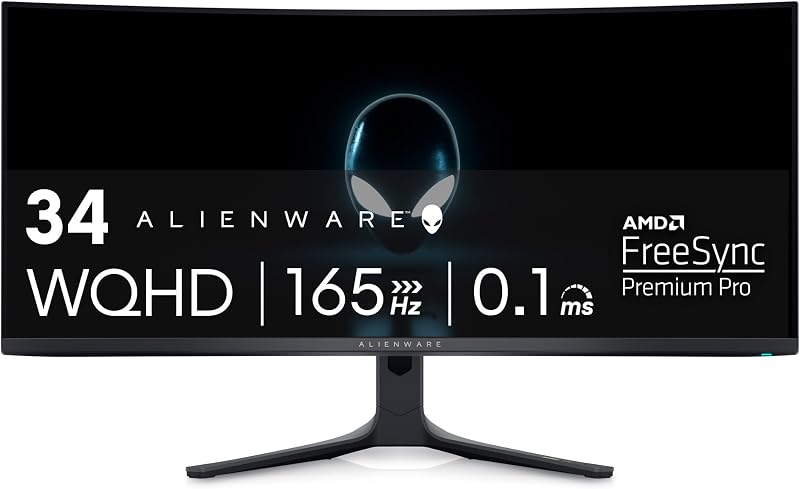
| Screen Size and Shape | 34 inches (1800R Curved) | 27 inches (Flat) |
| Aspect Ratio | 21:9 Ultrawide | 16:9 Standard |
| Native Resolution | 3440 x 1440 (WQHD) | 2560 x 1440 (QHD) |
| Panel Technology | Quantum Dot OLED (QD-OLED) | OLED |
| Maximum Refresh Rate | 165Hz (DisplayPort) / 100Hz (HDMI) | 240Hz (DisplayPort and HDMI) |
| Pixel Response Time | 0.1ms GtG | 0.03ms GtG |
| Color Gamut Coverage | 99.3% DCI-P3 | 98.5% DCI-P3 |
| Variable Refresh Rate | AMD FreeSync Premium Pro, VESA AdaptiveSync | NVIDIA G-SYNC Compatible, AMD FreeSync Premium Pro |
| HDR Certification | VESA DisplayHDR TrueBlack 400 (1000 nits peak) | VESA DisplayHDR True Black 400 (HDR10) |
| Warranty Coverage | 3-year premium warranty including OLED burn-in | Not listed |
| Best For | Immersive cinematic campaigns and simulation gaming | High-speed competitive esports and tactical first-person shooters |
Refresh Rate and Motion Clarity
Refresh rate and pixel response determine how crisp fast-moving targets appear when panning your camera rapidly in high-stakes matches. The faster a panel refreshes and switches pixel colors, the less motion blur, trailing, and ghosting you perceive. In dynamic gaming environments, elevated refresh rates translate directly to lower input latency and smoother motion tracking, allowing you to react fractions of a second faster to enemy movements.
When comparing the AW3423DWF vs 27GS95QE refresh rate, the difference is stark. The LG 27GS95QE delivers an exceptional 240Hz refresh rate across both its DisplayPort 1.4 and HDMI 2.1 inputs, backed by an ultra-low 0.03ms Gray-to-Gray response time. By contrast, the Alienware AW3423DWF operates at a native 165Hz over DisplayPort and is restricted to 100Hz over HDMI, coupled with a 0.1ms Gray-to-Gray response time. While a 0.1ms pixel transition is remarkably fast compared to legacy LCD monitors, evaluating the AW3423DWF vs 27GS95QE response time reveals that LG pushes pixel transitions more than three times faster on paper. If you frequently browse matchups like the alienware aw2725df vs lg 27gs95qe, you know that 240Hz and beyond remains the gold standard for dedicated competitive play.
In actual play, the extra 75Hz provided by the 27GS95QE grants competitive players a tangible edge in fast-paced arena shooters and battle royales. Fast mouse flicks feel noticeably tighter, tracking targets through smoke or rapid strafes remains tack-sharp, and tearing is kept at bay via both official NVIDIA G-SYNC Compatible validation and AMD FreeSync Premium Pro. The AW3423DWF provides buttery smooth animation at 165Hz with AMD FreeSync Premium Pro and VESA AdaptiveSync certification, but it cannot match the raw frame-pumping velocity of its rival. When evaluating the Alienware AW3423DWF or LG 27GS95QE for competitive fps enthusiasts, speed-focused players will immediately appreciate the fluidity of the 240Hz ceiling.
Edge: LG 27GS95QE delivers a significantly higher 240Hz refresh rate and a quicker 0.03ms response time that gives competitive players superior motion tracking and lower latency.
Display Size, Aspect Ratio, and Field of View
Screen real estate and form factor dictate how much virtual space occupies your vision, directly shaping your sense of immersion and tactical orientation. A wider aspect ratio pulls you deeper into game environments by filling your peripheral vision, whereas a standard aspect ratio keeps all HUD elements and action consolidated directly within your primary sightlines without requiring head movement.
Comparing the Alienware 34 ultrawide vs LG 27 oled showcases two radically different engineering philosophies. The Alienware AW3423DWF features a substantial 34-inch curved panel boasting a 21:9 ultrawide aspect ratio and an 1800R curvature. Its 3440 x 1440 WQHD resolution supplies roughly 34 percent more horizontal screen canvas than a standard 16:9 monitor. Meanwhile, the LG 27GS95QE provides a classic 27-inch flat panel with a standard 16:9 aspect ratio and 2560 x 1440 QHD resolution. The pixel pitch on both units sits at 0.23, meaning both present comparable pixel density, but the physical scale and shape create contrasting operational experiences.
For cinematic campaigns, open-world exploration, racing titles, and flight simulators, the ultrawide curve of the AW3423DWF wraps around your field of view to create an enthralling, theater-like atmosphere that a flat 27-inch monitor cannot replicate. It also offers abundant horizontal room for multitasking and side-by-side productivity windows. Conversely, the 27-inch 16:9 layout of the 27GS95QE is universally supported across every competitive title, esports tournament standard, and streaming setup without any letterboxing or black pillar bars. If you are choosing between the Alienware AW3423DWF or LG 27GS95QE for gaming that leans heavily toward cinematic narrative, the extra ultrawide breadth is impossible to ignore.
Edge: Alienware AW3423DWF provides a sweeping 34-inch 21:9 ultrawide canvas and gentle 1800R curve that envelops your field of view for unmatched immersion.
Panel Technology, Brightness, and Color Reproduction
Color rendition and luminance determine the visual punch of highlights, shadows, and environment textures. When looking at a QD-OLED vs OLED gaming monitor, the underlying panel architecture dictates how saturated primary colors remain at higher brightness thresholds, making panel choice essential for HDR fidelity.
The Alienware AW3423DWF uses Quantum Dot Display Technology (QD-OLED) paired with a 1,000,000:1 contrast ratio, 250 nits typical brightness, and a peak brightness rating of 1000 nits. The Quantum Dot layer enhances color vibrancy and color volume, allowing the display to reach an exceptional 99.3% DCI-P3 coverage alongside a factory-calibrated Delta E of less than 2 out of the box. Alienware also integrates a dedicated Creator Mode OSD setting that lets users seamlessly switch between native DCI-P3 and sRGB color profiles. Readers exploring our alienware aw3423dwf vs aw3423dw breakdown will recognize this precision tuning as a major hallmark of the QD-OLED platform.
The LG 27GS95QE relies on an advanced OLED panel featuring an impressive 1,500,000:1 contrast ratio, a typical brightness of 275 cd/m², and support for HDR10 with 98.5% DCI-P3 color gamut coverage. Both monitors carry VESA DisplayHDR True Black 400 certification, guaranteeing pixel-level black depths, zero backlight bleed, and halo-free highlights. Both models also use matte screen finishes with anti-glare, low-reflection treatments to combat harsh room reflections. However, the Quantum Dot layer on the AW3423DWF yields wider color coverage, factory-verified color accuracy, and specialized creator modes, giving it the upper hand for pure chromatic vibrancy.
Edge: Alienware AW3423DWF wins thanks to Quantum Dot technology delivering 99.3% DCI-P3 coverage, factory calibration with Delta E < 2, and dedicated Creator Mode profile toggling.
Connectivity and Hardware Compatibility
The physical ports on a monitor dictate which devices you can attach and what maximum bandwidth you can achieve. Modern gaming setups often bridge high-end graphics cards with current-generation game consoles, making high-bandwidth video inputs vital for unlocking peak refresh rates and HDR features simultaneously.
Connectivity is where the LG 27GS95QE takes a commanding technological lead. The LG display incorporates modern HDMI 2.1 ports alongside DisplayPort 1.4. Crucially, LG enables full 240Hz refresh rate support across both its HDMI 2.1 and DisplayPort connections. This makes the 27GS95QE exceptionally versatile, enabling high-frame-rate 120Hz 1440p gaming with variable refresh rates on modern home consoles, while simultaneously facilitating top-tier 240Hz throughput on gaming PCs over either interface.
In contrast, the input configuration on the Alienware AW3423DWF is more restrictive. While it achieves its native 165Hz refresh rate over DisplayPort 1.4, its HDMI inputs are limited to 100Hz at native resolution. This limitation means console gamers cannot achieve full 120Hz performance at native resolution through HDMI on the Alienware display, restricting its optimal high-refresh operational capability purely to DisplayPort PC connections. For gamers weighing versatile cross-platform setups, as detailed in our alienware aw3423dw vs lg 27gs95qe comparison, the LG monitor’s modern HDMI 2.1 bandwidth eliminates serious signal bottlenecks.
Edge: LG 27GS95QE wins with high-bandwidth HDMI 2.1 and DisplayPort 1.4 ports that both achieve up to 240Hz, offering superior compatibility for both PCs and modern consoles.
Ergonomics, Build Quality, and Burn-In Protection
Physical construction, thermal management, and long-term panel protection are paramount when investing in organic light-emitting diode technology. Because OLED pixels are organic, uneven degradation over time remains an inherent concern for static user interface elements, making manufacturer warranty terms and cooling engineering essential purchase criteria.
Alienware equips the AW3423DWF with its distinctive Legend 2.0 design language, which integrates customizable RGB AlienFX lighting, dedicated 360-degree ventilation channels for improved heat dissipation, and an intuitive centralized 5-axis OSD joystick. It features TUV-certified ComfortView Plus hardware low-blue light filtration to minimize eye fatigue during marathon sessions. Most importantly, Alienware includes a 3-year premium warranty that explicitly covers OLED burn-in, providing vital reassurance against permanent image retention. The monitor has a substantial desktop footprint, weighing 20.5 pounds and measuring 32.1 inches deep with its stand.
The LG 27GS95QE is engineered with a gamer-centric, virtually borderless, ultra-thin aesthetic that optimizes desk space, weighing a lighter 16.2 pounds with dimensions of 10.2 inches deep by 23.8 inches wide. It features an ergonomic stand with versatile tilt, height, and swivel adjustments to help you dial in exact viewing angles. However, the product listing does not specify explicit burn-in warranty terms for the LG unit. Those interested in larger format LG displays might also review the alienware aw3423dwf vs lg 32gs95ue, but within this matchup, Alienware’s dedicated 360-degree thermal engineering and explicit three-year burn-in guarantee deliver unmatched long-term ownership peace of mind.
Edge: Alienware AW3423DWF takes the advantage by including an explicit 3-year warranty covering OLED burn-in, backed by robust 360-degree thermal ventilation.
Pros and Cons
Alienware AW3423DWF
Pros
- Immersive 34-inch 21:9 ultrawide curved display
- Vibrant QD-OLED with 99.3% DCI-P3 coverage
- Includes 3-year warranty covering burn-in
- Factory calibrated with Delta E under 2
Cons
- Refresh rate capped at 165Hz
- HDMI input limited to 100Hz
- Heavier 20.5-pound desktop footprint
View Alienware AW3423DWF on Amazon
LG 27GS95QE

Pros
- Blistering 240Hz refresh rate for esports
- Ultra-low 0.03ms pixel response time
- Dual HDMI 2.1 supporting full 240Hz
- Versatile tilt, height, and swivel stand
Cons
- Standard 16:9 aspect lacks ultrawide immersion
- Burn-in warranty coverage not specified
- Slightly lower 98.5% DCI-P3 color gamut
Who Should Buy Each One
Choose the Alienware AW3423DWF If
- You want a wide 34-inch 21:9 curved display that wraps around your vision for immersive RPGs, simulators, and open-world campaigns.
- You require professional-grade color accuracy with 99.3% DCI-P3 coverage, factory Delta E < 2 calibration, and an onboard sRGB Creator Mode.
- You demand long-term purchase security backed by an explicit 3-year premium warranty that includes OLED burn-in coverage.
- You game exclusively or primarily on a PC connected via DisplayPort to maximize the 165Hz WQHD experience.
Choose the LG 27GS95QE If
- You play fast-paced competitive esports and tactical first-person shooters where a 240Hz refresh rate and 0.03ms response time grant a gameplay advantage.
- You prefer a tournament-standard 27-inch 16:9 flat screen that keeps every mini-map and HUD element within your direct field of view.
- You connect modern gaming consoles and PC hardware using high-bandwidth HDMI 2.1 to achieve refresh rates beyond 100Hz.
- You need a lighter, compact battlestation setup with full tilt, height, and swivel stand adjustments to maximize desktop space.
Final Verdict
For the vast majority of PC gamers seeking the definitive visual upgrade, the Alienware AW3423DWF is the superior overall display. Its expansive 34-inch 21:9 ultrawide canvas completely transforms cinematic gaming, drawing you into digital environments in a way standard screens cannot match. Backed by Quantum Dot technology, factory calibration, true black levels, and a comprehensive three-year warranty covering burn-in, the AW3423DWF delivers an unparalleled balance of visual spectacle, color fidelity, and long-term ownership security for PC enthusiasts. If you are curious how newer 27-inch models compare to this ultrawide, our alienware aw3423dwf vs aw2725df breakdown offers additional perspective on panel generations.
However, the LG 27GS95QE is the definitive victor if competitive multiplayer performance dictates your setup. In titles where instantaneous reaction times and maximum frame clarity decide matches, the LG’s blistering 240Hz refresh rate, 0.03ms pixel response time, and dual HDMI 2.1 inputs leave the Alienware behind. Gamers who prioritize tactical shooters, play on modern consoles, or simply demand the motion clarity of a high-refresh 16:9 esports format will find the 27GS95QE tailored specifically to their competitive priorities.
FAQ
Can the Alienware AW3423DWF run at 120Hz on modern game consoles?
The Alienware AW3423DWF is limited to a 100Hz refresh rate over its HDMI connections at native resolution according to its technical specifications. As a result, console gamers looking for full 120Hz support over HDMI will not be able to achieve it at native resolution, making the DisplayPort connection on a PC the intended method for unlocking high-refresh performance.
Does the LG 27GS95QE support 240Hz over HDMI?
Yes, the LG 27GS95QE includes HDMI 2.1 alongside DisplayPort 1.4. Both connections support the monitor’s maximum 240Hz refresh rate, allowing high-bandwidth PC graphics cards to achieve top-speed output over either cable standard.
What is the difference between QD-OLED on the Alienware and OLED on the LG?
The Alienware AW3423DWF uses Quantum Dot Display Technology (QD-OLED), which combines an organic emissive panel with quantum dots to achieve broader color volume, reaching 99.3% DCI-P3 coverage and higher peak luminance up to 1000 nits. The LG 27GS95QE utilizes an advanced OLED panel delivering infinite contrast, 98.5% DCI-P3 coverage, and a typical brightness of 275 cd/m².
Is the screen finish glossy or matte on these monitors?
Both monitors feature matte screen finishes according to their specifications. The LG 27GS95QE utilizes an anti-glare with low reflection display treatment, while the Alienware AW3423DWF also employs a matte coating to reduce light reflections in bright gaming spaces.
Does the LG 27GS95QE stand support height adjustment?
Yes, the LG 27GS95QE comes equipped with an ergonomic stand that provides full tilt, height, and swivel adjustments, allowing you to position the display to your personal ergonomic requirements.
Which monitor has better burn-in warranty protection?
The Alienware AW3423DWF explicitly includes a 3-year premium warranty that covers OLED burn-in directly from the manufacturer. The LG 27GS95QE product listing does not specify explicit burn-in coverage terms.