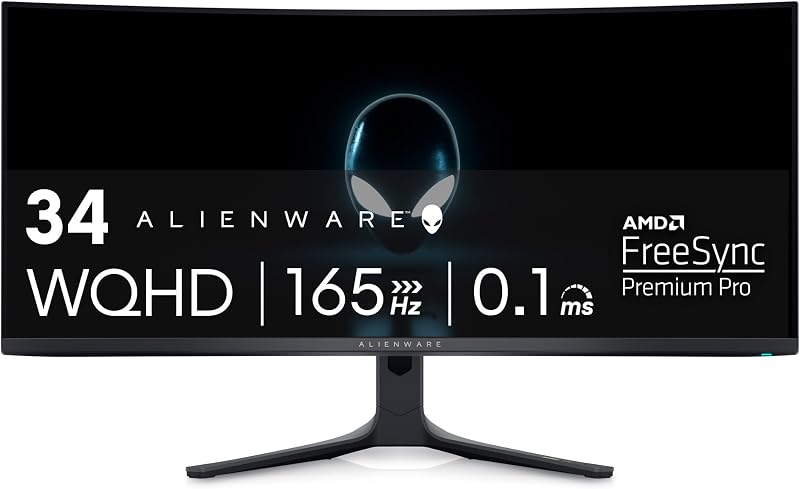
The core distinction that separates the Alienware AW3423DWF from the LG 32GS95UE comes down to screen geometry and motion speed strategy: Alienware delivers an ultra-wide 21:9 curved QD-OLED display running at 3440 x 1440 resolution and 165Hz, while LG provides a standard 16:9 flat 4K OLED display with a specialized Dual Mode feature capable of switching between 4K at 240Hz and 1080p at 480Hz.
Choose the Alienware AW3423DWF if you want an expansive, wraparound field of view designed to maximize visual immersion in open-world adventures, flight simulators, and sweeping story-driven titles. Choose the LG 32GS95UE if you want razor-sharp 4K text and visuals combined with the extreme frame rate versatility required for fast-paced competitive esports.

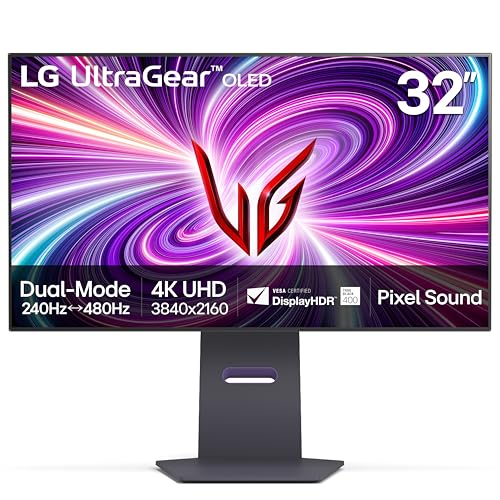
Alienware AW3423DWF vs LG 32GS95UE at a Glance
| Feature | Alienware AW3423DWF | LG 32GS95UE |
|---|---|---|
| Screen Size and Shape | 34 inches, 1800R curved | 32 inches (31.5-inch viewable), flat |
| Aspect Ratio | 21:9 ultrawide | 16:9 standard |
| Resolution | WQHD (3440 x 1440) | 4K UHD (3840 x 2160) |
| Panel Technology | Quantum Dot OLED (QD-OLED) | OLED |
| Refresh Rate | 165Hz (native DP), 100Hz (HDMI) | 240Hz (4K mode), 480Hz (Full HD mode) |
| Response Time (GtG) | 0.1ms | 0.03ms |
| Peak / Typical Brightness | 1000 nits peak, 250 typical | 275 cd typical |
| Contrast Ratio | 1,000,000:1 | 1,500,000:1 |
| Color Gamut | 99.3% DCI-P3 | 98.5% |
| Integrated Audio | None | Pixel Sound (CSO, woofer, DTS Virtual:X) |
| Manufacturer Warranty | 3-year warranty including OLED burn-in | 2-year limited warranty including OLED panel |
| Best For | Immersive single-player gaming and ultrawide media | Competitive esports and high-resolution versatility |
Resolution, Screen Shape, and Immersion
Display dimensions dictate how a monitor fits your desk and how your eyes process games. The Alienware AW3423DWF features a 34-inch panel shaped with an 1800R curvature and a 21:9 ultrawide aspect ratio. Its 3440 x 1440 resolution spreads pixels across an expansive horizontal plane with a 0.23mm pixel pitch. In use, this curvature gently wraps the edges of the display around your peripheral vision, drawing you into cockpits, racing tracks, and sprawling natural landscapes without demanding the sheer vertical head-turning required by giant screens. For anyone comparing modern ultrawide flagships, as explored in our alienware aw3423dwf vs aw3423dw breakdown, the physical wrap of the 1800R curve provides an unmistakable spatial advantage in simulation titles.
In contrast, the LG 32GS95UE adopts a traditional 16:9 aspect ratio across a flat 32-inch surface (measured as a 31.5-inch panel in its detailed listing). Where it pulls ahead dramatically is pixel density: driving 3840 x 2160 pixels into a 32-inch form factor yields a tight 0.18mm pixel pitch. Fine lines, small UI elements, and detailed textures render with crisp clarity that 1440p panels cannot match. Because the LG maintains the ubiquitous 16:9 standard, it eliminates the black letterboxing bars that appear on ultrawide monitors when watching standard television broadcasts or streaming 16:9 video content.
Choosing between these two form factors comes down to panoramic field of view versus pixel density. The AW3423DWF grants roughly 30 percent more horizontal peripheral vision, which makes game worlds feel noticeably wider and more cinematic. However, the 32GS95UE provides pure rendering detail, delivering smoother desktop text and cleaner edges in 4K native titles without distortion. Readers checking an alienware aw3423dw vs lg 32gs95ue comparison will find that this fundamental difference in shape determines day-to-day desk compatibility.
Edge: Alienware AW3423DWF for panoramic gaming immersion; LG 32GS95UE for text clarity and native 4K sharpness.
Refresh Rate, Speed, and Dual Mode Performance
Motion clarity separates good monitors from world-class gaming displays. The Alienware AW3423DWF refresh rate peaks at a native 165Hz when connected via DisplayPort, accompanied by a rapid 0.1ms Gray-to-Gray (GtG) response time. Because self-lit OLED pixels transition almost instantaneously, the 165Hz refresh rate produces exceptionally clean visuals devoid of the ghosting or trailing seen on conventional LCD panels. However, users should note that the AW3423DWF caps its refresh rate at 100Hz over HDMI connections, making DisplayPort mandatory for reaching its highest motion speeds.
The LG 32GS95UE completely reshapes this performance envelope using its VESA Certified Dual Mode system. In standard mode, it drives native 4K UHD graphics at an impressive 240Hz. For players who transition to high-speed shooters, the LG 32GS95UE dual mode 480Hz capability allows the panel to switch seamlessly to Full HD (1080p) at an astounding 480Hz. Coupled with a listed 0.03ms response time-more than three times faster than the Alienware on paper-the LG renders hyper-fast motion with virtually zero perceivable blur.
In competitive matches, frame rate and latency decide outcomes. While the Alienware provides more than enough fluidity for action role-playing games and casual online sessions, the LG offers unmatched tactical utility. You can play a cinematic role-playing game at 4K 240Hz in the afternoon and instantly drop to 1080p 480Hz for tournament-level first-person shooters in the evening. In the context of an AW3423DWF vs 32GS95UE evaluation, LG takes an undisputed technological leap in raw speed.
Edge: LG 32GS95UE, thanks to its 240Hz 4K baseline and class-leading 480Hz dual-mode capability.
Color Performance and Picture Quality
Both monitors harness self-emissive display technology to deliver absolute blacks, but they utilize different underlying panel architectures. The Alienware AW3423DWF uses Quantum Dot Display Technology (QD-OLED). By pairing blue OLED emitters with quantum dot color converters, the Alienware achieves 99.3% DCI-P3 color coverage and reaches 1000 nits peak brightness in HDR. It also includes an integrated Creator Mode that allows users to toggle between native DCI-P3 and sRGB color spaces with factory calibration delivering a Delta E under 2, ensuring professional-grade color accuracy out of the box.
The LG 32GS95UE uses a high-performance OLED panel with a certified 1,500,000:1 contrast ratio, which slightly edges out the 1,000,000:1 figure listed for the Alienware. It carries a 98.5% color gamut specification and a typical brightness rating of 275 cd. Like the Alienware, it is certified under VESA DisplayHDR True Black 400, ensuring that dark scenes produce zero backlight bleed, pitch-black shadow depth, and incredible micro-contrast during nighttime sequences.
When assessing an Alienware AW3423DWF review alongside an LG 32GS95UE review, the color differences highlight distinct panel strengths. The QD-OLED layer on the AW3423DWF produces slightly wider overall color saturation at 99.3% DCI-P3 and features dedicated creator profiles for color-critical work. Conversely, the LG counters with slightly higher listed typical brightness and an exceptional 1.5M:1 contrast ratio. Both provide reference-level contrast, but the Alienware delivers marginally broader chromatic range.
Edge: Alienware AW3423DWF, offering slightly wider 99.3% DCI-P3 coverage and dedicated Creator Mode calibration.
Gaming Versatility and Console Compatibility
Monitors must integrate smoothly across diverse gaming hardware, from custom desktop rigs to modern home consoles. In evaluating the Alienware AW3423DWF or LG 32GS95UE for gaming, port selection and variable refresh rate certifications play a critical role. The Alienware features AMD FreeSync Premium Pro and VESA AdaptiveSync Display certification. However, its HDMI input tops out at 100Hz and does not support HDMI 2.1 bandwidth, limiting its utility if you intend to hook up a console alongside your PC.
The LG 32GS95UE is equipped with modern HDMI 2.1 and DisplayPort 1.4 connectivity, supporting full 240Hz refresh rates across both connection types. It is officially validated as NVIDIA G-SYNC Compatible and also carries AMD FreeSync Premium Pro certification. Modern consoles operate natively at 16:9 4K resolutions up to 120Hz via HDMI 2.1, meaning the LG seamlessly ingests high-refresh console signals without scaling artifacts, stretching, or letterboxing.
This difference severely impacts multi-platform players. Connecting a console to the 21:9 Alienware results in black bars on either side of the screen, and the HDMI bandwidth limits output frame rates. The LG functions effortlessly as both an elite PC battlestation monitor and an uncompromised 4K console display. Those weighing an alienware aw2725df vs lg 32gs95ue setup will see that the LG 32GS95UE stands as the far more flexible display hub across different platforms.
Edge: LG 32GS95UE, courtesy of full HDMI 2.1 bandwidth, 4K console matching, and dual adaptive sync certifications.
Ergonomics, Audio, and Usability
Daily comfort depends on adjustability, desktop footprint, and peripheral integration. The Alienware AW3423DWF showcases Dell’s Legend 2.0 design, featuring customizable RGB AlienFX lighting, 360-degree ventilation for heat dissipation, integrated cable management, and a centralized 5-axis OSD joystick. It also incorporates TUV-certified ComfortView Plus, an always-on hardware low-blue-light filter designed to minimize eye strain without ruining color accuracy. Note that the Alienware does not include integrated speakers, meaning an external soundbar or gaming headset is mandatory.
The LG 32GS95UE introduces an innovative sound system called Pixel Sound. Instead of firing audio downward through the bottom bezel or backward against the wall, sound waves are emitted directly from behind the OLED panel toward the user, backed by a built-in woofer and DTS Virtual:X processing. For physical adjustment, the LG includes a versatile stand with tilt, height, and swivel mechanisms, while keeping a shallower physical depth of 10.9 inches compared to the Alienware’s 32.1-inch total unit depth listing.
Desk real estate and acoustic convenience give the LG a functional advantage in mixed office and gaming spaces. Having capable directional audio built directly into the screen frees up desk surface space otherwise occupied by desktop speakers. When balancing the Alienware AW3423DWF or LG 32GS95UE for productivity, the LG also benefits from a much higher pixel density that makes reading text and spreadsheets significantly sharper.
Edge: LG 32GS95UE, owing to its space-saving depth, versatile ergonomic stand, and innovative Pixel Sound integration.
Warranty Coverage and Burn-In Protection
Because organic light-emitting diodes wear over time, burn-in policies are an essential purchasing consideration for OLED monitors. The Alienware AW3423DWF comes with a robust 3-year premium warranty that explicitly includes coverage for OLED burn-in. Dell has designed this peace-of-mind coverage directly into their QD-OLED product line, allowing buyers to game and work with static desktop elements without constant anxiety about permanent image retention.
The LG 32GS95UE is backed by a 2-year UltraGear OLED warranty. According to its listing, this policy covers internal and functional parts, labor, and the OLED display panel itself. While a two-year warranty provides reasonable protection, it offers one year less coverage than the Alienware package and does not carry the same explicit burn-in naming convention in its primary listing copy.
When investing in flagship display hardware, that extra year of manufacturer backing matters. Buyers exploring similar comparisons, such as the alienware aw3423dwf vs aw2725df, frequently note that Alienware’s 3-year burn-in guarantee remains the gold standard in OLED customer care. For long-term peace of mind, Dell provides the safer safety net.
Edge: Alienware AW3423DWF, offering a longer 3-year warranty with explicit burn-in protection.
Pros and Cons
Alienware AW3423DWF
Pros
- Immersive 21:9 1800R curved display
- Vibrant QD-OLED with 99.3% DCI-P3
- Creator Mode with factory Delta E < 2
- 3-year warranty covering burn-in
Cons
- HDMI refresh rate capped at 100Hz
- Lower pixel density than 4K displays
- No integrated speakers
View Alienware AW3423DWF on Amazon
LG 32GS95UE

Pros
- Dual Mode 4K 240Hz or 1080p 480Hz
- Crisp 4K UHD with 0.18mm pixel pitch
- Blazing 0.03ms GtG response time
- Innovative Pixel Sound panel audio
- Full HDMI 2.1 and DisplayPort 1.4 support
Cons
- Lacks panoramic ultrawide immersion
- Shorter 2-year manufacturer warranty
Who Should Buy Each One
Choose the Alienware AW3423DWF If
- You primarily play immersive simulation games, open-world RPGs, and single-player titles that benefit from a panoramic 21:9 curved field of view.
- You do color-critical photo or video editing that requires a dedicated sRGB/DCI-P3 Creator Mode with Delta E under 2 accuracy.
- You want maximum long-term warranty security backed by a 3-year policy that explicitly covers OLED burn-in.
- You prioritize deep chromatic richness and broad color volume delivered via Quantum Dot OLED technology.
Choose the LG 32GS95UE If
- You compete in fast-paced first-person shooters where switching to 480Hz at 1080p provides a genuine tactical speed advantage.
- You need crisp 4K UHD resolution for razor-sharp productivity, clean desktop text, and native 16:9 media consumption.
- You regularly connect modern gaming consoles like the PS5 or Xbox Series X that demand native 4K support and HDMI 2.1 bandwidth.
- You want high-quality integrated desktop audio emitted directly through the screen via Pixel Sound without adding external speakers.
Final Verdict
For most competitive players, multi-platform gamers, and users who demand razor-sharp 4K text, the LG 32GS95UE represents the stronger overall package. Its revolutionary Dual Mode architecture gives you two monitors in one: a pristine 4K OLED display running at 240Hz for immersive visual masterpieces, and a blistering 480Hz Full HD competitive display for esports tournaments. Backed by full-bandwidth HDMI 2.1 ports and direct-from-screen Pixel Sound audio, the 32GS95UE easily adapts to virtually any gaming setup or console desk.
However, the Alienware AW3423DWF remains the superior choice for single-player gaming purists who prioritize cinematic immersion above all else. Its 1800R curved 21:9 ultrawide panel wraps captivating game worlds around your eyes in a way no 16:9 screen can match. Factor in 99.3% DCI-P3 color performance, a dedicated sRGB Creator Mode, and an exceptional 3-year burn-in warranty, and the AW3423DWF remains an unforgettable monitor for enthusiasts who want panoramic visual brilliance.
FAQ
Is the LG 32GS95UE worth it for competitive esports?
Yes. The LG 32GS95UE is uniquely suited for competitive esports because of its VESA Certified Dual Mode. At the touch of a button, it switches from 4K 240Hz down to 1080p at 480Hz with a nearly instantaneous 0.03ms response time, delivering top-tier motion clarity and responsiveness for fast-twitch competitive titles.
Is the Alienware AW3423DWF worth it for daily office work?
The Alienware AW3423DWF handles office work well thanks to its wide 21:9 aspect ratio, which allows you to view multiple windows side-by-side without needing dual monitors. However, its 0.23mm pixel pitch at 3440 x 1440 means text will not look quite as crisp as it does on a native 4K display like the LG 32GS95UE, though its 3-year burn-in warranty provides reassurance against static taskbars.
How does the LG 32GS95UE dual mode 480Hz work?
The LG 32GS95UE features hardware-level switching that lets you toggle between native 4K resolution at 240Hz and Full HD (1920 x 1080) resolution at 480Hz. This gives gamers the flexibility to play high-detail graphics at 4K or sacrifice resolution for raw frame rate and blur reduction in competitive shooters.
Can the Alienware AW3423DWF reach its maximum refresh rate over HDMI?
No. The Alienware AW3423DWF supports its native 165Hz refresh rate exclusively through its DisplayPort connection. Over HDMI, the monitor is limited to a 100Hz refresh rate at 3440 x 1440 resolution, so PC gamers should always use DisplayPort to achieve full speed.
Which monitor has better warranty protection against OLED burn-in?
The Alienware AW3423DWF offers superior warranty protection. Dell includes a 3-year premium warranty that explicitly covers OLED burn-in. The LG 32GS95UE offers a 2-year warranty covering the OLED panel and internal parts, which is one year shorter than Dell’s coverage.
Can the Alienware AW3423DWF display 16:9 console gaming properly?
Yes, but with trade-offs. Because modern consoles output in standard 16:9 aspect ratios, playing on the 21:9 Alienware will result in black pillarbox bars on the left and right sides of the image. Furthermore, because it lacks HDMI 2.1, it cannot run console games at 4K 120Hz, whereas the 16:9 4K LG 32GS95UE supports full console output natively.


