The choice between an ultrawide monitor and a dual monitor setup comes down to whether your workflow benefits more from an unbroken visual canvas or rigid physical boundaries between applications. A single ultrawide panel removes the distracting center bezel to create a continuous, panoramic workspace, whereas a dual monitor setup provides two distinct screens that make discrete window snapping and task segregation effortless.
Choose an ultrawide monitor if you need an expansive timeline for editing, immersive simulation gaming, or a seamless view across multiple documents without physical interruptions. Choose a dual monitor setup if you frequently manage dedicated secondary tasks like video calls or monitoring dashboards alongside your primary work, or need flexible multi-angle positioning.


Ultrawide Monitor vs Dual Monitor at a Glance
| Attribute | Ultrawide Monitor | Dual Monitor |
|---|---|---|
| Screen Configuration | Single continuous 21:9 curved panel | Two separate 16:9 flat panels |
| Display Resolution | WQHD 3440 x 1440 | Dual FHD 1920 x 1080 |
| Screen Size | 34 inches | Dual 15.6 inches |
| Refresh Rate | 165Hz to 200Hz | 60Hz |
| Panel Technology | Fast VA LED | IPS LCD |
| Response Time | 1ms MPRT | The listing does not specify |
| Primary Connectivity | DisplayPort, HDMI | USB Type-C, HDMI |
| Weight and Form Factor | 15.3 lbs (7.01 kg), desktop stationary | 3.5 lbs, foldable and portable |
| Ergonomic Adjustments | Tilt (-5° to 15°), 1500R curvature, VESA mount | 0° to 315° rotation, 180° stand, vertical stack |
| Best For | Panoramic workflows, timeline editing, immersive gaming | Window segregation, mobile setups, stacked multi-tasking |
Multitasking and Window Organization
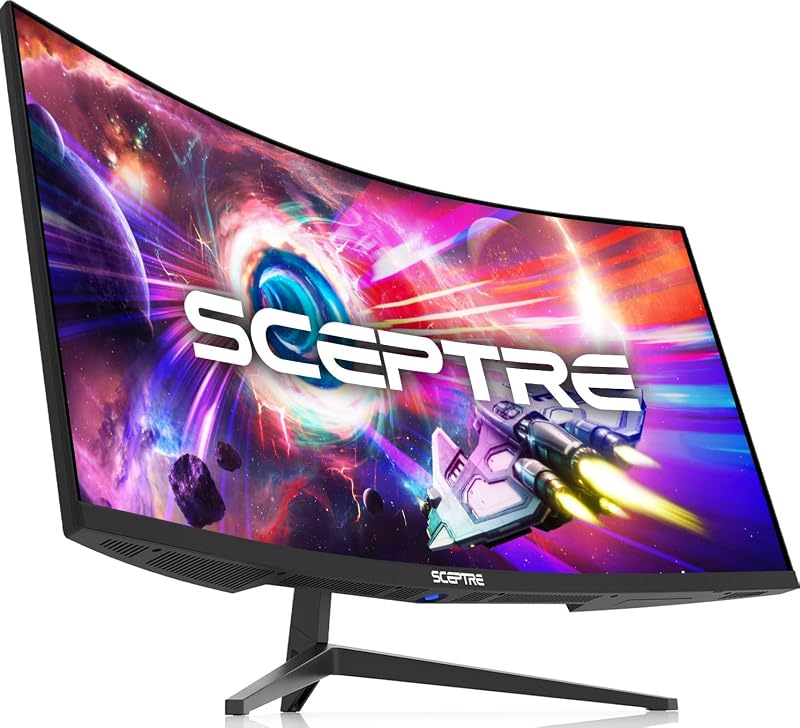
Evaluating an ultrawide or dual monitor for productivity reveals fundamentally different approaches to screen management. When working on a single wide panel like the Sceptre 34-Inch Curved Ultrawide WQHD Monitor, you gain 30% more horizontal screen space compared to a conventional display without a physical plastic divider running down the center. This seamless 3440 x 1440 resolution lets you keep three narrow documents open side-by-side or spread wide video editing timelines and massive spreadsheets across the entire field of view. However, maximizing an application fills the entire 34-inch canvas unless you rely on specialized operating system snapping tools or picture-by-picture (PBP) modes to partition the workspace manually.
In contrast, a dual monitor system inherently separates your tasks by hardware design. Using a dual-screen unit like the InnoView Portable Dual Monitor, each 15.6-inch panel operates as an independent 1920 x 1080 display. This allows you to press maximize on a web browser, code editor, or spreadsheet on one display while keeping reference materials, chat clients, or video conferencing applications pinned on the other without overlapping. For comparisons of premium single-panel configurations, reviewing the dell u3423we vs samsung viewfinity s9 shows how productivity users navigate desktop scaling, but the hard dividing line of dual screens remains unmatched for isolating distinct workflows.
The operational trade-off in the dual monitor vs ultrawide debate comes down to how your eyes move across information. A dual 16:9 configuration forces your eyes to jump across a central bezel or screen gap, which disrupts fluid horizontal scanning but provides clear psychological boundaries between tasks. When planning an ultrawide or dual monitor for work, users who juggle full-screen software alongside secondary communication apps will appreciate the hard stop of dual monitors, while those managing sprawling media tracks will benefit from the uninterrupted canvas.
Edge: Dual monitor provides natural, hardware-enforced window isolation that prevents accidental window overlapping during complex multi-app tasks.
Display Resolution and Visual Real Estate
A direct comparison of 21:9 ultrawide vs dual 16:9 setups highlights significant differences in total pixel density and usable work area. A 34-inch ultrawide monitor operates at a native Wide Quad HD resolution of 3440 x 1440, totaling nearly five million pixels on a single surface. The high pixel count delivers crisp text rendering and allows comfortable side-by-side placement of complex data tables without visual cramping, which is why an ultrawide monitor review often emphasizes clarity and fine detail.
Dual monitor setups in the compact dual-panel category, such as the Topmonitor Portable Dual Monitor, provide two individual 1920 x 1080 displays. Combined, two Full HD screens deliver approximately 4.14 million pixels split between two panels. While this offers ample vertical space when stacked or positioned next to a laptop, the lower native vertical resolution of 1080p means you see fewer spreadsheet rows and lines of text before needing to scroll compared to a 1440p vertical canvas. Detailed professional monitor assessments, including the dell u3423we vs benq pd2725u analysis, underscore how higher vertical pixel counts directly streamline workflow navigation.
Color presentation also sets these platforms apart. High-performance ultrawide displays like the SANSUI 34-Inch Curved Gaming Monitor offer expansive color gamuts reaching 131% sRGB and 96% DCI-P3 with deep 3000:1 contrast ratios on Fast VA panels. Dual portable IPS monitors provide respectable 72% to 100% NTSC coverage with typical contrast ratios between 800:1 and 1000:1. The ultrawide option delivers deeper blacks and richer color saturation across an expansive, uninterrupted surface.
Edge: Ultrawide monitor wins with its 1440p vertical resolution, five-million-pixel canvas, and superior color gamut coverage.
Gaming Immersion and Motion Performance
When deciding between an ultrawide or dual monitor for gaming, the experience is overwhelmingly dictated by refresh rates, response times, and bezel interference. The SANSUI 34-inch curved display pushes refresh rates up to 200Hz alongside an overdrive 1ms response time, while the Sceptre C345B-QUT168 provides up to 165Hz with a 1ms MPRT rating. Both feature AMD FreeSync or adaptive VRR support to eliminate screen tearing during high-framerate action. The expanded 21:9 aspect ratio widens the field of view in supported titles, placing peripheral elements naturally into your sightlines through the 1500R curvature.
Dual monitor setups face severe physical limitations for interactive gaming. Because dual monitors place a bezel right in the center of your primary line of sight, spanning a game across both panels splits reticles, crosshairs, and character models directly down the middle. As a result, users running dual monitors almost always game on only one of the two screens while leaving the other idle or reserved for secondary utilities like Discord. Dedicated gaming display reviews, such as the alienware aw3423dwf vs lg 32gs95ue breakdown, consistently emphasize the necessity of centered, uninterrupted sightlines.
Furthermore, dual 1080p foldable displays are built primarily for utility and office productivity, featuring modest 60Hz refresh rates. Fast-paced titles will show visible motion blur and ghosting on a 60Hz panel compared to the fluid motion delivered by a 165Hz or 200Hz gaming panel. If interactive media and gaming performance factor into your decision, dual screens cannot match the fluidity or field-of-view advantages of a curved ultrawide panel.
Edge: Ultrawide monitor dominates gaming with 165Hz to 200Hz refresh rates, 1ms response times, and no center bezel to disrupt gameplay.
Ergonomics, Curvature, and Workspace Footprint
The physical impact on your ultrawide vs dual monitor workspace depends heavily on your desk depth and mounting arrangements. A 34-inch ultrawide monitor measures roughly 31.8 inches wide and 17.96 inches high, weighing up to 15.3 pounds (7.01 kg). To maintain comfortable viewing angles across such a broad plane, panels like the Sceptre and SANSUI employ a 1500R curvature. This physical arc wraps the outer edges toward your eyes, matching your natural field of view and reducing the neck strain caused by constantly turning your head from side to side.
Dual monitor options like the InnoView and Topmonitor offer exceptional ergonomic agility through a stacked, foldable form factor. Weighing only 3.5 pounds and occupying an 8.5-inch footprint, these dual-screen setups can rotate from 0° to 315° using 180° adjustable stands. Instead of spreading horizontally across your desk, they can stack vertically, which saves considerable desktop width and lets you position reference material directly above your primary view without turning your neck left or right. The Topmonitor model also adds 10-point touch control, introducing direct gesture navigation that desktop ultrawides lack.
The contrast in form factor highlights different use cases. A 34-inch ultrawide requires a permanent desk setup, robust monitor arms, and substantial clearance to accommodate its fixed 8.6-inch stand depth. Dual portable displays fold down flat to under an inch in thickness, enabling true mobility between home, office, or client meetings. Deciding whether is a dual monitor worth it often hinges on whether your work demands this mobile flexibility or a fixed, heavy-duty workstation.
Edge: Dual monitor provides far superior space efficiency, vertical stacking capability, and flexible 315-degree articulation.
Connectivity, Cable Routing, and Power Draw
Managing inputs and power distribution is another core differentiator in this comparison. Ultrawide monitors are designed as high-bandwidth stationary hubs. The SANSUI provides a DisplayPort 1.4 connection alongside two HDMI 2.1 ports capable of driving 200Hz, while the Sceptre offers dual DisplayPort and dual HDMI connections with built-in stereo speakers. These monitors pull standard AC wall power, consuming around 42 watts under normal operation. However, because they rely primarily on traditional video cables, they rarely deliver single-cable laptop charging or video transmission without external docking hardware.
Dual portable monitors excel in modern digital integration through full-featured USB Type-C connections. Both the InnoView and Topmonitor allow single-cable or two-cable connections that handle video signal, data, and power simultaneously when connected to compatible laptops. You can review how modern standards handle these requirements in our thunderbolt vs usb-c connectivity guide. The InnoView operates with a 30-watt power draw, while the touchscreen Topmonitor is rated for 65 watts, allowing them to run directly from laptop ports or compact external power bricks.
The trade-off lies in simplicity versus peripheral support. An ultrawide monitor requires dedicated video cables and standard desktop power, but it easily accepts multiple stationary inputs from gaming consoles and desktop PCs simultaneously. A dual USB-C monitor keeps cable clutter minimal on mobile desks but may require driver installations on certain platforms, such as macOS systems running extended display modes across both screens.
Edge: Dual monitor wins for single-cable USB-C convenience and plug-and-play simplicity on modern laptops.
Pros and Cons
Ultrawide Monitor
Pros
- Unbroken 21:9 panoramic canvas
- High 165Hz to 200Hz refresh rates
- Crisp 3440 x 1440 WQHD resolution
- Curved 1500R immersive viewing
- Fast 1ms response time
Cons
- Heavy 15-pound stationary desktop footprint
- Lacks hardware-enforced window separation
View Sceptre 34-Inch Curved Ultrawide WQHD Monitor on Amazon
Dual Monitor

Pros
- Independent physical screen segregation
- Lightweight 3.5-pound foldable portability
- Flexible 315-degree vertical stacking
- Single-cable USB Type-C connectivity
- Available 10-point touchscreen control
Cons
- Limited to 60Hz refresh rate
- Center bezel obstructs panoramic viewing
- Lower 1080p native resolution
View InnoView Portable Dual Monitor 15.6″ 1920×1080 on Amazon
Who Should Buy Each One
Choose the Ultrawide Monitor If
- You edit video, audio, or large spreadsheets and need a wide, unbroken horizontal timeline without bezels.
- You play simulation, racing, or competitive games and demand high refresh rates between 165Hz and 200Hz with 1ms response times.
- You want high-definition 3440 x 1440 WQHD resolution with rich contrast and wide color gamut coverage on a dedicated desktop.
- You prefer a curved 1500R screen that matches your natural peripheral vision and eliminates the visual gap of dual frames.
Choose the Dual Monitor If
- You need rigid application separation to keep communication apps, notes, or dashboards pinned while working full-screen on another display.
- You travel frequently or switch workstations and require a lightweight 3.5-pound foldable setup that fits in a bag.
- You prefer vertical stacking to save desk width and minimize horizontal neck movement throughout the workday.
- You want direct touch control gestures and simplified single-cable USB Type-C connectivity for your laptop.
Final Verdict
For most desktop professionals and enthusiasts seeking a permanent desk upgrade, the curved ultrawide monitor is the superior investment. Models like the Sceptre C345B-QUT168 and SANSUI 34-inch display deliver a massive 3440 x 1440 resolution canvas, deep contrast, 1ms response times, and refresh rates up to 200Hz that make both productivity and gaming exceptionally smooth. Eliminating the center bezel transforms how you view wide timelines, multi-window documents, and entertainment media, making an ultrawide monitor review consistently favor unified viewing.
However, a dual monitor system remains the smarter choice if your daily routine requires absolute isolation between tasks or mobile flexibility. The InnoView and Topmonitor dual displays provide stacked vertical ergonomics, touch interaction, and lightweight portability that a 15-pound curved panel cannot match. If you frequently work on the go, manage constant video meetings alongside separate documents, or lack the desk depth for a 34-inch panel, a dual-screen configuration delivers the targeted multitasking structure you need.
FAQ
Is an ultrawide monitor worth it over two separate screens?
An ultrawide monitor is worth it if you prioritize an uninterrupted visual field, higher vertical resolution (1440p vs 1080p), and fast refresh rates for fluid motion. It removes the center bezel entirely, which significantly benefits video editors, data analysts, and gamers who need panoramic vision without physical barriers.
Is a dual monitor worth it for a mobile laptop setup?
A dual monitor setup is worth it for mobile professionals because foldable dual displays weigh around 3.5 pounds and connect via USB Type-C without bulky power supplies. They let you duplicate or extend your display space in coffee shops, client offices, or shared desks where large desktop monitors cannot fit.
Can you split an ultrawide monitor into two virtual screens?
Yes, you can split an ultrawide monitor using built-in monitor hardware features like Picture-in-Picture (PIP) and Picture-by-Picture (PBP), as found on the SANSUI 34-inch display. Additionally, operating system window-snapping tools allow you to dock windows side by side to mimic the functionality of two discrete screens.
Do dual monitors consume more power than a single ultrawide monitor?
Power consumption varies based on the specific hardware. The Sceptre 34-inch ultrawide monitor consumes approximately 42 watts, whereas portable dual 15.6-inch monitors range from 30 watts on the InnoView up to 65 watts on the Topmonitor model, making their energy usage broadly comparable depending on backlight brightness and touch features.
How does gaming differ between ultrawide and dual monitor setups?
Ultrawide displays are built for gaming immersion, offering 21:9 field-of-view support, refresh rates up to 200Hz, and 1ms response times. Dual monitors place a thick plastic bezel directly in the center of your view, which makes spanning a single game across both screens impractical and limits high-speed gameplay to 60Hz on standard dual panels.
Do dual portable monitors work with both Windows and Mac systems?
Dual monitors like the InnoView and Topmonitor support both Windows and Mac operating systems via USB-C or HDMI connections. However, Mac systems may require driver installation to support independent extended display mode across both panels, whereas Windows systems typically offer plug-and-play multi-screen extension natively.


