The decisive difference between the Gigabyte MO32U24 and the Asus ROG Swift PG32UQX comes down to display architecture: lightning-fast 240Hz QD-OLED motion clarity with true per-pixel blacks versus an ultra-bright Mini-LED backlighting array engineered for 1400-nit highlights. While both panels share a 32-inch 4K UHD 3840×2160 resolution, the MO32U24 targets esports responsiveness and perfect dark-room contrast, whereas the PG32UQX leverages 1,152 local dimming zones and dedicated NVIDIA G-SYNC Ultimate hardware for blinding HDR luminance.
Competitive multiplayer gamers, console players needing HDMI 2.1, and dark-room cinephiles should choose the Gigabyte MO32U24. Users working or gaming in bright, daylight-filled rooms who demand maximum specular highlight punch without any risk of permanent burn-in should choose the Asus ROG Swift PG32UQX.


Gigabyte MO32U24 vs Asus ROG Swift PG32UQX at a Glance
| Attribute | Gigabyte MO32U24 | Asus ROG Swift PG32UQX |
|---|---|---|
| Panel Technology | QD-OLED | Mini-LED IPS |
| Screen Size | 31.5 inches (32″ class) | 32 inches |
| Native Resolution | 3840 x 2160 (4K UHD) | 3840 x 2160 (4K UHD) |
| Refresh Rate | 240Hz | 144Hz |
| Response Time | 0.03ms GtG | Not listed |
| Peak Brightness | 300 cd/m² | 1400 nits (DisplayHDR 1400) |
| Contrast Ratio | 1,500,000:1 | Not listed (1,152 FALD zones) |
| Variable Refresh Rate Tech | AMD FreeSync Premium Pro, G-SYNC Compatible | NVIDIA G-SYNC ULTIMATE |
| Video Inputs | HDMI 2.1 (x2), DisplayPort, USB Type-C | DisplayPort 1.4 DSC, HDMI 2.0 (x3) |
| Hardware Features | ObsidianShield Film, Type-C KVM, Graphene heatsink | LiveDash OLED bar, Quantum Dot, 1152 FALD zones |
| Best For | Competitive esports, dark-room gaming, and modern consoles | Daylight environments, searing HDR highlights, and static desktop work |
Refresh Rate and Motion Clarity
Refresh rate determines how many frames a monitor can display each second, while pixel response time dictates how cleanly individual pixels transition from one color to another without leaving ghosting trails. When comparing the Gigabyte MO32U24 vs Asus PG32UQX refresh rate, the difference on paper immediately translates to dramatic changes in motion fluidity. The MO32U24 refreshes at an exceptional 240Hz, drawing a new frame every 4.16 milliseconds. By contrast, the PG32UQX maxes out at 144Hz, updating every 6.94 milliseconds. In fast-motion scenarios like tracking enemies in tactical shooters or scanning terrain in racing games, the 240Hz panel provides noticeably smoother motion tracking and lower peripheral smear.
The gap becomes even wider when inspecting the PG32UQX vs MO32U24 response time metrics. The Gigabyte MO32U24 achieves a rated 0.03ms gray-to-gray response time, as organic self-emissive diodes switch states virtually instantly. On the Asus ROG Swift PG32UQX, the manufacturer listing does not specify a millisecond response time rating. Because the Asus utilizes an IPS liquid-crystal panel backlit by Mini-LEDs, physical crystal reorientation inherently takes several milliseconds longer than self-illuminating diodes. Readers cross-referencing a Gigabyte MO32U24 review with an Asus ROG Swift PG32UQX review will observe that fast-moving high-contrast elements remain razor-sharp on the MO32U24, whereas the PG32UQX displays minor trailing during erratic camera pans.
Dynamic clarity across different display panel types follows similar competitive patterns seen in the alienware aw3423dw vs asus rog swift pg27aqdm comparison. For buyers deciding between the Gigabyte MO32U24 or Asus ROG Swift PG32UQX for gaming, the MO32U24 provides a clear speed advantage that elevates high-framerate competitive play to an entirely different tier.
Edge: Gigabyte MO32U24. Its 240Hz refresh rate and instantaneous 0.03ms response time produce vastly superior motion clarity with zero perceptible ghosting.
HDR Performance and Peak Brightness
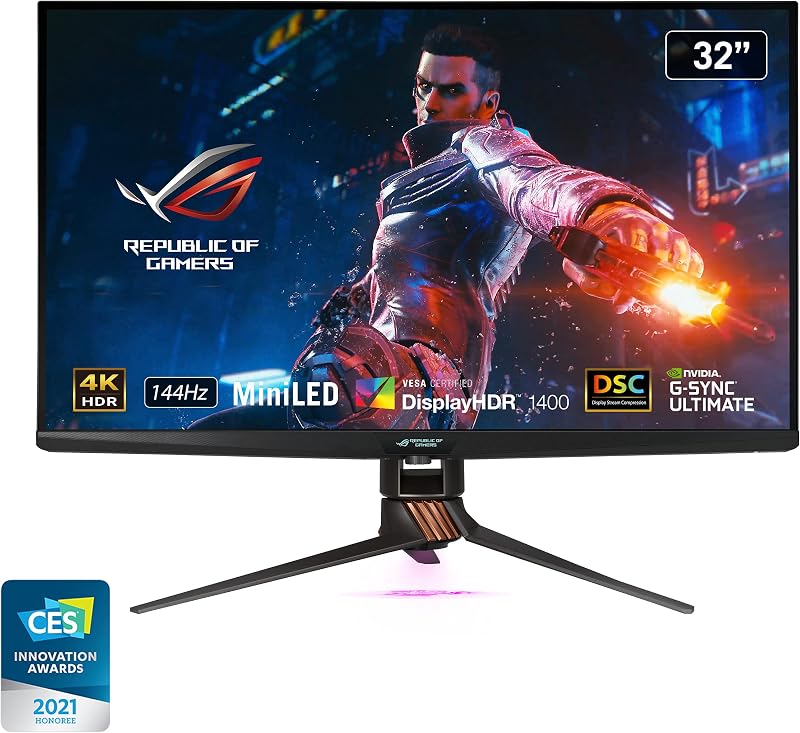
High Dynamic Range performance is defined by the contrast between the darkest shadows and the most luminous highlights. The Asus ROG Swift PG32UQX is built specifically to deliver industry-leading HDR brightness. Certified for VESA DisplayHDR 1400, it reaches a peak brightness of 1400 nits using a Full Array Local Dimming (FALD) backlight composed of 1,152 independent mini-LED zones. This design allows daylight scenes, laser fire, flames, and direct sunlight reflections to pierce through with raw physical intensity, preserving deep highlight separation even across large portions of the screen.
The Gigabyte MO32U24, by comparison, lists a brightness specification of 300 cd/m². QD-OLED panels rely on self-emissive subpixels, meaning they cannot sustain massive full-field brightness levels equivalent to dense Mini-LED backlights. However, the MO32U24 delivers per-pixel local dimming across all 8.29 million pixels. This means specular stars in a pitch-black galaxy render with zero haloing or blooming. Deciding between the Gigabyte MO32U24 or Asus ROG Swift PG32UQX for HDR depends heavily on your ambient lighting environment. The ROG Swift PG32UQX easily dominates well-lit rooms and large highlight sequences, while the MO32U24 delivers superior micro-contrast in low-light environments.
Ambient conditions dictate real-world HDR effectiveness, an equation explored thoroughly in our asus rog swift pg32uqx vs samsung odyssey neo g7 32 guide. For shoppers questioning is Asus ROG Swift PG32UQX worth it purely for dramatic brightness, its 1400-nit luminance remains virtually unmatched among 32-inch 4K gaming displays.
Edge: Asus ROG Swift PG32UQX. A massive 1400-nit peak brightness backed by 1,152 FALD zones delivers unmatched visual punch in bright rooms and wide HDR scenes.
Panel Technology, Contrast, and Black Depth
Underlying panel engineering dictates how accurately a monitor renders dark scenes and fine details. The Gigabyte MO32U24 employs a QD-OLED display panel boasting a 1,500,000:1 contrast ratio. Because each pixel generates its own light and color, individual pixels can shut off completely, producing true zero-nit black levels. Gigabyte outfits the panel with an ObsidianShield Film, which features a 3H hardness rating for 2.5x greater scratch resistance and boosts perceived black levels by up to 40% under strong ambient room lighting, preventing the magenta tinting that affected earlier QD-OLED generations.
The Asus ROG Swift PG32UQX uses an IPS liquid crystal panel backed by quantum-dot technology and 1,152 mini-LED dimming zones. Quantum dots allow it to cover 98% of the DCI-P3 color spectrum with true 10-bit color depth (and a listed color gamut metric of 150). However, distributing 1,152 dimming zones across 3840×2160 pixels means that each individual zone is responsible for lighting over 7,000 pixels. In high-contrast scenes-such as white subtitles or HUD reticles displayed against a midnight sky-light unavoidably bleeds past the object edges, creating noticeable blooming artifacts around bright elements.
Zonal backlighting limitations are common across FALD displays, as detailed in our lg 32gx870a vs asus rog swift pg32uqx assessment. The MO32U24 avoids zone blooming entirely, ensuring that every dark corner, shadow detail, and bright highlight exists in pristine isolation down to the subpixel.
Edge: Gigabyte MO32U24. Per-pixel illumination yields true infinite black levels and completely eliminates backlight blooming artifacts.
Connectivity, Bandwidth, and Hardware Features
Modern display connectivity affects which source devices you can attach and whether you can unlock their maximum refresh rates and color depths. Analyzing the Gigabyte MO32U24 vs Asus ROG Swift PG32UQX specs demonstrates a clear generational divide. The MO32U24 features two modern HDMI 2.1 ports, DisplayPort, and a multi-function USB Type-C port. HDMI 2.1 provides the raw bandwidth required to push native 4K at 120Hz or 240Hz from current-generation gaming consoles and modern graphics cards without chroma subsampling. It also includes an integrated Type-C KVM switch, enabling users to swap keyboard and mouse control across four onboard USB ports between a desktop and a laptop with a single button press.
The Asus ROG Swift PG32UQX is outfitted with DisplayPort 1.4 featuring Display Stream Compression (DSC), two USB 3.2 Gen 1 ports, a USB 2.0 port, and three HDMI ports. However, its HDMI ports are built on the older HDMI 2.0 standard. While DisplayPort easily supports 4K at 144Hz on PC, connecting a modern gaming console over HDMI restricts output to 4K at 60Hz. To balance this, the PG32UQX includes dedicated premium hardware: an integrated NVIDIA G-SYNC Ultimate hardware processor for low-latency variable refresh rate control, plus a LiveDash OLED display on the lower bezel that shows customizable graphics or real-time system diagnostics like CPU and GPU temperatures.
Port selection differences dictate practical versatility for multi-system users, mirroring issues examined in the dell s2725qs vs asus rog swift pg32uqx comparison. The MO32U24 offers vastly superior modern port bandwidth and seamless multi-device switching through its KVM suite.
Edge: Gigabyte MO32U24. Dual HDMI 2.1 ports enable full 4K high-refresh console gaming, while an integrated Type-C KVM simplifies multi-PC workflows.
Burn-In Prevention and Thermal Management
Panel longevity and thermal dissipation are critical considerations when running high-performance monitors for long hours. The Gigabyte MO32U24 relies on organic light-emitting materials, which inherently carry a theoretical risk of permanent image retention if static elements remain illuminated continuously. To counteract this, Gigabyte integrates an AI-based GIGABYTE OLED Care suite that manages pixel shifting, logo dimming, and background panel refreshes with minimal user disruption. Thermally, the MO32U24 uses a customized fanless heatsink paired with graphene thermal film and four-sided ventilation to dissipate heat passively without producing acoustic noise.
The Asus ROG Swift PG32UQX is built around inorganic IPS liquid crystals and solid-state Mini-LED diodes, making it completely immune to burn-in. Users can leave static desktop spreadsheets, productivity taskbars, and browser windows open for countless hours without worrying about uneven pixel wear. However, driving 1,152 mini-LEDs up to 1400 nits alongside a high-power NVIDIA G-SYNC Ultimate processor produces significant internal heat. Asus addresses this with an active internal cooling fan, which runs continuously during operation and introduces slight ambient fan noise into whisper-quiet rooms.
Balancing active cooling against solid-state panel durability involves distinct trade-offs, as noted in the gigabyte m27up sa vs asus rog swift pg32uqx breakdown. While Gigabyte’s silent graphene system and AI safeguards are state-of-the-art for OLED, the Asus provides absolute peace of mind for static productivity workloads.
Edge: Asus ROG Swift PG32UQX. Complete immunity to burn-in makes it far safer for daily productivity, despite its active internal cooling fan.
Pros and Cons
Gigabyte MO32U24

Pros
- Searing 1400-nit peak HDR brightness
- 1152-zone Mini-LED local dimming
- Dedicated NVIDIA G-SYNC Ultimate module
- LiveDash OLED hardware info display
- Completely immune to burn-in
Cons
- Older HDMI 2.0 bandwidth
- Capped at 144Hz refresh rate
- Response time not listed
View Gigabyte MO32U24 on Amazon
Who Should Buy Each One
Choose the Gigabyte MO32U24 If
- You play fast-paced multiplayer or esports titles that demand a 240Hz refresh rate and 0.03ms response time.
- You game primarily in dim or light-controlled environments where halo-free, infinite contrast creates total immersion.
- You connect modern consoles or a work laptop alongside your PC and need HDMI 2.1 bandwidth and Type-C KVM switching.
- You demand a completely silent, fanless monitor build with passive graphene heatsink cooling.
Choose the Asus ROG Swift PG32UQX If
- You play in sunlit rooms with large windows and need 1400-nit peak brightness to cut through strong ambient glare.
- You use your monitor for extended productivity work and require total immunity from OLED burn-in.
- You want a dedicated NVIDIA G-SYNC Ultimate hardware processor for rock-solid variable refresh rate handling.
- You value custom hardware touches like the integrated LiveDash OLED status bar for system temperature monitoring.
Final Verdict
For most gamers evaluating the Asus ROG Swift PG32UQX vs Gigabyte MO32U24, the Gigabyte MO32U24 is the superior modern gaming display. Its QD-OLED panel delivers an unbeatable 240Hz refresh rate, instantaneous 0.03ms pixel response times, and infinite contrast with zero backlight blooming. Backed by dual HDMI 2.1 ports for console compatibility, an integrated Type-C KVM switch, ObsidianShield surface treatment, and a silent graphene cooling architecture, it represents the gold standard for high-speed, immersive 4K gaming. When asking is Gigabyte MO32U24 worth it, the answer is an unambiguous yes for competitive and cinematic players alike.
The Asus ROG Swift PG32UQX remains an exceptional powerhouse for enthusiasts with specific environmental and workload requirements. If your desktop setup is flooded with natural sunlight, or if your daily schedule includes long hours of static productivity software, the PG32UQX holds a clear advantage. Its 1400-nit peak brightness punches through harsh ambient light, while its Mini-LED IPS panel frees you from any panel maintenance routines or burn-in anxieties.
FAQ
Does the Gigabyte MO32U24 have burn-in protection?
Yes, the Gigabyte MO32U24 features an AI-based GIGABYTE OLED Care protection system that runs non-intrusive maintenance algorithms in the background to minimize image retention risks. It also incorporates a graphene thermal film and custom heatsink to cool the panel passively without noisy fans.
Can the Asus ROG Swift PG32UQX output 4K at 120Hz on modern consoles?
No, the Asus ROG Swift PG32UQX features HDMI 2.0 ports rather than HDMI 2.1, which caps 4K console output at 60Hz. To experience its full 144Hz refresh rate at 4K resolution, you must connect a PC via DisplayPort 1.4 using Display Stream Compression.
What is the response time difference between these two monitors?
The Gigabyte MO32U24 specifies an ultra-fast 0.03ms gray-to-gray response time, enabling near-instantaneous pixel transitions. The Asus ROG Swift PG32UQX listing does not specify an official millisecond response time rating, though its IPS liquid crystal structure naturally exhibits longer transition times than self-emissive OLED diodes.
What does the LiveDash OLED display do on the Asus PG32UQX?
The LiveDash OLED screen is a secondary display embedded directly into the lower front bezel of the Asus ROG Swift PG32UQX. Users can configure it to display custom monochrome logos or live hardware diagnostics, including CPU temperatures and GPU clock speeds.
Does the Gigabyte MO32U24 include an integrated KVM switch?
Yes, the Gigabyte MO32U24 features a built-in Type-C KVM switch. This allows you to plug your keyboard and mouse directly into the monitor and switch control seamlessly between two connected host computers using a dedicated hardware button.
Which monitor is better suited for brightly lit rooms?
The Asus ROG Swift PG32UQX is substantially better suited for brightly lit rooms due to its 1400-nit peak brightness capability and DisplayHDR 1400 certification. The Gigabyte MO32U24 is rated at 300 cd/m², which delivers incredible contrast in dark or moderate lighting but cannot match the raw luminance of Mini-LED backlighting.