Choosing between the LG 32GX870A and the Asus ROG Swift PG32UQX comes down to whether you prioritize instant pixel response and extreme competitive frame rates or blazing full-screen HDR brightness and zero burn-in risk. The LG display relies on an organic light-emitting diode panel with a flexible dual-mode refresh capability, whereas the Asus flagship leverages an advanced Mini-LED full-array backlight system capable of sustaining intense luminance across demanding scenes.
Competitive first-person shooter players who need blistering motion clarity should choose the LG 32GX870A, while visual purists seeking dazzling highlight intensity in cinematic HDR titles should choose the Asus ROG Swift PG32UQX.


LG 32GX870A vs Asus ROG Swift PG32UQX at a Glance
| Feature | LG 32GX870A | Asus ROG Swift PG32UQX |
|---|---|---|
| Panel Technology | OLED with Micro Lens Array+ | Mini-LED IPS with Quantum Dot |
| Native Resolution | 4K UHD (3840 x 2160) | 4K UHD (3840 x 2160) |
| Refresh Rate | 4K at 240Hz / FHD at 480Hz | 4K at 144Hz |
| Pixel Response Time | 0.03ms (GtG) | Not listed |
| Peak Brightness | Up to 1300 nits | 1400 nits |
| Local Dimming & Contrast | Per-pixel dimming (1.5M:1 ratio) | 1152-zone Full Array Local Dimming |
| Variable Refresh Rate | G-SYNC Compatible, FreeSync Premium Pro | Hardware G-SYNC ULTIMATE |
| Video Inputs | DisplayPort 2.1, USB Type-C | DisplayPort 1.4 DSC, 3x HDMI 2.0 |
| Audio Features | Integrated speakers, DTS Headphone:X | Not listed |
| Best For | High-frame-rate esports and dark-room immersion | Maximum HDR luminance and bright-room gaming |
Refresh Rate and Competitive Motion Clarity
Refresh rate and pixel response time define how fluid fast-moving action appears during critical gaming moments. In fast-paced competitive games, tracking targets through rapid camera pans requires the display surface to transition between colors immediately. A monitor with slow pixel response times generates trailing artifacts, smearing fine details and degrading situational awareness. The LG 32GX870A refresh rate sets an extraordinary benchmark by incorporating a hardware-level Dual-Mode feature. Gamers can render graphically rich open-world titles in native 4K UHD at up to 240Hz, or toggle a dedicated hotkey to switch the panel into Full HD at an astonishing 480Hz. Coupled with a near-instantaneous 0.03ms gray-to-gray response time, the self-lit OLED pixels transition without trailing or ghosting, delivering peerless visual definition in rapid firefights.
The Asus ROG Swift PG32UQX approaches competitive play from a traditional high-refresh perspective, operating at a maximum refresh rate of 144Hz at native 4K UHD. While 144Hz provides smooth motion compared to standard desktop monitors, it operates at a fraction of the temporal update frequency offered by LG’s 480Hz mode. The listing does not specify the exact gray-to-gray pixel response time for the PG32UQX, but liquid crystal displays inherently exhibit slower state changes than self-emissive organic diodes. When evaluating the lg 32gs95ue vs asus rog swift pg27aqdm or other high-speed panels, the gap between high-refresh OLEDs and standard IPS panels becomes immediately visible during fast swipes. On the Asus, fine lines and crosshairs can show minor trailing against complex backgrounds.
Choosing between the LG 32GX870A or Asus ROG Swift PG32UQX for esports yields an unambiguous victor. While the 144Hz ceiling on the Asus display remains adequate for casual multiplayer gaming and expansive simulation experiences, high-tier competitive players benefit substantially from the 480Hz ceiling and 0.03ms response transitions on the UltraGear. The LG panel eliminates motion blur at a fundamental hardware level, providing an informational speed advantage in titles where split-second reaction times determine the outcome of an engagement.
Edge: LG 32GX870A provides more than triple the peak refresh speed in Full HD dual-mode alongside instantaneous 0.03ms pixel response times.
HDR Brightness, Local Dimming, and Contrast
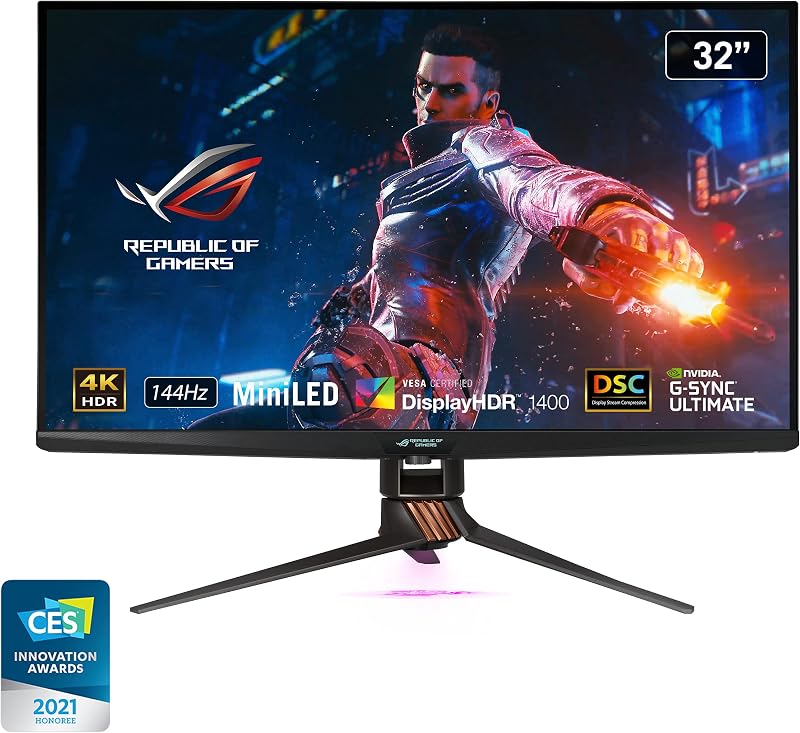
High Dynamic Range reproduction hinges on the interaction between luminance highlights, deep black levels, and backlight precision. When evaluating the LG 32GX870A OLED vs Asus PG32UQX Mini-LED, you are examining two diametrically opposed display philosophies. The Asus ROG Swift PG32UQX is built specifically to conquer sustained peak luminance challenges. It features a Full Array Local Dimming backlight equipped with 1152 independent Mini-LED zones combined with Quantum Dot technology. This complex optical array enables an official VESA DisplayHDR 1400 certification, allowing the Asus PG32UQX peak brightness to strike 1400 nits. Explosions, sunlight reflecting off armor, and dynamic specular highlights achieve an intense, tangible visual punch that persists even when a large portion of the screen is brilliantly illuminated.
The LG 32GX870A counters with self-emissive organic pixels backed by Micro Lens Array+ technology. Rather than using discrete backlighting zones, every single pixel on the UltraGear functions as its own light source, yielding an official contrast ratio of 1,500,000:1. The LG panel earns a VESA DisplayHDR True Black 400 certification, ensuring absolute black levels with zero backlight bleed or haloing around bright objects. While it reaches a peak brightness of up to 1300 nits on tiny window sizes, its typical full-screen brightness sits at 275 nits. In bright, daylight-flooded gaming spaces, the LG display will appear significantly dimmer across expansive snow fields or bright skyboxes than its Mini-LED rival, as seen when comparing similar panels in our asus rog swift pg32uqx vs samsung odyssey neo g7 32 breakdown.
When deciding on the LG 32GX870A or Asus ROG Swift PG32UQX for HDR gaming, your ambient environment and highlight preferences dictate the winner. The 1152 dimming zones on the Asus can exhibit subtle blooming artifacts when small white UI elements or subtitles sit against deep pitch-black space. However, for sheer visual impact, sustained radiance, and brilliant color volume spanning 98% of the DCI-P3 gamut, the Asus monitor delivers an unmatched sense of raw power that avoids the aggressive brightness limiting typical of large OLED panels.
Edge: Asus ROG Swift PG32UQX dominates in overall HDR impact thanks to 1400 nits of peak brightness and a dense 1152-zone Mini-LED backlight.
Connectivity and Modern Bandwidth Standards
Display connectivity dictates the resolution, refresh rate, and color bit depth your graphics card can push simultaneously without degrading visual fidelity. The LG 32GX870A incorporates modern input standards designed for current and future graphics architectures, featuring DisplayPort 2.1 and USB Type-C alongside standard display connections. DisplayPort 2.1 provides immense native transmission bandwidth, allowing modern graphics hardware to drive native 4K resolution at 240Hz without relying on aggressive signal compromises. Furthermore, the inclusion of USB Type-C connectivity adds versatile single-cable flexibility for modern computing devices, making it easier to integrate contemporary laptops alongside dedicated desktop rigs.
The Asus ROG Swift PG32UQX reflects an older connectivity paradigm, which is an important consideration when analyzing any thorough Asus ROG Swift PG32UQX review. The monitor provides DisplayPort 1.4 with Display Stream Compression, three HDMI 2.0 ports, two USB 3.1 ports, and a USB 2.0 interface. Because the HDMI ports are limited to version 2.0 rather than HDMI 2.1, the PG32UQX cannot accept 4K 120Hz signals from modern consoles like the PlayStation 5 or Xbox Series X over HDMI, capping those systems at 4K 60Hz. PC gamers must route their primary connection through the single DisplayPort 1.4 port, using DSC compression to reach 4K at 144Hz with full 10-bit color depth.
The connectivity difference between the two displays represents a generational shift. Similar limitations often appear when evaluating older flagships against newer screens, such as in our gigabyte mo32u24 vs asus rog swift pg32uqx analysis. Users looking to build a forward-looking gaming setup will appreciate the cutting-edge DisplayPort 2.1 pipeline and USB-C versatility of the LG UltraGear, whereas the Asus display requires users to work around older port limitations on external multimedia hardware.
Edge: LG 32GX870A wins with forward-compatible DisplayPort 2.1 and modern USB Type-C connectivity.
Adaptive-Sync and System Integration
Tear-free gameplay requires seamless coordination between the graphics rendering pipeline and the monitor refresh cycle. The Asus ROG Swift PG32UQX distinguishes itself by integrating a dedicated hardware NVIDIA G-SYNC ULTIMATE processor. This onboard module handles variable refresh rate calculations with ultra-low latency, variable overdrive tuning, and certified HDR variable refresh performance across its entire frequency spectrum up to 144Hz. For players who exclusively utilize high-end NVIDIA graphics cards, this dedicated processor guarantees flawless frame synchronization and responsive synchronization without software stutter.
The LG 32GX870A relies on software-validated adaptive synchronization, carrying official validation as NVIDIA G-SYNC Compatible alongside AMD FreeSync Premium Pro. While it lacks a physical proprietary FPGA G-SYNC module, this open-standard approach delivers exceptional versatility across both NVIDIA and AMD graphics hardware. The VRR implementation operates flawlessly across both the native 240Hz 4K configuration and the blazing 480Hz Full HD mode. Furthermore, this open standard allows the display to run without the active cooling fans that dedicated G-SYNC Ultimate hardware processors often require, ensuring completely silent operation during demanding gaming sessions.
Beyond raw synchronization, both manufacturers provide proprietary integration utilities. The Asus PG32UQX features a distinctive LiveDash OLED display embedded directly into the front bottom bezel. This secondary OLED strip displays real-time hardware metrics such as CPU temperatures, GPU clock speeds, and custom animations without requiring an on-screen overlay. On the software side, the LG display includes the UltraGear Switch app, enabling users to segment their 32-inch 4K canvas into up to six customized multitasking windows with hotkey assignments. In head-to-head evaluation like the gigabyte m27up sa vs asus rog swift pg32uqx comparison, having physical hardware readouts directly on the bezel gives the Asus a unique enthusiast aesthetic.
Edge: Asus ROG Swift PG32UQX takes the edge with a dedicated hardware NVIDIA G-SYNC ULTIMATE module and the physical LiveDash status display.
Audio, Ergonomics, and Panel Longevity
Physical construction, desktop ergonomics, and long-term panel maintenance strongly influence day-to-day satisfaction. The LG 32GX870A features a modern, ultra-thin borderless design mounted to a fully adjustable ergonomic stand that accommodates height, tilt, swivel, and 90-degree pivot adjustments. For audio, the UltraGear integrates robust internal stereo speakers tuned with deep bass, alongside a 4-pole headphone jack equipped with DTS Headphone:X spatial 3D audio processing. This audio implementation allows players to plug a gaming headset directly into the monitor to enjoy positional sound cues and clear microphone communication. Because organic displays require maintenance, LG includes dedicated OLED Care software tools like pixel cleaning, paired with a 2-year limited warranty that explicitly covers key components including the OLED panel itself.
The Asus ROG Swift PG32UQX is built with an aggressive, industrial aesthetic featuring a substantial desktop footprint. Weighing 24 pounds, the display chassis houses the dense Mini-LED backlighting array and robust internal heatsinks. The package includes premium additions such as a tripod mounting screw on top of the stand for streaming webcams, replaceable ROG logo LED light covers for desktop projection, a bundled color calibration report, and a complimentary 3-month Adobe Creative Cloud subscription. The listing does not specify built-in speakers or pivot adjustments for the Asus stand, meaning users must provide their own external desktop speakers or separate audio interfaces.
Longevity is an area where the two panel types diverge fundamentally. While any comprehensive LG 32GX870A review must highlight the potential risk of permanent organic image retention during prolonged static desktop productivity, the inorganic Mini-LED IPS panel on the Asus PG32UQX is entirely immune to burn-in. When comparing high-end displays like the asus rog swift pg32uqx vs lg 27up850, users who spend twelve hours a day working with static spreadsheets and persistent application taskbars will enjoy complete peace of mind on the Asus, whereas the LG requires proactive use of its built-in panel care features.
Edge: LG 32GX870A wins for daily usability with integrated DTS spatial audio, complete ergonomic pivot adjustments, and built-in panel care tools.
Pros and Cons
LG 32GX870A

Pros
- Dual-mode 4K 240Hz and Full HD 480Hz
- Near-instantaneous 0.03ms response time
- Micro Lens Array+ panel up to 1300 nits
- Modern DisplayPort 2.1 and USB-C connectivity
- Built-in DTS Headphone:X spatial audio
Cons
- Modest 275-nit typical full-screen brightness
- Risk of permanent organic panel burn-in
- Limited to a 2-year warranty period
Asus ROG Swift PG32UQX
Pros
- Blinding 1400-nit peak DisplayHDR 1400 luminance
- 1152-zone Mini-LED full array local dimming
- Hardware NVIDIA G-SYNC ULTIMATE module
- Built-in LiveDash OLED hardware status screen
- Immune to permanent organic burn-in
Cons
- Refresh rate capped at 144Hz
- HDMI ports limited to older 2.0 bandwidth
- Heavy 24-pound chassis
View Asus ROG Swift PG32UQX on Amazon
Who Should Buy Each One
Choose the LG 32GX870A If
- You play competitive first-person shooters and want to switch into 480Hz Full HD mode instantly via a hotkey
- You game primarily in dimly lit rooms where 1.5M:1 contrast and true per-pixel black levels matter most
- You own modern graphics hardware capable of taking advantage of native DisplayPort 2.1 transmission bandwidth
- You want integrated spatial headphone audio with DTS Headphone:X processing built directly into the display
Choose the Asus ROG Swift PG32UQX If
- You game in bright, sunlit rooms and require 1400 nits of sustained peak HDR luminance to overpower ambient light
- You use your monitor heavily for static productivity tasks and demand total immunity from panel burn-in
- You want a dedicated hardware NVIDIA G-SYNC ULTIMATE processor for certified variable refresh performance
- You value hardware monitoring via the integrated LiveDash OLED status screen on the front display bezel
Final Verdict
The choice between the LG 32GX870A vs Asus PG32UQX highlights two distinct zeniths of monitor engineering. For the vast majority of PC gamers, the LG 32GX870A stands as the superior overall recommendation. Its innovative Dual-Mode architecture bridges the gap between cinematic single-player campaigns at 4K 240Hz and blistering competitive esports matches at 1080p 480Hz. When combined with near-instantaneous 0.03ms pixel response times, infinite contrast ratios, modern DisplayPort 2.1 connectivity, and integrated DTS audio, the LG delivers a responsive, versatile gaming experience that standard LCD panels cannot replicate.
On the other hand, is Asus ROG Swift PG32UQX worth it for dedicated visual purists? Absolutely, provided your primary priority is high-impact HDR presentation without brightness limitations. The PG32UQX remains an unmatched master of sustained peak luminance, using its 1152 Mini-LED zones to pump out 1400 nits of specular highlights without fear of aggressive brightness limiters or organic burn-in. If you play graphically intense games in a brightly lit environment and prefer the bulletproof longevity of Quantum Dot IPS hardware, the Asus ROG Swift PG32UQX remains an extraordinary display.
FAQ
Does the LG 32GX870A support 480Hz at 4K resolution?
No, the 480Hz refresh rate on the LG 32GX870A operates exclusively at Full HD (1920 x 1080) resolution. When running in native 4K UHD (3840 x 2160) resolution, the display operates at a maximum refresh rate of 240Hz. Users can switch between these two modes quickly using a dedicated hotkey.
How many local dimming zones does the Asus ROG Swift PG32UQX have?
The Asus ROG Swift PG32UQX features a Full Array Local Dimming backlight equipped with 1152 independent Mini-LED zones. This extensive array allows the monitor to illuminate bright objects while independently darkening adjacent dark regions to achieve DisplayHDR 1400 certification.
Can the Asus ROG Swift PG32UQX run 4K at 120Hz on current gaming consoles?
No, the Asus PG32UQX features HDMI 2.0 ports rather than HDMI 2.1 ports. Because HDMI 2.0 lacks the bandwidth required for 4K at 120Hz, gaming consoles like the PlayStation 5 and Xbox Series X are limited to 4K at 60Hz when connected to this display.
What does the LiveDash OLED display do on the Asus PG32UQX?
The LiveDash OLED display is a small utility screen built into the front deco bar of the Asus PG32UQX monitor. It can be configured to display real-time PC system metrics, such as CPU temperatures and GPU information, or showcase customized static logos and animations.
Does the LG 32GX870A warranty include protection for the OLED panel?
Yes, the LG 32GX870A includes a 2-year limited manufacturer warranty that explicitly covers key components, including the OLED display panel. The monitor also features built-in OLED Care tools, such as pixel cleaning, to help maintain panel performance over time.
Which monitor is better for competitive esports shooters?
The LG 32GX870A is substantially better for competitive first-person shooters. It offers an ultra-fast 0.03ms pixel response time that eliminates motion blur, along with a 480Hz Full HD mode that provides more than three times the motion smoothness of the 144Hz ceiling on the Asus PG32UQX.


