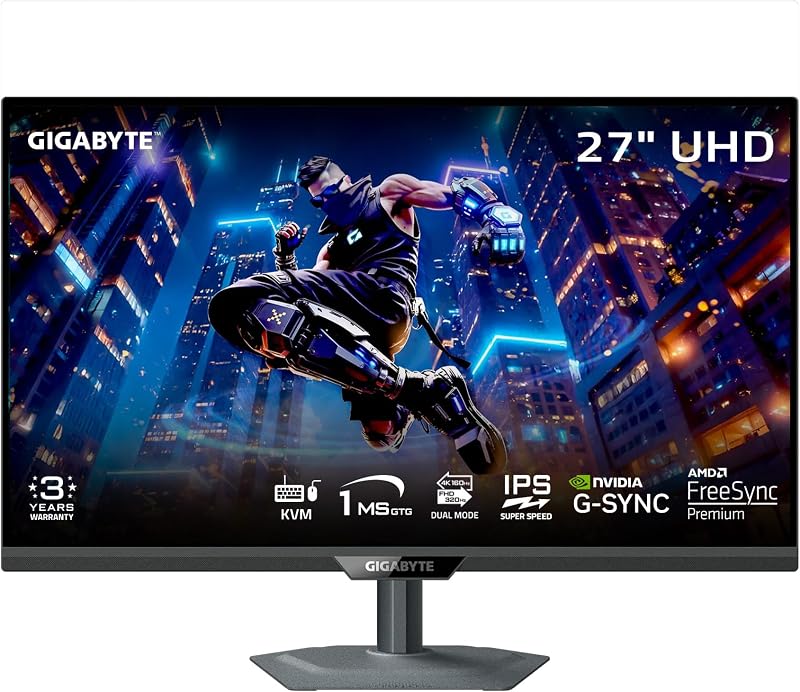
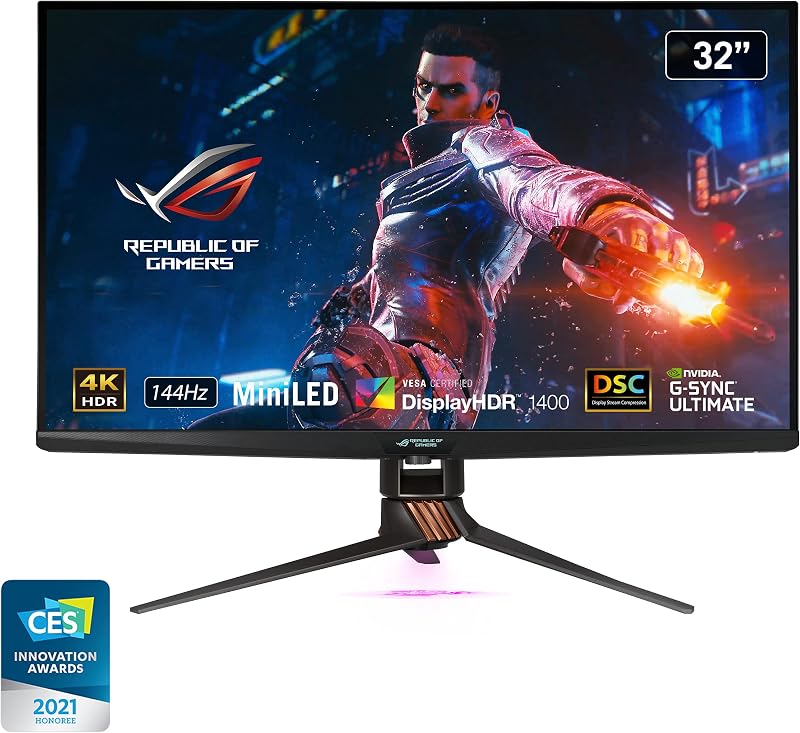
The central split between these two high-end 4K monitors comes down to whether you prioritize lightning-fast esports frame rates and workstation convenience or uncompromising, cinema-grade dynamic range. The Gigabyte M27UP SA leans into flexible performance with a 27-inch SuperSpeed IPS panel that allows players to toggle between ultra-sharp 4K at 160Hz and esports-ready Full HD at 320Hz, accompanied by an integrated Type-C KVM switch. In contrast, the Asus ROG Swift PG32UQX is an uncompromising visual powerhouse, deploying an expansive 32-inch quantum-dot IPS display backed by a full-array local dimming backlight with 1152 individual mini-LED zones and a scorching 1400-nit peak luminance.
Choose the Gigabyte M27UP SA if you play high-tempo competitive shooters alongside productivity tasks and need multi-device workstation switching. Choose the Asus ROG Swift PG32UQX if your priority is true reference-tier HDR visual fidelity and immersive large-format gaming.


Gigabyte M27UP SA vs Asus ROG Swift PG32UQX at a Glance
| Feature | Gigabyte M27UP SA | Asus ROG Swift PG32UQX |
|---|---|---|
| Screen Size and Aspect Ratio | 27 inches, 16:9 | 32 inches, 16:9 |
| Panel Technology | SuperSpeed IPS LCD | Quantum Dot Mini-LED IPS LCD |
| Native Resolution and Maximum Refresh | 3840 x 2160 at 160Hz | 3840 x 2160 at 144Hz |
| Alternative Refresh Modes | Dual Mode FHD (1920 x 1080) at 320Hz | Not listed |
| Backlight and Local Dimming | Standard LCD edge-lit, Not listed zones | 1152-zone Full Array Local Dimming (FALD) |
| Peak Brightness and HDR Tier | 350 cd/m², VESA DisplayHDR 400 | 1400 nits, VESA DisplayHDR 1400 |
| Color Depth and Gamut Coverage | 8-bit color depth, 125% sRGB | True 10-bit, 98% DCI-P3 (150 gamut) |
| Adaptive Sync Technology | AMD FreeSync Premium, G-SYNC Compatible | NVIDIA G-SYNC ULTIMATE |
| Special Hardware Features | Type-C KVM switch, Color Enhancement | LiveDash OLED display, 3-month Adobe CC |
| Physical Dimensions (D x W x H) | 2.3″ x 24.1″ x 14.6″ | 19.84″ x 28.62″ x 12.05″ |
| Best For | Fast-paced esports, multi-system desks | Cinematic HDR visuals, enthusiast gaming |
HDR Performance and Backlight Dimming
High Dynamic Range performance represents the single largest technical gulf between these two displays. The Asus PG32UQX represents an engineering benchmark for liquid crystal displays, using a Full Array Local Dimming backlight packed with 1152 independent mini-LED zones. Coupled with quantum-dot technology, this backlight pushes peak brightness to an astonishing 1400 nits, earning it VESA DisplayHDR 1400 certification. In high-contrast scenes, such as bright streetlamps against a midnight sky or fiery explosions in deep space, each individual zone modulates independently to keep blacks pitch dark while pushing small specular highlights to retina-searing intensities. Readers evaluating the asus rog swift pg32uqx vs samsung odyssey neo g7 32 often look for this exact FALD precision to avoid the washed-out gray bars typical of standard PC monitors.
The M27UP SA handles HDR through a much simpler baseline architecture. It carries VESA DisplayHDR 400 certification with a specified brightness of 350 candela per square meter and a standard static contrast ratio of 1000:1. The listing does not specify any local dimming zones, meaning it functions with a conventional global backlight. While DisplayHDR 400 allows the monitor to accept and decode an HDR signal, it cannot deliver meaningful intra-frame contrast. When a bright element appears on the screen, the entire backlight must ramp up its intensity, which lifts dark areas and turns deep shadows into a dark gray haze.
If true visual impact in high-fidelity titles like Alan Wake 2 or Cyberpunk 2077 is what you seek, the PG32UQX operates in another realm entirely. The M27UP provides basic signal compliance, but for shoppers debating whether the asus rog swift pg32uqx mini led hdr execution justifies a dedicated investment, the 1152 dimming zones deliver tangible, transformative picture quality that an edge-lit DisplayHDR 400 panel cannot duplicate.
Edge: Asus ROG Swift PG32UQX due to its 1152-zone mini-LED FALD backlight and extreme 1400-nit peak output.
Refresh Rate and Motion Clarity
Motion clarity and operational flexibility are where the M27UP claims its most distinct advantages. Gigabyte built this monitor around a 27-inch SuperSpeed IPS panel featuring innovative dual-mode functionality. In native operation, it outputs 3840 x 2160 resolution at a brisk 160Hz refresh rate with a 1ms gray-to-gray response time. However, when competitive needs take precedence, the user can toggle the monitor into Full HD mode, transforming the display into a blisteringly fast 1920 x 1080 panel running at 320Hz. In competitive first-person shooters where rapid target tracking and low frame latency matter above all else, jumping to 320Hz gives the M27UP an immense operational edge over fixed-rate displays.
The PG32UQX caps its native 4K refresh rate at 144Hz via DisplayPort 1.4 with Display Stream Compression. While 144Hz is smooth enough for most enthusiast single-player campaigns and casual multiplayer, the listing does not mention any dual-mode or lower-resolution high-frequency switching. In addition, the PG32UQX features a dedicated hardware NVIDIA G-SYNC Ultimate processor. This hardware module guarantees tear-free synchronization, wide VRR ranges, and variable overdrive right down to zero hertz, but its dense mini-LED processing pipeline introduces slightly more overhead than streamlined competitive panels. Gamers comparing the lg 32gx870a vs asus rog swift pg32uqx regularly encounter this exact tension between motion speed and visual density.
For high-stakes esports titles such as Valorant, Counter-Strike 2, or Apex Legends, the M27UP SA dual mode 320Hz functionality makes it an vastly more versatile gaming tool. Switching from high-resolution graphical grandeur to sheer esports velocity on the fly makes the M27UP a two-in-one monitor for multifaceted players.
Edge: Gigabyte M27UP SA thanks to its dual-mode 320Hz refresh speed and ultra-fast 1ms GtG response time.
Color Reproduction and Panel Technology
Visual fidelity extends beyond brightness into chromatic richness and gradation precision. The PG32UQX uses an advanced quantum-dot enhancement film layered over its IPS panel. This hardware configuration yields a wide color gamut covering 98% of the cinematic DCI-P3 color space, alongside an overall gamut rating of 150 listed on the spec sheet. Crucially, the PG32UQX supports true 10-bit color depth, unlocking a palette of over one billion distinct colors. Each unit ships with an individual factory color calibration report in the box, ensuring that color transitions remain smooth and free of banding. Those browsing comparisons like the asus rog swift pg32uqx vs lg 27up850 will recognize this quantum-dot layer as a hallmark of professional-grade color accuracy.
The M27UP features a standard SuperSpeed IPS architecture paired with an 8-bit color depth pipeline, delivering approximately 16.7 million colors. It specifies a wide color gamut of 125% sRGB and incorporates software-level Color Enhancement features. While 125% sRGB provides punchy, saturated hues that flatter games and everyday browsing, an 8-bit panel cannot match the nuanced gradations and broad color volume achievable by a true 10-bit quantum-dot screen displaying HDR master content.
In creative tasks involving video color grading, digital photography, or wide-gamut media production, the PG32UQX stands far ahead. The M27UP delivers vibrant colors suitable for gaming and office duties, but it lacks the specialized wide-spectrum coatings and calibration credentials of its 32-inch rival.
Edge: Asus ROG Swift PG32UQX due to its true 10-bit quantum-dot panel, 98% DCI-P3 coverage, and factory calibration.
Screen Size, Immersion, and Desktop Footprint
Display size drastically influences both in-game immersion and workspace ergonomics. The PG32UQX presents a sweeping 32-inch visual field, giving cinematic landscapes and cockpit views an expansive presence that pulls the viewer into the virtual environment. However, that immersion demands significant physical real estate. The Asus chassis measures a substantial 19.84 inches deep by 28.62 inches wide, weighing in at 24 pounds. Its large, angular stand extends deep into the desk surface, requiring a spacious desk or a heavy-duty monitor arm to keep the screen from crowding your keyboard and mousepad.
The M27UP opts for a traditional 27-inch form factor. Because it spreads the exact same 3840 x 2160 pixel grid across a smaller physical canvas, it produces a tighter pixel pitch of 0.16 mm. This yields exceptionally crisp text, sharp edges, and high visual density without requiring aggressive anti-aliasing. Physically, the M27UP is far more manageable, measuring just 2.3 inches deep and 24.1 inches wide with a weight of 20 pounds. Its compact footprint integrates effortlessly onto shallow computer desks where every inch of mouse travel counts. Readers studying comparisons such as the dell s2725qs vs asus rog swift pg32uqx frequently find that 27-inch setups provide easier sightline control for fast-paced gaming.
Choosing between these two depends on your physical setup. The 32-inch PG32UQX creates an unmatched cinematic showcase for sprawling open-world titles, but the 27-inch M27UP offers superior pixel density and a clean, space-saving physical profile that fits comfortably on any desk.
Edge: Tie. The Asus excels in sweeping cinematic immersion, while the Gigabyte provides superior pixel sharpness and desk ergonomics.
Connectivity, Productivity, and Hardware Extras
A monitor often serves as the central hub of an entire desk, making input configuration and hardware utilities vital differentiators. The M27UP shines as a hybrid productivity tool thanks to its integrated Type-C KVM switch. By plugging a laptop into the Type-C port and a desktop gaming rig into the standard inputs, users can toggle their keyboard, mouse, and display feed between two separate systems at the press of a single physical button. It also runs efficiently, drawing a modest 27 watts during typical operation. This makes the M27UP an outstanding option for work-from-home users who share one set of peripherals across professional and personal computers.
The PG32UQX takes an entirely different approach to hardware extras, prioritizing enthusiast customization and creator perks. Mounted along the lower bezel is a LiveDash OLED display, an integrated miniature screen capable of displaying custom animated logos or real-time hardware monitoring stats like CPU temperatures and GPU clock speeds. It also bundles a three-month subscription to the Adobe Creative Cloud suite, alongside enthusiast accessories such as a color calibration report, tripod screw mounts, replaceable ROG light covers, and an ROG storage pouch. However, its video connectivity shows limitations: while it features DisplayPort 1.4 with DSC, its three HDMI inputs are strictly HDMI 2.0, meaning modern game consoles cannot achieve 4K 120Hz uncompressed output over HDMI. The listing shows a USB hub comprising two USB 3.1 ports and USB 2.0 jacks, but lacks Type-C video input or KVM switching.
When evaluating the gigabyte mo32u24 vs asus rog swift pg32uqx landscape, workstation integration often tips the scales. While the Asus LiveDash display and creative extras are novel, the daily practical utility of Gigabyte’s Type-C KVM switch makes it vastly more functional for modern multi-device computing.
Edge: Gigabyte M27UP SA due to its built-in Type-C KVM switch and energy-efficient 27W operation.
Pros and Cons
Gigabyte M27UP SA
Pros
- Dual-mode 4K 160Hz or FHD 320Hz
- Fast 1ms GtG response time
- Built-in Type-C KVM switch
- Modest 27-watt power consumption
- Slim desktop depth profile
Cons
- Limited to DisplayHDR 400
- Standard 1000:1 contrast ratio
- 8-bit color depth limitation
View Gigabyte M27UP SA on Amazon
Asus ROG Swift PG32UQX
Pros
- 1152-zone Mini-LED local dimming
- Blistering 1400 nits peak brightness
- True 10-bit quantum dot panel
- Hardware NVIDIA G-SYNC Ultimate processor
- Integrated LiveDash OLED system readout
Cons
- Video inputs restricted to HDMI 2.0
- Bulky stand requiring deep desk clearance
- Refresh ceiling capped at 144Hz
View Asus ROG Swift PG32UQX on Amazon
Who Should Buy Each One
Choose the Gigabyte M27UP SA If
- You split your gaming time between high-resolution 4K exploration and fast-paced 320Hz competitive esports shooters.
- You manage both a work laptop and a gaming desktop using a shared keyboard and mouse via the integrated Type-C KVM switch.
- Your workstation has limited desk depth and requires a slim, lightweight 27-inch chassis with a 2.3-inch profile.
- You prefer sharp pixel density for productivity and text rendering, courtesy of the 0.16 mm pixel pitch.
Choose the Asus ROG Swift PG32UQX If
- You demand reference-tier HDR picture quality powered by a 1152-zone mini-LED local dimming backlight and 1400 nits of peak brightness.
- You want a sprawling 32-inch quantum-dot canvas with true 10-bit color depth covering 98% of the DCI-P3 color space.
- You own a high-end NVIDIA graphics card and want the hardware-synchronized performance of a dedicated G-SYNC Ultimate module.
- You appreciate unique enthusiast features such as the LiveDash OLED system readout and bundled Adobe Creative Cloud access.
Final Verdict
For the vast majority of PC gamers and hybrid professionals, the Gigabyte M27UP SA emerges as the more adaptable, practical, and versatile display. Its ability to switch between native 4K at 160Hz for visual exploration and 1080p at 320Hz for competitive multiplayer gives it a dual identity that no fixed-refresh screen can match. Factor in the integrated Type-C KVM switch, an efficient 27-watt power profile, and a desk-friendly 27-inch frame, and the M27UP delivers exceptional modern utility across gaming and professional workloads alike.
The Asus ROG Swift PG32UQX remains an unrivaled visual titan designed for users who refuse to compromise on visual spectacle. Its 1152 mini-LED local dimming zones, quantum-dot color layer, and DisplayHDR 1400 certification achieve contrast, depth, and highlight brilliance that standard edge-lit panels simply cannot touch. If your primary objective is cinematic immersion, reference-quality HDR fidelity, and expansive 32-inch screen real estate, the PG32UQX stands in a class of its own.
FAQ
How does the dual-mode feature work on the Gigabyte M27UP SA?
The dual-mode feature allows users to switch display operating parameters depending on their task. In native mode, the panel operates at 3840 x 2160 resolution with a 160Hz refresh rate for high graphical fidelity. When toggled into its high-speed esports profile, the screen operates at Full HD 1920 x 1080 resolution while elevating the refresh rate to 320Hz, delivering smoother motion clarity and lower frame latency for competitive shooters.
Does the Asus ROG Swift PG32UQX support 4K 120Hz on modern consoles?
The listing specifications for the PG32UQX confirm that its video connectivity consists of DisplayPort 1.4 with DSC and three HDMI 2.0 ports. Because it lacks HDMI 2.1 ports, current-generation home consoles cannot output uncompressed 4K at 120Hz over HDMI, limiting native 4K high-refresh gameplay primarily to PC connections via DisplayPort.
Can the Gigabyte M27UP SA produce true high-contrast HDR?
The M27UP SA features VESA DisplayHDR 400 certification, a brightness rating of 350 candela per square meter, and a 1000:1 contrast ratio without dedicated local dimming zones. While it can receive and display HDR metadata, it lacks the multi-zone hardware backlight necessary to render bright highlights alongside deep, uncompromised shadows simultaneously.
What does the LiveDash OLED display do on the Asus PG32UQX?
The LiveDash OLED display is a small utility screen built into the front bottom deco bar of the PG32UQX. It can be configured to show custom animated icons, personalized graphics, or real-time hardware telemetry from your computer, including CPU temperature, GPU information, and operational frequencies.
What are the power requirements of these two displays?
The Gigabyte M27UP SA is rated for a modest power consumption of 27 watts during standard operation. The Asus ROG Swift PG32UQX listing specifies a 240-volt power adapter, necessary to drive its high-intensity 1152-zone mini-LED backlight and hardware G-SYNC Ultimate processing engine, though specific operational wattage is not listed.
What hardware accessories come included with the Asus ROG Swift PG32UQX?
The Asus PG32UQX listing details a comprehensive accessory package, including ROG DisplayPort and HDMI cables, an ROG USB-A to B cable, a power cord and adapter, an individual factory color calibration report, a tripod thread screw, a wall mount screw, replaceable LED light covers, an ROG pouch, and a 3-month subscription offer for Adobe Creative Cloud.


