The single deciding factor between the Gigabyte M27UP SA and the LG 27UP850 comes down to motion refresh rate versus laptop docking convenience. Gigabyte builds its 27-inch 4K panel around speed with a dual-mode engine reaching up to 320Hz, while LG tailors its 4K display for single-cable workstation simplicity using high-wattage power delivery.
Gamers and esports players should choose the Gigabyte M27UP SA for its fluid frame rendering and dual-resolution adaptability. Creative professionals and remote workers should select the LG 27UP850 for its 96W USB-C charging capabilities and versatile ergonomic stand.


Gigabyte M27UP SA vs LG 27UP850 at a Glance
| Feature | Gigabyte M27UP SA | LG 27UP850 |
|---|---|---|
| Screen Size & Panel | 27 inches, SuperSpeed IPS | 27 inches, IPS |
| Native Resolution | 3840 x 2160 (4K UHD) | 3840 x 2160 (4K UHD) |
| Refresh Rate | 160Hz UHD / 320Hz FHD Dual Mode | 60Hz |
| Response Time | 1ms GtG | Not listed |
| Contrast Ratio | 1000:1 | 1200:1 |
| Brightness | 350 cd/m² | 400 cd/m² |
| Color Gamut | 125% sRGB | DCI-P3 95% |
| Variable Refresh Rate | AMD FreeSync Premium, G-SYNC Compatible | AMD FreeSync |
| USB-C & Connectivity | Type-C KVM switch | USB-C with 96W Power Delivery, 2 HDMI |
| Ergonomic Adjustments | Not listed | Height, Pivot, Tilt |
| Power Consumption | 27 watts | 96 watts |
| Best For | High-speed competitive gaming and KVM setups | Laptop docking, office productivity, and color work |
Refresh Rate and Motion Handling
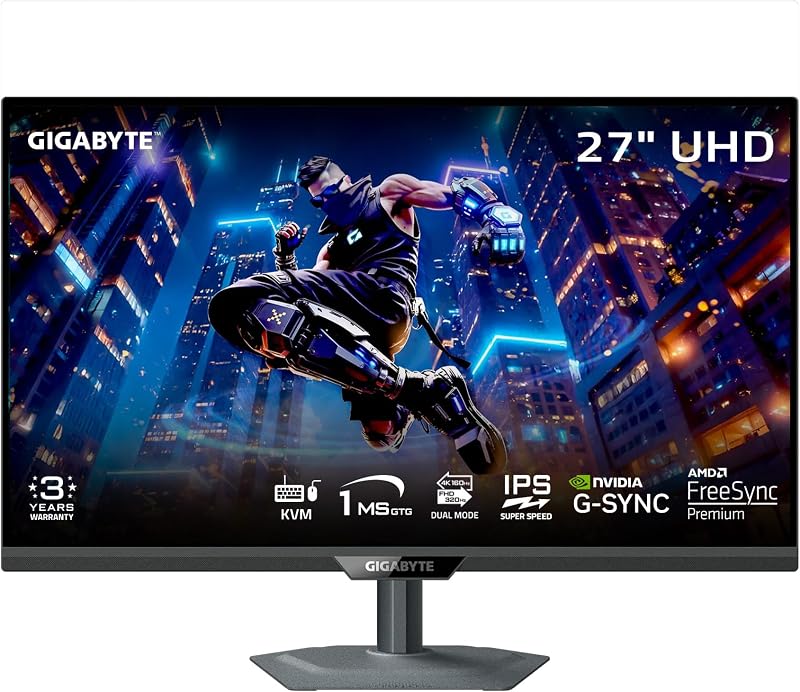
Refresh rate determines how many times per second the display redraws the image, dictating motion clarity and input responsiveness. In this head-to-head, the M27UP SA refresh rate vs 27UP850 comparison reveals a dramatic difference in design priorities. The Gigabyte M27UP SA is engineered around fluid movement, featuring a native 160Hz refresh rate at 4K resolution alongside an innovative dual-mode setting that drops the resolution to Full HD (1080p) to unlock a blisteringly fast 320Hz. Paired with a 1ms gray-to-gray (GtG) response time on its SuperSpeed IPS panel, this monitor ensures that fast-moving visuals, rapid camera pans, and critical esports action remain razor-sharp without severe ghosting or motion blur.
The LG 27UP850, by comparison, operates at a traditional 60Hz refresh rate across its 3840 x 2160 resolution panel. While 60Hz is entirely sufficient for spreadsheets, video editing, web browsing, and casual non-competitive play, it falls far short of what modern graphics cards can output during fast gaming sessions. When testing Gigabyte M27UP SA or LG 27UP850 for gaming, the difference in perceived fluidity is immediate. The 60Hz refresh rate on the LG limits visual updates to once every 16.6 milliseconds, whereas the Gigabyte updates every 6.25 milliseconds at 160Hz, and down to 3.125 milliseconds when running at 320Hz in FHD mode. This massive disparity gives players faster visual feedback and lower motion latency.
Furthermore, the variable refresh rate support on the Gigabyte M27UP SA includes both AMD FreeSync Premium and official G-SYNC Compatible certification. This dual-standard coverage eliminates screen tearing and stuttering across both AMD and NVIDIA GPUs. The LG 27UP850 listing confirms AMD FreeSync support, but it lacks the G-SYNC Compatible badge and the higher-tier FreeSync Premium performance standards found on the Gigabyte. Readers exploring alternative performance displays can also review our comparison of the lg 27gr93u vs gigabyte m27up sa to see how dedicated gaming monitors handle panel speed.
Edge: Gigabyte M27UP SA, thanks to its 160Hz 4K baseline, 320Hz dual-mode capability, 1ms response time, and broad adaptive sync support.
Connectivity, KVM, and Laptop Docking
Workstation connectivity dictates how effectively a monitor integrates with your computer hardware and desktop peripherals. The LG 27UP850 stands out prominently here because of its USB-C connection outfitted with 96W power delivery. This high wattage allows power-hungry laptops to charge directly through the monitor while carrying the display signal and USB data over a single cable. It eliminates the clutter of separate charging bricks, transforming the display into an organized docking solution for modern MacBook Pro models, Dell XPS units, and Windows ultrabooks.
The Gigabyte M27UP SA approaches productivity through peripheral sharing rather than high-wattage charging. It incorporates a Type-C KVM switch that allows users to connect two separate systems-such as a dedicated gaming desktop and a secondary work laptop-and control both using a single set of keyboard and mouse hardware with a push of a button. However, the listing does not specify a high-wattage USB-C power delivery figure for the Gigabyte, meaning high-power mobile workstations will still require their dedicated AC wall adapter during heavy operation.
Deciding between the two depends entirely on whether your daily workflow involves multi-system switching or single-cable laptop convenience. If your desk hosts both a gaming rig and a work laptop, the Type-C KVM switch on the M27UP SA provides immense practical value by removing external peripheral switchers. Conversely, if your entire computing setup revolves around a single laptop workstation, the LG 27UP850 USB-C power delivery design offers a tidier desktop without cable clutter. For larger workstation footprints with high-tier docking, consider checking the gigabyte mo32u24 vs m27up sa breakdown.
Edge: LG 27UP850, as its 96W power delivery provides superior single-cable charging for mobile workstations.
Color Gamut, Brightness, and Visual Clarity
Both monitors feature 27-inch 4K UHD screens with identical 3840 x 2160 native resolutions, delivering sharp text and dense imagery with a fine 0.16mm pixel pitch. However, their color tuning and optical specifications diverge significantly. The LG 27UP850 features a panel tuned to cover 95% of the wide DCI-P3 color gamut, a color space standard heavily favored in digital cinema, commercial video post-production, and professional photo workflows. It also achieves a typical brightness of 400 cd/m² and a higher static contrast ratio of 1200:1, providing deeper blacks and brighter highlights than conventional IPS panels.
The Gigabyte M27UP SA focuses instead on the wider consumer color spectrum, quoting a 125% sRGB color gamut coverage alongside 8-bit color depth. While 125% sRGB produces vibrant, saturated colors that make video games and media consumption look lively, it represents a different color standard than the cinema-oriented DCI-P3 space emphasized by LG. Furthermore, the Gigabyte display delivers 350 cd/m² of brightness and a standard 1000:1 contrast ratio, which sits slightly lower than the LG in black-level depth and overall luminance headroom.
Both models feature VESA DisplayHDR 400 certification and matte screen surfaces that suppress reflections in brightly lit rooms. While DisplayHDR 400 provides entry-level high-dynamic-range compliance, the extra brightness and 1200:1 contrast ratio of the LG 27UP850 give it an advantage in maintaining image depth. Users deciding between Gigabyte M27UP SA or LG 27UP850 for productivity in photo retouching or color-critical design will benefit more from the calibrated DCI-P3 space and superior contrast of the LG. Those curious about high-end HDR standards can read our analysis of the gigabyte m27up sa vs asus rog swift pg32uqx.
Edge: LG 27UP850, providing higher static contrast (1200:1), greater brightness (400 cd/m²), and a wider DCI-P3 color gamut.
Ergonomics, Stand Adjustments, and Desk Space
Physical flexibility and workspace footprints play a major role in day-to-day comfort, particularly during long computing sessions. The LG 27UP850 includes a fully adjustable ergonomic stand featuring height, pivot, and tilt capabilities. The ability to pivot the display into a vertical orientation is particularly advantageous for software engineers, data analysts reviewing long spreadsheets, and digital document editors. In addition, its 3-side virtually borderless bezel design allows for seamless side-by-side positioning in multi-monitor desk arrays.
The Gigabyte M27UP SA listing does not specify full stand adjustability metrics, nor does it list pivot or height travel figures in its official product specifications. Buyers prioritizing vertical rotation or fine ergonomic adjustments out of the box will find clear certainty with the LG stand. Furthermore, the physical specifications indicate that the LG weighs 13 pounds, whereas the Gigabyte M27UP SA lists an item weight of 20 pounds, making the Gigabyte a significantly heavier unit to move or mount.
Chassis dimensions also differ according to the manufacturer specifications. The Gigabyte M27UP SA measures 2.3 inches deep, 24.1 inches wide, and 14.6 inches high without factoring in stand extension limits, while the LG 27UP850 lists depth at 22.4 inches (including the extended base), width at 24.2 inches, and height at 11.5 inches. If physical flexibility and effortless vertical alignment are paramount for your home office, the LG provides confirmed mechanical adjustments right from the box. You can compare other ergonomic setups in our gigabyte m27up sa vs dell s2725qs breakdown.
Edge: LG 27UP850, due to its documented height, pivot, and tilt stand adjustments alongside a lighter chassis.
Power Consumption and Energy Efficiency
Energy draw impacts long-term operational efficiency and thermal output inside your workspace. The specifications highlight a massive difference in rated power consumption between these two 4K displays. The Gigabyte M27UP SA lists an exceptionally modest power draw of just 27 watts. For a 27-inch 4K high-refresh panel driving a SuperSpeed IPS array, a 27-watt consumption figure represents remarkable operational efficiency during extended gaming or daily desktop computing sessions.
The LG 27UP850 lists a power consumption rating of 96 watts. A major reason for this substantial power draw is the integrated 96W USB-C power delivery feature. When the monitor is actively charging a high-performance laptop while driving internal circuitry, audio, and backlight arrays at 400 cd/m², its electrical demand reaches higher levels. The unit is designed to operate on voltages up to 240 volts, reflecting its identity as an all-in-one charging station rather than a standalone display.
If your setup utilizes a separate desktop tower where internal monitor power delivery is unnecessary, the low 27-watt footprint of the Gigabyte keeps heat dissipation low and electricity usage minimal. However, if using the LG replaces a standalone 96W laptop charging brick, the total system power draw remains balanced. Looking strictly at the operational draw of the monitor itself, the Gigabyte holds an undeniable edge in baseline energy demand. Compare this efficiency against other performance displays like the gigabyte m27up sa vs samsung odyssey neo g7 32.
Edge: Gigabyte M27UP SA, demanding only 27 watts of power compared to the 96-watt specification of the LG.
Pros and Cons
Gigabyte M27UP SA
Pros
- Dual-mode 160Hz UHD and 320Hz FHD refresh
- Fast 1ms GtG SuperSpeed IPS panel
- Built-in Type-C KVM switch
- Both FreeSync Premium and G-SYNC compatible
- Low 27-watt power consumption
Cons
- Lower 1000:1 contrast ratio
- Moderate 350 cd/m² maximum brightness
- Heavier 20-pound unit weight
View Gigabyte M27UP SA on Amazon
LG 27UP850

Pros
- Robust 96W USB-C power delivery
- Wide 95% DCI-P3 color gamut
- Higher 1200:1 static contrast ratio
- Full height, pivot, and tilt adjustable stand
- Brighter 400 cd/m² display panel
Cons
- Limited to 60Hz refresh rate
- Response time not specified in listing
- Lacks dedicated KVM functionality
Who Should Buy Each One
Choose the Gigabyte M27UP SA If:
- You play fast-paced multiplayer titles, competitive shooters, or racing simulations requiring 160Hz 4K or 320Hz FHD frame rates.
- You manage both a gaming desktop and a secondary computer and want to switch keyboard and mouse controls seamlessly via an integrated Type-C KVM switch.
- You need broad variable refresh rate synchronization with confirmed support for both AMD FreeSync Premium and NVIDIA G-SYNC Compatible systems.
- You prioritize low energy consumption and minimal display power draw during lengthy daily sessions.
Choose the LG 27UP850 If:
- You work from a modern USB-C laptop and require a single-cable connection that delivers up to 96W of high-speed charging.
- You edit digital video, process photography, or execute graphic design tasks requiring accurate 95% DCI-P3 color gamut reproduction.
- You need a versatile stand that supports portrait orientation pivoting, height travel, and tilt adjustments right out of the box.
- You work in a brightly lit environment that benefits from 400 cd/m² peak brightness and a 1200:1 static contrast ratio.
Final Verdict
When reviewing the Gigabyte M27UP SA vs LG 27UP850 matchup, the better choice hinges entirely on your computing workflow. The Gigabyte M27UP SA is the superior display for gaming enthusiasts and hybrid desktop users. Its SuperSpeed IPS panel, native 160Hz 4K refresh rate, groundbreaking 320Hz FHD dual-mode operation, and built-in KVM switch provide motion clarity and device switching that the LG cannot match. If responsive gameplay and swift peripheral management define your daily computing, the Gigabyte model is clearly the winning investment.
However, the LG 27UP850 remains the undisputed champion for laptop-centric productivity, office workflows, and color-accurate creation. Its integrated 96W USB-C power delivery replaces bulky laptop docks, while its 95% DCI-P3 color gamut, 400 cd/m² brightness, 1200:1 contrast ratio, and fully articulate ergonomic stand make it an exceptional creative workstation tool. Choose the Gigabyte M27UP SA for uncompromising gaming performance, or select the LG 27UP850 if single-cable laptop convenience and creative color fidelity are your top priorities.
FAQ
Can the Gigabyte M27UP SA run at 320Hz in 4K resolution?
No. The Gigabyte M27UP SA dual-mode functionality allows you to switch between ultra-clear 4K UHD at 160Hz and ultra-fast 1080p Full HD at 320Hz. You cannot achieve 320Hz while maintaining the full 3840 x 2160 pixel resolution.
Is LG 27UP850 worth it for console or PC gaming?
The LG 27UP850 provides a crisp 4K visual presentation and includes AMD FreeSync, which makes it suitable for casual gaming and cinematic single-player titles. However, because it is capped at a 60Hz refresh rate and does not list a fast 1ms response time, it is not ideal for competitive multiplayer gaming where higher refresh rates like 120Hz or 160Hz are preferred.
Does the USB-C port on the LG 27UP850 charge modern laptops?
Yes. The LG 27UP850 features USB-C connectivity with 96W Power Delivery. This is ample power to rapidly charge most modern ultrabooks and larger mobile workstations like the 14-inch and 16-inch MacBook Pro or Windows productivity laptops over a single cable.
What does the Type-C KVM switch on the Gigabyte M27UP SA do?
The built-in Type-C KVM switch allows you to connect two different computer sources to the monitor and control both devices using only one keyboard and mouse. With the press of a physical button on the monitor, peripheral inputs switch seamlessly between your connected machines.
Which monitor offers better color accuracy for video editing?
The LG 27UP850 is better suited for professional video editing because its panel is specified to cover 95% of the DCI-P3 color gamut with a 1200:1 contrast ratio and 400 cd/m² brightness. The Gigabyte M27UP SA covers 125% of the sRGB gamut, which is great for standard gaming but narrower for cinema-standard workflows.
Can the stands on both monitors pivot into a vertical portrait mode?
The LG 27UP850 officially includes a 3-side borderless stand that supports height, tilt, and pivot adjustments for vertical viewing. The Gigabyte M27UP SA listing does not specify pivot or ergonomic adjustment features in its product specifications.