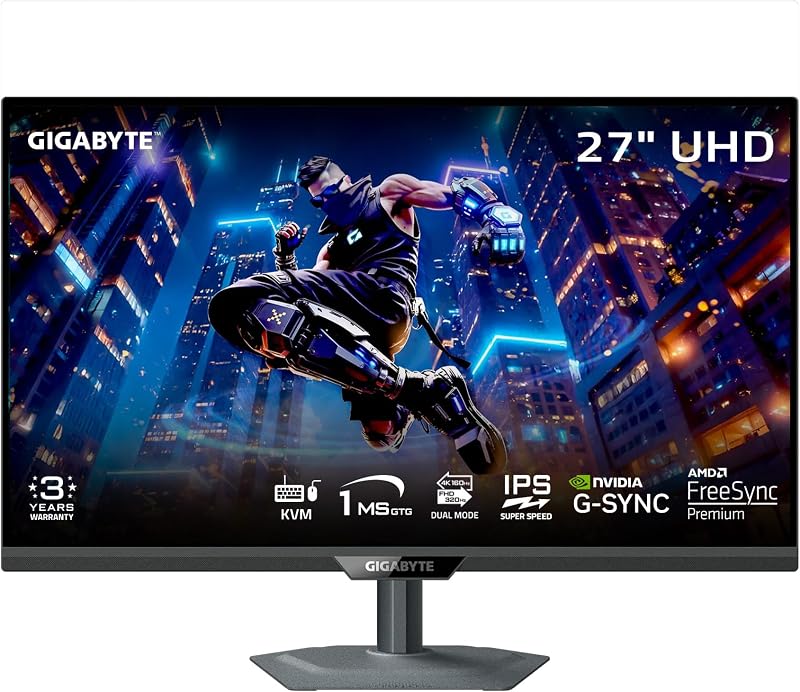
Choosing between the Gigabyte MO32U24 and the Gigabyte M27UP SA comes down to a fundamental trade-off between self-emissive visual contrast and flexible competitive speed. The MO32U24 delivers a 31.5-inch QD-OLED display built around an astonishing 1,500,000:1 contrast ratio, instantaneous 0.03ms pixel response, and native 4K gaming at 240Hz. By contrast, the M27UP SA features a 27-inch SuperSpeed IPS panel that specializes in dual-mode flexibility, enabling players to switch seamlessly between sharp native 4K at 160Hz and ultra-fast 1080p at 320Hz.
Gamers seeking unmatched black levels, vibrant colors, and cinematic immersion should choose the MO32U24, while competitive multiplayer enthusiasts who prioritize maximum refresh rates, static desktop resilience, and a compact viewing field should select the M27UP SA.


Gigabyte MO32U24 vs Gigabyte M27UP SA at a Glance
| Feature | Gigabyte MO32U24 | Gigabyte M27UP SA |
|---|---|---|
| Panel Technology | QD-OLED | SuperSpeed IPS (LCD) |
| Screen Size | 32 inches (31.5-inch viewable) | 27 inches |
| Native Resolution | 3840 x 2160 (4K UHD) | 3840 x 2160 (4K UHD) |
| Refresh Rate | 240Hz | Dual Mode: 4K 160Hz / FHD 320Hz |
| Response Time | 0.03ms GtG | 1ms GtG |
| Contrast Ratio | 1,500,000:1 | 1000:1 |
| Brightness | 300 cd/m² | 350 cd/m² |
| Screen Finish | Anti-Reflection (ObsidianShield Film) | Matte |
| Variable Refresh Tech | AMD FreeSync Premium Pro, G-SYNC Compatible | AMD FreeSync Premium, G-SYNC Compatible |
| Stand Adjustability | Height, Tilt, Swivel, Pivot | Not listed |
| Best For | Cinematic visuals and HDR gaming | High-framerate esports and dual-resolution versatility |
Panel Technology and Contrast Performance
The panel architecture represents the single most significant divergence between these two monitors. The MO32U24 relies on quantum dot organic light-emitting diode (QD-OLED) engineering, where each of the 8.3 million pixels produces its own illumination independently. This enables true zero-nit black levels alongside highlights, achieving an advertised contrast ratio of 1,500,000:1. When playing dark titles or watching high-dynamic-range content, dark scenes exhibit zero backlight bleed or IPS glow, creating depth and dimensional realism that standard backlit monitors cannot replicate. Readers researching premium OLED alternatives often look at the gigabyte mo32u24 vs samsung odyssey neo g7 32 to weigh mini-LED local dimming against this true per-pixel illumination.
On the other side of this comparison, the M27UP SA uses a SuperSpeed IPS liquid crystal display paired with a traditional backlight. This architecture produces a standard 1000:1 static contrast ratio. While modern IPS panels provide dependable viewing angles up to 178 degrees and accurate color reproduction, dark scenes inevitably reveal gray-tinted blacks and faint perimeter glow when viewed in dim environments. The M27UP SA covers 125% of the sRGB color space with 8-bit color depth and carries VESA DisplayHDR 400 certification. This ensures bright, vivid colors in everyday titles, but it lacks the dynamic punch and localized contrast control that makes HDR content truly pop on an OLED panel.
To preserve long-term panel health, Gigabyte built AI-based OLED Care into the MO32U24 to guard against permanent burn-in, backed by a customized heatsink, four-sided ventilation, and a graphene thermal film in a fanless chassis. The M27UP SA requires no such maintenance routines. Because inorganic IPS crystals do not degrade from displaying static user interface elements, the M27UP SA can sit on desktop spreadsheets or web browsers for ten hours a day without any risk of permanent image retention.
Edge: Gigabyte MO32U24 because its self-emissive QD-OLED panel delivers an extraordinary 1,500,000:1 contrast ratio that thoroughly outperforms standard IPS backlighting.
Refresh Rate and Motion Clarity
Motion presentation separates these displays just as sharply as panel technology. The MO32U24 operates at a fixed native 4K resolution at 240Hz, supported by an ultra-fast 0.03ms gray-to-gray response time. Because OLED pixels switch states almost instantaneously, fast camera pans in action games remain remarkably crisp without the trailing, smearing, or ghosting seen on traditional LCD panels. When evaluating the gigabyte mo32u24 refresh rate for competitive play, running 240 frames per second at full 3840×2160 requires an exceptionally powerful graphics card, but it rewards the user with uncompromising clarity across the entire panel.
The M27UP SA takes a radically different tactical route through its hardware dual-mode feature. In native 4K mode, it runs at a capable 160Hz with a 1ms response time, delivering sharp detail for story-driven single-player campaigns. However, with the flip of a setting, the gigabyte m27up sa dual mode 320hz configuration drops the internal rendering to 1080p (Full HD) while doubling the refresh limit to 320Hz. For players comparing competitive options like the lg 32gx870a vs gigabyte m27up sa, having 320Hz on tap provides an ultra-responsive input pipeline where every millisecond of latency reduction counts in fast-paced matchmaking.
When deciding between the gigabyte mo32u24 or m27up sa for esports, buyers must weigh raw frame frequency against pixel transition speeds. While the M27UP SA pushes 80 additional frames per second in 1080p mode, its 1ms IPS response time still leaves minor motion blur compared to the near-instantaneous 0.03ms transitions of the MO32U24. The MO32U24 also features AMD FreeSync Premium Pro alongside NVIDIA G-SYNC Compatibility, whereas the M27UP SA features standard AMD FreeSync Premium with G-SYNC compatibility.
Edge: Gigabyte MO32U24 because its 0.03ms pixel response time delivers clearer motion at 240Hz in native 4K than an IPS panel can produce even at higher refresh rates.
Screen Size and Desktop Ergonomics
Screen size dictates not only physical desk space requirements but also visual field-of-view during tense gameplay. The MO32U24 features a 31.5-inch viewing diagonal housed within dimensions of 28.3 inches wide, 24 inches high, and 9.45 inches deep, with a weight of 23.4 pounds. This expansive surface fills peripheral vision, creating an absorbing window into open-world environments, simulation rigs, and expansive video timelines. Buyers analyzing the gigabyte mo32u24 vs dell s2725qs will note that 32-inch 4K panels offer a comfortable native pixel density that avoids aggressive desktop scaling.
Conversely, the M27UP SA measures 27 inches diagonally, with dimensions listed at 24.1 inches wide, 14.6 inches high, and 2.3 inches deep, weighing 20 pounds. Its 0.16mm pixel pitch at 4K yields a tight pixel density that renders vector fonts, fine lines, and small details with exceptional sharpness. In competitive titles like tactical first-person shooters, the 27-inch format allows players to scan the entire screen, including minimaps and health indicators, without shifting their neck or darting their eyes excessively. This compact footprint also fits much more comfortably on narrow computer desks.
Ergonomic adjustability provides another practical differentiator according to the official mo32u24 vs m27up sa specs. The MO32U24 includes a fully articulated stand with height, tilt, swivel, and pivot adjustments, letting you dial in the exact ergonomic position or rotate the display vertically. For the M27UP SA, the listing does not specify whether the factory stand includes height adjustment, swivel, or pivot capabilities. Gamers who prioritize out-of-the-box physical versatility will appreciate the complete four-way adjustability built into the larger display.
Edge: Gigabyte MO32U24 for its comprehensive four-way ergonomic stand and expansive visual canvas, though the M27UP SA remains the preferred size for competitive tactical focus.
Brightness and Ambient Light Handling
Lighting conditions in your gaming room will heavily influence how each panel performs day to day. The M27UP SA delivers a rated brightness of 350 cd/m² paired with a classic matte screen finish. This non-glare coating actively diffuses reflections from overhead ceiling fixtures, nearby floor lamps, or daytime window sunlight. Combined with its standard backlight, this monitor maintains strong visibility and clean image legibility across bright office or bedroom environments without requiring blackout curtains. Anyone asking is gigabyte m27up sa worth it for a bright daytime workstation will find its sustained luminance and anti-glare coating well matched to well-lit spaces.
The MO32U24 features a rated brightness of 300 cd/m² and incorporates an anti-reflection finish treated with ObsidianShield Film. According to Gigabyte, this specialized film boosts perceived black levels by up to 40% under strong ambient illumination while adding 3H surface hardness for 2.5 times greater scratch resistance. Gamers who have browsed the lg 27gr93u vs gigabyte mo32u24 know that ambient light can cause certain OLED panels to show raised purple or magenta black levels. The ObsidianShield film works to keep deep blacks intact even when ambient lights are on.
Nevertheless, OLED displays must actively manage overall screen brightness to control thermal buildup and protect organic components. In scenes where a game displays broad fields of bright snow, sky, or white document windows, the MO32U24 may moderate its full-field brightness. The M27UP SA experiences no such thermal throttling, operating steadily at an energy-efficient 27 watts of power consumption without shifting its luminance balance based on screen content.
Edge: Gigabyte M27UP SA because its 350 cd/m² brightness and matte treatment provide dependable visibility in brightly lit rooms without thermal throttling.
Connectivity and Device Switching
Modern gaming setups frequently integrate multiple machines, such as a high-end desktop gaming tower alongside a work laptop or a home console. Both of these displays belong to Gigabyte’s feature-rich productivity-gaming lineup, and both incorporate a built-in Type-C KVM switch. This feature enables you to connect a keyboard and mouse directly to the monitor and switch control between two separate computers using a single physical button on the chassis, eliminating the clutter of redundant input devices on your desk.
The MO32U24 provides a comprehensive port array tailored for top-tier bandwidth. It includes two HDMI 2.1 inputs, a DisplayPort connection, a USB Type-C port, and four total USB ports. The inclusion of full-bandwidth HDMI 2.1 is critical for modern graphics cards and current-generation gaming consoles, supporting 4K resolution at high refresh rates with variable refresh rate (VRR) enabled. Readers cross-referencing options in our lg 27gr93u vs gigabyte m27up sa guide know that robust port configurations simplify multi-system desks substantially.
For the M27UP SA, the listing specifically confirms the Type-C KVM switch, but the exact breakdown of individual HDMI and DisplayPort revisions is not specified in the product data. While it reliably drives dual-mode switching between 160Hz 4K and 320Hz 1080p from a connected PC, the MO32U24 provides greater certainty for multi-device owners thanks to its fully documented dual HDMI 2.1 ports, DisplayPort, and four-port USB hub.
Edge: Gigabyte MO32U24 due to its clearly documented dual HDMI 2.1 ports, DisplayPort input, and four-port USB hub complementing its Type-C KVM switch.
Pros and Cons
Gigabyte MO32U24

Pros
- Infinite 1,500,000:1 QD-OLED contrast ratio
- Ultra-fast 0.03ms pixel response time
- Fluid 240Hz refresh at native 4K
- Complete four-way ergonomic stand adjustability
- Silent fanless cooling with graphene film
Cons
- Risk of OLED burn-in over time
- Lower standard brightness at 300 nits
- Heavier desktop footprint at 23.4 pounds
View Gigabyte MO32U24 on Amazon
Gigabyte M27UP SA
Pros
- Versatile dual-mode switching up to 320Hz
- Immune to burn-in on IPS panel
- Higher 350 cd/m² screen brightness
- Efficient 27-watt power consumption
Cons
- Standard 1000:1 static contrast ratio
- Slower 1ms response time than OLED
- Stand adjustability not specified in listing
View Gigabyte M27UP SA on Amazon
Who Should Buy Each One
Selecting the right monitor between these two advanced Gigabyte displays depends on the games you play, your room lighting, and your desktop usage habits. Review these concrete buying scenarios before making your investment.
Choose the Gigabyte MO32U24 If
- You want true infinite contrast, absolute zero-nit blacks, and premium HDR performance in atmospheric games.
- You prioritize instant 0.03ms pixel response times to eliminate ghosting and motion blur during fast gameplay.
- You have a dedicated high-end GPU capable of pushing high frame rates at native 4K resolution across a 32-inch screen.
- You require complete out-of-the-box ergonomic adjustability, including height adjustment, tilt, swivel, and full pivot rotation.
Choose the Gigabyte M27UP SA If
- You play fast-paced multiplayer titles where 320Hz refresh rates at 1080p deliver a competitive tactical advantage.
- You use your monitor for long workdays displaying static windows and spreadsheets without worrying about burn-in.
- You play in a brightly illuminated room where 350 cd/m² brightness and a matte anti-glare finish are essential.
- You prefer the tighter 27-inch form factor to easily monitor the entire screen without excessive head movement.
Final Verdict
For the vast majority of PC enthusiasts seeking a transformational visual upgrade, the Gigabyte MO32U24 is the superior monitor. Its 31.5-inch QD-OLED panel combines breathtaking 1,500,000:1 contrast, pristine HDR fidelity, and razor-sharp 4K 240Hz clarity backed by near-instantaneous 0.03ms response times. The inclusion of ObsidianShield protective film, a robust fanless graphene cooling system, four-way ergonomic adjustment, and dual HDMI 2.1 ports makes it a complete, top-tier centerpiece for gaming rigs that demand maximum graphical realism.
However, the Gigabyte M27UP SA remains an exceptional tool for competitive esports players and mixed-use office workstations. Its ingenious dual-mode switching gives you the flexibility to enjoy detailed 4K visuals at 160Hz or switch down to ultra-responsive 1080p at 320Hz when competitive rank is on the line. Paired with 350 cd/m² brightness, an energy-sipping 27-watt power profile, and absolute immunity from image retention, the M27UP SA is the practical, speed-focused choice for high-framerate shooters and prolonged daily productivity.
FAQ
Can the Gigabyte M27UP SA run 320Hz at native 4K resolution?
No, the 320Hz refresh rate is exclusive to the monitor’s Full HD (1920×1080) mode. When operating at native 4K UHD (3840×2160), the M27UP SA caps its refresh rate at 160Hz. The dual-mode feature is specifically designed to let users choose between maximum resolution at 160Hz or maximum speed at 320Hz.
Does the Gigabyte MO32U24 require a cooling fan?
No, the MO32U24 uses a completely fanless cooling design. Heat dissipation is handled silently through a combination of graphene thermal film, customized heatsinks, and four-sided chassis ventilation, preventing thermal buildup without introducing background fan noise to your room.
What does the ObsidianShield Film do on the Gigabyte MO32U24?
The ObsidianShield Film is an advanced anti-reflection surface layer that boosts perceived black levels by up to 40% when the monitor is used in ambient light. It also adds a 3H surface hardness rating, delivering 2.5 times greater scratch resistance to protect the delicate QD-OLED surface during cleaning and regular use.
Is the Gigabyte M27UP SA prone to screen burn-in?
No, the M27UP SA uses a SuperSpeed IPS LCD panel with a separate LED backlight. Because it relies on inorganic liquid crystals rather than organic light-emitting diodes, it does not suffer from permanent burn-in or pixel degradation, making it completely safe for displaying static productivity software and browser tabs for hours on end.
Can I use a single keyboard and mouse with two computers on these monitors?
Yes, both the MO32U24 and the M27UP SA feature built-in Type-C KVM switches. By connecting your peripherals to the monitor’s USB ports and wiring two separate computers via USB Type-C and standard display cables, you can toggle keyboard and mouse control between both systems using a single physical button on the monitor.
Which monitor is better suited for high-speed first-person shooters?
The choice depends on whether you prefer raw frame volume or motion clarity. The M27UP SA delivers higher refresh numbers with its 320Hz 1080p mode, giving esports players maximum input responsiveness. However, the MO32U24 delivers faster 0.03ms pixel response times, virtually eliminating motion ghosting and smearing at native 4K 240Hz.


