The single technical difference that decides the choice between these two displays comes down to refresh rate architecture: the Gigabyte M27UP SA features dual-mode switching that lets players alternate between native 4K at 160Hz and high-speed Full HD at 320Hz, whereas the LG 27GR93U focuses exclusively on a dedicated 4K presentation at 144Hz paired with a higher native brightness rating.
Gamers who split their time between immersive visual adventures and fast-twitch competitive esports should select the M27UP SA for its 320Hz flexibility, while visual purists seeking elevated panel luminance and certified AMD FreeSync Premium Pro should choose the 27GR93U.


LG 27GR93U vs Gigabyte M27UP SA at a Glance
| Feature | LG 27GR93U | Gigabyte M27UP SA |
|---|---|---|
| Screen Size and Panel Type | 27-inch LCD (IPS) | 27-inch SuperSpeed IPS LCD |
| Native Resolution | 3840 x 2160 (4K UHD) | 3840 x 2160 (4K UHD) |
| Refresh Rate Options | 144Hz | Dual Mode: 160Hz UHD or 320Hz FHD |
| Response Time | 1ms | 1ms GtG |
| Peak Brightness | ≥ 400 cd/m2 | 350 cd/m2 |
| Color Gamut and Depth | 0.95 gamut, VESA DisplayHDR 400 | 1.25 gamut (125% sRGB), 8-bit, VESA DisplayHDR 400 |
| Variable Refresh Rate | AMD FreeSync Premium Pro, G-Sync Compatible | AMD FreeSync Premium, G-Sync Compatible |
| Connectivity and Features | HDMI 2.1 VRR, DisplayPort 1.4, HDCP 2.2, Flicker Safe | Type-C KVM switch, Color Enhancement |
| Power Consumption | 55 watts | 27 watts |
| Best For | Pure 4K visual immersion, console VRR, and bright rooms | Hybrid esports competition, multi-system desks, and power savings |
Refresh Rate and Dual Mode Versatility
Refresh rate determines motion fluidness, tracking accuracy, and frame delivery during gameplay. A standard 144Hz refresh rate updates the monitor image once every 6.94 milliseconds, providing a fluid presentation for open-world titles and single-player campaigns. When driving 8.3 million pixels at 3840 x 2160, maintaining 144 frames per second demands substantial graphics processing capability. For players seeking maximum competitive performance, pushing past 144Hz allows lower motion blur and reduced input latency during target tracking.
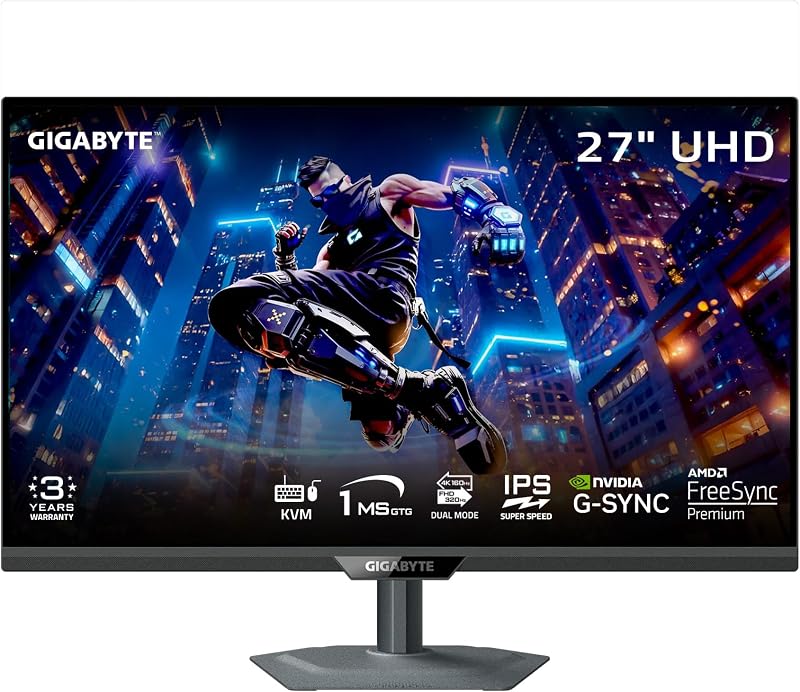
The core innovation highlighted in any Gigabyte M27UP SA review is its dual-mode capability. In native resolution, the monitor operates as an ultra-clear 3840 x 2160 display refreshing at 160Hz. With the press of a toggle, the panel transforms into a 1920 x 1080 Full HD screen running at 320Hz, cutting frame rendering intervals down to 3.125 milliseconds. In contrast, the LG 27GR93U refresh rate remains anchored to its native 144Hz ceiling. Readers exploring multi-panel setups can check our analysis of the gigabyte mo32u24 vs m27up sa to see how high-refresh panels compare against alternative display configurations.
Choosing between these two approaches depends on your gaming catalog. The Gigabyte M27UP SA dual mode enables users to run graphic-heavy cinematic titles in crisp 4K at 160Hz, then instantly downshift to 1080p to feed 320Hz frame rates into fast-paced shooters where response speed overrides visual resolution. The LG monitor stays committed to native 4K output at 144Hz across all applications, preventing pixel scaling artifacts at the cost of high-frequency esports frame headroom.
Edge: Gigabyte M27UP SA wins because its dual-mode system delivers higher 160Hz 4K fluidity alongside a dedicated 320Hz competitive esports mode.
Luminance and DisplayHDR 400 Visual Clarity
Luminance dictates how effectively a monitor overcomes daylight glare, reflections, and ambient room lighting. Display panels with higher candela-per-square-meter ratings produce punchier whites and maintain better perceptual contrast in sunlit spaces. Both monitors measure 27 inches diagonally with a 16:9 aspect ratio and a native resolution of 3840 x 2160 pixels, yielding an identical pixel pitch of 0.16 millimeters. Both screens also carry matte surface finishes to scatter reflections and hold VESA DisplayHDR 400 certification.
The physical light output between the two screens reveals clear separation. The LG 27GR93U specifies a peak brightness of greater than or equal to 400 cd/m2, giving it sufficient backlight headroom to drive vivid highlights under standard room conditions. The Gigabyte M27UP SA lists a maximum brightness of 350 cd/m2. That 50 cd/m2 differential gives the LG screen an advantage when mitigating strong light sources directly behind or beside the desk. For an expanded look at competitive 4K alternatives, read our comparison of the lg 27gr93u vs gigabyte mo32u24.
While both monitors leverage DisplayHDR 400 processing to translate high dynamic range metadata, the higher baseline luminance on the LG model gives it a perceptible lift in specular intensity. The matte finish on both units controls specular reflections, but the LG display’s higher backlight output ensures fine contrast gradations remain visible across bright environments, solidifying the LG 27GR93U review reputation for stable desktop presentation.
Edge: LG 27GR93U wins due to its higher rated brightness of ≥ 400 cd/m2 compared to the 350 cd/m2 output of its competitor.
Color Gamut and Visual Saturation
Color gamut specifications define the palette of shades a display panel can physically render. A broader gamut allows monitors to display richer reds, deeper greens, and vibrant sky blues without clipping tonal nuances into flat patches. Both screens utilize In-Plane Switching LCD technology with wide 178-degree horizontal and vertical viewing angles, preventing color shifting when viewed from off-center seating positions. Both panels also share an identical static contrast ratio of 1000:1.
Color performance specs diverge across the listings. The Gigabyte M27UP SA lists a wide color gamut rating of 1.25, translating directly to 125% coverage of the standard sRGB color space, accompanied by 8-bit color depth and integrated Color Enhancement processing. The LG 27GR93U lists a color gamut rating of 0.95. This broader 125% saturation potential on the Gigabyte allows game environments with rich art styles to appear punchier and more vibrant out of the box. Those cross-shopping different panel types can view our breakdown of the gigabyte m27up sa vs dell s2725qs.
For creative hobbyists and players who favor vibrant game palettes, the wider color envelope of the M27UP SA offers extra saturation flexibility. The LG display delivers a controlled color profile suitable for native sRGB balance, but the Gigabyte panel provides a noticeably wider spectrum coverage for users who prefer richer graphical reproduction.
Edge: Gigabyte M27UP SA wins by providing a wider 1.25 color gamut rating with 125% sRGB coverage.
Adaptive Sync and Console Synchronization
Adaptive sync technologies synchronize the monitor refresh rate to the exact frame output of the graphics card, eliminating screen tearing and minimizing stuttering during heavy visual loads. Both monitors feature rapid 1ms response times (with Gigabyte detailing a 1ms Gray-to-Gray metric on its SuperSpeed IPS panel) and carry official NVIDIA G-SYNC Compatible validation to ensure smooth variable frame performance on GeForce hardware.
The difference lies in AMD synchronization certification and console input handling. The LG 27GR93U features AMD FreeSync Premium Pro, the highest tier of AMD variable refresh certification, which mandates low-latency tone mapping for HDR content alongside variable refresh rate delivery. It also incorporates dedicated HDMI 2.1 VRR (Variable Refresh Rate) alongside DisplayPort 1.4 and HDCP 2.2 support, making it an optimal companion for modern 4K gaming consoles. Readers weighing alternative high-end options can study the lg 32gx870a vs gigabyte m27up sa for wider context.
The Gigabyte M27UP SA supports standard AMD FreeSync Premium, which guarantees baseline variable refresh rates and low framerate compensation without the strict HDR metadata communication pipeline found in FreeSync Premium Pro. When evaluating the LG 27GR93U gaming performance across modern PCs and gaming consoles, the inclusion of HDMI 2.1 VRR and FreeSync Premium Pro guarantees wider sync compatibility across complex dynamic lighting scenarios.
Edge: LG 27GR93U wins with higher-tier AMD FreeSync Premium Pro certification and integrated HDMI 2.1 VRR support.
Productivity Features and Energy Efficiency
Modern gaming monitors frequently pull double duty as daily workstations. Hardware features such as integrated peripheral switches, physical desk footprints, and overall electrical power draw dictate how effortlessly a screen integrates into home offices and multi-device setups. Physical ergonomics and power consumption play substantial roles over long daily sessions.
The Gigabyte M27UP SA provides exceptional workstation utility through its integrated Type-C KVM switch. This built-in hardware switch allows users to connect two separate devices, such as a gaming desktop and a work laptop, and control both using a single keyboard and mouse set with one-button toggling. Furthermore, the Gigabyte operates at an exceptionally low power consumption of just 27 watts. In contrast, the LG 27GR93U consumes 55 watts during operation and does not feature an onboard KVM switch, though it does include Flicker Safe eye-care technology. Shoppers evaluating workstation capabilities can compare this with the gigabyte m27up sa vs samsung odyssey neo g7 32.
Physical profiles also diverge noticeably between the two units. The Gigabyte display chassis measures 2.3 inches deep, 24.1 inches wide, and 14.6 inches high, although it registers a substantial weight of 20 pounds. The LG monitor lists a deeper desktop footprint of 10 inches deep by 24.17 inches wide and 22.76 inches high, but weighs a lighter 6.4 kilograms (approximately 14.1 pounds). The Gigabyte model’s massive power efficiency savings and Type-C KVM switch make it a substantially more versatile desk centerpiece.
Edge: Gigabyte M27UP SA wins through its integrated Type-C KVM switch and superior 27-watt power efficiency.
Pros and Cons
LG 27GR93U

Pros
- 400 cd/m2 peak brightness
- AMD FreeSync Premium Pro certification
- HDMI 2.1 VRR console support
- Lighter 6.4 kg overall weight
Cons
- Higher 55-watt power consumption
- Refresh rate capped at 144Hz
- No integrated KVM switch
Gigabyte M27UP SA
Pros
- Dual-mode 160Hz 4K and 320Hz FHD
- Integrated Type-C KVM switch
- Ultra-low 27-watt power consumption
- Wide 125% sRGB color gamut
Cons
- Lower 350 cd/m2 peak brightness
- 8-bit color depth limitation
- Heavier 20-pound unit weight
View Gigabyte M27UP SA on Amazon
Who Should Buy Each One
Choose the LG 27GR93U If
- You play in brightly lit spaces and require peak brightness of at least 400 cd/m2 to combat glare.
- You connect to modern gaming consoles that utilize HDMI 2.1 Variable Refresh Rate protocols.
- You want certified AMD FreeSync Premium Pro tone mapping for HDR gaming.
- You focus exclusively on 4K resolution at 144Hz without needing 1080p resolution scaling.
Choose the Gigabyte M27UP SA If
- You play both visual 4K cinematic titles and competitive esports requiring 320Hz speed.
- You manage two computers on one desk and need an integrated Type-C KVM switch.
- You prefer a wider color gamut with 125% sRGB coverage for vibrant game environments.
- You want to keep power draw minimal with an efficient 27-watt operational rating.
Final Verdict
For the majority of PC gamers deciding between the LG 27GR93U or Gigabyte M27UP SA for gaming, the Gigabyte M27UP SA is the more versatile investment. Its dual-mode engine delivers the best of two worlds: native 4K gaming running smoothly at 160Hz for immersive visual experiences, paired with an instant switch to Full HD at 320Hz for elite competitive shooters. Factoring in its integrated Type-C KVM switch, wider 125% sRGB gamut coverage, and remarkably lean 27-watt power consumption, the monitor proves that the Gigabyte M27UP SA is worth it for multi-genre gamers and hybrid desk setups.
The LG 27GR93U remains the superior selection for players who prioritize pure 4K panel luminance and dedicated console integration. With its robust brightness rating reaching ≥ 400 cd/m2, high-tier AMD FreeSync Premium Pro synchronization, and HDMI 2.1 VRR connectivity, the LG model excels in bright rooms and pairs seamlessly with modern 4K home consoles. If your gaming library never requires sub-4K resolutions and your battle station demands maximum visual pop under bright room lighting, the 27GR93U provides uncompromising clarity.
FAQ
How does dual-mode switching work on the Gigabyte M27UP SA?
The Gigabyte M27UP SA features hardware-level switching that allows users to toggle between two distinct resolution and refresh profiles on the fly. In its default UHD mode, the screen presents a sharp 3840 x 2160 resolution at up to 160Hz. When switched into FHD mode, the panel renders a 1920 x 1080 image while doubling its refresh ceiling to an ultra-responsive 320Hz, providing maximum motion smoothness for competitive esports titles without requiring multiple specialized monitors.
Does the LG 27GR93U support modern gaming consoles with VRR?
Yes, the LG 27GR93U is equipped with HDMI 2.1 featuring Variable Refresh Rate (VRR) and HDCP 2.2 compliance. This allows modern gaming consoles to output full native 4K resolution at high refresh rates with tear-free variable frame pacing. Combined with AMD FreeSync Premium Pro support, the LG display synchronizes frame pacing smoothly across console and PC hardware alike.
Which monitor is brighter for well-lit rooms?
The LG 27GR93U provides higher brightness output, rated at greater than or equal to 400 cd/m2. In comparison, the Gigabyte M27UP SA lists a brightness of 350 cd/m2. Both monitors feature matte screen finishes to disperse reflections, but the higher luminous output of the LG panel gives it an operational edge when combating daylight or ambient lighting in sunlit rooms.
What is the difference in power consumption between these monitors?
The Gigabyte M27UP SA operates with significantly greater power efficiency, drawing just 27 watts during use. The LG 27GR93U lists a power consumption rating of 55 watts, consuming more than double the electrical energy of the Gigabyte display. Users mindful of energy costs and thermal output across prolonged gaming sessions will benefit from the Gigabyte model’s lower draw.
Can I control two computers with the Gigabyte M27UP SA?
Yes, the Gigabyte M27UP SA includes an integrated Type-C KVM switch. By connecting two separate host devices, such as a desktop PC and a laptop, users can route their keyboard and mouse peripherals directly through the monitor and toggle control between both systems using a dedicated physical button on the monitor chassis, eliminating the need for standalone external switch boxes.
Are both monitors compatible with NVIDIA graphics cards?
Both the LG 27GR93U and the Gigabyte M27UP SA are officially G-SYNC Compatible and support AMD FreeSync technologies. This ensures that users running modern NVIDIA GeForce graphics cards can enable variable refresh rates via DisplayPort or HDMI connections to eliminate screen tearing, motion stutter, and input lag across the entire operating refresh range.


