The single deciding factor between these two flagship displays comes down to whether you prioritize a versatile dual-mode refresh rate for high-frame competitive gaming or maximum pixel density in a compact desktop footprint. The LG 32GS95UE delivers an expansive 32-inch 4K OLED experience capable of switching into a tournament-grade Full HD 480Hz mode, while the Samsung Odyssey OLED G8 packages native 4K UHD resolution into a 27-inch QD-OLED panel running at 240Hz with an extraordinarily dense 166 PPI.
Choose the LG 32GS95UE if you play high-speed competitive shooters alongside cinematic single-player campaigns on a larger screen, or choose the Samsung Odyssey OLED G8 if you prefer extreme visual sharpness and dedicated heat pipe cooling on a standard 27-inch desk setup.
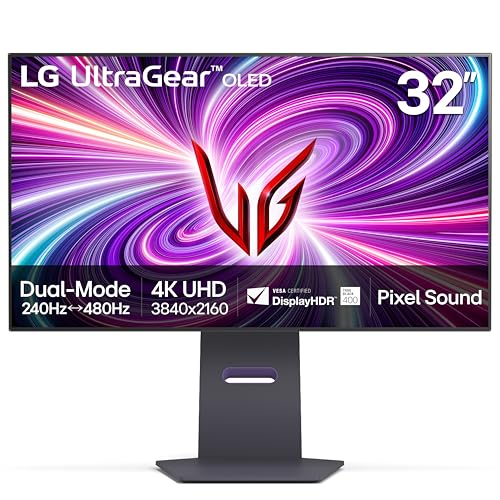

LG 32GS95UE vs Samsung Odyssey OLED G8 at a Glance
| Feature | LG 32GS95UE | Samsung Odyssey OLED G8 |
|---|---|---|
| Screen Size | 32 inches (31.5 inches viewable) | 27 inches |
| Display Technology | OLED | QD-OLED |
| Resolution | 4K UHD (3840 x 2160) | 4K UHD (3840 x 2160) |
| Refresh Rate | 240Hz (4K) / 480Hz (Full HD) | 240Hz |
| Response Time | 0.03ms (GtG) | 0.03ms (GtG) |
| Pixel Density / Pitch | 0.18 mm pixel pitch | 166 PPI (0.15 mm pixel pitch) |
| Brightness | 275 cd/m² | 250 cd/m² |
| Contrast Ratio | 1,500,000:1 | 1,000,000:1 |
| Burn-In Mitigation | 2 Year OLED warranty (parts, labor, panel) | Safeguard+ Pulsating Heat Pipe & Thermal Modulation |
| Integrated Audio | Pixel Sound (CSO, woofer, DTS Virtual:X) | Not listed |
| Best For | Esports versatility and screen immersion | Ultra-sharp desktop visuals and thermal safety |
Refresh Rate and Motion Clarity
Refresh rate is the foundation of competitive motion clarity, dictating how cleanly fast-moving targets appear during intense gameplay. In any comprehensive LG 32GS95UE review, the standout feature is LG’s VESA Certified Dual Mode. This technology allows you to run the monitor as a native 3840 x 2160 display at 240Hz for graphical fidelity, or toggle instantly into a 1920 x 1080 mode operating at an astounding 480Hz. This capability fundamentally transforms the panel from a cinematic desktop centerpiece into an esports weapon capable of displaying twice as many frames per second when tracking enemies in tactical shooters.
The Samsung Odyssey OLED G8 operates as a dedicated 240Hz monitor at 3840 x 2160 resolution. While 240 frames per second on an OLED panel provides elite responsiveness, it does not offer a lower-resolution 480Hz operating state. Both monitors share an instantaneous 0.03ms gray-to-gray response time that practically eliminates visual ghosting, trailing, and smear. Variable refresh rate performance is identically matched on paper, with both displays featuring official NVIDIA G-SYNC compatibility and AMD FreeSync Premium Pro validation to prevent tearing across varying frame rates. When comparing motion options against other high-end panels, as examined in our lg 32gs95ue vs msi mpg 321urx analysis, the sheer utility of LG’s dual-mode switch stands apart.
The practical difference between 240Hz and 480Hz is most apparent in competitive tracking scenarios. While 240Hz delivers fluid visuals for standard multiplayer titles, the 480Hz mode on the LG halves motion blur and input interval for hyper-fast titles like Counter-Strike or Apex Legends. When debating whether to buy the LG 32GS95UE or Samsung Odyssey OLED G8 for esports, the LG’s dual mode provides a distinct structural advantage that a standard 240Hz monitor cannot replicate.
Edge: LG 32GS95UE wins due to its innovative Dual Mode feature that provides a 480Hz refresh rate option for competitive gaming alongside standard 240Hz 4K playback.
Screen Size and Pixel Density
Display size directly dictates viewing distance, peripheral field coverage, and fine-image rendering. The Odyssey OLED G8 features a 27-inch diagonal screen, which is widely considered the standard size for competitive desktop play because it keeps the entire HUD within the user’s focal field without requiring excessive head turning. In contrast, the 32GS95UE uses a 32-inch form factor (31.5 inches viewable), creating a substantially larger viewing canvas that fills more peripheral vision and makes sprawling open-world game worlds feel significantly more immersive.
However, fitting a 3840 x 2160 resolution into these two different physical sizes creates a substantial difference in fine detail. The Samsung Odyssey OLED G8 27 inch 4K screen packs 3840 x 2160 pixels into a smaller surface area, producing an impressive pixel density of 166 PPI with a tight 0.15 mm pixel pitch. The 32GS95UE stretches the exact same number of pixels across a 32-inch diagonal, yielding a pixel pitch of 0.18 mm. In an LG 32GS95UE vs Samsung OLED G8 pixel density evaluation, the Samsung holds an undeniable advantage in text rendering clarity, fine foliage lines, and sub-pixel edge smoothness.
This sharpness difference becomes tangible during productivity tasks, desktop navigation, and detailed strategy gaming where small UI elements and text legibility matter. On the Samsung, aliasing is virtually imperceptible even when sitting close to the glass. On the LG, the image remains remarkably crisp due to 4K resolution, but the slightly larger pixel pitch is visible at closer desktop distances. For shoppers comparing 27-inch high-clarity alternatives like in our alienware aw2725df vs samsung odyssey oled g8 overview, the Odyssey G8 sets a high watermark for desktop crispness.
Edge: Samsung Odyssey OLED G8 wins by delivering an ultra-crisp 166 PPI pixel density that noticeably sharpens fine textures and desktop typography.
Panel Technology and Visual Performance
Both displays utilize self-emissive organic light-emitting diode technology, meaning every individual pixel illuminates and shuts off independently to achieve true, infinite blacks with zero backlight bleed. Both monitors hold VESA DisplayHDR True Black 400 certification, which ensures impeccable shadow detail and distinct highlights in dark environments. However, the exact panel execution differs between LG’s traditional OLED architecture and Samsung’s Quantum Dot OLED (QD-OLED) engineering.
The Odyssey OLED G8 utilizes QD-OLED technology with a 1,000,000:1 contrast ratio, 250 cd/m² brightness, and a wide color gamut listed at 0.99 (99%). Quantum dots help generate saturated primaries by converting blue light into rich reds and greens. The 32GS95UE relies on LG’s refined OLED panel technology, achieving a manufacturer-rated brightness of 275 cd/m², a 1,500,000:1 contrast ratio, and a color gamut spec of 98.5. The LG provides slightly higher rated peak brightness in its specifications, giving it a slight boost in perceived punchiness in mixed lighting conditions.
Screen finish is another crucial element in visual performance. The 32GS95UE utilizes an anti-glare low reflection matte coating designed to diffuse ambient room lights and reduce direct glare without washing out dark content. The Odyssey OLED G8 incorporates Samsung’s proprietary Glare Free technology, which is verified to be 54% less glossy than conventional anti-reflection films, keeping reflections minimal while preserving dark room contrast. Readers investigating how QD-OLED handles reflections against competitor panels in our samsung odyssey oled g8 vs msi mpg 321urx comparison will find that Samsung’s Glare Free implementation effectively eliminates specular distractions in moderately lit spaces.
Edge: Tie. The LG offers marginally higher listed brightness and contrast figures, while the Samsung leverages QD-OLED color purity paired with advanced Glare Free anti-reflection treatment.
Thermal Management and Burn-In Mitigation
Because OLED pixels degrade over extended periods of static illumination, heat dissipation and pixel health algorithms are vital for long-term ownership. When examining an in-depth Samsung Odyssey OLED G8 review, thermal engineering is a primary highlight. Samsung equips the Odyssey OLED G8 with Safeguard+, featuring a world-first Pulsating Heat Pipe cooling system. This internal mechanism circulates coolant to diffuse heat five times faster than traditional graphite sheets, actively dropping core operating temperatures to safeguard against permanent image retention.
Samsung supplements this internal hardware with algorithmic software safeguards. Its Thermal Modulation System continually calculates thermal loads to moderate brightness dynamically, preventing hot spots from forming. Furthermore, Samsung includes dedicated Logo and Taskbar Detection that automatically dims stationary graphics like user interface icons, taskbars, and heads-up displays before they cause uneven pixel wear. These multi-tiered safeguards give users substantial protection during mixed-use desktop sessions containing static windows.
LG approaches long-term reliability by combining integrated operating algorithms with robust consumer warranty backing. The 32GS95UE includes a dedicated 2 Year UltraGear OLED Warranty that specifically covers internal and functional parts, labor, and the OLED display panel itself. While the monitor listing does not highlight a pulsating coolant pipe, LG’s explicit coverage of the OLED panel provides formal assurance against panel defects and premature failures. However, Samsung’s proactive physical heat-pipe architecture represents a more sophisticated hardware approach to preventing heat buildup at the source.
Edge: Samsung Odyssey OLED G8 wins for its comprehensive Safeguard+ system featuring pulsating heat pipe coolant technology and automated logo detection.
Integrated Features, Audio, and Ergonomics
Built-in convenience features often tip the balance when two premium monitors offer similar gaming specifications. The LG 32GS95UE separates itself dramatically in desktop audio with its Pixel Sound technology. Rather than relying on small downward-firing or rear-facing speakers, the 32GS95UE uses Cinematic Sound OLED (CSO) hardware with integrated woofers and DTS Virtual:X support to vibrate the panel itself. Sound waves emit directly from behind the glass toward the user, creating precise directional audio and dialog clarity without cluttering your desk with external speakers.
The Samsung Odyssey OLED G8 lacks integrated speakers according to its specification sheet, requiring external audio gear or headphones. However, Samsung emphasizes aesthetic customization and immersion through its CoreSync and CoreLighting+ features. Positioned on the back of the chassis, this lighting array projects colors matching the on-screen action into your room across 16.7 million hues, creating an ambient light halo that expands the visual mood beyond the bezel. For buyers considering how peripheral aesthetics fit into larger desk setups, comparing these features against ambient-lit ultra-wides like in our lg 34wn80c vs samsung odyssey g9 49 review illustrates how lighting impacts desk atmosphere.
From an ergonomic perspective, both monitors include robust stands with tilt and height adjustments, while the LG explicitly specifies swivel adjustments as well. Connectivity on the 32GS95UE includes standard HDMI 2.1 and DisplayPort 1.4 inputs supporting high refresh rates up to 240Hz at 4K. Physical dimensions also reflect their screen sizes: the LG measures 28.1 inches wide and weighs 19.8 pounds, whereas the more compact Samsung measures 24.08 inches wide and weighs 15.2 pounds, making the Samsung far easier to fit on shallower or smaller desks.
Edge: LG 32GS95UE wins due to its innovative Pixel Sound audio system that fires sound directly from the screen panel, eliminating the mandatory need for desktop speakers.
Pros and Cons
LG 32GS95UE

Pros
- VESA Certified 480Hz Full HD Dual Mode
- Direct-screen Pixel Sound with DTS Virtual:X
- Large 32-inch 4K immersive OLED canvas
- Two-year warranty covering the OLED panel
Cons
- Larger 0.18 mm pixel pitch than 27-inch 4K
- Heavier 19.8-pound footprint requires more desk space
Samsung Odyssey OLED G8

Pros
- Ultra-dense 166 PPI 4K QD-OLED clarity
- Pulsating heat pipe dynamic cooling system
- Glare Free certified anti-reflection surface
- CoreSync and CoreLighting plus ambient projection
Cons
- Locked to 240Hz maximum refresh rate
- No integrated audio speakers listed
View Samsung Odyssey OLED G8 on Amazon
Who Should Buy Each One
Choose the LG 32GS95UE If
- You play competitive shooters that can capitalize on a blistering 480Hz Full HD mode.
- You prefer a larger 32-inch display that fills your vision during narrative games and media streaming.
- You want high-quality direct audio without having to buy or position external desktop speakers.
- You value peace of mind backed by a manufacturer warranty that explicitly covers the OLED panel.
Choose the Samsung Odyssey OLED G8 If
- You want maximum text and asset sharpness with a class-leading 166 PPI pixel density.
- You have a smaller or shallower desk setup where a 27-inch panel is the ideal physical fit.
- You want advanced internal cooling, including a pulsating heat pipe to actively combat burn-in.
- You enjoy ambient RGB lighting that projects dynamic game colors onto your rear wall.
Final Verdict
When weighing the Samsung Odyssey OLED G8 vs LG 32GS95UE, the LG emerges as the superior all-around gaming monitor for the majority of enthusiasts. By combining a generous 32-inch 4K screen with its groundbreaking dual-mode toggle, the 32GS95UE offers two completely distinct gaming experiences in a single chassis. You get uncompromised 240Hz visual richness for graphical masterpieces and 480Hz motion clarity for competitive esports matches, supplemented by impressive Pixel Sound acoustic technology and explicit two-year panel warranty coverage.
On the other hand, the Odyssey OLED G8 remains the premier choice for detail-focused gamers seeking peak pixel density. Its 27-inch 4K QD-OLED panel produces an incredibly sharp 166 PPI image that renders fine textures and typography with immaculate precision. Supported by its innovative Safeguard+ pulsating heat pipe and glare-free surface, the Samsung is the definitive recommendation if you prioritize compact desk ergonomics, razor-sharp fidelity, and robust hardware cooling over pure esports frame rates.
FAQ
How does the LG 32GS95UE dual mode 480Hz feature work?
The LG 32GS95UE features a VESA Certified Dual Mode that allows you to switch operating states directly through the monitor. You can run the display in native 4K UHD (3840 x 2160) at up to 240Hz for maximum visual fidelity, or switch to Full HD (1920 x 1080) at up to 480Hz to achieve maximum motion clarity and lower latency in fast-paced competitive esports titles.
What is the difference in pixel density between these two monitors?
The Odyssey OLED G8 delivers a pixel density of 166 PPI on its 27-inch screen with a pixel pitch of 0.15 mm. The LG 32GS95UE shares the same 3840 x 2160 native resolution but spreads it over a 32-inch panel, resulting in a 0.18 mm pixel pitch. This makes the Samsung noticeably sharper when viewing small text and fine micro-details at close desktop distances.
Which monitor is better: LG 32GS95UE or Samsung Odyssey OLED G8 for esports?
For dedicated competitive esports, the LG 32GS95UE holds a significant advantage due to its 480Hz Full HD mode. While the Samsung Odyssey OLED G8 performs admirably with its 240Hz refresh rate and 0.03ms response time, the 480Hz capability on the LG cuts frame rendering intervals in half, providing smoother tracking and lower input lag for professional and high-level shooter gameplay.
Does the Samsung Odyssey OLED G8 have built-in speakers?
The product listing for the Samsung Odyssey OLED G8 does not specify any integrated speakers. In contrast, the LG 32GS95UE features Pixel Sound technology, which uses Cinematic Sound OLED exciters, an integrated woofer, and DTS Virtual:X to project audio directly from behind the panel into the room.
What cooling technology does the Samsung Odyssey OLED G8 use to prevent burn-in?
The Odyssey OLED G8 utilizes Samsung’s Safeguard+ Dynamic Cooling System, which incorporates a Pulsating Heat Pipe. This system releases coolant to diffuse internal heat five times faster than a standard graphite sheet. It works alongside an algorithmic Thermal Modulation System and static logo/taskbar detection to lower brightness on stationary graphics and prevent overheating.
Is LG 32GS95UE worth it for mixed gaming and productivity?
The LG 32GS95UE is well worth consideration if you want a versatile single-display setup. Its 32-inch 4K panel provides plenty of screen real estate for multitasking, its anti-glare coating cuts down on daytime reflections, and its two-year panel warranty offers peace of mind against retention. However, if your productivity work demands the highest possible text sharpness, the tighter 166 PPI pixel density of the 27-inch Samsung may be preferable.
Is Samsung Odyssey OLED G8 worth it if you only game at 240Hz?
The Samsung Odyssey OLED G8 is completely worth it if you play games primarily at 4K and prioritize visual density and QD-OLED color rendition over hyper-high esports refresh rates. It delivers one of the sharpest 4K gaming experiences on the market, backed by advanced cooling and a certified Glare Free matte finish that excels in varied room lighting.


