Comparing high-end 32-inch 4K gaming displays comes down to a fundamental choice between extreme refresh rate flexibility and color-saturated panel physics. The primary difference that decides the choice for most buyers in the LG 32GS95UE vs MSI MPG 321URX comparison is LG’s VESA Certified Dual Mode capability-which toggles between native 4K at 240Hz and 1080p at 480Hz-against MSI’s Quantum Dot OLED panel that emphasizes glossy visual depth, broad color purity, and a unified 90W USB Type-C hub.
Esports competitors and high-framerate shooter enthusiasts should choose the LG 32GS95UE for its unmatched 480Hz speed and anti-glare reflection suppression. Creative professionals, multi-system desktop users, and visual immersion gamers should choose the MSI MPG 321URX for its glossy Quantum Dot clarity and integrated KVM productivity.
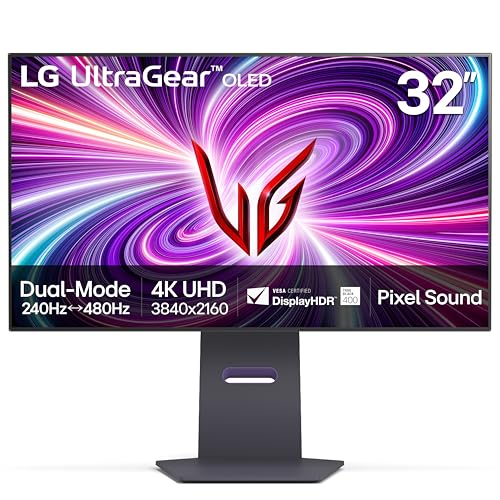

LG 32GS95UE vs MSI MPG 321URX at a Glance
| Feature | LG 32GS95UE | MSI MPG 321URX |
|---|---|---|
| Panel Technology | OLED (WOLED) | Quantum Dot OLED (QD-OLED) |
| Native Resolution | 3840 x 2160 (4K UHD) | 3840 x 2160 (4K UHD) |
| Maximum Refresh Rate | 480Hz (Full HD) / 240Hz (4K UHD) | 240Hz (4K UHD) |
| Response Time (GtG) | 0.03ms | 0.03ms |
| Screen Finish | Matte Anti-Glare Low Reflection | Glossy |
| Brightness | 275 cd | 250 nits |
| HDR Certification & Contrast | DisplayHDR True Black 400 (1,500,000:1) | DisplayHDR True Black 400 (Extremely high) |
| Color Gamut | 98.5% | 99% DCI-P3 (1.07B colors, Delta E ≤ 2) |
| Video & Data Connectivity | HDMI 2.1, DisplayPort 1.4 | HDMI 2.1, DisplayPort 1.4a, USB-C (90W PD) |
| Integrated Audio | Pixel Sound (CSO, Woofer, DTS Virtual:X) | Not listed |
| Best For | Competitive esports and bright room gaming | Vivid cinematic visuals and multi-device desks |
Refresh Rate and Dual Mode Performance
Refresh rate and pixel transition speeds determine motion clarity, input tracking, and competitiveness during high-velocity gameplay. Both the LG 32GS95UE and the MSI MPG 321URX deliver a near-instantaneous 0.03ms gray-to-gray response time, virtually eliminating motion blur and ghosting trails. Under standard 4K UHD conditions, both displays output fluid 240Hz motion at a dense 3840 x 2160 resolution, taking full advantage of modern graphics hardware across expansive visual worlds.
The operational divide widens when evaluating LG 32GS95UE vs MSI MPG 321URX dual mode capabilities. LG incorporates the world’s first VESA Certified Dual Mode architecture, allowing players to shift between 4K UHD at 240Hz and Full HD at 480Hz with a dedicated switch. Shifting to 480Hz doubles the temporal update rate, giving competitive players an immense tracking advantage in fast-paced first-person shooters. The MSI MPG 321URX remains fixed at a maximum 240Hz ceiling across all resolutions. In terms of variable refresh rate synchronization, LG backs its display with official NVIDIA G-SYNC Compatible validation and AMD FreeSync Premium Pro, while the MSI unit lists Adaptive-Sync compliance.
For gamers selecting the LG 32GS95UE vs MSI MPG 321URX for gaming across mixed genres, LG offers two distinct monitors in a single frame: an ultra-crisp 4K canvas for visual epics and an elite 480Hz esports display for tournament titles. MSI provides top-tier 240Hz motion, but cannot match the raw frame-pacing ceiling of LG’s specialized 480Hz operating mode.
Edge: LG 32GS95UE because its hardware Dual Mode delivers a blisteringly fast 480Hz Full HD tier alongside native 4K 240Hz operation.
Panel Technology and Color Reproduction
Color rendering, luminance purity, and panel structure establish visual richness in creative applications and cinematic single-player campaigns. The MSI MPG 321URX utilizes Quantum Dot OLED (QD-OLED) technology, which pairs a blue OLED emitter with printed quantum dot layers. This design produces 1.07 billion colors (10-bit depth), covering 99% of the DCI-P3 color spectrum with factory-calibrated accuracy rated at Delta E ≤ 2. The LG 32GS95UE employs a standard OLED panel listing a 98.5% color gamut and a 0.18 pixel pitch across its 31.5-inch active viewing area.
Quantum Dot technology offers distinct spectral advantages in saturated highlights, maintaining vibrant color purity without washing out into pure white. For enthusiasts comparing the samsung odyssey oled g8 vs msi mpg 321urx, MSI’s implementation stands out for precision color profiling and high fidelity. When considering LG 32GS95UE vs MSI MPG 321URX text clarity, both panels share an identical 3840 x 2160 pixel grid and 0.18 pixel pitch across a 31.5-inch diagonal, though the differing subpixel arrangements between QD-OLED and traditional OLED panels can subtly influence micro-edge sharpness on high-contrast desktop typography.
MSI’s comprehensive color accuracy calibration and dedicated 10-bit color pipeline make it better suited for color-critical media production and saturated visual presentations. LG produces vivid, realistic imagery, but MSI’s quantum dot foundation captures a broader, more accurate chromatic range.
Edge: MSI MPG 321URX because its Quantum Dot OLED panel delivers 99% DCI-P3 coverage, 10-bit color, and factory-calibrated Delta E ≤ 2 accuracy.
Screen Finish and Ambient Light Handling
A monitor’s external coating dictates how it handles environmental illumination, reflections, and perceived contrast in various room environments. The LG 32GS95UE is manufactured with an Anti-Glare with Low Reflection matte screen finish. This matte layer scatters incoming glare from desk lamps, windows, and overhead lighting fixtures, preserving legibility and maintaining deep black levels without mirroring the surroundings back to the viewer.
Conversely, the MSI MPG 321URX features a glossy screen surface. A glossy finish maximizes perceived transparency, delivering an uninhibited window into the pixel array without the subtle grain or haze that matte coatings can introduce in bright lighting. However, glossy QD-OLED surfaces reflect ambient light directly and can exhibit raised black levels or a purplish tint when hit by strong direct light. Upgrading your desk environment with balanced hardware, similar to matching motherboard platforms in an asus rog strix b650e-f vs msi mpg x670e carbon build, requires careful attention to where lights are placed relative to a glossy display.
Shoppers evaluating the MSI MPG 321URX vs LG 32GS95UE for daytime use or rooms with unavoidable ambient light will appreciate LG’s diffuse anti-glare barrier. MSI reigns supreme in pitch-black or dim, studio-style rooms, but LG provides far greater environmental flexibility.
Edge: LG 32GS95UE because its anti-glare low-reflection matte coating suppresses harsh reflections and preserves black depth in brightly lit environments.
HDR Dynamic Range and Luminance
High Dynamic Range performance depends on pixel-level luminance control, peak highlights, and absolute black floor thresholds. In the LG 32GS95UE vs MSI MPG 321URX HDR evaluation, both monitors carry the VESA DisplayHDR True Black 400 certification. Because both displays use self-illuminating OLED pixels that switch completely off, they achieve true infinite black levels with zero blooming, halos, or backlight bleed.
On manufacturer specification sheets, LG lists a brightness rating of 275 cd and a 1,500,000:1 contrast ratio. MSI lists a brightness rating of 250 nits with an “Extremely high” contrast designation. The 25-unit variance between the two is minimal during real-world HDR content consumption. Both panels render shadowy corridors, gleaming metal highlights, and intricate starry skies with pinpoint per-pixel luminance precision. Pairing these panels with modern enthusiast rigs, such as an asus rog strix z790-a vs msi mpg z790 edge gaming setup, provides the graphical bandwidth needed to feed high-bitrate HDR metadata cleanly over high-bandwidth video interfaces.
Because both units meet identical VESA DisplayHDR True Black 400 benchmarks, share true per-pixel dimming, and operate within a nearly identical luminance envelope, neither display establishes a decisive visual lead in pure HDR dynamic range.
Edge: Tie because both panels achieve DisplayHDR True Black 400 compliance with self-emissive per-pixel contrast and near-identical baseline brightness ratings.
Connectivity, KVM, and Workflow Convenience
I/O flexibility and device management determine how seamlessly a display integrates into multi-machine workstations. The MSI MPG 321URX includes a comprehensive port layout consisting of HDMI 2.1, DisplayPort 1.4a, and a versatile USB Type-C connection supporting 90W Power Delivery. This 90W USB-C port enables single-cable video, data, and charging for high-performance laptops. Furthermore, MSI includes an onboard KVM switch alongside Picture-in-Picture (PiP) and Picture-by-Picture (PbP) modes, allowing a user to command two distinct host machines using one mouse and keyboard.
The LG 32GS95UE equips HDMI 2.1 and DisplayPort 1.4, providing full bandwidth for 4K 240Hz and FHD 480Hz variable refresh rate gaming from gaming PCs and modern consoles. However, the LG listing does not specify any integrated USB-C video input, high-wattage power delivery, or built-in KVM hardware. Users who balance multiple systems-such as pairing an elite desktop workstation using components like an msi mpg z790 edge vs gigabyte z790 aorus elite ax with a corporate laptop-will find LG requires external splitters or peripheral switches.
For hybrid desk setups, asking is MSI MPG 321URX worth it yields a clear answer. The integrated 90W USB-C hub, KVM control, Console Mode, and MSI Gaming Intelligence AI streamline daily workflows in ways the purely gaming-focused LG cannot match.
Edge: MSI MPG 321URX because of its 90W USB Type-C power delivery, integrated KVM switch, and multi-system PiP/PbP capabilities.
Audio Architecture, Ergonomics, and Chassis Design
A monitor’s physical footprint, acoustic features, and chassis mechanics dictate how comfortably it mounts and functions on your desk. The LG 32GS95UE introduces integrated Pixel Sound technology, where acoustic actuators situated behind the panel vibrate the screen itself to project directional audio forward directly at the player. Backed by an integrated woofer and DTS Virtual:X processing, this sound system eliminates the absolute necessity of external desktop speakers or headsets for casual media listening. The MSI listing does not mention integrated speakers, requiring separate external audio hardware.
Physical profiles also diverge substantially between the two. The LG 32GS95UE measures 10.9 inches deep, 28.1 inches wide, and 24.6 inches high, weighing in at a relatively lightweight 19.8 pounds with its tilt, height, and swivel adjustable stand. The MSI MPG 321URX features a 4-way adjustable stand and Mystic Light rear ambient lighting, measuring 28 inches deep, 9.5 inches wide, and 19 inches high, but carries a noticeably heavier weight of 27.2 pounds. Stable mounts are essential, much like selecting a sturdy motherboard foundation such as an msi mpg z790 edge vs asus tuf gaming b860-plus build, especially if you plan to arm-mount a 27.2-pound display.
Between the innovative forward-firing Pixel Sound architecture, lighter total footprint, and full positional adjustment, the LG 32GS95UE offers a cleaner all-in-one desktop experience for users wanting to minimize desktop cable clutter.
Edge: LG 32GS95UE because its integrated Pixel Sound screen audio system and lighter 19.8-pound chassis provide superior standalone usability.
Pros and Cons
LG 32GS95UE

Pros
- Dual Mode 480Hz at Full HD
- Anti-glare low reflection matte coating
- Integrated Pixel Sound screen audio
- NVIDIA G-SYNC Compatible validated
- Lightweight 19.8-pound design
Cons
- No USB-C Power Delivery
- Lacks integrated KVM switch
- Narrower color gamut than QD-OLED
MSI MPG 321URX

Pros
- Quantum Dot OLED panel fidelity
- 99% DCI-P3 with Delta E ≤ 2
- 90W USB Type-C power delivery
- Integrated KVM switch and PiP/PbP
- Glossy screen finish for maximum clarity
Cons
- Refresh rate capped at 240Hz
- No integrated audio speakers
- Heavier 27.2-pound chassis
Who Should Buy Each One
Choose the LG 32GS95UE If
- You compete in fast-paced esports shooters and want the 480Hz Full HD Dual Mode for maximum motion resolution and tracking.
- Your gaming room has uncontrolled ambient lighting, uncovered windows, or ceiling fixtures that demand a matte anti-glare finish.
- You want clean, minimalist desktop audio without buying external computer speakers, thanks to built-in Pixel Sound and DTS Virtual:X.
- You mount your monitor on a lightweight monitor arm and prefer a lighter 19.8-pound total display weight.
Choose the MSI MPG 321URX If
- You prioritize color saturation and creative fidelity, benefiting from a 10-bit Quantum Dot panel with 99% DCI-P3 coverage and Delta E ≤ 2 accuracy.
- You use a single desk setup for both a gaming PC and a work laptop, requiring an integrated KVM switch and 90W USB Type-C charging.
- You play predominantly in light-controlled or darkened rooms where a glossy screen finish enhances visual depth and contrast.
- You want multi-window multitasking options including Picture-in-Picture (PiP), Picture-by-Picture (PbP), and Console Mode.
Final Verdict
For most competitive PC gamers, the LG 32GS95UE stands as the superior gaming asset. Its ability to toggle between native 4K UHD at 240Hz for cinematic fidelity and 1080p at 480Hz for twitch shooters makes it two premium displays in one housing. Combined with an anti-glare matte coating that easily manages uncontrolled lighting, forward-firing Pixel Sound screen speakers, and official NVIDIA G-SYNC Compatible validation, any comprehensive LG 32GS95UE review highlights a display built from the ground up for adaptable, top-tier gaming performance.
However, the MSI MPG 321URX claims victory for creators, visual purists, and multi-device workstation setups. In any thorough MSI MPG 321URX review, its Quantum Dot OLED panel delivers visibly richer color saturation and factory-tuned Delta E ≤ 2 accuracy that outclasses standard OLED color volume. Backed by an integrated KVM switch and 90W USB-C power delivery, the MSI MPG 321URX is the premier pick if your priorities center on vivid visual fidelity, productivity convenience, and light-controlled viewing.
FAQ
How does the Dual Mode feature work on the LG 32GS95UE?
The LG 32GS95UE features a hardware-based Dual Mode function certified by VESA. With a single button press, the monitor switches its internal timing controller from 4K UHD (3840 x 2160) at 240Hz down to Full HD (1920 x 1080) at 480Hz, providing double the frame-pacing ceiling for competitive esports titles without requiring GPU-side downscaling workarounds.
Does the MSI MPG 321URX have built-in speakers?
The product listing for the MSI MPG 321URX does not specify any internal speakers. Users will need to connect an external sound system, desktop speakers, or a dedicated gaming headset for audio output.
What is the benefit of LG’s Pixel Sound technology?
Instead of using standard speakers mounted beneath or behind the casing, LG’s Pixel Sound uses sound actuators positioned behind the OLED panel to vibrate the screen itself. This directs audio waves forward straight toward the user, providing clear directional sound with an integrated woofer and DTS Virtual:X processing.
Can the MSI MPG 321URX charge a laptop while displaying video?
Yes. The MSI MPG 321URX includes a multi-purpose USB Type-C display port with 90W Power Delivery. This allows compatible modern laptops to transmit video, share data across the monitor’s built-in KVM hub, and recharge using a single cable.
Which screen finish is better for a room with direct sunlight?
The LG 32GS95UE is better suited for rooms with direct or bright light due to its matte Anti-Glare with Low Reflection display finish. The MSI MPG 321URX uses a glossy screen finish that produces deep visual clarity in dark settings, but can reflect ambient lighting sources directly into the player’s eyes.
Do both monitors support HDMI 2.1 for console gaming?
Yes, both monitors feature HDMI 2.1 video inputs. This allows modern gaming consoles to output high-resolution graphics up to 4K UHD with high refresh rates and variable refresh rate capabilities.


