The decisive difference between these two 27-inch 4K displays lies in the choice between extreme frame rate versatility and static contrast performance. The Gigabyte M27UP SA features an innovative dual-mode display panel that alternates between 160Hz UHD clarity and ultra-responsive 320Hz FHD speed, while the Dell S2725QS emphasizes deeper visual depth through an upgraded 1500:1 static contrast ratio and integrated comfort engineering.
Competitive esports players and multi-device workstation power users should pick the Gigabyte M27UP SA for its blazing motion handling and hardware KVM switch. General office workers, media consumers, and casual gamers should choose the Dell S2725QS for its richer black levels, built-in acoustic drivers, and certified low blue light protection.


Gigabyte M27UP SA vs Dell S2725QS at a Glance
| Feature | Gigabyte M27UP SA | Dell S2725QS |
|---|---|---|
| Native Screen Resolution | 3840 x 2160 pixels (4K UHD) | 3840 x 2160 pixels (4K UHD) |
| Maximum Refresh Rate | 160Hz UHD / 320Hz FHD (Dual Mode) | 120Hz UHD |
| Static Contrast Ratio | 1000:1 | 1500:1 |
| Response Time | 1ms GtG | 0.03ms (5ms in listing title) |
| Color Space Coverage | 125% sRGB | 99% sRGB |
| HDR Specification | VESA DisplayHDR 400 | HDR readiness |
| Eye Comfort Engineering | Not listed | ComfortView Plus (≤35% blue light) |
| Productivity Switching | Type-C KVM switch | Not listed |
| Built-In Audio | Not listed | Re-engineered integrated sound system |
| Chassis Dimensions and Weight | 2.3″D x 24.1″W x 14.6″H, 20 lbs | 7.89″D x 24.08″W x 15.3″H, 14.3 lbs |
| Adaptive Sync Support | AMD FreeSync Premium, G-SYNC Compatible | AMD FreeSync Premium |
| Best For | Esports, high-fps competitive gaming, and dual-PC setups | Everyday productivity, multimedia consumption, and home office comfort |
Refresh Rate, Motion Handling, and Dual-Mode Gaming
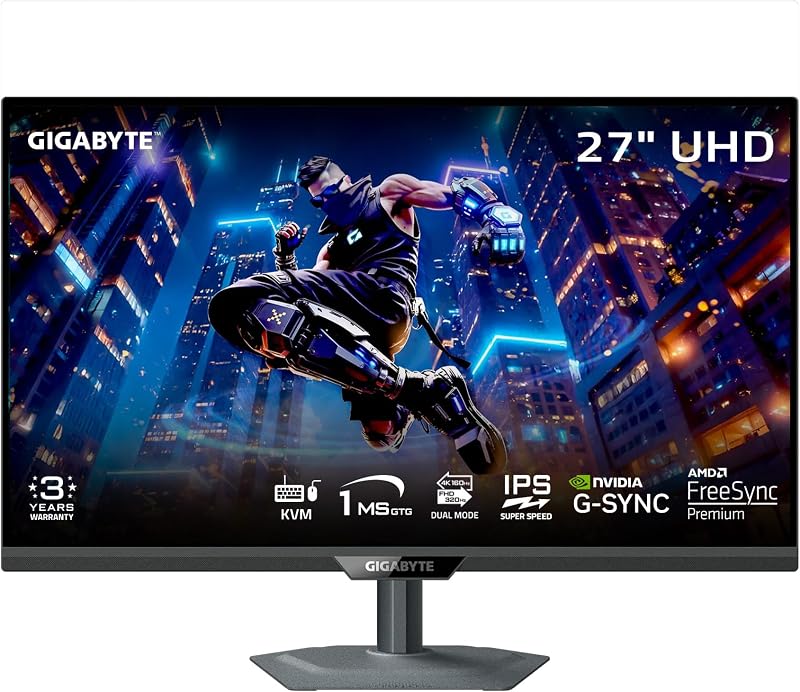
The core operating frequency of a gaming monitor dictates how fluidly motion renders on screen, which directly influences visual tracking in high-speed titles. Evaluating the lg 32gx870a vs gigabyte m27up sa shows that flexible refresh configurations can transform how a display handles different game genres. The Gigabyte M27UP SA features a standout hardware capability called dual mode, allowing users to alternate between a razor-sharp 160Hz at 4K resolution and an ultra-fluid 320Hz at 1080p FHD. This transforms the screen into a split-personality powerhouse: visually intense role-playing games run at full UHD clarity, while fast-paced shooters gain competitive input latency and exceptional motion clarity at 320Hz.
By comparison, the Dell S2725QS caps out at a 120Hz refresh rate at 4K UHD. While 120Hz provides a noticeable leap over traditional 60Hz office panels, offering fluid cursor movement and smooth gameplay, it does not support dual-mode frequency scaling. The Dell listing claims an ultra-low 0.03ms response time (alongside a 5ms rating in its primary title), paired with AMD FreeSync Premium to eliminate screen tearing. When weighing the Gigabyte M27UP SA or Dell S2725QS for gaming, users focused primarily on competitive multiplayer will benefit substantially from the higher ceiling of the Gigabyte M27UP SA refresh rate and its 1ms GtG SuperSpeed IPS panel.
Choosing between these two approaches comes down to whether your graphics hardware and gaming library demand extreme frame rates. The 320Hz FHD mode on the Gigabyte panel ensures that competitive esports athletes do not suffer from the processing overhead of rendering 4K, giving them instant tournament-grade tracking. The Dell monitor functions well for modern console gaming or relaxed single-player titles that peak around 120 frames per second, but it cannot match the specialized responsiveness of the Gigabyte M27UP SA dual mode 320Hz performance profile.
Edge: Gigabyte M27UP SA for its flexible dual-mode hardware switching that offers 160Hz 4K fidelity and esports-ready 320Hz FHD performance.
Contrast Ratio, Black Levels, and Visual Depth
Static contrast determines the separation between the darkest shadows and the brightest highlights in an image, directly impacting the perceived depth of movies, games, and text. Traditional In-Plane Switching (IPS) displays typically sit at a baseline 1000:1 contrast ratio, which often produces grayish blacks in dimly lit rooms. In this category, the Dell S2725QS 1500 to 1 contrast rating represents a tangible technical upgrade over standard IPS architecture. That extra 50 percent boost in static contrast prevents deep shadow details from flattening out, generating punchier visuals during dark cinematic sequences or moody game environments.
The Gigabyte M27UP SA adheres to the standard 1000:1 contrast ratio native to SuperSpeed IPS panels, focusing primarily on liquid crystal switching speed rather than deep black extraction. While its 350 candela per square meter brightness ensures comfortable viewing in bright ambient environments, dark scenes in low-light rooms will exhibit typical IPS characteristics. In contrast, an analysis of the gigabyte mo32u24 vs dell s2725qs reveals how higher native contrast on standard panels bridges the gap toward deeper visual immersion without relying on expensive localized dimming zones.
For buyers who do significant text work, document editing, and nighttime media consumption, the Dell panel delivers visibly superior background uniformity and text edge definition. Black fonts pop crisply against bright white documents, reducing eye fatigue during long reading sessions. While the Gigabyte provides standard IPS contrast suitable for daylight gaming, the Dell S2725QS extracts noticeably richer image dimensionality across both productivity applications and casual movie streaming.
Edge: Dell S2725QS for its upgraded 1500:1 static contrast ratio that yields richer blacks and superior overall image depth.
Workspace Ergonomics, Eye Comfort, and Built-In Audio
A desktop display serves as the central anchor of your daily work environment, where eye strain and cable management directly impact daily productivity. The Dell S2725QS introduces ComfortView Plus technology, a hardware-level solution engineered to reduce harmful blue light emissions to 35 percent or lower without shifting screen hues into an unnatural yellow cast. This allows graphic designers, writers, and office workers to maintain true color perception while shielding their retinas during marathon work sessions. Dell also equips the chassis with re-engineered integrated speakers that provide increased output power, deeper frequency response, and an expanded decibel range compared to previous generations.
The Gigabyte M27UP SA focuses its physical design on gaming utility. It weighs a substantial 20 pounds compared to the 14.3-pound profile of the Dell, requiring a sturdier monitor arm or desktop footprint. The listing for the M27UP SA does not specify integrated speakers or dedicated low blue light hardware calibrations, which means buyers will rely on external speakers or dedicated desktop headsets for audio playback. When considering the Dell S2725QS or Gigabyte M27UP SA for productivity, the acoustic and ergonomic integration of the Dell unit creates a cleaner, less cluttered workstation.
Visual presentation also differentiates the two chassis styles. The Dell S2725QS sports a modern ash white finish accented by ultra-thin bezels, blending cleanly into contemporary home office decor. In comparison, examining alternatives like the gigabyte m27q2 vs dell s2725dsm demonstrates that dedicated gaming displays frequently adopt utilitarian dark matte plastics that emphasize function over minimalist aesthetics. The Dell S2725QS excels here by packaging low eye fatigue and integrated multimedia sound into an elegant, office-friendly frame.
Edge: Dell S2725QS for its built-in ComfortView Plus hardware, upgraded internal speakers, and modern aesthetic styling.
Color Gamut Coverage and Image Accuracy
Color rendering capabilities determine how vibrant digital assets appear and how faithfully a monitor displays creative content. The Gigabyte M27UP SA features an expansive 125% sRGB color gamut coverage supported by 8-bit color depth, delivering vibrant, highly saturated tones that bring game worlds to life. Furthermore, the M27UP SA comes with certified VESA DisplayHDR 400 compliance, guaranteeing a standardized level of peak luminance and tonal range when viewing high dynamic range material.
The Dell S2725QS specifies a color gamut covering 99% sRGB alongside baseline HDR readiness. While a 99% sRGB spectrum aligns neatly with standard web design and digital photo work, it lacks the extended wide-gamut saturation of the Gigabyte panel. As highlighted in comparisons such as the gigabyte m27up sa vs lg 27up850, standard sRGB profiles ensure accurate color representation for daily office applications, but wide-gamut displays yield noticeably richer reds, greens, and secondary tones in modern game engines and animated media.
Both monitors feature 350 nits of brightness across a 178-degree viewing angle, ensuring that off-axis viewing does not shift colors or wash out details. However, any comprehensive Gigabyte M27UP SA review will underscore that the combination of 125% sRGB volume and DisplayHDR 400 certification provides a punchier, more vibrant canvas for gaming and HDR entertainment than the standard-gamut calibration found on the Dell.
Edge: Gigabyte M27UP SA for its wider 125% sRGB color spectrum and verified VESA DisplayHDR 400 certification.
Connectivity, Device Switching, and Setup Efficiency
Managing multiple computer inputs on a single monitor has become essential for users who juggle personal desktops and work laptops. The Gigabyte M27UP SA incorporates a built-in Type-C KVM switch, enabling seamless transitions between two connected devices with the push of a single physical button. By routing your keyboard and mouse directly through the monitor, you can switch control between a gaming rig and an office laptop instantly, avoiding duplicate peripherals or external hardware switches. The display also maintains an efficient 27-watt power consumption profile during standard operation.
The Dell S2725QS listing highlights standard 4K connectivity with AMD FreeSync Premium synchronization, but it does not specify an integrated KVM switch or Type-C peripheral management. Anyone reviewing the Dell S2725QS vs Gigabyte M27UP SA for dual-system workstations will find that operating two computers on the Dell requires either manual cable switching or third-party accessory boxes. Exploring broader comparisons such as the gigabyte m27up sa vs asus rog swift pg32uqx reinforces how much daily friction a native KVM switch removes for modern professionals.
For hybrid workers who dock a company laptop by day and fire up a custom gaming desktop by night, the Type-C KVM on the Gigabyte M27UP SA provides undeniable day-to-day value. It consolidates power, video, and peripheral data through minimal wiring, turning the monitor into an active hardware hub rather than just a passive output screen.
Edge: Gigabyte M27UP SA for its integrated Type-C KVM switch that simplifies multi-system desktop setups.
Pros and Cons
Gigabyte M27UP SA
Pros
- Dual-mode 160Hz UHD and 320Hz FHD switching
- Integrated Type-C KVM switch
- Wide 125% sRGB color gamut coverage
- VESA DisplayHDR 400 certification
- Fast 1ms GtG response time
Cons
- Lower 1000:1 static contrast ratio
- Heavier 20-pound total chassis weight
- No integrated speakers listed
View Gigabyte M27UP SA on Amazon
Dell S2725QS

Pros
- Higher 1500:1 static contrast ratio
- ComfortView Plus low blue light hardware
- Re-engineered integrated sound system
- Modern ash white ultra-thin bezel styling
- Smooth 120Hz refresh rate at 4K
Cons
- Lacks high-speed dual-mode resolution switching
- Narrower 99% sRGB color gamut
- No built-in KVM hardware
Who Should Buy Each One
Choose the Gigabyte M27UP SA If
- You play competitive multiplayer shooters that benefit from switching down to 1080p to achieve an extreme 320Hz refresh rate.
- You manage a work laptop and a gaming desktop simultaneously and want a built-in Type-C KVM switch to share one keyboard and mouse.
- You desire wide-gamut 125% sRGB color saturation alongside VESA DisplayHDR 400 certification for vibrant gaming visuals.
- Your graphics card supports high refresh rates at 4K resolution up to 160Hz through FreeSync Premium or G-SYNC compatible setups.
Choose the Dell S2725QS If
- You spend extended hours reading text, writing code, or managing spreadsheets and need hardware-level ComfortView Plus low blue light filtering.
- You prefer deeper blacks and superior visual contrast delivered by an upgraded 1500:1 static contrast IPS panel.
- You want a clean desktop aesthetic featuring an ash white chassis, ultra-thin bezels, and built-in acoustic speakers without adding desktop audio clutter.
- Your gaming needs cap out at 120Hz for casual single-player campaigns or current-generation console entertainment.
Final Verdict
For shoppers weighing the question of whether the Gigabyte M27UP SA is worth it, the answer depends almost entirely on competitive gaming ambition and desktop architecture. With its industry-leading dual-mode engineering providing 160Hz at 4K and 320Hz at FHD, paired with an integrated Type-C KVM switch, the M27UP SA stands as the superior high-performance screen. It bridges the gap between high-fidelity graphical exploration and blazing-fast esports responsiveness, making it the top overall choice for enthusiasts who demand maximum frame rates and seamless multi-system control.
Conversely, those asking if the Dell S2725QS is worth it will find their answer in refined daily ergonomics and superior static contrast. The Dell panel outclasses standard IPS monitors with its 1500:1 contrast ratio, delivering richer shadows, sharper text separation, and improved viewing comfort. Backed by hardware-level ComfortView Plus eye protection, capable integrated speakers, and a sleek ash white exterior, the Dell S2725QS remains the smarter investment for home office professionals, general productivity users, and casual multimedia viewers.
FAQ
Does the Gigabyte M27UP SA run at 320Hz while displaying in 4K resolution?
No, the dual-mode functionality on the Gigabyte M27UP SA splits its capabilities between two distinct profiles. It operates at up to 160Hz when running at native 3840 x 2160 (4K UHD) resolution, and shifts to 320Hz when set to 1920 x 1080 (FHD) resolution to maximize motion clarity and reduce graphics processing strain in competitive gaming.
How does the 1500 to 1 contrast ratio on the Dell S2725QS compare to standard IPS panels?
Most traditional IPS monitors, including the Gigabyte M27UP SA, feature a 1000:1 static contrast ratio. The 1500:1 static contrast on the Dell S2725QS represents a 50 percent increase in dynamic separation between shadows and highlights, resulting in visibly deeper black levels, richer shadow details, and reduced grayish glow in dark rooms.
Can the Type-C KVM on the Gigabyte M27UP SA switch between any two computers?
The integrated Type-C KVM switch allows you to connect two different computing systems, such as a desktop PC and a Type-C laptop. By pressing the dedicated KVM button on the monitor, your connected keyboard, mouse, and display output switch between the two devices instantly without needing to swap cables.
Does the Dell S2725QS include built-in speakers?
Yes, the Dell S2725QS features re-engineered integrated audio drivers engineered to provide greater output power, deeper frequency response, and an expanded decibel range compared to earlier monitor generations, providing clear sound for meetings and media without external speakers.
Are both monitors compatible with variable refresh rate technologies?
Both monitors support AMD FreeSync Premium to eliminate tearing and stuttering during gameplay. The Gigabyte M27UP SA listing also explicitly specifies G-SYNC Compatible support, ensuring smooth synchronization across both AMD and NVIDIA graphics platforms.
Which monitor is better suited for all-day office productivity?
The Dell S2725QS is better suited for everyday office productivity due to its ComfortView Plus low blue light technology, higher 1500:1 contrast for crisp text readability, integrated speakers, and elegant ultra-thin bezel design that minimizes visual fatigue during extended workdays.


