The deciding difference between these two OLED gaming monitors comes down to panel format and frame rate flexibility: the LG 32GS95UE delivers a 32-inch 4K screen with a dual-mode switch to Full HD at 480Hz, whereas the Asus ROG Swift PG27AQDM provides a dedicated 26.5-inch 1440p canvas at 240Hz engineered for high-intensity competitive play with specialized heat dissipation.
Choose the LG 32GS95UE if you want cinematic 4K detail for atmospheric titles paired with ultra-high-refresh esports flexibility. Choose the Asus ROG Swift PG27AQDM if you want a compact esports form factor, higher peak HDR luminance, and extended hardware burn-in protection.
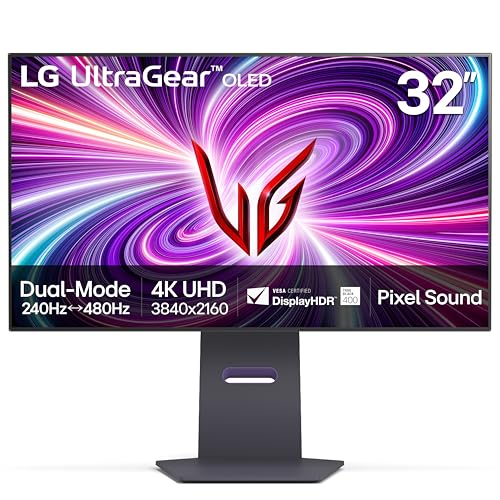

LG 32GS95UE vs Asus ROG Swift PG27AQDM at a Glance
| Attribute | LG 32GS95UE | Asus ROG Swift PG27AQDM |
|---|---|---|
| Screen Size | 32 inches (31.5-inch viewable) | 26.5 inches |
| Native Resolution | 3840 x 2160 (4K UHD) | 2560 x 1440 (QHD) |
| Refresh Rate | 240Hz (4K) / 480Hz (FHD Dual Mode) | 240Hz |
| Response Time | 0.03ms (GtG) | 0.03ms (GtG) |
| Contrast Ratio | 1,500,000:1 | 1,500,000:1 |
| Brightness Rating | 275 cd | 1000 nits peak (3% HDR window) |
| HDR Certification / Tech | DisplayHDR True Black 400 | MLA-OLED, META Technology |
| Display Coating | Matte Anti-Glare Low Reflection | Matte Anti-Glare Micro-Texture |
| Audio | Pixel Sound (CSO, woofer, DTS Virtual:X) | Not listed |
| Included Ergonomics | Tilt, height, swivel desktop stand | Monitor arm included |
| Warranty | 2-year limited (parts, labor, panel) | 3-year limited with burn-in & advanced replacement |
| Best For | Hybrid 4K visual and 480Hz esports gaming | Dedicated high-frame-rate 1440p competitive gaming |
Resolution and Dual-Mode Versatility
Display resolution determines the visual detail of game worlds as well as the graphical workload placed on your computer hardware. The 32GS95UE features a native 3840 x 2160 panel, yielding dense image clarity across its 31.5-inch active viewing area with a tight 0.18 millimeter pixel pitch. When navigating expansive single-player games, simulation titles, or productivity tasks, this pixel density renders fine textures and sharp geometry without aliasing. In contrast, the ROG Swift PG27AQDM runs at a native 2560 x 1440 resolution over a 26.5-inch diagonal, offering a balanced pixel grid that produces sharp visual feedback without requiring top-tier graphics card power to maintain high frames.
The true functional divide is the dual-mode feature built into the LG display. While the Asus monitor operates strictly as a 2560 x 1440 panel, the LG screen is the world’s first VESA-certified dual-mode gaming monitor. With a button press, the LG 32GS95UE dual mode 480Hz profile downscales resolution to 1920 x 1080 while doubling the panel refresh rate. This hardware-level transformation converts a large, graphics-focused 4K screen into a blistering fast frame delivery tool for competitive shooters where speed outranks resolution. Readers evaluating high-density alternatives might also study the asus rog swift pg27aqdm vs msi mpg 321urx matchup to understand how 4K panels compare against high-speed 1440p units.
For gamers who move between varied game genres, this flexibility eliminates the need to choose between cinematic immersion and esports velocity. The Asus monitor keeps your system locked into 1440p at all times, which is optimal for competitive shooters but cannot deliver native 4K UHD rendering when cinematic campaigns demand it. If you value switching between high visual fidelity and ultra-fast competitive profiles, the LG display gives you two distinct display profiles in a single unit.
Edge: LG 32GS95UE because its dual-mode engine switches between native 4K 240Hz and Full HD 480Hz on the fly.
Motion Clarity and Refresh Rates
Motion blur, ghosting, and frame pacing govern how accurately you track fast targets across the screen. When comparing LG 32GS95UE vs PG27AQDM response time specifications, both monitors operate at an instantaneous 0.03-millisecond gray-to-gray (GtG) transition speed. Because OLED pixels alter illumination almost instantly without liquid crystal alignment delays, both panels eliminate smearing and trailing behind moving geometry. Every frame transition is crisp, providing clean silhouette visibility during rapid mouse movements.
The primary performance difference is overall frame throughput. Operating the Asus PG27AQDM 1440p 240Hz configuration feeds 240 distinct images per second to the player, which cuts frame latency down substantially compared to conventional 144Hz or 165Hz displays. At 4K resolution, the LG monitor matches that 240Hz refresh rate. However, once you activate the LG display’s 480Hz mode, the refresh interval is halved again. Updating every 2.08 milliseconds at 480Hz creates an exceptionally fluid motion track, giving esports players tracking advantages in fast titles. If you are comparing competitive refresh performance across other screens, looking into the alienware aw2725df vs asus rog swift pg27aqdm comparison demonstrates how high-refresh OLED panels shape gameplay.
Variable refresh rate synchronization prevents tearing and frame judder across both displays. The LG screen is officially validated for both NVIDIA G-SYNC and AMD FreeSync Premium Pro, operating with a minimum 120Hz refresh baseline at Full HD for tear-free output. Asus specifies G-Sync compatible support to ensure tear-free tracking on GeForce cards. While both deliver 0.03ms response speeds and 240Hz motion fluidity, LG’s 480Hz ceiling elevates frame delivery beyond what the Asus hardware can reach.
Edge: LG 32GS95UE due to its 480Hz refresh rate capability that doubles the motion fluidness of 240Hz panels.
Brightness, Contrast, and HDR Performance
OLED displays are praised for self-lit pixels that achieve complete darkness, producing infinite contrast and eliminating the backlight glow seen on traditional monitors. Both the LG and Asus models advertise an identical 1,500,000:1 static contrast ratio, ensuring deep black levels in dark environments. Whether walking through shadowy caves or viewing high-contrast space scenes, both screens avoid backlight bleed, keeping bright objects distinct against pure black backdrops.
Where these monitors diverge significantly is their luminance engineering and HDR implementation. The ROG Swift PG27AQDM incorporates MLA-OLED (Micro Lens Array) and META technology alongside a custom heatsink, pushing peak brightness up to 1000 nits on a 3 percent HDR window. Asus also integrates a factory calibration yielding Delta E < 2 color accuracy and claims a 99% DCI-P3 gamut (with 135 color gamut noted in technical specs), making small specular highlights pop vividly. It also includes an optional uniform brightness setting to eliminate irritating auto-dimming swings during desktop work. Shoppers curious about how Asus measures up against other top-tier OLEDs can read the asus rog swift pg27aqdm vs samsung odyssey oled g8 overview.
The LG 32GS95UE carries VESA DisplayHDR True Black 400 certification and lists a standard brightness rating of 275 cd alongside a 98.5 color gamut rating. While DisplayHDR True Black 400 guarantees deep black floor performance and reliable color tracking, the panel does not match the 1000-nit specular punch offered by the Asus hardware. For players who value bright specular flashpoints-such as explosions, neon signage, and direct sunlight highlights-the Asus panel produces a more intense perceptual punch.
Edge: Asus ROG Swift PG27AQDM due to its MLA-OLED technology delivering 1000-nit peak HDR brightness.
Screen Size, Desk Space, and Mounting Ergonomics
A monitor’s physical footprint directly affects field of view, desk clutter, and how comfortably your eyes sweep the visual area during tense matches. The Asus ROG Swift features a 26.5-inch panel, a display format long favored by tournament players. A 27-inch class display lets your peripheral vision capture the entire screen without requiring physical head movement, which is critical when tracking mini-maps and ammo counters. Additionally, the Asus package ships with a dedicated monitor arm rather than a standard desktop base, freeing up surface area and providing flexible positioning across deep or shallow desks. However, the Asus hardware package remains substantial, weighing 22.1 pounds and measuring 23.82 inches deep by 25.83 inches wide by 26.34 inches high with its mount.
The LG 32GS95UE takes up a larger visual space with its 32-inch class (31.5-inch measured) panel. A screen of this scale fills your visual field, enhancing immersion in open-world RPGs, flight simulators, and expansive action games. The LG display rests on an included desktop stand that provides tilt, height, and swivel adjustments, occupying dimensions of 10.9 inches deep, 28.1 inches wide, and 24.6 inches high at a total weight of 19.8 pounds. Those cross-shopping smaller sizes often examine the lg 27gs95qe vs asus rog swift pg27aqdm guide to weigh 27-inch alternatives.
Both monitors utilize matte anti-glare screen coatings to mitigate distracting ambient light reflections in bright rooms. Asus uses an anti-glare micro-texture surface, while LG implements an Anti-Glare with Low Reflection display. When considering LG 32GS95UE or Asus ROG Swift PG27AQDM for gaming desks, the Asus monitor holds the physical advantage for dedicated esports setups thanks to its compact 26.5-inch diagonal and included desk arm.
Edge: Asus ROG Swift PG27AQDM for its tournament-preferred 26.5-inch size and space-saving bundled monitor arm.
Audio, Thermal Management, and Warranty Protection
OLED monitors generate internal heat, and managing thermal load is critical to maintaining panel integrity and preventing permanent image retention. Asus engineered the ROG Swift PG27AQDM with a large custom heatsink paired with intelligent voltage optimization. By directing heat away from the organic diodes without relying on noisy cooling solutions, Asus limits thermal stress. Backing this thermal hardware is an extensive 3-year warranty that explicitly includes OLED burn-in coverage and an Advanced Replacement service, providing long-term peace of mind. Asus also adds a 3-month Adobe Creative Cloud subscription code with the product.
LG approaches display integration by innovating on audio reproduction rather than bundling utility software. The 32GS95UE introduces Pixel Sound technology, transforming the OLED panel itself into the speaker diaphragm. Utilizing Crystal Sound OLED (CSO) actuators, a built-in woofer, and DTS Virtual:X processing, audio waves project straight forward from behind the display glass directly toward the user, rather than bouncing down from a bottom bezel. This setup offers clean dialogue and directional positioning without requiring desktop speakers. For gamers checking display durability across form factors, comparisons like the alienware aw3423dw vs asus rog swift pg27aqdm highlight how manufacturers address heat and warranties.
For warranty coverage, the LG display includes a 2-year limited UltraGear warranty covering internal functional parts, labor, and the OLED display panel. While LG covers panel defects, the Asus warranty provides an additional year of total protection, explicitly incorporates burn-in remediation, and offers advanced replacement logistics. Gamers looking for long-term ownership security will find the Asus warranty package more comprehensive.
Edge: Asus ROG Swift PG27AQDM due to its 3-year warranty featuring explicit burn-in coverage and custom heatsink thermal design.
Connectivity and System Compatibility
Connecting modern gaming PCs and current-generation consoles requires fast interface bandwidth to support uncompressed color depths at maximum frame rates. The LG 32GS95UE is equipped with HDMI 2.1 and DisplayPort 1.4 ports. The inclusion of HDMI 2.1 ensures full-bandwidth compatibility with current gaming hardware, allowing 4K resolution at 240Hz alongside variable refresh rate support. The listing notes that NVIDIA G-SYNC Compatible operation is supported over DisplayPort on GeForce GTX 10 Series and higher GPUs, and over HDMI 2.1 on GeForce RTX 30 Series and higher GPUs.
The Asus ROG Swift PG27AQDM listing specifies DisplayPort and HDMI connectivity, but the product data does not specify the exact version revisions for these ports. While its 2560 x 1440 native resolution does not demand the massive data pipe required by a 4K 240Hz panel, having verified HDMI 2.1 ports on the LG monitor provides future-proofed hardware compatibility for console players and PC enthusiasts connecting via modern graphics cards.
Additionally, the LG monitor carries AMD FreeSync Premium Pro certification alongside its official NVIDIA G-SYNC validation, ensuring wide-ranging variable refresh rate operation across both graphics ecosystems. While the Asus monitor reliably provides G-Sync compatible functionality, the verified HDMI 2.1 architecture and dual FreeSync/G-Sync compliance on the LG model give it the edge in connectivity and input flexibility.
Edge: LG 32GS95UE because of its verified HDMI 2.1 and DisplayPort 1.4 interface support.
Pros and Cons
LG 32GS95UE

Pros
- Dual Mode 4K 240Hz or FHD 480Hz
- Instant 0.03ms response time
- Innovative Pixel Sound panel audio
- HDMI 2.1 and DisplayPort 1.4 ports
Cons
- Lower peak brightness than Asus
- Shorter two-year warranty coverage
Asus ROG Swift PG27AQDM

Pros
- Peak 1000-nit HDR brightness
- Custom heatsink thermal management
- Three-year warranty with burn-in coverage
- Bundled ergonomic monitor arm
Cons
- Locked to 1440p native resolution
- Listing omits HDMI version details
View Asus ROG Swift PG27AQDM on Amazon
Who Should Buy Each One
Choose the LG 32GS95UE If
- You play both high-fidelity open-world games at 4K and fast competitive shooters at 480Hz.
- You prefer an immersive 31.5-inch screen size that fills your field of view during gameplay.
- You want integrated front-firing sound through Pixel Sound technology without adding desk speakers.
- You need verified HDMI 2.1 connections for modern graphics cards and gaming consoles.
Choose the Asus ROG Swift PG27AQDM If
- You want a focused 26.5-inch 1440p format that lets you view all on-screen action without head turning.
- You demand high perceptual HDR brightness reaching 1000 nits via MLA-OLED technology.
- You want an included ergonomic monitor arm out of the box to maximize your desktop space.
- You prioritize warranty security with a 3-year plan covering OLED burn-in and advanced replacement.
Final Verdict
When weighing Asus ROG Swift PG27AQDM vs LG 32GS95UE, the LG display is the more versatile investment for most modern gamers. Its dual-mode panel architecture solves a fundamental dilemma in PC gaming by offering crisp 4K visual density at 240Hz alongside a lightning-fast 480Hz Full HD mode for competitive play. Combined with modern HDMI 2.1 connectivity, a large 31.5-inch canvas, and innovative on-panel Pixel Sound audio, the LG 32GS95UE handles diverse gaming workloads with unmatched adaptability.
However, the Asus ROG Swift PG27AQDM remains the superior pick for dedicated competitive players who want an optimized 1440p esports workstation. Its 26.5-inch frame size is easier to track in tournament settings, while its custom heatsink and MLA-OLED panel deliver an impressive 1000-nit peak HDR brightness that outshines the LG panel. Factor in an included monitor arm and a reassuring 3-year warranty with explicit burn-in coverage, and the Asus display delivers exceptional value for gamers who stay focused on high-speed competitive play.
FAQ
Does the LG 32GS95UE dual-mode feature cause scaling blur?
The LG 32GS95UE uses a VESA-certified Dual Mode hardware implementation that switches the panel operation directly to Full HD (1920 x 1080) at 480Hz. Because the switch occurs at the hardware level rather than through standard software stretching, it delivers clean frame rendering optimized for high-speed motion tracking.
Can the Asus ROG Swift PG27AQDM run at 4K resolution?
No, the Asus ROG Swift PG27AQDM has a native resolution of 2560 x 1440 (QHD) and does not support 4K playback. Gamers who want native 3840 x 2160 rendering should select the LG 32GS95UE.
How do the warranties compare for OLED burn-in protection?
The Asus ROG Swift PG27AQDM comes with a 3-year warranty that explicitly covers burn-in and includes an Advanced Replacement service. The LG 32GS95UE includes a 2-year limited warranty covering internal parts, labor, and the OLED display panel.
Do both monitors require external speakers?
The Asus ROG Swift PG27AQDM listing does not specify integrated speakers, meaning most setups will require headphones or dedicated external audio. The LG 32GS95UE includes built-in Pixel Sound technology, which emits sound waves directly from behind the OLED panel using CSO actuators, an internal woofer, and DTS Virtual:X.
Is HDMI 2.1 supported on both displays?
The LG 32GS95UE explicitly features HDMI 2.1 alongside DisplayPort 1.4, allowing high-bandwidth refresh rates up to 240Hz at 4K. The Asus ROG Swift PG27AQDM specifications confirm HDMI and DisplayPort connectivity, but the listing does not specify the revision standards.
Which monitor has higher peak brightness for HDR?
The Asus ROG Swift PG27AQDM delivers higher peak luminance, reaching up to 1000 nits on a 3 percent HDR window thanks to its MLA-OLED panel and META technology. The LG 32GS95UE holds a DisplayHDR True Black 400 certification with a listed brightness rating of 275 cd.
Is the Asus ROG Swift PG27AQDM worth it for competitive esports?
Yes, the Asus ROG Swift PG27AQDM is well-suited for competitive esports due to its 26.5-inch screen size, 240Hz refresh rate, 0.03ms response time, custom heatsink, and bundled desk arm that maximizes free mouse space.
Is the LG 32GS95UE worth it for a mixed console and PC setup?
The LG 32GS95UE is exceptionally well suited for mixed setups because its HDMI 2.1 ports support native 4K output up to 240Hz for modern hardware, while its 480Hz dual mode gives PC users extreme speed when needed.


